Hyper: Meslo powerline font renders incorrectly on Hyper 1.3.3
When using "Meslo LG L DZ for Powerline" Hyper is unable to correctly render the powerline font, which works totally fine in iTerm2.
Screenshot shows issues rendering when rendering Powerline icons.

Screenshot shows issue where powerline icon is cut off at the top of the window.

-
Hyper 1.3.3
Electron 1.4.16
darwin x64 16.5.0
.hyper.js
// Future versions of Hyper may add additional config options,
// which will not automatically be merged into this file.
// See https://hyper.is#cfg for all currently supported options.

module.exports = {
  config: {
    // default font size in pixels for all tabs
    fontSize: 14,

    // font family with optional fallbacks
    fontFamily: '"Meslo LG L DZ for Powerline", Menlo, "DejaVu Sans Mono", Consolas, "Lucida Console", monospace',

    // terminal cursor background color and opacity (hex, rgb, hsl, hsv, hwb or cmyk)
    cursorColor: 'rgba(248,28,229,0.8)',

    // `BEAM` for |, `UNDERLINE` for _, `BLOCK` for █
    cursorShape: 'BLOCK',

    // set to true for blinking cursor
    cursorBlink: false,

    // color of the text
    foregroundColor: '#fff',

    // terminal background color
    backgroundColor: '#000',

    // border color (window, tabs)
    borderColor: '#333',

    // size of window by pixels (width, height)
     windowSize: [1200, 600],

    // custom css to embed in the main window
    css: '',

    // custom css to embed in the terminal window
    termCSS: '',

    // set to `true` (without backticks) if you're using a Linux setup that doesn't show native menus
    // default: `false` on Linux, `true` on Windows (ignored on macOS)
    showHamburgerMenu: '',

    // set to `false` if you want to hide the minimize, maximize and close buttons
    // additionally, set to `'left'` if you want them on the left, like in Ubuntu
    // default: `true` on windows and Linux (ignored on macOS)
    showWindowControls: '',

    // custom padding (css format, i.e.: `top right bottom left`)
    padding: '12px 14px',

    // the full list. if you're going to provide the full color palette,
    // including the 6 x 6 color cubes and the grayscale map, just provide
    // an array here instead of a color map object
    colors: {
      black: '#000000',
      red: '#ff0000',
      green: '#33ff00',
      yellow: '#ffff00',
      blue: '#0066ff',
      magenta: '#cc00ff',
      cyan: '#00ffff',
      white: '#d0d0d0',
      lightBlack: '#808080',
      lightRed: '#ff0000',
      lightGreen: '#33ff00',
      lightYellow: '#ffff00',
      lightBlue: '#0066ff',
      lightMagenta: '#cc00ff',
      lightCyan: '#00ffff',
      lightWhite: '#ffffff'
    },

    // the shell to run when spawning a new session (i.e. /usr/local/bin/fish)
    // if left empty, your system's login shell will be used by default
    // make sure to use a full path if the binary name doesn't work
    // (e.g `C:\\Windows\\System32\\bash.exe` instead of just `bash.exe`)
    // if you're using powershell, make sure to remove the `--login` below
    shell: '',

    // for setting shell arguments (i.e. for using interactive shellArgs: ['-i'])
    // by default ['--login'] will be used
    shellArgs: ['--login'],

    // for environment variables
    env: {},

    // set to false for no bell
    bell: 'SOUND',

    // if true, selected text will automatically be copied to the clipboard
    copyOnSelect: false

    // if true, on right click selected text will be copied or pasted if no
    // selection is present (true by default on Windows)
    // quickEdit: true

    // URL to custom bell
    // bellSoundURL: 'http://example.com/bell.mp3',

    // for advanced config flags please refer to https://hyper.is/#cfg
  },

  // a list of plugins to fetch and install from npm
  // format: [@org/]project[#version]
  // examples:
  //   `hyperpower`
  //   `@company/project`
  //   `project#1.0.1`
  plugins: [
    'hyperline',
    'hyper-blink',
    'hyper-solarized-dark',
    'hyperlinks',
    'hyper-tab-icons'
  ],

  // in development, you can create a directory under
  // `~/.hyper_plugins/local/` and include it here
  // to load it and avoid it being `npm install`ed
  localPlugins: []
};
 jrzimmerman
All 6 comments
I believe https://github.com/zeit/hyper/pull/1536 will fix it
 albinekb
on 19 May 2017
albinekb
on 19 May 2017
is there a fix for that? i have similar problem with Meslo LG M for Powerline and Source Code Pro for Powerline
 nicholasp
on 3 Oct 2017
nicholasp
on 3 Oct 2017
Add Roboto Mono for Powerline to start of fontFamily before Menlo. Works good, looks good.
 treeder
on 11 Dec 2017
treeder
on 11 Dec 2017
I have a solution, but it may not work for some characters. It works fully fine for me, but it's possible that some unicode characters might not render properly. I use Meslo LG S for Powerline, and this also works with Roboto Mono for Powerline, but the tips of the right-facing arrow is cut off.

Meslo LG L DZ for Powerline is unusable.

But it works just fine on Meslo LG S for Powerline.
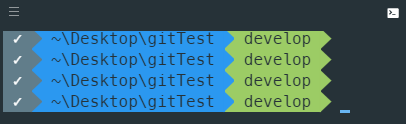
In termCss add
~~~
.unicode-node {
display: inline !important;
}
~
The shell I use is Powershell running a custom prompt and the hyper-material theme. I haven't tested it on anything else.
One last thing is that after running cls or clear, the top of the margin above the text gets cut off. You can see this in all the images.
 preyneyv
on 15 Jan 2018
preyneyv
on 15 Jan 2018
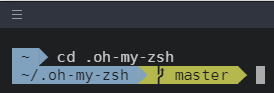
I resolved this by adding the following to my .hyper:
// custom css to embed in the terminal window
termCSS:'x-row > span { line-height: 1.2em; }',
before:

After:
 AddAndy
on 3 Feb 2018
AddAndy
on 3 Feb 2018
used the same solution as @AddAndy but with a 1.4em over LG S.
Perfect!
 dalmoz
on 24 Feb 2018
dalmoz
on 24 Feb 2018
Related issues
 cilice
·
3Comments
cilice
·
3Comments
 weabot
·
3Comments
weabot
·
3Comments
 ConstantinChirila
·
3Comments
ConstantinChirila
·
3Comments
 laur1s
·
3Comments
laur1s
·
3Comments
 dbkaplun
·
3Comments
dbkaplun
·
3Comments
Most helpful comment
I resolved this by adding the following to my .hyper:
// custom css to embed in the terminal window
termCSS:'x-row > span { line-height: 1.2em; }',
before:

After:
