Hyper: Weird characters when running ZSH on Hyper
I just installed Hyper 1.0. When I open Hyper and activate zsh as my shell, I get this weird characters.
If I open zsh in another terminal, for instance Terminator, they all look alright.

 enriquemorenotent
All 10 comments
Looks like you need to set your fontFamily to a font that's powerline-patched
here is info on how to set your fontFamily https://hyper.is/#cfg
That should do the trick!
 albinekb
on 13 Dec 2016
albinekb
on 13 Dec 2016
The solution to my problem was to add this line on the settings:
fontFamily: '"Droid Sans Mono for powerline", Menlo, "DejaVu Sans Mono", "Lucida Console", monospace',
I am not sure if this had an effect on it working or not, but before doing that I tried other things like installing this fonts (https://github.com/powerline/fonts) or running sudo apt-get install fonts-powerline
enriquemorenotent
on 13 Dec 2016
For posterity, here are the necessary steps:
What you need is indeed any Powerline-compatible font. It must be installed (any way you like, Font Book is fine).
Then it must be the active font-face in Hyper.
If the font is named "Droid Sans Mono For Powerline", it has to be there completely, since "for powerline" is part of the name, not a suffix of sorts.
Your setting is 👍
That's it!
 L-A
on 13 Dec 2016
L-A
on 13 Dec 2016
What is weird is that when I set the font to "Ubuntu Mono" in the default system terminal, the characters look fine, but when I set it on Hyper, they do not.
I am not sure if there is some weird wiring going on under the hood, but the I have never had this trouble with any other terminal (I have tried "Terminator" and "Cool Retro Term"). They all could show the characters without any trouble.
Maybe Hyper needs to do some extra automatic configuration?
enriquemorenotent
on 13 Dec 2016
Same problem here. I'm using the Menlo Regular for Powerline font on my iTerm2 with zsh and it display correctly:

I have change the font on ~/.hyper.js configuration file:

But the display is still broken:

Will try dig into the problem a bit more later and see how we can fix that. In the meantime, if anyone has a valid solution, I'm in.
 softmonkeyjapan
on 14 Dec 2016
softmonkeyjapan
on 14 Dec 2016
Ok so I just changed the font to another Powerline font (I'm using Inconsolata-g for Powerline instead of Menlo Regular for Powerline) and seems to work fine now:

softmonkeyjapan
on 14 Dec 2016
@softmonkeyjapan What happens if you name it "Menlo for Powerline"?
L-A
on 14 Dec 2016
Yep indeed it works fine. The Regular needed to be removed. It works fine thanks for the feedback.
softmonkeyjapan
on 14 Dec 2016
For me "Menlo for Powerline" does not give me any result :/
enriquemorenotent
on 14 Dec 2016
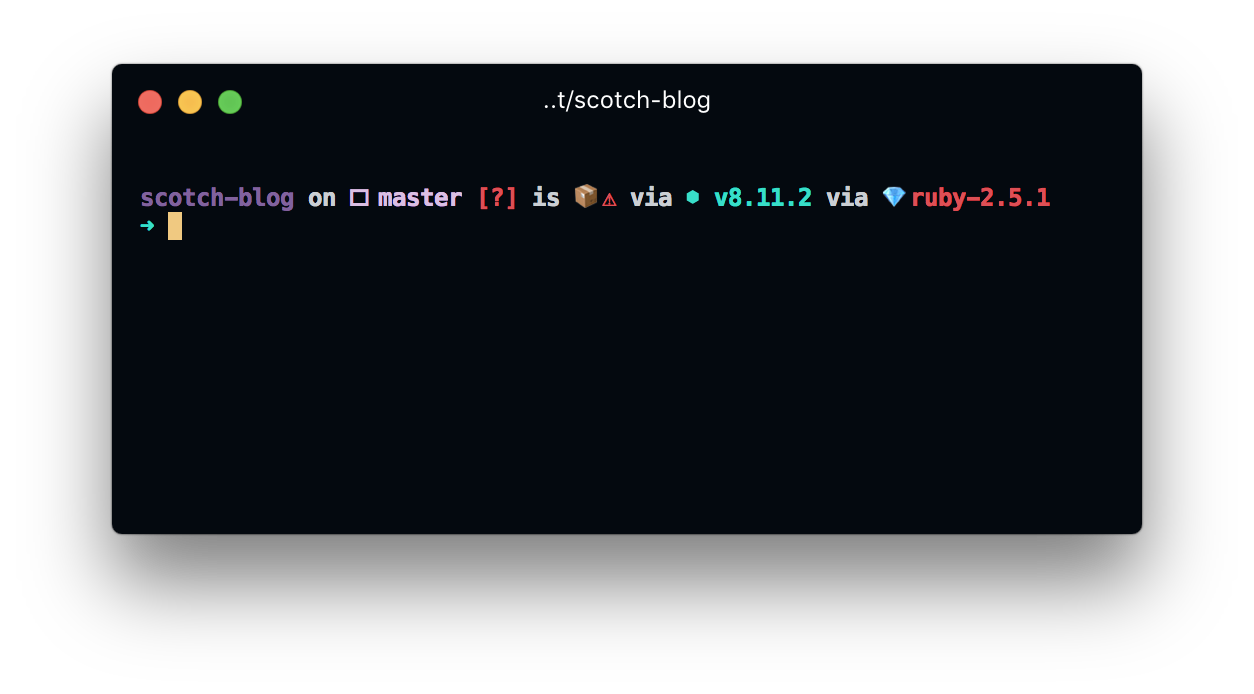
Well, I'm having same issue. I tried to install other fonts, same result.
 lalabuy948
on 5 Aug 2018
lalabuy948
on 5 Aug 2018
Related issues
 ConstantinChirila
·
3Comments
ConstantinChirila
·
3Comments
 legomushroom
·
3Comments
legomushroom
·
3Comments
 cilice
·
3Comments
cilice
·
3Comments
 alejandrofloresm
·
3Comments
alejandrofloresm
·
3Comments
 eoinmurray
·
3Comments
eoinmurray
·
3Comments
Most helpful comment
@softmonkeyjapan What happens if you name it "Menlo for Powerline"?
The regular weight doesn't have "Regular" in its name.