- [x] I am on the latest Hyper.app version
- [x] I have searched the issues of this repo and believe that this is not a duplicate
- OS version and name: Windows 8.1 x64, v6.3.9600
- Hyper.app version: 1.0.0
- Link of a Gist with the contents of your .hyper.js: LINK
- Relevent information from devtools _(CMD+SHIFT+I on Mac OS, CTRL+SHIFT+I elsewhere)_: N/A
- The issue is reproducible in vanilla Hyper.app: Is Vanilla
Issue
I have an issue with the accent marks in Spanish, they appear as a unknown character (It seems to be related to encoding) I leave a screenshot, thanks!

 urkopineda
All 14 comments
@urkopineda could you paste some Spanish characters to comment, i'll try on my branch
 dotcypress
on 13 Dec 2016
dotcypress
on 13 Dec 2016
@dotcypress, here are:
- á é í ó ú
- ñ ç
That character from screenshot should be 'Versión'. Thanks!
urkopineda
on 13 Dec 2016
Hello there.
Same here in french :
Microsoft Windows [version 6.1.7601]
Copyright (c) 2009 Microsoft Corporation. Tous droits r�serv�s.
é, à, è, ù, ç, ê
 Cycymomo
on 13 Dec 2016
Cycymomo
on 13 Dec 2016
Same here in french, under MAC OS X (also under Linux)

 martin-damien
on 19 Dec 2016
martin-damien
on 19 Dec 2016
Same here in french under Ubuntu

 apeyroux
on 17 Jan 2017
apeyroux
on 17 Jan 2017
I can't reproduce this 🤔 Accented chars works fine for me on macOS, Linux and Windows 😥
 matheuss
on 21 Jan 2017
matheuss
on 21 Jan 2017
SHELL=/bin/bash
TERM_PROGRAM=Hyper
TERM=xterm-256color
TERM_PROGRAM_VERSION=1.1.0
LANGUAGE=fr_FR
alex@laptop:~$ locale
locale: Cannot set LC_CTYPE to default locale: No such file or directory
locale: Cannot set LC_MESSAGES to default locale: No such file or directory
locale: Cannot set LC_ALL to default locale: No such file or directory
LANG=fr.UTF-8
LANGUAGE=fr_FR
LC_CTYPE="fr.UTF-8"
LC_NUMERIC="fr.UTF-8"
LC_TIME="fr.UTF-8"
LC_COLLATE="fr.UTF-8"
LC_MONETARY="fr.UTF-8"
LC_MESSAGES="fr.UTF-8"
LC_PAPER="fr.UTF-8"
LC_NAME="fr.UTF-8"
LC_ADDRESS="fr.UTF-8"
LC_TELEPHONE="fr.UTF-8"
LC_MEASUREMENT="fr.UTF-8"
LC_IDENTIFICATION="fr.UTF-8"
LC_ALL=
Same thing in my computer:
ezequiel@ezequielkit ~ $ uname -a
Linux ezequielkit 3.13.0-24-generic #47-Ubuntu SMP Fri May 2 23:30:00 UTC 2014 x86_64 x86_64 x86_64 GNU/Linux
ezequiel@ezequielkit ~ $ locale
locale: Cannot set LC_CTYPE to default locale: No such file or directory
locale: Cannot set LC_MESSAGES to default locale: No such file or directory
locale: Cannot set LC_ALL to default locale: No such file or directory
LANG=es_419.UTF-8
LANGUAGE=
LC_CTYPE="es_419.UTF-8"
LC_NUMERIC=es_AR.UTF-8
LC_TIME=es_AR.UTF-8
LC_COLLATE="es_419.UTF-8"
LC_MONETARY=es_AR.UTF-8
LC_MESSAGES="es_419.UTF-8"
LC_PAPER=es_AR.UTF-8
LC_NAME=es_AR.UTF-8
LC_ADDRESS=es_AR.UTF-8
LC_TELEPHONE=es_AR.UTF-8
LC_MEASUREMENT=es_AR.UTF-8
LC_IDENTIFICATION=es_AR.UTF-8
LC_ALL=
 ezequieltejada
on 25 Jan 2017
ezequieltejada
on 25 Jan 2017
Im also having this issue.
OS: Linux mint 18.1 - Mate

Imágenes, Música. Any character with a an Accent isnt being displayed.
 Camotubi
on 14 Feb 2017
Camotubi
on 14 Feb 2017
Same issue on MacOS X Sierra 10.12.3
export LANG=fr_FR-UTF-8 make the character with an accent looks without instead of the ??.
é becomes e, à becomes a, ...
I can't write é or any other accent in Hyper.
Tried to change the font but no effect.
 rbe1733
on 14 Feb 2017
rbe1733
on 14 Feb 2017
Same issue with accent.
No solution ?
 nacimgoura
on 21 Aug 2017
nacimgoura
on 21 Aug 2017
Hyper 1.4.8 (stable) on Windows 10 (1709) w/ Git Bash.
Solved by adding the env.LANG property with value fr_FR.UTF-8.
$ vim ~/.hyper.js
    // for environment variables
    env: {
        TERM: 'msys', // Don't pay attention to that property if you are on UNIX/LINUX
        LANG: "fr_FR.UTF-8"
    },
If you would like to list and search for a specific locale
$ locale -a | grep "fr" # this wont work on windows based shell
If you would like to test a specific locale before applying changes to the ~/.hyper.js
$ export LANG=fr_FR.UTF-8
Then test the locale with a command like vimtutor.
Replacing fr with the locale you want to search.
Tested in vimtutor which displays diacritic french characters properly now.
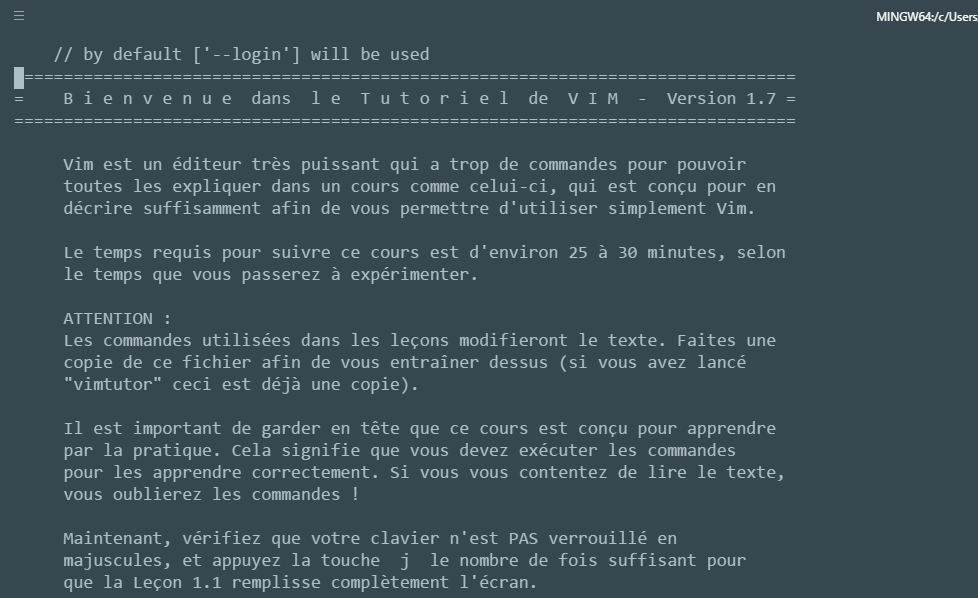
 aminnairi
on 7 Nov 2017
aminnairi
on 7 Nov 2017
Works also on MacOS High Sierra.
@aminnairi Thanks for the tip
But do not configure TERM to msys. Not recognized on MacOS X.
rbe1733
on 7 Nov 2017
This is a specific environment variable for Windows. Don't pay attention to that if you are on GNU/Linux or Mac OSX or UNIX. Updated my answer with this comment. Thanks for pointing that out @rbe1733
aminnairi
on 7 Nov 2017
Related issues
 laur1s
·
3Comments
laur1s
·
3Comments
 eoinmurray
·
3Comments
eoinmurray
·
3Comments
 hxnt
·
3Comments
hxnt
·
3Comments
 weabot
·
3Comments
weabot
·
3Comments
 anthonyettinger
·
3Comments
anthonyettinger
·
3Comments
Most helpful comment
Hyper 1.4.8 (stable) on Windows 10 (1709) w/ Git Bash.
Solved by adding the
env.LANGproperty with valuefr_FR.UTF-8.If you would like to list and search for a specific locale
If you would like to test a specific locale before applying changes to the
~/.hyper.jsThen test the locale with a command like
vimtutor.Replacing
frwith the locale you want to search.Tested in
vimtutorwhich displays diacritic french characters properly now.