Hyper: [Windows] Sometimes when I do a full reload, the terminal becomes transparent

All 21 comments
Whoa, that's weird. I never faced it 😰 Any extra info? Any plugins or themes?
 matheuss
on 22 Nov 2016
matheuss
on 22 Nov 2016
nope. fresh install
 luisrudge
on 22 Nov 2016
luisrudge
on 22 Nov 2016
Same here. On full reload it becomes transparent. As if the background color wouldn't be applied or something like that. Everything else seems to be the same.
@matheuss Which element gets the background color of the terminal?
 Specro
on 23 Nov 2016
Specro
on 23 Nov 2016
@luisrudge Could we see the console inspection if there is errors?
 ppot
on 27 Nov 2016
ppot
on 27 Nov 2016
I played with this a bit - there are no errors in the console. state.ui.backgroundColor has a value. It looks like the app's background color should come from electron's browser window property for it and I think that's where this is giving out. It's either a problem with BrowserWindow or the function Hyper is using to get the color value. Maybe the return value is invalid?
That's where I've gotten so far, hope it's on the right track.
 citycide
on 29 Nov 2016
citycide
on 29 Nov 2016
I also have this problem, but I'm running linux. I've built the latest version of master .
System info:
OS:         Arch Linux x64
WM:         bspwm
Compositor: compton
I've made the following changes to my config to help show what might be going on:
backgroundColor: 'rgba(0,0,0,0.6)',
showHamburgerMenu: true,
 Lindenk
on 30 Nov 2016
Lindenk
on 30 Nov 2016
I confirm this behaviour with the latest stable release 👍 fresh install, no plugins.
 mbeaudru
on 12 Dec 2016
mbeaudru
on 12 Dec 2016
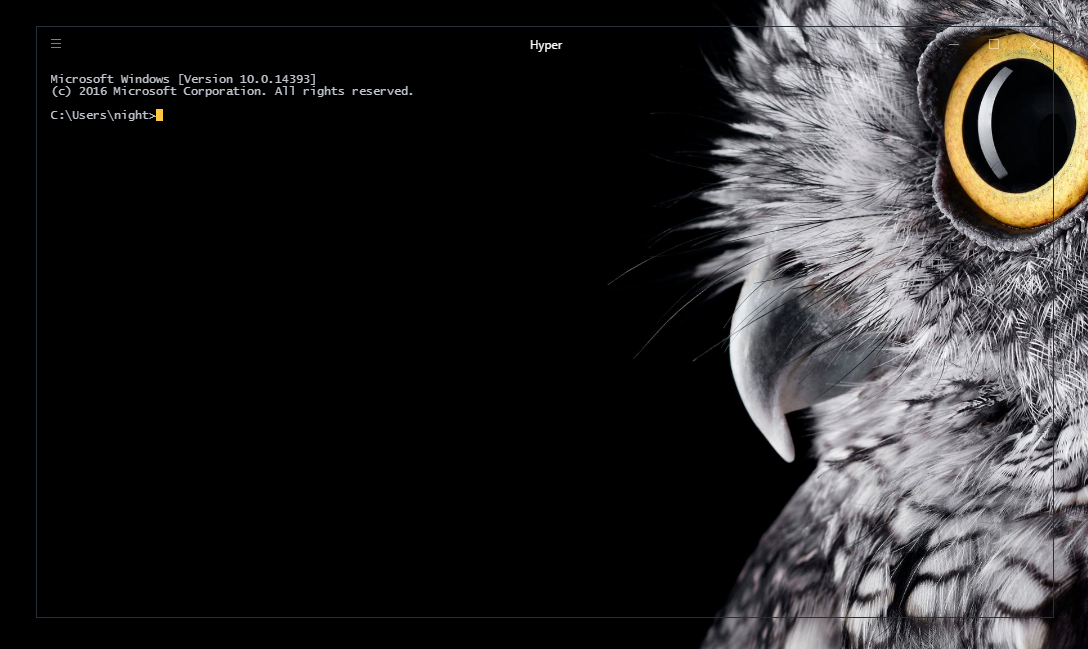
@matheuss I can also confirm this to happen on Windows 10 Pro and Hyper 1.0.0 ( I also had this issue on previous builds. )
 stefanivic
on 12 Dec 2016
stefanivic
on 12 Dec 2016
I'm not sure, but maybe this related to background bug when i open dev tools on mac?!

 dotcypress
on 12 Dec 2016
dotcypress
on 12 Dec 2016
Same bug only after trying some plugins on Win10 & v1.0.0. Removing of breaking plugin did not help.
 amankkg
on 13 Dec 2016
amankkg
on 13 Dec 2016
I have the same problem. I set:
backgroundColor: 'rgba(0,0,0,0.75)' (or with any alpha)
and when I do a full reload, or either closing and restarting the app, the background is black with the same alpha (I don't know wich, but I suppose 0.5) everytime. Sometimes it becomes totally transparent
hyper: 1.0.0
OS: Windows 10 Pro build 14393
node: 7.2.1
(Sorry for my bad markdown)
 luckv
on 15 Dec 2016
luckv
on 15 Dec 2016
I am also experiencing this on my Windows 7 PC
 GerjanOnline
on 17 Dec 2016
GerjanOnline
on 17 Dec 2016
Close in #1262
ppot
on 18 Dec 2016
@luckv This is fixed in my previous comment PR
ppot
on 18 Dec 2016
OS version and name: windows 10 x64
Hyper.app version: 1.0.0
I have also the same problem after trigger "Full Reload"
 damien122
on 21 Dec 2016
damien122
on 21 Dec 2016
I've done some research into finding what causes the transparent background on a full reload, and these are my initial findings:
Testcase:
- Set background color to
rgba(255, 0, 0, 0.75)in hyper.js (setElectronBackgroundColor outputs#bfFF0000) - Set initial background color to
rgba(0, 0, 0, 0.75)(electron color#bf000000) in defaults for BrowserWindow constructor
Expected behavior
- Initial background for BrowserWindow is a red background color
- Background color will be black when BrowserWindow is shown. A flash of red -> black might be expected
Observed behavior
- Hyper launches with a black background, which flashes to almost instantly to red (nothing to worry about)
- Background stays red, when
setBackgroundColoris called on init event
Conclusion
Enabling/disabling of transparency in options results in same behavior. There is one difference on a full reload; When transparency is enabled then the background of BrowserWindow turns transparent, if it's disabled then the background stays the same color as the backgroundColor option passed into the constructor of BrowserWindow.
At first glance this seems to be an issue with Electron, as it seems that Electron does nothing on the setBackgroundColor method call on Windows 10.
When I have some time this week, I will try to reproduce this problem with a simple Electron app. If that works out, we can log an issue on the Electron repo with our findings.
 sliepie
on 5 Jan 2017
sliepie
on 5 Jan 2017
@JarnoNijboer Yea let us know what you find. Just downloaded Hyper for windows and am seeing this issue as well.
 TraceyK14
on 6 Jan 2017
TraceyK14
on 6 Jan 2017
It actually happens on every full reload.
 Stanzilla
on 13 Jan 2017
Stanzilla
on 13 Jan 2017
this bug is the same like this -> https://github.com/zeit/hyper/issues/1638
Do the opposite of this solution and the full reload will work typically with build >= 1.3.1
damien122
on 17 Mar 2017
Will be hard to recreate the process, but I was having the same issue when reloading hyper (on Windows 10 with bash.exe). Started playing around with the order plugins were loaded in the config file and now the full reload is working properly.
It could also be linked to the fact that I'm using a backgroundColor and termCSS: 'body {background-color: rgb(x,y,z)} with the default opacity of 1 if that helps.
Working with the following plugins and order:
...
plugins: [
  "hyper-statusline",
  "hyper-tabs-enhanced",
  "hyper-chesterish"
],
...
EDIT
Looks like after closing the config file, the full reload reverted to fully transparent :f\ Might have been a bug bc when it was working my fontFamily and backgroundColor was overriding the chesterish theme settings.
 ghughes27
on 13 Jun 2017
ghughes27
on 13 Jun 2017
Fixed in v2 🎉
 albinekb
on 19 Apr 2018
albinekb
on 19 Apr 2018
Related issues
 anthonyettinger
·
3Comments
anthonyettinger
·
3Comments
 sarneeh
·
3Comments
sarneeh
·
3Comments
 dbkaplun
·
3Comments
dbkaplun
·
3Comments
 eoinmurray
·
3Comments
eoinmurray
·
3Comments
 rauchg
·
3Comments
rauchg
·
3Comments
Most helpful comment
I confirm this behaviour with the latest stable release 👍 fresh install, no plugins.