Hydrogen: Could not export pattern dialog shows up every time I try to copy track
Hydrogen version * : 1.0.0
Operating system + version : Windows 10
Audio driver + version : Logitech Headphones + 10.0.19041.1
Every time I try to copy a pattern or try to import it, I keep getting "Failed To Export Dialog".
Steps to reproduce (In my case)
- Create a pattern.
- Copy it.
You should get the error telling it's failed to Export.
Create a pattern.
- Export it.
- Try to import it.
- You should get the same error.
 BiswajitPual
All 32 comments
I've tried with 1.0.1 on my LibraZiK-3 (Debian GNU/Linux) and it works as expected here.
@BiswajitPual : could you try the same with the newest 1.0.1 version and report back here? Thanks.
 trebmuh
on 17 Sep 2020
trebmuh
on 17 Sep 2020
I've tried with 1.0.1 on my LibraZiK-3 (Debian GNU/Linux) and it works as expected here.
@BiswajitPual : could you try the same with the newest 1.0.1 version and report back here? Thanks.
The problem still persists.
BiswajitPual
on 17 Sep 2020
Thank you for testing. You'll need to wait for someone with windows' skills to check that now.
trebmuh
on 17 Sep 2020
Hi @BiswajitPual !
i've couldn't reproduce the issue at first, but i can see from the code what goes wrong. What happens in your case is that Hydrogen is trying to save a temporary version of a pattern to a temporary directory. This fails somehow, and the "could not export pattern" dialog is raised.
The first problem is that the caption of the dialog is wrong. This should be sth. like "Could not create temporary copy of pattern" or sth. like that. The second problem is that Hydrogen is not able to write the pattern to that directory. I don't know why this is, the temporary directory is retrieved by asking QT (our window toolkit), and QT should ask your system about that directory. It could be that the directory does not exist or is not writable. You could try to launch Hydrogen as adminstrator (just for testing..), this could solve the issue if it is a permission problem.
I will add some debug output about the used directories (user/system drumkit directory, temporary directory,...) to Hydrogen to make it clearer to the user where Hydrogen stores files. In addition, it makes sense that Hydrogen throws an error on startup if it is not able to write to the temporary directory.
 mauser
on 24 Sep 2020
mauser
on 24 Sep 2020
@BiswajitPual: If you want, you could try this version of Hydrogen which includes my current fixes. I've added a check which checks if the temp directory is write on startup of the Hydrogen application. If it is not writable, a warning will pop up which also includes the path which hydrogen wants to write to.
mauser
on 24 Sep 2020
I get same issue on Windows 10 with ver1.0.0 and 1.0.1 - it also wont allow a delete of a pattern comes up with same error - I have run as admin but no change - I have a version 0.9.7 that work fine on another windows 10 machine but when install 0.9.7 on win 10 with issue all the dialog boxes are white with no text but can copy and delete patterns
 SithlordIII
on 26 Sep 2020
SithlordIII
on 26 Sep 2020
@SithlordIII : Could you try out the version of Hydrogen which i have linked in my last post? It doesn't solve the problem, but it gives a error messages that would help to understand the problem
mauser
on 27 Sep 2020
@mauser , I tried the new version in both normal and "run as admin"
I'm getting the this error now.
"Could not save pattern to temporary directory"
BiswajitPual
on 27 Sep 2020
@mauser : Thank you for your reply , Just installed the version in the link I get the "could not save pattern to temporay directory" dialog when I copy or delete a pattern - I have run as admin aswell , I have tried on a differnet machine (WIN 10) thats not had hydrogen installed before , I have checked all permissions in the folders and all apear to be ok
SithlordIII
on 27 Sep 2020
I'm also getting the "could not save pattern to temporay directory" dialog when I copy or delete a pattern on Win10
 dhpinkerton
on 9 Nov 2020
dhpinkerton
on 9 Nov 2020
Hi, @mauser are we near a solution to the windows issue preventing copy/delete of patterns in windows 10 o/s Warmest Regards
SithlordIII
on 24 Nov 2020
I got it working by create a c:\tmp directory, giving all users full permission to it and then setting the system environment variables TMP & TEMP to use this new directory.
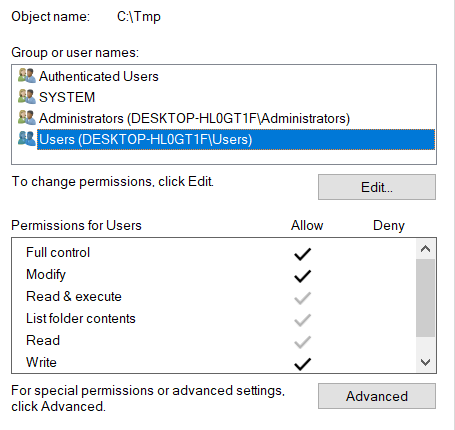
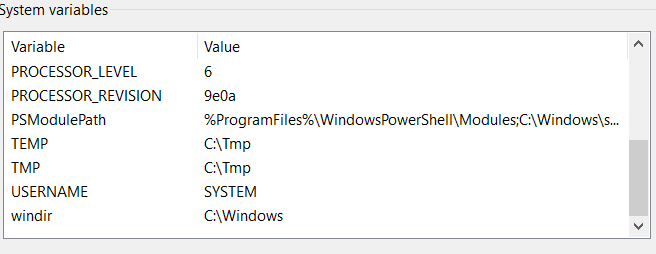
dhpinkerton
on 24 Nov 2020
@dhpinkerton Thank you for your reply, Just tried this but no joy for me , I uninstalled and reinstalled hydrogen rebooted and still showing cannot export for copy/delete , tried as admin to and rechecked security permissions
SithlordIII
on 25 Nov 2020
I forgot to mention I also deleted the TMP & TEMP variables from the user profile. In a dos shell typing "set" should show the current values. Confirm you are pointing to the new tmp directory.
dhpinkerton
on 25 Nov 2020
Morning @dhpinkerton THANK YOU After a little messing about got your solution to work , will get my son to have a proper play today I was changing SYSTEM enviroment variables to the C:\Tmp not USER PROFILE enviroment variables which I have now done
1 Open the Control Panel (icons view), and click/tap on the User Accounts icon.
2 Click/tap on the Change my environment variables link on the left side,
Again Thank you and will get my son to fully test later today I have 2 other machines with same issue so will try above on them this evening
SithlordIII
on 25 Nov 2020
Hi @SithlordIII @dhpinkerton, can I ask you what the file permissions on your default user temp directories (C:\Users\%USERNAME%\AppData\Local\Temp) are? Do the directories exist and are writable?
 cme
on 25 Nov 2020
cme
on 25 Nov 2020
I tried to add the permissions @dhpinkerton [2] listed above to the
(C:\Users\%USERNAME%\AppData\Local\Temp)
I added users and everyone as user to full control but didnt work
when I changed USER environment variables to the c:\Tmp it worked with
the users set to full control
On 25/11/2020 09:21, Colin McEwan wrote:
Hi @SithlordIII [1] @dhpinkerton [2], can I ask you what the file permissions on your _default_ user temp directories (C:\Users\%USERNAME%\AppData\Local\Temp) are? Do the directories exist and are writable?
--
You are receiving this because you were mentioned.
Reply to this email directly, view it on GitHub [3], or unsubscribe [4].
Links:
[1] https://github.com/SithlordIII
[2] https://github.com/dhpinkerton
[3]
https://github.com/hydrogen-music/hydrogen/issues/941#issuecomment-733578121
[4]
https://github.com/notifications/unsubscribe-auth/AFLVCFQEIV4CUFAAB3ESZLLSRTECFANCNFSM4RQNWXRA
SithlordIII
on 25 Nov 2020
I will check these on the other machine when i get home
On 25/11/2020 09:21, Colin McEwan wrote:
Hi @SithlordIII [1] @dhpinkerton [2], can I ask you what the file permissions on your _default_ user temp directories (C:\Users\%USERNAME%\AppData\Local\Temp) are? Do the directories exist and are writable?
--
You are receiving this because you were mentioned.
Reply to this email directly, view it on GitHub [3], or unsubscribe [4].
Links:
[1] https://github.com/SithlordIII
[2] https://github.com/dhpinkerton
[3]
https://github.com/hydrogen-music/hydrogen/issues/941#issuecomment-733578121
[4]
https://github.com/notifications/unsubscribe-auth/AFLVCFQEIV4CUFAAB3ESZLLSRTECFANCNFSM4RQNWXRA
SithlordIII
on 25 Nov 2020
Hi everyone,
this thread shows that we really need more debugging capabilites with Hydrogen on Windows. Hydrogen writes a log file to the user directory (normally), but somehow this also does not work on windows (at least not on my machines).
My plan is to add the following features so we can debug issues like this easier:
- open the log file or its directory via the debug menu
- choose the log level via the debug menu
- repair logging to the log file on windows
This does not directly fix this bug, but it should help to nail down the problem..
mauser
on 25 Nov 2020
@SithlordIII :
Could you try this version of Hydrogen? It should show a command window with log output after Hydrogen started. Furthermore, you can set the log level via "Debug" -> "Log level" -> "Debug", then try to copy a pattern. After the pattern copying fails, either look at the console window or open the log file directly via "Debug" -> "Open log file". You could also try to attach that file to your comment.
mauser
on 25 Nov 2020
@mauser Thank you rest permissions and user variables back to where they where originally and got original error / have installed version you linked to set debug etc tried copying and delete a few times image of console window below (but wouldnot let me open LOG file )
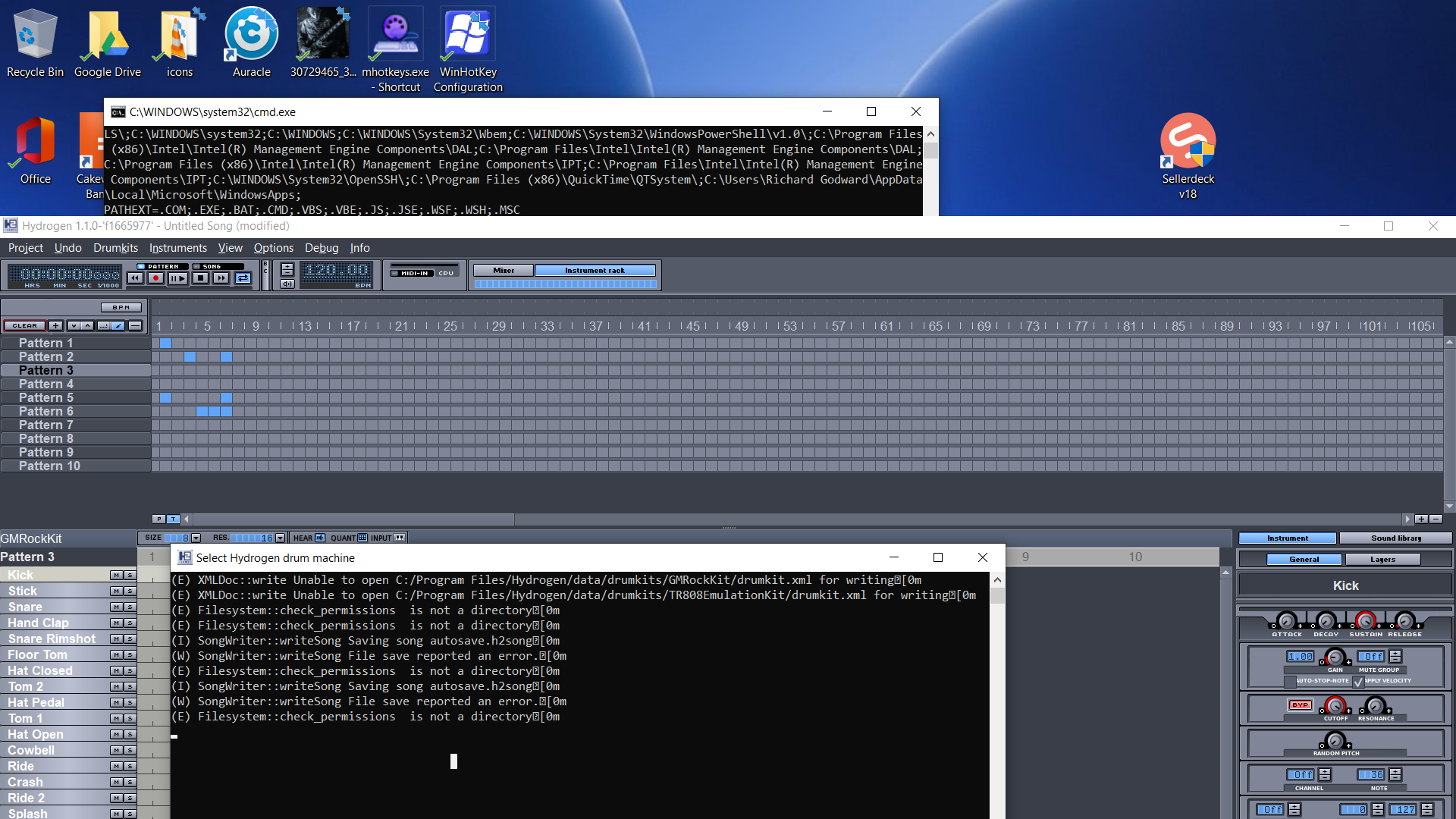
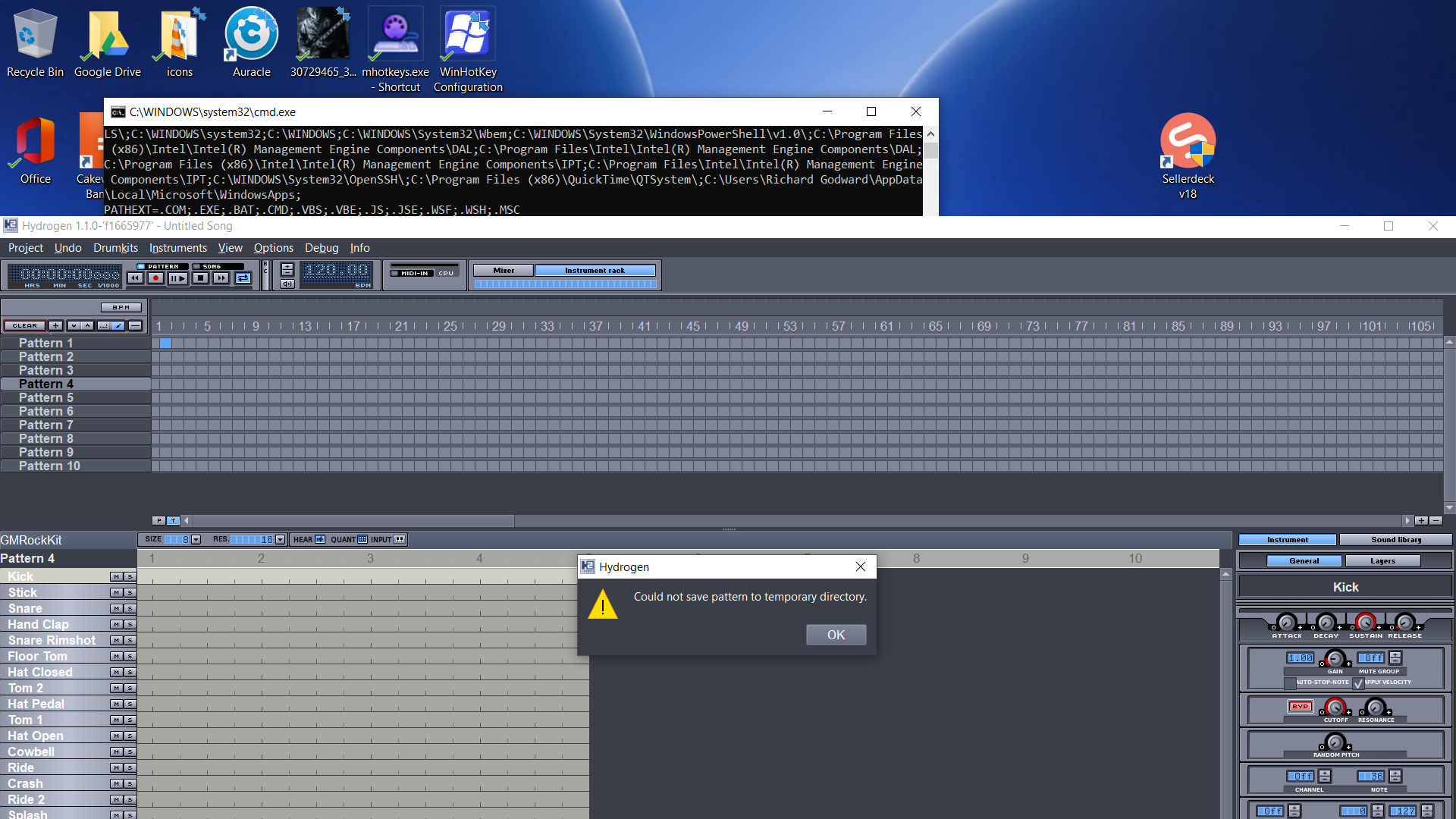
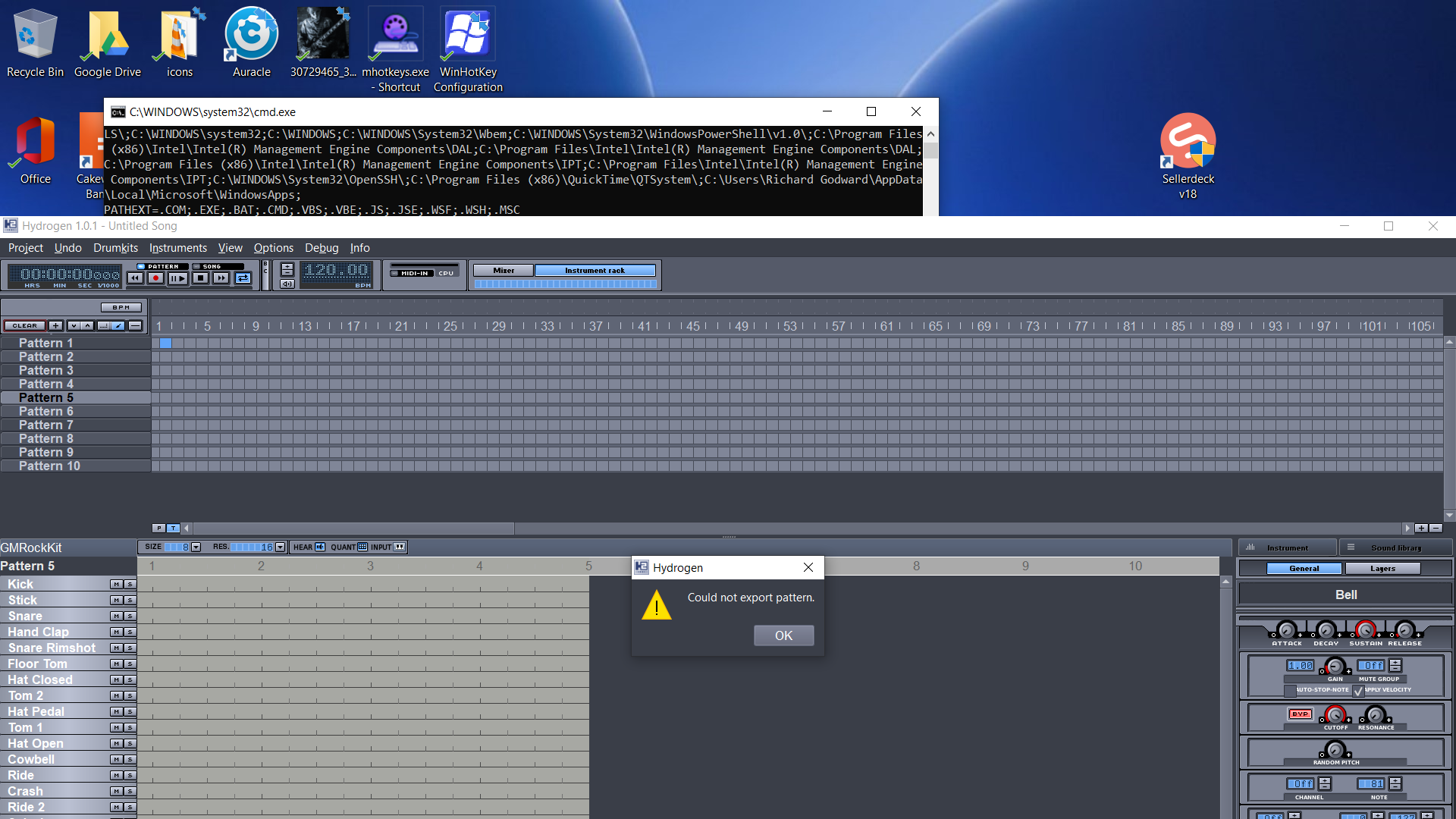
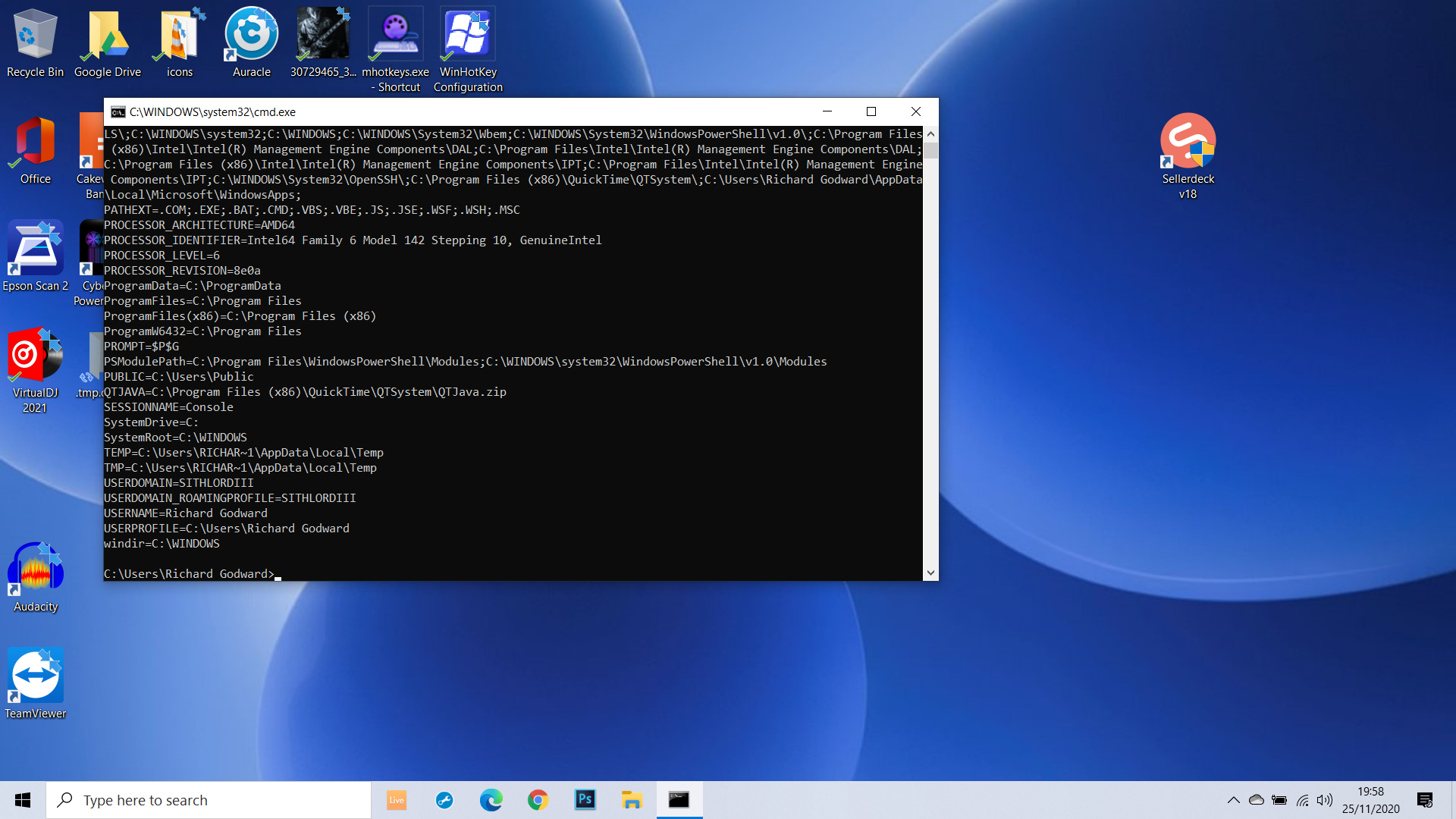
SithlordIII
on 25 Nov 2020
Ok, two additional things:
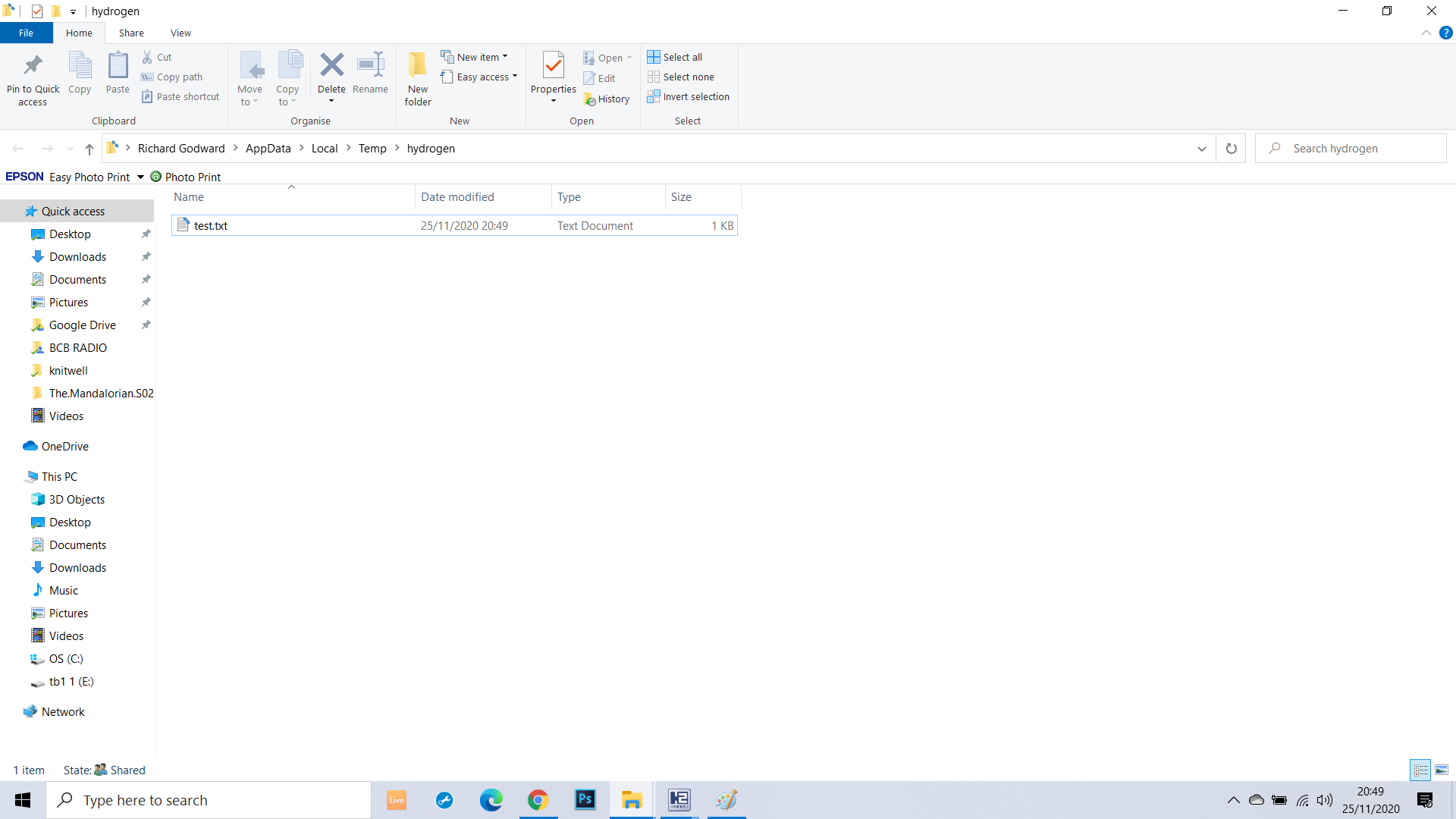
Can you open "Debug" -> "Show filesystem information" and show us a screenshot of that dialog? In addition, could you hit the "open" button in the first row of that dialog to open the temporary directory? It would be great if you could try to create a file in that directory.
mauser
on 25 Nov 2020
@mauser last images show empty folder right clicked created text document ok openened edited and re saved
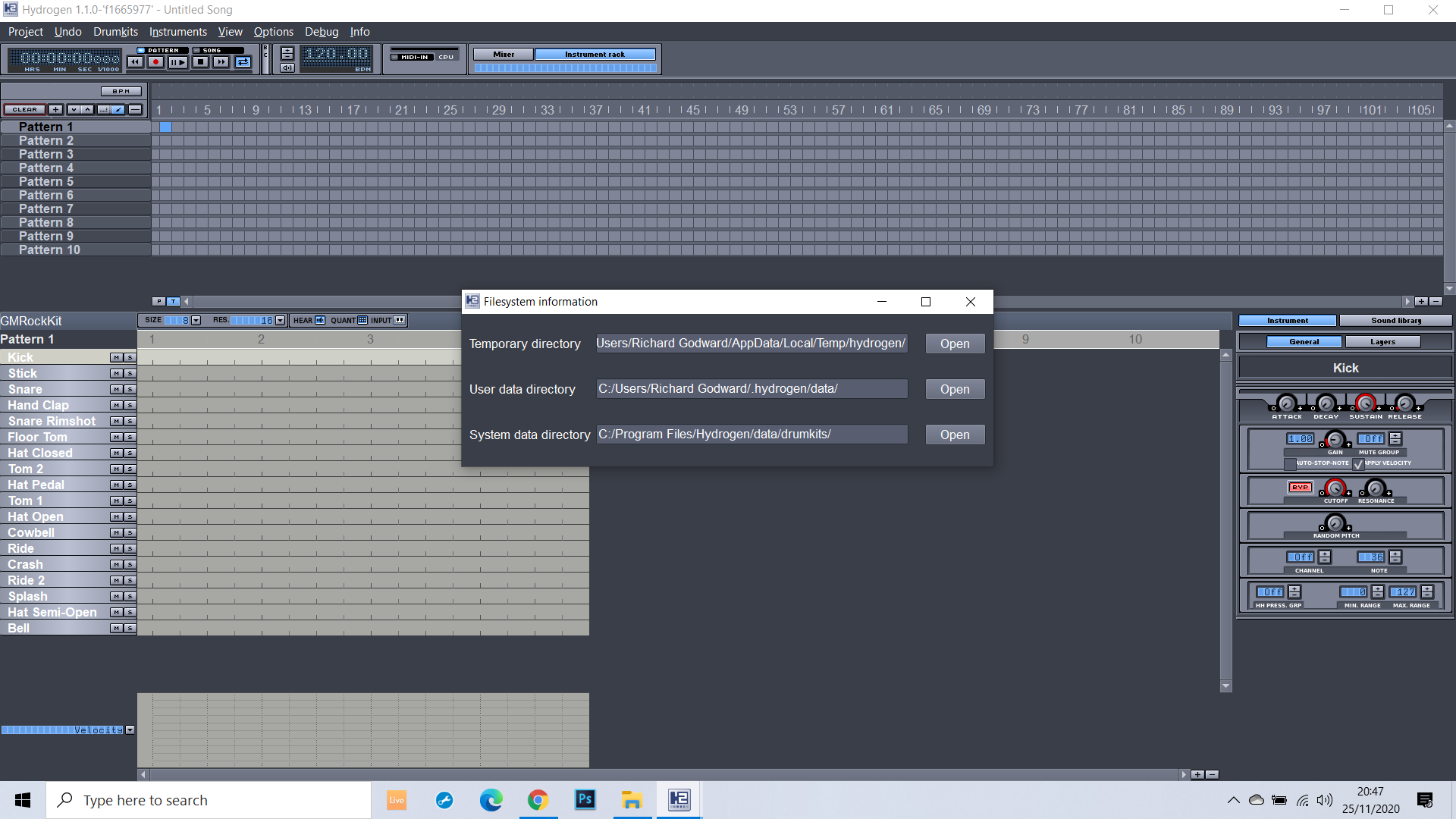
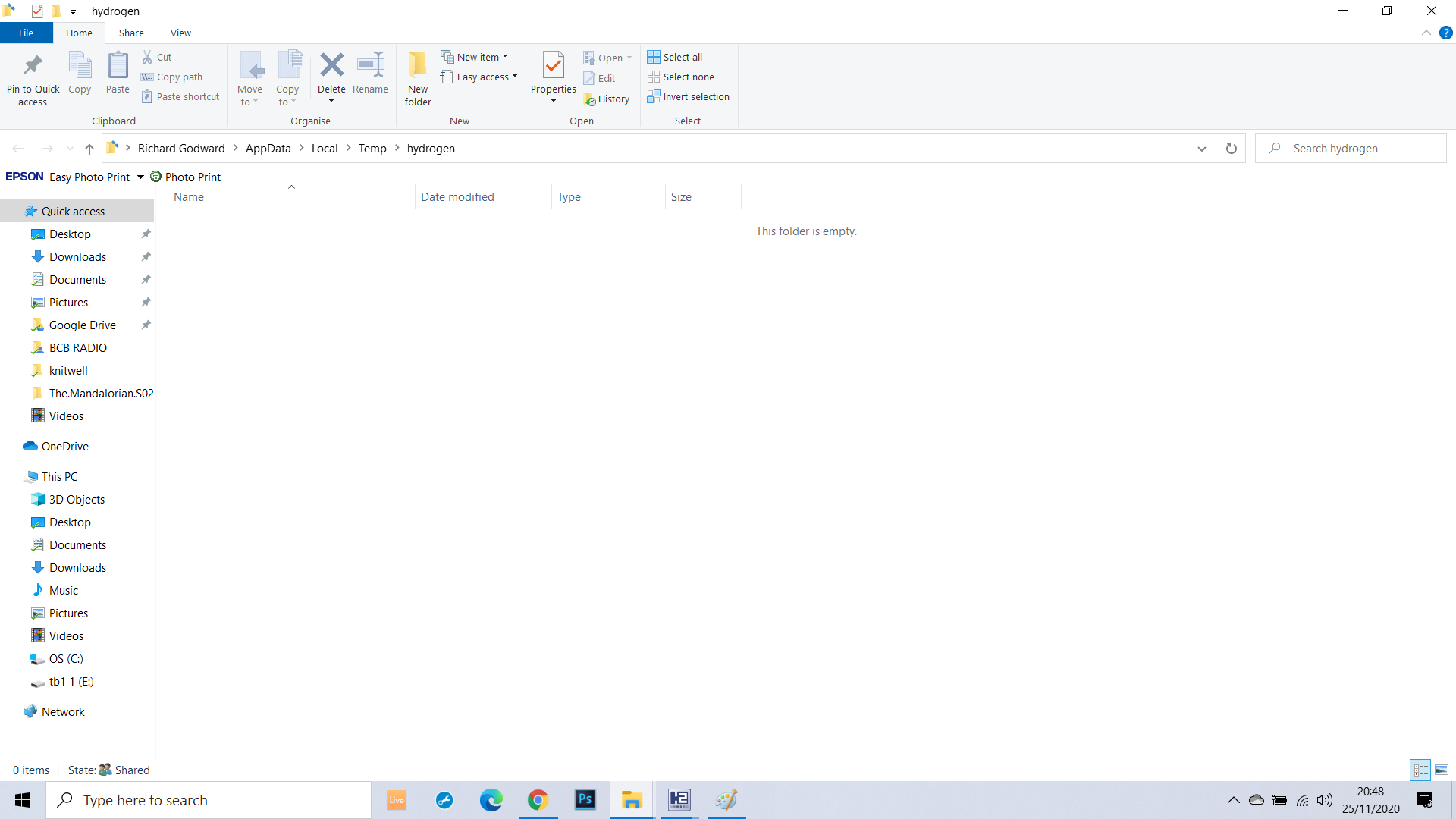
SithlordIII
on 25 Nov 2020
@SithlordIII : Thanks a lot, that explains it. It is the whitespace in your username which causes the problem. I've created a new windows user "example user" and now i can reproduce it also on my windows computer. That's a classic :) I will see why this gives us trouble on windows and what we can do about it, but not today. Thanks for providing the screenshot and beeing patient!
mauser
on 25 Nov 2020
@mauser Your most welcome happy to help anyway we can and thank you for such a fantastic musicall tool too ,
SithlordIII
on 25 Nov 2020
This version might fix this problem.
mauser
on 27 Nov 2020
thank you will download and get my son to test as soon as im home
On 27/11/2020 12:24, Sebastian Moors wrote:
This version [1] might fix this problem.
--
You are receiving this because you were mentioned.
Reply to this email directly, view it on GitHub [2], or unsubscribe [3].
Links:
[1]
https://ci.appveyor.com/api/buildjobs/h9canbiuepsp9j16/artifacts/build%2FHydrogen-1.1.0-win64.exe
[2]
https://github.com/hydrogen-music/hydrogen/issues/941#issuecomment-734811008
[3]
https://github.com/notifications/unsubscribe-auth/AFLVCFSTV4KBDNMOCKYWZBLSR6LBVANCNFSM4RQNWXRA
SithlordIII
on 27 Nov 2020
@mauser Evening Installed version requested and this version allows coying and deleting of patterns Thank You , I will get my son to have a proper play but looks like issue has now been resolved without the need to change tmp folders and alter folder permissions well done and Thank you
SithlordIII
on 27 Nov 2020
Perfect! I will close this issue now, but just comment again if anything is still going wrong.
mauser
on 27 Nov 2020
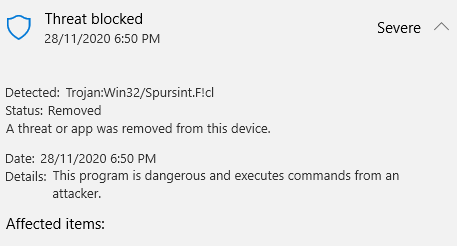
Download failed
dhpinkerton
on 28 Nov 2020
Download failed
The chances are high that this is (another) false positive. It seems to happen often that software which has been compiled with mingw is detected as a virus and removed by some malware protection tools.
The binary has been built with the AppVeyor cloud build service, so i can't guarantee that it is malware free, but it seems to be not very likely..
mauser
on 28 Nov 2020
@mauser @dhpinkerton Ive downloaded ok no issues found scanned using Windows defender and Sohpos Antivirus -- only issue was I had Smart Screen saying was an unpublised/verified exe - just select run anyway , re scanned machine and all ok no issues
SithlordIII
on 29 Nov 2020
Related issues
 liquidshadows71
·
10Comments
liquidshadows71
·
10Comments
 theGreatWhiteShark
·
7Comments
mauser
·
7Comments
theGreatWhiteShark
·
7Comments
mauser
·
7Comments
 simonvanderveldt
·
11Comments
simonvanderveldt
·
11Comments
 gnzgg
·
9Comments
gnzgg
·
9Comments
Most helpful comment
Hi everyone,
this thread shows that we really need more debugging capabilites with Hydrogen on Windows. Hydrogen writes a log file to the user directory (normally), but somehow this also does not work on windows (at least not on my machines).
My plan is to add the following features so we can debug issues like this easier:
This does not directly fix this bug, but it should help to nail down the problem..