Hydrogen: Unable to remove beat when changing from higher grid resolution
Hydrogen version * : 1.0.0-beta2
Operating system + version : 5.4.40-1-Manjaro MATE 20.0.1, Arch based
Audio driver + version : snd_hda_intel
To repeat this bug/issue
- Just put the grid resolution in 16
- Enter a beat on a non-8 space (for example 7)
- Put the grid resolution back to 8
- Try to remove (clicking on the beat again) that beat on 7, an you won't be able
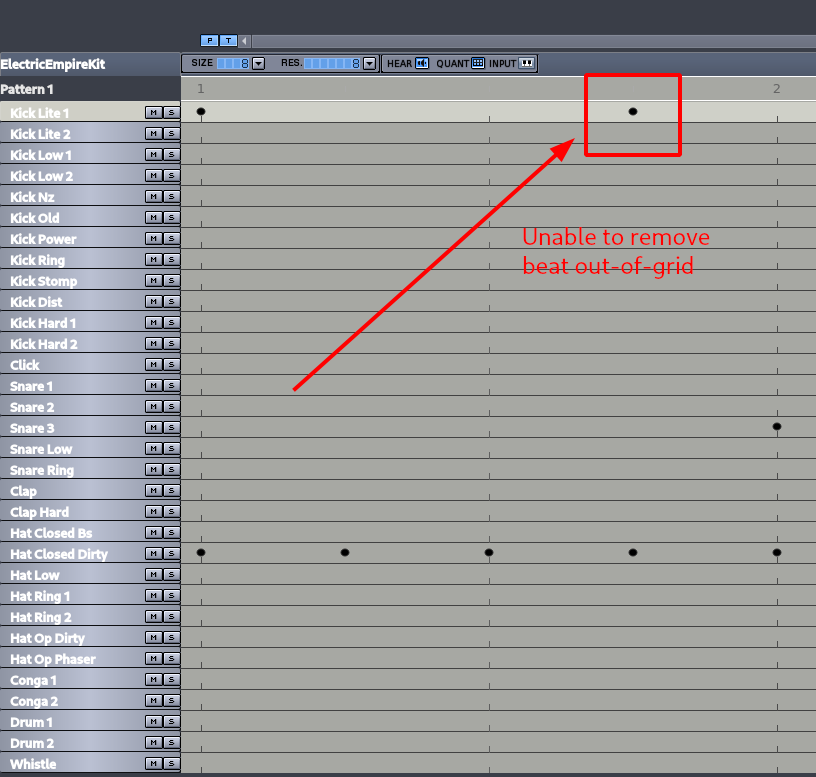
This is repeated always when changing to a lower resolution grid. It would be great to be able to remove those beat which are still out-of grid.
I know this changes a bit the concept of grid, but maybe allowing to only remove out of the grid would do this better.
 Porrumentzio
All 13 comments
I've found this irritating occasionally too, but have flipped back and forth between wondering what the right thing to do is.
The current behaviour is irritating, but not a large problem as it should be fairly obvious to the user how to remove such a note, particularly since in order to be in this situation they must have already figured out how to change the time base.
I think it's not quite obvious what the desired behaviour of clicking to remove an off-grid note would be. It's fairly obvious for notes that are far away from grid positions (clicking exactly on the note removes it, otherwise the behaviour is as it is now), but for notes very close to grid positions, where the note's representation might even cover a grid position, it's ambiguous: should the user expect a click remove the off-grid note, or place an on-grid note?
The other issue is reversibility: the user should expect consistency with other visible notes, for which clicking again will re-place a deleted note. I'm not sure how big an issue that really is though.
I think having some method of removing without changing timebase would be useful; perhaps a context menu?
 cme
on 2 Jun 2020
cme
on 2 Jun 2020
I would say that, being able to draw a rectangle with a mouse, and then, all the notes within being selected, then one just have to push the "Del" keyboard key could be a great trade-off.
 trebmuh
on 2 Jun 2020
trebmuh
on 2 Jun 2020
@trebmuh Agreed, and the selection idea is mentioned in #848 as well. I'll probably take a shot at this as well and see how it feels.
cme
on 2 Jun 2020
That would be good. Also, when drawing the selection, highlight the selected notes with a high-contras color (maybe red) for nobody having confusions.
About context menus, that also would be a great idea, but that's already on another issue :)
Thanks for answering!
Porrumentzio
on 3 Jun 2020
I finally got round to spending a bit of time on this, and have added selection and deletion to the DrumPatternEditor. Very much work-in-progress:
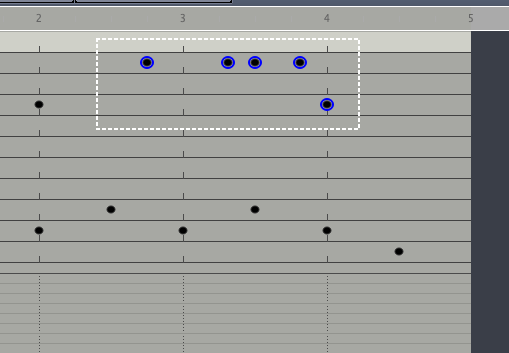
Changes include basic selection and deletion (I'll add more of the obvious functionality later), patterned after the behaviour of the SongEditor, and implemented as a templated class so it can be applied to multiple widget classes.
I intend to add that to the PianoRollEditor as well, and change the SongEditor's selection mode to use it, so there's consistency between the different editors.
When it's ready, I guess this should close this and #848, and #868.
I'm not going to pull-request yet since it's work-in-progress, but it ought to be ready for v1.1. If anyone wants to try it out, it's on branch dev-pattern-editor-selection at github.com/cme/hydrogen
cme
on 20 Jul 2020
Great, thanks for the work!!!
Porrumentzio
on 21 Jul 2020
It looks awesome!
trebmuh
on 22 Jul 2020
A wee work-in-progress demo:
https://youtu.be/pvOC2J97Isw
cme
on 2 Aug 2020
Wow @cme, it looks really-really awesome!!
I like a lot the GUI of the selection, the color, the circles and the circled squares.
I also like that each pattern have different colors!
Porrumentzio
on 2 Aug 2020
I like a lot the GUI of the selection, the color, the circles and the circled squares.
I should point out, that the very large circles round the pointer are just QuickTime screen recorder's "show clicks" functionality.
I also like that each pattern have different colors!
I can't take any credit for that, it's existing functionality, in Preferences -> Appearance -> "Coloring method for Song Editor elements" -> "Automatic"
cme
on 2 Aug 2020
I should point out, that the very large circles round the pointer are just QuickTime screen recorder's "show clicks" functionality.
Yes for sure, I talked about Hydrogen's
it's existing functionality
I didn't know about it! I think this way it's much easily comprehensible, though it loses its retro/90'ish appearance. I would think about making that default!
Porrumentzio
on 2 Aug 2020
Initial implementation of this is in #919 if anyone wants to give it a try.
cme
on 10 Aug 2020
919 allows this and is merged to master. Closing.
cme
on 18 Oct 2020
Related issues
 theGreatWhiteShark
·
7Comments
theGreatWhiteShark
·
7Comments
 mauser
·
7Comments
trebmuh
·
10Comments
mauser
·
7Comments
trebmuh
·
10Comments
 oddtime
·
6Comments
oddtime
·
6Comments
 38github
·
6Comments
38github
·
6Comments
Most helpful comment
I finally got round to spending a bit of time on this, and have added selection and deletion to the DrumPatternEditor. Very much work-in-progress:
Changes include basic selection and deletion (I'll add more of the obvious functionality later), patterned after the behaviour of the SongEditor, and implemented as a templated class so it can be applied to multiple widget classes.
I intend to add that to the PianoRollEditor as well, and change the SongEditor's selection mode to use it, so there's consistency between the different editors.
When it's ready, I guess this should close this and #848, and #868.
I'm not going to pull-request yet since it's work-in-progress, but it ought to be ready for v1.1. If anyone wants to try it out, it's on branch
dev-pattern-editor-selectionat github.com/cme/hydrogen