Hydrogen: Idea: Create ipynb notebook file from Hydrogen
It would be cool to be able to export notebooks from a plain text file use by Hydrogen.
Hydrogen has support for multiple cells. It would be great to be able to play nicely with nteract and jupyter notebook.
Where to start?
- The current text editor in Hydrogen can be accessed via
store.editor getCellsreturns the text editor ranges of all cellsgetTextInRangereturns the text content of a given range@nteract/commutablecan create a notebook data structure which then can be saved to disk
 lgeiger
All 24 comments
Another cool thing we have is that we can automatically build a notebook in the background too, using all the execute_input messages for source and all the outputs. Getting the current view as a notebook would be cool too.
 rgbkrk
on 22 May 2017
rgbkrk
on 22 May 2017
I'll check this out. Been meaning to look into hydrogen for sometime.
 Madhu94
on 1 Sep 2017
Madhu94
on 1 Sep 2017
For anyone who needs this right now, I have uploaded my interim solution as a gist here.
 ttor
on 29 Sep 2017
ttor
on 29 Sep 2017
@lgeiger So, unless you begin a block of code with a comment that has %% in it, all the contents of the editor are taken to be just one cell ? For the Run All command.
Maybe I didn't look hard enough, but that wasn't too clear from the docs. I know the example gif in the README showed the %% in the comments, but my eyes usually glide over comments most of the time :)
(Mental reminder to make that obvious from the docs)
Madhu94
on 7 Oct 2017
milestone suggestion:
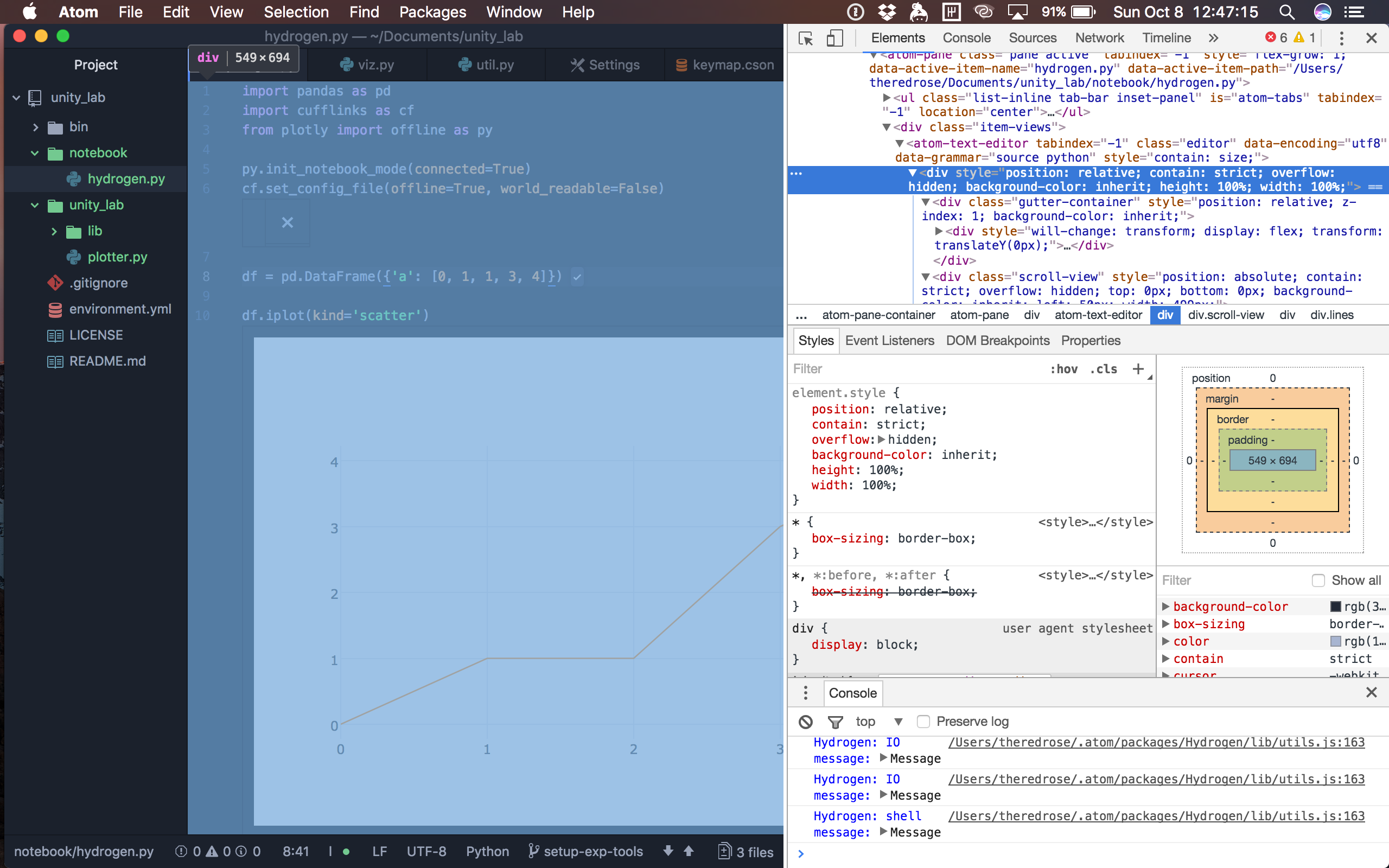
- a low-hanging fruit is to just save the entire atom pane with the input and output as an HTML file, so people can immediately export to share with people as-is
- the next stage is to dig deeper into this HTML div and extract the elements
related thing done for saving a preview pane of a markdown file as-is into an HTML file: https://github.com/atom/markdown-preview/pull/68
See the screenshot for the targetable HTML div.
 kengz
on 8 Oct 2017
kengz
on 8 Oct 2017
Thanks @kengz , I think I've got this.
Madhu94
on 12 Oct 2017
@kengz, @Madhu94 Thanks a lot for your interest in implementing this feature.
Rather than using the HTML on the page which will become messy very fast, the easiest solution is to use @nteract/commutable as roughly outlined above.
Commutable is also used inside nteract to do all notebook manipulation and will have all you need.
Feel free to join our Slack if you have more questions.
lgeiger
on 13 Oct 2017
@lgeiger I am doing it with @nteract/commutable as you suggested in the first update. I have not worked out how to get the outputs exactly (I think they're in store.kernel.OutputStore). Once I get a minimal version working, I'll put up a WIP pull request.
Madhu94
on 13 Oct 2017
@lgeiger Thanks for leaving this feature for new contributors. I absolutely love the Hydrogen codebase.
Madhu94
on 13 Oct 2017
Great that you're working on it.
For the first working version I'd focus on the source code and wouldn't worry too much about the output, we can always do this in future PR's. Looking forward to it.
lgeiger
on 13 Oct 2017
It's also possible to grab Hydrogen output via Stitch or Pandoctools. The latter can export to ipynb and designed to leverage the full power of Pandoc filters (Jupyter output collecting is also a Pandoc filter).
See this usage code example on Stackoverflow.
 kiwi0fruit
on 21 Jun 2018
kiwi0fruit
on 21 Jun 2018
@lgeiger , I see that there has been a PR on this, but how can I use this with Hydrogen in Atom? I cannot find documentation on how to do this.
 saber7165
on 6 Jan 2019
saber7165
on 6 Jan 2019
There will be more documentation once https://github.com/nteract/hydrogen/pull/1498 gets merged
 kylebarron
on 6 Jan 2019
kylebarron
on 6 Jan 2019
@kylebarron, thanks. I got confused because here it shows it as merged and the branch deleted more than a year ago. So I thought this is part of the package now.
saber7165
on 6 Jan 2019
It is, it's the "export notebook" command, it just isn't documented well
kylebarron
on 6 Jan 2019
Do you know how I can call it, or have any example? Is it like run-cell and run-all commands or sth different? I can certainly wait though for #1498 to get merged.
saber7165
on 6 Jan 2019
You just call "export notebook", and you just need to have cell markers. See the "run cell" docs
kylebarron
on 6 Jan 2019
@kylebarron, thanks. It worked really well. Do you know if option 1 here (converting the hydrogen output to html) has been implemented or not?
saber7165
on 6 Jan 2019
It hasn't been implemented and I agree with @lgeiger that it's not a good use of time, because if we have good export to a notebook, then you can use nbconvert to convert to HTML
kylebarron
on 6 Jan 2019
@kylebarron and @lgeiger, I agree to some extent. However, nbconvert is an additional step which also needs to run the code in order to generate the output. This would be waste of time if the code takes time to run. Once the output is generated from atom though, I think there should be option to take a "snapshot" and save it as html. Like in Spyder, one can just right click on the ipython terminal and save the whole output as html. I addition, adding such options makes users independent of any extra tools other than Hydrogen+atom.
saber7165
on 7 Jan 2019
No, nbconvert doesn't run the code, it just exports whatever is already saved in the notebook file.
kylebarron
on 7 Jan 2019
Cool. So this means that one can run the code in Hydrogen, then save the code with the outputs using #1498 to a notebook, and then use nbconvert to get html, right? I am interested in having the outputs (and possibly the code) saved to html file.
saber7165
on 7 Jan 2019
At present it only exports code and not results. See #1503
kylebarron
on 7 Jan 2019
Nice! I'll wait then. Thanks for all the info.
saber7165
on 7 Jan 2019
Related issues
 jasonleonhard
·
3Comments
jasonleonhard
·
3Comments
 HaoranXue
·
4Comments
HaoranXue
·
4Comments
 ethan92429
·
3Comments
ethan92429
·
3Comments
 mda6
·
3Comments
mda6
·
3Comments
 onyxfish
·
4Comments
onyxfish
·
4Comments
Most helpful comment
I'll check this out. Been meaning to look into hydrogen for sometime.