I find this erreur please help
(Virtual machine: Ubuntu 18.04)

 Jouda-2020
All 14 comments
@Jouda-2020 perhaps provide some more details including your network and environment? Its not clear to me what you are doing and why the DSN is causing a problem.
Ory also has a Slack ory-community.slack.com and Community site community.ory.sh
 tacurran
on 30 Apr 2020
tacurran
on 30 Apr 2020
Hi tacurran
I am following this site
https://www.ory.sh/run-oauth2-server-open-source-api-security/
Step by step
Jouda-2020
on 30 Apr 2020
Looks like you're running windows? Do you know how you can set environment variables on windows? The error happens because the DSN environment variable is not set (because export does not work on Windows):
export DSN=postgres://hydra:secret@ory-hydra-example--postgres:5432/hydra?sslmode=disable
I don't have a Windows machine available at the moment, but you can substitute the variables. So
 docker run -it --rm \
  --network hydraguide \
  oryd/hydra:v1.4.2 \
  migrate sql --yes $DSN
becomes
 docker run -it --rm \
  --network hydraguide \
  oryd/hydra:v1.4.2 \
  migrate sql --yes postgres://hydra:secret@ory-hydra-example--postgres:5432/hydra?sslmode=disable
You need to do the same for SYSTEMS_SECRET
 aeneasr
on 1 May 2020
aeneasr
on 1 May 2020
No i don't know.
I have windows 10 and i work on virtual machine: Ubuntu 18.04
I tried on windows but i find many erreus so i change it.
Right now i am working on Ubuntu 18.04 ( Virtual machine)
But i remember very well that export work with successful !

Jouda-2020
on 1 May 2020
If you run linux, then just execute this command:
 docker run -it --rm \
  --network hydraguide \
  oryd/hydra:v1.4.2 \
  migrate sql --yes $DSN
after
export DSN=postgres://hydra:secret@ory-hydra-example--postgres:5432/hydra?sslmode=disable
in the same shell and it will work.
aeneasr
on 1 May 2020
I follow you


Jouda-2020
on 1 May 2020
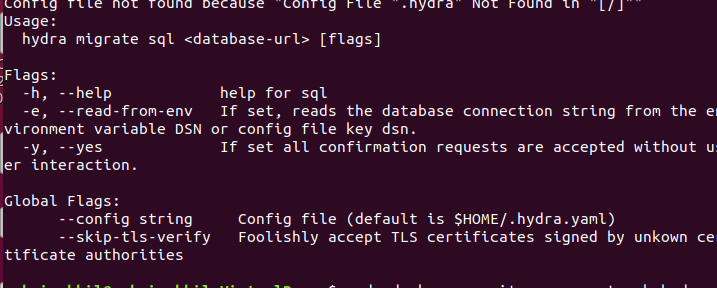
the first command clearly shows that the DSN is not set because the migrate command fails. It is also possible that sudo is causing this.
aeneasr
on 2 May 2020
Did you get it working?
aeneasr
on 4 May 2020
Seriously no, i'm still trying.
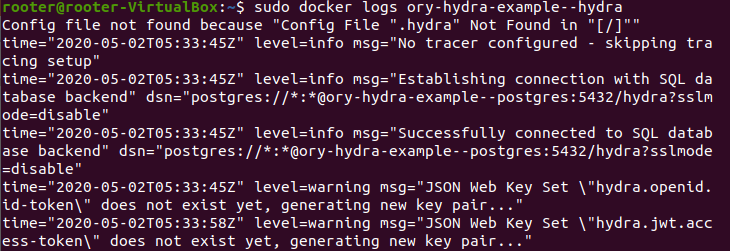
The migrate command passed with successful
Jouda-2020
on 4 May 2020
Also try:
docker run -d \
  --name ory-hydra-example--hydra \
  --network hydraguide \
  -p 9000:4444 \
  -p 9001:4445 \
  -e SECRETS_SYSTEM=$SECRETS_SYSTEM \
  -e DSN=postgres://hydra:secret@ory-hydra-example--postgres:5432/hydra?sslmode=disable \
  -e URLS_SELF_ISSUER=http://127.0.0.1:9000/ \
  -e URLS_CONSENT=http://127.0.0.1:9020/consent \
  -e URLS_LOGIN=http://127.0.0.1:9020/login \
  oryd/hydra:v1.4.2 serve all --dangerous-force-http
Hi, I have a simular problem.
level=fatal msg="Unable to instantiate service registry." error="no driver is capable of handling the given DSN"
Everything works until I try to connect to digitalocean postgres db.
environment:
- DSN=postgresql://hydra:[email protected]:25060/hydra?sslmode=require
I also played with kratos and had no issues using this way of connection.
Any guesses?
 rolandschellhorn
on 5 May 2020
rolandschellhorn
on 5 May 2020
Not without details - please open a separate issue and fill out the template. Thank you!
aeneasr
on 5 May 2020
I only changed the DSN string inside quickstart.yml to DO-Postgres-Connection-String.
I figured it out, it does not work with the original suggested connection string starting with „postgresql“ but with „postgres“ it works - which was not a problem when working with kratos.
rolandschellhorn
on 5 May 2020
Finally
Jouda-2020
on 5 May 2020
Related issues
 ayushbpl10
·
4Comments
ayushbpl10
·
4Comments
 audioXD
·
8Comments
aeneasr
·
3Comments
audioXD
·
8Comments
aeneasr
·
3Comments
 RichardLindhout
·
3Comments
RichardLindhout
·
3Comments
 someone1
·
8Comments
someone1
·
8Comments
Most helpful comment
I only changed the DSN string inside quickstart.yml to DO-Postgres-Connection-String.
I figured it out, it does not work with the original suggested connection string starting with „postgresql“ but with „postgres“ it works - which was not a problem when working with kratos.