Hydra: No CSRF value available in the session cookie happend in the guiding demo
HI, i install the demo follow as https://www.ory.sh/docs/hydra/5min-tutorial. the first and second time demo works welll. but after that i got 'No CSRF value available in the session cookie' error . could you help me ?
hydra_1 | time="2020-03-05T06:10:20Z" level=error msg="An error occurred" debug="No CSRF value available in the session cookie" description="The request is not allowed" error=request_forbidden hint="You are not allowed to perform this action."

 LuoWei0731
All 7 comments
Make sure to not confuse localhost and 127.0.0.1 and use a browser that allows cookies
On 5. Mar 2020, at 03:16, LuoWei0731 notifications@github.com wrote:
HI, i install the demo follow as https://www.ory.sh/docs/hydra/5min-tutorial. the first and second time demo works welll. but after that i got 'No CSRF value available in the session cookie' error . could you help me ?hydra_1 | time="2020-03-05T06:10:20Z" level=error msg="An error occurred" debug="No CSRF value available in the session cookie" description="The request is not allowed" error=request_forbidden hint="You are not allowed to perform this action."
—
You are receiving this because you are subscribed to this thread.
Reply to this email directly, view it on GitHub, or unsubscribe.
 aeneasr
on 5 Mar 2020
aeneasr
on 5 Mar 2020
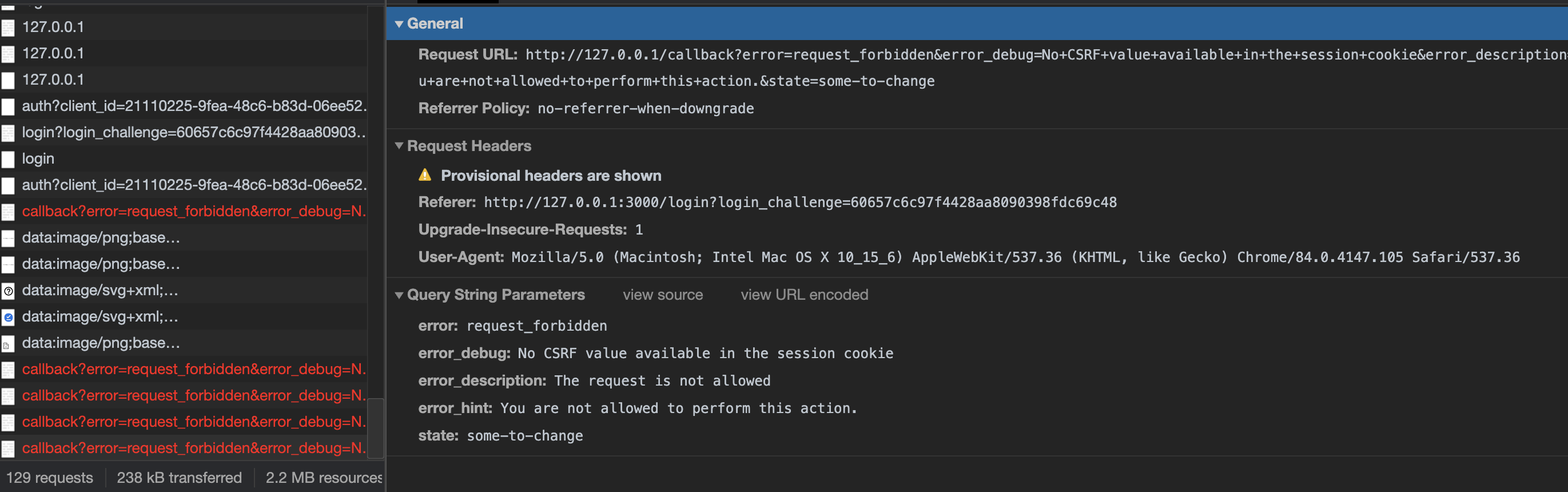
I have a similar issue with Chrome v84.0.4147.125 (but it works with Safari v13.1.2).
I cannot login using Chrome and access the consent screen.
The error from the docker log is:
hydra_1 | time=2020-08-13T04:42:04Z level=info msg=access denied audience=audit error=map[message:request_forbidden reason:You are not allowed to perform this action. status:Forbidden status_code:403] http_request=map[headers:map[accept:text/html,application/xhtml+xml,application/xml;q=0.9,image/webp,image/apng,*/*;q=0.8,application/signed-exchange;v=b3;q=0.9 accept-encoding:gzip, deflate, br accept-language:en-US,en;q=0.9,fr;q=0.8 cache-control:max-age=0 cookie:_csrf=grXlH0pxagriO-rAh_8E4aRL referer:http://127.0.0.1:3000/login?login_challenge=fcdbcb1595434e779eda0b6569485637 user-agent:Mozilla/5.0 (Macintosh; Intel Mac OS X 10_15_6) AppleWebKit/537.36 (KHTML, like Gecko) Chrome/84.0.4147.125 Safari/537.36] host:127.0.0.1:4444 method:GET path:/oauth2/auth query:audience=&client_id=auth-code-client&login_verifier=020669e581b241bdacbd391e681a04e6&max_age=0&nonce=zhadpabkxbodidtwpgbhiwjd&prompt=&redirect_uri=http%3A%2F%2F127.0.0.1%3A5555%2Fcallback&response_type=code&scope=openid+offline&state=wcfdqswwvhdlgrpajbtpmnmn remote:172.17.0.1:40696 scheme:http] service_name=ORY Hydra service_version=v1.6.0
I tried to change the cookie settings of Chrome without any success.
Is it because of some security features of Chrome because of no HTTPs or local IP?
 NicolasMahe
on 13 Aug 2020
NicolasMahe
on 13 Aug 2020
Same here, it works fine on Safari but not on Chrome
 ezerw
on 13 Aug 2020
ezerw
on 13 Aug 2020
I have the same with chrome 84.0.4147.125
Hydra version 1.4.6.
Logs show this: "time="2020-08-13T11:39:28Z" level=error msg="An error occurred" debug="No CSRF value available in the session cookie" description="The request is not allowed" error=request_forbidden hint="You are not allowed to perform this action.""
It doesn't complain that CSRF token is invalid/missing, but there's no token stored in the internal Hydra session store...
It works in Firefox/Safari. Looks like this Chrome build changed something that disrupts Hydra server-side session management.
 Tomasz-Smelcerz-SAP
on 13 Aug 2020
Tomasz-Smelcerz-SAP
on 13 Aug 2020
Hi there, sorry to hear that this is apparently an issue for Chrome environments.
To help, it is critical to have at least some idea of your set up. Please fill out the issue template. Also note that this issue is about the 5 minute tutorial. Seeing that there are older versions reported here I assume that you're not running the tutorial.
If your environment stopped working since upgrading chrome or similar problems, please create a separate issue with as much detail as possible.
If you have issues with the 5 minute tutorial please state so clearly and we'll reopen this.
aeneasr
on 13 Aug 2020
aeneasr
on 14 Aug 2020
aeneasr
on 14 Aug 2020
Related issues
 ms42Q
·
8Comments
ms42Q
·
8Comments
 flavioleggio
·
7Comments
flavioleggio
·
7Comments
 wojciechce
·
3Comments
aeneasr
·
3Comments
wojciechce
·
3Comments
aeneasr
·
3Comments
 dselyuzhitskiy
·
3Comments
dselyuzhitskiy
·
3Comments