Hydra: The CSRF value from the token does not match the CSRF value from the data store
Please use issues only to file potential bugs or request features. For everything else please go to
the ORY Community or join the ORY Chat.
Hi,
I am facing an error in implementing Login and consent flow with hydra. I have successfully verified user credentials and login requests. When I redirect to URL after accepting a login request from hydra I face a CSRF token error.
Redirect URL after accepting login request:
&{RedirectTo:http://127.0.0.1:4444/oauth2/auth?client_id=auth-code-client&login_verifier=d3767e8bc13a4b8c92c30e99b2e86a21&redirect_uri=http%3A%2F%2F127.0.0.1%3A3001%2Fcallback&response_type=code&scope=openid+offline&state=aaaaaasdasfdasdasdasd}
Hydra Logs:
hydra_1 | time="2019-11-25T07:09:24Z" level=info msg="started handling request" method=GET remote="172.20.0.1:52942" request="/oauth2/auth?client_id=auth-code-client&login_verifier=d3767e8bc13a4b8c92c30e99b2e86a21&redirect_uri=http%3A%2F%2F127.0.0.1%3A3001%2Fcallback&response_type=code&scope=openid+offline&state=aaaaaasdasfdasdasdasd"
hydra_1 | time="2019-11-25T07:09:24Z" level=error msg="An error occurred" debug="The CSRF value from the token does not match the CSRF value from the data store" description="The request is not allowed" error=request_forbidden hint="You are not allowed to perform this action."
hydra_1 | time="2019-11-25T07:09:24Z" level=info msg="completed handling request" measure#hydra/public: http://127.0.0.1:4444/.latency=85727770 method=GET remote="172.20.0.1:52942" request="/oauth2/auth?client_id=auth-code-client&login_verifier=d3767e8bc13a4b8c92c30e99b2e86a21&redirect_uri=http%3A%2F%2F127.0.0.1%3A3001%2Fcallback&response_type=code&scope=openid+offline&state=aaaaaasdasfdasdasdasd" status=302 text_status=Found took=85.72777ms
Language: go 1.13
Operating System : Ubuntu
Can anyone help out what is going wrong here.?
 ankit307
All 10 comments
Make sure:
- You're not running a browser with private mode (e.g. Brave)
- Your browser can store cookies (disable extensions)
- You're not running two auth flows at the same time
- You're not using AJAX for performing the OAuth2 Flow
 aeneasr
on 25 Nov 2019
aeneasr
on 25 Nov 2019
@aeneasr
I have ensured these Points.
- You're not running a browser with private mode (e.g. Brave)
- Your browser can store cookies (disable extensions)
- You're not running two auth flows at the same time
- You're not using AJAX for performing the OAuth2 Flow
Using Code to redirect at backend.
` name := "Ankit"
loginRequest, errLog := c.Admin.AcceptLoginRequest(&admin.AcceptLoginRequestParams{
LoginChallenge: consentRequestID,
Body: &models.HandledLoginRequest{
Remember: false,
RememberFor: 10000,
Subject: &name,
},
Context: context.Background(),
})
http.Redirect(w, r, loginRequest.Payload.RedirectTo, http.StatusFound)
`
ankit307
on 25 Nov 2019
If nothing works, delete cookies for the domain you're on, and retry the flow. CSRF is always a cookie issue.
aeneasr
on 25 Nov 2019
After Clearing cooking and retying the Flow.
I got this error Logged in Hydra console.
==> No CSRF value available in the session cookie
time="2019-11-25T10:25:13Z" level=error msg="An error occurred" debug="No CSRF value available in the session cookie" description="The request is not allowed" error=request_forbidden hint="You are not allowed to perform this action."
- Cookies are enabled in my browser
ankit307
on 25 Nov 2019
Make sure you're retrying the flow from the start...
aeneasr
on 25 Nov 2019
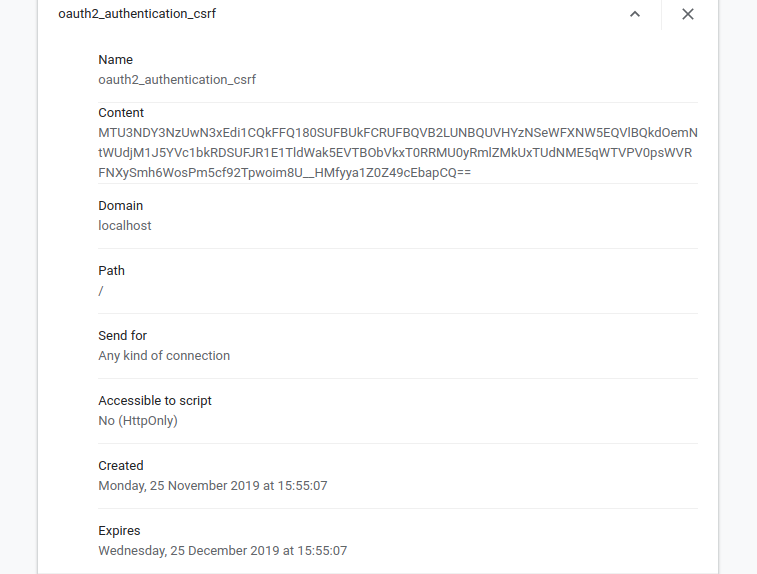
I have started the flow from start.
By requesting auth flow by URL.
http://localhost:4444/oauth2/auth?client_id=auth-code-client&scope=openid+offline&response_type=code&redirect_uri=http://127.0.0.1:3001/callback&state=demotestdemotestapp
ankit307
on 25 Nov 2019
@aeneasr Please look if you could help out.
ankit307
on 25 Nov 2019
There is really nothing to add to the list from above: https://github.com/ory/hydra/issues/1647#issuecomment-558070792
This is clearly an issue with cookies. I'm really not sure what else I can help here.
aeneasr
on 25 Nov 2019
Ah, also - make sure you're not confusing localhost and 127.0.0.1 in the requests. Those are separate domains with separate cookies. Make sure none of your request trail has either the one or the other. It should always be the same.
aeneasr
on 25 Nov 2019
Ah, also - make sure you're not confusing
localhostand127.0.0.1in the requests. Those are separate domains with separate cookies. Make sure none of your request trail has either the one or the other. It should always be the same.
This was helpful. After updating to 127.0.0.1 It worked.
ankit307
on 26 Nov 2019
Related issues
 lpotherat
·
7Comments
lpotherat
·
7Comments
 wojciechce
·
3Comments
wojciechce
·
3Comments
 ayushbpl10
·
4Comments
ayushbpl10
·
4Comments
 safurabahrami
·
3Comments
safurabahrami
·
3Comments
 flavioleggio
·
7Comments
flavioleggio
·
7Comments
Most helpful comment
Ah, also - make sure you're not confusing
localhostand127.0.0.1in the requests. Those are separate domains with separate cookies. Make sure none of your request trail has either the one or the other. It should always be the same.