Hugo: Markdown images from hooks wrapped in <p>
What version of Hugo are you using (hugo version)?
$ hugo version
Hugo Static Site Generator v0.62.2-83E50184/extended linux/amd64 BuildDate: 2020-01-05T18:57:23Z
Does this issue reproduce with the latest release?
Yes
When using a Render Hook Template for Image Markdown the image gets wrapped in a </p> no matter what the template contains. If the template contains e.g. a <figure> this results in invalid HTML since <figure> is not permitted content for <p>.
This issue also show in the example page https://portable-hugo-links.netlify.com/2019/12/30/blog-post/.
See the W3C Validator: https://validator.w3.org/nu/?doc=https%3A%2F%2Fportable-hugo-links.netlify.com%2F2019%2F12%2F30%2Fblog-post%2F
 kraftner
All 7 comments
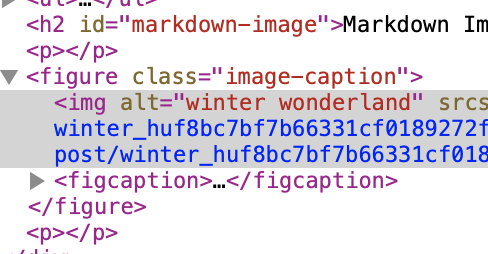
Maybe I need some more coffee, but I don't see any p-tag wrapping the figure in the above example...?
 bep
on 13 Jan 2020
bep
on 13 Jan 2020
Sorry, I could have been clearer on this since I stumbled over that first myself. That's also the reason why I included the link to the W3C Validation.
The browser automatically "fixes" this by closing the <p> before the <figure> and opening a new one before the closing </p>. But like this you end up with two empty <p>'s before and after the figure.
The DOM Inspector already show the fixed DOM, you need to look at it via "View Source": Firefox even highlights the dangling </p> in red:

kraftner
on 13 Jan 2020
You are right, I did need some more coffee.
bep
on 13 Jan 2020
To me, this boils down to this: CommonMark/Goldmark treats images as inline elements. If you use the <img> tag in your hook template, this is fine (at least according to the W3C Validator).
The problem is, we have no (known) way to look at an image in Markdown and tell if it is intended to be displayed inline or not. This question was raised on Twitter some time ago, and I didn't really understand it:
https://twitter.com/lvv_me/status/1210175815012376577?s=20
The user above uses the .Title field to determine if it is a block or inline, and since CommonMark does not say anything about this, I guess that is the best you can do. Or you can say that "I have only block images".
But you need to tell Hugo about this, and I assume that it isn't practical to do this on parse time, so perhaps we could add a {{ .IsBlock }} signal method that we need to end/remove any surrounding p-s.
This is me thinking out loud. Maybe @yuin has a tip.
bep
on 13 Jan 2020
I almost agree with @bep's opinion.
Images are inline elements in CommonMark and no block level image elements exist. Images have URL, alt text and title text. Images can not have other information in markup.
So what we can do in CommonMark is:
- Define your own rules for images like "An image that has empty alt text is a block level" "A Paragraph that has one image only is a block level image."
- Implement the rules in your Markdown processor.
- In goldmark, you can use ASTTransformer for transforming nodes.
FYI, Generic directives/plugins syntax is being discussed in CommonMark. If we have this syntax, you will be able to use attributes like {display=block} .
 yuin
on 14 Jan 2020
yuin
on 14 Jan 2020
Few thoughts:
I think @yuin nailed it on the head in both points (and the FYI).
This should be addressed in some way though -- perhaps even just documentation -- since everybody (Hugo, Goldmark, the developer, the editor, etc.) are all doing the "correct" thing, but the browsers are doing something unexpected at page render time. This means that it is particularly hard to debug and then you have to inject something like :
window.addEventListener('DOMContentLoaded', () => {
  document.querySelectorAll('p:empty')
    .forEach(e => e.remove());
})
which is a nascence.
 HenrySkup
on 23 Jan 2020
HenrySkup
on 23 Jan 2020
@HenrySkup I have to disagree with
[...] since everybody (Hugo, Goldmark, the developer, the editor, etc.) are all doing the "correct" thing, but the browsers are doing something unexpected at page render time.
The generated HTML is invalid, nesting <pre> inside <p>, so the browsers are behaving correctly. I think if there is no way to technically solve this to output valid HTML there should at least be documentation explaining that images have to be inline elements to generate valid HTML. So no <figure> elements for example.
kraftner
on 23 Jan 2020
Related issues
 artelse
·
3Comments
artelse
·
3Comments
 antifuchs
·
3Comments
antifuchs
·
3Comments
 chrissparksnj
·
3Comments
chrissparksnj
·
3Comments
 geddski
·
3Comments
geddski
·
3Comments
 VoidingWarranties
·
3Comments
VoidingWarranties
·
3Comments
Most helpful comment
I almost agree with @bep's opinion.
Images are inline elements in CommonMark and no block level image elements exist. Images have URL, alt text and title text. Images can not have other information in markup.
So what we can do in CommonMark is:
FYI, Generic directives/plugins syntax is being discussed in CommonMark. If we have this syntax, you will be able to use attributes like
{display=block}.