Hugo: Image processing requires lots of memory
Hi!
I'm currently using Hugo 0.48. I created my own figure shortcode that generates a number of different image sizes for responsive images. I noticed that using the shortcode increased the memory usage by a lot. To generate a couple of simple pages with 10-20 images on each page uses a couple gigabytes of memory.
Here is my shortcode: https://github.com/Noki/optitheme/blob/master/layouts/shortcodes/figure.html
It looks like Hugo keeps all images in memory when creating them instead of freeing memory once an image is created. The only way to generate the website on machines with small amounts of memory is to cancel the generation process and start it multiple times. Each time a couple of images are written to the ressources directory. Once all images are there the generation works fine.
Expected behaviour would be that I could easily generate a website with a couple of hundred images and my shortcode on a small machine with 1 GB of memory.
Best regards
Tobias
 Noki
Noki
All 13 comments
This belongs in the Forum or in the Hugo Themes repo Issues tracker if this theme is listed on the website.
It is recommended that you commit the /resources/ directory with the generated images after running hugo server locally so that you don't encounter the problems you describe.
 onedrawingperday
on 15 Sep 2018
onedrawingperday
on 15 Sep 2018
@onedrawingperday why does this belong into the forum? I just used my shortcode to demonstrate a general issue that is present in Hugo. It is not template specific. It is specific to the image generation process and the way it frees ressources.
Noki
on 15 Sep 2018
In addition: If you have a page with e.g. 100 images and generate multiple versions of each image. You will not get to the point where you can commit the ressources directory. At least not if hugo has to generate all of them in a single run. This will not work on machines with less than XX GB of memory.
Noki
on 15 Sep 2018
It looks like Hugo keeps all images in memory when creating them instead of freeing memory once an image is created.
I'm pretty sure we're not doing that, but it's worth checking.
That said, we do
- Process in parallel
- Read each image into memory
So, if you start out with lots of big images -- it will be memory hungry even if Go's Garbage Collector gets to do its job properly.
But I will have a look at this.
 bep
on 15 Sep 2018
bep
on 15 Sep 2018
@bep this sounds reasonable. So maybe the parallel processing is the problem than. In that case it might be a good idea to have a setting where you can limit / configure this so the generation works on small machines.
jfyi: I tried to automated the build process using google cloud build. The standard machines have only 2 GB of memory.
Noki
on 15 Sep 2018
@Noki This issue was re-opened obviously.
But there is a technique for low memory machines and I am using one for my 1 core VM and posted about it here
I am working with image intensive sites so I know what you're talking about.
But whether this can be addressed in Hugo or if this is from upstream I don't know.
onedrawingperday
on 15 Sep 2018
In that case it might be a good idea to have a setting where you can limit / configure this so the generation works on small machines.
We currently do this in parallel with number of Go routines = GOMAXPROCS * 4. GOMAXPROCS is an environment variable that you can set (defaults to 1), but since we always multiply by 4 it would not help you.
I will consider adding a more flexible setting for this.
bep
on 15 Sep 2018
@bep Any update on this one?
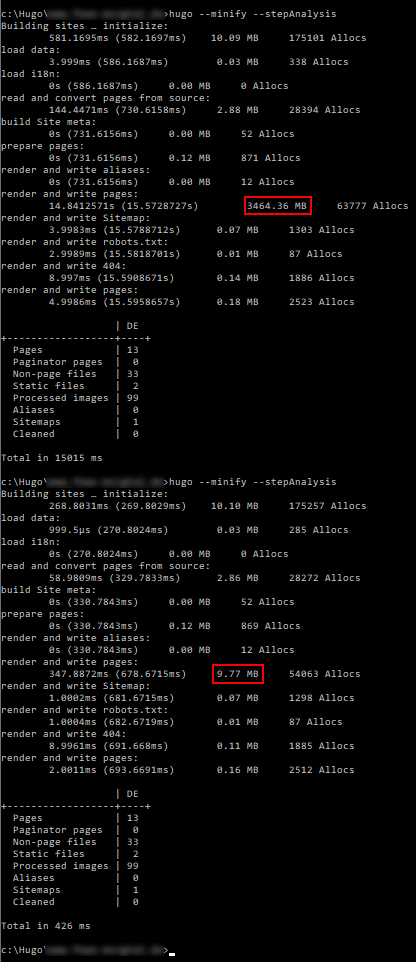
I think it would really help having an image processing queue and a flag to limit the number of images processed in parallel.
Here is a screenshot showing the memory-usage on my machine.
Noki
on 7 Oct 2018
@Noki I don't think the --stepAnalysis is a good tool to use in this case. I suspect it shows total memory usage -- not the peek value (I'm not totally sure what it shows), which I think is more relevant.
▶ gtime -f '%M' hugo --quiet
670793728

go/gohugoio/hugoDocs  master ✗                                                              15d ✖ ⚑ ◒
▶ rm -rf resources &&  gtime -f '%M' hugo --quiet
918601728
The Hugo docs isn't "image heavy", but the above should be an indicator. The above shows "maximum resident set size of the process during its lifetime, in Kbytes."
I will try to add a "throttle" to the image processing and see if that has an effect. Will report back.
bep
on 26 Oct 2018
I have added a PR that I will merge soon that will boldly close this issue as "fixed" -- please shout if it doesn't.
bep
on 26 Oct 2018
@bep Thanks for fixing this!
Image processing works now for me with a peak memory usage of ~230 MB. This is great and allows me to build on small cloud instances. As expected the build time was quite long (>60 seconds) and I had to increase the timeout setting in the Hugo config to a value higher than this. Before I increased the timeout setting Hugo did not finish building and was stuck and I had to manually terminate the process. Turning on debug showed the following as last lines before getting stuck:

So there seems to be an additional problem here. Expected behaviour would be to quit instead of getting stuck.
In addition the new color highlighting of "WARN" matches "WARN" in "WARNING" as well. ;-)
Noki
on 29 Oct 2018
Before I increased the timeout setting Hugo did not finish building and was stuck and I had to manually terminate the process. Turning on debug showed the following as last lines before getting stuck:
If you could do a
kill -SIGABRT <process-id>
When it is stuck, the above should provide a stack trace.
Also, when you say "building on small cloud instances" I have to double check: You know that you can commit the processing result in resources/_gen/images to avoid reprocessing?
(and I will fix the WARN s WARNING)
bep
on 29 Oct 2018
Here is the stacktrace:
/hugo/tpl/template.go:128 +0xaf
github.com/gohugoio/hugo/hugolib.(*Site).renderForLayouts(0xc000348000, 0x1110276, 0x4, 0x110ae80, 0xc000aca280, 0x1345ce0, 0xc000440000, 0xc0002caa00, 0x8, 0x8, ...)
        /hugo/hugolib/site.go:1749 +0xbb
github.com/gohugoio/hugo/hugolib.(*Site).renderAndWritePage(0xc000348000, 0xc0002dde10, 0xc000933cb0, 0x16, 0xc0005dc360, 0x14, 0xc000aca280, 0xc0002caa00, 0x8, 0x8, ...)
        /hugo/hugolib/site.go:1691 +0xf4
github.com/gohugoio/hugo/hugolib.pageRenderer(0xc000348000, 0xc000249b00, 0xc000249aa0, 0xc000aae6f0)
        /hugo/hugolib/site_render.go:169 +0x72e
created by github.com/gohugoio/hugo/hugolib.(*Site).renderPages
        /hugo/hugolib/site_render.go:43 +0x160

goroutine 147 [semacquire, 1 minutes]:
sync.runtime_SemacquireMutex(0xc0009eb728, 0xd43d00)
        /usr/local/go/src/runtime/sema.go:71 +0x3d
sync.(*Mutex).Lock(0xc0009eb724)
        /usr/local/go/src/sync/mutex.go:134 +0xff
sync.(*Once).Do(0xc0009eb724, 0xc000065ee0)
        /usr/local/go/src/sync/once.go:40 +0x3b
github.com/gohugoio/hugo/hugolib.(*Page).initPlain(0xc000284000, 0xc00046af00)
        /hugo/hugolib/page.go:569 +0x70
github.com/gohugoio/hugo/hugolib.(*Page).setAutoSummary(0xc000284000, 0x0, 0x0)
        /hugo/hugolib/page.go:801 +0x34
github.com/gohugoio/hugo/hugolib.(*Page).initContent.func1.1(0xc000284000, 0xc000583aa0)
        /hugo/hugolib/page.go:305 +0xdf
created by github.com/gohugoio/hugo/hugolib.(*Page).initContent.func1
        /hugo/hugolib/page.go:293 +0xea

goroutine 94 [semacquire]:
sync.runtime_SemacquireMutex(0xc0009eb788, 0xd43d00)
        /usr/local/go/src/runtime/sema.go:71 +0x3d
sync.(*Mutex).Lock(0xc0009eb784)
        /usr/local/go/src/sync/mutex.go:134 +0xff
sync.(*Once).Do(0xc0009eb784, 0xc000ae1ee0)
        /usr/local/go/src/sync/once.go:40 +0x3b
github.com/gohugoio/hugo/hugolib.(*Page).initPlain(0xc000284a00, 0xc00088a700)
        /hugo/hugolib/page.go:569 +0x70
github.com/gohugoio/hugo/hugolib.(*Page).setAutoSummary(0xc000284a00, 0x0, 0x0)
        /hugo/hugolib/page.go:801 +0x34
github.com/gohugoio/hugo/hugolib.(*Page).initContent.func1.1(0xc000284a00, 0xc000537680)
        /hugo/hugolib/page.go:305 +0xdf
created by github.com/gohugoio/hugo/hugolib.(*Page).initContent.func1
        /hugo/hugolib/page.go:293 +0xea

rax    0xca
rbx    0x1cdbf40
rcx    0x4e2b03
rdx    0x0
rdi    0x1cdc080
rsi    0x80
rbp    0x7ffd1c9ebfa0
rsp    0x7ffd1c9ebf58
r8     0x0
r9     0x0
r10    0x0
r11    0x286
r12    0xc002ca6000
r13    0x7f07f2
r14    0x1
r15    0xc00093e000
rip    0x4e2b01
rflags 0x286
cs     0x33
fs     0x0
gs     0x0
You know that you can commit the processing result in resources/_gen/images to avoid reprocessing?
I know I could. But It would increase the size of my git repo by a lot because currently I generate 4 additional versions for each image. In addition I don't consider this to be best practice. I only want to keep the original images in my repo.
Noki
on 29 Oct 2018
Related issues
 VoidingWarranties
·
3Comments
VoidingWarranties
·
3Comments
 artelse
·
3Comments
artelse
·
3Comments
 mumblecrunch
·
3Comments
mumblecrunch
·
3Comments
 carandraug
·
3Comments
carandraug
·
3Comments
 arikroc
·
3Comments
arikroc
·
3Comments