Hugo-coder: Custom SCSS files generated twice
Hi all,
I'm currently working to create a new projects showcase page as you can see here.
I noticed that this feature #244 causes problem. The SCSS files are generated twice because they are already generated before as you can see below :
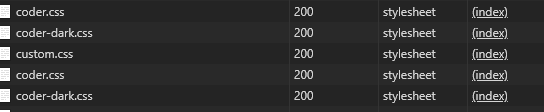
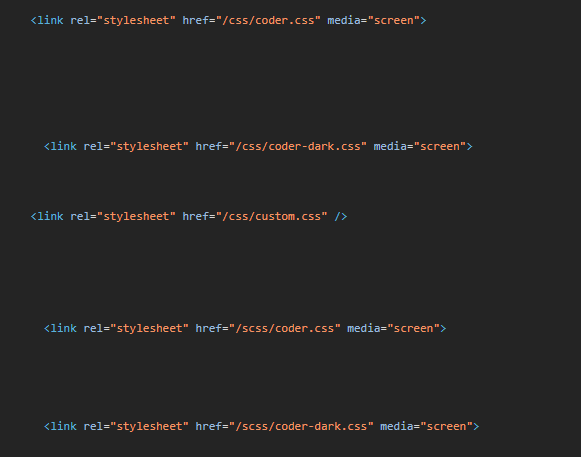
Steps to reproduce
Add this line to your
config.tomlfile (the files are located insideassets/directory)custom_scss = ["scss/coder.scss", "scss/coder-dark.scss"]Override the SCSS files of the theme (copy them inside
assets/directory)
 clement-pannetier
All 3 comments
Hmm... weird. Looks like there is something missing in the base template.
I'm gonna take a look later.
 luizdepra
on 26 Apr 2020
luizdepra
on 26 Apr 2020
Ahhh, man. I think I know what is the problem.
If you are overriding any SCSS file from the theme you don't need to put it in the custom_scss. Hugo is smart enough to figure it out and do the job.
Try removing both files from the config and see if everything is ok.
luizdepra
on 14 May 2020
Ok, so it's just to add new SCSS files like @elihunter173 did in repo here, not SCSS files with the same name as in the theme.
Thanks.
clement-pannetier
on 15 May 2020
Related issues
 mauricioabreu
·
5Comments
mauricioabreu
·
5Comments
 sunxichen
·
3Comments
sunxichen
·
3Comments
 vvug
·
4Comments
vvug
·
4Comments
 maxdrohde
·
3Comments
luizdepra
·
6Comments
maxdrohde
·
3Comments
luizdepra
·
6Comments