Hub: Retraining locally saved model in Tensorflow hub
I'm using windows and Tensorflow 1.7.
I'm retraining a pretrained mobilenet model on my own data as below,
python retrain.py --image_dir training_imgs --tfhub_module https://tfhub.dev/google/imagenet/mobilenet_v2_100_224/feature_vector/1 --bottleneck_dir C:\\tmp\\bottleneck --saved_model_dir model_save --final_tensor_name final_tensor
In above command the model is being fetched from URL "https://tfhub.dev/google/imagenet/mobilenet_v2_100_224/feature_vector/1 ". Is there a way to provide
local model here instead of fetching the model from web?
After retraining, the model is saved into directory 'model_save' which I'm passing as an argument into the command.
I came until this step successfully and now I want to retrain my locally saved model from previous step on some more data. When I try to load this model and retrain as below,
So now I'm passing locally saved model as an argument to the 'tfhub_module' line
python retrain.py --image_dir C: ...\\code\\cnn_time_series\\ford\\crop\\test --tfhub_module C: ...Desktop\\code\\saved_mode\\model_save--bottleneck_dir C:\\tmp\\bottleneck --saved_model_dir model_save2
I get below error,
tensorflow.python.framework.errors_impl.NotFoundError: NewRandomAccessFile failed to Create/Open: C: ....model_save\tfhub_module.pb : The system cannot find the file specified.
;
Can any one please suggest where I'm doing wrong?
 anil-vuppala
All 9 comments
Hi Anil,
You can use a local model by providing the name of a local directory. Please see https://github.com/tensorflow/hub/blob/master/tensorflow_hub/resolver.py#L543
The SavedModel produced by retrain.py cannot be used as a module. Instead, the SavedModel is the whole model that can be used for serving.
The retrain.py script does not currently support the continuation of training from an existing checkpoint, which is what you're looking for. To achieve that, you can replace the line https://github.com/tensorflow/hub/blob/master/examples/image_retraining/retrain.py#L1031 and the one thereafter by:
tf.train.Saver().restore(sess, CHECKPOINT_NAME)
Then a subsequent run of the script will initialize the variables from the training checkpoint of the previous run (when CHECKPOINT_NAME still exists on your disk).
Hope this helps! S
 svsgoogle
on 25 Apr 2018
svsgoogle
on 25 Apr 2018
For the record: the two lines mentioned in the previous comment that should be replaced are:
init = tf.global_variables_initializer()
sess.run(init)
@anil-vuppala did you ever get this to work properly? I'm wanting to achieve the same thing and am having similar issues. I think some of the info above has changed as there are no longer 543 lines on the script resolver.py so I'm not sure exactly what I need to be reviewing from that file.
 IamSierraCharlie
on 26 Nov 2018
IamSierraCharlie
on 26 Nov 2018
I have a question, if I continue to train from a checkpoint, how should the image folder be? Like, can I create a new folder with new image categories, or can I put new roses images to the old flower_photos folder, or can I have new categories inside the flower_photos folder?
Edited: I created a new folder with only one category in it and got this error:"Restoring from checkpoint failed. This is most likely due to a mismatch between the current graph and the graph from the checkpoint.", "Assign requires shapes of both tensors to match. lhs shape= [1] rhs shape= [5]." Does it mean I can only train with a folder with 5 sub-folders all contain images? Since I created an empty sub-folder, but it did not count to the shape.
I managed to train on a different set of data with the same structure.
How do I add another category (for example: 5 flower types + 1 more flower type) to the model?
And how do I continue to train one category at a time?
 Infra-Knight
on 18 Jan 2019
Infra-Knight
on 18 Jan 2019
@Infra-Knight Whole point about transfer learning is to be able to utilize the information learned from one set of data on other datasets. So, yes you can train the model on your own data with new categories.
anil-vuppala
on 18 Jan 2019
@anil-vuppala Yeah, but I already trained 5 flower categories and save to a checkpoint (using retrain.py provided by Tensorflow), can I and how do I use that checkpoint (meta, index, and data-00000-of-00001) to train a sixth category without running the whole thing again?
Infra-Knight
on 18 Jan 2019
Hi Anil,
You can use a local model by providing the name of a local directory. Please see https://github.com/tensorflow/hub/blob/master/tensorflow_hub/resolver.py#L543
The SavedModel produced by retrain.py cannot be used as a module. Instead, the SavedModel is the whole model that can be used for serving.
The retrain.py script does not currently support the continuation of training from an existing checkpoint, which is what you're looking for. To achieve that, you can replace the line https://github.com/tensorflow/hub/blob/master/examples/image_retraining/retrain.py#L1031 and the one thereafter by:
tf.train.Saver().restore(sess, CHECKPOINT_NAME)
Then a subsequent run of the script will initialize the variables from the training checkpoint of the previous run (when CHECKPOINT_NAME still exists on your disk).
Hope this helps! S
can u tell me how i should modify retrain.py?
i have a local model as
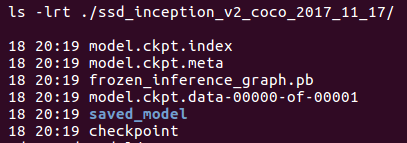
i found that the module download from https://tfhub.dev/google/imagenet/mobilenet_v2_100_224/feature_vector/2 looks like this
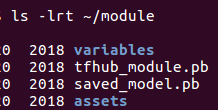
my local model has no file like tfhub_module.pb
what should i to to retrain my local model with my own datasets
thanks very much!
 sdu2011
on 18 Apr 2019
sdu2011
on 18 Apr 2019
@sdu2011
You can save your model in .pb format in tensorflow. Please refer https://www.tensorflow.org/tfx/serving/tutorials/Serving_REST_simple
anil-vuppala
on 22 Apr 2019
@sdu2011 Hope my answer can help you:
https://stackoverflow.com/questions/54200599/tensorflow-continue-training-a-graph-pb-with-more-data/54939872#54939872
Infra-Knight
on 22 Apr 2019
Related issues
 bzburr
·
4Comments
bzburr
·
4Comments
 devspartan
·
3Comments
devspartan
·
3Comments
 artemmavrin
·
3Comments
artemmavrin
·
3Comments
 dav-ell
·
4Comments
dav-ell
·
4Comments
 martiansideofthemoon
·
3Comments
martiansideofthemoon
·
3Comments
Most helpful comment
Hi Anil,
You can use a local model by providing the name of a local directory. Please see https://github.com/tensorflow/hub/blob/master/tensorflow_hub/resolver.py#L543
The SavedModel produced by retrain.py cannot be used as a module. Instead, the SavedModel is the whole model that can be used for serving.
The retrain.py script does not currently support the continuation of training from an existing checkpoint, which is what you're looking for. To achieve that, you can replace the line https://github.com/tensorflow/hub/blob/master/examples/image_retraining/retrain.py#L1031 and the one thereafter by:
tf.train.Saver().restore(sess, CHECKPOINT_NAME)
Then a subsequent run of the script will initialize the variables from the training checkpoint of the previous run (when CHECKPOINT_NAME still exists on your disk).
Hope this helps! S