Https-everywhere: HTTPS Everywhere uses too much memory
Member note: One straightforward fix for this is described here (issue comment), along with an example PR in the Firefox codebase
I use HTTPS Everywhere Chrome 43.0.2357.65 (64-bit Linux) and the extension eats a little more than 100MB of memory. Isn't it too much for this kind of extension?
 bcroq
bcroq
All 81 comments
What do you mean by "this kind of extension"?
Noting the raw XML rulesets totalling 62M
 reedy
on 27 May 2015
reedy
on 27 May 2015
When I wrote "this kind of extension" I had uBlock in mind. This extension has 53869 filters on my computer and uses 68MB of memory.
bcroq
on 27 May 2015
@bcrow: Yes, my gut feeling is that HTTPS Everywhere can and should be optimized for better memory and CPU use. We haven't had the time to do it yet, but would very much welcome help from someone who is experienced at profiling extensions.
The uBlock number you quote is actually encouraging! HTTPS Everywhere has 14.5k 'rulesets', but each ruleset contains many targets and rules, which are presumably more akin to uBlock's filters. There are 39361 rules and 41287 targets, for a total of ~80k entities. The memory usage for those entities sounds proportional to uBlock, which is a surprise to me. Still, we can probably do a better job of keeping inactive rulesets out of memory.
 jsha
on 27 May 2015
jsha
on 27 May 2015
For the record, this is not a Chrome-specific issue. It might be worth editing the title of this report accordingly.
In my Firefox profile, HTTPS Everywhere 5.0.5 is using almost seven times as much memory as uBlock Origin 0.9.8.2.
 foresto
on 13 Jun 2015
foresto
on 13 Jun 2015
Scoping this out for Firefox, will report back what I find
 jsantell
on 18 Jun 2015
jsantell
on 18 Jun 2015
Taking 100+ MiB memory upon opening only the 'New Tab'(which is taken ~70 MiB).
FYI: 44.0.2403.89 chromium on Debian 8.1, installed _this_ via chrome webstore, _this_.version: 2015.7.17
 imdjh
on 11 Aug 2015
imdjh
on 11 Aug 2015
Agree uBlock has shown the way forward to reduce memory usage. Can we get this prioritised?
 widefox
on 28 Aug 2015
widefox
on 28 Aug 2015
Maybe it is possible to make online service API and make pre-request to fetch a rule?
Also it may be a small cache for last used domains.
 stokito
on 22 Sep 2015
stokito
on 22 Sep 2015
It would really help if this issue were prioritized. HTTPS Everywhere uses more RAM than any of my tabs or extensions on Chrome.

 txtsd
on 22 Sep 2015
txtsd
on 22 Sep 2015
200M memory usage, this is getting a bit excessive.
 jaens
on 1 Oct 2015
jaens
on 1 Oct 2015
I took a look at the heap snapshot, it's about 40MB, mostly going into the RuleSet objects. I think this could be reduced by:
- Not using
RegExpobjects unless necessary (as they use more memory than strings, especially if they are JIT-compiled). - Not creating empty arrays in the rulesets, as these always consume heap (just set the collection to
nullwhen there are no entries).
There's probably value in reducing the peak memory usage as well by caching the parsed XML as JSON, so the heap wouldn't be oversized on startup.
jaens
on 1 Oct 2015
@jsha Is there any way you can elevate or prioritize this issue? I get that RAM isn't a problem for most people, but a lot of us still use old hardware with not that much RAM.
txtsd
on 1 Oct 2015
@txtsd I concur with your point. Doing any form of Clojure web development while using Chrome is close to impossible due to high memory consumption. And this a 4GB ram machine.
 Immortalin
on 2 Oct 2015
Immortalin
on 2 Oct 2015
I was bored and had a go at doing some of these optimizations myself (https://github.com/blockoperation/https-everywhere/compare/master...blockoperation:chromium-memory-usage).
This catches the really obvious cases (i.e. "^http:" for "from" in rules, cookie name patterns that match everything, etc), and almost halves the number of regexes on my setup (I tested these changes on the latest release in the web store, so the effect may be more or less with up to date rules) and reduces the heap snapshot by several MB.
 blockoperation
on 6 Oct 2015
blockoperation
on 6 Oct 2015
I've added a basic implementation of ruleset caching (i.e. parsing the XML once and then loading it from chrome.storage on subsequent launches) to that branch as well, with a dramatic effect on peak usage. I would make a pull request, but I haven't run all of the proper tests, and the caching only refreshes when the storage is manually wiped or the extension version changes, which isn't ideal for developing rulesets – nothing seems to be broken, though.
Another optimization I'm playing with is not creating arrays in RuleSet unless they're going to hold more than one item, and then using Array.isArray wherever they're accessed – this saves another several MB for me, but it makes the code quite unreadable and I don't know what the performance overhead would be like.
blockoperation
on 8 Oct 2015
I am here, because there is only 3 Gb on my notebook and can only have 10 tabs on Chrome. So...
I don't know about the code structure, but is it possible to split all rules into three sets:
- plain strings that are matched with .startsWith() against host
- plain strings that are matched against I don't know what
- regexp that are matched against everything
So, then choosing the first 2 types of rules, the 80k should be enough. Right?
 techtonik
on 19 Oct 2015
techtonik
on 19 Oct 2015
Also, why XML is required? It should provide too much overhead over JSON.
techtonik
on 19 Oct 2015
@techtonik I already asked about JSON in ruleset https://github.com/EFForg/https-everywhere/issues/3011
stokito
on 19 Oct 2015
@stokito I haven't found an explanation there, so the question about JSON vs XML overhead is still open.
techtonik
on 19 Oct 2015
I have a machine with 16GB RAM, Chrome uses 200MB and HTTPSEverywhere 120MB.
IMHO this issue should be escalated and fixed quickly.
 timbru31
on 24 Oct 2015
timbru31
on 24 Oct 2015
I've had a go at a total rewrite, and now I've got it down to 11-12 MB heap snapshot and 40ish MB in the task manager immediately after launching (after GC obviously) and 70 MB in the task manager after a few hours of normal browsing.
Some highlights::
- using Map for RuleSets.targets (surprisingly big saving, albeit likely with a performance hit on ruleCache misses)
- not using single-length arrays in RuleSets.targets for hostnames with only one applicable ruleset
- not creating empty lists in RuleSets.ruleCache for hostnames with no rulesets (I just set them to null instead)
- parsing the XML once and then caching the result in chrome.storage for subsequent launches
- storing rules/exclusions/cookierules in each ruleset as stringified JSON until first used
- reducing that stringified data as much as possible (e.g. "" for from="^http:" to="https:" and "example.com" for from="^http://example.com" to="https://example.com")
- using a single static object that just returns true when tested instead of regexes for all-matching patterns (such as the cookie name in almost all cookierules)
- using a single static object for simple http-to-https rules
- using a separate class for hostname-specific http-to-https rules, storing only the hostname
- using a separate class for rulesets with only a simple http-to-https rule, storing only the name/note/state/default_state
- manipulating a URL object rather than a string when applying rules so that simple http-to-https ones can just change the protocol (avoiding some string garbage)
- using substr with precalculated indices to remove trailing/leading dots from hostnames instead of slicing them in a loop
- using the same per-tab objects to store both the applicable rulesets and redirect counters (which are deleted when the request is completed or the tab is closed, fixing a small memory leak in the current behaviour)
- not creating those tab objects until a redirect or applicable ruleset is encountered
- breaking out background.js into multiple files to make things a bit more readable
Some of these changes may hurt performance, while others may improve it, but this seems to be as good as it gets for memory usage without sacrificing the ability to disable/enable individual rulesets, changing the way rulesets are written, or going into uBlock levels of micro-optimization.
As it steps on a lot of peoples' code, relies on ES6 (I doubt anyone using an out-of-date browser would be security and therefore privacy conscious enough to use this extension, though) and doesn't have feature parity (I haven't added back the switch planner yet), it's probably not suitable for a pull request, but I'll put it in my branch at some point for people to see.
blockoperation
on 27 Oct 2015
That's awesome. What is required to get this merged?
techtonik
on 29 Oct 2015
https://github.com/blockoperation/https-everywhere/compare/master...blockoperation:chromium-memory-usage
The last commit is the important one.
Some caveats:
- all settings (i.e. user rules and rule on/off states) are now in chrome.storage, and there's no code to migrate them yet
- no switch planner yet
- rules that match https urls do not work (https requests go through a non-blocking handler instead which only records the applicable rulesets for the popup to use – it's trivial to revert this, though)
- there's a memory leak when the enable-fast-unload flag is enabled in Chromium (it makes chrome.tabs.onRemoved unreliable in certain cases, so tab objects can accumulate – closing a YouTube tab while the video is playing is a reliable reproducer)
- notes for default-off rulesets are just set to "default off" rather than the reason for them being default-off (this is an attempt to save memory, but I'll probably change it back as it's not a very substantial one and having the notes is probably more useful)
- ruleset/cookie caches are just plain objects rather than LRU caches (this is purely because I've never observed either one getting even remotely close to full in normal use, but again, this is trivial to revert)
- Chromium >=45 is required due to use of arrow functions
A few other todos:
- find a faster alternative to DOMURL (it's used on every single request, and it's fairly slow – the one in uBlock is significantly faster, but it doesn't support stripping out and then adding back credentials, and I'm not 100% on the ethics/legality of reusing things from other projects)
- pool tab objects (sometimes the memory usage piles up when closing/opening lots of tabs, and it doesn't seem to be a leak, so maybe this is the answer)
- find some more common cases of rules that can be compacted (e.g. optional subdomains, ports, etc)
blockoperation
on 29 Oct 2015
At the risk of playing captain obvious here: Why do we need to keep all those rules in RAM (all the time) in the first place?
 torotil
on 30 Oct 2015
torotil
on 30 Oct 2015
You do not need to keep all of the rules in memory, but for the ones going into storage, you need to have something to index them by (eg. a domain), since otherwise you would have to load them all into memory anyway when you were trying to find a matching rule.
Since some of the rules are fairly complex regexes, indexing them would be... "somewhat" complicated.
jaens
on 31 Oct 2015
The metadata for rulesets (i.e. name/default state/targets along with an index or key) need to be kept in memory, but the rules themselves can wait.
Not loading them until they're first needed would be ideal, but that's a pain as the load would be triggered by the webrequest handler and would therefore have to be synchronous (and localStorage would probably too small for all of the rules, which would rule out being able to do that).
The next best thing is optimizing the footprint of unused rulesets as much as possible.
Deferring the loading of disabled rulesets (which, by default, is a pretty big chunk of them) until they're enabled is easy though, as there's no reason it can't be done asynchronously.
EDIT: Just tried using localStorage. It's impossible to fit everything in there, but keeping the metadata in chrome.storage (loaded at launch time to instantiate the ruleset objects) and putting just the rule/exclusion/cookie patterns in localStorage (loaded by the ruleset objects the first time they're used) is possible. That on top of my other changes brings the heap snapshot on launch down to 9 MB and post-GC task manager figure to 30ish MB. It still takes up half of the quota though, so it's not very futureproof in terms of adding new rulesets.
blockoperation
on 31 Oct 2015
@blockoperation Is it usable in its current state?
txtsd
on 15 Nov 2015
Yeah it works fine as far as I can tell (as long as you don't use any sites that have downgrade rules), though there's still some improvements I've made that aren't committed yet (tab object pooling, lazy loading of ruleset data, faster version of URL, etc) which make a big difference. Should be an improvement over the status quo, still.
blockoperation
on 15 Nov 2015
@blockoperation Do push those commits, please.
I built your branch (sync'd with upstream) yesterday, and I've been using it since. Memory usage seems to stay under 50MB with regular use!
txtsd
on 16 Nov 2015
The extension still takes more than 100M of RAM on my computer. To compare, Matlab (!) takes only 3 times more!
In my opinion, 100+M of memory is definitively too much for what HTTPS Everywhere does.
 christophetd
on 30 Nov 2015
christophetd
on 30 Nov 2015
@txtsd I'll get around to it this week.
One important thing I didn't think consider is that the manifest specifies split incognito, which means the localStorage caching won't work in incognito mode – I use spanning incognito in my own build (not in my branch, just in my own crx) so I completely forgot about that. There would have to be no objections to going back to spanning incognito for that commit to work.
blockoperation
on 1 Dec 2015
@blockoperation: thanks for working on this. it's definitely insanely over consuming in memory, so this is really helpful. It'd be fantastic though to get feedback from @jsha - clearly there are changes, and it'd be nice to know if this is going to be something integrated, or a fork.
 imajes
on 3 Dec 2015
imajes
on 3 Dec 2015
Hey, this is awesome work -- I'm more than happy to merge these changes! Thanks so much @blockoperation!
I'll reply in detail to the questions above, but first: To merge these, I'd need to see them as more reasonably sized, auditable pull requests (rather than one mega overhaul of everything).
Right now, it's really hard to audit/review the changes (e.g. utils.js didn't change that much -- I can't tell if this got properly git mv'd, or if Github is displaying it poorly).
 semenko
on 17 Dec 2015
semenko
on 17 Dec 2015
[Whoops, misclicked above].
It's also important to make sure we don't increase CPU overhead with these changes. Our memory usage is definitely poor, but I'm not 100% convinced that it significantly impacts our users. One problem we've had is that underpowered machines are quite sensitive to CPU usage: small Chromebooks are OK with 100MB+ usage from HTTPSe but have their browsing experience _destroyed_ if HTTPSe does more on their tiny CPUs.
semenko
on 17 Dec 2015
Answers to some of the technical questions from @blockoperation:
- All settings in chrome.storage: :white_check_mark: OK
- No switch planner: :no_entry_sign: I'd like to preserve this, unless @jsha feels otherwise
- Rules that match https urls do not work: :no_entry_sign: Needs to be fixed -- but I'm trying to reduce those rules & listen only for relevant URLs anyway. See #1327
- Memory leak with enable-fast-unload flag: :white_check_mark: OK
- Notes for default-off rulesets are just set to "default off": :white_check_mark: OK
- Ruleset/cookie caches are just plain objects rather than LRU caches: :question: I'll need to think about this for long-lived browser sessions. We have users who deploy this on kiosks that relaunch rarely. How about some FIFO / size limit here instead of full-blown LRU?
- Chromium >=45 is required: :white_check_mark: OK.
Other todos:
- find a faster alternative to DOMURL: I wouldn't worry about this for now. I've tried this in the past (we used urijs, etc., if you dig around the history). It's not a huge performance boost, and meant we had to perpetually update things for new TLDs. I'd prefer to let Chrome handle URL parsing.
- "I'm not 100% on the ethics/legality of reusing things from other projects": If you attribute the code, and it's a compatible license, this is fine. But for DOMURL, let's not worry about that now.
Please do send along ~tractable PRs, and I'll merge them ASAP! :fireworks:
semenko
on 17 Dec 2015
@semenko: Cheers for the feedback. I'll start working on this today, then.
My branch is a bit of a mess as I did the rewrite in one shot without thinking about how it would work in git, and then clumsily committed it without thinking. I'll make a new branch and do things properly this time.
How do you feel about using spanning incognito, though? One change I've made since I last committed is to put the rule patterns in localStorage (so that it's possible to load them during webRequest events), and obviously that won't work with split incognito. The commit to enable split incognito says it's for security reasons wrt the LRU caches, but surely it would take a serious security bug in Chromium for shared caches to be an issue, or am I being dense and missing something here?
Edit: What sort of PRs are you looking for (in terms of content)?
Should I do any refactoring/cleanups first and then make other PRs later for the implementation changes, should I make one large PR and optimize/refactor as I go (keeping the commits as readable as possible, of course), or should I just forgo any unnecessary refactoring and try to fit my optimizations into the current code? I know this issue is purely about memory usage, but IMO the latter would make things quite unreadable.
blockoperation
on 18 Dec 2015
No switch planner: :no_entry_sign: I'd like to preserve this, unless @jsha feels otherwise
I'm okay dropping this. I never promoted this feature as much as I intended, and I haven't heard of anyone using it. It was a fun hack, but not super important.
jsha
on 18 Dec 2015
@blockoperation
How do you feel about using spanning incognito, though?
Split incognito exists so there isn't a shared "history" of browsed sites in the LRU cache, after an incognito window is closed.
Otherwise:
- Alice visits a site in Incognito
- Alice closes the incognito window, but leaves Chrome itself open
- Eve uses Alice's computer hours later, and can inspect HTTPSe in the dev tools and see a pseudo-history of sites visited while in incognito (in the rule_cache LRU cache).
It's OK to switch to spanning incognito, so long as there isn't some equivalent history of recent sites visited.
[This doesn't need to be perfect — incognito isn't a security guarantee against skilled attackers (it doesn't zeroize memory / GPU buffers, local DNS caches exist, etc.) — so some transient incognito persistence could be OK.]
One change I've made since I last committed is to put the rule patterns in localStorage (so that it's possible to load them during webRequest events)
:exclamation: I really worry about performance here. :exclamation:
Memory is frequently a bikeshed issue -- and a bunch of the posts here are from users with 16GB RAM machines, running IDEs, Matlab, and more.
Are users actually experiencing _problems_ from HTTPSe memory usage (beyond seeing a big number in the task manager)? [For me, HTTPSe is using less memory than my GitHub tabs, Inbox.google.com, the Hangouts extension, etc.]
One thing that's truly crippling to users is added latency from HTTPSe -- it absolutely destroys the browsing experience. :disappointed: It's very hard to notice on powerful machines, but — if you test HTTPSe on a Chromebook or underpowered netbook, doing more in the webRequest event _will_ cause pages to take multiple seconds to load.
What sort of PRs are you looking for (in terms of content)?
I'd prefer smaller PRs that don't break the extension, that I can review & merge incrementally.
(That said, I understand the need for some huge PRs that refactor lots of stuff -- that's ok too, if need be.)
or should I just forgo any unnecessary refactoring and try to fit my optimizations into the current code?
The current Chrome codebase is a mess. Feel free to gut it.
semenko
on 18 Dec 2015
One other note on rearchitecting to the storage: Firefox currently puts the rules in a sqlite database. If that's reasonable in Chrome and the APIs are good, it would be nice to have both extensions use the same storage mechanism.
jsha
on 18 Dec 2015
@semenko
I see your point on the incognito history leak (I was thinking about public computers where you'd hope they have devtools disabled by policy), though if someone dodgy has unsupervised physical access to your personal machine with the browser running, all bets are off (all you have to do is go to 'chrome://net-internals/#dns' and boom, you've got every DNS lookup made in the browsing session).
I guess anything that breaks the isolation of incognito mode – especially in a privacy extension – is bad idea though, so maybe it is best to stick with split incognito (maybe some type of incognito-only cache that clears when the last incognito tab closes could work, but that would be a waste of time to implement).
As for the localStorage thing: I'm not talking about loading the rules from there every time they're used, just the first time they're used. It's probably one of the lowest hanging fruits for reducing memory usage. On the other hand, it would create yet another history leak (someone could just look for all rulesets marked as 'loaded'), so maybe it's not such a good idea.
blockoperation
on 18 Dec 2015
As for the localStorage thing: I'm not talking about loading the rules from there every time they're used, just the first time they're used.
Yep, this is how it works in FF too: Rules are loaded from sqlite as they are used and then kept in memory. We also handle the history-clearing event and use it to purge our loaded rulesets.
jsha
on 18 Dec 2015
Oh, also to answer @imajes' question clearly: yes, these memory / performance improvements are definitely something I'd like to see merged. I'm mostly going to lean on @semenko's leadership here, if he doesn't mind, since he's been doing a great job on this so far. Thanks!
jsha
on 28 Dec 2015
Hi,
I searched about this problem and I am here now.
All extensions are OK but HTTPS Everywhere is using twice as much memory.
Please see: http://img.prntscr.com/img?url=http://i.imgur.com/sqx7gXn.png
Still no update for fixing this problem?
Thanks
 bkrucarci
on 21 Jan 2016
bkrucarci
on 21 Jan 2016
@bkrcrc A relevant pull request has been merged just yesterday, so hopefully the improvements will land in a new release soon.
 WOnder93
on 21 Jan 2016
WOnder93
on 21 Jan 2016
It is great new, thank you :) :+1:
bkrucarci
on 21 Jan 2016
@blockoperation @semenko great job guys, keep it going! =)
techtonik
on 23 Jan 2016
maybe use a bloom filter to match out the url?
we will come to know which url exists or not, and then if found to confirm from some on disk db.
ref : [http://blog.alexyakunin.com/2010/03/nice-bloom-filter-application.html]
 saikpr
on 10 May 2016
saikpr
on 10 May 2016
This issue is still affecting me.
HTTPS Everywhere is using 2x more ram than any other extension, this is not acceptable on my 4GB RAM notebook. Are there any bugfixes available yet?

 coderobe
on 4 Jun 2016
coderobe
on 4 Jun 2016
Please avoid "me too" posts. If you'd like to express support for this issue, use GitHub's new "Add your reaction" feature to give a thumbs up on the top post in this issue.
jsha
on 6 Jun 2016
Has there been any movement on this?
Running multiple Chrome profiles has this extension using half a gig of my memory (2 profiles at ~250MB)
 9point6
on 28 Oct 2016
9point6
on 28 Oct 2016
I'll pay 5$ in bitcoins to someone who will fix that
stokito
on 28 Oct 2016
I'll pay 5$ in bitcoins to someone who will fix that
- https://www.bountysource.com/issues/18099059-https-everywhere-uses-too-much-memory
- Set currency to Bitcoin on top right.
 Mikaela
on 28 Oct 2016
Mikaela
on 28 Oct 2016
On the Firefox side, we saved a lot of memory by reading in the rulesets in string form, then parsing them only on an as-necessary basis: https://github.com/EFForg/https-everywhere/pull/4110/files. If someone would like to port similar logic to the Chrome extension, that would be a win.
jsha
on 28 Oct 2016
umatrix is better
he have:
change to fake Refer: yes
change to fake useragent; yes
force esctrict https
and all native enhancer
 monstertruckpa
on 16 Jan 2017
monstertruckpa
on 16 Jan 2017
and scriptsafe or noscript.
theses are good.
monstertruckpa
on 17 Jan 2017
@monstertruckpa this is out of scope for this issue
coderobe
on 18 Jan 2017
Uses 128MB here. Far more than any other extension.
 samhh
on 18 Mar 2017
samhh
on 18 Mar 2017
I find that the extension claims, on average, 200-250MB using Chromium on Linux. And heap snapshots and the javascript memory column report 60MB. I find that this reduces the number of tabs I can comfortably keep open on a my 2GB machine by 2 to 3. Not everyone is a developer with a 16GB Macbook. There are many users of 2GB Chromebooks who would likely benefit from memory optimization.
As others have pointed out, it seems excessive to load over 22,000 rulesets into a massive and complex data structure if a user may only rely on a few rules in any given session. I think the large amount of memory Chrome allocates to the extension is a product of the sheer size and scale of the data structure.
The approach taken by the Firefox extension (mentioned by @jsha) would be a good way to save memory. At launch, use the pre-generated rulesets.json to load an index of targets and an array of xml rulesets strings, but only process each ruleset string as needed (i.e., in the event of a target match). I can't imagine that generating a data structure for one or two rulesets on the fly would slow down browsing when Chrome currently processes tens of thousands of rulesets in just a second or two at launch.
 madalu
on 10 Apr 2017
madalu
on 10 Apr 2017
@jsha Do you have any data on what percent of rulesets are used during a browsing session? Or what percent of rulesets are covered by domains hit during a browsing sessions?
 mgiuffrida
on 20 Apr 2017
mgiuffrida
on 20 Apr 2017
Nope, sorry.
jsha
on 20 Apr 2017
Um.. do you guys check your reviews occasionally? There's currently a memory leak that more than a few users have noticed. You might want to ratchet that up to priority #1. I'm posting it here because this issue came up when I searched for 'Memory Leak'. Current Chrome and extension.
 crogonint
on 1 May 2017
crogonint
on 1 May 2017
@crogonint technical debts, debts of competence, bus factor. The idea to fix this is dead until somebody finds a way to introduce changes in small easy and reviewable steps.
techtonik
on 1 May 2017
@anatoly We're talking about a memory leak here, not a total
rewrite.Track it down and plug it, how hard is that?
In other news, if the project is dead, can you suggest another one
that does the same thing? Sorry, I'm a long time Firefox guy, I have
no clue which apps to trust in Chrome. I figured the EFF would be a
safe bet. :/
I've got one suggestion.. instead of ripping your hair out figuring
how to make 8 billion websites redirect to a secure server, why don;t
you scrape a contact email and give the user a pop up with a canned
email that they can edit telling the company that they don't
appreciate doing business with a company that doesn't respect their
privacy enough to secure the connection? ..just a thought.
On 5/1/17, anatoly techtonik notifications@github.com wrote:
@crogonint technical debts, debts of competence, bus factor. The idea to fix
this is dead until somebody finds a way to introduce changes in small easy
and reviewable steps.--
You are receiving this because you were mentioned.
Reply to this email directly or view it on GitHub:
https://github.com/EFForg/https-everywhere/issues/1775#issuecomment-298335080
--
- James T. Long
There are 10 kinds of people in the world - those who understand
binary, and those who don't.
crogonint
on 2 May 2017
@crogonint If there's an actual memory leak, could you link to the issue and/or pull request? This issue is about HTTPS Everywhere using more memory than necessary, not about a memory leak.
jsha
on 3 May 2017
You've got to be kidding me. I came here because of the issue. There
are dozens, if not hundreds of reviews in the Chrome store reporting
the same thing. ..and you guys don't even have an issue open on it??
I'm installing Firefox at the moment, I'll try to get around to it in
a bit, but I'm frankly shocked that you're not even aware of it.
On 5/2/17, Jacob Hoffman-Andrews notifications@github.com wrote:
@crogonint If there's an actual memory leak, could you link to the issue
and/or pull request? This issue is about HTTPS Everywhere using more memory
than necessary, not about a memory leak.--
You are receiving this because you were mentioned.
Reply to this email directly or view it on GitHub:
https://github.com/EFForg/https-everywhere/issues/1775#issuecomment-298801675
--
- James T. Long
There are 10 kinds of people in the world - those who understand
binary, and those who don't.
crogonint
on 3 May 2017
@crogonint what @jsha was politely trying to point out is that the issue not a memory leak. It is excessive memory usage. It is an important issue but it is not easy to fix and your comments are not helpful.
 Odaeus
on 3 May 2017
Odaeus
on 3 May 2017
@Odaeus the way to fix the issue with misunderstanding is to make a writeup and attacking plan with different branches. This issue is 30 pages long and everybody wonders why it is not fixed yet. Given short writeup people at least have a chance to try and come up with a fix.
techtonik
on 4 May 2017
FYI, the proposed fix was described above (but I understand it's easy to miss in such a long thread). Specifically, this was improved in the Chrome version by parsing rulesets on-demand. Once the Firefox version moves to WebExtensions (soon), it will be using the same codebase as the Chrome version, and will therefore have the same improvement.
jsha
on 4 May 2017
@jsha this extension still uses 100Mb on Chrome. I don't even want to know how much it eats on Firefox, because @crogonint complains about Chrome. If you mean that the fix was partially implemented already, then a write up is more than a necessity to avoid people wasting time. If EFF somewhat sponsors this project, that would be a priority thing to do if you ask me how to direct this capacity.
techtonik
on 4 May 2017
@jsha ah there's definitely some confusion here then. As I consider this issue still unresolved in Chrome. Are you sure you don't mean the other way around? As your comment here indicates that the on-demand parsing was implemented in the Firefox version but not in Chrome yet.
Odaeus
on 4 May 2017
Confirming this as still unresolved on MacOS / Chrome build 58.0.3029.96 (64-bit), using HTTPS Everywhere 2017.4.19. Currently, with a mere 8 tabs open, the plugin eats about 230MiB RAM - this is way more than the 150MiB i measured about one year ago (see above).

coderobe
on 4 May 2017
@Odaeus:
@jsha ah there's definitely some confusion here then. As I consider this issue still unresolved in Chrome. Are you sure you don't mean the other way around? As your comment here indicates that the on-demand parsing was implemented in the Firefox version but not in Chrome yet.
Thanks for spotting that! You are correct, I had it exactly backwards. Such a big thread definitely leads to confusion. I'll edit the top post in this thread to link directly to the relevant comment so it's clear what needs to happen.
jsha
on 4 May 2017
Wasn't trying to upset anyone. Feel free to delete my comments from
the thread since it's useless fluff. ..You might want to do the same
with other comments. ;) I'm still a bit shocked that none of the devs
have checked the reviews and opened their own ticket.
On 5/4/17, Jacob Hoffman-Andrews notifications@github.com wrote:
@Odaeus:
@jsha ah there's definitely some confusion here then. As I consider this
issue still unresolved in Chrome. Are you sure you don't mean the other
way around? As your comment here indicates that the on-demand parsing was
implemented in the Firefox version but not in Chrome yet.Thanks for spotting that! You are correct, I had it exactly backwards. Such
a big thread definitely leads to confusion. I'll edit the top post in this
thread to link directly to the relevant comment so it's clear what needs to
happen.--
You are receiving this because you were mentioned.
Reply to this email directly or view it on GitHub:
https://github.com/EFForg/https-everywhere/issues/1775#issuecomment-299267520
--
- James T. Long
There are 10 kinds of people in the world - those who understand
binary, and those who don't.
crogonint
on 5 May 2017
@jsha You edited the first post to state "Member note: One straightforward fix for this is described at #1775 (comment), along with an example PR in the Firefox codebase" but the hyperlink to the comment is not valid; it just hyperlinks back to this issue.
 taylorkline
on 17 May 2017
taylorkline
on 17 May 2017
Thanks for pointing that out; I've re-edited to fix the link.
jsha
on 17 May 2017
I just noticed this, its still affecting me. What a mess. Can we please fix this? I Looked into the Chrome Memory tab snapshot thing and couldnt really find the source of it. It just seems like its wasteful with arrays, and with duplication of the same stuff in memory multiple times.
Can we get an official declaration on what needs to be done at this point in time please? I can lend my skills to extension editing.
 genbtc
on 6 Jun 2017
genbtc
on 6 Jun 2017
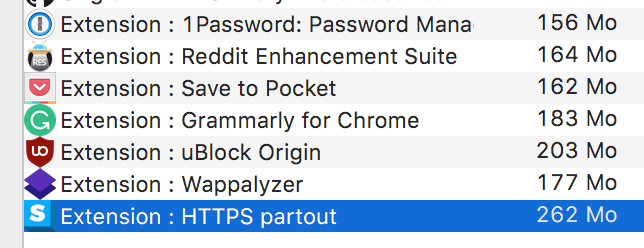
Same issue with 262MB on Chrome 60.0.3112.101 (64-bits MacOS).
 ghost
on 22 Aug 2017
ghost
on 22 Aug 2017
This thread needs to be reticketed with a list of possible solutions if someone still wants to fix the problem.
techtonik
on 25 Aug 2017
I have a few ideas.
ghost
on 25 Aug 2017
@Hainish Lock this issue for Talos' sake!
ghost
on 25 Aug 2017
Close in favour of #12232
 gloomy-ghost
on 3 Nov 2017
gloomy-ghost
on 3 Nov 2017
Related issues
 Jochen-A-Fuerbacher
·
3Comments
Jochen-A-Fuerbacher
·
3Comments
 margre8
·
3Comments
margre8
·
3Comments
 austin987
·
5Comments
austin987
·
5Comments
 J0WI
·
4Comments
J0WI
·
4Comments
 Lissy93
·
4Comments
Lissy93
·
4Comments
Most helpful comment
This issue is still affecting me.
HTTPS Everywhere is using 2x more ram than any other extension, this is not acceptable on my 4GB RAM notebook. Are there any bugfixes available yet?