Https-everywhere: UI dropdown checkboxes look fuzzy on external display screen
Type: code issue
Firefox 65
Version: 2019.1.31
macOS 10.14.3
Macbook Pro
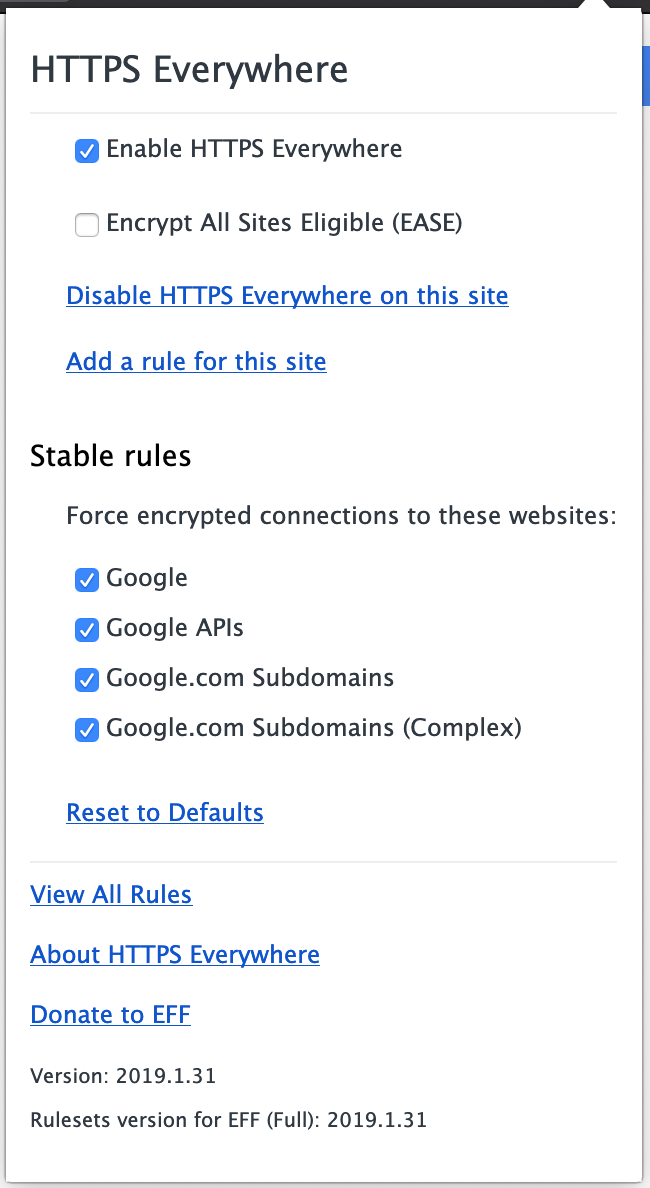
On an external 1920x1080 HD monitor, the checkboxes in the UI dropdown look blurry / fuzzy
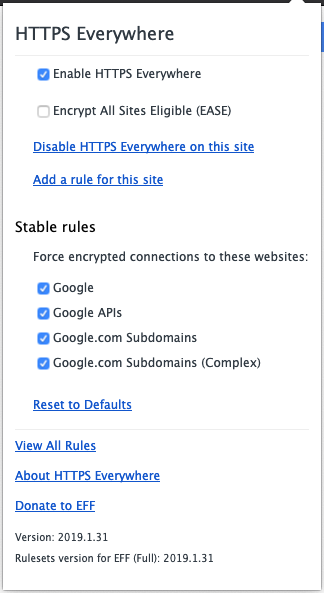
They're crisp when the window is moved to the builtin Retina display.
 wesinator
All 7 comments
That's most likely a DPI issue.
 pipboy96
on 12 Feb 2019
pipboy96
on 12 Feb 2019
@wesinator Is this explicitly just HTTPS Everywhere's menu? Could you check another extension out to see if the menu also blurs out and compare?
 zoracon
on 13 Feb 2019
zoracon
on 13 Feb 2019
@wesinator Here's a page with a checkbox, please check if it's blurry: https://pipboy96.github.io/index.html
pipboy96
on 13 Feb 2019
@wesinator Here's a page with a checkbox, please check if it's blurry: https://pipboy96.github.io/index.html
This might not cause the same issue as an extension popup menu, but it doesn't hurt to try
zoracon
on 13 Feb 2019
@zoracon It's just a <input type="checkbox">, just like the popup checkboxes.
pipboy96
on 13 Feb 2019
@pipboy96 Oh interesting, yea that looks blurry too:

I guess this is a Firefox UI issue then
wesinator
on 13 Feb 2019
@wesinator Please report this bug on Mozilla bugtracker then.
pipboy96
on 13 Feb 2019
Related issues
 Hainish
·
4Comments
Hainish
·
4Comments
 J0WI
·
4Comments
J0WI
·
4Comments
 Cull-Methi
·
4Comments
Cull-Methi
·
4Comments
 austin987
·
5Comments
austin987
·
5Comments
 diracdeltas
·
3Comments
diracdeltas
·
3Comments