Https-everywhere: Non-default "Block all unencrypted requests" and "Show counter" preferences show inconsistently, and don't restore correctly
Both the "Block all unencrypted requests" and "Show counter" preferences refuse to restore in a state where they are functionally enabled and disabled, respectively. It may also apply to the global enable/disable setting, but right now that appears to work correctly and I'm afraid to touch it because I don't want that breaking, too.
I've had this issue in the past -- miraculously it was fixed some time ago -- and now it's back since the release that changed the appearance of the preferences popup.
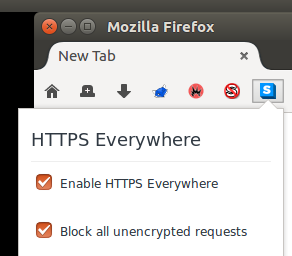
Having enabled the "Block all unencrypted requests" before exiting, when I open Firefox again, I can see the icon change to red, and then it flips back to blue on its own. Functionally, the plugin does what the colour of the icon reflects, regardless of the state of the check box in the preferences popup. Essentially, the state of the settings get reversed at some point during startup -- seems like it's reverting to defaults for some reason?
Uninstalling, removing all extensions.https_everywhere preferences, browser restart, and reinstalling resulted in this:
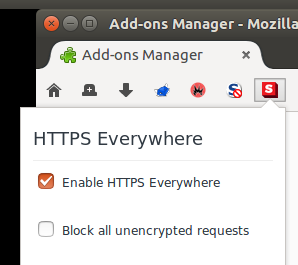
Somehow, not touching it at that point and restarting the browser, I saw it work correctly on the first restart, but then not the second and onward.
Cycling the check box puts it back into the correct state while the browser is running. On browser restart, it's back in the desynchronized state again.
 jseigel
All 7 comments
I've been consistently seeing this with "Show counter" too. When starting Firefox, HTTPS Everywhere would act like "Show counter" was turned on despite me keeping it off. Here's a video: https://crashcoherency.net/misc/httpseverywhere-counter-bug.webm
 Macil
on 2 Sep 2017
Macil
on 2 Sep 2017
This happens for me too.
 jeremyn
on 2 Sep 2017
jeremyn
on 2 Sep 2017
The same applies to the main "Enable HTTPS Everywhere" checkbox. Disable the checkbox, the icon becomes gray. Close/reopen firefox: HTTPS everywhere's icon is blue + counter active but the checkbox is still unchecked. Checking it again does apparently nothing.
This started to happen with the transition to web extension. FF 55 with extension 2017.8.31.
 wavexx
on 3 Sep 2017
wavexx
on 3 Sep 2017
Made an account just to add that this is happening for me as well. Every time I restart Firefox, I have to go into the Add-ons Manager to check and then uncheck the Show Counter box to get the green counter box to go away.
 slfhv
on 6 Sep 2017
slfhv
on 6 Sep 2017
This should be fixed in the latest. Please confirm?
 Hainish
on 5 Oct 2017
Hainish
on 5 Oct 2017
It works for me, specifically in Firefox, "Block all unencrypted requests" can restore as enabled and "Show counter" can restore as disabled. Thanks.
jeremyn
on 6 Oct 2017
Looks good to me! Thanks!
jseigel
on 6 Oct 2017
Related issues
 cschanaj
·
4Comments
cschanaj
·
4Comments
 apple-web-evangelist
·
4Comments
apple-web-evangelist
·
4Comments
 00h-i-r-a00
·
4Comments
00h-i-r-a00
·
4Comments
 diracdeltas
·
3Comments
diracdeltas
·
3Comments
 the8472
·
4Comments
the8472
·
4Comments
Most helpful comment
This happens for me too.