Https-everywhere: Text missing in UI in Firefox when using non-"English (US)" language
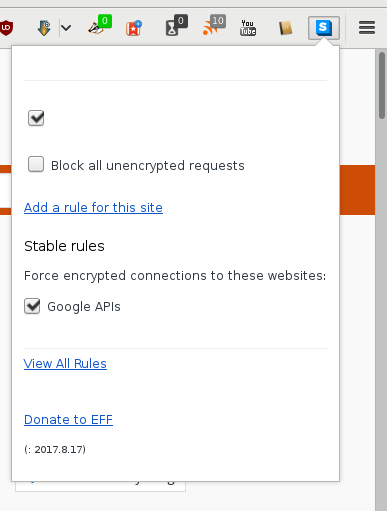
 jony0008
All 32 comments
Looks like an i18n issue.
 ghost
on 20 Aug 2017
ghost
on 20 Aug 2017
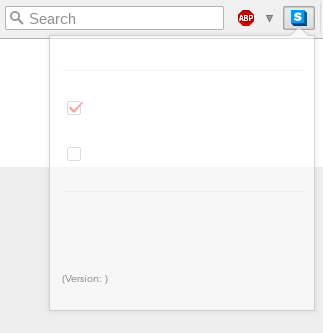
I have the same problem on Firefox 52.3.0 on Ubuntu: There is nothing but the check boxes and the version string.
 Cynnexis
on 20 Aug 2017
Cynnexis
on 20 Aug 2017
What's an example URL or ruleset where this happens?
 jeremyn
on 22 Aug 2017
jeremyn
on 22 Aug 2017
In my case, this bug appears regardless of the URL, even in the Start Page about:home. For the ruleset, I noticed that each time I try to check/uncheck a box, the panel close, and when I reopen it, the configuration did not change (same config as the image below: first box checked, this other uncheck).
Cynnexis
on 22 Aug 2017
@Cynnexis Send me a developer console log.
ghost
on 22 Aug 2017
It looks like JavaScript in popup.html have crashed.
ghost
on 22 Aug 2017
I can reproduce on Tor Browser 7.0.4.
 Bisaloo
on 22 Aug 2017
Bisaloo
on 22 Aug 2017
@koops76 How can I access to the console log?
Cynnexis
on 23 Aug 2017
@Cynnexis F12 > Console
ghost
on 23 Aug 2017
I had the exact same result at first as @Cynnexis showed a screenshot of above. Curiously, when I opened the console through Tools > Web Developer > Web Console, and cleared the console log by clicking on the trash can icon to the left in its toolbar (I don't know if this is really relevant or not, but am including it for completeness; there was no relevant output before I cleared the console), HTTPS Everywhere started displaying correctly; I clicked its toolbar button hoping to capture some debugging information to add to this issue, and it displayed just fine. It also looks like Privacy Badger, which has been acting up exactly like HTTPS Everywhere just did, has now also started working. Both appear to remain stable also after restarting the browser. No output in the console window. Firefox ESR 52.3.0 / 64-bit, Debian.
ghost
on 23 Aug 2017
I opened the console windows juste like @koops76 said and load a page (Qwant.com in this case) . Then I clicked the _HTTPS Everywhere_ button, but no outputs appeared in the console:
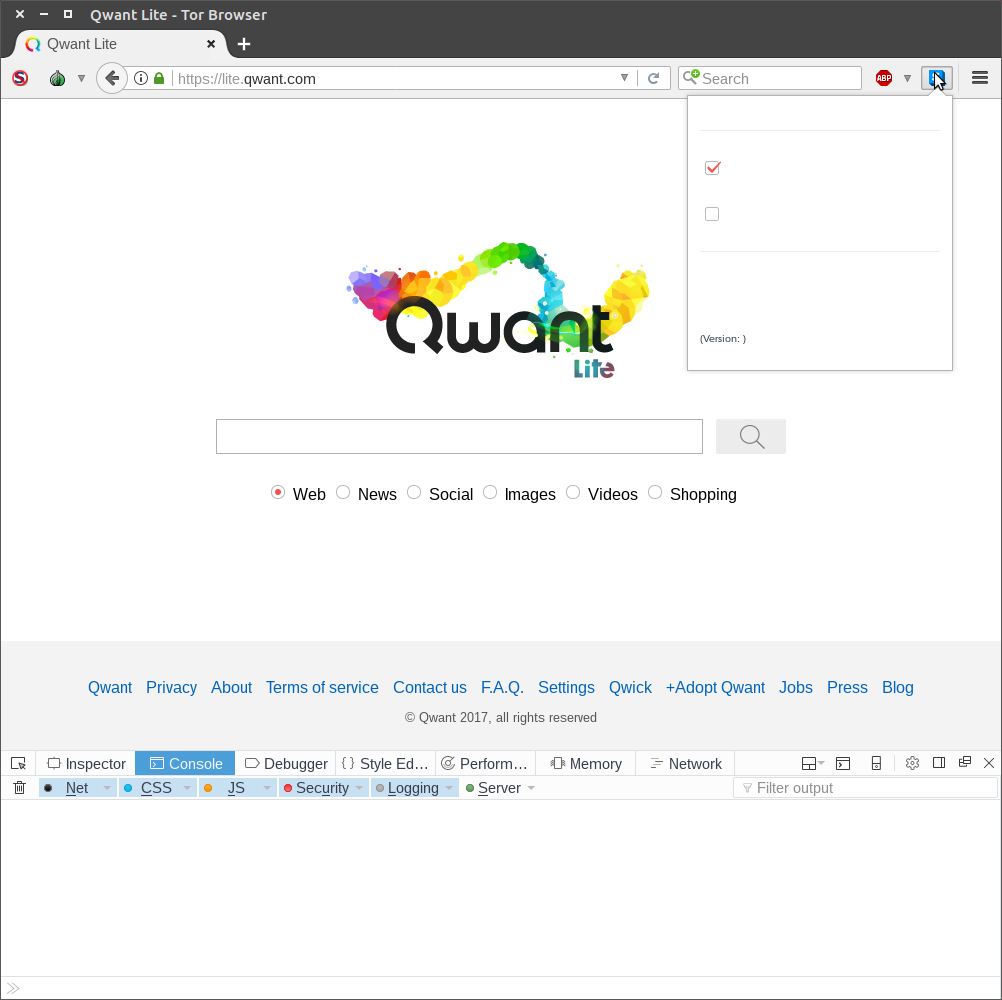
Clicking the trash icon to clear the console did nothing, even when I reopened _HTTPS Everywhere_ panel.
Cynnexis
on 24 Aug 2017
Sorry; strike my previous comment. I believe I've found what caused the issue shown in https://github.com/EFForg/https-everywhere/issues/12009#issuecomment-323594187 at least in my case: Javascript. If I use the "Toggle Javascript" add-on toolbar button to completely disable Javascript, then the HTTPS Everywhere dropdown shows as essentially empty and doesn't work, as previously shown. If I turn Javascript back on, then it works. @Cynnexis I see that you have NoScript in "no scripts allowed" mode in your most recent screenshot. Consider trying turning on Javascript globally via NoScript, and also if you have any other add-on that may interfere with Javascript make sure it doesn't, and see if it works better.
ghost
on 24 Aug 2017
In that case this is a duplicate of issue #11948, see specifically https://github.com/EFForg/https-everywhere/issues/11948#issuecomment-323188167. There are issues opened against both Firefox and Tor as linked in https://github.com/EFForg/https-everywhere/issues/11948#issuecomment-323231663.
jeremyn
on 24 Aug 2017
I have javascript enabled and I have the same result as @jony0008.
 LMLB
on 29 Aug 2017
LMLB
on 29 Aug 2017
@LMLB Please describe your system and provide a screenshot.
jeremyn
on 29 Aug 2017
Windows 7 64 bit, Firefox 55.0.3 (64-bit, Swedish).
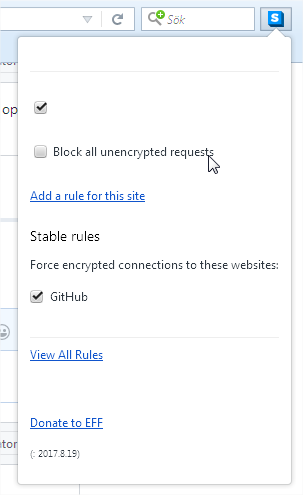
However, if I install the "English (US)" language pack from https://addons.mozilla.org/firefox/language-tools/ and change the general.useragent.locale pref to en-US and restart Firefox, it looks like this:
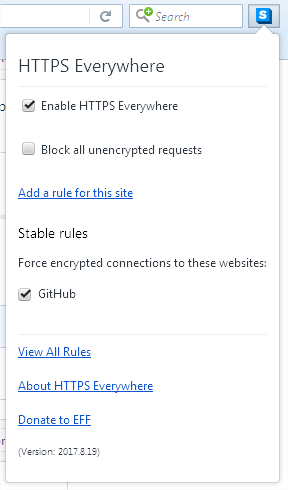
Edit: It turns out installing the language pack is not necessary, just changing general.useragent.locale is enough. (this will only changes the language in addons, Firefox stays in the original language).
Finally, here is a workaround for this bug: open about:config, change general.useragent.locale to en-US, and restart Firefox. All add-ons will be in English, but Firefox will be in the language it was installed in.
LMLB
on 30 Aug 2017
@LMLB Indeed, it is an I18N issue. We need to do something with the current I18N system.
ghost
on 30 Aug 2017
Thanks for the extra information @LMLB .
jeremyn
on 30 Aug 2017
I am having the same problem - but it's not due to some of the claimed causes mentioned in this thread. My system lang is US English, including the Firefox general.useragent.locale setting. I have completely disabled Noscript. I have allowed all the popup settings I can find, but it doesn't make any difference. Two points that hasn't been made so far::
- when I R-click the toolbar icon, the full popup (with text) appears for half a second, then is overwritten by another popup that shows only scattered tickboxes and horizontal lines, no text.
- certain entries on the R-click menu are selectively missing now from other Firefox add-ons as well, eg, Save-Page-WE
 rncgit
on 30 Sep 2017
rncgit
on 30 Sep 2017
@rncgit Likely a Firefox issue.
ghost
on 30 Sep 2017
Any progress on this issue? I still have the problem.
jony0008
on 1 Oct 2017
This is because the actual translations have been blanked out for 3 locales: sv_SE (Swedish) ca@valencia (Valencian Catalan) and ms (Malay). I'll try to get this fixed ASAP.
 Hainish
on 6 Oct 2017
Hainish
on 6 Oct 2017
There are three locales that are similar that are translated for each of these:
sv (Swedish, no country specification), ca (Catalan generic), and ms_MY (Malay from Malaysia). For now, use one of these.
Hainish
on 6 Oct 2017
@Hainish sv should be used for Swedish and not sv_SE because Swedish is spoken in other countries such as Finland and is not specific to Sweden.
jony0008
on 6 Oct 2017
@jony0008 my suggestion is only for HTTPS Everywhere, not in general. We'll still be fixing the problem for the affected locales
Hainish
on 6 Oct 2017
@Hainish I tried changing general.useragent.locale to sv from the default (sv-SE) but it didn't make any difference.
 niklasholm
on 7 Nov 2017
niklasholm
on 7 Nov 2017
I've just pinged the upstream transifex maintainer again.
Hainish
on 15 Dec 2017
I've received notification that the upstream transifex fix was not pushed properly. I have been notified that it was fixed with this commit: https://gitweb.torproject.org/translation.git/commit/?h=https_everywhere&id=4b55350d48a78614ad14087dc4eefe289543ff5b
Hainish
on 10 Jan 2018
@Hainish Swedish strings are missing in the commit. I think you pushed sv_SE strings which don't exist, and sv strings should be pushed instead.
jony0008
on 11 Jan 2018
@jony0008 can you confirm that the Swedish translation is still missing in the 2018.2.26 release? (It may take a moment to propagate the update in the Firefox & Chrome extension stores.)
Hainish
on 27 Feb 2018
@Hainish The Swedish translation is not missing in the latest version and the previous version. It works well in both Firefox and Chrome.
jony0008
on 27 Feb 2018
@jony0008 great, thank you! Closing now.
Hainish
on 28 Feb 2018
Related issues
 Cull-Methi
·
4Comments
Cull-Methi
·
4Comments
 cschanaj
·
4Comments
cschanaj
·
4Comments
 zoracon
·
3Comments
zoracon
·
3Comments
 J0WI
·
4Comments
Hainish
·
4Comments
J0WI
·
4Comments
Hainish
·
4Comments
Most helpful comment
I can reproduce on Tor Browser 7.0.4.