Https-everywhere: Embedded WebExtension on FF ESR does not work if JS is disabled
After I got the 2017.8.15 update on my FF55 64Bit (Win10) the extension simply does not work anymore.
Before the update it correctly rewrote scummvm.org or 4chan.org, to name some examples (both are still listed on the atlas rule list as working). . After the update all domains I checked are not rewritten to HTTPS anymore and I suspect this is the case for all. I also checked a handful random ones from atlas, which where also not rewritten.
Also the new tab in the developers console does nothing - what exactly should iut do? I see an explanation and checkign the box does a reload, but then nothing happens. No matter if I'm on an unknown site (no matter if HTTP or HTTPS) or an know site (no matter if HTTP or HTTPS). Also no matter if mixed content.
Well, the extension still shows the GUI button. But is it supposed to not list matching rules anymore? And as I already posted: #11943 (which was a dupe as it turned out)
So, to me it seems that the GUI is correctly rendered, but none of the actual functionalities is working.
I tried purging the extension from my profile (deleting all occurences in about:config and delting all extension-related files in the profile folder), and reinstalling it cleanly. It did not help.
 foobar13373
All 46 comments
I'm getting the same behaviour on Win10 FF55.0.2(64b)/Tor 7.0.4(32b)
#11944 somewhat related, probably. But I can't get it to work even on "Low".
 Folant
on 16 Aug 2017
Folant
on 16 Aug 2017
ping @Hainish
 ghost
on 17 Aug 2017
ghost
on 17 Aug 2017
HTTPS Everywhere works for me for http://scummvm.org using Firefox v55.0.1, extension version 2017.8.15, Ubuntu 16.04. By "works" I mean if I watch the developer console Network tab and type "scummvm.org" into the address bar and press enter, the initial request is made to https://scummvm.org/ and gets a 301 response.
 jeremyn
on 17 Aug 2017
jeremyn
on 17 Aug 2017
@jeremyn
In my installation the request goes exactly to where it was made. A HTTP request to scummvm.org stays on plain http.
I tried with all my other extension (uBlock Origin and Decentral Eyes) disabled and enabled. Same behavior in both cases.
Are there any settings in about:config that could influence HTTPS Everwhere's core functionality in the new version?
foobar13373
on 17 Aug 2017
@foobar13373 Regarding about:config settings: none that I know of.
Could you please attach a screenshot showing what your add-on UI looks like, showing the box expanded that says "HTTPS Everywhere" with all the checkboxes?
jeremyn
on 17 Aug 2017
dom.storage.enabled is enabled for me in about:config and according to Firefox, enabled (true) is the default setting.
jeremyn
on 17 Aug 2017
@user684 We have to store persistent settings somewhere.
jeremyn
on 17 Aug 2017
Screenshot (using scummvm.org as an example):

dom.storage.enabled is set to true in my case. But I agree that this should not be required for the extension, I was often thinking about turning this off (didn't do it already because I need to find the real implications on the behavior). Aren't there other possibilities to store settings? Or at least making storage enabled for addons but not for web pages?
edit: Where does the extension store the rulesets? Seems they do not get loaded at all.
foobar13373
on 17 Aug 2017
I just renamed my FF profile folder, started FF to create a fresh profile, installed HTTPS-E from eff.org - and it was working (even the block all unencypted checkbox).
So there surely must be some other setting that is influencing how/if HTTPS-E is working.
foobar13373
on 17 Aug 2017
It is not working in my original profile, even if I disable all addons (uBlock Origin + Decentral Eyes) and only leave HTTPS-E active.
I have safebrowsing off, OCSP off (generally I turn features bugs off that trigger requests to locations that are not requested by me in some way, either by entering it in the bar or by willingly enabling an add-on by hand) and opted in for e10s.
foobar13373
on 17 Aug 2017
No. I only use a regular FF 55 with HTTPS-E, uBlock Origin (block everything by default, then whitelist allowed requests on a per domain base), Decentral Eyes. With home-calling off (OCSP, "safe" browsing, address bar suggestions, status/crash reports etc.). Cookies are disabled (I enable some sites by hand), browser history is cleaned on exit. DRM is disabled. All shipped search engines are removed and replaced by Duck Duck Go. Passwords / form data are never stored.
All this through the regular preferences dialogue. I think only opting-in for e10s was actually done by editing about:config by hand. But iirc e10s is enabled by default now anyways, isn't it?
foobar13373
on 17 Aug 2017
I could isolate the problem. And it is really strange. I created a clean profile again, installed only HTTPS-E. It was working. Then I switched setting by setting in the regular settings dialogue and restarted the browser every time. So I tested each setting separately.
HTTPS Everywhere is not working if you choose custom privacy settings and disable cookies at all and restart the browser!
So, for some strange reason the extension is depending on cookies now?
I tried this on scummvm.org again. Oh, and also the HTTPS-E WebDev console tab was working now, with cookies enabled.
I inspected the cookies and there was no sign of a HTTPS-E cookie, only the spyware cookies from Google and PayPal.
foobar13373
on 17 Aug 2017
Thanks for the report @foobar13373. I'm looking into this now.
 Hainish
on 17 Aug 2017
Hainish
on 17 Aug 2017
@foobar13373 I can confirm your results, that is, that unchecking "Accept cookies from sites" in about:preferences#privacy and restarting Firefox will cause HTTPS Everywhere to not rewrite http://scummvm.org to HTTPS. Good catch!
jeremyn
on 17 Aug 2017
@foobar13373 By the way, you can work with profiles using about:profiles. You don't need to rename folders or anything like that.
jeremyn
on 17 Aug 2017
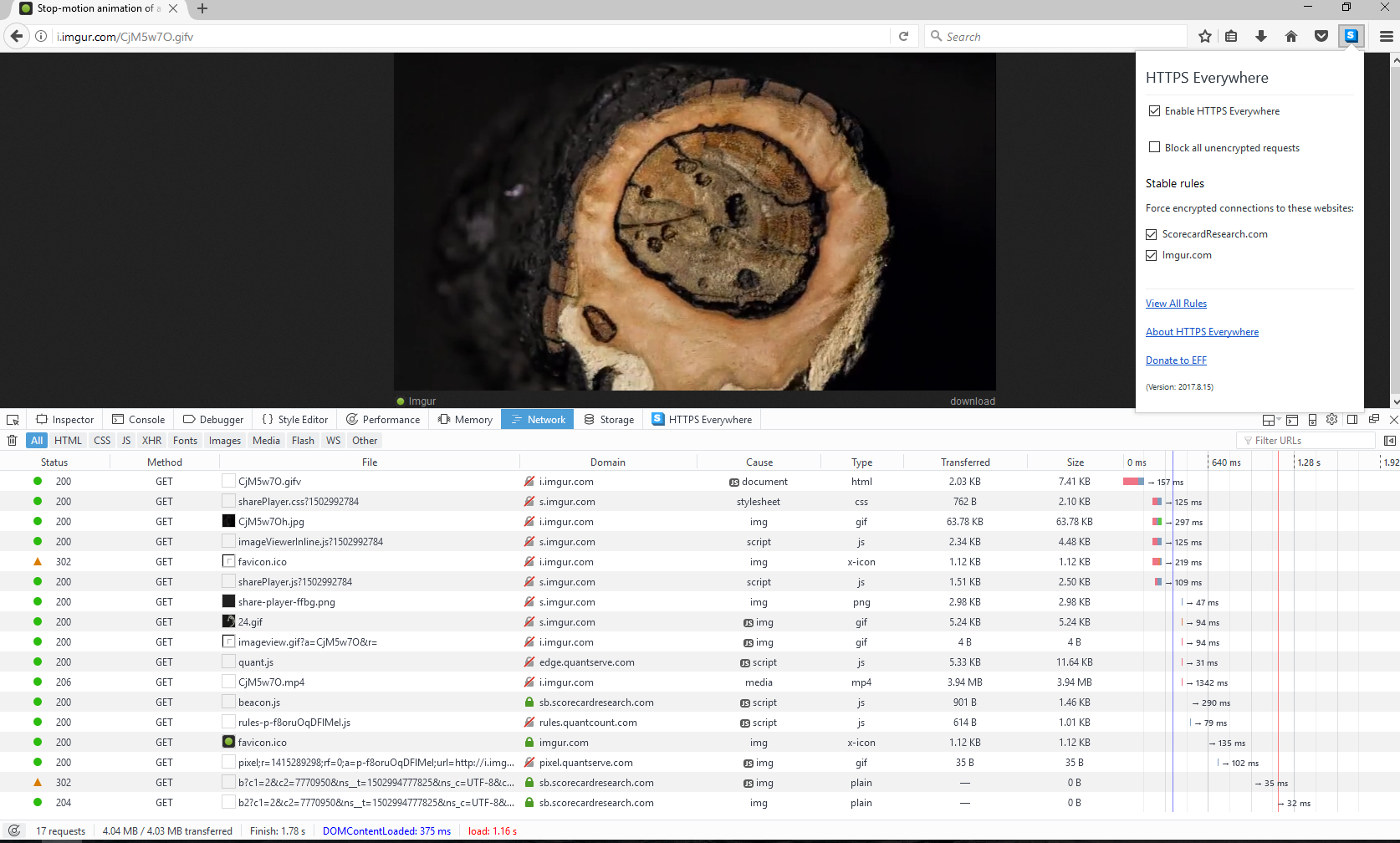
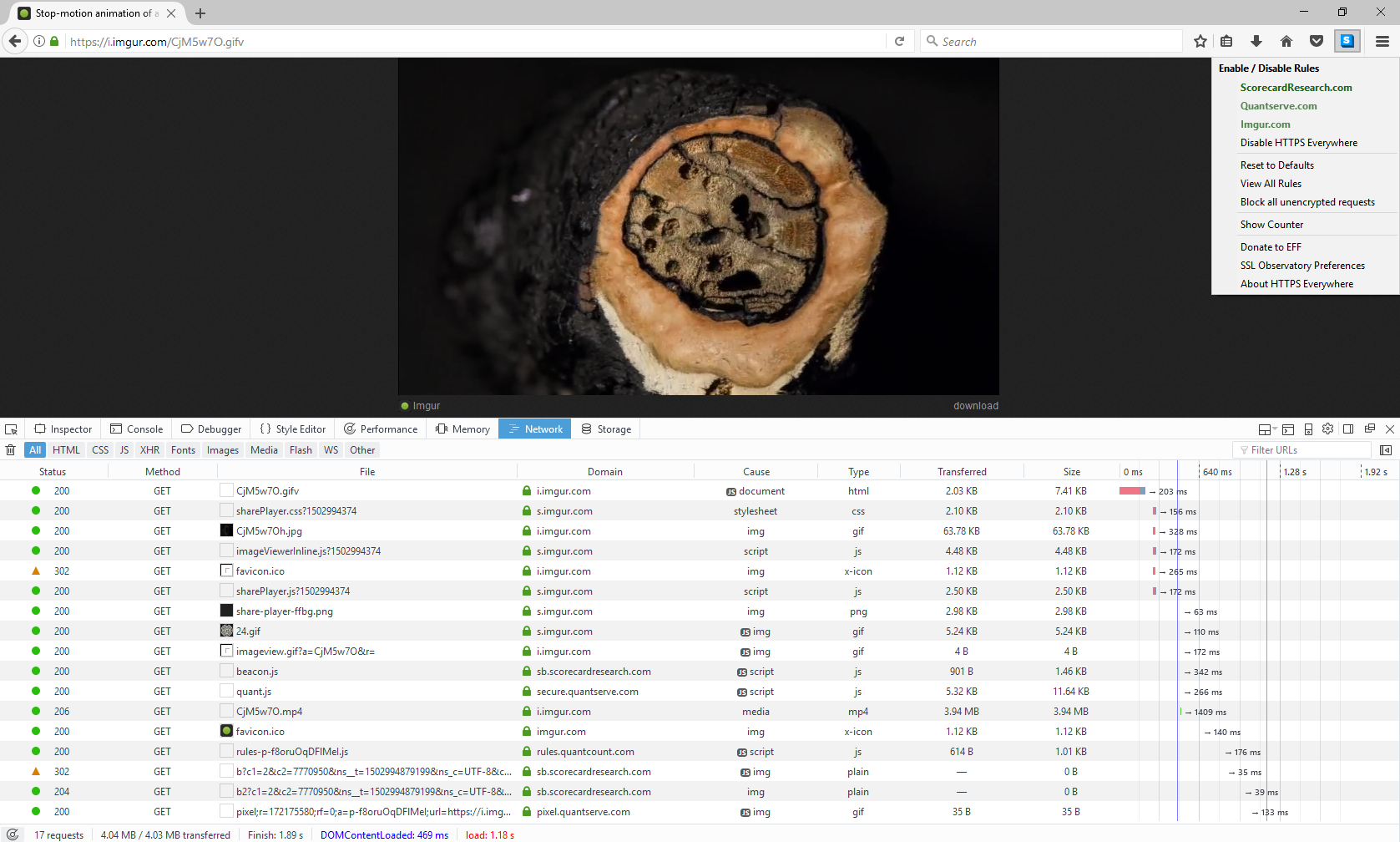
It seems that all cookie/profile manipulations have zero impact in my case. i.imgur.com for example 🤔
- New profile with 2017.8.15
- New profile with 5.2.21
Folant
on 17 Aug 2017
If it's not possible to whitelist specific extension or the extension is not adjusted to not use localStorage/cookies, I'd rather not use HTTPS-E anymore. Since I'm working with a full-block uBlock Origin with whitelisting anyways (most of my visited/bookmarked sites are https anyways already), enabling cookies/localStorage just for HTTPS Everyhwere would lower my privacy settings, I feel.
foobar13373
on 17 Aug 2017
I've identified the issue and have a fix for it
Hainish
on 17 Aug 2017
This will be released at some point today
Hainish
on 17 Aug 2017
The data that is stored in localStorage is whether specific rules are enabled/disabled. If we mock out the localStorage object on run, the enable/disable will not persist across browser runs but at least it will not cause the extension to stop running when cookies are disabled.
Hainish
on 17 Aug 2017
This is what I've done for the hotfix, we'll have to come up with a better solution later.
Hainish
on 17 Aug 2017
Nice, that sounds perfectly fine for me as I was never using custom or manually dis/enabled rules, only the shipped ones as the are.
But a more general fix would surely be nice for people with custom settings and disabled cookies.
foobar13373
on 17 Aug 2017
This should be fixed as of https://github.com/EFForg/https-everywhere/commit/8ac30544e8724e43a30d7a54b157cd96c9728bde, I'll keep this open until we get good reports of this resolving the issue.
Hainish
on 17 Aug 2017
I'll make an emergency release today. I'm also getting a related error report from Tor Browser: https://trac.torproject.org/projects/tor/ticket/23258. This does not fix the issue there. I'd like to bundle the fixes together if possible.
Hainish
on 17 Aug 2017
There is another issue with the extension not behaving correctly when JavaScript is disabled. This worked before, so this is again unexpected. This behavior is not observed in Chromium with JavaScript disabled.
Hainish
on 17 Aug 2017
I'm not seeing any useful output from the debugging console for this error. I do observe blank fields in the popup.
Hainish
on 17 Aug 2017
Testing between Firefox 52 (ESR) and Firefox 55.
When JavaScript is disabled in 55, the extension behaves properly upon browser load.
When JavaScript is disabled in 52 ESR, the extension does not redirect URLs and the popup is loaded with blank fields.
Hainish
on 17 Aug 2017
@Hainish I doubt that any extensions work with disabled JavaScript.
ghost
on 17 Aug 2017
@Hainish Check if #11908 will fix it.
ghost
on 17 Aug 2017
@koops76 yes, extensions are supposed to work when JavaScript is disabled.
Hainish
on 17 Aug 2017
@Hainish Try stepping through the code using the debugger.
ghost
on 17 Aug 2017
It looks like this is related to https://bugzilla.mozilla.org/show_bug.cgi?id=1329731
Hainish
on 17 Aug 2017
The cookies issue should be fixed if you update now and restart. If you have JavaScript disabled in Firefox ESR, you'll still encounter some problems.
Hainish
on 18 Aug 2017
@foobar13373 can you test this fix?
Hainish
on 18 Aug 2017
Unfortunately it is still broken for me in Tor Browser.
 jylr
on 18 Aug 2017
jylr
on 18 Aug 2017
@jylr this is expected, see https://bugzilla.mozilla.org/show_bug.cgi?id=1329731 and https://trac.torproject.org/projects/tor/ticket/23258#comment:25
Hainish
on 18 Aug 2017
I see, thanks.
jylr
on 18 Aug 2017
@Hainish The problem I described in https://github.com/EFForg/https-everywhere/issues/11948#issuecomment-323155485 reproducing @foobar13373 's original issue, is fixed for me.
jeremyn
on 18 Aug 2017
@Hainish
HTTPS-E works now if cookies are disabled and localStorage is enabled. Having both, cookies _and_ localStorage (dom.storage.enabled set to false), disabled, shows the same behaviour as before (HTTPS-E _not_ working at all).
foobar13373
on 18 Aug 2017
Just for the record: @gorhill is facing similar issues in uBlock Origin:
https://github.com/gorhill/uBlock/issues/2824
There's his solution: https://github.com/gorhill/uBlock/commit/6fb6b4ed989ee9b6c0f910ede2f3d38ea99581e8
foobar13373
on 18 Aug 2017
@Hainish Then use try...catch.
ghost
on 18 Aug 2017
Latest version still doesn't work with imgur links like this one: http://i.imgur.com/ia1NcWr.jpg but it does work for http://imgur.com/
Tested using a new Firefox profile, default settings and no other add-ons.
 Kezxo
on 18 Aug 2017
Kezxo
on 18 Aug 2017
I can confirm this. But it seems to be another issue, it's not related to JS, cookies or storage.
foobar13373
on 18 Aug 2017
@user684 @koops76 simply accessing localStorage raises a security exception. In the current version I've surrounded all localStorage references in a try/catch.
Hainish
on 18 Aug 2017
@Kezxo The Imgur problem is being tracked in issue https://github.com/EFForg/https-everywhere/issues/11981.
jeremyn
on 19 Aug 2017
At this point, this seems to be out of our control. https://bugzilla.mozilla.org/show_bug.cgi?id=1329731 is the issue to track for this.
Hainish
on 23 Aug 2017
Related issues
 diracdeltas
·
3Comments
diracdeltas
·
3Comments
 Jochen-A-Fuerbacher
·
3Comments
Jochen-A-Fuerbacher
·
3Comments
 cschanaj
·
4Comments
cschanaj
·
4Comments
 margre8
·
3Comments
cschanaj
·
3Comments
margre8
·
3Comments
cschanaj
·
3Comments