Can anyone confirm the htop available on homebrew (2.02) is broken on macOS 10.13 (crashes iTerm2 after several seconds)?
 MenkeTechnologies
All 249 comments
I am facing a similar issue. After several seconds running htop in iTerm2 (and Terminal.app too). The terminal halts and I have to force close it. After that, iTerm2 won't open again and macOS refuses to reboot. I have to force reboot macOS by holding the power button.
 fykuan
on 26 Sep 2017
fykuan
on 26 Sep 2017
I'm experiencing the exact same behavior as @fykuan describes with the only difference that htop can run for quite a while before it crashes on my machine, I'd estimate up to half an hour or so.
I just asked on apple.stackexchange.com about this and at least one person replied in the comments reporting the same problem.
I installed htop (version 2.0.2) with brew install htop.
This only started happening after the upgrade to macOS 10.13 (High Sierra).
 anothernode
on 28 Sep 2017
anothernode
on 28 Sep 2017
I experience the same problem. Like @anothernode, it happens after a few hours on my machines.
Htop version 2.0.2, installed from MacPorts.
 Nax
on 28 Sep 2017
Nax
on 28 Sep 2017
Having the same issue. iTerm runs fine on its own until I start htop. Initially htop runs fine but if I keep it running for a while (more than a couple of minutes), I see the spinning pointer and eventually have to force quit iTerm. I cannot start both iTerm and Terminal apps without restarting the laptop.
 amertkara
on 28 Sep 2017
amertkara
on 28 Sep 2017
Good to know I'm not the only one having this issue. Using iTerm2 and htop is installed using homebrew. Hopefully this gets fixed soon.
 cusster
on 29 Sep 2017
cusster
on 29 Sep 2017
After that, iTerm2 won't open again and macOS refuses to reboot.
What the ...
I am glad to say that htop for me, once compiled, always worked on Linux - I never had a situation where Linux would fail to reboot in such a situation ... :)
I guess for the time being one should not use htop on High Sierra until it is fixed; wonder what changed if it worked before ...
 ghost
on 29 Sep 2017
ghost
on 29 Sep 2017
I'm experiencing the same issue htop: 2.0.2 MacOS: 10.13(17A365). Anyone know a fix?
 spprichard
on 10 Oct 2017
spprichard
on 10 Oct 2017
I can also confirm the same on macOS 10.13 with htop 2.0.2 running in iTerm2 build 3.0.3. After some time I get the spinning pointer. Activity Monitor goes totally blank and MBP needs to be rebooted.
 roopej
on 11 Oct 2017
roopej
on 11 Oct 2017
Same issue. htop 2.0.2, iTerm2 3.1.3, macOS: 10.13.
After some time of running htop (could be less than a minute or several hours) iTerm hangs. Other apps are working but I can't launch new ones. Also running apps can't do IO operations, i.e. Safari opens new tab but not loading web page, AppCode infinitely tries to index project, Tunnelbrick seems to be disconnected. I had an idea that something happens with persistent storage like ssd was suddenly disconnected.
 nayzak
on 11 Oct 2017
nayzak
on 11 Oct 2017
Does anyone else think its pretty weird that a crashing / mis-behaving htop process is able to ham up the kernel so much that it requires a system reboot?
 diclophis
on 12 Oct 2017
diclophis
on 12 Oct 2017
It is indeed, this looks like htop may be starving some system resources, mach ports maybe?
Nax
on 12 Oct 2017
I was also running down a hunch that it had something to do with colored text rendering in both Terminal.app and iTerm2.app.... we noticed in our org some interesting properties around this crash..
1) if your running htop in Terminal.app, and it crashes, it can also crash a seperate iTerm2.app session
2) If you have htop running in a terminal app, and its "minimized" it will run fine... up until the moment you bring the app into the foreground and make it visible...
diclophis
on 13 Oct 2017
Another interesting aspect of this bug is that, after htop crashes, and locks the terminal app... the Activity Monitor.app fails to load and render processes as well!
diclophis
on 14 Oct 2017
This may happened when some processes take much cpu and memory.
 jiamo
on 18 Oct 2017
jiamo
on 18 Oct 2017
This may happened when some processes take much cpu and memory.
XCode and SourceKitService always does :D
nayzak
on 18 Oct 2017
hardware: Macbook pro 13' 2017
environment: htop 2.0.2, iTerm2 3.0.15, macOS: 10.13
I meet the same problem several times after I upgrade my system to macOS 10.13
 x13945
on 20 Oct 2017
x13945
on 20 Oct 2017
I don't see how it's htop's problem. I believe that's some kind of a bug in mac OS kernel.
 dikeert
on 20 Oct 2017
dikeert
on 20 Oct 2017
This was serious enough to cause kernel errors that prevented both iTerm and Terminal from opening, and no processes to be shown in Activity Monitor, as well as an indefinite hang on shutdown.
Looking at the console indicated a large number of deny fsctl errors but I don’t know if this is correlated.
Hard resetting the laptop, booting into safe mode and uninstalling htop via brew has resolved the issue in my case.
I’ll try to update this comment with more details when I have some time.
 damienstanton
on 20 Oct 2017
damienstanton
on 20 Oct 2017
I get the same thing, although my Mac can usually run for a few hours before the problem occurs; this may be due to the fact that I always run with -d50 for a 5 seconds refresh interval, which is slower than the default, so it might make sense that I can last a little longer.
 BrandonNC
on 22 Oct 2017
BrandonNC
on 22 Oct 2017
sudo htop seems to get around the problem for now.
on my machine it's normally seconds before htop freezes since upgrading to high sierra, but with sudo rights, it's been going strong for several hours.
 besmith43
on 23 Oct 2017
besmith43
on 23 Oct 2017
@besmith43 Hm, that would be quite a good workaround. But others reported here that it took several hours before the crash happened, so I'm not yet convinced that it's really safe.
By the way, I'm using glances at the moment. I don't like it as much as htop, but it's all right for the meantime.
anothernode
on 23 Oct 2017
confirming in htop 2.0.2, iTerm 3.1.4 and Terminal, MacOS 10.13
 csi-adziahel
on 23 Oct 2017
csi-adziahel
on 23 Oct 2017
Yes, htop seems to be broken on macOS 10.13. It's super weird that i can't restart the system normally and only restarted works by brute force after this bug occurs 😥
 vaquer
on 25 Oct 2017
vaquer
on 25 Oct 2017
Same.
 joaomoreno
on 25 Oct 2017
joaomoreno
on 25 Oct 2017
Has anyone reported this to Apple? I've got the same symptoms described here.
 matthewbauer
on 26 Oct 2017
matthewbauer
on 26 Oct 2017
same situation here. I was wondering if it's another APFS issue. seems I'm wrong then :D
 Unayung
on 26 Oct 2017
Unayung
on 26 Oct 2017
I'd like to look into what happened (for science?) but Certificate Manager is so broken that I can't get a certificate to codesign gdb right now....
 evanslify
on 26 Oct 2017
evanslify
on 26 Oct 2017
I don't use Homebrew, although I installed htop via MacPorts — it appears to work without issue on macOS 10.13 (running over 12 hours):
$ sudo port install htop
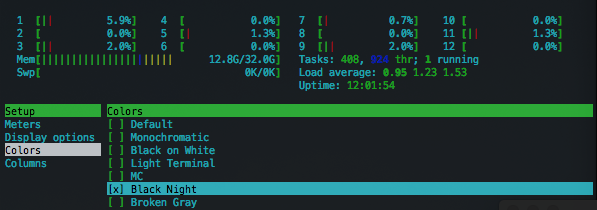
$ htop
_* it's unnecessary to run htop as sudo_
 dylib
on 29 Oct 2017
dylib
on 29 Oct 2017
@dylib good question, it could be that the brew manifest points to a broken version of the source. In either case I don't use Ports so I've resorted to using vtop or glances.
damienstanton
on 30 Oct 2017
I have the same issue here. Now I'm trying to see if htop build with ncurses provided from homebrew has the same issue. Currently I haven't encounter the same problem.
EDIT
Seems not like the problem of ncurses. When CPU loading is high, the problem will occur again.
 chuanchan1116
on 30 Oct 2017
chuanchan1116
on 30 Oct 2017
Others have reported the same problems with an installation done via MacPorts, so I don't think it's a homebrew related issue.
anothernode
on 30 Oct 2017
I got a fresh VM of macOS 10.13 running, built htop from source, ran without sudo, didn't crash the system. Curious. Maybe I need to have more process running in order to crash it.
edit:
~I took it up to 487 processes, and use stress --cpu 2 to stress out the cores. Still cannot reproduce.~
I can now somehow reproduce this problem. Will reply when I find out the root cause.
evanslify
on 30 Oct 2017
@anothernode: Interesting. htop is still running fine continuously after 1 day 21 hours 36 minutes. If anything changes I'll report back, although no issues thus far that I can tell.
process        memory       compressed memory   threads     ports
htop           7.3 MB       0 bytes             1           19

Real Memory Size: 8.4 MB
Virtual Memory Size: 4.16 GB
Shared Memory Size: 320 KB
Private Memory Size: 7.1 MB

CPU Time:  4:11.79
Context Switches: 591628
Faults: 311640
Assertions: 0
Mach System Calls: 2534220
Unix System Calls: 58633444

Open file and ports
txt
/opt/local/bin/htop
txt
/opt/local/lib/libncurses.6.dylib
txt
/usr/lib/dyld
txt
/private/var/db/dyld/dyld_shared_cache_x86_64
0
/dev/ttys001
1
/dev/ttys001
2
/dev/ttys001
Can anyone with the issue in htop confirm for me that this also causes the issue:
ps aux
?
matthewbauer
on 31 Oct 2017
Highly unlikely. ps aux just dumps the process list once within a split second and then exits. Whereas htop displays a constantly refreshed process list until quit by user. The issue, as reported by most users here, only arises after htop was running for a while, like half an hour or sometimes several hours, but never within seconds.
anothernode
on 31 Oct 2017
@anothernode Ok perhaps the "issue" had already happened but after that I think ps aux will stop working (just as activity monitor stops working).
Anyway it looks like 10.13.1 is released and I suspect the bug is fixed there!!!
matthewbauer
on 31 Oct 2017
What makes you think so? Nothing in the release notes for macOS 10.13.1 point in that direction. Also, I think if this would actually be a bug in the macOS kernel, we would read about this on the front page of the The Verge.
anothernode
on 31 Oct 2017
What makes you think so?
Well if you have to force reboot it's definitely a kernel bug, right? At least a process shouldn't be able to mess up the system so bad. I'm installing now so I can report back soon though.
matthewbauer
on 31 Oct 2017
Of course, any code that has access to system resources can mess up the system completely and there's nothing a kernel developer could do against it.
anothernode
on 31 Oct 2017
@matthewbauer in my case, as soon as Terminal hangs (and I force quit it) all the application that somehow works with processes become unavailable. For example:
- Activity monitor doesn't show any processes
killall -9 htop, which I tried to run from PyCharm's terminal, hangsps axhangs as well
 madcat1991
on 31 Oct 2017
madcat1991
on 31 Oct 2017
Currently looking deeper into this issue. I don't think this will only happen to htop.
evanslify
on 1 Nov 2017
@madcat1991 I'm confirming I'm affected by these symptoms as well. The 10.13.1 update is still pending though, will test it after installation.
csi-adziahel
on 1 Nov 2017
I get this issue within a 1 minute on 10.13.0 and htop via brew
 joedborg
on 1 Nov 2017
joedborg
on 1 Nov 2017
also occurring on 10.13.1 just seconds after running htop.
 niklaszantner
on 1 Nov 2017
niklaszantner
on 1 Nov 2017
All right, 10.13.1 seems unaffected (htop is running for tens of minutes flawlessly and counting).
csi-adziahel
on 1 Nov 2017
@csi-adziahel Others reported otherwise.
anothernode
on 1 Nov 2017
@anothernode yep, seen that, just saying.
csi-adziahel
on 1 Nov 2017
OK, now it's froze for me too.
csi-adziahel
on 1 Nov 2017
I think the issue is somehow related to invalidating terminal window more
or less frequently as htop does. There is an approach to easily reproduce
the issue for me:
- Run htop
- Open another terminal tab (Command+T) and run some another command that
invalidates or scrolls screen e.g. 'ls -lR /' - Wait a bit and the issue reproduces. It is not reproducible if there is
no htop running in the system.
 ihayvuk
on 1 Nov 2017
ihayvuk
on 1 Nov 2017
I had Activity Monitor running before htop with terminal hang, so I was
able to kill bash processes from Activity Monitor and this restored my
system.
On 1 November 2017 at 15:49, Ihor Hayvuk ihayvuk@gmail.com wrote:
I think the issue is somehow related to invalidating terminal window more
or less frequently as htop does. There is an approach to easily reproduce
the issue for me:
- Run htop
- Open another terminal tab (Command+T) and run some another command that
invalidates or scrolls screen e.g. 'ls -lR /'- Wait a bit and the issue reproduces. It is not reproducible if there is
no htop running in the system.
ihayvuk
on 1 Nov 2017
Thanks for the tip (both, especially the activity monitor one) @ihayvuk. I might know where to look for.
evanslify
on 2 Nov 2017
Update regarding MacPorts htop:
After several days of running without issue it's finally had the symptons everyone's described. :(
dylib
on 2 Nov 2017
@dylib but do you experience hang after several seconds of running?
 alvis
on 2 Nov 2017
alvis
on 2 Nov 2017
Sorry for the long wait. I tried to pinpoint which part is the root cause —
Maybe some calls have some kind of concurrency bug? But I don’t have enough
experience and knowledge to figure this out in a timely manner.
Would appreciate some suggestions.
Anyway, here’s my findings:
- By creating and closing process very rapidly, one could easily reproduce
this problem. I used something likewhile true; do sh -c "exit 0"; done. - Making htop refresh faster (I used
htop -d 0.1) would
further exaggerate this issue.
On Thu, Nov 2, 2017 at 17:49 Alvis Tang notifications@github.com wrote:
@dylib https://github.com/dylib but do you experience hang after
several seconds of running?—
You are receiving this because you commented.
Reply to this email directly, view it on GitHub
https://github.com/hishamhm/htop/issues/682#issuecomment-341369272, or mute
the thread
https://github.com/notifications/unsubscribe-auth/AMeDEtaYVB3ohaN5_5zOdQU7uKK_J0iJks5syZANgaJpZM4PjlCW
.
evanslify
on 2 Nov 2017
Crashed the heck out my laptop with 2 htop -d 0.1
Crashed within less than 2 or 3 minutes.
MacOS 10.13
 arthurlm44
on 3 Nov 2017
arthurlm44
on 3 Nov 2017
Has anyone tried already with HEAD?
 gadkadosh
on 6 Nov 2017
gadkadosh
on 6 Nov 2017
@gadkadosh Looks like actually no one had that idea so far 😬
I just compiled HEAD and am running it now with htop -d 0.1 (so hyperactive!) since a few minutes. No crash so far...
anothernode
on 6 Nov 2017
@anothernode just compiled the master on OSX 10.13.1 and the beachball appeared after a few minutes. Is it still running fine for you? Not sure if the way I compiled is the right way though..
autoreconf -i
./configure
make
and then ran the compiled binary from the root.
amertkara
on 6 Nov 2017
@amertkara I compiled on macOS 10.13.1 with:
./autogen.sh
./configure
make
autoconf and automake were installed through homebrew.
It's still running (50 minutes and counting).
anothernode
on 6 Nov 2017
@anothernode I may have made a mistake when I ran it. I did htop instead of ./htop so I ran the installed version of it. Now running the actual compiled binary. I will report how it goes.
amertkara
on 6 Nov 2017
I did compile htop from HEAD (52831955c7) like you suggested, and so far it seems to be working fine.
Le 6 nov. 2017 à 15:51, Mert Kara notifications@github.com a écrit :
@anothernode https://github.com/anothernode I may have made a mistake when I ran it. I did htop instead of ./htop so I ran the installed version of it. Now running the actual compiled binary. I will report how it goes.
—
You are receiving this because you commented.
Reply to this email directly, view it on GitHub https://github.com/hishamhm/htop/issues/682#issuecomment-342171524, or mute the thread https://github.com/notifications/unsubscribe-auth/AEEVxyyLQQg4wkyUWULPZFvclgFD9bS6ks5szxz-gaJpZM4PjlCW.
Nax
on 6 Nov 2017
Bad news: the HEAD build crashed just like the 2.0.2 stable version after running about an hour.
Note that I used htop -d 0.1 and it still ran for an hour before the crash happened, so -d 0.1 doesn't really seem to make a big difference, at least not on my machine.
anothernode
on 6 Nov 2017
@anothernode thanks for trying. I was about to try myself. Didn't have much time so far, and since it's annoying to have to reboot each time it happens, I was reluctant to. I guess we'll have to dig deeper.
I actually never user -d 0.1 and was still affected.
gadkadosh
on 6 Nov 2017
Can confirm: I can trigger this problem with either HEAD or 2.0.2 release, while using while true; do sh -c "exit 0"; done to spam at the background.
Because this can be confusing (yeah, who will spam this in the background anyway), let me explain my story on debugging:
I upgraded my Mac to 10.13, and I wonder why htop crashes so often. So I set up a fresh VM (10.13) but cannot reproduce this problem in a timely way. So I tried to reproduce my environment by coping my entire .tmux.conf and install some of the plugins (I have tmux-powerline and tmux-scroll-copy-mode). After that, I get to crash htop easily.
But I cannot trigger this problem easily with either a fresh tmux install (no .tmux.conf) or without tmux running then.
So I narrowed down by taking out pieces and pieces from my .tmux.conf, and the last part happens to be status-line, which contains some command which calls cat and then cut.
Then I tried to spam with something else (hence sh -c exit 0), it would also crash htop.
So I suspect that the trigger is to have some program create process in the background, at the correct time.
evanslify
on 6 Nov 2017
@gadkadosh Surely debugging this is a PITA. Tips on debugging this:
- Have activity monitor open. If the issue triggers, activity monitor cannot fetch new list of processes but may able be used to kill
htop. - Or use a VM (which I do use, just restore the VM to previous state)
evanslify
on 6 Nov 2017
This issue from osxfuse describes same "syndromes" we would encounter if triggered (ps hanging, shutdown doesn't work etc), but the root cause might not as same.
And this problem doesn't get triggered if we use (initially reported here) sudo htop. I wonder why the difference is so big between sudo and without sudo.
evanslify
on 6 Nov 2017
@evanslify thanks. So far I was not able to kill anything anymore with activity monitor, or with a different terminal. Maybe I just wasn't lucky :)
gadkadosh
on 6 Nov 2017
Has anyone been able to reproduce the issue while running it with sudo htop?
 ilovezfs
on 12 Nov 2017
ilovezfs
on 12 Nov 2017
Hey. I may have to do a presentation this week, so won't have time to debug this at the moment.
However, if anyone here has experience in kernel debugging, please let me know :)
The stack trace during hang:
Call graph:
    2543 Thread_3263608   DispatchQueue_1: com.apple.main-thread  (serial)
      2543 start  (in libdyld.dylib) + 1  [0x7fff7f339145]
        2543 main  (in htop) + 660  [0x10dfab454]  htop.c:231
          2543 ScreenManager_run  (in htop) + 172  [0x10dfb581c]  ScreenManager.c:184
            2543 checkRecalculation  (in htop) + 267  [0x10dfb5f6b]  ScreenManager.c:133
              2543 ProcessList_scan  (in htop) + 152  [0x10dfb4c68]  ProcessList.c:350
                2543 ProcessList_goThroughEntries  (in htop) + 490  [0x10dfc132a]  DarwinProcessList.c:174
                  2543 DarwinProcess_scanThreads  (in htop) + 127  [0x10dfc0abf]  DarwinProcess.c:315
                    2543 task_for_pid  (in libsystem_kernel.dylib) + 10  [0x7fff7f47ff12]
I ran bisect, 5ee6715843902da1aa40782a9d00f41ca855a2ee is the first bad commit, which adds some code bby using task_for_pid to grab some information from threads.
evanslify
on 13 Nov 2017
@ilovezfs I've been running sudo htop for about 16 hours now without problems. So, as far as I'm concerned, it's save enough to assume that the error is limited to invocations without super user privileges.
anothernode
on 14 Nov 2017
@evanslify I tried to get High Sierra running in VirtualBox with this howto and failed miserably :(
Do you (or anyone else) know about any instructions on how to do this that actually work? Or are you using Parallels or VMWare?
anothernode
on 14 Nov 2017
Moritz,
I used VMware Fusion 10 and it worked flawlessly. Maybe you missed some
steps while creating the VM?
On Tue, Nov 14, 2017 at 10:38 PM, Moritz Reiter notifications@github.com
wrote:
@evanslify https://github.com/evanslify I tried to get High Sierra
running in VirtualBox with this howto
http://tobiwashere.de/2017/10/virtualbox-how-to-create-a-macos-high-sierra-vm-to-run-on-a-mac-host-system/
and failed miserably :(Do you (or anyone else) know about any instructions on how to do this that
actually work? Or are you using Parallels or VMWare?—
You are receiving this because you were mentioned.
Reply to this email directly, view it on GitHub
https://github.com/hishamhm/htop/issues/682#issuecomment-344278365, or mute
the thread
https://github.com/notifications/unsubscribe-auth/AMeDEhDxDsCBMFb2jWUTIC8i7bi9TrIIks5s2aXYgaJpZM4PjlCW
.
evanslify
on 14 Nov 2017
@evanslify Thanks for the info!
I think VirtualBox has only experimental support for running macOS as a guest. Unfortunately I don't have a VMware Fusion or Parallels Desktop license.
anothernode
on 14 Nov 2017
Hi everyone, thank you for the continued investigation on this bug (I don't have a Mac/macOS and thus cannot debug this myself). In the link provided by @matthewbauer ( https://github.com/NixOS/nix/issues/1583 ) it seems the similar issue reported in Nix went away with the 10.13.2 beta — I wonder if anyone can confirm?
A userspace application should not be able to mess up with the system like that requiring hard reboots, so even if htop is doing something wrong, there's probably a bug in macOS somewhere along weth way as well. I'll stay tuned to see what comes up, and if there's anything that can be done on the htop side, I'll take the patch and make a new release ASAP.
Thanks!!
 hishamhm
on 20 Nov 2017
hishamhm
on 20 Nov 2017
Same 👍
 lucasmoreiradev
on 27 Nov 2017
lucasmoreiradev
on 27 Nov 2017
@hishamhm I still have no much time to dive into this, may I suggest that we create another branch which retains this commit for debugging, and revert that commit at the moment on release/master?
evanslify
on 29 Nov 2017
macOS 10.13.2 got released to public and Apple's security content description document for the Update contains a whole lot of Kernel related fixed security issues. The entries contain these descriptions:
- "Description: A memory corruption issue was addressed with improved memory handling."
- "Description: A type confusion issue was addressed with improved memory handling."
- "Description: An out-of-bounds read was addressed with improved bounds checking."
I have no idea what this means exactly, but maybe it's a hint that Apple indeed had some trouble with the Darwin kernel which again maybe really was the root cause for htop crashing so badly.
I'll give it a shot as soon as I get around to install macOS 10.13.2.
anothernode
on 7 Dec 2017
@anothernode just upgraded to macOS 10.13.2 from 10.12.6 yesterday (which i now regret) and getting the same behavior as others described. may take minutes to over an hour to crash, manifests as iterm or terminal crashing, can no longer open other apps, no processes in activity monitor, have to hard reboot.
 JudeQuintana
on 7 Dec 2017
JudeQuintana
on 7 Dec 2017
@JudeQuintana Hm, I just had htop running (without sudo) for one hour without a crash on macOS 10.13.2. But I aborted now because of your report, as I don't want to risk messing up my system right now.
anothernode
on 7 Dec 2017
It appears there is definitely a kernel regression of some kind related to the new AFS stuff, but in any case this might be prohibitively difficult to debug from the htop side. At this point, because it is such a hard bug [it does cause complete system lockup]... it's probably in everyone's best interest to just look for another top tool and use htop on known working platforms.
damienstanton
on 7 Dec 2017
@damienstanton why would APFS be relevant?
ilovezfs
on 7 Dec 2017
I recently took the High Sierra update because I saw that the system freeze bug with nix-daemon had finally been fixed. I can confirm that this bug affects me on macOS 10.13.2, with all the symptoms described in the thread
- I ran
htopas an unprivileged user for a little less than half an hour (in iTerm2 in atmuxsession with thefishshell, as it happens) - iTerm froze and as far as I could tell, so did the processes running within it.
- Once force-closed, iTerm could not be reopened
- Terminal.app (whose default profile loads a
bashshell and does not attach to or start a `tmux session) also could not be opened - All of the contents of the table of information displayed in Activity Monitor were blank
- Other applications were usable
- Reboot appeared to work but hung once all applications had been closed (including the desktop shell (the Dock and whatever renders the desktop background)), leaving me with a movable cursor against a black background indefinitely
 therealpxc
on 7 Dec 2017
therealpxc
on 7 Dec 2017
Interestingly @evanslify's test works fine on 10.13.2:
while true; do sh -c "exit 0"; done
Must have been an unrelated bug?
matthewbauer
on 7 Dec 2017
I'm running macOS 10.13.1 on a hackintosh, which does not use APFS. I have exactly the same issue, so I highly doubt it's related to APFS.
 taylorthurlow
on 8 Dec 2017
taylorthurlow
on 8 Dec 2017
I am debugging this freezing issue for the whole night. Took a while to pinpoint it to htop being the cause. For me, the iTerm/Terminal freezes with beach ball of death and takes down effectively the whole system. Finder sees only some of the files (if it launches at all), whole system acts as the disk is read only or something. Force quit doesn't work (if it's window opens at all). Cannot launch anything from that point in time, running apps have write access to disk (running vmware had no problem). Then after a while the whole system locks up and mouse stops responding. In one case I had two mouse pointers before the freeze - the original one froze and new one arose.
Upgrading to 10.13.2 (17C88) didn't resolve the issue, this system freeze happened on 10.13.1 and 10.13.2 for me with htop 2.0.2 after a few minutes.
Tried to run with sudo htop ~10 instances with -d 0.2 for about half hour and the issue didn't come up. Even when spawning lots of processes in the background.
 daliborfilus
on 8 Dec 2017
daliborfilus
on 8 Dec 2017
Interestingly @evanslify's test works fine on 10.13.2:
while true; do sh -c "exit 0"; done
Must have been an unrelated bug?
The way I see it we can only say that the crashes happen in a non-predictable way. Some reported that the crash happened seconds after starting htop, others reported that htop was running fine for hours before crashing. In my own experience it sometimes happens sooner, sometimes later.
Spawning shell processes in an infinite loop as @evanslify suggested might be a way to increase the likelihood of the crash happening rather sooner than later, but it could also just be coincidence. We just don't know for sure. It's certainly not a test that could be used to make any definite statements about whether the problem still exists or not.
anothernode
on 8 Dec 2017
Hm, I stand corrected. Some prior errors in the console we were discussing related to APFS seemed to be correlated with the htop lockup.
But clearly it appears it's also happening on systems without it.
damienstanton
on 8 Dec 2017
Do we know for certain that the issue can't be triggered by other top-like programs? If the prospect of figuring out what's going on as htop users and developers seems out of reach, we might as well see if we can reproduce the issue any other ways, and formally report this to Apple, even if we are pessimistic about what they will do to fix it.
therealpxc
on 8 Dec 2017
@therealpxc mine would block with no htop but Activity Monitor in background, 10.13.1
 gibsn
on 8 Dec 2017
gibsn
on 8 Dec 2017
@therealpxc I am testing with glances, will report back
https://github.com/nicolargo/glances
update:
after an hour, no issue with it (on 10.13.2)
amertkara
on 8 Dec 2017
I am running Activity Monitor all the time (uptime 16 days) in case I accidentally launch htop and system freezes. No freezes.
 neworld
on 8 Dec 2017
neworld
on 8 Dec 2017
I was using both glances and the built in top for quite a while after the trouble with htop started and never had any problem with those. Now I mostly use htop, but always start it with sudo, which also works fine for me.
anothernode
on 8 Dec 2017
@gibsn I'm sorry. Can you clarify what you mean by ‘block’?
I'm going to give it a try with glances, vtop, top (the one bundled with macOS), and gtop, which are all the things I can think of. I'll just go for all at once and start narrowing it down if I can produce the crash this way.
therealpxc
on 8 Dec 2017
None of those tools I used (or the shell loop from earlier) triggered the issue after more than 4 hours today. It looks like it's only htop. We might as well report the bug; it seems like we have as clear a picture of the steps to reproduce and the behavior of the crash as we'll ever get at this point.
therealpxc
on 9 Dec 2017
@therealpxc sorry, I meant 'freeze'
I see that I seem to be the only one experiencing this problem with Activity Monitor as well so guess I will give it another try. By now I haven't been using any of htop, top, Activity Monitor etc for a couple of days and had no freezes so far.
gibsn
on 9 Dec 2017
Just to second what @therealpxc already described earlier: I got around to set up a macOS 10.13.2 VM using VMware Fusion now and was able to reproduce the crash quickly.
anothernode
on 13 Dec 2017
I'm hitting this issue on macOS 10.13.3 beta 1 installed natively on 2015 13" MBP.
 nitingupta910
on 14 Dec 2017
nitingupta910
on 14 Dec 2017
FYI: We reported the issue to Apple via our University's support contract, hope they'll look into it soon.
 mheistermann
on 15 Dec 2017
mheistermann
on 15 Dec 2017
@mheistermann Do you know if the filed a Radar?
 gnachman
on 19 Dec 2017
gnachman
on 19 Dec 2017
I am still seeing this issue on 10.13.2 (the latest official release) as well.... I believe this issue has something to do with the general WindowServer problems that many are having with High Sierra 10.13. Apple completely rewrote the window server in Metal 2 for High Sierra and seems to have done a very poor job of it.
Here is a related thread on Apple's support forums:
https://discussions.apple.com/message/32738260?start=0&tstart=0
This thread is currently 32 pages long with people complaining about High Sierra freezing due to Window Server issues related to mainly high resolution external monitors and heavy graphics/video tasks.
I believe our issue is related because every time htop causes this system freeze for me, if I check iStat Menus it always has the WindowServer process running at around 100% CPU load... this is similar to the issue I experience with High Sierra freezing when I connect my laptop to an external 4k display which freezes the whole system after a while as well.
This is definitely in large part an Apple issue in that they have to fix the issues with the rewritten WindowServer in Metal 2 to make it functional and not freeze the system... however, any help the htop creators/maintainers could offer to make it useable until Apple offers a fix (not too hopeful at this point since people have been complaining about the rewritten WindowServer issues since the betas of 10.13 this summer and its still not fixed as of 10.13.2...) would be greatly appreciated.
Thanks. Hope this adds some more context to what I believe is the source of this issue.
 jemueller
on 19 Dec 2017
jemueller
on 19 Dec 2017
I filed a radar and they marked it as a dup of 35496948.
gnachman
on 21 Dec 2017
If anybody needs a terminal to investigate after the crash, the VS Code terminal continues to work after htop kills iTerm and Terminal.
Pretty sure this is the case, but I don't have time to crash my system to confirm. I have used it to clean things up after this issue before I knew htop was the cause.
 feep
on 29 Dec 2017
feep
on 29 Dec 2017
Same here happening on Gentoo Prefix install on 10.13.2 (if you wonder what Gentoo Prefix is, just Google).
 KireinaHoro
on 4 Jan 2018
KireinaHoro
on 4 Jan 2018
Repro pretty easily on my mac (10.13.2) + iTerm.
I'll subscribe to the issue and in the meantime uninstall htop so that I wouldn't accidently launch it (since it's so useful) and shoot myself in the foot :)
 zen0wu
on 5 Jan 2018
zen0wu
on 5 Jan 2018
I've set
depends_on MaximumMacOSRequirement => :sierra
in the Homebrew formula (https://github.com/Homebrew/homebrew-core/pull/22479) so that this stops happening to people until it's fixed.
Out of curiosity, does this also happen if you use htop-osx https://github.com/max-horvath/htop-osx ?
ilovezfs
on 6 Jan 2018
Not having this issue in either Terminal or iTerm2.
Running the latest 10.13.3 High Sierra public beta—build 17D29a.
Just got this message when I ran brew upgrade:
```
==> Upgrading 1 outdated package, with result:
htop 2.0.2_1
htop: This formula either does not compile or function as expected on macOS
versions newer than Sierra due to an upstream incompatibility.
Error: An unsatisfied requirement failed this build.
 alwillis
on 6 Jan 2018
alwillis
on 6 Jan 2018
@alwillis I would wager that the brew upgrade error you are experiencing is a direct result of @ilovezfs's update to the brew formula.
 Brendan-Schuetze
on 6 Jan 2018
Brendan-Schuetze
on 6 Jan 2018
@MrAta Please see @ilovezfs 's comment. @Brendan-Schuetze also mentioned this.
 nwalke
on 6 Jan 2018
nwalke
on 6 Jan 2018
You can get past the blocking brew upgrade error while keeping htop installed by using the command brew pin htop before brew upgrade. (Caveat: This will preserve the issues mentioned in this thread, though it may not be equally bad on all systems/use-cases — Use this at your own risk.)
If you do this, please don't report any issues about htop on 10.13 to Homebrew.
Once fixed upstream, htop updates can be re-enabled by command brew unpin htop.
UPDATE: No longer necessary and not recommended after Homebrew update https://github.com/Homebrew/brew/pull/3644 merged on 2018-01-09.
 vszakats
on 6 Jan 2018
vszakats
on 6 Jan 2018
If you do that, please don't report any issues about htop on 10.13 to Homebrew.
ilovezfs
on 6 Jan 2018
From the symptoms, it looks like it might be starving the computer of memory. It doesn’t look like anyone’s debugged this, so once I get back to my computer I’ll take a look and get it reported to Apple.
 saagarjha
on 6 Jan 2018
saagarjha
on 6 Jan 2018
@saagarjha I have debugged on this before but don't know where to look other than blaming it on xnu. Can we work together on this issue?
evanslify
on 6 Jan 2018
Uh, sure, but I’m not at my computer and I’m not an expert, so the amount of assistance I can provide is limited :) With that in mind, I’d attach to in in LLDB and pause after a couple seconds so it doesn’t grow out of control. Then check Activity Monitor?
saagarjha
on 6 Jan 2018
@gnachman That's funny because I filed the radar 35496948 and that was marked as a duplicate of 30083393.
matthewbauer
on 6 Jan 2018
@saagarjha I've tried that before, you may try it but in my speculation that timing is somehow important in this issue (it doesn't work if I run htop step by step)
evanslify
on 6 Jan 2018
@matthewbauer, would you mind putting a copy of the Radar on Open Radar or something similar?
saagarjha
on 6 Jan 2018
@evanslify can you attach to the process after it’s started?
saagarjha
on 6 Jan 2018
@saagarjha Yes. But please note that terminal would freeze after this bug is triggered.
evanslify
on 6 Jan 2018
Can you get the attach to be done automatically after a delay, using sleepand the like?
saagarjha
on 6 Jan 2018
Did anyone:
- run htop remotely through SSH from another machine and display locally on iTerm/Termina.app? That would confirm this to be a "rendering" bug/leak when interacting with the terminal and not something htop does internally
- run htop locally inside screen/tmux and detach? That would confirm this to be something htop does internally and not tied to rendering
 lloeki
on 6 Jan 2018
lloeki
on 6 Jan 2018
@saagarjha No, new process cannot be launched after triggered, I tried sleep 10; gdb --pid=<pid>
@lloeki
- Running remotely from SSH would trigger this bug, but would recover once ssh session is terminated (enter+~+.)
- It would still crash.
evanslify
on 6 Jan 2018
@evanslify I realise I was ambiguous on 1. I mean, ssh from macOS into, say, a linux box, and run htop on the linux machine, displaying its output continuously in the terminal on macOS.
lloeki
on 6 Jan 2018
OK, I'm back at my computer and tried the steps mentioned in this thread. Specifically, I:
- Ran
sudo htop -d 0.1in an iTerm tab. - Ran
while true; do sh -c "exit 0"; donein another tab.
Unfortunately (fortunately?) I cannot reproduce this issue–I've had it running for at least 10 minutes, and as I type this I'm not seeing anything out of the ordinary. Other than high CPU usage everything seems fine. I've also tried running htop without sudo for a short while, but I'm not seeing anything out of the ordinary there (well, Console spams sandbox violations but that's to be expected).
For reference, I'm using htop: stable 2.0.2 (bottled) on macOS High Sierra 10.13.3 Beta (17D29a). Any tips on getting this to reproduce?
saagarjha
on 6 Jan 2018
OK, I've gotten it to reproduce by running htop without sudo, and got a debugger attached by running sleep 2; sudo lldb -p $(pgrep -f htop) in another tab. Let me see what I can figure out.
saagarjha
on 6 Jan 2018
Alright, I played around with the process in the debugger and I think I've figured out what's going on (why it's happening is another matter): htop is getting stuck running in a loop running task_for_pid on the same set of processes. First I did all the hoopla to get htop to hang (run while true; do sh -c "exit 0"; done in another iTerm tab), then ran lldb $(which htop). Once I got to the LLDB shell:
(lldb) b task_for_pid # Break on task_for_pid, where it's hanging
(lldb) break command add
> p $arg2 # This is the PID passed to task_for_pid
> continue
> DONE
(lldb) process launch -o /dev/null -- -d 0.1 # Redirect output so it doesn't bother us, and launch with the arguments we need
If you do this, you'll notice that it will loop infinitely on this breakpoint. What's more interesting is the PIDs it's printing, though: at the beginning, it will go through all the PIDs in a descending order. After that, however, it will start repeating a small list of PIDs. Stopping the process with Control+C, using select all and copy (scrolling doesn't work in iTerm at this point, so just take everything), and pasting somewhere else, we see this PIDs belong to, in order:
(htop)
(Some number of faceless iTerm processes)
(The main GUI iTerm process i.e. the one from /Applications/iTerm 2.app/Contents/MacOS/iTerm 2)
It seems that htop is getting stuck in some sort of recursive loop where it tries to gather statistics on itself, or maybe it's a bug in task_for_pid? I'm not sure. Either way, I'm going to bed, so maybe this is enough for someone else to figure it out while I'm away?
saagarjha
on 6 Jan 2018
@lloeki Running a Raspbian htop in a Terminal.app SSH session doesn't seem to trigger the problem (waited 90 minutes).
On the other hand I could reproduce it by running htop locally earlier today after a shorter period — Terminal beachballed, system became unresponsive, "remedied" by a reboot.
vszakats
on 6 Jan 2018
@saagarjha That's what htop does, it iterates through all process and get their mach ports (on macOS) in order to obtain some stats. I suspect the bug is in task_for_pid since they added some lines to mitigate a CVE related to privilege escalation.
Previously I have tried using a VM running Sierra but this bug doesn't seem to affect it.
evanslify
on 6 Jan 2018
That's what htop does, it iterates through all process and get their mach ports (on macOS) in order to obtain some stats.
I'd assume htop would periodically go through every PID from 1-some large number whenever the list is supposed to update, right? I'm not seeing this; instead it's just stuck on the same handful of PIDs.
saagarjha
on 6 Jan 2018
I stumbled upon this bug and quickly tried successfully to make my mac crash without htop. Just running task_for_pid in a loop with a while true; do sh -c "exit 0"; done does the trick, I got a crash basically instantly when I started the while loop. Seems like a kernel bug to me.
This is the POC I used: https://pastebin.com/TsHRpecC
 grrrrrrrrr
on 6 Jan 2018
grrrrrrrrr
on 6 Jan 2018
macOS 10.13.2 (17C88), iTerm2 Build 3.1.5
running in two tabs
- htop -d 0.1
- while true; do sh -c "exit 0"; done
I've recreated the issue twice within a few seconds both times.
Rather than the homebrew version I compiled release version 2.0.2 from Jul 21, 2016 on the same version on macOS.
Also tried to compile and run of the master branch, but I end up with a black terminal window and 100% cpu load if that's any help.
 bjorke
on 6 Jan 2018
bjorke
on 6 Jan 2018
@grrrrrrrrr seams like it kind of locks the terminal you can still terminate the process, it's not to the point of having to force reboot the system.
But that means there's some middle ground here, where it stops working in the terminal but don't affect the kernel?
bjorke
on 6 Jan 2018
Did anybody report this kernel bug to Apple?
 pschaub
on 6 Jan 2018
pschaub
on 6 Jan 2018
@bjorke it locked my iterm and after a force quit it would not load either my iterm or the stock terminal so the effects are definitely not limited to the poc app. I also got a constant spinning ball.
grrrrrrrrr
on 6 Jan 2018
@grrrrrrrrr I did not get that behavior at all, I could simply it stop with ctrl + c and start it again.
But with htop it completely freezes the system.
I built your code with gcc
gcc test.c -o test.out
gcc -v
Configured with: --prefix=/Applications/Xcode.app/Contents/Developer/usr --with-gxx-include-dir=/Applications/Xcode.app/Contents/Developer/Platforms/MacOSX.platform/Developer/SDKs/MacOSX10.13.sdk/usr/include/c++/4.2.1
Apple LLVM version 9.0.0 (clang-900.0.39.2)
Target: x86_64-apple-darwin17.3.0
Thread model: posix
InstalledDir: /Applications/Xcode.app/Contents/Developer/Toolchains/XcodeDefault.xctoolchain/usr/bin
bjorke
on 6 Jan 2018
@bjorke you're using Clang/LLVM, not gcc, Apple symlinks it. You can see it in the version output you've posted.
 JoshDoug
on 6 Jan 2018
JoshDoug
on 6 Jan 2018
@JoshDoug that's why I linked it, I'm not sure what htop compiles with on osx.
Or what compiler @grrrrrrrrr was using.
bjorke
on 6 Jan 2018
I can confirm @grrrrrrrrr's PoC works, by running like 10 of instances of program in parallel and would exhibit same behavior like one encountered with htop.
evanslify
on 6 Jan 2018
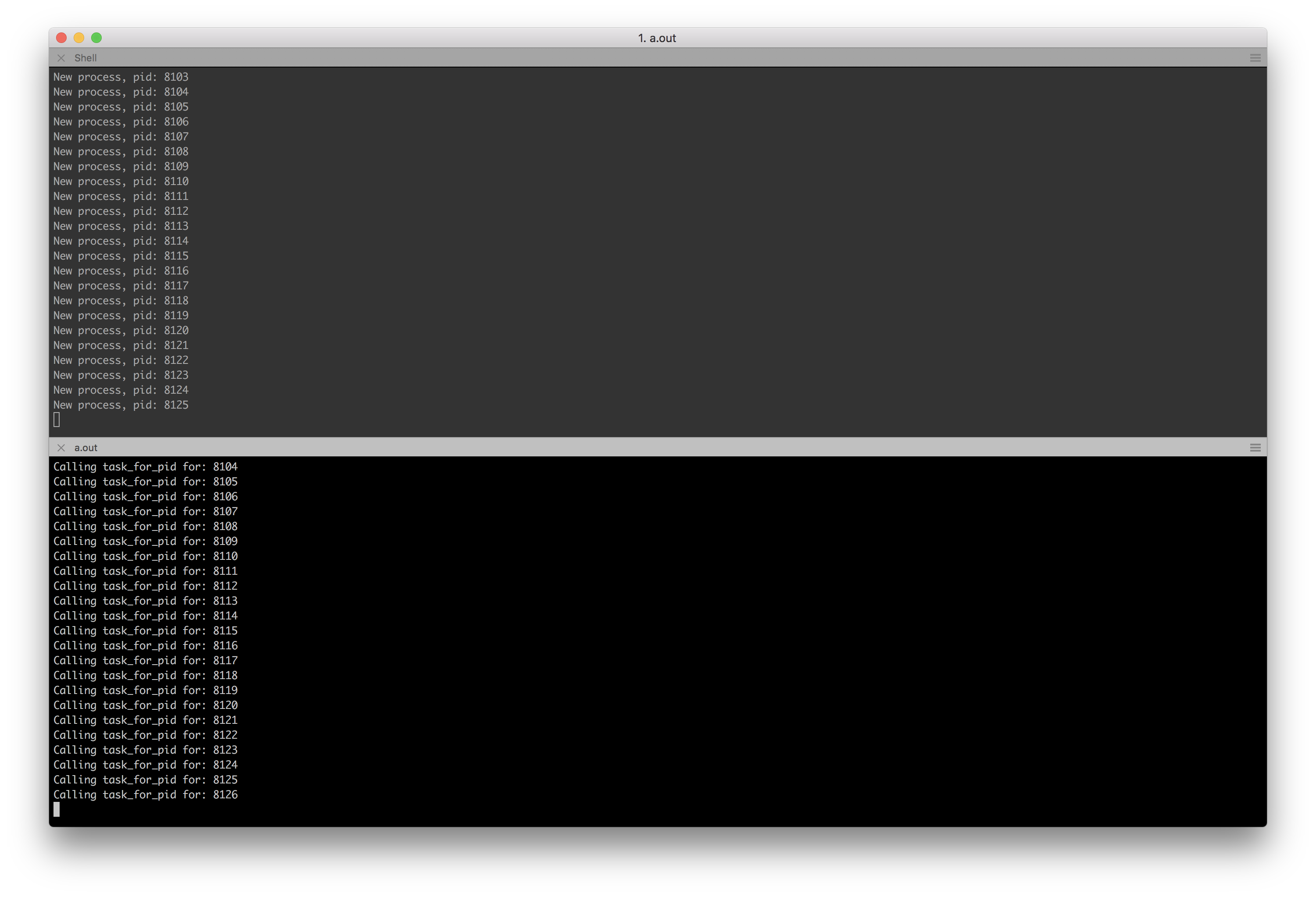
I looked into this a bit more, it's a race condition in task_for_pid in combination with spawning processes. I changed my POC to print the pid before calling task_for_pid and also print the pid in the spawned processes. The freeze happens when task_for_pid is called for a process that was either just spawned or just terminated:
I filed a bug with Apple for this.
grrrrrrrrr
on 6 Jan 2018
Thanks @grrrrrrrrr! I thought taskgated is to blame, since thread backtrace looks like this to me while using kernel remote debugging:
* thread #5, name = '0xffffff8011f0fca0', queue = '0x0'
    frame #0: 0xffffff80005a54e3 kernel.debug`machine_switch_context(old=0xffffff8011f0fca0, continuation=0x0000000000000000, new=0xffffff800ff8f650) at pcb.c:458
    frame #1: 0xffffff80003e0870 kernel.debug`thread_invoke(self=0xffffff8011f0fca0, thread=0xffffff800ff8f650, reason=0) at sched_prim.c:2442
    frame #2: 0xffffff80003def3b kernel.debug`thread_block_reason(continuation=0x0000000000000000, parameter=0x0000000000000000, reason=0) at sched_prim.c:2980
    frame #3: 0xffffff80003dd08b kernel.debug`thread_block(continuation=0x0000000000000000) at sched_prim.c:2996
    frame #4: 0xffffff80003865f9 kernel.debug`ipc_mqueue_receive(mqueue=0xffffff800de6b878, option=0, max_size=4294967295, rcv_timeout=0, interruptible=1) at ipc_mqueue.c:935
    frame #5: 0xffffff80003bdfa6 kernel.debug`mach_msg_rpc_from_kernel_body(msg=0xffffff8988d3bd50, send_size=52, rcv_size=52, legacy=0) at ipc_mig.c:427
    frame #6: 0xffffff80003bdb73 kernel.debug`mach_msg_rpc_from_kernel_proper(msg=0xffffff8988d3bd50, send_size=52, rcv_size=52) at ipc_mig.c:338
    frame #7: 0xffffff8000453902 kernel.debug`check_task_access(task_access_port=0xffffff800dce6040, calling_pid=582, calling_gid=20, target_pid=653) at task_access_user.c:229
    frame #8: 0xffffff8000c3e817 kernel.debug`__KERNEL_WAITING_ON_TASKGATED_CHECK_ACCESS_UPCALL__(task_access_port=0xffffff800dce6040, calling_pid=582, calling_gid=20, target_pid=653) at vm_unix.c:751
  * frame #9: 0xffffff8000c3ec29 kernel.debug`task_for_pid(args=0xffffff8988d3bf40) at vm_unix.c:828
    frame #10: 0xffffff80005885b1 kernel.debug`mach_call_munger64(state=0xffffff8014116fc0) at bsd_i386.c:573
    frame #11: 0xffffff80005d1466 kernel.debug`hndl_mach_scall64 + 22
Would you elaborate more about race condition in task_for_pid? Or is there something I got wrong?
evanslify
on 6 Jan 2018
Has anyone tried codesigning htop to see if it helps?
taskgated(8)
     -s       Allow signed applications marked as "safe" to have free access to task
              ports, without having to pass an authorization check. Note that such callers
              must be marked both allowed and safe.
So it might alter behavior, which could explain why e.g. Activity Monitor isn't having the same impact on people's systems.
ilovezfs
on 7 Jan 2018
Signing htop with a developer certificate doesn't fix this issue. I haven't figured out how to give it the SecTaskAccess entitlement yet; every time I try to run it it crashes with EXC_CRASH (Code Signature Invalid).
saagarjha
on 8 Jan 2018
@grrrrrrrrr What is the Apple ticket number / url?
 davidscott-turner
on 8 Jan 2018
davidscott-turner
on 8 Jan 2018
@davidscott-turner I filed a bug at https://bugreport.apple.com/web/?problemID=36335339 but not sure if this is publicly accessible?
bugreport is not a good place to report kernel issues though so I also contacted apple security to make sure a human looks at the report.
grrrrrrrrr
on 8 Jan 2018
Yeah, unfortunately Radars are not publicly accessible. You could try copying it Open Radar, though.
saagarjha
on 8 Jan 2018
Wow, I just stumbled upon this thread after a friend of mine noticed homebrew's complaints. I can't believe the insanity people are describing here. I've left sudo htop running for weeks without even a hint of a problem. I'm currently on 10.13.2 and I've been using htop since High Sierra beta so this is really bizarre to me.
 ylluminarious
on 9 Jan 2018
ylluminarious
on 9 Jan 2018
@ylluminarious Same here. I've been using it daily without any issues. I wonder what's different since others are seeing crashes?
 externl
on 9 Jan 2018
externl
on 9 Jan 2018
@externl Well, I know that one thing in my setup which is often frowned upon is that I've completely disabled SIP. I have no idea whether that could be causing the issue or not, but I bet that most people here are using SIP whereas I am not.
ylluminarious
on 9 Jan 2018
@ylluminarious Ah, well that would probably explain it since the issue seems to be related to signing. I have SIP enabled, maybe I just don't leave htop running long enough?
externl
on 9 Jan 2018
@externl AFAIK, SIP is not related to code-signing. However, I have also completely disabled Gatekeeper, to the extent possible. Gatekeeper is in charge of enforcing code-signing, so that would make more sense with what you're saying.
ylluminarious
on 9 Jan 2018
@ylluminarious For me, the issue happens only when you run htop without sudo.
nitingupta910
on 9 Jan 2018
@nitingupta910 I have not used plain htop for considerable lengths of time, since sudo htop is the one with my settings. I am reluctant to test whether sudo makes a difference, since I have a lot of work open right now and I don't want to reboot.
ylluminarious
on 9 Jan 2018
@ylluminarious sudo does make a difference. I can reproduce the crash easily when not using sudo. On the other hand, I do use htop __with__ sudo all the time without any problems.
When running without sudo, you should be able to provoke the crash happening fairly reliably by spawning processes in an infinite loop, as @evanslify pointed out earlier: while true; do sh -c "exit 0"; done.
anothernode
on 9 Jan 2018
brew install htop
htop: This formula either does not compile or function as expected on macOS
versions newer than Sierra due to an upstream incompatibility.
Error: An unsatisfied requirement failed this build.
 Mirocow
on 9 Jan 2018
Mirocow
on 9 Jan 2018
brew install https://raw.githubusercontent.com/Homebrew/homebrew-core/master/Formula/htop.rb
Updating Homebrew...
==> Auto-updated Homebrew!
Updated 1 tap (homebrew/core).
==> Updated Formulae
awscli
################################################################## 100.0%
htop: This formula either does not compile or function as expected on macOS
versions newer than Sierra due to an upstream incompatibility.
Error: An unsatisfied requirement failed this build.
Mirocow
on 9 Jan 2018
@Mirocow try to go through thread before posting something which was already discussed.
Situation you're describing is related to homebrew, so it is here: https://github.com/Homebrew/homebrew-core/pull/22479
 sanyer
on 9 Jan 2018
sanyer
on 9 Jan 2018
@Mirocow You can do brew pin htop to silence the complaints from homebrew. @nodesocket and @jpwenzel had similar questions at this thread, but one of the homebrew maintainers deleted my suggestion to brew pin htop. I guess they don't want people filing tickets to homebrew about this issue, although I think that pinning the formula is a better alternative than uninstalling.
ylluminarious
on 9 Jan 2018
brew pin is a super bad idea here. Please don't recommend it.
ilovezfs
on 9 Jan 2018
@ilovezfs How so?
ylluminarious
on 9 Jan 2018
When the actual fix comes along there will be no mechanism other than manually noticing and unpinning to get that upgrade. Just brew install htop --ignore-dependencies if you must have it now.
ilovezfs
on 9 Jan 2018
@ilovezfs Ok, I had not thought of --ignore-dependencies. That's not a bad solution. Still, I did not think it would be hard to remember to unpin the formula after the fix is found. I figured everyone with this issue would be following the situation for a fix. Apologies if I caused any difficulty with my suggestion.
ylluminarious
on 9 Jan 2018
@ylluminarious no worries.
ilovezfs
on 9 Jan 2018
Also note there's no need to uninstall now that https://github.com/Homebrew/brew/pull/3644 is merged.
ilovezfs
on 9 Jan 2018
@ilovezfs That's good news, thanks for letting us know.
ylluminarious
on 9 Jan 2018
@ilovezfs Added an update to my pin comment. Let me know if it'd be better to remove the text instead of overstriking it.
vszakats
on 9 Jan 2018
FWIW: I'm having the same problems as described here (terminal crash, activity monitor stopped working, ps, pgrep, top, etc stopped working as well), but I didn't had htop open when it happens. I was running go (particularly, go run main.go).
 caarlos0
on 9 Jan 2018
caarlos0
on 9 Jan 2018
@caarlos0 What specifically was the go script doing/do you have source?
 tyduptyler13
on 9 Jan 2018
tyduptyler13
on 9 Jan 2018
@tyduptyler13 my mistake, I had htop open in a hidden iterm panel apparently... (discovered that after restarting and opening iterm again, which them showed what it had open before)
caarlos0
on 10 Jan 2018
Wow, lots of discussions recently.
Given that running as root works flawlessly, I think one can just do either of:
alias htop='sudo htop'sudo chown root /usr/local/bin/htop && sudo chmod u+s /usr/local/bin/htop
The 2nd option is what top uses, please make sure you understand the security implications first. Source: https://github.com/hishamhm/htop/wiki/macOS%3A-run-without-sudo (credit: @wataash).
 ryenus
on 10 Jan 2018
ryenus
on 10 Jan 2018
About options from @ryenus: As htop can kill processes, send signals, set priority, affinity etc., make sure you're aware of all security implications when you set htop as setuid.
 dos1
on 10 Jan 2018
dos1
on 10 Jan 2018
So glad I'm not the only one having this issue -- I just noticed it 3-4 weeks ago and was contemplating installing Linux on my MBP out of frustration (at which pointed I'd lose my iPhone backups, so it wasn't ideal).
Seems running htop as root is the current workaround so I'll just roll with that for now. Thanks everyone involved.
 agoree407
on 11 Jan 2018
agoree407
on 11 Jan 2018
➜ vifile >brew upgrade
Updating Homebrew...
==> Upgrading 1 outdated package, with result:
htop 2.0.2_1
htop: This formula either does not compile or function as expected on macOS
versions newer than Sierra due to an upstream incompatibility.
Error: htop: An unsatisfied requirement failed this build.
➜ vifile >
➜ vifile >
➜ vifile >sw_vers -productVersion
10.13.2
➜ vifile >
 LeoDemon
on 13 Jan 2018
LeoDemon
on 13 Jan 2018
This is intentional, see https://github.com/Homebrew/brew/pull/3644.
saagarjha
on 13 Jan 2018
Adding to @ryenus and @dos1's comments, make sure not to chmod u+s htop on a server (e.g. iOS CI machine). At least sudo doesn't bypass security checks.
 jcayzac
on 16 Jan 2018
jcayzac
on 16 Jan 2018
Same symptoms as @fykuan described in 2nd comment.
But I noticed same terminal.app hangs not only with htop.
For the 1st time I noticed it with brew cask uninstall chefdk. Today I had the same problem after disconnecting from docker container with CTRL+D. I remember I also had this in other situations on my both Macs with Sierra and after clean High Sierra installation.
 gavvvr
on 22 Jan 2018
gavvvr
on 22 Jan 2018
Didn't read all the comments - is there a "fix" yet?
 black-snow
on 22 Jan 2018
black-snow
on 22 Jan 2018
@gavvvr yup, mostly triggered by htop (not in root mode). but also had term crashing with a simple git status. well, as described it's a high sierra bug.
 embano1
on 22 Jan 2018
embano1
on 22 Jan 2018
Still waiting for the fixing...
 seagle0128
on 22 Jan 2018
seagle0128
on 22 Jan 2018
As this clearly is a macOS bug, everybody affected here should report this problem to Apple via https://bugreport.apple.com/. Find some more information here: https://developer.apple.com/bug-reporting/
Mention in your bug report that "this is a duplicate of rdar://36335339" so the engineers more efficiently can process them. (as per https://github.com/hishamhm/htop/issues/682#issuecomment-356081420). This is how you "vote" for bugs in macOS. It works. The more people file the bug via this way the more likely and the faster Apple fixes it. Just commenting here doesn't help anything or anybody.
 kommen
on 22 Jan 2018
kommen
on 22 Jan 2018
Interestingly I installed htop 2.0.2 before I upgraded and now on High Sierra 10.13.2 htop works without any issue but it won't upgrade to htop 2.0.2_1
 exadeci
on 23 Jan 2018
exadeci
on 23 Jan 2018
Is the issue still present on High Sierra 10.13.3?
 m1h4
on 24 Jan 2018
m1h4
on 24 Jan 2018
@m1h4 ~already updated, htop is running for 30 minutes and I dont see issue~
after another 30 minutes I`ve got this issue
 podhy
on 24 Jan 2018
podhy
on 24 Jan 2018
@m1h4 it is =(
 yevhen-m
on 25 Jan 2018
yevhen-m
on 25 Jan 2018
I'm on macOS 10.13.2 and htop 2.0.2. I haven't been able to reproduce this issue, oddly enough. Is this specific to particular hardware or something? My hardware:
- MacBook Pro (13-inch, Late 2016, Four Thunderbolt 3 Ports)
- Intel(R) Core(TM) i5-6267U CPU @ 2.90GHz
- 8 GB 2133 MHz LPDDR3
I have some slightly older devices on which I haven't tested this. I'll give it a try when I get a chance to see if the hardware makes a difference.
I'm installing 10.13.3; if anything changes, I'll report back.
 Zenexer
on 28 Jan 2018
Zenexer
on 28 Jan 2018
@kommen Care to add rdar://36335339 to OpenRadar?
Zenexer
on 28 Jan 2018
@Zenexer Most users experience problems after keeping htop running for longer periods of time.
 robertszewczyk
on 28 Jan 2018
robertszewczyk
on 28 Jan 2018
Possibly related: https://jvns.ca/blog/2018/01/28/mac-freeze/
 wodin
on 28 Jan 2018
wodin
on 28 Jan 2018
Has anyone tried reproducing this on macOS High Sierra 10.13.4 Beta (17E139j)? I'm not able to anymore.
saagarjha
on 29 Jan 2018
@wodin Thanks for sharing that article. It's good that someone is trying to get to the root of the problem. Here is the implementation of task_for_pid in XNU, in case anyone wants to dig deeper.
ylluminarious
on 29 Jan 2018
I got an update from Apple about the bug I filed:
We forwarded your report to the appropriate team and our latest beta of macOS High Sierra 10.13.4 addresses the issue.
grrrrrrrrr
on 29 Jan 2018
@robertszewczyk I left it running overnight on 10.13.3, and it didn't crash. I'm going to play around with the example at the link @wodin posted; maybe I can uncover something relevant.
Zenexer
on 30 Jan 2018
@Zenexer Interesting. Are you on Beta of macOS? PLease see answer from @grrrrrrrrr. Looks like remedy from Apple is soon to come.
robertszewczyk
on 30 Jan 2018
@robertszewczyk No; I was unable to reproduce it on 10.13.2 or 10.13.3 (both stable). However, the example linked by wodin does cause a crash.
Zenexer
on 30 Jan 2018
@Zenexer Paul. As we don't know the root cause of the issue I would recommend to wait up for Apple to release new version. I honestly have no idea why is it happening. I wish I could help.
robertszewczyk
on 30 Jan 2018
If I leave htop open with fork/exec running in a loop, it seems as though it does eventually crash. I guess I just didn't have enough processes starting. Not looking for a solution, since Apple fixed it; I'm digging because I'm curious.
Zenexer
on 30 Jan 2018
$ brew install htop
htop: This formula either does not compile or function as expected on macOS
versions newer than Sierra due to an upstream incompatibility.
Error: An unsatisfied requirement failed this build.
 h0wardch3ng
on 30 Jan 2018
h0wardch3ng
on 30 Jan 2018
Same boat. Of all days to get a new server…
 JacobSyndeo
on 31 Jan 2018
JacobSyndeo
on 31 Jan 2018
Though I'm not collaborator of this repository, but I urge anyone having issues with brew install htop: Please hold the temptation of replying to this thread about this issue anymore. Go through the entire thread before posting another new reply about homebrew not installing htop.
Previous replies in this threads made it very clear: _htop crashes on current version of macOS_
And that's what the error message says.
This would get resolved _after_ the issue is fixed. You can brew install htop until then. Not now. Posting another reply about this in this thread would also not make that patch from Apple lands sooner.
TL;DR: Apple caused regression in a recent version, causing htop to crash so homebrew would refuse to install in order to not crash your mac
evanslify
on 31 Jan 2018
I just had htop (plus the while true; do sh -c "exit 0"; done loop) running in a Fusion VM with the High Sierra 10.13.4 public beta for about 2 hours without a crash. On 10.13.3 and earlier this test fairly reliably crashed my VM within about 10 minutes at most. So, to me it looks like Apple really fixed the root cause.
Kudos to everyone here who contributed to the investigation, reported to Apple etc... You rock! Thanks a lot!
anothernode
on 31 Jan 2018
I have backported https://github.com/hishamhm/htop/commit/b2771218 to 2.0.2 in https://github.com/Homebrew/homebrew-core/pull/23674 so if you
brew update
You should now be able to
brew install htop
or
brew upgrade htop
Anyone who used brew pin should
brew unpin htop
brew update
brew upgrade htop
After this got fixed in upstream, would we just uncomment these lines then?
On Sun, Feb 4, 2018 at 22:43 ilovezfs notifications@github.com wrote:
I have backported b277121
https://github.com/hishamhm/htop/commit/b2771218 to 2.0.2 in
Homebrew/homebrew-core#23674
https://github.com/Homebrew/homebrew-core/pull/23674 so if youbrew update
You should now be able to
brew install htop
or
brew upgrade htop
Anyone who used brew pin should
brew unpin htop
brew update
brew upgrade htop—
You are receiving this because you were mentioned.
Reply to this email directly, view it on GitHub
https://github.com/hishamhm/htop/issues/682#issuecomment-362911592, or mute
the thread
https://github.com/notifications/unsubscribe-auth/AMeDEn55-H0rP9HNAeqzRG_4uDyFoZoLks5tRcIkgaJpZM4PjlCW
.
evanslify
on 4 Feb 2018
@evanslify 2.1.0 with https://github.com/hishamhm/htop/commit/b2771218 baked in is expected later today so we'll need a reverse patch at that point to walk the changes back assuming that's what @hishamhm wants to do.
ilovezfs
on 4 Feb 2018
I just made a quick fix not to affect people not having high Sierra https://github.com/hishamhm/htop/pull/728
 pmalhaire
on 4 Feb 2018
pmalhaire
on 4 Feb 2018
@hishamhm In https://github.com/hishamhm/htop/commit/b2771218, it appears that you disabled thread scanning completely on macOS. Yet, some people are saying that this bug in XNU has been fixed by Apple in 10.13.4. Perhaps, rather than commenting out those lines, you should make a conditional which only disables thread scanning on versions of High Sierra below 10.13.4.
ylluminarious
on 5 Feb 2018
On Friday I installed 10.3.4 Beta (17E139j) and had htop 2.0.2 running all weekend (non-sudo) with no issue. So I concur that the workaround is only needed with 10.3.3.
 dylanmc
on 5 Feb 2018
dylanmc
on 5 Feb 2018
@ylluminarious @dylanmc I did as told.
pmalhaire
on 5 Feb 2018
What is the value of sysctl kern.osrelease on 10.13.4?
ilovezfs
on 6 Feb 2018
kern.osrelease: 17.5.0.
saagarjha
on 6 Feb 2018
Thanks @saagarjha I fixed my PR
pmalhaire
on 6 Feb 2018
Although it is nice that this has now been fixed so that I can use htop without sudo in HS, here is the workaround I used in my aliases dotfile which is sourced by my shell profile scripts that works nicely in a pinch in situations such as these.
if [[ "$(uname -a)" =~ "Darwin Kernel Version 17" ]]; then
    alias htop="sudo htop" # or other appropriate mitigation
fi
Edit: I'm not saying that you should do this... I just think it made sense at the time because it will always prompt for password on only the affected platform, and once the storm calms, the band-aid can be cleanly ripped off... feel free to downvote away, I'd downvote these mitigations myself too.
Admittedly a better check would be to test on htop's version. So I should have done that instead, definitely.
Edit: The patched 2.0.2_2 version from homebrew doesn't actually report a different version number when you ask it. 😞
 unphased
on 12 Feb 2018
unphased
on 12 Feb 2018
@neverpanic, would you be able to pull some of this great work into MacPorts? The latest version of htop there is still the problematic 2.0.2 and you're listed as the maintainer if I understood the Github mapping correctly.
 Smattr
on 8 Mar 2018
Smattr
on 8 Mar 2018
@Smattr https://github.com/macports/macports-ports/commit/39e819234eda9ea8b8d1ee12d68b84ad7652f570, thanks for the reminder.
 neverpanic
on 9 Mar 2018
neverpanic
on 9 Mar 2018
2.1.0 homebrew version crashes on 10.13.3 at least without sudo again reproducible for me
(maybe @ilovezfs )
ghost
on 28 Mar 2018
@monouser7dig can you test this please?
diff --git a/Formula/htop.rb b/Formula/htop.rb
index 1b70288..db81354 100644
--- a/Formula/htop.rb
+++ b/Formula/htop.rb
@@ -1,6 +1,7 @@
 class Htop < Formula
   desc "Improved top (interactive process viewer)"
   homepage "https://hisham.hm/htop/"
+  revision 1

   stable do
     url "https://hisham.hm/htop/releases/2.1.0/htop-2.1.0.tar.gz"
@@ -35,6 +36,9 @@ class Htop < Formula
   depends_on "ncurses" => :optional

   def install
+    inreplace "darwin/DarwinProcessList.c",
+              "CompareKernelVersion(17, 5, 0) < 0",
+              "CompareKernelVersion(17, 5, 0) > 0"
     system "./autogen.sh" if build.head?
     system "./configure", "--prefix=#{prefix}"
     system "make", "install"
and brew upgrade -s htop
ilovezfs
on 28 Mar 2018
thanks for the patch
> brew upgrade -s htop
Updating Homebrew...
==> Auto-updated Homebrew!
Updated 1 tap (homebrew/core).
==> Updated Formulae
amber

==> Upgrading 1 outdated package, with result:
htop 2.1.0_1
==> Upgrading htop
==> Downloading https://hisham.hm/htop/releases/2.1.0/htop-2.1.0.tar.gz
######################################################################## 100.0%
==> Downloading https://github.com/hishamhm/htop/commit/52e2884f.patch?full_index=1
######################################################################## 100.0%
==> Patching
==> Applying 52e2884f.patch
patching file darwin/DarwinProcessList.c
==> ./configure --prefix=/usr/local/Cellar/htop/2.1.0_1
==> make install
==> Caveats
htop requires root privileges to correctly display all running processes,
so you will need to run `sudo htop`.
You should be certain that you trust any software you grant root privileges.
==> Summary
🍺  /usr/local/Cellar/htop/2.1.0_1: 11 files, 187.2KB, built in 21 seconds
while true; do sh -c "exit 0"; done crashed immediately but apart from that it runs for a few minutes just fine without a crash so far so I guess it's probably not perfect but maybe better, 3.0 is round the corner so just see how it evolves ....
Edit: two minutes later freezes so it‘s not actually better 😆 sorry
ghost
on 28 Mar 2018
@ilovezfs @hishamhm I was concerned by @monouser7dig's comments above so I decided to test it out myself. And wow, what an awful bug to experience. Even after @pmalhaire's patch and using htop 2.1.0 from homebrew, this bug definitely still exists. After leaving an unprivileged htop process running for about an hour or so (on a system running 10.13.3), I definitely saw the same symptoms described above.
The kernel becomes terribly unresponsive, and even networking stops functioning. A reboot seems completely impossible, from the menu, from Cmd + Option + Eject, and even from holding in the power button for 1.5 seconds. Truly, a hard reset seems to be the only recourse. Even with APFS, I am still wary about effects on the filesystem from such an act. Anyway, I would say that htop needs a serious warning in homebrew saying that sudo must be used or else you will crash your system in a terribly unpleasant way. Either that or a new fix must be proposed or htop must simply not be run on High Sierra versions lower than 10.13.4.
ylluminarious
on 29 Mar 2018
@ylluminarious I'm assuming you didn't test with what I suggested above.
ilovezfs
on 29 Mar 2018
@ilovezfs I did not because of @monouser7dig's remarks, saying that the patch seemed ineffective:
while true; do sh -c "exit 0"; done crashed immediately but apart from that it runs for a few minutes just fine without a crash so far so I guess it's probably not perfect but maybe better, 3.0 is round the corner so just see how it evolves ....
Edit: two minutes later freezes so it‘s not actually better 😆 sorry
ylluminarious
on 29 Mar 2018
@ylluminarious it's likely HOMEBREW_DEVELOPER is not set for him and brew update reverted the change. Please test what I suggested.
ilovezfs
on 29 Mar 2018
@ilovezfs Hmm... ok, but I must test it in a virtual machine. The last test I performed was on real hardware (my own real hardware) and I cannot afford another setback like that today. I was hoping that @monouser7dig's issues would have been isolated and that I would not experience the same issue, but I was wrong. So I will have to test in a virtual machine to be on the safe side in case your newest patch goes awry.
ylluminarious
on 29 Mar 2018
@ylluminarious I'm reverting the patch from https://github.com/hishamhm/htop/pull/728 for now until this is sorted out: https://github.com/Homebrew/homebrew-core/pull/25887
ilovezfs
on 29 Mar 2018
fwiw it's actually still the same as I modified it checked using brew edit htop
ghost
on 29 Mar 2018
What a horrible bug; I can't believe XNU's got such a glaring problem. I'd rather blame anything BUT the kernel… but really, NO userland code (ESPECIALLY unprivileged userland code) should be able to wreck such havoc on it. It should have protections against whatever code in htop is inadvertently causing this. From what I understand, Apple's patched this in 10.13.4, right?
JacobSyndeo
on 29 Mar 2018
@monouser7dig Could you clarify exactly what you mean? What is "still the same"? And what did you modify? What did you check? Sorry, your statement is just a little brief and I'm sure we would all like as much clarity as possible right now.
ylluminarious
on 29 Mar 2018
@monouser7dig OK. For you,
brew uninstall htop
git -C "$(brew --repo homebrew/core)" reset --hard
brew update
brew install htop
which should download and install the new bottle without the patch from https://github.com/hishamhm/htop/pull/728.
ilovezfs
on 29 Mar 2018
@JacobSyndeo Yes, according to others above, Apple has seemingly fixed this in 10.13.4. We are now worrying about users of previous versions of High Sierra since 10.13.4 hasn't even been released yet.
ylluminarious
on 29 Mar 2018
thanks ilovezfs!
(figured it out using cd /usr/local/Homebrew/Library/Taps/homebrew/homebrew-core/Formula[master] and reset hard 😆 always an adventure using the homebrew folder/ link structure)
Apple has seemingly fixed this in 10.13.4
I think it's all good if that is the case 😄 let's see how htop 3 breaks It again, or not 😃
ghost
on 29 Mar 2018
@ilovezfs Hmm... so I tried to test things out earlier as you requested but I couldn't get the bug to happen at all in a VM. Even without your patch, I simply could not get the bug to happen. Even with the while true; do sh -c "exit 0"; done command, I could not get the system to hang or crash as it did on my real hardware. I am afraid to test out your patch outside of a VM, even on other hardware of mine since APFS is still relatively new, and although crash-protection is supposed to be in place now, I have been bitten by crashes before so I prefer to keep that feature in reserve for when an actual power outage occurs. I am afraid that someone else will have to test it unless there is a very confident assurance that someone can give that the new patch will actually work.
ylluminarious
on 29 Mar 2018
@ylluminarious see https://github.com/hishamhm/htop/pull/728#issuecomment-377116573
ilovezfs
on 29 Mar 2018
@ilovezfs Thanks, I'll chime in there.
ylluminarious
on 29 Mar 2018
fwiw macOS 11.13.4 (just released) with homebrew htop 2.1.0 works for me for over 1h now and even with while true; do sh -c "exit 0"; done
_btw. I had no data loss whatsoever with APFS yet even though the crashes with htop or anything but if you want to be better safe than sorry.._
ghost
on 30 Mar 2018
same, latest htop has been running smooth for over 12 hours on 10.13.4, no issues
JudeQuintana
on 30 Mar 2018
FYI the problematic feature is entirely disabled in 2.1.0, so those results are not surprising. I don't doubt that it's fixed in 10.13.4, but still.
ilovezfs
on 30 Mar 2018
Something I haven't seen discussed here, on #728, or #772 is that the problematic function at the root of this, task_for_pid, is marked obsolete in the Mach headers (mach/mach_traps.h). While the underlying cause may have been a kernel bug, it seems clear Apple themselves are not using this function. Perhaps they even intend to remove it in future. Should htop move to using a different interface for this functionality?
For reference, top on macOS does the reverse; tracks PIDs and uses pid_for_task. Having said that, pid_for_task also falls in the obsolete section in the Mach headers.
Smattr
on 31 Mar 2018
@Smattr If that function is obsolete, what is the recommended alternative?
ylluminarious
on 31 Mar 2018
Apple themselves are not using this function
No, they very much are. See for example LLDB. There really is no replacement for task_for_pid that I'm aware of.
saagarjha
on 31 Mar 2018
It's common for apple to deprecate api with no alternative. The team in charge of the kernel seems to be too small.
pmalhaire
on 31 Mar 2018
task_for_pid is a critical component of XNU, though. It’s used heavily throughout the system.
saagarjha
on 31 Mar 2018
I thought the problem to blame is within taskgated?
evanslify
on 2 Apr 2018
@evanslify It seems to be a mixed problem... both DarwinProcess_scanThreads and unelevated privileges are what cause the problem, but it must happen with both together, not separated.
ylluminarious
on 2 Apr 2018
@ilovezfs @hishamhm @pmalhaire Looks like #772 fixes the problem for good and resolves the issues which I reported while testing @pmalhaire's initial patch in #728.
ylluminarious
on 2 Apr 2018
@ilovezfs @hishamhm Just in case my above comment isn't clear: I left htop running for 4 hours on 10.13.3 with @pmalhaire's patch in #772 and I didn't crash. His patch should be merged.
ylluminarious
on 4 Apr 2018
Installs with homebrew on high sierra and works!
 mschwartz
on 8 Apr 2018
mschwartz
on 8 Apr 2018
@hishamhm, I compiled 2.1.0 and haven't had any issues whatsoever since running for over 48 hours in addition to while true; do sh -c "exit 0"; done.
$ sw_vers
ProductName:    Mac OS X
ProductVersion: 10.13.4
BuildVersion:   17E199
$ ./htop -v
htop 2.1.0 - (C) 2004-2018 Hisham Muhammad
Released under the GNU GPL.
If I encounter anything I'll be sure to report back; I'm curious also about the MacPorts version too, so I'll install that later today and report back the result — cheers!
dylib
on 10 Apr 2018
@hishamhm If you want to, I think this issue could (should) be closed now. With the release of macOS 10.13.4 and htop 2.2.0, I think we're out of the woods with this nasty bug.
ylluminarious
on 14 Apr 2018
+1, If we cannot reproduce this anymore and there's no new reports related to this issue, than we can close this.
evanslify
on 10 May 2018
@neverpanic FYI, while this is still open, you might want to update the htop Macport once again to 2.2.0.
ylluminarious
on 10 May 2018
@neverpanic Thanks! Just noticed the update.
ylluminarious
on 12 May 2018
For everyone experiencing this on remote ssh hosts:
Removing this line from /etc/ssh/sshd_config:
AcceptEnv LANG LC_*
fixed it for me.
 Paulomart
on 15 Sep 2019
Paulomart
on 15 Sep 2019
@Paulomart, that's sort of a hackish solution. Instead of preventing those variables from being set, you should either install the correct locale on the remote host or choose a locale that your remote host already has.
Additionally, this issue is for htop running locally, not on a remote host; any problems you're experiencing as a result of an incorrect locale are most likely not related to the issue described here.
Zenexer
on 15 Sep 2019
Related issues
 kcgthb
·
8Comments
kcgthb
·
8Comments
 edouard-lopez
·
5Comments
edouard-lopez
·
5Comments
 grantwwu
·
3Comments
grantwwu
·
3Comments
 nuno-agostinho
·
6Comments
edouard-lopez
·
3Comments
nuno-agostinho
·
6Comments
edouard-lopez
·
3Comments
Most helpful comment
Another interesting aspect of this bug is that, after
htopcrashes, and locks the terminal app... theActivity Monitor.appfails to load and render processes as well!