Html: Default 'display' value for form controls
Test: http://software.hixie.ch/utilities/js/live-dom-viewer/saved/6270
Element | Chrome | Firefox | Edge | Safari
---|---|---|---|---
<select></select> | inline-block | inline-block | inline-block | inline-block
<button></button> | inline-block | inline-block | inline-block | inline-block
<input type=text> | inline-block | inline | inline-block | inline-block
<input type=search> | inline-block | inline | inline-block | inline-block
<input type=tel> | inline-block | inline | inline-block | inline-block
<input type=url> | inline-block | inline | inline-block | inline-block
<input type=email> | inline-block | inline | inline-block | inline-block
<input type=password> | inline-block | inline | inline-block | inline-block
<input type=date> | inline-flex | inline | inline-block | inline-block
<input type=month> | inline-flex | inline | inline-block | inline-block
<input type=week> | inline-flex | inline | inline-block | inline-block
<input type=time> | inline-flex | inline | inline-block | inline-block
<input type=datetime-local>| inline-flex | inline | inline-block | inline-block
<input type=number> | inline-block | inline | inline-block | inline-block
<input type=range> | inline-block | inline-block | inline-block | inline-block
<input type=color> | inline-block | inline | inline-block | inline-block
<input type=checkbox> | inline-block | inline-block | inline-block | inline-block
<input type=radio> | inline-block | inline-block | inline-block | inline-block
<input type=file> | inline-block | inline-block | inline-block | inline-block
<input type=submit> | inline-block | inline | inline-block | inline-block
<input type=image> | inline-block | inline | inline-block | inline-block
<input type=reset> | inline-block | inline | inline-block | inline-block
<input type=button> | inline-block | inline | inline-block | inline-block
Should all of them be inline-block?
cc @tkent-google @MatsPalmgren @jwatt @bzbarsky @thejohnjansen @cdumez
 zcorpan
All 46 comments
There are also rendering differences around underline propagation into text controls: Firefox doesn't do it even if display: inline is set (which is the default), while Chrome, at least, does.
Is there any other aspect of rendering that would be different for inline-block vs inline here?
Apart from that, it's mostly OK to set these inline-block, I guess. One exception is image inputs with alt text when the image load fails. Having those be inline-block could easily lead to unreadable alt text, no?
Also interested in whether @dbaron has thoughts.
 bzbarsky
on 10 Oct 2018
bzbarsky
on 10 Oct 2018
I don't think there's anything else rendering-wise.
Good point about alt text. I need to test that, but it could make sense to make type=image inline by default.
zcorpan
on 10 Oct 2018
https://html.spec.whatwg.org/multipage/rendering.html#images-3 says input type=image should be rendered as a button, but browsers don't do that. It seems better for users to do that though. Is there interest in changing this in implementations?
Firefox renders the alt text inline (like it does for img). Edge, Chrome, Safari render as inline-block, honoring any specified dimensions. In Safari, the other dimension is based on the aspect ratio of the rendered alt text, which seems... weird. The text is not rendered at all if it doesn't fit.
http://software.hixie.ch/utilities/js/live-dom-viewer/saved/6273
zcorpan
on 11 Oct 2018
For users, the best thing is if alt text does not get cut off, no?
bzbarsky
on 11 Oct 2018
I'd expect both, not cut off and rendered as a button (when displaying alt).
 annevk
on 11 Oct 2018
annevk
on 11 Oct 2018
How do you expect to work for long alt text, especially when there are size styles on the element?
bzbarsky
on 11 Oct 2018
As an inline (which ignores size styling I think). (That seems like the ideal behavior, given that we can get away with displaying alt text inline.)
annevk
on 11 Oct 2018
Right, but you can't really render an inline "as a button" once it's line-wrapping, since buttons don't do that.
bzbarsky
on 11 Oct 2018
Somewhat related, I think we need a spec for ::before/::after pseudos on form controls: #4086.
 MatsPalmgren
on 11 Oct 2018
MatsPalmgren
on 11 Oct 2018
https://html.spec.whatwg.org/multipage/rendering.html#images-3 says input type=image should be rendered as a button
It seems that this point applies only in some special cases when the image has not loaded. One of these cases is Quirks mode, and at least Firefox in Quirks mode seems to display non-loaded image button pretty "button-like" (although it reports its border-style as none):
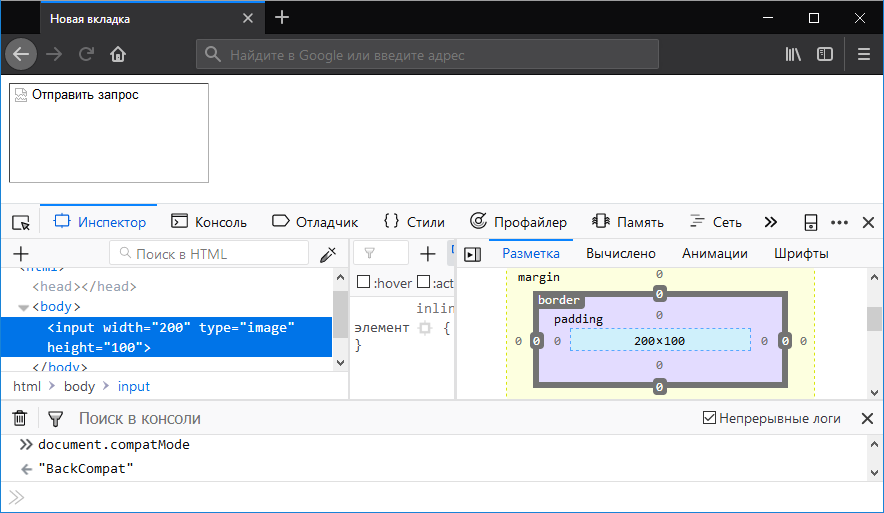
Chrome in Quirks mode renders it similarly, but with uniform border color. Unfortunately, I was not able to get this rendering in Standards mode, despite setting no alt attribute.
 SelenIT
on 29 Oct 2018
SelenIT
on 29 Oct 2018
It seems that this point applies only in some special cases when the image has not loaded.
No, you're looking at the wrong point. Per https://html.spec.whatwg.org/multipage/input.html#image-button-state-(type=image) we have:
The input element represents either an image from which a user can select a coordinate and submit the form, or alternatively a button from which the user can submit the form.
and then further makes it clear that the "represents a button" case is all cases when the image is not available. And then we end up in the _last_ case of https://html.spec.whatwg.org/multipage/rendering.html#images-3 (the one for "If the element is an input element that does not represent an image and the user agent does not expect this to change") which says:
The user agent is expected to treat the element as a replaced element consisting of a button whose content is the element's alternative text. The intrinsic dimensions of the button are expected to be about one line in height and whatever width is necessary to render the text on one line.
None of this depends on quirks mode, in the spec as currently written.
bzbarsky
on 29 Oct 2018
As noted in https://www.w3.org/Bugs/Public/show_bug.cgi?id=24296 inline-block for text inputs is not quite right. Moving that bug into here.
 domenic
on 29 Mar 2019
domenic
on 29 Mar 2019
@emilio you might be interested.
bzbarsky
on 30 Mar 2019
I'd be happy to switch all of them to inline-block -- now that inline-block exists (which it didn't when the original UA stylesheet was written) it's a better fit for what these form controls do.
 dbaron
on 30 Mar 2019
dbaron
on 30 Mar 2019
How does that interact with the vertical-alignment issue?
bzbarsky
on 30 Mar 2019
For which vertical-align values and which controls would changing between inline and inline-block change the vertical alignment?
dbaron
on 30 Mar 2019
The relevant value of vertical-align is baseline.
I paged things a bit more, and it was only an issue if "overflow" actually applied to these things, because an overflow-not-visible inline-block can't do useful baseline-alignment (sets its baseline at the bottom of the box, not at anything related to the text).
bzbarsky
on 30 Mar 2019
So, does Chrome commit to fixing this bug so that <input style="display:inline" type=image alt="ALT text..."> uses an actual CSS inline box? And to change its <input type=date> etc to use inline-block by default instead of inline-flex?
MatsPalmgren
on 1 Apr 2019
@hayatoito / @tkent-google / @lilles / @ericwilligers would any of you be able to comment here?
Would you be willing to agree on inline-block as a default display value for <input> regardless of it's type?
 emilio
on 1 Apr 2019
emilio
on 1 Apr 2019
type=date in desktop Chrome needs flex layout internally. It's possible to make the default display value to inline-block and ignore it. Is it helpful for web authors?
 tkent-google
on 2 Apr 2019
tkent-google
on 2 Apr 2019
Differences in form controls rendering are a pain, and this is part of it, though I suppose this issue in isolation has little impact.
zcorpan
on 2 Apr 2019
to make the default display value to
inline-blockand ignore it
I don't like the idea of deliberately _ignoring_ any specific values in default styles, as a web author, I would find this confusing, perhaps even frustrating.
Maybe the inline-flex layout of the date input can be replaced by the display:flex wrapper pseudo-element containing all other internal parts of the control, which is itself contained in the display: inline-block container similar to other inputs? Alternatively, the standard could specify only the outer display role of such controls (e.g. "The element is expected to render as an atomic inline-level box"), leaving its inner display layout model up to the implementation details.
SelenIT
on 2 Apr 2019
@tkent-google So, the implication of what you're saying is that "Chrome is THE web standard. Why should authors care about any other browser?".
The purpose of having web-platform standards is to ensure that anyone that implements them correctly should end up with a browser that is web-compatible. Here, let's try an example:
data:text/html,<input type=date style="flex-flow:column">
Does the layout in Firefox and Chrome look compatible to you?
Stuff like this is a major source of web-compat issues for Firefox precisely because the Chrome team apparently just make stuff up "because we need it internally". I'm not saying Firefox is perfect, but at least we _try_ to implement what the specs say. BTW, Chrome also supports display:inline-grid for grid layout:
data:text/html,<input type=date style="display:grid; grid-template-columns:repeat(5, 100px)">
But when I style it display:inline-block the computed value ends up inline-flex, table maps to flex etc... Are other UA vendors expected to reverse-engineer Chrome like this in order to be web-compatible?
We could of course make the spec say that type=date etc should use flex layout, but then we also need to define what children they have and the values of all the other properties that apply to flex layout, etc. That's a lot more complicated than saying that it's display:inline-block and that the interior is opaque (regardless of type). It also limits the possible designs for a date control if we expose details of the interior like that.
If flex/grid/(other?) layout is the model you're advocating then please write up a detailed spec for what Chrome is doing exactly, so that we can discuss it.
MatsPalmgren
on 2 Apr 2019
@matspalmgren let's please not make accusations like that. I understand it's frustrating trying to achieve interop here. But @tkent-google asked a simple question about the benefits from web authors, and made no statement of the type you say he is implying.
You did a great job answering his question, by pointing out concrete interop issues and how they might affect web developers. I just wish you had done it in a more welcoming tone, without sarcastic rhetorical questions or putting words in others' mouths.
Remember, we are all in this together, attempting to make a better web platform. Please assume good faith by others. Especially others like tkent, who has personally sunk hundreds of hours into interop work aligning Chrome with specs and web platform tests.
domenic
on 2 Apr 2019
Well, I asked a simple question if Chrome intends to honor the current specs and he replied that Chrome is intentionally not following the specs and asked why it would be helpful for web authors to do so. I think that's disrespectful towards standards and towards other UA vendors.
To be clear: it's fine with me if he wants to advocate for standardization of whatever Chrome is doing, but then someone needs to write up a detailed spec for it so that it can be discussed.
(Still waiting for an answer on the first part on my question regarding ALT text, btw.)
MatsPalmgren
on 2 Apr 2019
I concur with @selenIT and @MatsPalmgren that making it inline-block and fixing blink so it uses an anonymous wrapper inside if they need to seems the easiest way to achieve interop.
Indeed, that's what Firefox does for date and time inputs: We use display: inline-flex on an inner element that is inside a shadow root not accessible to content, that wraps the form controls: https://searchfox.org/mozilla-central/rev/44a212460990ffffecf50a8e972d3cbde2e7216b/toolkit/content/widgets/datetimebox.css#13
I know Blink does similar things in other form controls, so it doesn't seem unreasonable to ask for the same I think.
emilio
on 2 Apr 2019
Oh, I wan't aware that the specification already asks inline-block vaguely. Then Chrome implementation should be fixed anyway. I thought the specification didn't specify display value, and it's implementation-dependent. I'm sorry for my wrong assumption.
tkent-google
on 3 Apr 2019
Is there any other aspect of rendering that would be different for inline-block vs inline here?
Can <input> be a "container" in the CSS meaning of the word? If so, then I assume specifying display:inline-block on it makes it a "block container". If so, then we have a problem with all properties that says "Applies to: block containers", right? Just to pick a couple of random examples: align-content and column-count. What effect do they have on say <input type=file>? Then there's display itself. What internal layout should <input type=file style="display:grid"> have? So, it's not just overflow that is problematic.
Regarding overflow, it's worth noting that UAs generally ignore the value (Gecko honors overflow:visible on <input type=file> though (Chrome doesn't) and this caused a web-compat issue). Chrome honors overflow:scroll though (test), but Gecko doesn't. (Filed a Chromium bug about that.)
If we want to keep the interior layout of <input> opaque then css-display should probably say that its <display-inside> is undefined and that it never counts as "block/grid/flex/multicol/table container". This means that overflow, align-content, flex-direction etc never applies. (With the exception of the ALT-text case, which I think should create a normal CSS box according to its display.)
<button> is a different kind of element though. It renders its child elements which the author has full styling control over and thus it makes sense to me that all of CSS should apply to it. This is also what UAs already do (mostly), overflow:visible is supported in both Firefox and Chrome for example. Firefox supports display:grid etc and Chrome intends to add support for that too, IIUC. So we should not treat <button> the same as <input> IMO.
So, here's what I would recommend as the next steps for the spec:
- specify that
<input type=image alt=text>and<button>creates a box normally according to itsdisplayvalue and that it honors all relevant CSS properties for that type of box... - ...and that
displayon other<input>s, and<select>, only affect<display-outside>and never counts as "block/grid/flex/multicol/table container"s and thus properties that only applies to such containers do not apply. - specify that single-line text controls that by default supports scrolling its value in the inline-axis, i.e.
<input type=text/password/search/etc>counts as "scroll container" (this affects their min-size:auto)
With those additions, I think I'm fine with making <input> have display:inline-block by default in Gecko's UA sheet.
MatsPalmgren
on 14 Apr 2019
Gecko bug https://bugzilla.mozilla.org/show_bug.cgi?id=1539469
Some of this is specified in #4143 and tested in https://github.com/web-platform-tests/wpt/pull/14824
I will follow up with the rest that is in scope for this issue.
zcorpan
on 14 May 2019
Per https://github.com/mozilla/gecko-dev/commit/1e7b3034312c8b67d816ec3ce35e383224ab084a Gecko has now changed to inline-block for all input elements.
@emilio did this change baseline alignment? Overflow? What happens with images showing alt text?
I'd like to fix the spec (this week or next week), but I'm still a bit confused about what it should say. From https://www.w3.org/Bugs/Public/show_bug.cgi?id=24296 it seems some magic needs to be specified...
zcorpan
on 14 Aug 2019
Sorry, I glossed over @MatsPalmgren comment above
So, here's what I would recommend as the next steps for the spec:
Does this match what is now implemented in Firefox?
zcorpan
on 14 Aug 2019
I think that matches what Firefox does atm, yes.
A broken <input type="image"> with alt text would create a non-replaced inline-block box by default, but it honors display, so <input type="image" style="display: inline"> would create an inline box and so on.
emilio
on 15 Aug 2019
@MatsPalmgren
If we want to keep the interior layout of
<input>opaque then css-display should probably say that its<display-inside>is undefined and that it never counts as "block/grid/flex/multicol/table container". This means thatoverflow,align-content,flex-directionetc never applies. (With the exception of the ALT-text case, which I think should create a normal CSS box according to itsdisplay.)
- ...and that
displayon other<input>s, and<select>, only affect<display-outside>and never counts as "block/grid/flex/multicol/table container"s and thus properties that only applies to such containers do not apply.
This will mean that other properties that apply currently will also not apply, such as width and height. Right?
I don't think that making <display-inside> undefined makes it clear what the expected rendering is. We could force it to flow-root and also safelist a few "Applies to: block containers" properties that we want to support. If we do this, and don't include overflow in the safelist, that seems to me like it would address the concerns?
zcorpan
on 5 Nov 2019
...or a blocklist for things we definitely don't want to apply (like overflow), and leave it undefined (for now) which other properties apply and how.
zcorpan
on 5 Nov 2019
@zcorpan
Does this match what is now implemented in Firefox?
I think so, but form controls are under-tested and do lot's of weird stuff to support legacy behavior, so I might be wrong.
I don't think that making
<display-inside>undefined makes it clear what the expected rendering is. We could force it toflow-root
Maybe. We still want to honor display for the ALT-text case though, but other than that I guess we could say that all <display-inside> values behaves as flow-root. I'm still a bit hesitant about it because I don't think we want to commit to supporting all things that are normally supported in block layout to the interior of these elements, say align-content:end or overflow:visible or ::first-letter.
or a blocklist for things we definitely don't want to apply (like overflow), and leave it undefined (for now) which other properties apply and how.
Yeah, I suspect that to achieve interoperability we'll likely need a list of which properties are honored and how. (IIRC, appearance:none also affects which properties are honored.) Excluding arbitrary <display-inside> values automatically excludes many properties though.
MatsPalmgren
on 5 Nov 2019
I created a demo for baseline alignment of different input types when overflow is visible, hidden, scroll.
http://software.hixie.ch/utilities/js/live-dom-viewer/saved/7355
A few findings:
- For most controls, the text in the control has the same baseline as the surrounding text regardless of 'overflow'.
- Firefox: overflow: hidden on button types clips the text at the padding edge.
- Chrome:
type=colorhas different baseline depending on overflow. - Safari/Firefox:
type=colorhas "baseline" alignment regardless of overflow. - range, checkbox and radio don't have text and have the same alignment (like replaced elements) regardless of overflow.
- Chrome:
type=filechanges alignment for non-visible overflow. - Firefox/Chrome:
type=imagechanges alignment for non-visible overflow (as @MatsPalmgren prefers) - Safari: doesn't show the
alttext fortype=image. When setting asrcattribute it shows a blue questionmark, still noalttext. Aligned like a replaced element regardless of overflow. - Safari: button, reset, submit, file show a scrollbar for overflow: scroll.
- Chrome: button, reset, submit, file, image show a scrollbar for overflow: scroll.
- Firefox: only image shows a scrollbar for overflow: scroll.
Since maintaining the text baseline is recognized as an important property to maintain, I think we should say simply that 'overflow' doesn't apply to input (except for image).
Which other properties should be ignored?

zcorpan
on 6 Nov 2019
I've added a commit in https://github.com/whatwg/html/pull/4840 to force inner display type to flow-root and ignore overflow for input elements that are not type=hidden or type=image.
zcorpan
on 6 Nov 2019
I added three more columns that check each of the existing cases but with -webkit-appearance:none. Chrome Canary on Linux has different behavior for overflow when that is set. I see scrollbars in most cases in the last column. Chrome also synthesizes the baseline differently depending on that property for type=checkbox for example (content-box vs margin-box).
It's also worth noting that the baseline is different for some of these controls. For example, type=color uses the content-box edges, whereas type=range use the margin-box edges in Firefox but the border-box edges in Chrome. We need to agree on these baselines and specify them somewhere.
Since maintaining the text baseline is recognized as an important property to maintain, I think we should say simply that 'overflow' doesn't apply to input (except for image).
That sounds reasonable to me.
The type=image is only special when it displays it's ALT-text though. It then should create a box according to its display value with the ALT-text inside it. I added a few variations on that in the test.
MatsPalmgren
on 6 Nov 2019
When input type=image is showing an image, it's a normal replaced element, right?
zcorpan
on 6 Nov 2019
Yes, it's identical to <img> from a layout POV.
MatsPalmgren
on 6 Nov 2019
@MatsPalmgren do you think type=button, type=reset, type=submit should force inner display type to flow-root, while <button> support grid and flex?
Granted, grid and flex aren't going to be particularly useful for input since the contents can only be text, but I wanted to check if this is desired since it's inconsistent.
zcorpan
on 7 Nov 2019
I added three more columns that check each of the existing cases but with
-webkit-appearance:none. Chrome Canary on Linux has different behavior foroverflowwhen that is set. I see scrollbars in most cases in the last column.
Thanks. On macOS in Chrome I see scrollbars for the same elements with and without -webkit-appearance: none:
- file
- submit
- image (alt)
- reset
- button
Chrome also synthesizes the baseline differently depending on that property for
type=checkboxfor example (content-box vs margin-box).
I've filed a new issue about figuring out where the baseline actually is for different form controls:
https://github.com/whatwg/html/issues/5065
zcorpan
on 7 Nov 2019
@MatsPalmgren
I've specified this for text, search, tel, url, email, and password types in https://github.com/whatwg/html/pull/4840/commits/98deb7d5d4eebc25dc8556ff46d2bef487bdde1b
For some controls it's a bit unclear if we should require scrolling. In particular date, month, week, time, datetime-local, number. They look like text entry widgets (in browsers), but the spec is very vague about these and I suppose they could have a very different UI.
We could require that the other controls (range, color, checkbox, radio, file, button, submit, reset) explicitly do not create a scroll container. Should we do that?
zcorpan
on 8 Nov 2019
It appears this is a new can of worms...
https://drafts.csswg.org/css-sizing-3/#example-b06093ff
https://github.com/w3c/csswg-drafts/issues/765
but seems to be defined in https://drafts.csswg.org/css-sizing-3/#min-content-zero which form controls have the shrink-to-zero behavior. Are there wpt tests for that?
Edit: I filed https://github.com/whatwg/html/issues/5071
zcorpan
on 8 Nov 2019
New attempt to test the scroll container aspect (with different assumptions)
zcorpan
on 8 Nov 2019
I just came across a bug in chrome which referenced this: https://bugs.chromium.org/p/chromium/issues/detail?id=970249
I have a fix for chrome to stop using display:inline-flex for some input types: https://chromium-review.googlesource.com/c/chromium/src/+/2555698
Are these WPTs supposed to cover the changes? https://github.com/web-platform-tests/wpt/pull/20148/
 josepharhar
on 23 Nov 2020
josepharhar
on 23 Nov 2020
Related issues
 empijei
·
3Comments
tkent-google
·
3Comments
empijei
·
3Comments
tkent-google
·
3Comments
 FANMixco
·
3Comments
FANMixco
·
3Comments
 mustaqahmed
·
4Comments
mustaqahmed
·
4Comments
 lacolaco
·
3Comments
lacolaco
·
3Comments