Html-webpack-plugin: MInify incorrectly strips required type attribute from inline `<script type="module">`
Expected behaviour
Default behavior should not break execution of inline ESM modules.
Current behaviour
If you load the tag <script type="module"> without altering the minify options, the type will get stripped. The result, <script>import { foo } from "./bar.js"; ...</script>, is a syntax error.
Environment
- Node.js v12.7.0
- win32 10.0.18363
- [email protected]
- [email protected]
Config / Relevant Links
See this minimal reproduction -- just npm install then run webpack. Note that in the output, the script tag has no type attribute, so it will fail to execute because import is only allowed in a module context.
Additional context
You can paste index.html into this online minifier, which I believe is supposed to be backed by the same library as this plugin uses for minification. The type attribute is left intact. That suggests that either we're not using a current version of the library, or this plugin doesn't use the same default options when calling the minifier.
 thw0rted
All 14 comments
Update: it looks like I was wrong and instead of the Kangax html-minifier you're using this one, where this problem is a known issue. I'm asking them for clarification now.
thw0rted
on 12 May 2020
Oh that sounds horrible - lets see if they are able to fix it.
Otherwise we need to adjust the default minifcation settings.
 jantimon
on 12 May 2020
jantimon
on 12 May 2020
The author put together https://github.com/DanielRuf/html-minifier-terser/pull/40 very quickly, and I think once that's merged it should fix my original problem.
thw0rted
on 13 May 2020
This should work now in v5.1.1 which keeps this attribute and its value and strips the others.
 DanielRuf
on 13 May 2020
DanielRuf
on 13 May 2020
Cool so all we need to do to close this issue is to upgrade to 5.1.1?
jantimon
on 14 May 2020
It sounds like that's the case, yeah.
thw0rted
on 14 May 2020
Cool would you like to create a pull request which updates the version and adds an additional unit test?
jantimon
on 14 May 2020
I cloned the master branch and npm run test is behaving strangely. First run errored with two faliures, but I figured maybe it was just One Of Those Windows Things, like when sometimes a Git checkout fails because it thinks it can't write to a subdirectory somewhere, but just running the checkout again is fine. So I ran it a second time and the result was much worse. Some of the tests referenced appear to be timing-based; is it possible that they only succeed if you're not doing other stuff with your CPU while the tests run?
thw0rted
on 14 May 2020
Actually it compares the first run with the second run so a slow cpu should not be a problem..
If you create a pull request all tests will be run by travis so maybe that way it is easier.
jantimon
on 14 May 2020
Ah, I was trying to do green-red-green testing, and I fell down at step 1. I figure my test isn't much good if I can't verify that it fails before the dependency upgrade and passes after, right?
thw0rted
on 14 May 2020
correct - you would have to:
- create a new test
- commit and push it
- create a pr
- see it fail
- upgrade dependency
- see it succeed
- 🎉
jantimon
on 14 May 2020
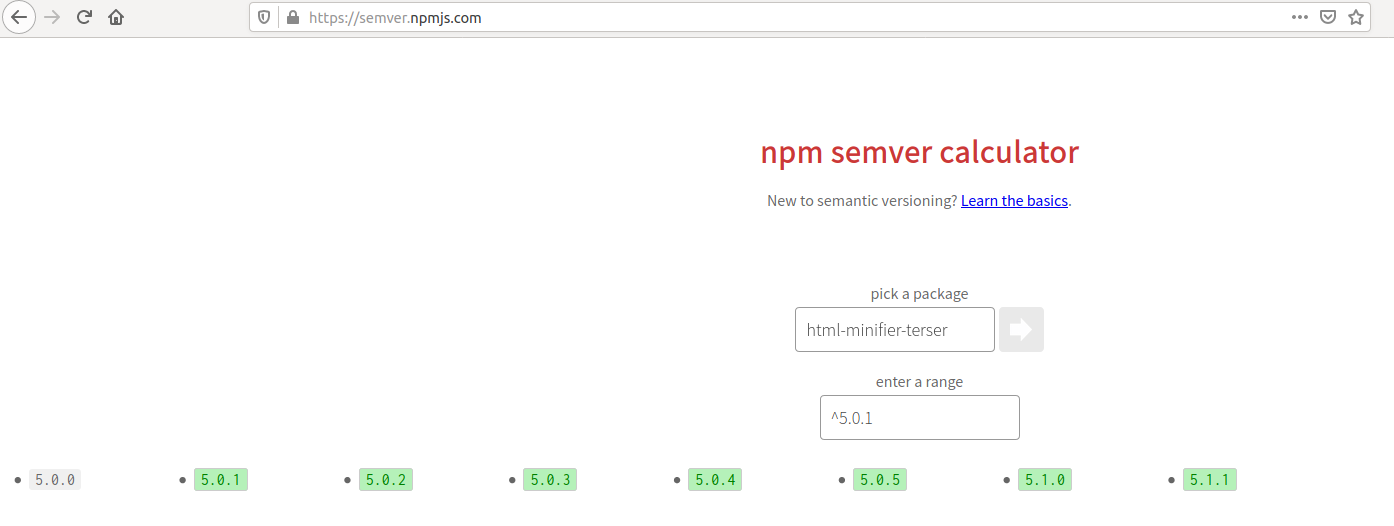
- upgrade dependency
Ehm, the SemVer selector already picks up the 5.x releases so not sure what you mean:
DanielRuf
on 14 May 2020
Oh correct - but I guess an additional test wouldn’t hurt :)
jantimon
on 14 May 2020
This issue had no activity for at least half a year. It's subject to automatic issue closing if there is no activity in the next 15 days.
![stale[bot] picture](https://avatars.githubusercontent.com/in/1724?v=4&s=40) stale[bot]
on 12 Dec 2020
stale[bot]
on 12 Dec 2020
Related issues
 lonelydatum
·
3Comments
lonelydatum
·
3Comments
 ghaiklor
·
3Comments
ghaiklor
·
3Comments
 mmjamal
·
3Comments
mmjamal
·
3Comments
 klinki
·
3Comments
klinki
·
3Comments
 ruoyiqing
·
3Comments
ruoyiqing
·
3Comments