In process hacker local address for some of the following processes are reporting the local address as 0.0.0.0
system, steam.exe, svchost.exe, spoolsv.exe, chrome.exe, skypeapp.exe dashost.exe
with my previous hosts file, some of these had a local adress that were either 0koryu0.easter.ne.jp or 24.244.3.32
I read this is because process hacker looks for the first 127.0.0.1 in the hosts file. However in your hosts file https://raw.githubusercontent.com/StevenBlack/hosts/master/hosts
127.0.0.1 localhost
127.0.0.1 localhost.localdomain
Local 127.0.0.1
255.255.255.255 broadcasthost
:: 1 localhost
:: 1 ip6-localhost
:: 1 ip6-loopback
fe80 :: 1% lo0 localhost
ff00 :: 0 ip6-localnet
ff00 :: 0 ip6-mcastprefix
ff02 :: 1 ip6-allnodes
ff02 :: 2 ip6-allrouters
ff02 :: 3 ip6-allhosts
0.0.0.0 0.0.0.0
are all clearly above the fold, I assume this is an issue with process hacker, however as 0.0.0.0 calls 0.0.0.0 does that mean the applications are calling to a blocked address? I assume then that these are the processes within the apps that are "analytics"? I could just change 0.0.0.0 to localhost in order to hide that these are blocked services?
 Chaython
All 9 comments
Hello! Thank you for opening your first issue in this repo. It’s people like you who make these host files better!
![welcome[bot] picture](https://avatars0.githubusercontent.com/in/4141?v=4&s=40) welcome[bot]
on 28 Apr 2019
welcome[bot]
on 28 Apr 2019
Hi Chaython @Chaython I'm trying to understand, but I can't seem to make sense of it.
Can you please rewrite that? I'll try again once you've clarified it.
 StevenBlack
on 29 Apr 2019
StevenBlack
on 29 Apr 2019
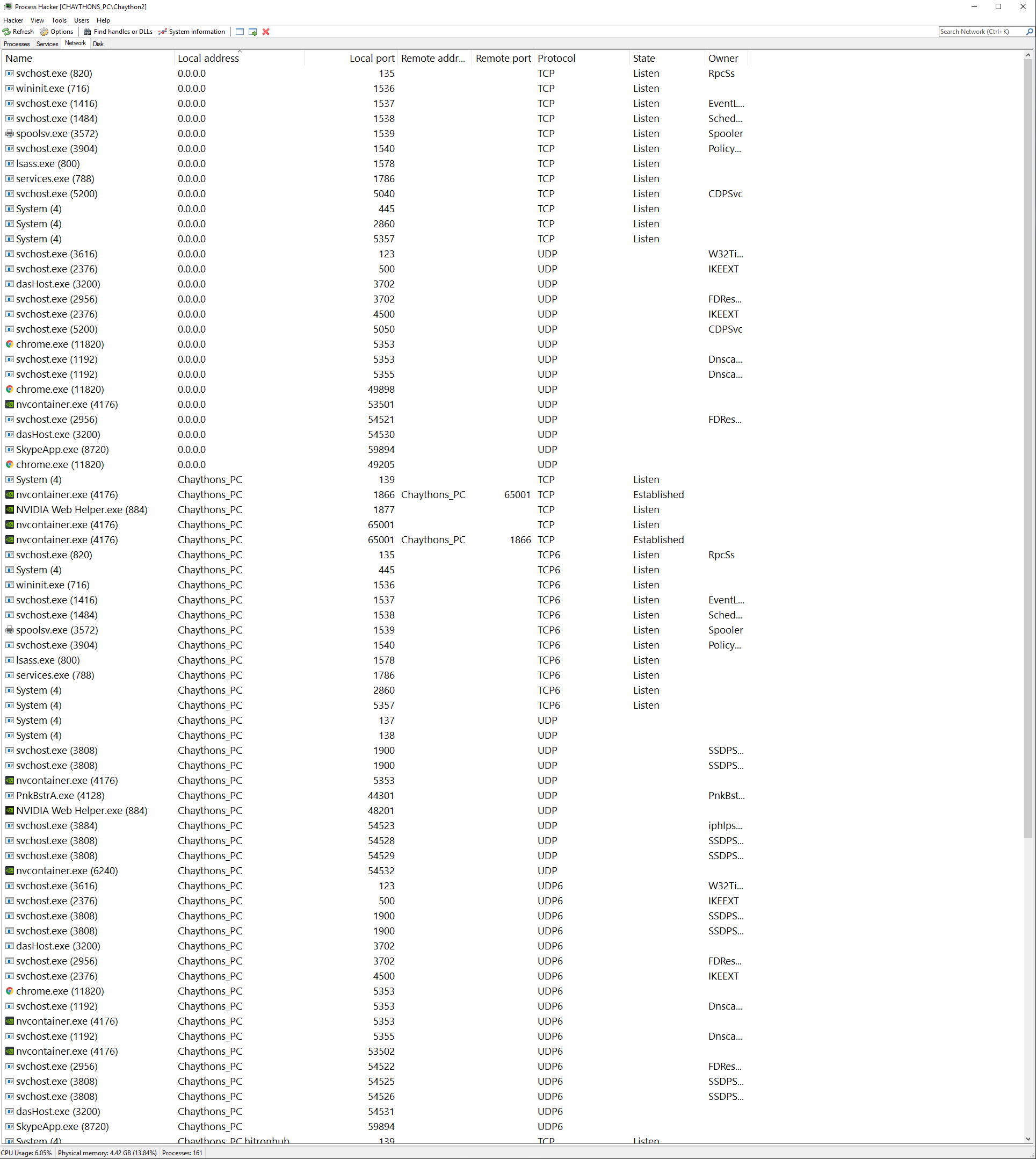
more of an issue with process hacker, though it's pulling local address from hosts file; as you can see some applications have a local address as 0.0.0.0 so is it because these are blocked in the hosts file?
Line 26 refers to 0.0.0.0 0.0.0.0
So if resulting address is 0.0.0.0; the local address is reporting 0.0.0.0
If I change 0.0.0.0 0.0.0.0 to 0.0.0.0 block the local address will be listed as block
So is there any reason you don't call 0.0.0.0 Blockedinhostsfile

Chaython
on 1 May 2019
0.0.0.0 0.0.0.0 is intended to block the RPC(Remote Procedure Call) to send unwanted information as most of the .DLL's,svchost.exe etc. are coded to do that and in home environment RPC is not needed but disabling it's not a option(another gift from Microsoft).Changing the zeroes with blockedinhosts.....bla bla bla will not block all those requests.Honestly....who cares about Process Hacker,the the purpose of the lists here is to provide better privacy protection and not to honor some stupid programs(there are much better alternatives out there for monitoring,you just need to google it....)
Steven @StevenBlack would advise not to merge that pull request.
 dnmTX
on 1 May 2019
dnmTX
on 1 May 2019
A link"state" is not established = it is still blocked. Local address title shouldn't matter, as long as it's not connecting to a remote address?
Chaython
on 1 May 2019
A link"state" is not established = it is still blocked
Until it isn't. Are you monitoring all those listening ports 24/7 to assure all of us that connection will never be established? I guess NOT !!!!
Local address title shouldn't matter
How about we send it to the land of zeroes just to be on the safe side
as long as it's not connecting to a remote address?
YOU can not guarantee that !!!!!
dnmTX
on 1 May 2019
I don't understand how this would be a risk, please provide explanation.
I do packet log so I could assure you it doesn't establish. Though I'm not doing a long term study; you have a firewall for a reason... Many people still use Windows Defender, Skype, MS Office, are you sure all MS software isn't uploading the same data? If you were so scared of MS spying on you, you wouldn't trust an in OS feature such as the hosts file to block that traffic.
Nothing in life is guaranteed but death.
Chaython
on 1 May 2019
I don't understand how this would be a risk, please provide explanation.
If any information(telemetry,who knows what else) is to be send/receive it will be to local address:
0.0.0.0 on port: 153(for example).Changing the local address to blockinhosts.... because of Process hacker will expose all those 0.0.0.0 local addresses so in short,they're not blocked.
The lists here is not intended to comply with firewalls or any other programs for that matter.
Nothing in life is guaranteed but death.
This is just STUPID......I'm done here !!!!!!
dnmTX
on 1 May 2019
I've tried my best to understand this issue.
I give up.
Closing.
StevenBlack
on 1 May 2019
Related issues
 gadgetchnnel
·
3Comments
gadgetchnnel
·
3Comments
 Sego1234
·
3Comments
Sego1234
·
3Comments
 mueller-ma
·
3Comments
mueller-ma
·
3Comments
 Laicure
·
3Comments
Laicure
·
3Comments
 TheGroundZero
·
3Comments
TheGroundZero
·
3Comments
Most helpful comment
I've tried my best to understand this issue.
I give up.
Closing.