Horizon: Horizon tries to load resources over HTTP on HTTPS
- Horizon Version: 3.2.5
- Laravel Version: 5.8.27
- PHP Version: 7.3
- Redis Driver & Version: predis/phpredis 1.1.1
- Database Driver & Version:
Description:
Even though Horizon url is accessed through the HTTPS, it still tries to load the resources from the HTTP. The rest of application works just fine, Laravel Nova is also working fine. For some reason only Horizon fails to understand that if it is accessed through the HTTPS, then all resources must be loaded through HTTPS.

Just a side note, Nova is loading resources from the relative path when horizon is trying to load resources from the absolute path (including domain name and protocol)
Steps To Reproduce:
Install Traefik as reverse proxy, create a service with Nginx running on port 80, proxy container port 80 to real domain with valid SSL certificate, here comes that page

 darki73
All 13 comments
Are you behind a load balancer? Have you configured your trusted proxies correctly? https://laravel.com/docs/5.8/requests#configuring-trusted-proxies
 driesvints
on 8 Jul 2019
driesvints
on 8 Jul 2019
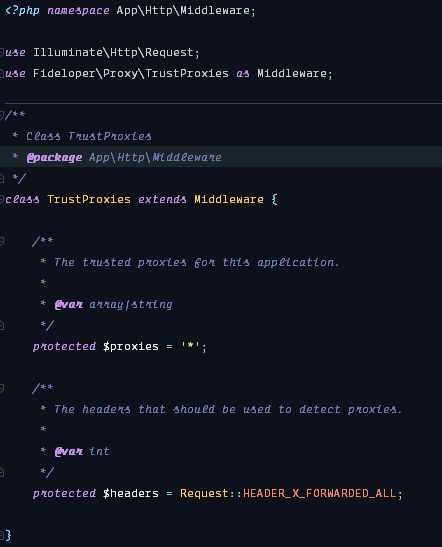
This is the content of my TrustProxies.php middleware, no load balancing, no nothing.
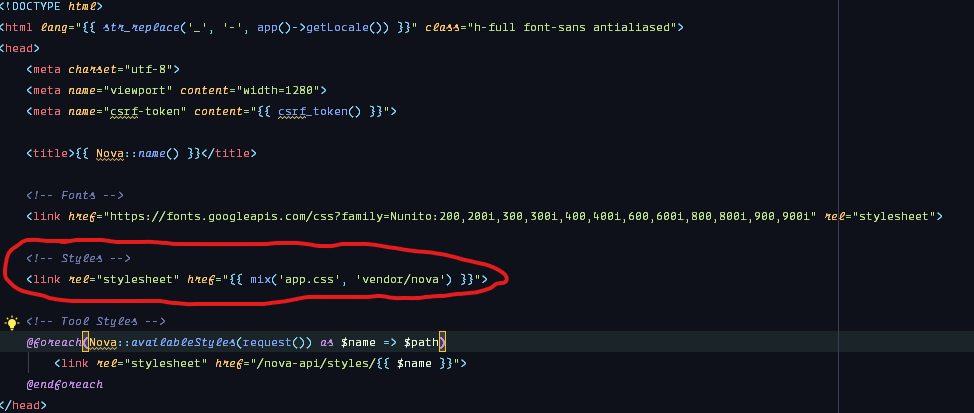
I (presumably) found a way to actually Nova_fy_ Horizon by changing:
From (styles):
<link href="{{ asset(mix($cssFile, 'vendor/horizon')) }}" rel="stylesheet" type="text/css">
To
<link href="{{ mix($cssFile, 'vendor/horizon') }}" rel="stylesheet" type="text/css">
And (js) from:
<script src="{{ asset(mix('app.js', 'vendor/horizon')) }}"></script>
To:
<script src="{{ mix('app.js', 'vendor/horizon') }}"></script>
This is pretty much how it is done in Nova, so from now on Horizon will try to fetch files from relative path rather than absolute.
darki73
on 8 Jul 2019
I think you're correct. @themsaid do you also follow this reasoning?
driesvints
on 9 Jul 2019
I've made a pull request just in case this issue will actually go through
https://github.com/laravel/horizon/pull/635
darki73
on 11 Jul 2019
The PR was closed but I wanna look into this a bit more. Are you behind Cloudflare? Does Horizon properly loads if you disable its HTTPS enforcement?
driesvints
on 30 Jul 2019
@driesvints I am just using the Cloudflare as DNS manager, however, none of the applications are under the cloudflare proxy. I am using Traefik as a reverse proxy and Horizon works just fine with the changes i've submitted in a PR.
And while Taylor's suggestion might work for other people, i cannot simply enforce https:// for everything, there are always some edge cases, and i have 2 of them (cant really talk much about why i do actually need http, and the way people can access it without being redirected to https). But 90% of the website is on https, _Nova_ is on https, _Telescope_ aswell, only Horizon fails to properly load resources, and i can ditch it, i am just using it to monitor jobs because from time to time they 'may' stuck
darki73
on 30 Jul 2019
@darki73 Telescope currently works in exactly the same way as Horizon.
I think it's probably best that in this case you publish the view files and make the modifications yourself. That way you're at least up and running. Like you said, this probably won't work for everyone.
driesvints
on 1 Aug 2019
my current solution is to add ASSET_URL with https to .env
 od3n
on 20 Nov 2019
od3n
on 20 Nov 2019
fix for me :
Add following string to AppServiceProvider::boot() method
\Illuminate\Support\Facades\URL::forceScheme('https');
 120dev
on 21 Nov 2019
120dev
on 21 Nov 2019
fix for me :
Add following string to AppServiceProvider::boot() method
\Illuminate\Support\Facades\URL::forceScheme('https');
i tried but only works on horizon ^1.4, not ^3.4.
may i know your horizon version?
od3n
on 22 Nov 2019
FYI
From my side I enabled my trusted proxies... That was it. It got solved.
My app is behind a load balancer (I added the internal network IP from the LB)
I'm using cloudflare, I wasn't having issues until I enabled cloudflare polish
I also tried with enabling for * all possible proxies and was still working all my app.
 moyvera
on 5 Feb 2020
moyvera
on 5 Feb 2020
This may not be the best practice, but setting .envASSET_URL=/. allows me to access normally
 LGZ1998
on 8 Jan 2021
LGZ1998
on 8 Jan 2021
Had the same issue and followed the Trusted Policy guideline. If you're on AWS, there's a warning in the following section as it needs a different header: https://laravel.com/docs/6.x/requests#configuring-trusted-proxies. If it's not working, then some headers might not pass properly to Laravel.
 slamannalespri
on 26 Jan 2021
slamannalespri
on 26 Jan 2021
Related issues
 rossuhms
·
5Comments
rossuhms
·
5Comments
 marianvlad
·
5Comments
marianvlad
·
5Comments
 RicardoRamirezR
·
3Comments
RicardoRamirezR
·
3Comments
 crash13override
·
5Comments
crash13override
·
5Comments
 mahdiahmadi73
·
3Comments
mahdiahmadi73
·
3Comments
Most helpful comment
i tried but only works on horizon ^1.4, not ^3.4.
may i know your horizon version?