Horizon: Multiple horizon instances on one server not working
I have a server with 4 horizon instances (all running under another prefix),
Job insertion always goes to the right horizon instance, but it is like a lottery which worker handles the job, which is really confusing to work with.
 johannessmit
All 40 comments
Sounds odd. How are your queues, workers and connections setup? Could you post your configuration from horizon.php and perhaps queue.php (the connections => redis -part).
Do you tell what queue the job should be put in when you fire it, i.e; dispatch($job)->onQueue('queue'); or do you just drop them all in your default queue?
 olssonm
on 28 Nov 2017
olssonm
on 28 Nov 2017
I have the same issue. I did onQueue and changed the horizon prefix and default queue.
The jobs are not handled at all.
 viezel
on 2 Jan 2018
viezel
on 2 Jan 2018
Any thoughts on that issue?
 krzysztofairlabs
on 16 Jan 2018
krzysztofairlabs
on 16 Jan 2018
I was facing a similar issue and what I did was to set up env variables to represent each worker I wanted to run - including the default one, which was causing most of the issues. I also declared prefix for horizon:
QUEUE_DEFAULT=cms_default
QUEUE_HIGH=cms_high
QUEUE_EMAIL=cms_email

HORIZON_PREFIX=cms_horizon:
I've updated config/horizon.php by replacing default queues with values associated with previously declared env variables:
// config/horizon.php

'environments' => [
    'production' => [
        'supervisor-1' => [
            'connection' => 'redis',
            'queue' => [
                env('QUEUE_DEFAULT', 'default'),
                env('QUEUE_HIGH', 'high'),
                env('QUEUE_EMAIL', 'email')
            ],
            'balance' => 'simple',
            'processes' => 10,
            'tries' => 3,
        ],
    ],

    'local' => [
        'supervisor-1' => [
            'connection' => 'redis',
            'queue' => [
                env('QUEUE_DEFAULT', 'default'),
                env('QUEUE_HIGH', 'high'),
                env('QUEUE_EMAIL', 'email')
            ],
            'balance' => 'simple',
            'processes' => 3,
            'tries' => 3,
        ],
    ],
],
I also updated config/queue.php by replacing default queue with the same variable and adding queues entry to keep names of all queues - again obtained from previously declared environment variables.
'connections' => [

    ...

    'redis' => [
        'driver' => 'redis',
        'connection' => 'default',
        'queue' => env('QUEUE_DEFAULT'),
        'retry_after' => 90,
    ],

],

'queues' => [
    'default' => env('QUEUE_DEFAULT'),
    'high' => env('QUEUE_HIGH'),
    'email' => env('QUEUE_EMAIL'),
]
Now - every time I use onQueue method I just use config() helper to fetch the correct name:
...->onQueue(config('queue.queues.email'));
I'm using forge so I've set all 3 workers and one horizon deamon for each domain on a single server - everything works just as expected - without any collisions.
(Obviously each site instance has different names for the queues and horizon prefix)
 sebastiansulinski
on 1 Feb 2018
sebastiansulinski
on 1 Feb 2018
Thanks @sebastiansulinski for this comprehensive explanation. Actually I am trying to reproduce this on my forge account, but what confuses me is, why is it necessary to spawn 3 queue workers (default, high, email) plus a horizon daemon for each domain. My understanding was that I define these three workers in config/horizon.php as supervisors, then just set a horizon daemon for each domain and horizon will spawn these three supervisors automatically. So that it is not necessary to add those workers in queue settings of forge.
Am I wrong about this? Do I have set horizon daemon and additionally all queue workers manually?
 travisbotello
on 13 Apr 2018
travisbotello
on 13 Apr 2018
Sorry about the delay @travisbotello - yes, you could just set all workers under one domain in forge and just set horizon deamons for each domain separately - they will still pick the queue you've set up in the config. I've only set 3 queue workers to illustrate how you could do it with 3 different ones, but if you don't use any priority / separation of concern, you can use just one - it's entirely your call.
sebastiansulinski
on 16 May 2018
Thanks @sebastiansulinski for your answer. However I think there was a misunderstanding in my question. My confusion was not about the question: single domain vs. for each domain. I am confused about three queue workers vs horizon daemon.
From your description I assume you setup 3 queues workers (default, high, email) in forge and a horizon daemon. From your config/horizon.php I can see that your horizon supervisor is only taking care of default queue. So you basically have this setup:
- worker for default queue
- worker for high queue
- worker for email queue
- horizon daemon for default queue
When I replicate this setup on my machine I see the following in Horizon:
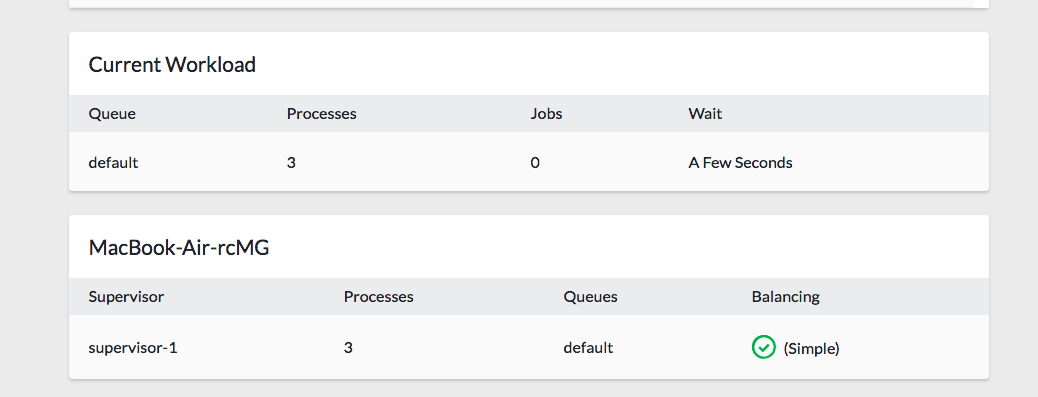
So horizon is not picking up my workers for the default, high or email queue. They are not monitored/managed or processed here.
When I kill and remove all workers from forge and change my config/horizon.php like this:
'supervisor-1' => [
                'connection' => 'redis',
                'queue' => ['default','high','email'],
                'balance' => 'simple',
                'processes' => 9,
                'tries' => 3,
            ],
Then my Horizon dashboard looks like this:

As you can see now Horizon spawned 3 workers (default, high, email) for the defined queues. No queue workers need to be setup in forge. I simply run one Horizon daemon that spins up all of my required processes.
So my point is, that it is redundant to create queue workers in forge (php artisan queue:work --queue=high) for each queue when we use Horizon. To take full advantage of Horizons queues management we just have to modify config/horizon.php to pick up our env.queues and then start Horizon daemon.
travisbotello
on 16 May 2018
Thanks @travisbotello - did you manage to run it without setting up any worker via forge?
I've tried it by first removing all previous workers and then deploying again with the hook that terminates horizon, which should potentially restart it with supervisor, but cannot get it to start any workers - any idea?
sebastiansulinski
on 16 May 2018
That said - locally (Valet) it works just fine, but not on the server.
sebastiansulinski
on 16 May 2018
Yes, for me it is working locally and on the server as well. I only run a Horizon daemon and this daemon creates all configured processes. No queue workers needed. Maybe you only modified the local env of the config/horizon.php. Make sure that you also update the production env (I made the same mistake :) ):
'environments' => [
        'production' => [
            'supervisor-1' => [
                'connection' => 'redis',
                'queue' => ['default','test-1','test-2','test-3'],
                'balance' => 'simple',
                'processes' => 10,
                'tries' => 3,
            ],
        ],

        'local' => [
            'supervisor-1' => [
                'connection' => 'redis',
                'queue' => ['default','test-1','test-2','test-3'],
                'balance' => 'simple',
                'processes' => 3,
                'tries' => 3,
            ],
        ],
    ],
Then it is sufficient to run php artisan horizon:terminate in your deployment script. It will immediately apply and deploy the processes in Horizon. I just added test-3, deployed and the Horizon dashboard was updated on my server like this:
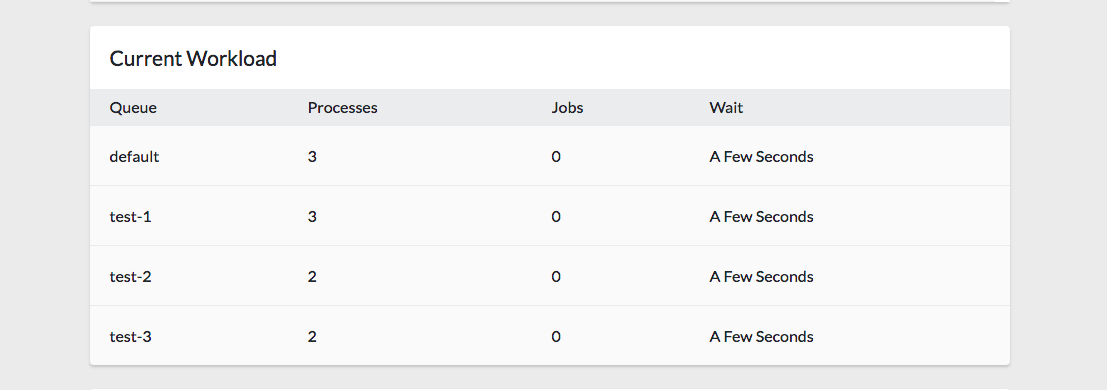
travisbotello
on 16 May 2018
I've set up my horizon config with the following:
'environments' => [
    'production' => [
        'supervisor-1' => [
            'connection' => 'redis',
            'queue' => [
                env('QUEUE_DEFAULT', 'default'),
                env('QUEUE_HIGH', 'high'),
                env('QUEUE_EMAIL', 'email')
            ],
            'balance' => 'simple',
            'processes' => 10,
            'tries' => 3,
        ],
    ],

    'local' => [
        'supervisor-1' => [
            'connection' => 'redis',
            'queue' => [
                env('QUEUE_DEFAULT', 'default'),
                env('QUEUE_HIGH', 'high'),
                env('QUEUE_EMAIL', 'email')
            ],
            'balance' => 'simple',
            'processes' => 3,
            'tries' => 3,
        ],
    ],
],
I've removed and re-added deamon for php artisan horizon and I'm deploying using Envoyer, where I've set up hook to run php artisan horizon:terminate, but all Im getting is the following:
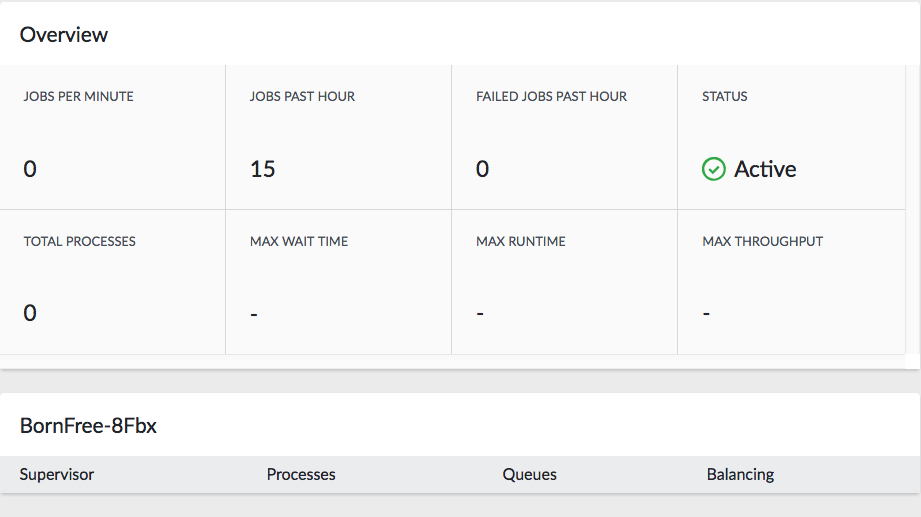
I tried restarting server, but it comes back with the same result - not sure what's causing it.
sebastiansulinski
on 16 May 2018
That is indeed very strange. It reports active but 0 processes. I am not sure about any caveats with Envoyer. I only deployed using Forge so far. I just copied your horizon config and modified my .env accordingly and deployed. And it is working. Some ideas that come to my mind:
- try running
php artisan config:clearto rule out any caching issues with config files - do you see any errors in deploy log?
- ssh into the machine and cd to laravel folder and run
php artisan horizon. Any errors?
travisbotello
on 16 May 2018
I did try all of the above - there are no errors in log. My envoyer hook does all re-caching etc:
cd {{ release }}

php artisan migrate --force
php artisan route:cache
php artisan config:cache
php artisan view:cache
php artisan storage:link
php artisan horizon:terminate
I restarted horizon using deamon in forge as well as manually via terminal without any luck.
It is definitely running, just doesn't seem to start those workers. Now even if I set them up via forge, they also do not show in horizon.
sebastiansulinski
on 16 May 2018
When I deploy my Horizon Dashboard looks the same as in your screenshot but only for a couple of seconds. Then it refreshes like this:
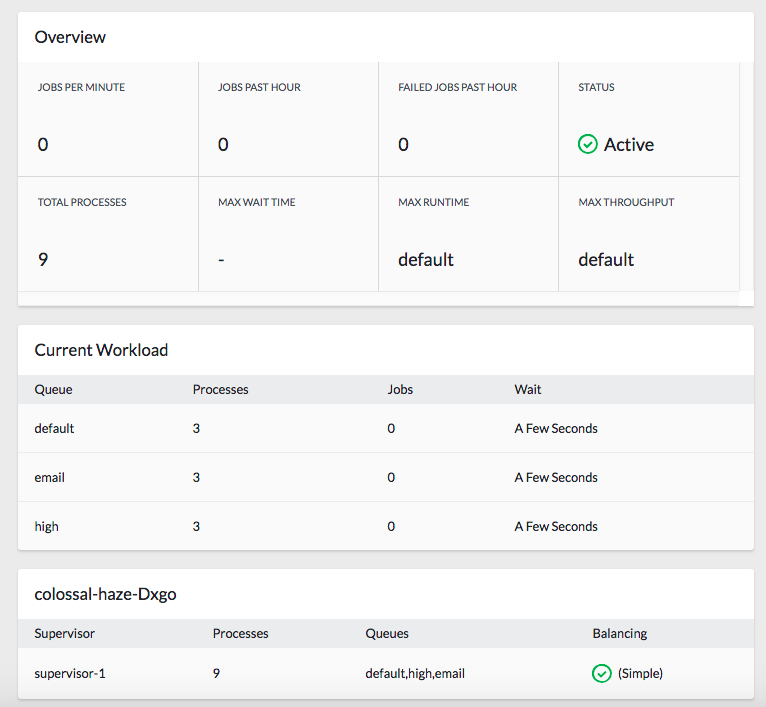
Also you can try to following to rule out any issues with the Horizon Dashboard view:
- ssh into your machine, cd to laravel folder and run
php artisan horizon:supervisors
Output should be something like this:
| Name                            | PID   | Status  | Workers                                            | Balancing |
+---------------------------------+-------+---------+----------------------------------------------------+-----------+
| colossal-haze-Dxgo:supervisor-1 | 31257 | running | redis:default (3), redis:high (3), redis:email (3) | simple    |
+---------------------------------+-------+---------+----------------------------------------------------+-----------+
Not that's probably where the issue is - I'm getting
No supervisors are running.
However when I run supervisorctl as a sudoer I get
daemon-35711 RUNNING pid 4963, uptime 0:05:22
Any idea?
sebastiansulinski
on 16 May 2018
Okay, interesting. Let's try this:
- Open up a terminal. ssh into the machine. cd to laravel folder and run:
$ php artisan horizon
Horizon started successfully.
Keep this terminal tab opened and bring up another one and run
php artisan horizon:supervisorsin same laravel folder. What is the output?Also the output of
ps auxww | grep "[h]orizon"would be interesting. I am getting this output:
forge    31250  0.1  4.3 348628 44328 ?        S    16:01   0:00 php artisan horizon
forge    31257  0.1  4.3 348628 44304 ?        S    16:01   0:00 /usr/bin/php7.2 artisan horizon:supervisor colossal-haze-Dxgo:supervisor-1 redis --delay=0 --memory=128 --queue=default,high,email --sleep=3 --timeout=60 --tries=3 --balance=simple --max-processes=10 --min-processes=1
forge    31267  0.0  4.3 348628 44312 ?        S    16:01   0:00 /usr/bin/php7.2 artisan horizon:work redis --delay=0 --memory=128 --queue=default --sleep=3 --timeout=60 --tries=3 --supervisor=colossal-haze-Dxgo:supervisor-1
forge    31268  0.0  4.3 348628 44172 ?        S    16:01   0:00 /usr/bin/php7.2 artisan horizon:work redis --delay=0 --memory=128 --queue=default --sleep=3 --timeout=60 --tries=3 --supervisor=colossal-haze-Dxgo:supervisor-1
forge    31269  0.0  4.3 348628 44312 ?        S    16:01   0:00 /usr/bin/php7.2 artisan horizon:work redis --delay=0 --memory=128 --queue=default --sleep=3 --timeout=60 --tries=3 --supervisor=colossal-haze-Dxgo:supervisor-1
forge    31270  0.0  4.3 348628 44412 ?        S    16:01   0:00 /usr/bin/php7.2 artisan horizon:work redis --delay=0 --memory=128 --queue=high --sleep=3 --timeout=60 --tries=3 --supervisor=colossal-haze-Dxgo:supervisor-1
forge    31271  0.0  4.3 348628 44176 ?        S    16:01   0:00 /usr/bin/php7.2 artisan horizon:work redis --delay=0 --memory=128 --queue=high --sleep=3 --timeout=60 --tries=3 --supervisor=colossal-haze-Dxgo:supervisor-1
forge    31272  0.0  4.3 348628 44248 ?        S    16:01   0:00 /usr/bin/php7.2 artisan horizon:work redis --delay=0 --memory=128 --queue=high --sleep=3 --timeout=60 --tries=3 --supervisor=colossal-haze-Dxgo:supervisor-1
forge    31273  0.0  4.3 348628 44256 ?        S    16:01   0:00 /usr/bin/php7.2 artisan horizon:work redis --delay=0 --memory=128 --queue=email --sleep=3 --timeout=60 --tries=3 --supervisor=colossal-haze-Dxgo:supervisor-1
forge    31274  0.0  4.3 348628 44324 ?        S    16:01   0:00 /usr/bin/php7.2 artisan horizon:work redis --delay=0 --memory=128 --queue=email --sleep=3 --timeout=60 --tries=3 --supervisor=colossal-haze-Dxgo:supervisor-1
forge    31275  0.0  4.3 348628 44304 ?        S    16:01   0:00 /usr/bin/php7.2 artisan horizon:work redis --delay=0 --memory=128 --queue=email --sleep=3 --timeout=60 --tries=3 --supervisor=colossal-haze-Dxgo:supervisor-1
As you can see this matches our configuration and Horizon Dashboard perfectly: one horizon instance that spawned 9 workers, 3 for each queue: default, high, e-mail...
travisbotello
on 16 May 2018
For php artisan horizon I got Horizon started successfully and it did add another supervisor by looking at the dashboard:

but again, without any workers.
When I run php artisan horizon:supervisors I still get No supervisors are running., but when I try ps with grep I get both of them listed:
forge     4963  0.1  0.6 380568 49724 ?        S    16:03   0:00 php artisan horizon
forge     5534  0.6  0.6 380572 50172 pts/0    S+   16:15   0:00 php artisan horizon
Okay. So locally everything is working for you, but on the server horizon is not starting the worker processes. I was able to reproduce your issue when my APP_ENV doesn't match the environment key in the horizon config. Then I see the same empty horizon dashboard like you. Horizon is started but no workers are spawned. Also I am getting the output No supervisors are running.
Maybe this is the issue? What is your APP_ENV on the server?
travisbotello
on 16 May 2018
Ha! - that certainly was one of the things - I had it as live on the server, but even though I've now changed it to production and restarted / reloaded everything, removed daemon and re-added it - sadly, still the same outcome.
sebastiansulinski
on 16 May 2018
So php artisan env returns production?
travisbotello
on 16 May 2018
Hey! - it didn't - I had to clear config and now it works!
Superb work @travisbotello - thanks very much for your help - saved me lots of head scratching.
sebastiansulinski
on 16 May 2018
Very welcome...there was a lot of uncertainty in my head regarding Horizon, Queue Workers etc. I think we now figured it out!
travisbotello
on 16 May 2018
Thanks @travisbotello. This caught me as well.
Horizon was running, but not processing any jobs.
● supervisor.service - Supervisor process control system for UNIX
   Loaded: loaded (/lib/systemd/system/supervisor.service; enabled; vendor preset: enabled)
   Active: active (running) since Tue 2018-09-25 15:04:21 UTC; 1 months 10 days ago
     Docs: http://supervisord.org
 Main PID: 28141 (supervisord)
    Tasks: 2 (limit: 4915)
   CGroup: /system.slice/supervisor.service
           ├─28141 /usr/bin/python /usr/bin/supervisord -n -c /etc/supervisor/supervisord.conf
           └─31791 php /home/ubuntu/projectname/artisan horizon
After adding the environment to config/horizon.php, I was able to sudo supervisorctl restart all.
Then I was able to check and see all of the workers running:
sudo systemctl status supervisor

● supervisor.service - Supervisor process control system for UNIX
   Loaded: loaded (/lib/systemd/system/supervisor.service; enabled; vendor preset: enabled)
   Active: active (running) since Tue 2018-09-25 15:04:21 UTC; 1 months 10 days ago
     Docs: http://supervisord.org
 Main PID: 28141 (supervisord)
    Tasks: 8 (limit: 4915)
   CGroup: /system.slice/supervisor.service
           ├─28141 /usr/bin/python /usr/bin/supervisord -n -c /etc/supervisor/supervisord.conf
           ├─31927 php /home/ubuntu/projectname/artisan horizon
           ├─31934 /usr/bin/php7.2 artisan horizon:supervisor ip-172-20-2-161-JyhJ:supervisor-1 redis --delay=0 --memory=128 --queue=default --sleep=3 --timeout=60 --tries=2 --balance=simp
           ├─31944 /usr/bin/php7.2 artisan horizon:work redis --delay=0 --memory=128 --queue=default --sleep=3 --timeout=60 --tries=2 --supervisor=ip-172-20-2-161-JyhJ:supervisor-1
           ├─31945 /usr/bin/php7.2 artisan horizon:work redis --delay=0 --memory=128 --queue=default --sleep=3 --timeout=60 --tries=2 --supervisor=ip-172-20-2-161-JyhJ:supervisor-1
           ├─31946 /usr/bin/php7.2 artisan horizon:work redis --delay=0 --memory=128 --queue=default --sleep=3 --timeout=60 --tries=2 --supervisor=ip-172-20-2-161-JyhJ:supervisor-1
           ├─31947 /usr/bin/php7.2 artisan horizon:work redis --delay=0 --memory=128 --queue=default --sleep=3 --timeout=60 --tries=2 --supervisor=ip-172-20-2-161-JyhJ:supervisor-1
           └─31948 /usr/bin/php7.2 artisan horizon:work redis --delay=0 --memory=128 --queue=default --sleep=3 --timeout=60 --tries=2 --supervisor=ip-172-20-2-161-JyhJ:supervisor-1
I hope this might help someone else who comes across the same problem.
 zyglobe
on 5 Nov 2018
zyglobe
on 5 Nov 2018
@johannessmit
I had the same problem, differents prefixes dont solve the problem, i setted different database number for the redis connection for each instance. All good after this.
https://www.dropbox.com/s/0zs5wk73nlqkbae/Screenshot%202018-11-28%2014.53.58.png?dl=0
In .env i have REDIS_DATABASE=0, REDIS_DATABASE=1, REDIS_DATABASE=2 etc.
Hope this will help
 digitalunityca
on 28 Nov 2018
digitalunityca
on 28 Nov 2018
@travisbotello
I am running both dev and production instances of my app on the same ubuntu server.
APP_ENV = dev (on development)
APP_ENV = production (on production)
Here is my horizon config in horizon.php:
'environments' => [
'production' => [
'supervisor-production' => [
'connection' => 'redis',
'queue' => [env('DEFAULT_QUEUE','default')],
'balance' => 'simple',
'processes' => 5,
'tries' => 3,
],
],
'dev' => [
'supervisor-dev' => [
'connection' => 'redis',
'queue' => [env('DEFAULT_QUEUE','default')],
'balance' => 'simple',
'processes' => 1,
'tries' => 3,
],
],
'local' => [
'supervisor-1' => [
'connection' => 'redis',
'queue' => [env('DEFAULT_QUEUE','default')],
'balance' => 'simple',
'processes' => 3,
'tries' => 3,
],
],
],
I have set
DEFAULT_QUEUE = dev_default
and
DEFAULT_QUEUE = production_default
respectively in .env file
Created a supervisor config file with these contents:
`[program:horizon-dev]
process_name=%(program_name)s
command=php /opt/lampp/dev/artisan horizon
autostart=true
autorestart=true
user=ubuntu
redirect_stderr=true
stdout_logfile=/opt/lampp/dev/horizon.log
[program:horizon-live]
process_name=%(program_name)s
command=php /opt/lampp/htdocs-copy-27dec18/artisan horizon
autostart=true
autorestart=true
user=ubuntu
redirect_stderr=true
stdout_logfile=/opt/lampp/htdocs-copy-27dec18/horizon.log`
Now my jobs sometimes get processed sometimes not.
And this is what I see in horizon dashboard:
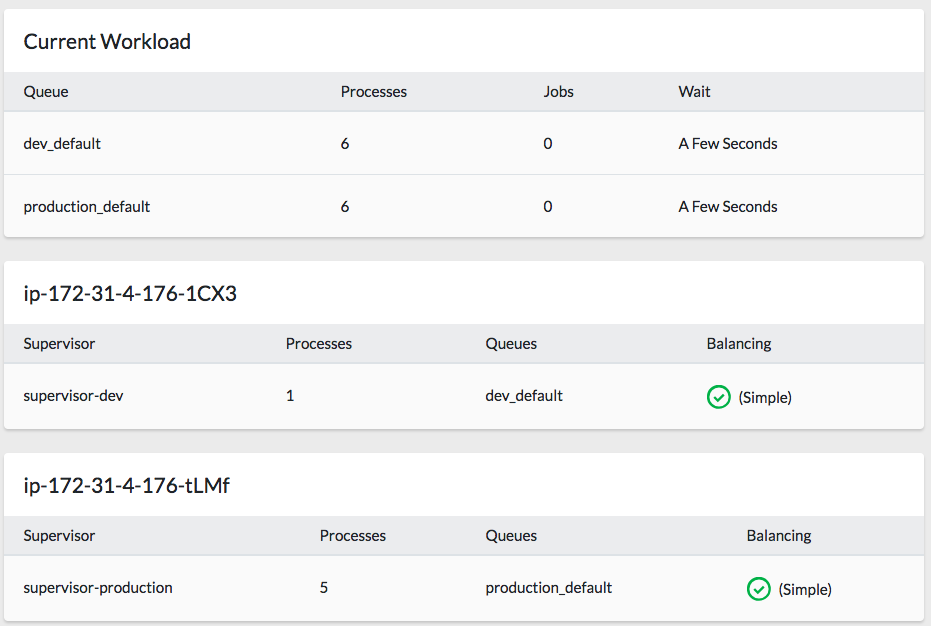
I have done
php artisan horizon:terminate
php artisan config:clear
 karamvirs
on 31 Jan 2019
karamvirs
on 31 Jan 2019
Two suggestions/questions:
- how are you tracking failed jobs? Are you seeing failed jobs in Hoirzon stats, or are you using failed-table?
- when running dev and production application on the same server you have to make sure that you are not using the same redis database for those applications, otherwise there might be some conflicts. So either change the databases or maybe work with a prefix (https://laracasts.com/discuss/channels/laravel/redis-cache-for-multiple-sites-on-same-server):
in database.php:
'redis' => [

        'client' => 'predis',

        'default' => [
            'host' => env('REDIS_HOST', '127.0.0.1'),
            'password' => env('REDIS_PASSWORD', null),
            'port' => env('REDIS_PORT', 6379),
            'database' => env('REDIS_DB', 0),
        ],

        'cache' => [
            'host' => env('REDIS_HOST', '127.0.0.1'),
            'password' => env('REDIS_PASSWORD', null),
            'port' => env('REDIS_PORT', 6379),
            'database' => env('REDIS_CACHE_DB', 1),
        ],

    ],
I have the failed_jobs table in database but it is blank.
The job I am running is a simple email.
When I dispatch a job on production queue, it immediately fails. On the production horizon dashboard I see an increment in JOBS PAST HOUR and no increment in failed jobs.
But then I check horizon.log on production and its empty.
Then I check horizon.log on dev and it says job failed.
It seems the production job is being picked by the dev queue.
I tried everything except multiple databases. Havent got it to work till now.
This page says you need to add multiple connections in queue.php as well.
Also I dont understand the difference between retry_after and timeout.
If "retry_after" refers to the time after which the job will be returned back to the queue and "timeout" refers to the time after which it will be killed, job processing will never reach "retry_after" as its recommended to keep it longer than the "timeout" value.
Whats the difference?
Will try multiple Redis databases today.
karamvirs
on 31 Jan 2019
Horizon documentaion does say this:
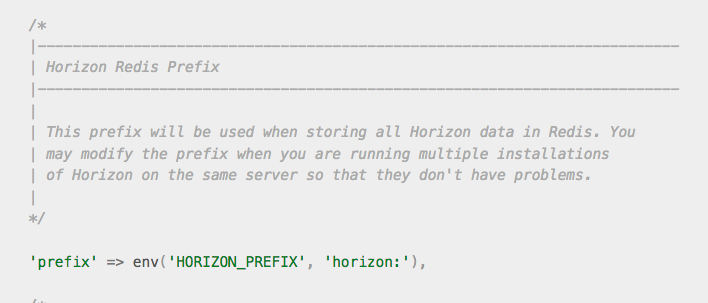
But it doesnt help.
karamvirs
on 31 Jan 2019
I think the relation between retry_after and timeout is much better explained in official Laravel docs. This Medium.com article is quite confusing regarding this:
The --timeout value should always be at least several seconds shorter than your retry_after configuration value. This will ensure that a worker processing a given job is always killed before the job is retried. If your --timeout option is longer than your retry_after configuration value, your jobs may be processed twice.
https://laravel.com/docs/5.7/queues#job-expirations-and-timeouts
Looking at the screenshot of your Horizon Dashboard it is very strange that under Current Workload you are seeing:
dev_default=> 6 processesproduction_ default=> 6 processes
Although you specified only 1 process for dev_default. Something is not working correctly here.
Please provide the output of php artisan horizon:supervisors and ps auxww | grep "[h]orizon"
travisbotello
on 1 Feb 2019
I changed my config yesterday and disabled dev and left only production and everything was normal.
I ll change it back over the weekend and send screenshots.
Question:
once we define the 'connection' in horizon.php, does it override the connection defined in queue.php?
Does the connection in queue.php matter at all after that?
Also, does the queue defined in horizon.php
'queue' => ['d-high','d-default'],
override the queue defined in queue.php?
Does horizon require to have queues defined in queue.php first?
karamvirs
on 1 Feb 2019
I think you are mixing something up here: Inside queue.php you define connections that can be used by horizon. (only Redis driver is supported for horizon) For example you are specifying a default redis connection (or you can also add more redis connections to queue.php that has a different retry_aftersetting): (https://laravel.com/docs/5.7/queues#connections-vs-queues)
'connections' => [
...
        'redis-test' => [
            'driver' => 'redis',
            'connection' => 'default',
            'queue' => 'default',
            'retry_after' => 90,
        ],
...
]
Then inside horizon.php you tell horizon to use this connection for managing the queues:
'environments' => [
        'production' => [
            'supervisor-1' => [
                'connection' => 'redis-test',
                'queue' => ['default'],
                'balance' => 'simple',
                'processes' => 10,
                'tries' => 3,
            ],
        ],

        'local' => [
            'supervisor-1' => [
                'connection' => 'redis-test',
                'queue' => ['default'],
                'balance' => 'simple',
                'processes' => 3,
                'tries' => 3,
            ],
        ],
    ],
Does horizon require to have queues defined in queue.php first?
No. In queue.php you define the default queue globally as well as the default queue for each connection. (https://laravel.com/docs/5.7/queues#queue-priorities) The queue property for a connection is no array, so you can't specify multiple. When using horizon you just have to add all of your desired queues that should be spawned as an array in the queue property. Horizon will take care of it. E.g.
'supervisor-1' => [
                'connection' => 'redis',
                'queue' => ['default','high','email'],
                'balance' => 'simple',
                'processes' => 9,
                'tries' => 3,
            ],
Take note that @sebastiansulinski in his post only added the different queues to his queue.php config to use the config helper for easier assignment ...->onQueue(config('queue.queues.email'));. But it is not required to add the queues to queue.php.
travisbotello
on 1 Feb 2019
Thanks for the clarification. I did not know that queue.php just specifies the default queue name.
Lot clearer now. BUt multiple horizons on same server is still a mystery.
I ve given up the plan to setup multiple horizon versions on the same server. It seems its better to keep them separate, than having issues with live jobs later.
karamvirs
on 2 Feb 2019
@travisbotello After I disabled the dev queues, its been working fine except for one thing.
Although I renamed my production queues to High, Default and Low, horizon shows the old and new versions of queue names. On dashboard it shows this:

On metrics->queues it shows this:
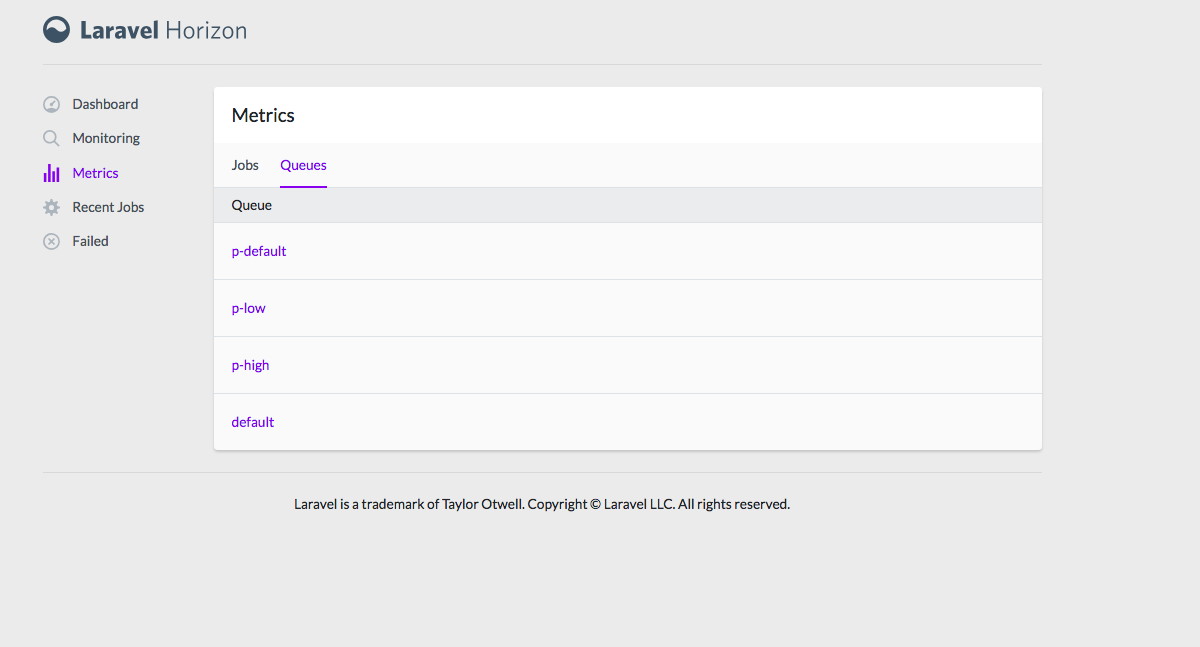
I ve done config:clear and cache:clear, horizon:terminate
Dont have the queues with p- in any config file.
Not sure where its coming from.
Its processing the jobs fine, but not sure what queue its processing them on.
karamvirs
on 4 Feb 2019
Are you running thesnapshot command accordingly? https://laravel.com/docs/5.7/horizon#metrics
travisbotello
on 5 Feb 2019
Yes. I ve set up the command in the scheduler.
On Tue 5 Feb, 2019, 7:01 PM Travis Botello, notifications@github.com
wrote:
Are you running the snapshot command accordingly?
https://laravel.com/docs/5.7/horizon#metrics—
You are receiving this because you commented.
Reply to this email directly, view it on GitHub
https://github.com/laravel/horizon/issues/244#issuecomment-460560853,
or mute the thread
https://github.com/notifications/unsubscribe-auth/ADCSUfjBQUumK4QLIE_VyGNubBl7wT1jks5vKUh8gaJpZM4QrjD1
.
karamvirs
on 5 Feb 2019
Imho this is expected behavior. Metrics are showing historical data as well. So when you rename queues, the old queues are also shown under Metrics. Check these posts:
https://github.com/laravel/horizon/issues/171
https://github.com/laravel/laravel/pull/4665
travisbotello
on 5 Feb 2019
You may be correct but I only started the scheduler after the new queues
have been running for 2-3days and have cleared config and cache after that
multiple times and terminated horizon as well.
And also I wonder if however it still is showing historical data, why it's
not showing the current queues - high and low.
On Tue 5 Feb, 2019, 7:21 PM Travis Botello, notifications@github.com
wrote:
Imho this is expected behavior. Metrics are showing historical data as
well. So when you rename queues, the old queues are also shown under
Metrics. Check these posts:171 https://github.com/laravel/horizon/issues/171
laravel/laravel#4665 https://github.com/laravel/laravel/pull/4665
—
You are receiving this because you commented.
Reply to this email directly, view it on GitHub
https://github.com/laravel/horizon/issues/244#issuecomment-460566499,
or mute the thread
https://github.com/notifications/unsubscribe-auth/ADCSUWEDwZbGcGML0cA087f67DQD8ESHks5vKU0rgaJpZM4QrjD1
.
karamvirs
on 5 Feb 2019
Maybe you should try to completely empty the redis dbs used by horizon. Then check if metrics are empty and start from scratch.
travisbotello
on 5 Feb 2019
@karamvirs @travisbotello hey guys. I'm glad that you are helping each other out but I'm going to have to ask you to take this to Discord or another medium as this is not a support forum. At the moment I'm constantly receiving notifications for this. Thanks!
 driesvints
on 5 Feb 2019
driesvints
on 5 Feb 2019
Related issues
 rossuhms
·
5Comments
rossuhms
·
5Comments
 RicardoRamirezR
·
3Comments
RicardoRamirezR
·
3Comments
 lasselehtinen
·
3Comments
lasselehtinen
·
3Comments
 okaufmann
·
3Comments
okaufmann
·
3Comments
 pmartelletti
·
4Comments
pmartelletti
·
4Comments
Most helpful comment
I was facing a similar issue and what I did was to set up env variables to represent each worker I wanted to run - including the default one, which was causing most of the issues. I also declared prefix for horizon:
I've updated
config/horizon.phpby replacing default queues with values associated with previously declared env variables:I also updated
config/queue.phpby replacing default queue with the same variable and addingqueuesentry to keep names of all queues - again obtained from previously declared environment variables.Now - every time I use
onQueuemethod I just useconfig()helper to fetch the correct name:I'm using forge so I've set all 3 workers and one horizon deamon for each domain on a single server - everything works just as expected - without any collisions.
(Obviously each site instance has different names for the queues and horizon prefix)