Homestead: php 7.4 and opcache (Settler 11.2.0)
Versions
- Vagrant: 2.2.16
- Provider: Virtualbox
- Homestead: 12.2.0, Settler 11.2.0
Host operating system
Windows 10
Homestead.yaml
---
ip: "192.168.10.10"
memory: 2048
cpus: 2
provider: virtualbox

authorize: ~/.ssh/id_rsa.pub

keys:
    - ~/.ssh/id_rsa

folders:
    - map: d:/localhost
      to: /home/vagrant/localhost

sites:
    - map: localhost
      to: /home/vagrant/localhost
      type: apache
      php: "7.4"

databases:
    - homestead

features:
    - mysql: true
    - mariadb: false
    - postgresql: false
    - ohmyzsh: false
    - webdriver: false
Vagrant destroy & up output
Provide a link to a GitHub Gist containing the complete output of vagrant destroy && vagrant up.
Do NOT paste the debug output in the issue, just paste the link to the Gist.
Expected behavior
Applications running on php 7.4 should work fine
Actual behavior
There is a problem when running php applications which use require or require_once more than 2x:
Fatal error: Uncaught Error: Call to undefined method ComposerAutoloaderInitc75ac39ffcf63d5de1cfd976cd853be2::getLoader() in /home/vagrant/localhost/vendor/autoload.php:12
--
Stack trace:
#0 /home/vagrant/localhost/config/bootstrap.php(30): require()
#1 /home/vagrant/localhost/public/index.php(21): require('/home/vagrant/l...')
#2 {main}
thrown in /home/vagrant/localhost/vendor/autoload.php on line 12
- Error appears on php 7.4, specific version 7.4.18 (and does not on 7.3 and 8.0); I wasn't able to downgrade to 7.4.3
- Error disappears for one time after restarting php fpm (
sudo systemctl restart php7.4-fpm.service) - Error does not appear when disabling opcache (
ini_set('opcache.enable', '0');in front controller - Error does not appear when resetting opcache (
opcache_reset) in front controller - I haven't changed default opcache settings
I upgraded from homestead v10.17.0 (settler 9.7.2), and issue doesn't appeared there on php 7.4
Steps to reproduce
- Create site with php 7.4
- Start application which uses
requireorrequire_oncelike application with composer managed dependencies - See error
References
none
 piotr-cz
All 15 comments
I was just about post the same issue. The problem also occurs with this simple piece of code:
<?php
declare(strict_types=1);
final class foo
{
public static function bar(): void
{
var_dump('bar');
}
}
foo::bar();
Which gives:
Fatal error: Uncaught Error: Call to undefined method foo::bar() in /home/vagrant/code/backend/webroot/foo.php:20 Stack trace: #0 {main} thrown in /home/vagrant/code/backend/webroot/foo.php on line 20
 frankvanhest
on 12 May 2021
frankvanhest
on 12 May 2021
I've narrowed it down to using classes from required files
<?php
require __DIR__ . '/foobar.php';
foo::bar();
Sounds like a bug in php7.4-opcache?
 svpernova09
on 12 May 2021
svpernova09
on 12 May 2021
@svpernova09
This is first thing that I thought about, but I'm not sure:
- I haven't found any related issues in PHP Bug tracking system.
- Issue didn't come up on php 7.4.14 running on Ubuntu 18.04 (settler 9.7.2).
Maybe it's happening only in specific software combinations like php 7.4 + Ubuntu 20.04 + Vagrant shared folder
I don't know if it's related - but die() and exit() in php scripts doesn't stop code execution anymore.
piotr-cz
on 13 May 2021
I've just downgraded to Homestead v10.17.0 (Settler 9.7.2, Ubuntu 18.04.5) and error doesn't come up here (opcache is enabled).
PHP version is in same version - 7.4.18 so it looks like the issue is somehow related to ubuntu 20.04 and php7.4-opcache
Another thing is that after logging in via vagrant ssh, welcome message shows wrong versions
Welcome to Ubuntu 18.04.5 LTS (GNU/Linux 4.15.0-124-generic x86_64)
...
* Homestead v12.2.0
* Settler v11.2.0 (Ubuntu 20.04)
@piotr-cz instead of going that far back, add version: 11.1.0 to your Homestead.yaml file, then checkout the release branch and then destroy & up. Can you recreate the error there?
svpernova09
on 13 May 2021
I'm not able to reproduce this on macOS & Virtualbox which leads me to believe it's not the base box. Here is a gist of the destroy & up log: https://gist.github.com/svpernova09/7b8b613d6ce56c6f64a2ab3746753380
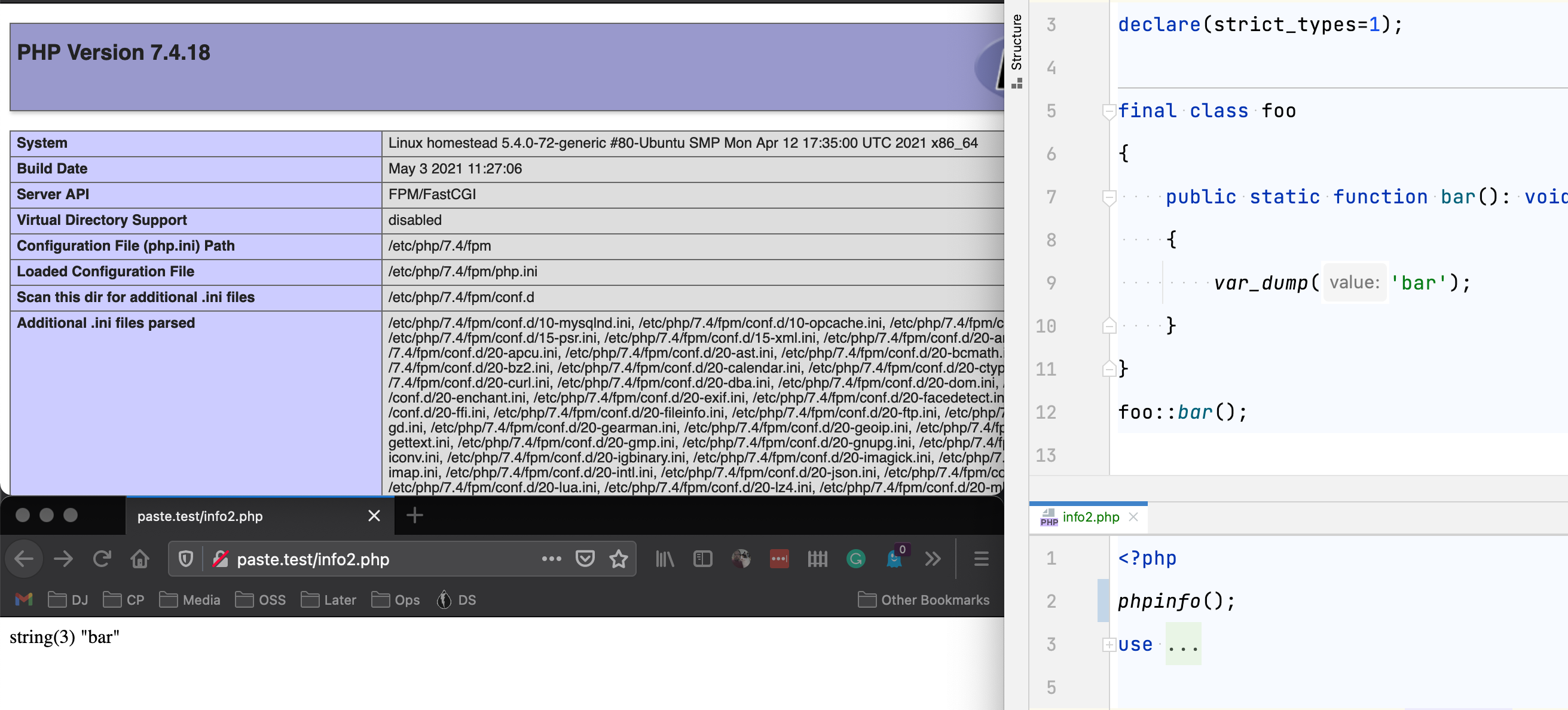
svpernova09
on 13 May 2021
@svpernova09 even after a refresh the result is the same? After a fpm restart or a change to the code showed the correct result once. After a refresh the error occurs.
Could the provider be something which can be a part of the problem reproduction. I’m using the latest version of Parallels desktop with the vagrant plugin version 2.2.0 and vagrant 2.14.
frankvanhest
on 13 May 2021
@svpernova09 even after a refresh the result is the same? After a fpm restart or a change to the code showed the correct result once. After a refresh the error occurs.
Could the provider be something which can be a part of the problem reproduction. I’m using the latest version of Parallels desktop with the vagrant plugin version 2.2.0 and vagrant 2.14.
Got it, thanks.
I have narrowed this down to an issue with the latest box. For now, you can downgrade to the previous box version by adding version: 11.1.0 to your Homestead.yaml and then vagrant destroy && vagrant up
svpernova09
on 13 May 2021
Problem in the php uopz module
If you delete it, life will be better:
sudo apt-get remove php7.4-uopz -y
sudo systemctl restart php7.4-fpm.service
 Tigla
on 13 May 2021
Tigla
on 13 May 2021
Can confirm that explicitly setting the version to 11.1.0 and re-provisioning fixes the issue.
 stevegrunwell
on 13 May 2021
stevegrunwell
on 13 May 2021
@svpernova09 Thanks for the workaround. I've downgraded and the problem is gone.
frankvanhest
on 13 May 2021
Problem in the php uopz module
If you delete it, life will be better:sudo apt-get remove php7.4-uopz -y sudo systemctl restart php7.4-fpm.service
I figured there was a conflict somewhere. I've reverted & tagged a new version: https://github.com/laravel/settler/releases/tag/v11.3.0 that backs out a lot of the additions (but keeps the Memcached fix). Boxes within the hour.
svpernova09
on 13 May 2021
Virtualbox & Parallels released. Hyper-V uploading.
svpernova09
on 13 May 2021
Hyper-V released as well. Thanks all.
svpernova09
on 13 May 2021
Related issues
 mattmcdonald-uk
·
3Comments
mattmcdonald-uk
·
3Comments
 daryn-k
·
5Comments
daryn-k
·
5Comments
 pluxain
·
3Comments
pluxain
·
3Comments
 mtpultz
·
4Comments
mtpultz
·
4Comments
 gormus
·
4Comments
gormus
·
4Comments
Most helpful comment
I figured there was a conflict somewhere. I've reverted & tagged a new version: https://github.com/laravel/settler/releases/tag/v11.3.0 that backs out a lot of the additions (but keeps the Memcached fix). Boxes within the hour.