Homestead: Homestead & WSL 2 - Windows 10
Provision/Configure Ubuntu 20.04
You must be on the Homestead branch 20.04. Create a new/blank Ubuntu 20.04 WSL Distribution. Run the new distribution and change directories to where you have Homestead cloned. For me this is /mnt/c/Users/halo/Code/homestead. Run the initial provisioning script to install the base Homestead system. The script will ask you for your WSL username and user group. You should use your username for your user group unless you have specific plans or requirements outside of the scope of Homestead.
$ cd Code/homestead
$ sudo ./bin/wsl-init
[sudo] password for halo:
What is your WSL user name?
halo
What is your WSL user group? (Same as username if you're unsure)
halo
Get:1 http://security.ubuntu.com/ubuntu focal-security InRelease [107 kB]
...
Create Sites from Homestead Configuration
Add a new top level configuration item in your Homestead.yaml configuration such as:
wsl_sites:
    -   map: vcdt.test
        to: /mnt/c/Users/halo/Code/vcdt/public
$ ./bin/homestead wsl:create-sites
The sites from wsl_sites will be created.
Create Databases from Homestead Configuration
WSL will read from the normal databases configuration in Homestead.yaml
databases:
    - homestead
    - vcdt
    - laminas
$ ./bin/homestead wsl:create-databases
mysql: [Warning] Using a password on the command line interface can be insecure.
mysql: [Warning] Using a password on the command line interface can be insecure.
mysql: [Warning] Using a password on the command line interface can be insecure.
mysql: [Warning] Using a password on the command line interface can be insecure.
mysql: [Warning] Using a password on the command line interface can be insecure.
mysql: [Warning] Using a password on the command line interface can be insecure.
WSL Databases have been created!
The databases from databases will be created.
Installing Optional Features
WSL will read from the normal features configuration in Homestead.yaml
features:
    - timescaledb: true
$ ./bin/homestead wsl:apply-features
Using postgresql.conf at this path:
/etc/postgresql/12/main/postgresql.conf

Writing backup to:
/tmp/timescaledb_tune.backup202010041216

Recommendations based on 50.17 GB of available memory and 8 CPUs for PostgreSQL 12
Saving changes to: /etc/postgresql/12/main/postgresql.conf
Command output can be found via: sudo cat ~/.homestead-features/timescaledb.log
WSL features have been configured!
 svpernova09
All 40 comments
@svpernova09 I got NULL error when I ran ./bin/homestead wsl:wsl:create-site
it created the site but error out before the cert.

`PHP Fatal error: Uncaught Error: Call to undefined function Laravel\Homestead\isNull() in /mnt/c/WSL2Homestead/src/WslCreateSiteCommand.php:82
Stack trace:
0 /mnt/c/WSL2Homestead/vendor/symfony/console/Command/Command.php(258): Laravel\Homestead\WslCreateSiteCommand->execute()
1 /mnt/c/WSL2Homestead/vendor/symfony/console/Application.php(916): Symfony\Component\Console\Command\Command->run()
2 /mnt/c/WSL2Homestead/vendor/symfony/console/Application.php(264): Symfony\Component\Console\Application->doRunCommand()
3 /mnt/c/WSL2Homestead/vendor/symfony/console/Application.php(140): Symfony\Component\Console\Application->doRun()
4 /mnt/c/WSL2Homestead/bin/homestead(16): Symfony\Component\Console\Application->run()
5 {main}
thrown in /mnt/c/WSL2Homestead/src/WslCreateSiteCommand.php on line 82`
 litan1106
on 11 Sep 2020
litan1106
on 11 Sep 2020
@svpernova09 I got NULL error when I ran ./bin/homestead wsl:wsl:create-site
it created the site but error out before the cert.
Whoops! I have some local changes I haven't pushed.
svpernova09
on 11 Sep 2020
Should be fixed as of da5eed767e34495f64aa5d2ab4d458179acf38e3
- Fixed
isNull->is_null - Changed
wsl:create-site->wsl:create-sites
svpernova09
on 11 Sep 2020
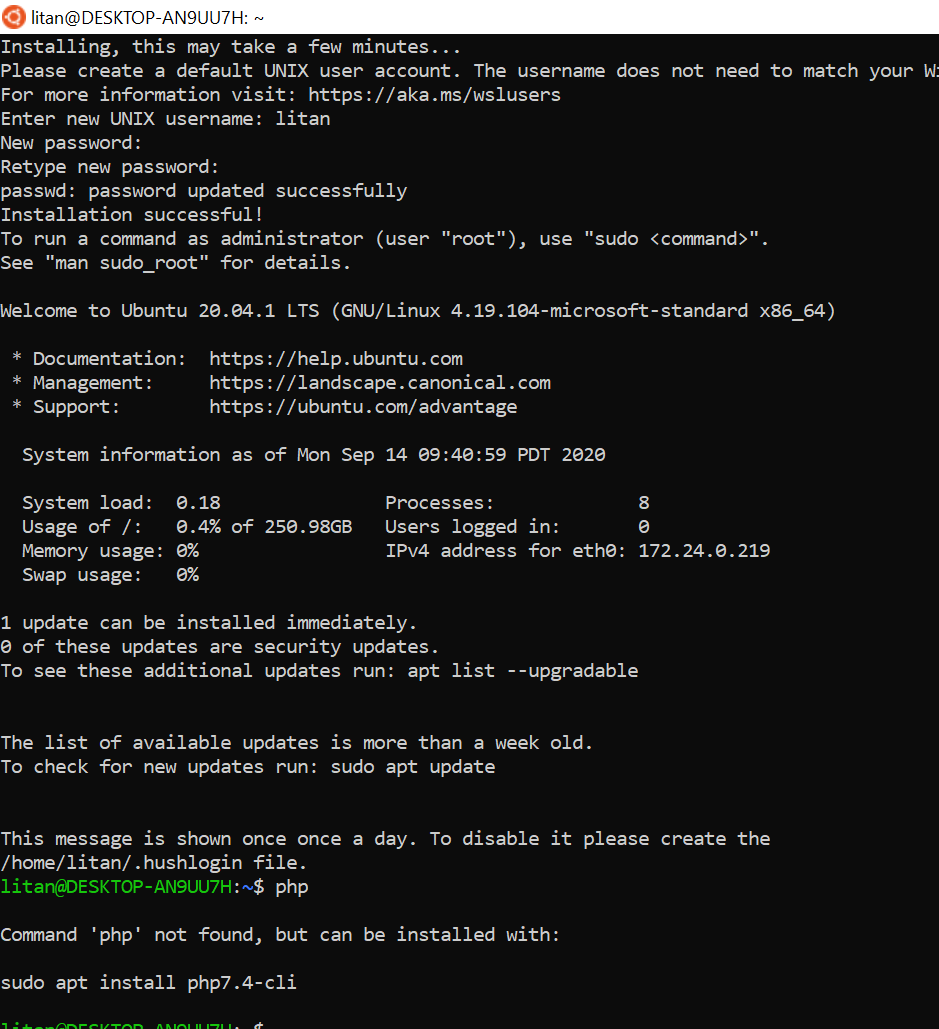
@svpernova09 I tried provision script again with a fresh ubuntu 20.04 with wsl2. It required php and composer as prerequisite.
php
./bin/homestead wsl:init
litan1106
on 14 Sep 2020
@svpernova09 I got an error with ./bin/homestead wsl:create-site because the nginx conf still referred to vagrant user.
nginx confg
cat /etc/nginx/nginx.conf
user vagrant;
worker_processes auto;
pid /run/nginx.pid;
wsl:create-site error
```/mnt/c/Homestead/src/WslCreateSiteCommand.php:91:
string(125) "Updating certificates in /etc/ssl/certs...
1 added, 0 removed; done.
Running hooks in /etc/ca-certificates/update.d...
done.
"
/mnt/c/Homestead/src/WslCreateSiteCommand.php:97:
string(38) " * Restarting nginx nginx
...fail!
"
PHP Fatal error: Uncaught Error: Call to a member function writeln() on string in /mnt/c/Homestead/src/WslCreateSiteCommand.php:100
Stack trace:
0 /mnt/c/Homestead/vendor/symfony/console/Command/Command.php(258): Laravel\Homestead\WslCreateSiteCommand->execute()
1 /mnt/c/Homestead/vendor/symfony/console/Application.php(916): Symfony\Component\Console\Command\Command->run()
2 /mnt/c/Homestead/vendor/symfony/console/Application.php(264): Symfony\Component\Console\Application->doRunCommand()
3 /mnt/c/Homestead/vendor/symfony/console/Application.php(140): Symfony\Component\Console\Application->doRun()
4 /mnt/c/Homestead/bin/homestead(16): Symfony\Component\Console\Application->run()
5 {main}
thrown in /mnt/c/Homestead/src/WslCreateSiteCommand.php on line 100```
litan1106
on 14 Sep 2020
@svpernova09 I tried provision script again with a fresh ubuntu 20.04 with wsl2. It required php and composer as prerequisite.
php ./bin/homestead wsl:init
I assumed PHP was already there. Will investigate.
svpernova09
on 14 Sep 2020
I got an error with ./bin/homestead wsl:create-site because the nginx conf still referred to vagrant user.
./bin/homestead wsl:create-site
I get
/mnt/c/Users/halo/Code/homestead/src/WslCreateSiteCommand.php:97:
string(38) " * Restarting nginx nginx
   ...done.
"
/mnt/c/Users/halo/Code/homestead/src/WslCreateSiteCommand.php:97:
string(38) " * Restarting nginx nginx
   ...done.
"
/mnt/c/Users/halo/Code/homestead/src/WslCreateSiteCommand.php:97:
string(38) " * Restarting nginx nginx
   ...done.
"
PHP Fatal error:  Uncaught Error: Call to a member function writeln() on string in /mnt/c/Users/halo/Code/homestead/src/WslCreateSiteCommand.php:100
Stack trace:
#0 /mnt/c/Users/halo/Code/homestead/vendor/symfony/console/Command/Command.php(258): Laravel\Homestead\WslCreateSiteCommand->execute()
#1 /mnt/c/Users/halo/Code/homestead/vendor/symfony/console/Application.php(916): Symfony\Component\Console\Command\Command->run()
#2 /mnt/c/Users/halo/Code/homestead/vendor/symfony/console/Application.php(264): Symfony\Component\Console\Application->doRunCommand()
#3 /mnt/c/Users/halo/Code/homestead/vendor/symfony/console/Application.php(140): Symfony\Component\Console\Application->doRun()
#4 /mnt/c/Users/halo/Code/homestead/bin/homestead(17): Symfony\Component\Console\Application->run()
#5 {main}
  thrown in /mnt/c/Users/halo/Code/homestead/src/WslCreateSiteCommand.php on line 100

Fatal error: Uncaught Error: Call to a member function writeln() on string in /mnt/c/Users/halo/Code/homestead/src/WslCreateSiteCommand.php on line 100

Error: Call to a member function writeln() on string in /mnt/c/Users/halo/Code/homestead/src/WslCreateSiteCommand.php on line 100

Call Stack:
    0.0016     394680   1. {main}() /mnt/c/Users/halo/Code/homestead/bin/homestead:0
    0.2639    1822992   2. Symfony\Component\Console\Application->run() /mnt/c/Users/halo/Code/homestead/bin/homestead:17
    0.3940    2060696   3. Symfony\Component\Console\Application->doRun() /mnt/c/Users/halo/Code/homestead/vendor/symfony/console/Application.php:140
    0.3941    2064112   4. Symfony\Component\Console\Application->doRunCommand() /mnt/c/Users/halo/Code/homestead/vendor/symfony/console/Application.php:264
    0.3941    2064112   5. Laravel\Homestead\WslCreateSiteCommand->run() /mnt/c/Users/halo/Code/homestead/vendor/symfony/console/Application.php:916
    0.3942    2065944   6. Laravel\Homestead\WslCreateSiteCommand->execute() /mnt/c/Users/halo/Code/homestead/vendor/symfony/console/Command/Command.php:258
But no nginx errors, I have fixed the writeln() error in eaa4f2add42b084b41fa51e3418dec64cbad0805
svpernova09
on 14 Sep 2020
@svpernova09 I tried provision script again with a fresh ubuntu 20.04 with wsl2. It required php and composer as prerequisite.
php ./bin/homestead wsl:initI assumed PHP was already there. Will investigate.
php not installed by default on ubuntu wsl
litan1106
on 14 Sep 2020
We should remove the PHP init command, move the wsl.sh script to bin/wsl-init.
Create new WSL distro, Navigate to homestead folder, run bin/wsl-init which bootstraps everything and from there you configureHomestead.yaml and start running wsl:create-sites` commands
svpernova09
on 14 Sep 2020
Using a57003f60e970e551712d0fb8f5eb3314216b667:
https://gist.github.com/svpernova09/849337cb89812b97925002042e6c6dbc
svpernova09
on 14 Sep 2020
@svpernova09 The new wsl-init script works great in WSL2. I noticed the php7.4-fpm service failed.
ERROR: unable to bind listening socket for address '/run/php/php7.4-fpm.sock': No such file or directory (2)
ERROR: FPM initialization failed
litan1106
on 15 Sep 2020
@svpernova09 The new wsl-init script works great in WSL2. I noticed the php7.4-fpm service failed.
ERROR: unable to bind listening socket for address '/run/php/php7.4-fpm.sock': No such file or directory (2) ERROR: FPM initialization failed
Haven't been able to replicate, but I have fixed a few other issues with 7f57b782e3e0314fad16fde90600bdf98b8b0d21
svpernova09
on 15 Sep 2020
New tweaks: 6aad11cad0efb4b7b1ea0ee0ac85ec5ad549d87b
Usage:
halo@Rage:/mnt/c/Users/halo$ cd Code/homestead
halo@Rage:/mnt/c/Users/halo/Code/homestead$ export WSL_USERNAME=halo
halo@Rage:/mnt/c/Users/halo/Code/homestead$ export WSL_USER_GROUP=halo
halo@Rage:/mnt/c/Users/halo/Code/homestead$ sudo -E ./bin/wsl-init
Log: https://gist.github.com/svpernova09/d2f39d6b14d745c70a30855f5740fb32
svpernova09
on 15 Sep 2020
@svpernova09 I used the above code to wsl-init but I still got an error with mysql. (I reinstalled ubuntu wsl for every wsl init test.)
https://gist.github.com/litan1106/9625765774dc5a701476953e1e55ffd1#file-new-wsl-init-log-L5754
litan1106
on 15 Sep 2020
@svpernova09 I used the above code to wsl-init but I still got an error with mysql. (I reinstalled ubuntu wsl for every wsl init test.)
https://gist.github.com/litan1106/9625765774dc5a701476953e1e55ffd1#file-new-wsl-init-log-L5754
This seems to be common on 20.04, I've seen this in my other systems, I believe it's because the user we're switching to doesn't have access to the filesystem and thus presents this weird error, but the mysql command appears to complete without error.
reinstalled ubuntu wsl for every wsl init test
Same, using Powershell: wsl --unregister Ubuntu-20.04 and then ubuntu2004.exe to create a new distro.
svpernova09
on 16 Sep 2020
@svpernova09 I ran ./bin/homestead wsl:create-site after sudo -E ./bin/wsl-init but I still ran into php7.4-fpm failed issue.
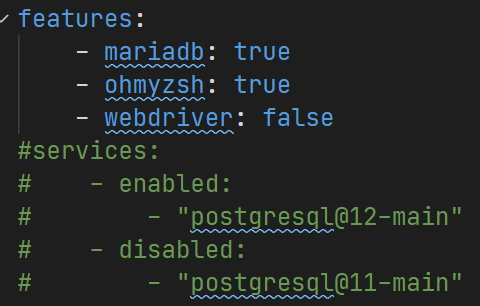
how do we enable features or services with this wsl2 init approach?
sudo service php7.4-fpm restart
* Restarting PHP 7.4 FastCGI Process Manager php-fpm7.4 [fail]
sudo cat /var/log/php7.4-fpm.log
[15-Sep-2020 14:45:59] ERROR: unable to bind listening socket for address '/run/php/php7.4-fpm.sock': No such file or directory (2)
litan1106
on 16 Sep 2020
how do we enable features or services with this wsl2 init approach?
You can't at the moment. My plan is to continue building PHP wrappers around the bash scripts similar to how Ruby is the wrapper for them when running in Vagrant. So I'm anticipating more commands such as "Create databases", "Install features", etc. I'm going to be writing about this process for phparch.com so at least those two features should be expected sometime this week.
svpernova09
on 16 Sep 2020
how do we enable features or services with this wsl2 init approach?
You can't at the moment. My plan is to continue building PHP wrappers around the bash scripts similar to how Ruby is the wrapper for them when running in Vagrant. So I'm anticipating more commands such as "Create databases", "Install features", etc. I'm going to be writing about this process for phparch.com so at least those two features should be expected sometime this week.
Nice. I am thinking something like this too.
litan1106
on 16 Sep 2020
Nice. I am thinking something like this too.
Yes exactly. feel free to PR this.
We also need to account for some features having variables parsed to the ENV. We're duplicating feature parsing and running and we also need to create the path(s) in wsl init
svpernova09
on 16 Sep 2020
@svpernova09 I ran
./bin/homestead wsl:create-siteaftersudo -E ./bin/wsl-initbut I still ran into php7.4-fpm failed issue.
sudo service php7.4-fpm restart
* Restarting PHP 7.4 FastCGI Process Manager php-fpm7.4 [fail]sudo cat /var/log/php7.4-fpm.log
[15-Sep-2020 14:45:59] ERROR: unable to bind listening socket for address '/run/php/php7.4-fpm.sock': No such file or directory (2)
I added the following to fixed the php fpm issue.
mkdir -p /run/php
touch /run/php/php7.4-fpm.sock
touch /run/php/php7.3-fpm.sock
litan1106
on 17 Sep 2020
@svpernova09 I am using this WSL 2 SystemD solution to start the services automatically so I don't have to start the services after system reboot.
systemctl start nginx
systemctl enable nginx
systemctl start mysql
systemctl enable mysql

...
how do we enable features or services with this wsl2 init approach?
You can't at the moment. My plan is to continue building PHP wrappers around the bash scripts similar to how Ruby is the wrapper for them when running in Vagrant. So I'm anticipating more commands such as "Create databases", "Install features", etc. I'm going to be writing about this process for phparch.com so at least those two features should be expected sometime this week.
Nice. I am thinking something like this too.
Currently hacking on this ^
svpernova09
on 17 Sep 2020
@svpernova09 I have been using the wsl2 homestead workflow for 2 weeks. it's perfect and super fast. so light weight, perfect integration with docker desktop with wsl2 distro
- I ran into slow terminal issue with ohmyzsh.
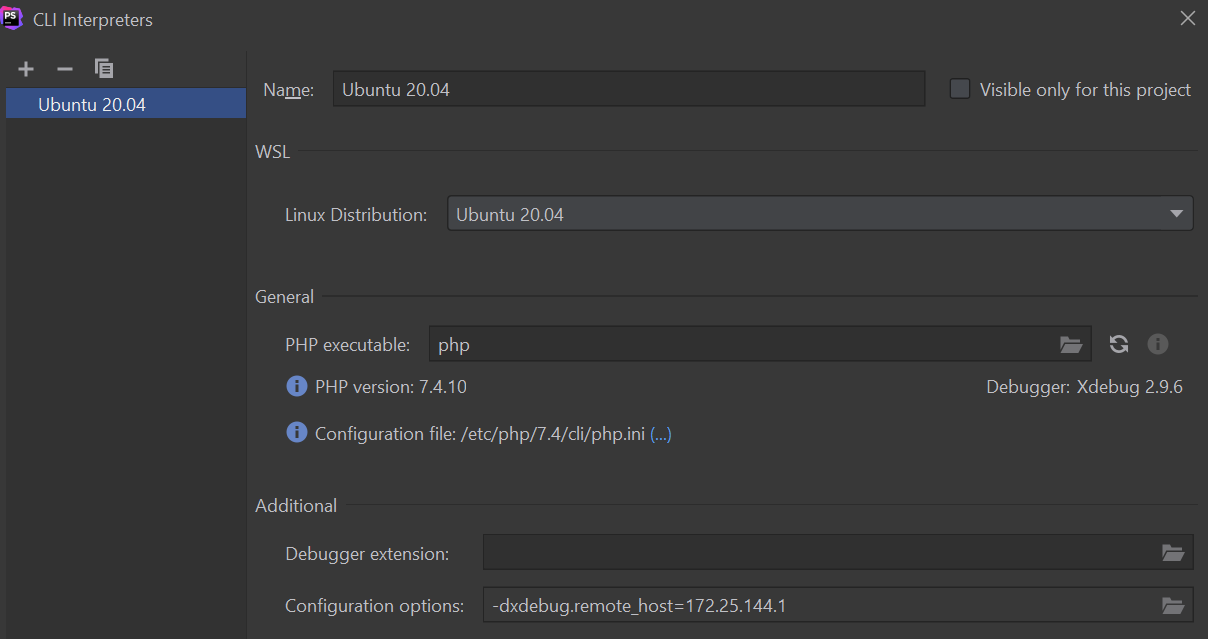
- I ran into xdebug issue with phpstorm because the wsl2 ip changes every reboot. (my work around for the phpstorm xdebug is to set the xdebug.remote_host every reboot. lol)
wsl2 host ip cat /etc/resolv.conf
thanks
litan1106
on 23 Sep 2020
@svpernova09 I have been using the wsl2 homestead workflow for 2 weeks. it's perfect and super fast. so light weight, perfect integration with docker desktop with wsl2 distro
* I ran into slow terminal issue with ohmyzsh.

* I ran into xdebug issue with phpstorm because the wsl2 ip changes every reboot. (my work around for the phpstorm xdebug is to set the xdebug.remote_host every reboot. lol)
wsl2 host ip cat
/etc/resolv.conf
thanks
I've run into this issue as well :/ I came across some google results where users implemented a script to cron @reboot to grab the IP and set it the xdebug config.
svpernova09
on 24 Sep 2020
@svpernova09 I did a test with wsl:apply-feature, it worked like a charm with the vagrant user. lol (with the vagrant user, we can get the feature scripts to work without a single change.)
Steps to reproduce:
- Create a new/blank Ubuntu 20.04 WSL Distribution with vagrant as username
- Clone laravel/homestead 20.04 branch
- Change to the homestead directory
- Run commands
sudo -E ./bin/wsl-init - Restart the ubuntu-20.04 shell/session
- Cd to the homestead directory again to run create-site and apply-feature
./bin/homestead wsl:apply-feature
./bin/homestead wsl:create-sites
./bin/homestead wsl:create-databases - Setup PHPStorm Remote Interpreter via SSH because it offers better integration / support than wsl now
- Enjoy the blazing faster and light weight wsl2 development
litan1106
on 28 Sep 2020
I'll gladly help to test this,
tried @litan1106 steps, and everything ran without errors.
i only have one question do i need to start nginx and mysql servers manually or are there any extra steps i need to do?
 pacharrin
on 2 Oct 2020
pacharrin
on 2 Oct 2020
I'll gladly help to test this,
tried @litan1106 steps, and everything ran without errors.
i only have one question do i need to start nginx and mysql servers manually or are there any extra steps i need to do?
You won't need to start it manually with this pr. (you can check sudo systemctl status nginx after you launch the wsl2 terminal`)
https://github.com/laravel/homestead/pull/1503/files#diff-06d003347c8900c844035a53e017e545R30
litan1106
on 2 Oct 2020
Sorry I've been AFK/Silent. I've been waiting on #Hacktoberfest :D and also trying to work through some issues in regards to Features and WSL, since the feature scripts all assume they're running as the vagrant user instead of the WSL user. So far in the one feature we've enabled for WSL it adds a bit of boilerplate bloat to the feature scripts and I'm just not sure what the right tradeoff to take is. PR reviews + more work coming. I also need to push a 20.04-dev branch so we can stop cowboy coding this onto the 20.04 branch.
svpernova09
on 2 Oct 2020
Sorry I've been AFK/Silent. I've been waiting on #Hacktoberfest :D and also trying to work through some issues in regards to Features and WSL, since the feature scripts all assume they're running as the
vagrantuser instead of the WSL user. So far in the one feature we've enabled for WSL it adds a bit of boilerplate bloat to the feature scripts and I'm just not sure what the right tradeoff to take is. PR reviews + more work coming. I also need to push a20.04-devbranch so we can stop cowboy coding this onto the20.04branch.
I think it's fine to use vagrant as user in wsl2 provision because any feature script created for homestead will work in wsl2 too. Unless you guys prefer to define a user in the Homestead.yaml, then get the user from Homestead.yaml settings.
litan1106
on 3 Oct 2020
I think it's fine to use vagrant as user in wsl2 provision because any feature script created for homestead will work in wsl2 too. Unless you guys prefer to define a user in the Homestead.yaml, then get the user from Homestead.yaml settings.
Yeah, I'm probably just going to add the boilerplate unless I can easily figure out a way around it. we'll see! Thanks for all your feedback & help!
svpernova09
on 3 Oct 2020
A few updates:
- Added Docs for Databases, Features, general updates
- Added WSL support for all features
- PRs should be made against
20.04-devbranch
svpernova09
on 4 Oct 2020
A few updates:
- Added Docs for Databases, Features, general updates
- Added WSL support for all features
- PRs should be made against
20.04-devbranch
Love the WSL2 Support. Thanks for the hard work again.
litan1106
on 6 Oct 2020
Hi I just redid tthe whole setup several times, to figure out a problem on my end.
But i found out that the Databases are not created. Is there any other command I have to run, so that the Databases are created?
EDIT: Just found the wsl:create-databases Function.
Nginx, php-fpm & mysql autostart is not yet configured during the setup process? If not I could take a look at it, if needed.
Thanks for the hard work! :)
 Houbsi
on 28 Oct 2020
Houbsi
on 28 Oct 2020
Hi I just redid tthe whole setup several times, to figure out a problem on my end.
~But i found out that the Databases are not created. Is there any other command I have to run, so that the Databases are created?~
EDIT: Just found the wsl:create-databases Function.Nginx, php-fpm & mysql autostart is not yet configured during the setup process? If not I could take a look at it, if needed.
Thanks for the hard work! :)
There is a pr #1517 for setup systemd on wsl2.
litan1106
on 28 Oct 2020
@svpernova09
I ran into issue when I tried to use mariadb instead of mysql in the ./bin/homestead wsl:apply-features
mariadb log
https://gist.github.com/litan1106/add837263254d88434ea012253d7ee0e
litan1106
on 3 Nov 2020
@svpernova09
I ran into issue when I tried to use mariadb instead of mysql in the./bin/homestead wsl:apply-featuresmariadb log
https://gist.github.com/litan1106/add837263254d88434ea012253d7ee0e
Confirmed. Seeing the following on a freshly configured 20.04:
halo@Rage:/mnt/c/Users/halo/Code/homestead$ ./bin/homestead wsl:apply-features
[sudo] password for halo:
Failed to retrieve unit state: Connection reset by peer
Warning! D-Bus connection terminated.
Failed to stop apparmor.service: Connection reset by peer
See system logs and 'systemctl status apparmor.service' for details.
Failed to retrieve unit state: Connection reset by peer
Failed to reload daemon: Connection reset by peer
Failed to reload daemon: Connection reset by peer
E: Sub-process /usr/bin/dpkg returned an error code (1)
E: Sub-process /usr/bin/dpkg returned an error code (1)
[info] Repository file successfully written to /etc/apt/sources.list.d/mariadb.list
[info] Adding trusted package signing keys...
[info] Running apt-get update...
[info] Done adding trusted package signing keys
touch: cannot touch '/etc/mysql/debian.cnf': No such file or directory
E: Sub-process /usr/bin/dpkg returned an error code (1)
sed: can't read /etc/mysql/mariadb.conf.d/50-server.cnf: No such file or directory
/mnt/c/Users/halo/Code/homestead/scripts/features/mariadb.sh: line 50: /etc/mysql/mariadb.conf.d/50-server.cnf: No such file or directory
ERROR 2002 (HY000): Can't connect to local MySQL server through socket '/var/run/mysqld/mysqld.sock' (2)
Failed to retrieve unit state: Connection reset by peer
Warning! D-Bus connection terminated.
Failed to restart mysql.service: Connection reset by peer
See system logs and 'systemctl status mysql.service' for details.
ERROR 2002 (HY000): Can't connect to local MySQL server through socket '/var/run/mysqld/mysqld.sock' (2)
ERROR 2002 (HY000): Can't connect to local MySQL server through socket '/var/run/mysqld/mysqld.sock' (2)
ERROR 2002 (HY000): Can't connect to local MySQL server through socket '/var/run/mysqld/mysqld.sock' (2)
ERROR 2002 (HY000): Can't connect to local MySQL server through socket '/var/run/mysqld/mysqld.sock' (2)
Failed to retrieve unit state: Connection reset by peer
Warning! D-Bus connection terminated.
Failed to restart mysql.service: Connection reset by peer
See system logs and 'systemctl status mysql.service' for details.
Failed to retrieve unit state: Connection reset by peer
Warning! D-Bus connection terminated.
Failed to restart mysql.service: Connection reset by peer
See system logs and 'systemctl status mysql.service' for details.
Command output can be found via: sudo cat ~/.homestead-features/mariadb.log
WSL features have been configured!
halo@Rage:/mnt/c/Users/halo/Code/homestead$
svpernova09
on 4 Nov 2020
Hi! First of all thank you !! I finally found what I needed.
Here are some bugs that I found:
I have enabled ohmyzsh as a feature and saw that it creates a /home/vagrant folder and attempted to use the vagrant user
https://gist.github.com/Simoneu01/4c3297b9dbc83f2ea41c28e464ff8e7e
wsl-int have a problem:
System has not been booted with systemd as init system (PID 1). Can't operate. WSL #457
The problem is in this line: wsl-init#L574
 Simoneu01
on 13 Nov 2020
Simoneu01
on 13 Nov 2020
WSL Support is now in master
svpernova09
on 27 Dec 2020
Awesome. Thanks
litan1106
on 27 Dec 2020
I shared my ubuntu wsl2 systemd gist if anyone interested.
https://gist.github.com/litan1106/b7752acaa371f89660c7b83f27f71577
litan1106
on 5 Jan 2021
Related issues
 bironeaj
·
3Comments
bironeaj
·
3Comments
 mtpultz
·
4Comments
mtpultz
·
4Comments
 Modelizer
·
5Comments
svpernova09
·
3Comments
Modelizer
·
5Comments
svpernova09
·
3Comments
 pqt
·
3Comments
pqt
·
3Comments
Most helpful comment
There is a pr #1517 for setup systemd on wsl2.