Homestead: Hot Reloading via Port 8080 Connection Refused
Versions
- Vagrant: 2.2.6
- Provider: Virtualbox
- Homestead: 8.2.1
Host operating system
Windows 10
Homestead.yaml
---
ip: "192.168.10.10"
memory: 2048
cpus: 1
provider: virtualbox

authorize: ~/.ssh/id_rsa.pub

keys:
    - ~/.ssh/id_rsa

folders:
    - map: C:\Web_Development\Code
      to: /home/vagrant/Code

sites:
    - map: bogeybrain.test
      to: /home/vagrant/Code/BogeyBrain/public

databases:
    - bogeybrain

features:
    - mariadb: false
    - mysql8: true

ports:
     - send: 8080
       to: 8080
Vagrant destroy & up output
https://gist.github.com/jfsullivan/8865ea38e4cc47fc878977ae80561cab
Expected behavior
I had Hot Module Reloading (HMR) working via Laravel Mix but then updated Homestead so that I could begin using Mysql 8.0. I run yarn hot and reload my browser window. I would expect to get a HMR connection thru port 8080 as I did before.
Actual behavior
I get the following errors in the browser console....
GET http://bogeybrain.test:8080//css/app.css net::ERR_CONNECTION_REFUSED
GET http://bogeybrain.test:8080//js/app.js net::ERR_CONNECTION_REFUSED
I can connect to the site when not using HMR. HMR is setup to access the main page via port 80 and the CSS and JS via port 8080. The main page is loaded but the CSS and JS connections are refused.
I have the following settings in my webpack.mix.js file to setup HRM
    // For Hot Reloading
    mix.options({
        hmrOptions: {
            host: 'bogeybrain.test',  // site's host name
            port: 8080,
        }
    });

    // // fix css files 404 issue
    mix.webpackConfig({
        // add any webpack dev server config here
        devServer: {
            proxy: {
                host: '192.168.10.10',  // host machine ip
                port: 8080,
            },
            watchOptions:{
                aggregateTimeout:200,
                poll:5000
            },

        }
    });
 jfsullivan
All 42 comments
GET http://bogeybrain.test:8080//css/app.css net::ERR_CONNECTION_REFUSED
GET http://bogeybrain.test:8080//js/app.js net::ERR_CONNECTION_REFUSED
Your URL has 2 /es. Check this isn't causing problems.
Past that, I don't really know.
 svpernova09
on 4 Nov 2019
svpernova09
on 4 Nov 2019
Yeah, that is coming from Lavavel Mix but is not the issue. It worked like that prior to updating Homestead and I also manually put those links in and get the same response. It looks like a port issue. I can telnet into Homestead via port 80 but not via port 8080.
jfsullivan
on 4 Nov 2019
Yeah, that is coming from Lavavel Mix but is not the issue. It worked like that prior to updating Homestead and I also manually put those links in and get the same response. It looks like a port issue. I can telnet into Homestead via port 80 but not via port 8080.
According to your gist Homestead _is_ mapping the port correctly between the host & guest. If you can't telnet, from the host that means the process in the guest isn't listening/running.
svpernova09
on 4 Nov 2019
That makes sense but I don't know why that would be. When I run yarn hot I get the following output...
vagrant@homestead:~/Code/BogeyBrain$ yarn hot
yarn run v1.19.0
$ node_modules/cross-env/dist/bin/cross-env.js NODE_ENV=development node_modules/webpack-dev-server/bin/webpack-dev-server.js --inline --hot --config=node_modules/laravel-mix/setup/webpack.config.js
ℹ 「wds」: Project is running at http://bogeybrain.test:8080/
ℹ 「wds」: webpack output is served from http://bogeybrain.test:8080/
ℹ 「wds」: Content not from webpack is served from /home/vagrant/Code/BogeyBrain/public
ℹ 「wds」: 404s will fallback to /index.html
I manually entered the paths for the files and get the same error so it is not an issue with the extra /
GET http://bogeybrain.test:8080/css/app.css net::ERR_CONNECTION_REFUSED
GET http://bogeybrain.test:8080/js/app.js net::ERR_CONNECTION_REFUSED
jfsullivan
on 4 Nov 2019
Run this command and paste the output here please:sudo ifconfig
svpernova09
on 4 Nov 2019
vagrant@homestead:~/Code/BogeyBrain$ sudo ifconfig
eth0: flags=4163<UP,BROADCAST,RUNNING,MULTICAST>  mtu 1500
        inet 10.0.2.15  netmask 255.255.255.0  broadcast 10.0.2.255
        inet6 fe80::a00:27ff:fe9e:e528  prefixlen 64  scopeid 0x20<link>
        ether 08:00:27:9e:e5:28  txqueuelen 1000  (Ethernet)
        RX packets 53848  bytes 47027161 (47.0 MB)
        RX errors 0  dropped 0  overruns 0  frame 0
        TX packets 17693  bytes 1688935 (1.6 MB)
        TX errors 0  dropped 0 overruns 0  carrier 0  collisions 0

eth1: flags=4163<UP,BROADCAST,RUNNING,MULTICAST>  mtu 1500
        inet 192.168.10.10  netmask 255.255.255.0  broadcast 192.168.10.255
        inet6 fe80::a00:27ff:fedd:9cbb  prefixlen 64  scopeid 0x20<link>
        ether 08:00:27:dd:9c:bb  txqueuelen 1000  (Ethernet)
        RX packets 6391  bytes 589956 (589.9 KB)
        RX errors 0  dropped 0  overruns 0  frame 0
        TX packets 4420  bytes 6529745 (6.5 MB)
        TX errors 0  dropped 0 overruns 0  carrier 0  collisions 0

lo: flags=73<UP,LOOPBACK,RUNNING>  mtu 65536
        inet 127.0.0.1  netmask 255.0.0.0
        inet6 ::1  prefixlen 128  scopeid 0x10<host>
        loop  txqueuelen 1000  (Local Loopback)
        RX packets 10364  bytes 2975722 (2.9 MB)
        RX errors 0  dropped 0  overruns 0  frame 0
        TX packets 10364  bytes 2975722 (2.9 MB)
        TX errors 0  dropped 0 overruns 0  carrier 0  collisions 0
ok, we got the right IP. Can you show whats in /etc/hosts
If this line doesn't exist, add it:
192.168.10.10 bogeybrain.test
Once you do that, run wget http://bogeybrain.test and it should download a file, paste the contents of that file here, please.
svpernova09
on 4 Nov 2019
That line didn't exist. It instead had
127.0.0.1 bogeybrain.test
I added it and the wget out put was...
<!DOCTYPE html>
<html class="h-full">
<head>
<meta charset="utf-8">
<meta name="viewport" content="width=device-width, initial-scale=1.0, maximum-scale=1.0">
<!-- CSRF Token -->
<meta name="csrf-token" content="DgkTmbsX1LNW1964jRun6PiIpqjv2ej2s9xYoCh5">
<!-- App Name used for cookies -->
<meta name="app-name" content="BogeyBrain">
<!-- Icons -->
<link rel="stylesheet" href="https://use.fontawesome.com/releases/v5.3.1/css/all.css" integrity="sha384-mzrmE5qonljUremFsqc01SB46JvROS7bZs3IO2EmfFsd15uHvIt+Y8vEf7N7fWAU" crossorigin="anonymous">
<link href="http://bogeybrain.test:8080/css/app.css" rel="stylesheet">
<script src="http://bogeybrain.test:8080/js/app.js" defer></script>
</head>
<body class="min-h-full m-0 p-0 bg-gray-100 text-base text-gray-800 font-body leading-normal relative">
<div id="app" data-page="{"component":"Home","props":{"app":{"name":"BogeyBrain"},"auth":{"user":null},"flash":{"success":null,"error":null},"errors":{}},"url":"\/","version":null}"></div>
</body>
</html>
Does the hot reload work now?
svpernova09
on 4 Nov 2019
No - same error - Connection refused
jfsullivan
on 4 Nov 2019
If you do wget http://bogeybrain.test:8080/css/app.css does it throw an error or do you get your CSS in a local file?
It's like the domain name is bound to the wrong IP, and not sure why.
svpernova09
on 4 Nov 2019
It was saved in a local file. So it looks like the port is working inside homestead but not from my Windows box to homestead. Am I reading that correct?
jfsullivan
on 4 Nov 2019
It was saved in a local file. So it looks like the port is working inside homestead but not from my Windows box to homestead. Am I reading that correct?
yeah, I believe so. You could try a different port, but AFAIK nothing inside Homestead should be listening on 8080, and Virtualbox wouldn't have been able to bind the port during vagrant up if it was in use on your host.
svpernova09
on 4 Nov 2019
No luck - I tried ports 8079 and 8081 and got the same error.
jfsullivan
on 5 Nov 2019
Go back to 8080.
What's the output of this command (From inside Homestead): sudo netstat -tulpn | grep :8080
svpernova09
on 5 Nov 2019
Where is that output supposed to go? There is no output in the console.
vagrant@homestead:~/Code/BogeyBrain$ sudo netstat -tulpn | grep :8080
vagrant@homestead:~/Code/BogeyBrain$
No output means there's nothing listening on 8080, which explains why it doesn't work. Whatever mix process you're expecting to be running in the VM on 8080, isn't.
svpernova09
on 5 Nov 2019
Sorry - I had closed the console window that yarn hot was running in last night. I restarted it and now
sudo netstat -tulpn | grep :8080
returns...
tcp 0 0 127.0.0.1:8080 0.0.0.0:* LISTEN 30089/node
jfsullivan
on 5 Nov 2019
So this looks good, node is listening on 8080 in the VM, if it's not working still I may be out of ideas. At this point we've verified ports are working, services are listening as expected.
svpernova09
on 5 Nov 2019
Yes, I am at a loss as well. It is still giving the same error. It looks like an issue between the local machine and the Homestead environment. The issues started when I updated Virtual Box, Vagrant, and Homestead. I don't want to revert since I need some MySQL 8.0 capabilities but working without Hot Module Replacement will be painful since I am using Vue heavily.
jfsullivan
on 5 Nov 2019
I don't think * it's Vagrant, or Homestead itself. If it *is Virtualbox, maybe downgrade to 6.0.0?
svpernova09
on 5 Nov 2019
No change with the downgrade to VirtualBox 6.0.0.
jfsullivan
on 5 Nov 2019
Do you have this in a reproducible repo that I could pull down and work with?
svpernova09
on 5 Nov 2019
Unfortunately, I do not and don't know how I could do that.
jfsullivan
on 5 Nov 2019
Unfortunately, I do not and don't know how I could do that.
I know very little about Vue, if you could scaffold out a project that uses the same hot reloading and give me steps to reproduce the issue, I could dive in and see what I could figure out.
svpernova09
on 5 Nov 2019
Do you know the version of Homestead you were using before that was working? I don't think anything we changed would cause this, but I'm running short on ideas.
svpernova09
on 5 Nov 2019
I will have to see the easiest way to build out that project. I don't recall which version of Homestead I was on. I'm pretty sure that I updated it a few months back.
jfsullivan
on 6 Nov 2019
Let me know if you want to revisit this.
svpernova09
on 22 Nov 2019
I've also come across this issue and have tried everything in this issue to help it, but alas.
The yarn hotcommand runs fine, but the app.js and css files are getting a 304 statuscode...
I'm trying to troubleshoot with the help of some articles, but if anyone has any great steps.
@svpernova09 If you don't mind pulling my homestead portfolio website you could use that in order to try and reproduce the error.
 Jturpijn
on 25 Nov 2019
Jturpijn
on 25 Nov 2019
Jturpijn, any luck with a solution?
jfsullivan
on 13 Dec 2019
I had this issue and I fixed it with this guide from webpack's site, let me know if it works for you. https://webpack.js.org/guides/development-vagrant/
 brycemurphy
on 13 Jan 2020
brycemurphy
on 13 Jan 2020
I've got the same issue and despite looking in many places can't find a solution.
Using a new installation of Windows 10, virtualbox, and homestead v10.3.
I get ERR_CONNECTION_REFUSED when trying to use hot reloading via port 8080.
If I use netstat on the vm I get
vagrant@homestead:~/code/Rosters/laravel$ sudo netstat -tulpn | grep :8080
tcp        0      0 127.0.0.1:8080          0.0.0.0:*               LISTEN      2213/node
so I take it node is listening on 8080,
but if I use telnet on Windows to connect to it I get
`PS C:\WINDOWS\system32> telnet 192.168.10.10 8080
Connecting To 192.168.10.10...Could not open connection to the host, on port 8080: Connect failed`
so I'm unable to connect to port 8080 on the vm.
Connecting to port 80 on the vm works fine.
I have included
ports:
     - send: 8080
       to: 8080
in my homestead.yaml but that hasn't helped.
Any suggestions?
 mikelukins
on 10 Mar 2020
mikelukins
on 10 Mar 2020
How to fix this pain in the ass?
I am using vagrant homestead on windows
app domain
http://my-app.local
 shahidkarimi
on 16 May 2020
shahidkarimi
on 16 May 2020
Any luck or we are at a loss?
 reisnobre
on 12 Jun 2020
reisnobre
on 12 Jun 2020
@reisnobre, (and anyone else still having this issue)
I need a reproducible scenario with instructions so I can see how this works.
Edit: I somehow missed this comment by @Jturpijn
@svpernova09 If you don't mind pulling my homestead portfolio website you could use that in order to try and reproduce the error.
I can give this a spin
svpernova09
on 12 Jun 2020
I just have the base laravel, that was created via laravel new and the basic configurations mentioned here.
I'm on Mac btw
Homestead.yaml
ip: "192.168.10.10"
memory: 1024
cpus: 1
provider: virtualbox
name: "hot-vagrant"
hostname: "vagrant"

authorize: ~/.ssh/id_rsa.pub

keys:
    - ~/.ssh/id_rsa

folders:
    - map: /Users/reisnobre/Projects/app.hot-vagrant
      to: /home/vagrant/code/hot-vagrant

sites:
    - map: hot-vagrant.test
      to: /home/vagrant/code/hot-vagrant/public

databases:
    - homestead
    - sypro-hub
    - sypro-hub-test

variables:
    - key: APP_ENV
      value: local

ports:
     - send: 8080
       to: 8080
webpack.mix.js
const mix = require('laravel-mix');

/*
 |--------------------------------------------------------------------------
 | Mix Asset Management
 |--------------------------------------------------------------------------
 |
 | Mix provides a clean, fluent API for defining some Webpack build steps
 | for your Laravel application. By default, we are compiling the Sass
 | file for the application as well as bundling up all the JS files.
 |
 */


mix.options({
  hmrOptions: {
    host: 'hot-vagrant.test',  // site's host name
    port: 8080
  }
})

mix.webpackConfig({
  // add any webpack dev server config here
  devServer: {
    proxy: {
      host: '0.0.0.0',  // host machine ip
      port: 8080
    },
    watchOptions:{
      aggregateTimeout: 200,
      poll: 5000
    }
  }
})

mix.js('resources/js/app.js', 'public/js')
  .sass('resources/sass/app.scss', 'public/css');
I'm just trying to set up the basic stuff, without Vue or anything.
I'm on a very deep rabbit hole trying to figure this out.
reisnobre
on 12 Jun 2020
@svpernova09 I've recently reuploaded my entire portfolio project with a new homestead environment using laravel 7. so that's unfortunate.
With this npm run hot as well as 'npm run dev --watch-poll' don't seem to work it won't reload or won't register any change in my code.
Jturpijn
on 12 Jun 2020
@Jturpijn without Vagrant and Homestead did you get the hot reloading working?
reisnobre
on 12 Jun 2020
@reisnobre As in npm hot reload with projects other than laravel? Yes, I have.
But I haven't used laravel without Vagrant or Homested.
Jturpijn
on 13 Jun 2020
I got working yesterday without Vagrant, using Valet.
reisnobre
on 13 Jun 2020
I'm having the same issue right now, can help you find out what's wrong.
 andriihorpenko
on 13 Jul 2020
andriihorpenko
on 13 Jul 2020
So I believe this is working as expected. You have to make some configuration changes and explicitly allow the port and you need to bind the server to the public network IP (usually eth0 in Homestead if you don't override network settings)
Here's what I did to get this working:
Homestead 10.x, base box 9.x but the version doesn't matter, the config changes are the same.
---
ip: "192.168.10.10"
memory: 2048
cpus: 2
provider: vmware_desktop
authorize: ~/.ssh/id_rsa.pub
keys:
    - ~/.ssh/id_rsa
folders:
    - map: C:\Users\halo\Code\reload-app
      to: /home/vagrant/reload-app
sites:
    - map: reload-app.test
      to: /home/vagrant/reload-app
ports:
    - send: 4200
      to: 4200
Noteably reload-app is an angular app installed via:
shell script
sudo npm install -g @angular/cli
ng new reload-app
ng serve --live-reload --hmr --host 192.168.245.128
192.168.245.128 is the IP of the network interface Homestead was assigned during vagrant up

The top part of the image is my browser viewing the app we just created via http://192.168.245.128:4200/ from my host. The bottom is the ng serve --live-reload --hmr --host 192.168.245.128 console.
Next check is to verify hot reloading works so I ran ng generate component xyz and the console saw the changes and reloaded and refreshed the browser window as expected.
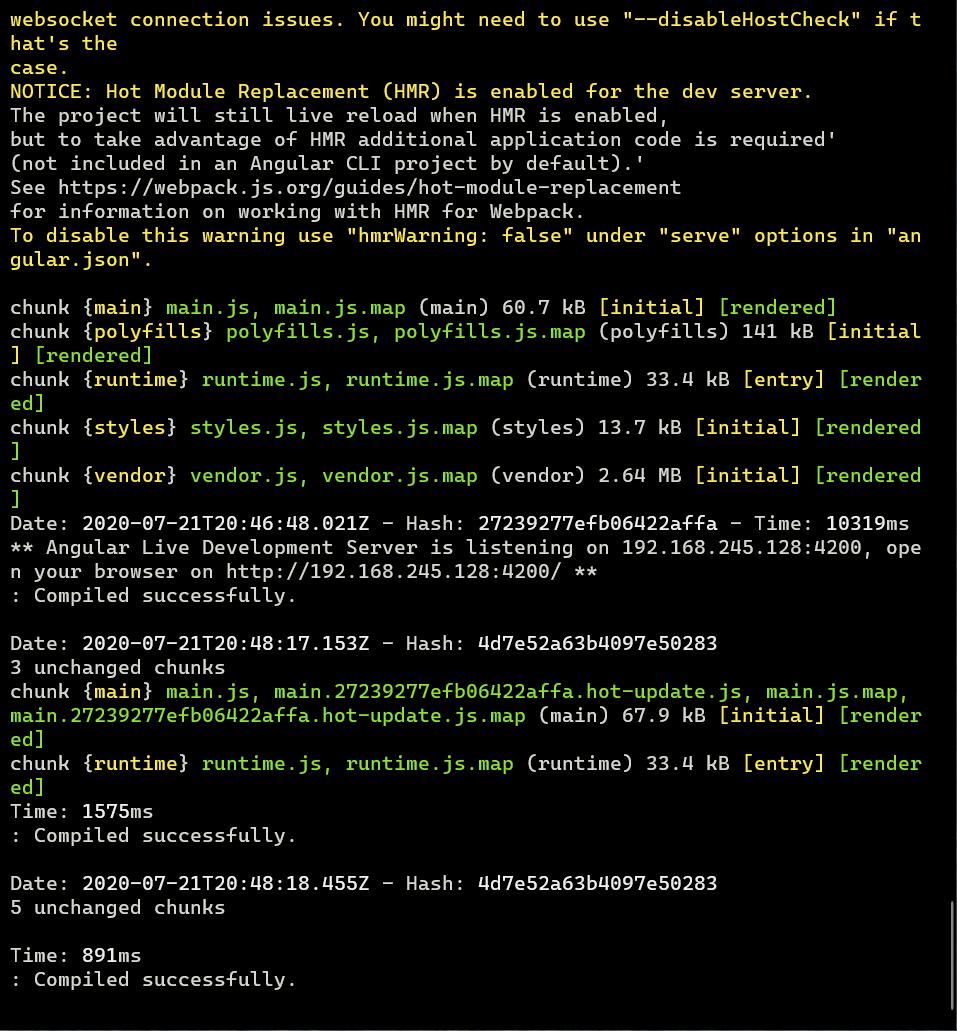
As far as I can tell, this is working exactly as expected. If you're still having problems after following these steps please open a new issue and be as detailed as you can.
svpernova09
on 21 Jul 2020
Related issues
 yazeed
·
3Comments
yazeed
·
3Comments
 mattmcdonald-uk
·
3Comments
mattmcdonald-uk
·
3Comments
 Quix0r
·
4Comments
Quix0r
·
4Comments
 mtpultz
·
4Comments
mtpultz
·
4Comments
 pqt
·
3Comments
pqt
·
3Comments