Is there a setting parameter to increase the disk size in the yaml file? Rather than 64GB as default, increasing or decreasing it?
 rbruhn
All 28 comments
No, we use a 64GB default size which is common among similar VM configurations. The volume will dynamically increase as you fill it until your host hard drive fills up.
 svpernova09
on 19 Jun 2019
svpernova09
on 19 Jun 2019
Hit the comment button too fast.
Also resizing the drive wouldn't be something we could do in Homestead it would have to be a box build time change and there's no way to easily customize this for individual users.
svpernova09
on 19 Jun 2019
Ok. Because MySql is running out of space and df -h shows 100% used. I have plenty of space on my host drive. If I delete one of the large databases, things work.
rbruhn
on 19 Jun 2019
What provider are you using? Virtualbox will expand as needed. But honestly, I'm not sure about the others.
svpernova09
on 19 Jun 2019
It will dynamically increase up to a maximum of 64GB, or whatever the disk size is set to.
A tricky component to this is that Vagrant packages disk images as vmdks, but last I checked it could only extend vdi disk images. If you own VMWare you should be able to extend it using it's CLI tools.
I had a coworker ask this exact question, and I think he ended up attaching a second virtual disk to the VM. It's not sharable, but the simplest solution.
Another thing to note is that we reserve ~40GB for MySQL databases. I have one project where I needed the disk space for Docker containers, so I uninstalled mysql and completely dropped the volumes with lvremove. Since everything is LVM, you should have a fair amount of flexibility as long as your needs fit within 64GB.
I'm curious how much disk space is used for an "empty" but formatted disk of 64GB vs 128GB. If it's not much, perhaps we default to some higher number since extending the disk itself is difficult.
 deviantintegral
on 19 Jun 2019
deviantintegral
on 19 Jun 2019
Virutalbox. When it happened, I cleaned everything. Started with a new box, imported the databases, etc. Now I'm running a script to add entries in another table and I get:
[2019-06-19 17:42:08] dev.ERROR: SQLSTATE[HY000]: General error: 1114 The table 'transcription_locations' is full (SQL: insert into `transcription_locations` (`classification_id`, `project_id`, `expedition_id`, `state_county_id`, `updated_at`, `created_at`) values (121325111, 75, 145, 448, 2019-06-19 17:42:08, 2019-06-19 17:42:08))
If those are the limits, then I guess I will simply drop the large database I don't need for now.
rbruhn
on 19 Jun 2019
It will dynamically increase up to a maximum of 64GB, or whatever the disk size is set to.
Right, I always get this backward.
svpernova09
on 19 Jun 2019
How big is your database? We allocate 40GB total for snapshots, but the individual partition is 10GB with the idea being you could have 4 totally unique database snapshots.
Lets say your database is 15GB and you want 20GB total, you could run:
lvextend -L20G -r homestead-vg/master
which will extend the logical volume and automatically resize the ext4 filesystem. If that works, I'd suggest dropping it in your after.sh (along with the fix from https://github.com/laravel/homestead/issues/1112 until Homestead 9 is out).
deviantintegral
on 19 Jun 2019
Now that I look at all the databases together, they are only 12GB. So something else is obviously causing the issue.
rbruhn
on 19 Jun 2019
I'm having issues with this as well. My PostgreSQL database won't fit in the box.
I've tried to change VM size via the Vagrantfile: config.disksize.size = "100GB", but that didn't seem to affect the df -h output. It did however change in Virtualbox configuration.
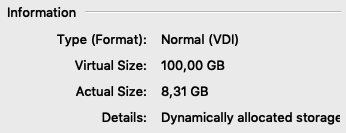
The only way to change the /dev/mapper/homestead--vg-root size was by lvextend -r -l +100%FREE /dev/mapper/homestead--vg-root. But the effects where minimal, it's now 20GB which still isn't enough.
vagrant@homestead:~$ df -h
Filesystem                                       Size  Used Avail Use% Mounted on
udev                                             1.9G     0  1.9G   0% /dev
tmpfs                                            395M  7.1M  388M   2% /run
/dev/mapper/homestead--vg-root                    23G  8.3G   14G  39% /
tmpfs                                            2.0G  8.0K  2.0G   1% /dev/shm
tmpfs                                            5.0M     0  5.0M   0% /run/lock
tmpfs                                            2.0G     0  2.0G   0% /sys/fs/cgroup
/dev/mapper/homestead--vg-mysql--master          9.8G  246M  9.1G   3% /homestead-vg/master
192.168.10.1:/Volumes/Development/Solvari/Sites   56G   56G   31G  65% /vagrant
tmpfs                                            395M     0  395M   0% /run/user/1000
 meijdenmedia
on 19 Jun 2019
meijdenmedia
on 19 Jun 2019
https://github.com/laravel/settler/commit/f2137448c1d4065636a6b5f6b1ca7d7da514a3a0
Working on building a beta for base box with a disk_size of 128GB. If provisioning goes well I should have beta Homestead & Settler released by morning.
svpernova09
on 21 Jun 2019
I'm having issues with this as well. My PostgreSQL database won't fit in the box.
I've tried to change VM size via the Vagrantfile:
config.disksize.size = "100GB", but that didn't seem to affect thedf -houtput. It did however change in Virtualbox configuration.
The only way to change the
/dev/mapper/homestead--vg-rootsize was bylvextend -r -l +100%FREE /dev/mapper/homestead--vg-root. But the effects where minimal, it's now 20GB which still isn't enough.Filesystem Size Used Avail Use% Mounted on udev 1.9G 0 1.9G 0% /dev tmpfs 395M 7.1M 388M 2% /run /dev/mapper/homestead--vg-root 23G 8.3G 14G 39% / tmpfs 2.0G 8.0K 2.0G 1% /dev/shm tmpfs 5.0M 0 5.0M 0% /run/lock tmpfs 2.0G 0 2.0G 0% /sys/fs/cgroup /dev/mapper/homestead--vg-mysql--master 9.8G 246M 9.1G 3% /homestead-vg/master 192.168.10.1:/Volumes/Development/Solvari/Sites 56G 56G 31G 65% /vagrant tmpfs 395M 0 395M 0% /run/user/1000
lvextend -r -l +100%FREE /dev/mapper/homestead--vg-root did it for me. Virtual size of VMDK in Virtual Box was 128G but df -h output for /dev/mapper/homestead--vg-root was only 18G. After this command it has now the size of my free space.
 affektde
on 6 Jul 2019
affektde
on 6 Jul 2019
I had the exact same issue as @affektde. It doesn't go above 18G. I am updated to latest of everything. Coworker beside me is outdated by a lot but his works fine.
 robclancy
on 10 Sep 2019
robclancy
on 10 Sep 2019
@svpernova09 It looks like I have a copy of the box with that disk space increase, but the space is all allocated to the vg-root filesystem and unavailable to MySQL. Is there any way to manage that?
udev                                                          1.6G     0  1.6G   0% /dev
tmpfs                                                         315M  7.9M  307M   3% /run
/dev/mapper/homestead--vg-root                                 92G  6.6G   82G   8% /
tmpfs                                                         1.6G  8.2k  1.6G   1% /dev/shm
tmpfs                                                         5.3M     0  5.3M   0% /run/lock
tmpfs                                                         1.6G     0  1.6G   0% /sys/fs/cgroup
/dev/mapper/homestead--vg-mysql--master                        11G  8.5G  1.5G  86% /homestead-vg/master
 ethanclevenger91
on 17 Sep 2019
ethanclevenger91
on 17 Sep 2019
@ethanclevenger91
Check this comment for a command to resize the LVM: https://github.com/laravel/homestead/issues/1273#issuecomment-530563742
svpernova09
on 17 Sep 2019
@svpernova09 Did finally figure that one out. Is there anyway to automate that if I destroy and recreate my box? Doesn't seem to belong in after.sh since I don't need it running each provision. Is there something customizable that only runs when creating the box?
ethanclevenger91
on 17 Sep 2019
@ethanclevenger91
Is there anyway to automate that if I destroy and recreate my box? Doesn't seem to belong in after.sh since I don't need it running each provision. Is there something customizable that only runs when creating the box?
Right, so if you look at our features code you can see we drop a file when a feature gets installed so it doesn't run on any subsequent provisions. I'd do something similar in your after.sh to resize the volume. These volume names should be pretty consistent, I don't know why we'd change them so I'd be comfortable scripting this.
svpernova09
on 17 Sep 2019
the space is all allocated to the vg-root filesystem and unavailable to MySQL
Is that's what happening with the current base box? One tricky thing is that ext4 file systems must be unmounted to be shrunk. However, in my experience booting into single user mode tends to hang the vagrant box, and I end up having to boot from the installer. Ideally, there should be unallocated space in the volume group, and then end users can expand or configure any logical volumes they wish.
Another (next major version) possibility would be to ship with a small root file system, and then have a config option to flag expanding root or mysql on the first boot. That we can do online (in fact, anything other than the root FS is relatively straight forward to do).
deviantintegral
on 20 Sep 2019
can we set disk_size on Homestead.yaml? (20g is not enough.)
ip: "192.168.10.10"
memory: 8096
cpus: 2
disksize: 40g
 litan1106
on 20 Dec 2019
litan1106
on 20 Dec 2019
can we set disk_size on Homestead.yaml? (20g is not enough.)
ip: "192.168.10.10"
memory: 8096
cpus: 2
disksize: 40g
unfortunately not because this is a setting we specify when we build the VM, it can't be set (AFAIK) at run time.
svpernova09
on 21 Dec 2019
@svpernova09 I ran into this problem again and tried that command
vagrant@homestead:~$ sudo lvextend -r -l +100%FREE /dev/mapper/homestead--vg-mysql--master
  Size of logical volume homestead-vg/mysql-master unchanged from 10.00 GiB (2560 extents).
  Logical volume homestead-vg/mysql-master successfully resized.
resize2fs 1.44.1 (24-Mar-2018)
The filesystem is already 2621440 (4k) blocks long.  Nothing to do!
Right now, I'm simply trying to get MySql server started so I can delete more databases.
rbruhn
on 23 Dec 2019
@svpernova09 I ran into this problem again and tried that command
pinging @deviantintegral as he might have a better idea.
svpernova09
on 23 Dec 2019
@rbruhn at a glance, I think you need to resize the underlying disk first. Assuming this is VirtualBox, you can do that with VBoxManage modifymedium ... with the VM shut down. Then, run the lvextend command again.
As far as configurable disk sizes go, we're using https://github.com/sprotheroe/vagrant-disksize on another project though that probably won't fly for Homestead since it supports multiple providers. Also, with WSL2 requiring hyper-v, unless VirtualBox gets rewritten to be a Hyper-V client I see it's usage decreasing, not increasing over the next year or two.
deviantintegral
on 24 Dec 2019
I have been running hyper-v (homestead for a year)
It's flawless beside the 90% full disk size issue.
litan1106
on 5 Jan 2020
Those of you running into disk capacity issues: I've released this alpha version https://app.vagrantup.com/laravel/boxes/homestead/versions/9.2.2-alpha1 which increases the disk size to 512GB and increases the initial LVM volumes to 64GB.
svpernova09
on 6 Jan 2020
I couldn't find the hyperv 9.2.2-alpha1 in the repo.
https://app.vagrantup.com/laravel/boxes/homestead
litan1106
on 7 Jan 2020
@litan1106 I've only built Virtualbox for the alpha/beta builds as a test.
svpernova09
on 7 Jan 2020
sudo lvextend -r -l +100%FREE /dev/mapper/homestead--vg-mysql--master worked for me then vagrant reload
 xlcrr
on 1 Mar 2021
xlcrr
on 1 Mar 2021
Related issues
 mtpultz
·
4Comments
mtpultz
·
4Comments
 yazeed
·
3Comments
svpernova09
·
5Comments
yazeed
·
3Comments
svpernova09
·
5Comments
 it-can
·
3Comments
it-can
·
3Comments
 daryn-k
·
5Comments
daryn-k
·
5Comments
Most helpful comment
How big is your database? We allocate 40GB total for snapshots, but the individual partition is 10GB with the idea being you could have 4 totally unique database snapshots.
Lets say your database is 15GB and you want 20GB total, you could run:
lvextend -L20G -r homestead-vg/masterwhich will extend the logical volume and automatically resize the ext4 filesystem. If that works, I'd suggest dropping it in your
after.sh(along with the fix from https://github.com/laravel/homestead/issues/1112 until Homestead 9 is out).