Homestead: App performing really slow
I tried postponing posting this and trying to figure it out myself but I'm several days in and totally out of ideas so hopefully someone can help.
Versions
- Vagrant: 2.1.1
- Provider: Virtualbox
- Homestead: 7.12.0
Host operating system
macOS High Sierra 10.13.6
Processor: 2.9 GHz Intel Core i5
Memory: 16 GB 1867 MHz DDR3
Graphics: Intel Iris Graphics 6100 1536 MB
Homestead.yaml
ip: 192.168.10.20
memory: 4096
cpus: 1
provider: virtualbox
authorize: ~/.ssh/id_rsa.pub
keys:
    - ~/.ssh/id_rsa
folders:
    - map: /Users/driesvints/Sites/beatswitch-web-app
      to: /home/vagrant/code
sites:
    - map: beatswitch.test
      to: /home/vagrant/code/public
      php: "7.1"
databases:
    - homestead
name: beatswitch
hostname: beatswitch
Vagrant destroy & up output
https://gist.github.com/driesvints/26ce2c2ac8cc17f43fde9572b67fcb2a
Expected behavior
I expect requests to take 1-3 seconds max.
I use Homestead for several projects and while performance isn't always "great" it's never terrible slow. However, with this particularly project my Laravel app runs really slow. It's a special setup with Doctrine ORM instead of Eloquent and an extra DynamoDB Local dependency (which I install with after.sh). But that shouldn't affect the performance really.
Actual behavior
Requests take 10-20 seconds approximately.
I tried several things like mysql tuning, different filesystem sync (nfs), memory & cpu increase. But nothing helped. So I'm totally in the dark why this app is performing slow on Homestead while it performs well on the previous custom box and on production.
Steps to reproduce
vagrant up- Try out the app and everything runs really slow (~10-20s / request)
Extra info
My after.sh script might be useful as well:
#!/bin/sh

## Install Java if it hasn't been installed yet
if ! [ -x "$(command -v java)" ]; then
    sudo apt-get install -fy
    sudo add-apt-repository -y ppa:openjdk-r/ppa
    sudo apt-get update -y
    sudo apt-get install -y openjdk-11-jre-headless
    sudo apt-get install -y openjdk-11-jdk
fi

# Install DynamoDB Local if it hasn't been downloaded yet
if ! [ -d "./dynamodb" ]; then
    mkdir -p dynamodb && cd dynamodb
    wget http://dynamodb-local.s3-website-us-west-2.amazonaws.com/dynamodb_local_latest.tar.gz
    tar -xvzf dynamodb_local_latest.tar.gz
fi
 driesvints
All 62 comments
Anything out of the ordinary in your Nginx or PHP logs?
Can you run Blackfire on one of the slow pages, and share the results? Would be interesting to compare the wall time vs what you're actually experiencing.
 browner12
on 19 Jul 2018
browner12
on 19 Jul 2018
@browner12 I doubt it's anything app-related because the app is performing well on the other box and on production so I don't think a tool like Blackfire will help here.
I'll try to check the logs later.
driesvints
on 19 Jul 2018
yah, this is a tough thing to debug. If you ran Blackfire on the Homestead Box and on production, and we saw a function or something performing much worse on HS, would that help us narrow the problem?
Another random thought, you don't have anything like Xdebug turned on?
browner12
on 19 Jul 2018
When I use the Laravel debugbar package I see that each query is performing greater than on the older box so I don't think it's one single thing that's running slower. Every page on the app is running slower. That's why I suspect it's a general issue/setting which is wrong.
xDebug is disabled by default. When I run php7.1 -v I don't see it enabled.
driesvints
on 19 Jul 2018
we recently had a user noticing slow migrations and test, and it turned out to be due to the type of hard drive he was using.
take a read through this one (https://github.com/laravel/homestead/issues/896) and maybe it helps
browner12
on 19 Jul 2018
@browner12 thanks. Unfortunately this was one of the things I already tried...
driesvints
on 19 Jul 2018
can you try testing on Ubuntu 16.04? and are you sure the changes to "0" took effect? can you narrow down what portions of the request are taking so long? Do you have DB calls in these request?
 scoutman57
on 19 Jul 2018
scoutman57
on 19 Jul 2018
Try adding natdnshostresolver: off to Homestead.yaml and destroy & up to see if the performance is still slow
 svpernova09
on 19 Jul 2018
svpernova09
on 19 Jul 2018
@scoutman57 how do I change the Ubuntu version in the Homestead.yaml?
@svpernova09 unfortunately this didn't change much 😔
driesvints
on 20 Jul 2018
@driesvints
From the app that is slow can you run find DIR_NAME -type f | wc -l to see how many files are there, and compare with apps that are not slow? I'm wondering if you're hitting this mysterious "too many files for Virtualbox sharing to handle without slowing down" that Drupal users seem to run into sometimes.
I'm also wondering if there's something else in 18.04 similar to what caused #896
svpernova09
on 20 Jul 2018
@svpernova09
For the failing app: 67693
For another app that works: 46721
So not that much of a difference.
driesvints
on 20 Jul 2018
Yeah, not enough difference.
Next thing to try is to map the "good" app and the "slow" app into the same VM (preferably use the slow app's VM) and see if the "good" app is still good in the "slow" apps VM.
Sorry this has been such a pain, thanks for doing all this debugging.
svpernova09
on 20 Jul 2018
@svpernova09 so the "good" app performs the same in the "bad" app's Homestead box as it does on its own Vagrant box.
But I kid you not. I rebuild the Vagrant box for the "slow" app now again after the weekend and after I tried out the "good" app on it, I noticed the "slow" app was performing a bit better than before. Why, I have no clue. It's still very slow, especially API requests but it's a tad better than before.
My machine specs are (also updated this on the issue description):
Processor: 2.9 GHz Intel Core i5
Memory: 16 GB 1867 MHz DDR3
Graphics: Intel Iris Graphics 6100 1536 MB
I'm going to try out the new setup on a colleague's machine which has a newer laptop to see if there are any differences.
driesvints
on 23 Jul 2018
Tried it on a colleague's Macbook which has a bit better specs but no dice. Requests were a tad faster but still slow.
His specs are:
macOS Sierra 10.12.6
Processor: 3,1 GHz Intel Core i5
Memory: 16 GB 2133 MHz LPDDR3
Graphics: Intel Iris Plus Graphics 650 1536 MB
So I'm really out of ideas at the moment... I tried using Vessel but the app also performs really slow on that. Tried Valet and app performs really well on it.
driesvints
on 23 Jul 2018
@svpernova09 so the "good" app performs the same in the "bad" app's Homestead box as it does on its own Vagrant box.
So this tells me that it's not Homestead, yet something in the project. Which is reassuring to me, but doesn't help you.
But I kid you not. I rebuild the Vagrant box for the "slow" app now again after the weekend and after I tried out the "good" app on it, I noticed the "slow" app was performing a bit better than before. Why, I have no clue. It's still very slow, especially API requests but it's a tad better than before.

I'm glad valet got the project working. I guess it's just something in the project causing issues. Does the "bad" application have symlinks anywhere in the code base?
At this point I'd have to have the app itself to replicate and debug any further to see what Homestead could do, but it sounds like this project has triggered the "too many files which is slowing down VirtualBox file sharing". Doesn't surprise me that NFS didn't solve anything (IME it rarely does).
svpernova09
on 23 Jul 2018
So this tells me that it's not Homestead, yet something in the project. Which is reassuring to me, but doesn't help you.
Just want to note that the "good" box Vagrant box is Homestead. So not sure if the "good" app would perform even better if we fixed the performance issues for the "slow" app.
I'm glad valet got the project working. I guess it's just something in the project causing issues. Does the "bad" application have symlinks anywhere in the code base?
No symlinks.
At this point I'd have to have the app itself to replicate and debug any further to see what Homestead could do, but it sounds like this project has triggered the "too many files which is slowing down VirtualBox file sharing". Doesn't surprise me that NFS didn't solve anything (IME it rarely does).
Yeah, I agree with you. Unfortunately sharing isn't an option since it's closed source. I think this is where it stops unfortunately and I'll have to look for other options.
Thank you for your time to help to debug this Joe & @browner12. Too bad we couldn't find a solution 😔
driesvints
on 23 Jul 2018
sorry we couldn't figure anything out. keep us posted if any new info comes up.
browner12
on 23 Jul 2018
Yeah, I agree with you. Unfortunately sharing isn't an option since it's closed source. I think this is where it stops unfortunately and I'll have to look for other options.
The next step would be to try the "bad" application on VMware. That would definitively tell me it's a number of files / file IO issue. But please don't go buy licenses if you don't already have them. (VMware + the Vagrant plugin are both paid products)
svpernova09
on 23 Jul 2018
Yeah, no license so no dice I'm afraid. I'm just going to leave it at this.
driesvints
on 23 Jul 2018
Yeah, no license so no dice I'm afraid. I'm just going to leave it at this.
I would be happy to review / sign an NDA if you think the company would allow me to in order to test this in my VMware setup. Understandable if not. Just throwing options out there.
svpernova09
on 23 Jul 2018
@svpernova09 hey Joe, thanks that's ok. We're going to continue with Valet for now. But thanks for offering, appreciating it! :)
driesvints
on 26 Jul 2018
@driesvints you don't change it in homestead.yaml, you have to change it in the actual homestead.rb (ruby file) its under scripts/ . i have uploaded one that works for Unbutu 16.04 rename homestead.txt to homestead.rb
homestead.txt
scoutman57
on 27 Jul 2018
@scoutman57 just realized you can simple set the "version" setting in your Homestead.yaml so no need to overwrite homestead.rb. I tried using the 5.2.0 box with Ubuntu 16.04 but it's also performing slow there.
I still don't think this is a Virtualbox issue since we also use Virtualbox with the other older Vagrantbox.
driesvints
on 27 Jul 2018
I tried using the 5.2.0 box with Ubuntu 16.04 but it's also performing slow there.
Well that relaxes my anxiety about there being a latent bug in 18.04.
Still odd.
svpernova09
on 27 Jul 2018
@driesvints I did not know you could set the version number in the Homestead.yaml. Where is that documented or how do I set it there? I don't see the rb file reading that from the yaml.
scoutman57
on 27 Jul 2018
@scoutman57 if you check the Vagrantfile you can see that it passes the settings from the Homestead.yaml to the rb file: https://github.com/laravel/homestead/blob/master/Vagrantfile#L27-L35
driesvints
on 27 Jul 2018
@driesvints I knew it pulled in settings, I just overlooked that was used in the RB file for the version. I see some other stuff set there, which is nice too. Like changing the Homestead box name. Now I feel so dumb.. But thank you for making me look again. I think the "official" documentation really needs to include all the optional YAML overrides.
scoutman57
on 27 Jul 2018
Don't feel dumb! Glad to help :)
On 27 Jul 2018, 17:43 +0200, Shannon Warren notifications@github.com, wrote:
@driesvints I knew it pulled in settings, I just overlooked that was used in the RB file for the version. I see some other stuff set there, which is nice too. Like changing the Homestead box name. Now I feel so dumb.. But thank you for making me look again. I think the "official" documentation really needs to include all the optional YAML overrides.
—
You are receiving this because you were mentioned.
Reply to this email directly, view it on GitHub, or mute the thread.
driesvints
on 27 Jul 2018
Now I feel so dumb..
Don't! We intentionally leave some of the lesser used settings undocumented in an attempt to keep the docs more straightforward. If you open up scripts/homestead.rb and search for settings you'll find all of the undocumented things you can override from the Homestead.yaml
svpernova09
on 27 Jul 2018
Ah, finally found a relatable issue :) If I read everything correctly, the problem wasn't resolved?
Tried a lot of options and settings already, but no dice. As you can see below, it takes about 20 seconds to load a simple login page when synced via NFS:
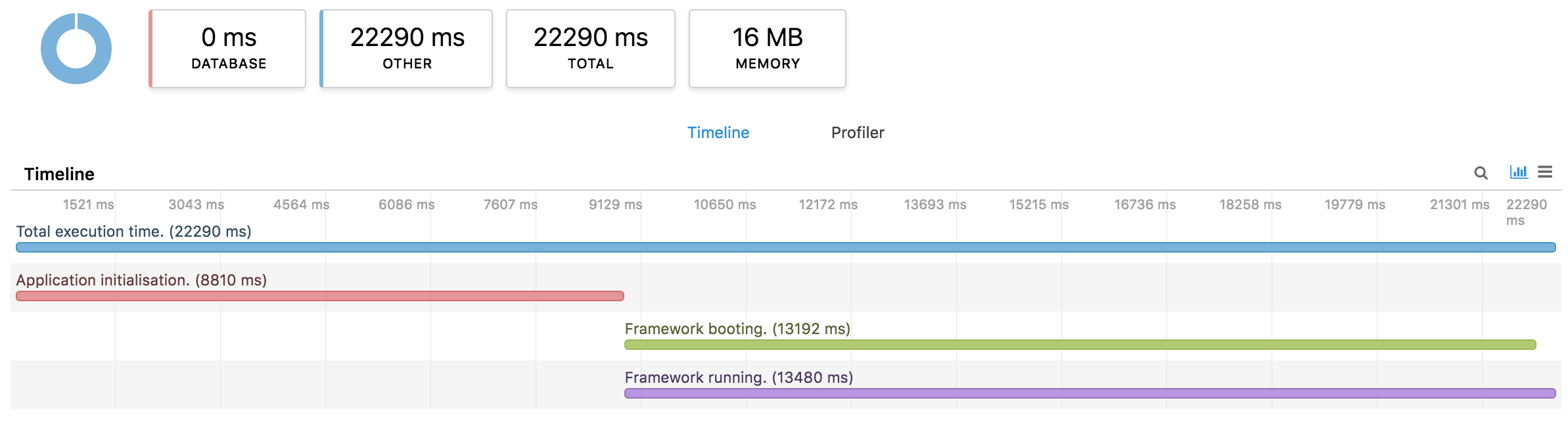
The project previously loaded in less than 2 seconds, so some update of macOS, Vagrant, VirtualBox, Homestead, or whatever seriously slowed this down. I can confidently say it's a disk I/O issue as running composer install or rm -rf vendor/ is terribly slow. Weird thing is, vanilla Vagrant boxes provisioned using e.g. Ansible (or not at all) perform fast as expected. Maybe a combination of the bug mentioned below and the project or files?
Another weird quirk: getting 502 Bad Gateway errors when xdebug is enabled in the latest Homestead. No issue a few versions back. Checked the logs, but couldn't pinpoint a single cause so tried it the old-fashioned way of enabling/disabling things.
References
- Related High Sierra Vagrant issue: https://github.com/hashicorp/vagrant/issues/9267.
- My Homestead.rb
Edit — Thinking this might be an issue where a service is clogging the disk I/O. @driesvints Did you have Supervisor set up on your Homestead VM? Specifically with a Horizon and/or other jobs running. If I disable the Supervisor service, my page load decreases from 20s to about 6 seconds.
Odd thing here is I don't have this issue on other non-Homestead VMs. Are there any services installed by default that are heavy on disk usage/load?
 sebastiaanluca
on 5 Dec 2018
sebastiaanluca
on 5 Dec 2018
@sebastiaanluca unfortunately I've moved on in the meantime and can't remember too much from the time I debugged this.
driesvints
on 5 Dec 2018
I was experiencing the same issue. What was causing it for me is the debugger. with debugger listening page load is ~15 seconds without ~2 seconds.
It probably won't help everyone but that was it for me.
 karmon
on 7 Dec 2018
karmon
on 7 Dec 2018
hey @karmon what debugger are you talking about? A system debugger? or something in the app?
browner12
on 7 Dec 2018
IDE debugger, in my case php storm using xdebugger
karmon
on 7 Dec 2018
To me, the problem was _debugbar_, it slowed things a lot on homestead.
I just added DEBUGBAR_ENABLED=false to my .env file, and the latency came down a lot!
I can just enable it again whenever I need it.
 scheMeZa
on 13 Feb 2019
scheMeZa
on 13 Feb 2019
I've got the same problem as @sebastiaanluca:
The project previously loaded in less than 2 seconds, so some update of macOS, Vagrant, VirtualBox, Homestead, or whatever seriously slowed this down. I can confidently say it's a disk I/O issue as running
composer installorrm -rf vendor/is terribly slow.
I know that both node_modules and vendor can have a ton of symlinks in them - would that slow the whole box down?
I run vagrant ssh and cd /var/www/project:
$ find . -type f | wc -ll
56369

$ time rm -R vendor

real    0m11.620s
user    0m0.005s
sys 0m7.777s

$ time rm -R node_modules

real    0m39.772s
user    0m0.024s
sys 0m22.616s
Homestead.yaml
cpus: 2
memory: 2048
provider: virtualbox
This box has 4 sites with 4 databases running out of 3 directories, but no single site is massive or anything. It only maps one folder:
folders:
  - map: sites
    to: /var/www/
For kicks, rather than mapping sites/* to /var/www/* (which is using one map to handle three directories with their own node_modules and vendor directories, would it be good to set up three maps like so:
folders:
  - map: sites/laravel
    to: /var/www/laravel

  - map: sites/wordpress
    to: /var/www/wordpress

  - map: sites/processwire
    to: /var/www/processwire
Specs
Macbook Pro i7 @ 2.6GHz / 16GB RAM
macOS: 10.14.4
Vagrant: 2.2.4
Virtualbox: 5.2.26 r128414
Homestead: 7.1.0
 ethanbeyer
on 11 Apr 2019
ethanbeyer
on 11 Apr 2019
@ethanbeyer
folders:
  - map: sites
    to: /var/www/
Don't map 1 folder for all your projects. map each project individually.
svpernova09
on 11 Apr 2019
Thanks for the reply, @svpernova09! I appreciate it. I made that change, provisioned it, and got this timing for the same call:
$ time rm -R node_modules/

real    0m39.756s
user    0m0.056s
sys 0m21.054s
Before:
$ time rm -R node_modules

real    0m39.772s
user    0m0.024s
sys 0m22.616s
Interesting. Is this Virtualbox? What version & What extensions version?
svpernova09
on 12 Apr 2019
Specs
Macbook Pro i7 @ 2.6GHz / 16GB RAM
macOS: 10.14.4
Vagrant: 2.2.4
Virtualbox: 5.2.26 r128414
Homestead: 7.1.0
@svpernova09 Yes, it is Virtualbox. Not sure what extensions you mean. Happy to look them up once I do!
However, I've done some more testing that I believe rules Homestead out as the culprit.
I copied a single site from this Homestead box and created a Vagrantfile for it with Scotchbox. It is only running one site and mapping one folder. I expected that removing node_modules to be a load faster, but it was not:
$ time rm -r node_modules/

real    0m44.751s
user    0m0.016s
sys 0m23.416s
What this tells me is that it's either Virtualbox or Vagrant.
ethanbeyer
on 12 Apr 2019
I'm going to update VB to 6.0.4 and see if that helps.
ethanbeyer
on 12 Apr 2019
@ethanbeyer
Open Virtualbox and go to Preferences -> Extensions and ensure you see something there. If not go download from https://download.virtualbox.org/virtualbox/6.0.4/Oracle_VM_VirtualBox_Extension_Pack-6.0.4.vbox-extpack
The extension version should match the virtualbox version. (When you upgrade Virtualbox it should prompt you the next time you run the app).
What this tells me is that it's either Virtualbox or Vagrant.
Vagrant itself has zero impact on speed of file access. It's 100% up to the provider, in this case it's Virtualbox. Virtualbox is notoriously slower than alternatives. (However it's the best free option)
svpernova09
on 12 Apr 2019
Updating to Virtualbox 6.0.4 and adding that extensions pack made a biiiig difference for me. It's still a little sluggish, but about 50% faster than the tests above, which I consider a win.
Thanks for your help!!
ethanbeyer
on 12 Apr 2019
Also, saw on your profile that you're from Memphis, and this is issue 901. Wiild.
ethanbeyer
on 12 Apr 2019
Also, saw on your profile that you're from Memphis, and this is issue 901. Wiild.

svpernova09
on 12 Apr 2019
Followed the instructions hoping it would be the solution, but alas:
$ time -r node_modules
real    2m4.500s
user    0m0.262s
sys     0m2.908s
Visiting a single static page still takes about 20 seconds with all debug packages etc disabled. I have no idea why a default Ubuntu box provisioned with Ansible (MySQL, PHP, firewall, etc etc) works fine (and fast).
sebastiaanluca
on 14 Apr 2019
Is this on an SSD? Is it an old computer? How's your CPU usage?
ethanbeyer
on 15 Apr 2019
MacBook Pro (Retina, 15-inch, Late 2013)
2,3 GHz Intel Core i7
16 GB 1600 MHz DDR3
SSD
macOS Mojave 10.14.4 (18E226)
Vagrant 2.2.4
VirtualBox 6.0.4 r128413 (Qt5.6.3) with extensions
laravel/homestead v8.2.0
CPU is barely used, memory still more than half available (VM has 8GB memory and 4 CPUs available, folder linked via NFS —same result without). CPU in machine is used for 2-4% by the bindfs process when accessing a page.
Lots of Vagrant VirtualBox users have issues with this (NFS or no NFS), so must be a setting of some sort. Tried everything anyone ever suggested so far, but no difference.
sebastiaanluca
on 15 Apr 2019
Really similar specs and setup to mine; I am sorry I don't have better news or ideas. I hope it's something that gets addressed by Virtualbox in the coming months, because that slowdown is a major drag.
The only thing I feel like could be Homestead specific is the 64GB dynamic volume; I wonder if setting it to a smaller fixed size would help. I may try that as a test later this afternoon.
ethanbeyer
on 15 Apr 2019
@sebastiaanluca,
It's crucial when reporting issues like this that you include at least your folder section of Homestead.yaml, that way we can spot if you're trying to map a huge folder of projects instead of each project individually. This is the most common issue people face but could also have zero impact on you.
CPU is barely used, memory still more than half available (VM has 8GB memory and 4 CPUs available, folder linked via NFS —same result without). CPU in machine is used for 2-4% by the bindfs process when accessing a page.
The traditional logic in regards to best performance has always been "NFS is the slowest folder sharing method but use it if Virtualbox defaults are slow", This isn't immune to the issue of "Don't map folders that contain projects, map each project individually".
The only thing I feel like could be Homestead specific is the 64GB dynamic volume; I wonder if setting it to a smaller fixed size would help. I may try that as a test later this afternoon.
We used to use 40GB forever but I think that changed when we swapped over to Packer since 64GB was the default from chef/bento. I would love to get this issue resolved so please keep me in the loop if you find anything.
svpernova09
on 15 Apr 2019
It's crucial when reporting issues like this that you include at least your folder section of
Homestead.yaml, that way we can spot if you're trying to map a huge folder of projects instead of each project individually. This is the most common issue people face but could also have zero impact on you.
It's a VM for a single project (always use one on a per-project basis), thus mapping only one project folder. node_modules is about 393MB and vendor 290MB. The project itself is built on Laravel and pretty medium in size, but IMO it's not related to PHP-FPM and so. Definitely a disk issue as I have it on some other Homestead VMs too. A macOS, Homestead, VirtualBox, or Vagrant update started causing it about a year ago. Before that Homestead was blazing fast and even faster with NFS (~400ms page load).
The traditional logic in regards to best performance has always been "NFS is the slowest folder sharing method but use it if Virtualbox defaults are slow", This isn't immune to the issue of "Don't map folders that contain projects, map each project individually".
Tried both NFS and VB folder sync, tweaking VM disk read/write/cache speeds (got a very small but neglectable speed boost there), NFS options ('rw', 'tcp', 'fsc', 'actimeo=1', 'nolock', 'noatime'), VB extensions, different Vagrant and VB versions, and lots of other things.
I upgraded to VB 6 yesterday and with NFS now disabled, I can say I notice a huge speed improvement:
$ time rm -r node_modules/

real    0m39.684s
user    0m0.053s
sys     0m20.271s
Previously over 2 minutes. Still not ideal for navigating sites though (~10 seconds page load), although faster. Many thanks for the new suggestions, hope we can find the real cause some day :)
sebastiaanluca
on 15 Apr 2019
I ran some tests.
First I cloned the box's .vmdk to clone.vdi with a fixed size. Then I duplicated the .vmdk again, this time with a variable size: clone-var.vdi, and compacted it with vboxmanage modifyhd clone-var.vdi --compact.
I attached each of these storage formats to the VB, ran vagrant ssh, npm install on the site, and then time rm -rf node_modules.
Here are the times for all three formats:
clone.vdi: 64GB / 64GB Actual
$ time rm -rf node_modules/

real    0m24.464s
user    0m0.043s
sys     0m10.008s
clone-var.vdi: 64GB / 10.7GB Actual
$ time rm -rf node_modules/

real    0m24.369s
user    0m0.033s
sys     0m10.978s
ubuntu-18.04-amd64-disk001.vmdk: 64GB / 9.83GB Actual
$ time rm -rf node_modules/

real    0m24.194s
user    0m0.037s
sys     0m10.771s
I do believe there's an IO issue - but it doesn't seem to matter if the disk on the VM is a fixed size or variable.
I would like to test this with a different max size, but VB does not allow me to shrink disks - just compact them. Is there a way to import laravel/homestead with a smaller maximum disk size? Willing to do more tests to see if that affects it at all.
ethanbeyer
on 15 Apr 2019
Follow-up:
If I perform the npm install on this directory outside of the VB, and then run du -hs node_modules, it's 279MB.
time rm -rf node_modules/

real    0m3.834s
user    0m0.131s
sys     0m3.667s
On the native machine, the sys and real time are very close. Is there something going on in the 10 or so seconds within the VB that could be optimized or debugged?
ethanbeyer
on 15 Apr 2019
@ethanbeyer
Any chance I could get you to join the Laravel Discord (https://discordapp.com/invite/mPZNm7A) and talk through some of this in the #homestead channel? I can build test boxes for you to debug if you're up for it.
svpernova09
on 15 Apr 2019
The traditional logic in regards to best performance has always been "NFS is the slowest folder sharing method but use it if Virtualbox defaults are slow"
I'm surprised to read this! In the Drupal community, the consensus is the opposite, and that vboxsf is too slow to use for any real project. In my testing over the years, vboxsf has been orders of magnitude slower than native IO, and NFS incurs only about to 10% hit.
For the fastest performance, you can set type: 'rsync' for your site mapping, which will copy the whole directory into the VM and give you native performance. To keep code in sync, you can set your IDE to auto-upload on save to the VM, and remember to run vagrant rsync when changing branches or the like. It's not as easy as other solutions, but it's a good workaround while you troubleshoot.
The last time I had serious vagrant performance issues was when I was running on a Windows host. Windows Defender turned out to be the culprit. I don't see any mention of checking for antivirus or antimalware tools interfering in this thread, but it's something to watch out for.
 deviantintegral
on 15 Apr 2019
deviantintegral
on 15 Apr 2019
I'm surprised to read this! In the Drupal community, the consensus is the opposite, and that vboxsf is too slow to use for any real project. In my testing over the years, vboxsf has been orders of magnitude slower than native IO, and NFS incurs only about to 10% hit.
Drupal seems to be the outlier here, where I hear more occurrences of native file sharing in Virtual Box being essentially unusable due to the sheer number of files being shared between host and guest. I've had some WordPress users mention the same, but it's really hard to truly nail down what they were doing / where it was going wrong.
svpernova09
on 15 Apr 2019
Testing
I have done my best to debug this further.
I ran the same test in all the following circumstances. The test was to run time rm -rf node_modules. The node_modules directory was 276M every time, with roughly 32,000 files inside. Tests 1-3 below are documented more fully above.
- I thought the problem might be a variable allocation sized disk, so I tried to run the box with a fixed size disk, and saw no difference in execution time.
- Following that logic, I tested the box with a
.vdidisk instead of a.vmdkdisk, to no effect. - I compacted the
.vdi, and saw no effect. - @svpernova09 built me a different box with different configurations than Vanilla Homestead, and the execution time was the same.
- Rolling VB back to 5.2 increased execution time.
- I turned NFS on, saw a 2% decrease in execution time.
There were other minute variations to the above.
"Solution"
Only one thing decreased the execution time for the test, and it's a VB setting.
- Halt the box, then Open Virtualbox
- Select the box, right click, select "Settings"
- Click "Storage" at the top of the dialog window
- Highlight
Controller: SATA Controller - Toggle
Use Host I/O Cacheto On - Click "OK" to save box settings
- Run
vagrant up
Depending on host and guest CPU load, this setting decreased execution time by 15-20% from the times above, averaging around:
$ time rm -rf node_modules

real    0m19.192s
user    0m0.006s
sys     0m8.538s
I know it's not amazing, but in all the tests I ran, it became clean that this issue is almost 100% in Virtualbox's court, as this issue has been raised within their community also.
ethanbeyer
on 16 Apr 2019
Use host I/O cache on decreased the VM disk performance for me 😅
$ time rm -r node_modules/

real    0m51.017s
user    0m0.023s
sys     0m20.924s
Same (NFS off), but use host I/O cache disabled (as before):
$ time rm -r node_modules/

real    0m38.397s
user    0m0.031s
sys     0m17.482s
Around 2+ minutes with NFS enabled.
sebastiaanluca
on 16 Apr 2019
if you do a du -hs node_modules...how big is it?
ethanbeyer
on 16 Apr 2019
392M with 1008 directories.
sebastiaanluca
on 18 Apr 2019
Guys, mine is running very slow and I've tried all possible solutions with no use so far.
I would really appreciate any help!
 mkwsra
on 21 Jul 2020
mkwsra
on 21 Jul 2020
This one worked fine for me. It shaved off all the initial load time.
In the file .env
CACHE_DRIVER=memcached
(Instead of CACHE_DRIVER=array)
 ctocph
on 27 Jan 2021
ctocph
on 27 Jan 2021
Related issues
 pluxain
·
3Comments
pluxain
·
3Comments
 daryn-k
·
5Comments
daryn-k
·
5Comments
 mtpultz
·
4Comments
svpernova09
·
5Comments
mtpultz
·
4Comments
svpernova09
·
5Comments
 Modelizer
·
5Comments
Modelizer
·
5Comments
Most helpful comment
To me, the problem was _debugbar_, it slowed things a lot on homestead.
I just added
DEBUGBAR_ENABLED=falseto my.envfile, and the latency came down a lot!I can just enable it again whenever I need it.