Homestead: There was a problem while downloading the metadata for your box
Hi,
For past few days, Homestead is throwing this message every time I try to start it. I am on latest Vagrant, Virtual box. How can I fix it?
🤘?~ homestead up
Bringing machine 'homestead-7' up with 'virtualbox' provider...
==> homestead-7: Checking if box 'laravel/homestead' is up to date...
==> homestead-7: There was a problem while downloading the metadata for your box
==> homestead-7: to check for updates. This is not an error, since it is usually due
==> homestead-7: to temporary network problems. This is just a warning. The problem
==> homestead-7: encountered was:
==> homestead-7:
==> homestead-7: The requested URL returned error: 404 Not Found
==> homestead-7:
==> homestead-7: If you want to check for box updates, verify your network connection
==> homestead-7: is valid and try again.
All seems fine on my network
Versions
- Vagrant: 2.0.2
- Provider: Virtualbox 5.2
- Homestead: Run
homestead --versionto show the version, return''s vagrant's version? I've pulled the latest from master from git repo.
Host operating system
MacOS High Sierra 10.13.2
 santoshachari
All 12 comments
@browner12 is this what you’re seeing?
--
- Joe Ferguson
JoeFerguson.me
MemphisPHP.org
On Feb 7, 2018, 04:20 -0600, Santosh Achari notifications@github.com, wrote:
Hi,
For past few days, Homestead is throwing this message every time I try to start it. I am on latest Vagrant, Virtual box. How can I fix it?
🤘?~ homestead up
Bringing machine 'homestead-7' up with 'virtualbox' provider...
==> homestead-7: Checking if box 'laravel/homestead' is up to date...
==> homestead-7: There was a problem while downloading the metadata for your box
==> homestead-7: to check for updates. This is not an error, since it is usually due
==> homestead-7: to temporary network problems. This is just a warning. The problem
==> homestead-7: encountered was:
==> homestead-7:
==> homestead-7: The requested URL returned error: 404 Not Found
==> homestead-7:
==> homestead-7: If you want to check for box updates, verify your network connection
==> homestead-7: is valid and try again.
Versions• Vagrant: 2.0.2
• Provider: Virtualbox 5.2
• Homestead: Run homestead --version to show the version, return''s vagrant's version? I've pulled the latest from master from git repo.Host operating system
MacOS High Sierra 10.13.2
—
You are receiving this because you are subscribed to this thread.
Reply to this email directly, view it on GitHub, or mute the thread.
 svpernova09
on 7 Feb 2018
svpernova09
on 7 Feb 2018
I believe that this is due https://atlas.hashicorp.com/ being decomissioned (as you can see when you access https://atlas.hashicorp.com/laravel/boxes/homestead/ ) , please run
sed -i -- 's/atlas.hashicorp/vagrantcloud/g' ~/.vagrant.d/boxes/*/metadata_url
and check if this solves the problem
If you aren't on linux, open the file ~/.vagrant.d/boxes/laravel-VAGRANTSLASH-homestead/metadata_url using a text editor and change it's content to https://vagrantcloud.com/laravel/homestead
 ricardoseriani
on 7 Feb 2018
ricardoseriani
on 7 Feb 2018
@ricardoseriani It did fix it. Thank you!
Just as note, the first time it threw this:
==> homestead-7: There was a problem while downloading the metadata for your box
==> homestead-7: to check for updates. This is not an error, since it is usually due
==> homestead-7: to temporary network problems. This is just a warning. The problem
==> homestead-7: encountered was:
==> homestead-7:
==> homestead-7: Illegal characters found in URL
==> homestead-7:
==> homestead-7: If you want to check for box updates, verify your network connection
==> homestead-7: is valid and try again.
I opened the file:
~/.vagrant.d/boxes/laravel-VAGRANTSLASH-homestead/metadata_url
and deleted _trailing space/new line_.
santoshachari
on 7 Feb 2018
yah, this was the error I was seeing. I did a vagrant box add laravel/homestead which must have updated this file, and fixed it.
 browner12
on 7 Feb 2018
browner12
on 7 Feb 2018
Thanks @ricardoseriani
I was on MacOS and fired up vim to edit the file and ended up getting Illegal characters found in URL.
I stumbled upon the solution given in #816
Final Steps-
- Open vim in binary mode
vim -b ~/.vagrant.d/boxes/laravel-VAGRANTSLASH-homestead/metadata_url - Disable Vim's automatic EOL, type the Vim command
:set noeol - Update file content to
https://vagrantcloud.com/laravel/homestead - Write and quit, type the Vim command
:wq
 bohraji
on 5 Mar 2018
bohraji
on 5 Mar 2018
thanks @bohraji
:set noeol solve the Illegal characters found in URL issue.
 kiwikefei
on 12 Mar 2018
kiwikefei
on 12 Mar 2018
Bash one-liner to fix trailing whitespace after running @ricardoseriani's sed command :
perl -pi -e 'chomp if eof' ~/.vagrant.d/boxes/*/metadata_url
Shamelessly stolen from here. Check that thread for other solutions if you don't have Perl.
 IllyaMoskvin
on 21 May 2018
IllyaMoskvin
on 21 May 2018
@ricardoseriani solution works fine for me, I'm in mac and edited the file with textEdit
 dealonzo
on 7 Jun 2018
dealonzo
on 7 Jun 2018
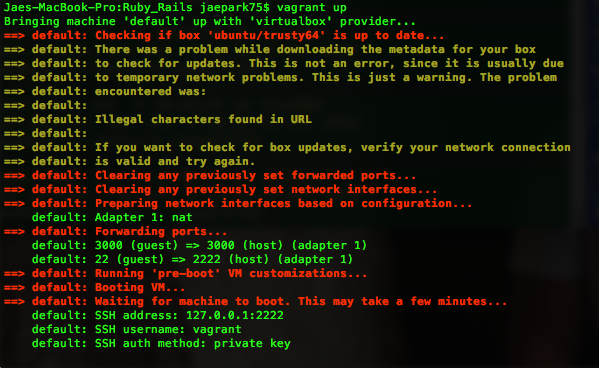
I'm on a Macbook. I'm having a difficult time. I originally upgraded the ubuntu after the vagrant up (which took a while), restarted my computer and now I have the same problem. I tried running "sed -i -- 's/atlas.hashicorp/vagrantcloud/g' ~/.vagrant.d/boxes/*/metadata_url" . I'm getting Illegal characters found in the URL. Time out is taking 2+ minutes. Vagrant wont run. If anyone has any advice, it would be much appreciated.
 jimmymixer
on 12 Jun 2018
jimmymixer
on 12 Jun 2018
@dealonzo how did you edit the file. Where did you find the file to edit?
jimmymixer
on 12 Jun 2018
The file is usually in ~/.vagrant.d/boxes/laravel-VAGRANTSLASH-homestead/metadata_url
ricardoseriani
on 12 Jun 2018
@jimmymixer please see comment above
dealonzo
on 12 Jun 2018
Related issues
 dorinniscu
·
4Comments
dorinniscu
·
4Comments
 m4olivei
·
4Comments
m4olivei
·
4Comments
 leandroruel
·
4Comments
leandroruel
·
4Comments
 gormus
·
4Comments
gormus
·
4Comments
 bironeaj
·
3Comments
bironeaj
·
3Comments
Most helpful comment
I believe that this is due https://atlas.hashicorp.com/ being decomissioned (as you can see when you access https://atlas.hashicorp.com/laravel/boxes/homestead/ ) , please run
sed -i -- 's/atlas.hashicorp/vagrantcloud/g' ~/.vagrant.d/boxes/*/metadata_urland check if this solves the problem
If you aren't on linux, open the file
~/.vagrant.d/boxes/laravel-VAGRANTSLASH-homestead/metadata_urlusing a text editor and change it's content tohttps://vagrantcloud.com/laravel/homestead