Homestead: Laravel command not found
Versions
- Vagrant: 2.0.1
- Provider: Virtualbox
- Homestead: Latest? (Adding box 'laravel/homestead' (v5.0.1) for provider: virtualbox)
Host operating system
Windows 7 Ultimate 64bit, Windows 10 Pro 64bit - both fresh installs.
Expected behavior
After successfully installing Virtualbox, Vagrant and Homestead...
vagrant ssh
cd code
composer global require "laravel/installer"
laravel new test
Expect new laravel installation
Actual behavior
laravel command not found
Workaround:
export PATH="~/.composer/vendor/bin:$PATH"
Never had to do this before on many other Homestead installs.
 sitesense
All 27 comments
someone else recently had this issue on the Slack channel. i'll dig a little in the repo.
may be an upstream change on the box, too
 browner12
on 16 Dec 2017
browner12
on 16 Dec 2017
relevant line: https://github.com/laravel/settler/blob/master/scripts/provision.sh#L100
BTW, it looks like Laravel Envoy and Installer should be installed automatically for you, too.
browner12
on 16 Dec 2017
very strange. if you bring up homestead, log in, and then run that line, it will output correctly.
but if you destroy & up, it is not getting it right.
so it seems like someone the composer global 'home' option is not defined correctly at that point in the script, although I don't see how. could there be some type of race condition here, or should all this stuff be executing sequentially?
browner12
on 16 Dec 2017
possibly relevant line in composer.
https://github.com/composer/composer/blob/master/src/Composer/Config.php#L266
also, if I composer config -g -l in Homestead, it returns with the 'home' key correctly set
browner12
on 16 Dec 2017
I can't see why that line in the script seems to fail, it works if you paste it into the terminal.
printf "\nPATH=\"$(sudo su - vagrant -c 'composer config -g home 2>/dev/null')/vendor/bin:\$PATH\"\n" | tee -a /home/vagrant/.profile
The path does get appended to .profile but is missing the part of the path that the script tries to dynamically create - /home/vagrant/.composer.
Of course we should find out why that is failing, but I don't see why we can't just hard code that path anyway. It's hard-coded elsewhere in homestead.rb for example, so dynamically creating it serves no purpose.
sitesense
on 17 Dec 2017
yah, i was trying to dig into where composer would set that config, but I can't find anywhere else it would be doing that other than the initial install.
Joe might have some more insight this week.
browner12
on 17 Dec 2017
Definitely looks like a bug in https://github.com/laravel/settler/blob/master/scripts/provision.sh#L100
I can confirm the behavior with the current v5.0.1 box.
 svpernova09
on 18 Dec 2017
svpernova09
on 18 Dec 2017
This is not fixed in 7.0.1 correct...? Should I use master to fix it? Or perhaps downgrade the box and the homestead package?
 amosmos
on 2 Jan 2018
amosmos
on 2 Jan 2018
@amosmos This will require a new release of the base box which I'm planning to do Soon™. For now you should be able to put this in your after.sh file:
printf "\nPATH=\"$(sudo su - vagrant -c 'composer config -g home 2>/dev/null')/vendor/bin:\$PATH\"\n" | tee -a /home/vagrant/.profile
Mean while I installed box 4.0.0 and it worked. But thanks, I'll try that too.
If you're already answering - may I ask you - how do I know the compatibility of the box and the homepage package? Like now that installed box 4.0.0 how do I know if it will work with homestead 7.0.1 or any one else? it actually did and I'm actually on master, but I wasn't sure when I installed.
I guess what I'm asking is how do I know when a box version requires a specific (min and max) version of the package and vice versa?
amosmos
on 2 Jan 2018
The repo requires a specific base box version (currently >= 4.0.0). We update that so when you run vagrant up if you have an older box version it will force you to upgrade.
svpernova09
on 2 Jan 2018
Oh I see. Is this dependency documented anywhere? Also do you think that boxes also have a minimum repo version? Like for example box 5.0.1 won't work with an old repo?
amosmos
on 2 Jan 2018
It is not documented anywhere but you can find it here: https://github.com/laravel/homestead/blob/master/scripts/homestead.rb#L15 You can also override this setting by adding a version key to your Homestead.yaml (also an undocumented feature).
There are going to be instances where the base box version isn't compatible with the repo version. I try to update that version requirement anytime there is a known issue but it can still happen.
The best advice is to always run the latest released versions of the base box and the Homestead repo. If you're brave and willing to live on the edge you can use master of the Homestead repo but that can quite often randomly break things.
svpernova09
on 2 Jan 2018
Got it. Thanks.
It's very confusing that running homestead requires 4 different pieces of software (virtualbox. vagrant, box and repo) and their versions compatibility is very specific.
In my specific case, Ihad the same issue as in this issue, so since I saw you solved it in the box but didn't release it yet, I had to use an older one, and didn't know with which repo version to use. Then I also noticed that you said virtualbox 5.2 isn't yet compatible, so had to go back to 5.1, and then saw you mentioned that vagrant 2.0.1 is causing many issues on windows, so had to go back there too...
Perhaps some quick note on best and latest "no issues" version matrix can help :-) Let me know if that is something you think can help and if I can assist somehow.
Thanks again for all your help!
amosmos
on 3 Jan 2018
This is still not working. Any fix to that? Adding the composer vendor bin directory to the path is necessary on every single vagrant up.
 rskinnerc
on 17 Jan 2018
rskinnerc
on 17 Jan 2018
@VetDev As stated earlier this will require a base box update to fully resolve. I'm waiting for xdebug 2.6 to go stable before I release a new box update. For now see https://github.com/laravel/homestead/issues/764#issuecomment-354764072 for a solution.
svpernova09
on 17 Jan 2018
I just updated my box two days ago and just noticed this, even after adding the printf "\nPATH=\"$(sudo su - vagrant -c 'composer config -g home 2>/dev/null')/vendor/bin:\$PATH\"\n" | tee -a /home/vagrant/.profile to after.sh file and do vagrant reload its still not working
 Quadriphobs1
on 28 Jan 2018
Quadriphobs1
on 28 Jan 2018
This is still not working. After vagrant up everything went well except that no Laravel files were created:
 naid
on 2 Feb 2018
naid
on 2 Feb 2018
vagrant up does not create Laravel files. You need to create that yourself or using the laravel new command.
FYI, Joe is building a new base box today.
browner12
on 2 Feb 2018
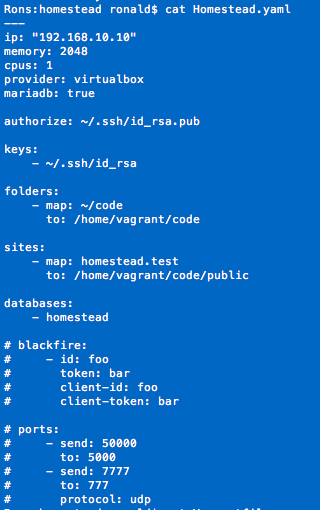
thanks @browner12 , It's working now. I just created a laravel project first and point that project's public directory as one of the site in the Homestead.yml file.
I also added this in the Vagrantfile since I'm experiencing problems with connecting to ssh:
    config.vm.provider "virtualbox" do |vb|
        vb.customize ["modifyvm", :id, "--cableconnected1", "on"]
        vb.gui = true
    end
and it would only connect after logging in to the gui. That is for another issue.
naid
on 6 Feb 2018
ping @svpernova09
just realized we never fixed this. any thoughts on how to get the Composer bin in our $PATH?
browner12
on 24 Feb 2018
Latest box update should have fixed this, are you able to reproduce on master?
svpernova09
on 24 Feb 2018
just did it a couple minutes ago on an up to date repo, most recent box, and newest vagrant and virtualbox.
had to run the PATH export manually.
I'll check again next time I do a destroy.
browner12
on 24 Feb 2018
Reopening for now. I'm going to be tied up all weekend, if you can verify the fix isn't in the settler provision script, throw a PR.
svpernova09
on 24 Feb 2018
sounds good. i'm running a destroy and up again right now to confirm.
browner12
on 24 Feb 2018
huh... worked this time. computers ¯_(ツ)_/¯
browner12
on 24 Feb 2018
This youtube video will help you.
 YuyangHYY
on 28 Feb 2018
YuyangHYY
on 28 Feb 2018
Related issues
 steveheinsch
·
3Comments
steveheinsch
·
3Comments
 mattmcdonald-uk
·
3Comments
mattmcdonald-uk
·
3Comments
 leandroruel
·
4Comments
leandroruel
·
4Comments
 m4olivei
·
4Comments
svpernova09
·
5Comments
m4olivei
·
4Comments
svpernova09
·
5Comments
Most helpful comment
huh... worked this time. computers ¯_(ツ)_/¯