Homebridge-hue: Issues with Philips Hue
Hi,
since a few versions I am having issues with some Hue lamps. If I set a scene not all lamps will be controlled correctly. I have to set the scene twice.
I can see the following in the logs, there are some communication issues.
Homebridge 1.1.6.
Homebridge-Hue 0.12.10
Thanks!
Dec  7 20:39:58 homebridge homebridge[541]: [12/7/2020, 8:39:58 PM] [Homebridge-Hue] Wohnzimmer Front: homekit hue changed from 39˚ to 41˚
Dec  7 20:39:58 homebridge homebridge[541]: [12/7/2020, 8:39:58 PM] [Homebridge-Hue] Wohnzimmer Front: homekit brightness changed from 50% to 25%
Dec  7 20:39:58 homebridge homebridge[541]: [12/7/2020, 8:39:58 PM] [Homebridge-Hue] Wohnzimmer Kugel: homekit on changed from 1 to 0
Dec  7 20:39:58 homebridge homebridge[541]: [12/7/2020, 8:39:58 PM] [Homebridge-Hue] Wohnzimmer Couch: homekit brightness changed from 50% to 25%
Dec  7 20:39:58 homebridge homebridge[541]: [12/7/2020, 8:39:58 PM] [Homebridge-Hue] Wohnzimmer Front: homekit saturation changed from 26% to 46%
Dec  7 20:39:58 homebridge homebridge[541]: [12/7/2020, 8:39:58 PM] [Homebridge-Hue] Küche Decke1: homekit brightness changed from 50% to 25%
Dec  7 20:39:58 homebridge homebridge[541]: [12/7/2020, 8:39:58 PM] [Homebridge-Hue] Wohnzimmer Lampe: homekit brightness changed from 50% to 25%
Dec  7 20:39:58 homebridge homebridge[541]: [12/7/2020, 8:39:58 PM] [Homebridge-Hue] Küche Decke2: homekit brightness changed from 50% to 25%
Dec  7 20:39:59 homebridge homebridge[541]: [12/7/2020, 8:39:59 PM] [Homebridge-Hue] Philips hue: bridge request 825: PUT /lights/12/state {"bri":64}
Dec  7 20:39:59 homebridge homebridge[541]: [12/7/2020, 8:39:59 PM] [Homebridge-Hue] Philips hue: bridge request 825: communication error: http status 503 Service Temporarily Unavailable
Dec  7 20:39:59 homebridge homebridge[541]: [12/7/2020, 8:39:59 PM] [Homebridge-Hue] Philips hue: bridge request 826: PUT /lights/11/state {"bri":64}
Dec  7 20:39:59 homebridge homebridge[541]: [12/7/2020, 8:39:59 PM] [Homebridge-Hue] Philips hue: bridge request 826: communication error: http status 503 Service Temporarily Unavailable
Dec  7 20:39:59 homebridge homebridge[541]: [12/7/2020, 8:39:59 PM] [Homebridge-Hue] Büro Wand: homekit adaptive lighting color temperature changed from 446 mired to 447 mired
Dec  7 20:39:59 homebridge homebridge[541]: [12/7/2020, 8:39:59 PM] [Homebridge-Hue] Büro Schreibtisch 2: homekit adaptive lighting color temperature changed from 446 mired to 447 mired
Dec  7 20:39:59 homebridge homebridge[541]: [12/7/2020, 8:39:59 PM] [Homebridge-Hue] Büro Schreibtisch 1: homekit adaptive lighting color temperature changed from 446 mired to 447 mired
^C
root@homebridge:/var/log#
 jostrasser
All 40 comments
Running into the same issue too with:
Homebridge-hue: 0.12.10
Homebridge: 1.2.4
[07/12/2020, 20:27:08] [Hue] Dimmable light 5: homekit on changed from 0 to 1
[07/12/2020, 20:27:35] [Hue] Dimmable light 4: homekit on changed from 1 to 0
[07/12/2020, 20:27:35] [Hue] Dimmable light 6: homekit on changed from 1 to 0
[07/12/2020, 20:27:35] [Hue] Dimmable light 7: homekit on changed from 1 to 0
[07/12/2020, 20:27:35] [Hue] Dimmable light 1: homekit on changed from 1 to 0
[07/12/2020, 20:27:35] [Hue] Dimmable light 5: homekit on changed from 1 to 0
[07/12/2020, 20:27:35] [Hue] Dimmable light 3: homekit on changed from 1 to 0
[07/12/2020, 20:27:35] [Hue] Dimmable light 2: homekit on changed from 1 to 0
[07/12/2020, 20:27:35] [Hue] Philips hue: bridge request 35: PUT /lights/11/state {"on":false}
[07/12/2020, 20:27:35] [Hue] Philips hue: bridge request 35: communication error: http status 503 Service Temporarily Unavailable
[07/12/2020, 20:27:35] [Hue] Philips hue: bridge request 36: PUT /lights/10/state {"on":false}
[07/12/2020, 20:27:35] [Hue] Philips hue: bridge request 36: communication error: http status 503 Service Temporarily Unavailable
 j0hnlam
on 7 Dec 2020
j0hnlam
on 7 Dec 2020
Could you please capture and attach a debug dump file?
 ebaauw
on 7 Dec 2020
j0hnlam
on 7 Dec 2020
ebaauw
on 7 Dec 2020
j0hnlam
on 7 Dec 2020
Sorry, I meant the log file. I need to see the debug messages with the commands that Homebridge Hue sends to the Hue
bridge.
ebaauw
on 7 Dec 2020
j0hnlam
on 7 Dec 2020
Please turn on Homebridge debug mode, I need to see the debug messages.
ebaauw
on 7 Dec 2020
Sorry, thought it was on, Here is the logs with debug mode enabled.
homebridge.log.txt
j0hnlam
on 7 Dec 2020
Thanks.
The Hue bridge should be able to handle the load, but somehow isn't. Did you try and reboot the Hue bridge? Do you have other Hue clients running that might be doing some serious API calls?
Could you try and set parallelRequests to 5 and see if that helps? Please capture and attach another debug log file. If that doesn't help either, try setting parallelRequests to 3.
Note to self: Damn, I still didn't get the messages right. The request numbers are wrong on the warning message.
ebaauw
on 7 Dec 2020
Did you enable adaptive lighting on the Hue lights? Does the error still occur when you turn off adaptive lighting?
ebaauw
on 7 Dec 2020
Restarted the hue bridge and here are the results:
parallelRequest=5
homebridge.log-parallelrequest5.txt
parallelRequest=3
homebridge.log-parallelrequest3.txt
Changing to parallelRequest=3 seems to fixed the issue. And no, adaptive lightning is not enabled.
j0hnlam
on 7 Dec 2020
Thanks. From what I can tell, Homebridge Hue is doing its job, throttling the requests as per the parallelRequests setting.
You weren't running Hue Sync when recalling the HomeKit scene, were you? From the dump file, It seems that app was using the bridge around the same time.
The setting 3 was needed for the gen-1 bridge; the gen-2 bridge used to be able to handle 10. It's been a long time since I've done serious stress testing, but then again, I haven't received any issues like this for years.
ebaauw
on 7 Dec 2020
I wasn't running Hue Sync app on any of my computers. I'm not too sure what generation my bridge is but I assume it's 1 since setting 3 is working for me. I started to run into this issue once I updated today.
j0hnlam
on 8 Dec 2020
Hi @ebaauw
at first, thanks for your support!
I have now tested to reduce the parallelRequests on my V2 Bridge.
It's a little bit strange...
Test scenario:
I am controlling 5 Lamps, 4 of them have Adaptive Lightning enabled.
I have to reduce the requests to "4" to avoid the "503 errors".
Starting with 5 requests they are coming back.
If I compare the test with another room where only 3 lamps are being controlled I cannot reproduce the issue...
Or in another one with 2 lamps.
In my case, parallelRequests=4 is the way to go.
Ure right, it can be a general load issue since enabling Adaptive Lightning.
I think the default value of 10 requests for a V2 Bridge is too much if Adaptive Lightning is enabled.
BR/JO!
jostrasser
on 8 Dec 2020
I'm not too sure what generation my bridge is but I assume it's 1 since setting 3 is working for me.
It’s gen-2, BSB002.
Gen-1 is the round one, BSB001, which is no longer supported as hasn’t been receiving firmware updates since API version 1.16.0.
ebaauw
on 8 Dec 2020
I've just tested with parallelRequest=3 with Adaptive Lighting on now and still working!
j0hnlam
on 8 Dec 2020
I’m having the same issue. I have a complex system with about 40 Hue lights. The lights are grouped in the hue app and only these groups are exposed to HomeKit. I still use the Hue app if I want to play with individual lights.
Things have gone a bit wonky lately. I’m not sure if this is a recent Hue hub update, or a recent homebridge-hue issue.
With parallelRequestset to 10 (default) I was getting a ton of 503 errors. I reduced the number of requests down and find no 503 errors when parallelRequestset=1. Any number > 1 caused errors. This is an improvement but many lights do not transition to new state although homekit shows the intended state.
Scenes with many lights (~10 groups, ~35 lights) were also taking a very long time to complete.
I also played around with wait time update. Trial and error led me to set this at 0. Scenes not only completed faster, but with fewer errors.
 michaelstein60
on 9 Dec 2020
michaelstein60
on 9 Dec 2020
The lights are grouped in the hue app and only these groups are exposed to HomeKit.
You do not want to combine HomeKit scenes with (multiple) Hue bridge groups. Group commands result in Zigbee broadcasts, and you don't want to spam your Zigbee network multiple of these within the same second.
I reduced the number of requests down and find no 503 errors when parallelRequestset=1
Scenes with many lights (~10 groups, ~35 lights) were also taking a very long time to complete.
That means Homebridge Hue won't send the next command to the Hue bridge until is has returned the previous command. This will take the HomeKit scene a lot longer to be recalled, and you'll probably notice different lights/groups turning on at slightly different times.
but many lights do not transition to new state although homekit shows the intended state
Is that some lights in a Hue bridge group, or always ether none or all lights in a Hue bridge group? In the first case, you're likely experiencing interference issues in the Zigbee network. Did you install a new Internet router, WiFi access point, Bluetooth device? Or one of you neighbours? Did you physically move the Hue bridge?
I also played around with wait time update. Trial and error led me to set this at 0. Scenes not only completed faster, but with fewer errors.
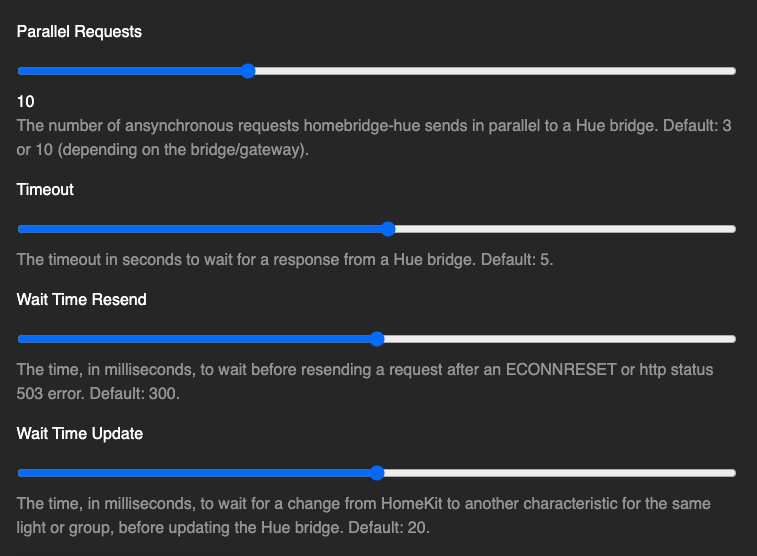
waitTimeUpdate tells Homebridge Hue how long to wait for a next characteristic change on the same _Lightbulb_, before sending the request to the Hue bridge. This allows Homebridge Hue to combine _On_, _Brightness_, _Hue_, and _Saturation_ of the same _Lightbulb_ (i.c. Zigbee group) to be combines in a single API call. Run homebridge -D to make Homebridge Hue log the API calls. The Hue bridge needs to translate the API calls into multiple Zigbee commands, one for the _On/Off_ clusters (for _On_), one for the _Level Control_ cluster (for _Brightness_), and one for the _Color Control_ cluster (for _Hue_ and _Saturation_). With Zigbee groups, this results in three Zigbee broadcasts. Again: you don't want to combine Hue bridge groups with HomeKit scenes. When setting waitTimeUpdate to 0, each characteristic is handled in a separate API call, giving the Hue bridge some more time in between Zigbee broadcasts. It does however result in more API calls, so this is likely why you need parallelRequests to be 1.
ebaauw
on 9 Dec 2020
Things have gone a bit wonky lately. I’m not sure if this is a recent Hue hub update, or a recent homebridge-hue issue.
Could you try an older version of Homebridge Hue in combination with the latest Hue bridge firmware? That should pinpoint the cause.
ebaauw
on 9 Dec 2020
Unfortunately when I revert to 0.12.4 I get an error on startup and continual reboots. I'm assuming a shared library was upgraded in subsequent versions and not downgraded when reverting to 12.4
I know 12.4 works on a clean install but I can't do a clean install without losing a ton of homekit programming.
Error: registry.npmjs.org: timeout after 5 seconds
at newError (/usr/lib/node_modules/homebridge-hue/node_modules/homebridge-lib/lib/HttpClient.js:26:10)
at ClientRequest.
at ClientRequest.emit (events.js:315:20)
at TLSSocket.emitRequestTimeout (_http_client.js:784:9)
at Object.onceWrapper (events.js:421:28)
at TLSSocket.emit (events.js:327:22)
at TLSSocket.Socket._onTimeout (net.js:483:8)
at listOnTimeout (internal/timers.js:554:17)
at processTimers (internal/timers.js:497:7)
michaelstein60
on 9 Dec 2020
Damn. Maybe setting timeout a bit longer prevents the timeout on the NPM Registry.
Otherwise I need to see if I can conduct another stress test this weekend.
ebaauw
on 9 Dec 2020
I should be around this weekend and am willing to help stress test. I’m a bit of a noob to homebridge but worked in home automation product development for many years so I’m not starting from scratch.
My system is large and has big light groups which may exasperate the issue.
michaelstein60
on 9 Dec 2020
I'm afraid I haven't kept the test scripts, but basically I created some 20 CLIP sensors, and updated them in parallel over the API. This would measure the bridge performance, independent of any Zigbee network issues. The gen-1 bridge would start reporting errors at the fourth update; the gen-2 bridge at the 11th.
After throttling the number of parallel requests, I was never able to flood the Zigbee network using HomeKit scenes in combination with lights. I never tested HomeKit scenes in combination with groups, but imho it doesn't make sense to do that. Either use Hue bridge (Zigbee) groups and scenes (far more efficient) or HomeKit ones (for user friendliness).
What server are you running Homebridge on? Maybe it's too fast, causing Homebridge Hue to hit the Hue bridge at a higher rate. I probably tested back in the days on a Raspberry Pi 3B, maybe a 3B+.
ebaauw
on 9 Dec 2020
Thought it might be helpful to understand why I'm using Hue for groups and HomeKit for scenes.
I'm currently working on 2 homes. LA Home is a Loft. It's a massive space with 18' high ceilings. I have 6 Hue BR30 bulbs above the kitchen counter and another 6 over the kitchen island. 99% of the time I control the counter as a unit and the island as a unit. I use the Hue app if I want to set some colorful scene and individual light control.
Much of the rest of the home is similar. Many fixtures contain multiple Hue bulbs but are controlled as a unit.
The reason that I chose not to group lights in HomeKit is based on reports I've read about HomeKit issues when hundreds of devices are used. I understand HomeKit has a limit of 1000 devices but people find it flakes out and fails to sync over iCloud with a couple hundred devices.
My other house (currently under construction) in Costa Rica is huge. It'll have >400 controlled devices and I'm concerned that HomeKit may fail and that would be a big problem for me. That's why I'm experimenting with Homebridge. Homebridge not only allows me to control non-homekit devices, but allows me to aggregate groups of devices like Hue lights. Using this method I can stay with HomeKit for the overall controls and not worry about exceeding some hidden limit.
michaelstein60
on 10 Dec 2020
Using Zigbee groups over HomeKit isn't a bad idea; just don't combine multiple Zigbee groups in a HomeKit scene. In Zigbee, lights can join multiple groups, so it's doable to force one Zigbee group per HomeKit scene. Alternatively, use Zigbee scenes.
Before the mentioned limits you'll hit the 149 bridged accessories per bridge (i.c. Homebridge) limit. This used to be 99, but Apple increased that a while ago.
You can mitigate that by create a multilight resourcelink to have Homebridge Hue expose multiple lights as different services in one accessory:
{
    "classid": 1,
    "description": "multilight",
    "links": [
      "/lights/221",
      "/lights/222",
      "/lights/223",
      "/lights/224",
      "/lights/225",
      "/lights/226"
    ],
    "name": "homebridge-hue",
    "owner": "xxxxxxxxxx",
    "recycle": false,
    "type": "Link"
  }
You can still show them as separate tiles in Home, controlling them individually, but you can no longer place them in different rooms (as that's at the accessory level).
I haven't seen any recent reports about the 1MB CKRecord limit (see #129). I managed to hit that in testing years ago (simply exposing my Zigbee network twice, using two different Homebridge / Homebridge Hue instances), but haven't tried it recently. I've seen recent reports that using old (iOS 9) devices in HomeKit breaks the sync and causes all sorts of nasty side effects, so I think/hope this limit has been addressed as well, at least on recent iOS versions.
ebaauw
on 11 Dec 2020
First I’d like to thank you for all the good work and especially taking the time to reply to my possibly odd use case.
The idea of using Hue scenes makes some sense, unfortunately I’m using adaptive lighting and that’s not supported in hue scenes as far as I can tell. This makes the use of homekit scenes mandatory.
My groups are setup as if they’re wired circuits. Bulbs can only be assigned to one group. The 6 bulbs in the kitchen counter are an example. This allows me to expose the group to HomeKit and set a color, or adaptive, and brightness as a single entity.
My scenes contain multiple groups, but as stated above the groups are not overlapping and lights belong to only one group. Do you see a problem with this?
Thanks again for your help.
michaelstein60
on 11 Dec 2020
By combining Zigbee groups with Homebridge scenes, you’re flooding the Zigbee network.
When recalling a HomeKit scene, HomeKit issues up to 50 characteristic changes in one message to Homebridge. Homebridge breaks this up into up to 50 set events to Homebridge Hue. Homebridge Hue tries to mitigate this denial-of-service attack, by collecting the changes (received within a waitTimeUpdate interval) per light or group accessory into a single API call to the Hue bridge. Depending on what you do in the scene, this still results in up to 12 to 50 API calls. Homebridge Hue throttles these calls, as per the parallelRequests setting. The Hue bridge breaks up each API call into one to three Zigbee messages to the light or group. Messages to a light are sent by unicast; messages to the group by broadcast. According to the Hue documentation, the Zigbee network can handle up to 20 unicasts, or one multicast per second. Other than checking the response to an API call, there’s no way for an API client to see how busy the Hue bridge or the Zigbee network is.
Empirically, the default settings of waitTimeUpdate and parallelRequests work for HomeKit groups and scenes of lights, and for controlling Zigbee groups manually. However this approach doesn’t cater for HomeKit groups or scenes of Zigbee groups.
To support these, Homebridge Hue would need to check whether it has send a light or group API call, and delay the next API call by 0.05 or 1 second. Technically complex, but probably doable. However, the consequence is that the next group would only react a second after the previous, causing a weird user experience of not all lights reacting at the same time. Also, this would be guessing; there’s no feedback whether the Zigbee command has actually completed (or executed at all), so hiccups in the network (interference, other API clients) would still cause issues. Until now, I didn’t think implementing this would justify the effort. If, indeed, the Hue bridge behaves differently with the latest firmware, we might need to reconsider.
Note however, that fundamentally, Zigbee is not suited to handle HomeKit (or any home automation system) groups and scenes. You’re far better off using Zigbee groups and scenes (recalling a Zigbee scene only takes one broadcast message, as the target states are stored on the lights).
ebaauw
on 11 Dec 2020
Thanks for that detailed reply. I thought hue groups would simplify things and reduce the data size in HomeKit, but now I understand how unreliable group broadcasts are.
Has Apple fixed the 1MB CKRecord limit? I’m trying to decide the best platform for the home I’m building and HomeKit was the choice until I learned about this restriction.
How can I see the size of my current HomeKit data?
Hue scenes won’t work for me since I want adaptive lighting. I’m migrating back to exposing individual bulbs to HomeKit to avoid the group issues we’ve discussed. Scenes will be set in HomeKit.
michaelstein60
on 11 Dec 2020
but now I understand how unreliable group broadcasts are.
They're actually very reliable; they just occupy the Zigbee network for a second or so, as each router in the mesh re-transmits the package. Zigbee employ a listen-before-transmit policy, so no device will send another message, while the broadcast propagates through the mesh.
Has Apple fixed the 1MB CKRecord limit?
I really don't know, but circumstantial evidence seems to suggest that limit no longer applies to HomeKit. Best do some stress testing to make sure.
How can I see the size of my current HomeKit data?
I have no idea.
ebaauw
on 11 Dec 2020
Re-created my old stress tests. The old gen-1 Hue bridge still reacts the way I remember; the gen-2 Hue bridge reacts very differently. I can now send 20 requests updating a CLIP sensor in parallel without any issue. Looks like they refactored the way the bridge handles API requests. It now acts more similar to deCONZ, except that deCONZ has an internal queue of 20 outstanding Zigbee requests, where the logs from this issue would suggest a queue of 5 outstanding Zigbee requests on the Hue bridge.
Not sure what the best approach to address this would be:
- Proactively try and estimate how long the request will take (at least distinguish between API calls to
/groupsvs/lights, maybe even try to deduce the number of clusters from the body), and throttle requests accordingly; - Reactively catch the 503 and resend the request (as I do for the ECONNRESET that used to be reported when the bridge couldn't handle the API requests).
Option 2) is way easier to implement, so let's try that first...
ebaauw
on 12 Dec 2020
@jostrasser @j0hnlam @michaelstein60 Could you try beta v0.12.12-0? It should retry the API call when met with a 503, and it should wait 50ms before issuing the next PUT after a previous PUT (or 1000ms when the previous PUT was to /groups). This is a blunt attempt at limiting the unicast ZigBee messages to 20 per second and broadcast messages to 1 per second, under the (false) assumption that each PUT, POST, or DELETE would result in a single Zigbee command.
Please capture and attach a debug log file, using the default values for parallelRequests and waitTimeUpdate, enabling Homebridge debug mode (-D) and setting DEBUG to HueClient*. Please try outrageous things: large HomeKit scenes or groups; HomeKit scenes of Hue (Zigbee) groups; enabling adaptive lighting for a dozen or so lights, etc. I expect/hope Homebridge Hue handles these without losing any light changes, albeit with a change in user experience due to different lights changing at noticeable different times.
ebaauw
on 13 Dec 2020
Installed beta v0.12.12-0 and still experiencing 503 errors when setting parallelRequests and waitTimeUpdate back to default values.
Here is the debug log file (Homebridge debug mode enabled):
homebridge.log.txt
Can you direct me how to set DEBUG to the HueClient*? Having trouble finding it in the homebridge dashboard. Thanks!
j0hnlam
on 14 Dec 2020
Sorry, I thought I'd answered this yesterday, but apparently forgot to hit the _Comment_ button...
Installed beta v0.12.12-0
But you're running v0.12.11:
[14/12/2020, 16:01:41] [Hue] homebridge-hue v0.12.11, node v14.15.1, homebridge v1.2.4
Did you install the beta through the _Install Previous Version_ feature
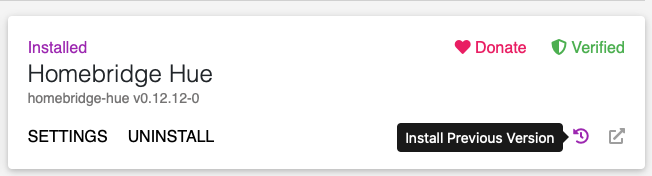
Can you direct me how to set
DEBUGto theHueClient*?
Under _Homebridge Settings_:

ebaauw
on 15 Dec 2020
I'm pretty sure I updated to the beta but didn't restart:
[14/12/2020, 16:04:07] [Homebridge UI] Running Command: sudo -E -n npm install -g [email protected]
Here is the updated logs with DEBUG on and HueClient*flag in the debug option and default values for parallelRequests and waitTimeUpdate after reboot:
homebridge.log.txt
Works a lot better but could only reproduce once where one light did not turn off by spamming on/off.
j0hnlam
on 15 Dec 2020
Here is the updated logs
Thanks! Looks like Homebridge Hue is interacting with the Hue bridge the way I intended it to, and like the Hue bridge likes it.
Works a lot better but could only reproduce once where one light did not turn off by spamming on/off.
I don't see any errors in the log. Still contemplating whether or not I should make the wait times after PUT configurable.
ebaauw
on 16 Dec 2020
Yeah, I didn't see the error either when that happened so not sure. Could just be a one off where the request got bounced because of the spamming.
j0hnlam
on 16 Dec 2020
hey @ebaauw
with the latest update (v0.12.12), do we revert the advanced settings? I for example reduced the parallel requests from 10 to 4 to get rid of the 503 errors. Just curious if it makes sense to go back to default values in this case.
 mtressl
on 17 Dec 2020
mtressl
on 17 Dec 2020
Yes, see above. https://github.com/ebaauw/homebridge-hue/issues/848#issuecomment-743993921
ebaauw
on 17 Dec 2020
Yes, see above. #848 (comment)
Thank you, will revert to 10 seconds and test the behaviour.
mtressl
on 17 Dec 2020
This started working as of v0.12.12-0 for me also.
However (and not 100% sure this is related) I started noticing these warnings as of v0.12.12-0:
(node:27632) MaxListenersExceededWarning: Possible EventEmitter memory leak detected. 11 error listeners added to [HueClient]. Use emitter.setMaxListeners() to increase limit
(node:27632) MaxListenersExceededWarning: Possible EventEmitter memory leak detected. 11 go listeners added to [HueClient]. Use emitter.setMaxListeners() to increase limit
 jonatan1979
on 18 Dec 2020
jonatan1979
on 18 Dec 2020
I don’t think it’s a memory leak; this would happen when your HomeKit group or scene contains 12 (or more) lights, and 11 PUT requests are put on hold (each of them waiting for a go event). The obvious remedy is for me to increase the limit, as suggested. I need to think whether I could re-write the code so it wouldn’t register so many listeners.
ebaauw
on 18 Dec 2020
Related issues
 derthobo
·
3Comments
derthobo
·
3Comments
 Stefan-83
·
4Comments
Stefan-83
·
4Comments
 brandungskieker
·
4Comments
brandungskieker
·
4Comments
 jannnfe
·
3Comments
jannnfe
·
3Comments
 leoneleone
·
9Comments
leoneleone
·
9Comments