Homebridge-hue: Cannot remove Phoscon-GW from favorite Screen in Homekit
Issue
Hello,
I have a problem, I moved from one Raspberry to another with a completely new Homebridge installation.
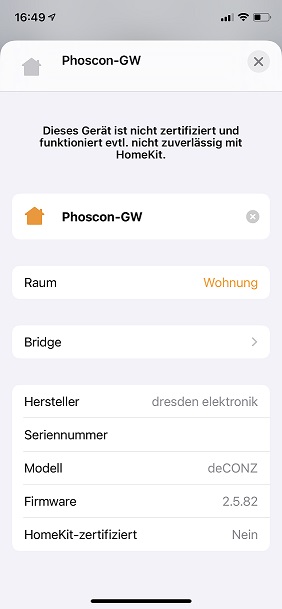
But now I have the problem that I cannot remove the Phoscon Gateway in HomeKit under Favorites.
Usually there is always the button "Show in favorites" which is completely missing here: /
Any idea? Do I now have to delete the gateway and then set up all the devices again?
And second question, I have two Osram outdoor plugs. These are shown to me as a light in the HomeKit, can you change that somehow?
Or does that have to be changed in the Deconz?
Many thanks :)
PS: i already asked in discord
 clipse2004
All 3 comments
As I already replied in Discord, the favourites are handled by Home. There’s nothing in the HAP protocol for that, and nothing Homebridge nor any plugin can do about that. They changed something in iOS 14 - I got a report of this already for one of the beta versions. Best file a bug report with Apple.
I no longer see the favourite option in iOS14 either for any _Not Supported_ accessory. However, I already unmarked these as favourites a long time ago (even before iOS13) and that setting is still honoured. The option is still available on macOS, and, I assume, on iOS13.
To expose the plugs as _Outlet_ instead of _Lightbulb_, create an outlet resourcelink. Search in the closed issues for details.
 ebaauw
on 19 Sep 2020
ebaauw
on 19 Sep 2020
They changed something in iOS 14
They no linger show the setting for _Not Supported_ accessories. It's still there on iOS 13 and macOS. If you change it there, it should be synced with iOS 14.
If you don't have any iOS 13 or macOS devices with Home, set linkbutton in config.json to expose a _Stateless Programmable Switch_ on the bridge/gateway accessory, so it's no longer _Not Supported_. This will allow you to change the favourite status of the accessory. It will stick, after you clear linkbutton.
Note that the switch only works for Hue bridges with an API version < v1.31.0 (i.e. the gen-1 Hue bridge). For non-Hue-bridge gateways it doesn't do anything, and for gen-2 Hue bridges, only one button press per minute is registered.
ebaauw
on 20 Sep 2020
Thanks for the workaround, @ebaauw, works as advertised. :+1:
 gizmotronic
on 20 Oct 2020
gizmotronic
on 20 Oct 2020
Related issues
 imbaimbaimba
·
11Comments
imbaimbaimba
·
11Comments
 Sturmhorst
·
4Comments
Sturmhorst
·
4Comments
 jannnfe
·
3Comments
jannnfe
·
3Comments
 rgerr
·
6Comments
rgerr
·
6Comments
 thumax
·
4Comments
thumax
·
4Comments
Most helpful comment
They no linger show the setting for _Not Supported_ accessories. It's still there on iOS 13 and macOS. If you change it there, it should be synced with iOS 14.
If you don't have any iOS 13 or macOS devices with Home, set
linkbuttonin config.json to expose a _Stateless Programmable Switch_ on the bridge/gateway accessory, so it's no longer _Not Supported_. This will allow you to change the favourite status of the accessory. It will stick, after you clearlinkbutton.Note that the switch only works for Hue bridges with an API version < v1.31.0 (i.e. the gen-1 Hue bridge). For non-Hue-bridge gateways it doesn't do anything, and for gen-2 Hue bridges, only one button press per minute is registered.