Homebridge-hue: FOHSWITCH is "unsupported"; I tried to support it, but not working yet.
Issue
FOHSWITCH is "unsupported"; I tried to support it, but not working yet.
Here is some of the work I've already done:
Here's some buttonevents numbers for this switch:
buttonevents-bed-switch-share.gz
As you can partially see, the above switch is a four button switch, but I've taken the optional two rockers off and placed the optional one rocker on, so there are only two buttons that I'm programming, thus only the up and down states; you might not notice that there are actually more than two buttons from the above diagnosis as a result. These switches give out an event for button down and button up, but it looks like software turns that into a button press without release for a while (a delay sense), and button release, which does cover most of the possible interpretation use cases. These Zigbee switches give out unique events for all the combinations I've tested on an earlier firmware on a switch bought before Philips had implemented the FOH program fully: each of press and release for: each possible combination of buttons pressed. For instance, if I press up left, or up right, or down left, or down right, or up both left and right, or down both left and right, or up left and down right, or dow left and up right, all of those have a unique code. Now, there is a different brand that sells these same switches but that does not expose the codes for more than one button press at a time; that means when I press both up or both down (or diagonal presses, for that matter), no code is sent, and nothing happens. As a result, I have 3 of these switches in my home (2 on another "Home" in homekit so you won't see them in my log files here), and 1 of them is programmed properly via hand-coded zigbee event responses in the Hue gateway to turn on both lights when both upper buttons are pressed and all the other obvious combinations (even diagonal!), but since that was not part of the FOH program, that switch doesn't show up as a Homekit accessory exported by the hue bridge, but the other two FOH switches I got do show up as Homekit accessories and are much better supported by Hue & native Homekit, but do not do anything when there are more than one button presses. Not all progress is improvement. Anyway, one of those FOH switches is in my personal "Home" that you see in these logs, and I really want to have it control some non-Hue devices, so I need to expose it to homebridge, but homebridge does not yet support it.
Here is how that switch shows up in Home app with homebridge running:
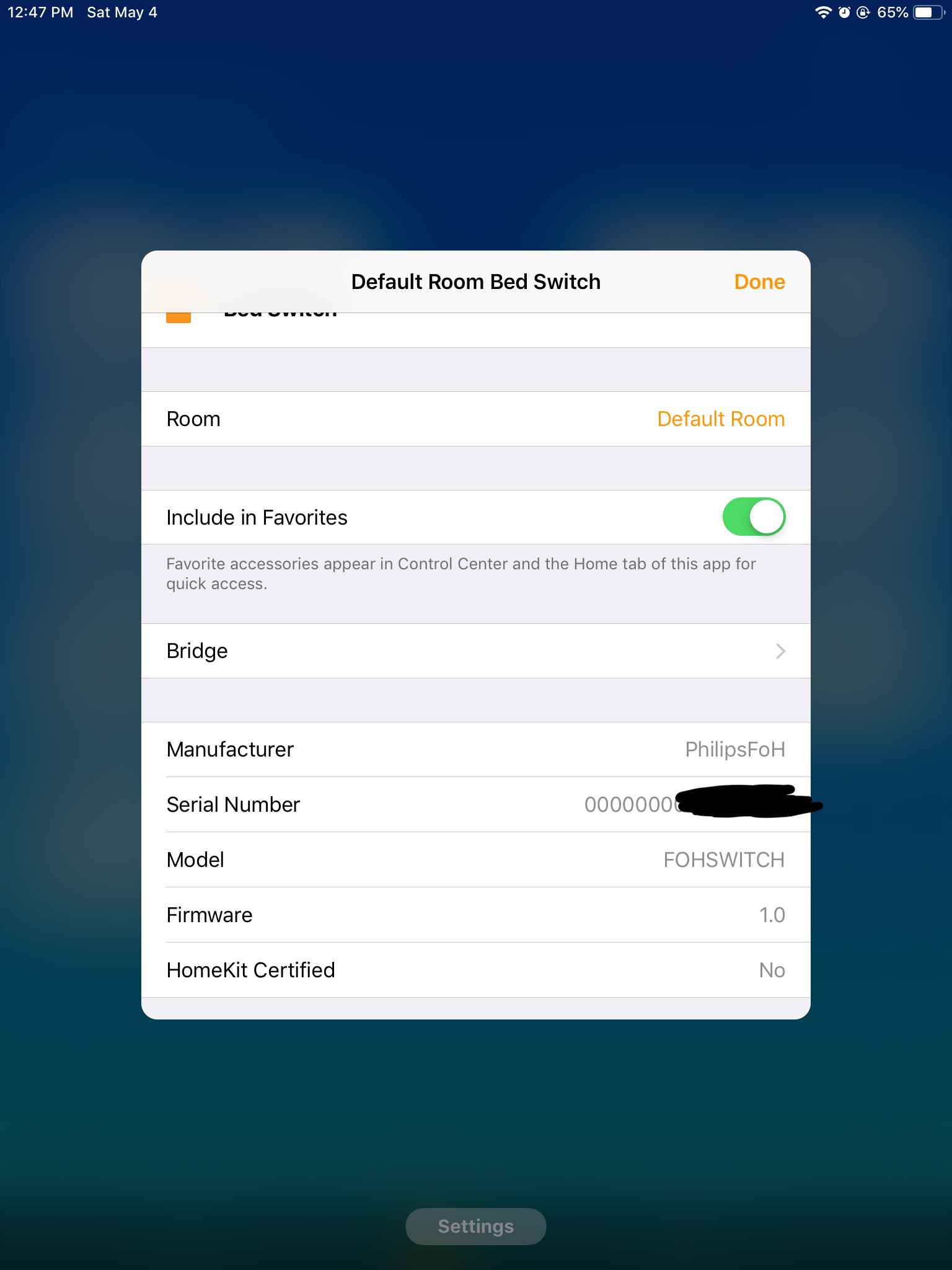
As you can see, the unsupported device has a Manufacturer of "PhilipsFoH" (which is wrong; it's a different manufacturer; but that's how lying Philips supports it, apparently), and a Model of "FOHSWITCH", which is a total lack of information, since there will be a zillion switch types in FoH, but that's what we have to work with.
I found some code pieces in homebridge-hue that seem like they are templates for support of this type of switch, so I started work on them around April 14:
Apparently, Google Node erased those files on April 24, so before I remembered I had TimeMachine running on that host, today I tried to remember a rough version of what I edited and came up with this sort of rough draft of lib/HueSensor.js and copied the case 'ZGPSwitch' in the switch for (this.obj.type) to a new 'FOHSwitch' (which you can see in the above screenshot); you can see I was a little more detailed above on April 14 with that diff file than in this little snippet, but they are conceptually similar; the above diff code was tested and failed, but the below is just conceptual and not as complete (never tested):
//===
      } else if (
        this.obj.manufacturername === 'Philips' &&
        this.obj.modelid === 'FOHSWITCH'
      ) {
        // FOH Switch
        this.createLabel(Characteristic.ServiceLabelNamespace.ARABIC_NUMERALS)
        this.createButton(1, 'UpDim', SINGLE_LONG)
        this.createButton(2, 'Up', SINGLE)
        this.createButton(3, 'DownDim', SINGLE_LONG)
        this.createButton(4, 'Down', SINGLE)
        this.type = {
          key: 'buttonevent',
          homekitValue: function (v) { return { 16: 1, 20: 2, 17: 3, 21: 4 }[v] },
          homekitAction: function () { return 0 }
//===
Log Messages
While censoring the log file, I ran across this error message which is about the switch I want supported. Note that the error message might be slightly different since I started trying to support it. Edit: looks like Google erased hours of my work, so no, that code is gone.
[4/24/2019, 5:35:24 PM] [Hue] Studio: /sensors/38: warning: unknown ZGPSwitch sensor {"state":{"buttonevent":21,"lastupdated":"2019-04-22T07:48:56"},"swupdate":{"state":"notupdatable","lastinstal\
l":null},"config":{"on":true},"name":"Bed Switch","type":"ZGPSwitch","modelid":"FOHSWITCH","manufacturername":"PhilipsFoH","productname":"Friends of Hue Switch","diversityid":"ded6468f-6b26-4a75-\
9582-f2b52d36a5a3","uniqueid":"00:00:00:00:01:70:xx:xx-xx","capabilities":{"certified":true,"inputs":[{"repeatintervals":[],"events":[{"buttonevent":16,"eventtype":"initial_press"},{"buttonevent"\
:20,"eventtype":"short_release"}]},{"repeatintervals":[],"events":[{"buttonevent":17,"eventtype":"initial_press"},{"buttonevent":21,"eventtype":"short_release"}]},{"repeatintervals":[],"events":[\
{"buttonevent":19,"eventtype":"initial_press"},{"buttonevent":23,"eventtype":"short_release"}]},{"repeatintervals":[],"events":[{"buttonevent":18,"eventtype":"initial_press"},{"buttonevent":22,"e\
venttype":"short_release"}]}]}}
[4/24/2019, 5:35:24 PM] [Hue] Studio: /sensors/38: warning: unknown ZGPSwitch sensor {"state":{"buttonevent":21,"lastupdated":"2019-04-22T07:48:56"},"swupdate":{"state":"notupdatable","lastinstal\
l":null},"config":{"on":true},"name":"Bed Switch","type":"ZGPSwitch","modelid":"FOHSWITCH","manufacturername":"PhilipsFoH","productname":"Friends of Hue Switch","diversityid":"ded6468f-6b26-4a75-\
9582-f2b52d36a5a3","uniqueid":"00:00:00:00:01:70:xx:xx-xx","capabilities":{"certified":true,"inputs":[{"repeatintervals":[],"events":[{"buttonevent":16,"eventtype":"initial_press"},{"buttonevent"\
:20,"eventtype":"short_release"}]},{"repeatintervals":[],"events":[{"buttonevent":17,"eventtype":"initial_press"},{"buttonevent":21,"eventtype":"short_release"}]},{"repeatintervals":[],"events":[\
{"buttonevent":19,"eventtype":"initial_press"},{"buttonevent":23,"eventtype":"short_release"}]},{"repeatintervals":[],"events":[{"buttonevent":18,"eventtype":"initial_press"},{"buttonevent":22,"e\
venttype":"short_release"}]}]}}
Debug Files
 Ulmo
Ulmo
All 12 comments
Does anybody have any pointers on how to press forward with making this work? When I last tried, this would not work. Let me re-run Homebridge to see how it behaves now with those April 14 edits:
Ok, I remember this failure: I now get the switch showing up with 8 buttons, each with a Single Press and Long Press code. Progress! But, when I Add functions in Home app to these buttons, none of them do anything; whenever I press the switch, nothing I assign to those buttons works. Have I done something wrong? What's the best way to diagnose that?
For instance, I'm going to add a level of 77ºF to my thermostat to the #1 button and #5 button for Single Press and see if that does anything.
I see in the log file this:
[5/4/2019, 1:54:53 PM] Homebridge is running on port 55224.
[5/4/2019, 1:59:11 PM] [Hue] Studio Ceiling Front: set homekit on from 0 to 1
[5/4/2019, 1:59:11 PM] [Hue] Studio Ceiling Front: set homekit brightness from 57% to 100%
[5/4/2019, 1:59:11 PM] [Hue] Studio Ceiling Front: set homekit hue from 37˚ to 39˚
[5/4/2019, 1:59:11 PM] [Hue] Studio Ceiling Front: set homekit saturation from 67% to 53%
[5/4/2019, 1:59:11 PM] [Hue] Studio Ceiling Front: set homekit color temperature from 443 mired to 367 mired
[5/4/2019, 1:59:11 PM] [Hue] Closet bulb 1: set homekit on from 0 to 1
[5/4/2019, 1:59:11 PM] [Hue] Closet bulb 1: set homekit brightness from 57% to 100%
[5/4/2019, 1:59:11 PM] [Hue] Closet bulb 1: set homekit hue from 37˚ to 39˚
[5/4/2019, 1:59:11 PM] [Hue] Closet bulb 1: set homekit saturation from 67% to 53%
[5/4/2019, 1:59:11 PM] [Hue] Closet bulb 1: set homekit color temperature from 443 mired to 367 mired
[5/4/2019, 1:59:11 PM] [Hue] Studio Desk: set homekit on from 0 to 1
[5/4/2019, 1:59:11 PM] [Hue] Studio Desk: set homekit brightness from 57% to 100%
[5/4/2019, 1:59:11 PM] [Hue] Studio Desk: set homekit hue from 37˚ to 39˚
[5/4/2019, 1:59:11 PM] [Hue] Studio Desk: set homekit saturation from 67% to 53%
[5/4/2019, 1:59:11 PM] [Hue] Studio Desk: set homekit color temperature from 443 mired to 367 mired
[5/4/2019, 1:59:11 PM] [Hue] Closet bulb 2: set homekit on from 0 to 1
[5/4/2019, 1:59:11 PM] [Hue] Closet bulb 2: set homekit hue from 176˚ to 39˚
[5/4/2019, 1:59:11 PM] [Hue] Closet bulb 2: set homekit saturation from 3% to 53%
[5/4/2019, 1:59:11 PM] [Hue] Closet bulb 2: set homekit color temperature from 156 mired to 367 mired
[5/4/2019, 1:59:13 PM] [Hue] Closet bulb 2: set homekit color temperature from 367 mired to 366 mired
[5/4/2019, 1:59:15 PM] [Hue] Closet bulb 1: set homekit color temperature from 367 mired to 366 mired
[5/4/2019, 1:59:15 PM] [Hue] Studio Desk: set homekit color temperature from 367 mired to 366 mired
[5/4/2019, 1:59:17 PM] [Hue] Studio Ceiling Front: set homekit color temperature from 367 mired to 366 mired
But what I don't see is anything to do with the Thermostat. The Thermostat is still set at 74ºF, not 77ºF. The Hue Bridge seems to get the configured switch to turn on the configured lights, but the Homekit reaction doesn't pick that button up at all; all you see in the above log file is the output of the Hue Bridge turning on lights, nothing to do with the switch press. Is homebridge-hue or homebridge getting this switch press at all? Is there a quick way to diagnose that?
Ulmo
on 4 May 2019
As you can see, the unsupported device has a Manufacturer of "PhilipsFoH" (which is wrong; it's a different manufacturer; but that's how lying Philips supports it, apparently), and a Model of "FOHSWITCH", which is a total lack of information, since there will be a zillion switch types in FoH, but that's what we have to work with.
These switches use the ZigBee Green Power (ZGP) protocol, which uses very minimal messages to deal with the very limited energy harvested from the button presses. The protocol doesn't support the reporting of modelid, manufacturername, swversion, or even a full mac address.
While censoring the log file, I ran across this error message
That's for me to see what the resource looks like. The message got mangled somehow. Could you please attach the debug dump file (see README)?
Could you post a (series of) screenshot(s) what the switch looks like in HomeKit when exposed natively by the Hue bridge?
I don't think we can support _Long Press_ for these reliably, when connected to the Hue bridge. It just reports press and release for each button (and button pair), irrespective of how long the button(s) was (were) pressed. As the hue bridge doesn't provide push notifications, homebridge-hue needs to poll it. The press event is often missed and best ignored, using only the release event to issue a _Short Press_.
Supporting these switches in homebridge-hue will be a bit more work, as deCONZ exposes these using regular buttonevent values (x000, x001, x002, x003) instead of the ZGP command codes. See https://github.com/dresden-elektronik/deconz-rest-plugin/commit/5a3767b7c3d6802d619368a63b5f856549d7a1e0.
 ebaauw
on 5 May 2019
ebaauw
on 5 May 2019
Would you be able to try the above commit? Or is it easier if I publish a beta version?
ebaauw
on 5 May 2019
Would you be able to try the above commit? Or is it easier if I publish a beta version?
Thank you! I will try that immediately, and work through your other queries over the next hour.
P.S., my edit of the URL of supported devices is known correct as of the time I checked it (April 14); you could apply that:
--- HueSensor.js.~1~    1985-10-26 01:15:00.000000000 -0700
+++ HueSensor (original).js     2019-04-14 14:52:26.000000000 -0700
@@ -206,7 +206,7 @@
   }
   this.infoService = this.accessory.getInfoService(this)

-  // See: http://www.developers.meethue.com/documentation/supported-sensors
+  // See: https://developers.meethue.com/develop/hue-api/supported-devices/
   let durationKey = 'duration'
   let readonlySensitivity = true
   switch (this.obj.type) {
@@ -226,6 +226,70 @@
Ok, I ran Homebridge with that patch applied, and I'm getting the following results:
- I do not see any log entries particular to this the way I run homebridge.
- When I go into Home app, I get the following:

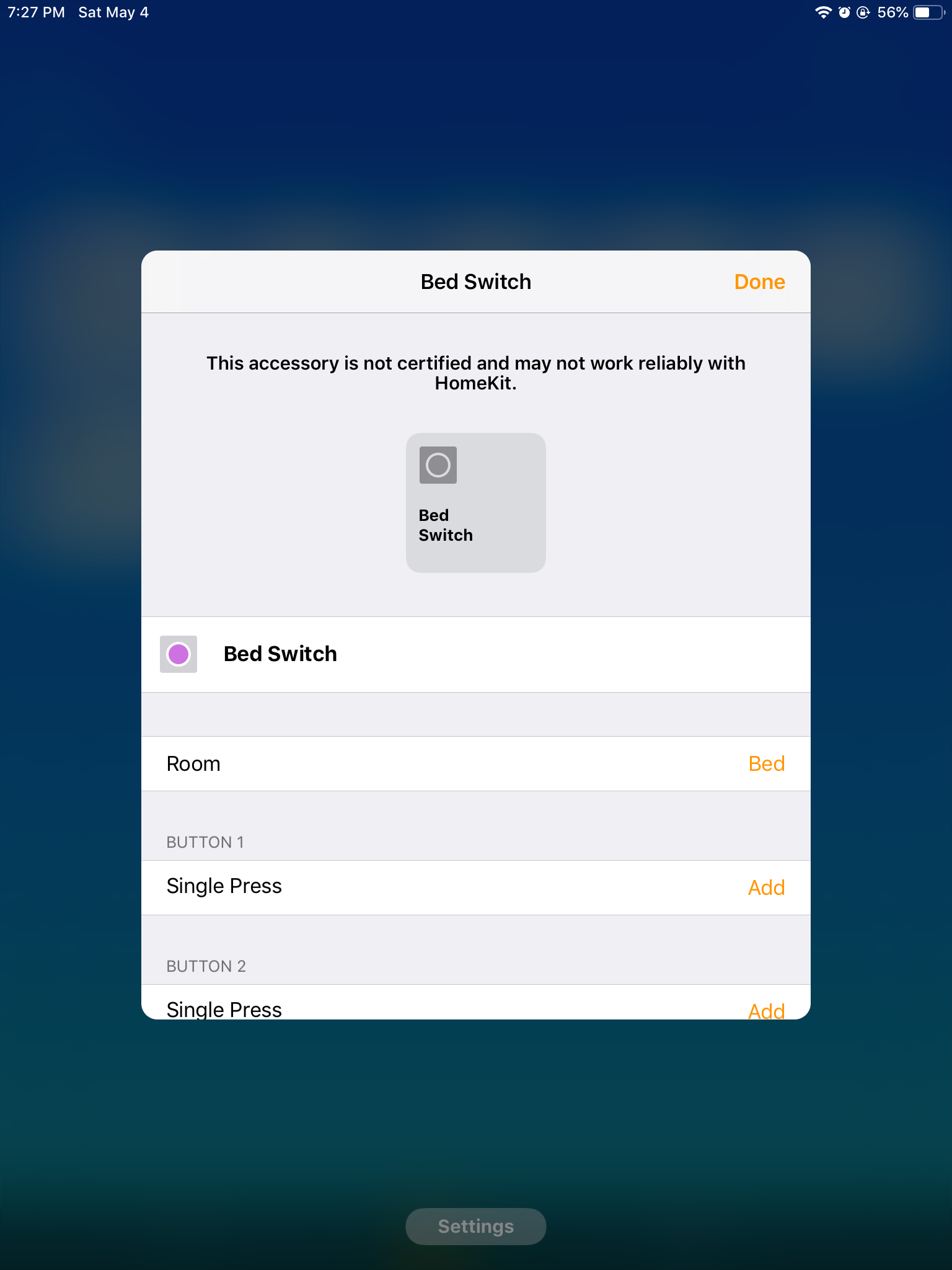
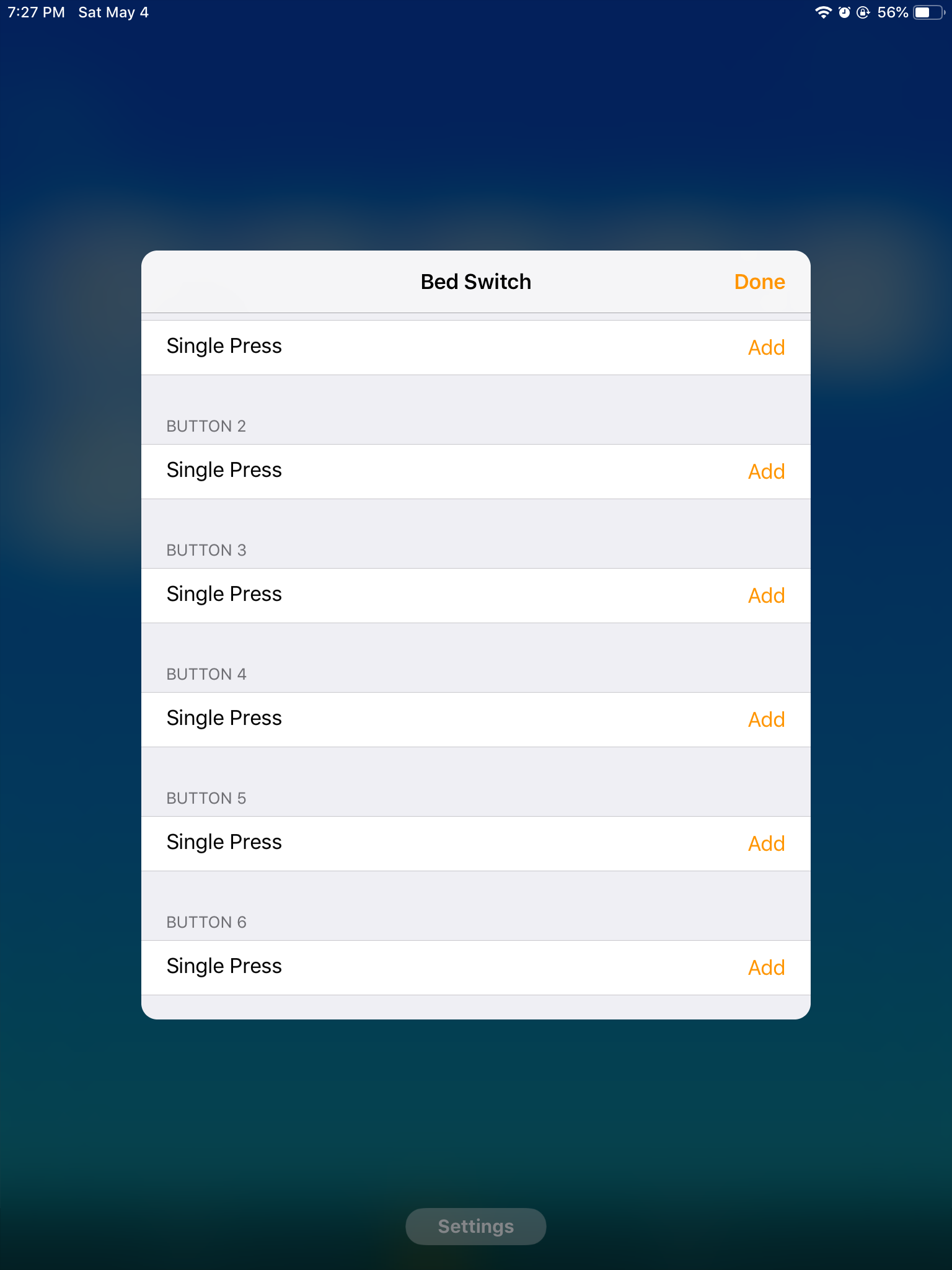
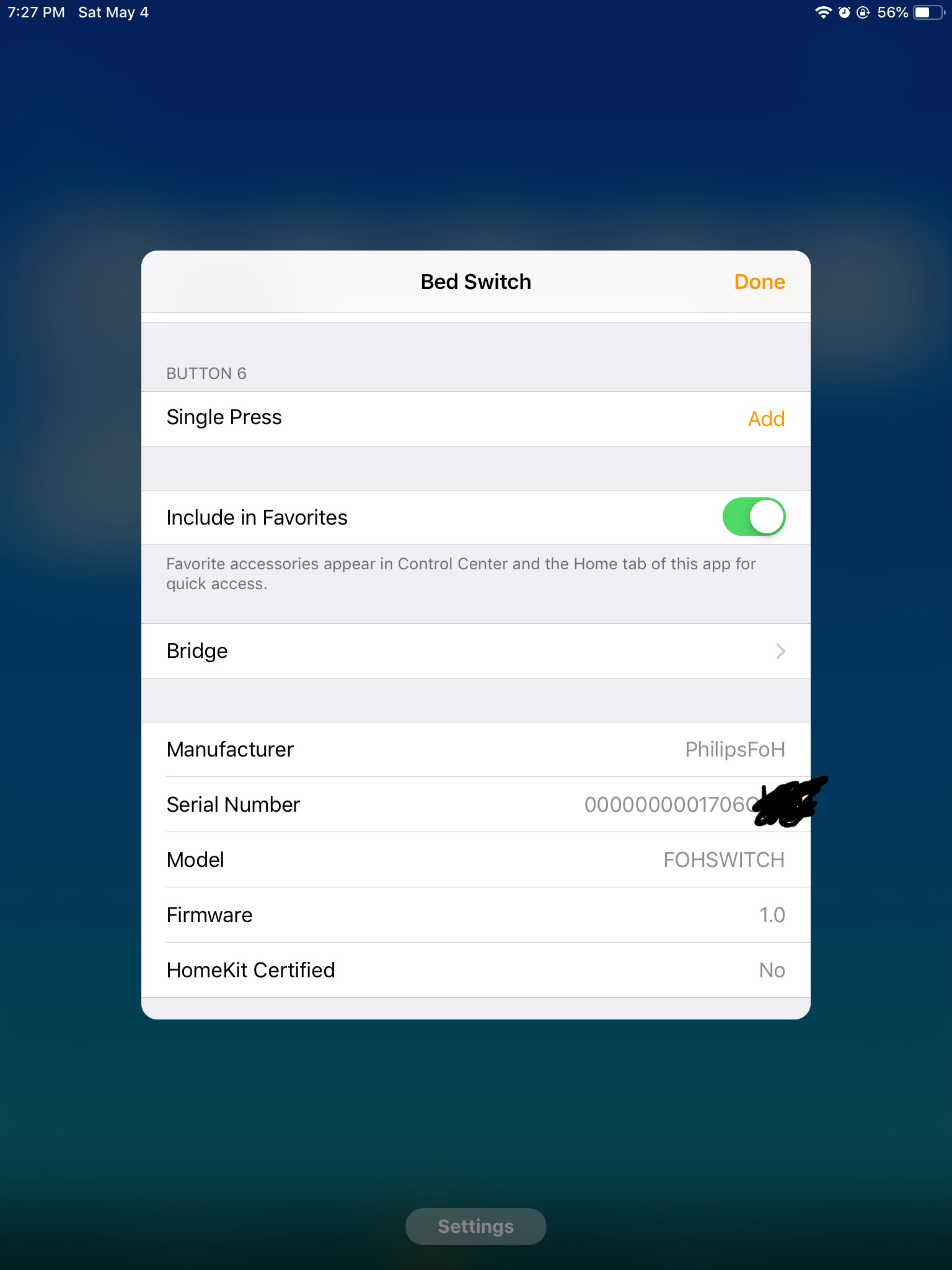
- When I set each button to go to 60ºF on the thermostat + the button number (button 1 is 61º, button 2 is 62º, and so on), I get:
Press up on single rocker:
[5/4/2019, 7:24:22 PM] Homebridge is running on port 55224.
[5/4/2019, 7:29:22 PM] [Tesla Powerwall] history
[5/4/2019, 7:31:16 PM] [Hue] Bed Switch Top Left: homekit button single press
[5/4/2019, 7:31:16 PM] [Hue] Studio Ceiling Front: set homekit on from 0 to 1
[5/4/2019, 7:31:16 PM] [Hue] Studio Ceiling Front: set homekit brightness from 100% to 43%
[5/4/2019, 7:31:16 PM] [Hue] Closet bulb 1: set homekit on from 0 to 1
[5/4/2019, 7:31:16 PM] [Hue] Closet bulb 1: set homekit color temperature from 366 mired to 367 mired
[5/4/2019, 7:31:16 PM] [Hue] Studio Desk: set homekit on from 0 to 1
[5/4/2019, 7:31:16 PM] [Hue] Studio Desk: set homekit color temperature from 366 mired to 367 mired
[5/4/2019, 7:31:16 PM] [Hue] Closet bulb 2: set homekit on from 0 to 1
[5/4/2019, 7:31:16 PM] [Hue] Closet bulb 2: set homekit color temperature from 366 mired to 367 mired
[5/4/2019, 7:31:18 PM] [Hue] Studio Desk: set homekit color temperature from 367 mired to 366 mired
[5/4/2019, 7:31:18 PM] [Hue] Closet bulb 2: set homekit color temperature from 367 mired to 366 mired
[5/4/2019, 7:31:20 PM] [Hue] Closet bulb 1: set homekit color temperature from 367 mired to 366 mired
[5/4/2019, 7:31:22 PM] [Hue] Studio Ceiling Front: set homekit brightness from 43% to 100%
I call that success! It says "[5/4/2019, 7:31:16 PM] [Hue] Bed Switch Top Left: homekit button single press
". And, the Thermostat is set to 61ºF! That's a Button 1 press!
Now, pressing down:
[5/4/2019, 7:32:18 PM] [Hue] Bed Switch Bottom Left: homekit button single press
[5/4/2019, 7:32:18 PM] [Hue] Studio Ceiling Front: set homekit on from 1 to 0
[5/4/2019, 7:32:18 PM] [Hue] Closet bulb 1: set homekit on from 1 to 0
[5/4/2019, 7:32:18 PM] [Hue] Studio Desk: set homekit on from 1 to 0
[5/4/2019, 7:32:18 PM] [Hue] Closet bulb 2: set homekit on from 1 to 0
[5/4/2019, 7:32:18 PM] [Hue] Closet bulb 2: set homekit brightness from 100% to 71%
[5/4/2019, 7:32:24 PM] [Hue] Closet bulb 2: set homekit brightness from 71% to 100%
And the Thermostat is set to 62ºF.
Now, I'm going to disassemble the switch and put on the double rocker setup to test the other functions of the switch for completeness and testing: (I will post this draft message now)
Now, with 4 buttons:
Upper left:
[5/4/2019, 7:41:50 PM] [Hue] Bed Switch Top Left: homekit button single press
[5/4/2019, 7:41:50 PM] [Hue] Studio Ceiling Front: set homekit color temperature from 366 mired to 367 mired
[5/4/2019, 7:41:50 PM] [Hue] Closet bulb 1: set homekit on from 0 to 1
[5/4/2019, 7:41:50 PM] [Hue] Closet bulb 1: set homekit color temperature from 366 mired to 367 mired
[5/4/2019, 7:41:50 PM] [Hue] Studio Desk: set homekit color temperature from 366 mired to 367 mired
[5/4/2019, 7:41:50 PM] [Hue] Closet bulb 2: set homekit on from 0 to 1
[5/4/2019, 7:41:50 PM] [Hue] Closet bulb 2: set homekit color temperature from 366 mired to 367 mired
[5/4/2019, 7:41:52 PM] [Hue] Studio Ceiling Front: set homekit color temperature from 367 mired to 366 mired
[5/4/2019, 7:41:54 PM] [Hue] Studio Desk: set homekit color temperature from 367 mired to 366 mired
[5/4/2019, 7:41:54 PM] [Hue] Closet bulb 2: set homekit color temperature from 367 mired to 366 mired
[5/4/2019, 7:41:56 PM] [Hue] Closet bulb 1: set homekit color temperature from 367 mired to 366 mired
Thermostat shows 61ºF (button 1 was pressed).
Lower left:
[5/4/2019, 7:42:46 PM] [Hue] Bed Switch Bottom Left: homekit button single press
[5/4/2019, 7:42:46 PM] [Hue] Studio Ceiling Front: set homekit on from 1 to 0
[5/4/2019, 7:42:46 PM] [Hue] Closet bulb 1: set homekit on from 1 to 0
[5/4/2019, 7:42:46 PM] [Hue] Studio Desk: set homekit on from 1 to 0
[5/4/2019, 7:42:46 PM] [Hue] Closet bulb 2: set homekit on from 1 to 0
[5/4/2019, 7:42:46 PM] [Hue] Closet bulb 2: set homekit brightness from 100% to 29%
[5/4/2019, 7:42:52 PM] [Hue] Closet bulb 2: set homekit brightness from 29% to 100%
Thermostat set to 62ºF (button 2 was pressed).
Upper right:
[5/4/2019, 7:43:26 PM] [Hue] Bed Switch Top Right: homekit button single press
[5/4/2019, 7:43:26 PM] [Hue] Studio Ceiling Front: set homekit on from 0 to 1
[5/4/2019, 7:43:26 PM] [Hue] Studio Ceiling Front: set homekit color temperature from 366 mired to 367 mired
[5/4/2019, 7:43:26 PM] [Hue] Studio Desk: set homekit on from 0 to 1
[5/4/2019, 7:43:26 PM] [Hue] Studio Desk: set homekit color temperature from 366 mired to 367 mired
[5/4/2019, 7:43:30 PM] [Hue] Studio Ceiling Front: set homekit color temperature from 367 mired to 366 mired
[5/4/2019, 7:43:32 PM] [Hue] Studio Desk: set homekit color temperature from 367 mired to 366 mired
Huh, I didn't know that did anything in hue bridge, but we know it should show up in homebridge. Thermostat set to 63ºF (button 3 was pressed).
Lower right:
[5/4/2019, 7:44:18 PM] [Hue] Bed Switch Bottom Right: homekit button single press
[5/4/2019, 7:44:18 PM] [Hue] Studio Ceiling Front: set homekit on from 1 to 0
[5/4/2019, 7:44:18 PM] [Hue] Studio Desk: set homekit on from 1 to 0
[5/4/2019, 7:44:22 PM] [Tesla Powerwall] history
Thermostat shows it was set to 64ºF (so button 4 was pressed).
I wonder why you have 6 statuses. I'm going to try some more types of pressing:
Both top buttons at the same time:
[5/4/2019, 7:45:32 PM] [Hue] Bed Switch Top Both: homekit button single press
Aha! Great! Good job! That is superb. Thank you for gathering that status. I forget how you got that capability input. Thermostat shows that it was set to 65ºF, showing that button 5 was pressed.
Both bottom buttons pressed at the same time:
[5/4/2019, 7:46:52 PM] [Hue] Bed Switch Bottom Both: homekit button single press
Very good. Thermostat shows it was set to 66ºF, so that means button 6 was pressed. Excellent! Thank you.
Other things to test: Holding upper left button:
[5/4/2019, 7:47:35 PM] [Hue] Rocker support: set homekit status from 0 to 2
[5/4/2019, 7:47:37 PM] [Hue] Bed Switch Top Left: homekit button single press
[5/4/2019, 7:47:37 PM] [Hue] Rocker support: set homekit status from 2 to 0
Hue app didn't change anything. I wonder what it would do if I specifically turned on some lights assigned to left button and held down lower left button:
Well, hue app does something, but I'm not sure if it passes this to Homekit:
[5/4/2019, 7:48:37 PM] [Hue] Rocker support: set homekit status from 0 to 4
[5/4/2019, 7:48:37 PM] [Hue] Studio Ceiling Front: set homekit brightness from 100% to 0%
[5/4/2019, 7:48:37 PM] [Hue] Closet bulb 1: set homekit brightness from 100% to 0%
[5/4/2019, 7:48:37 PM] [Hue] Studio Desk: set homekit brightness from 100% to 0%
[5/4/2019, 7:48:37 PM] [Hue] Closet bulb 2: set homekit brightness from 100% to 0%
[5/4/2019, 7:48:39 PM] [Hue] Studio Ceiling Front: set homekit brightness from 0% to 59%
[5/4/2019, 7:48:41 PM] [Hue] Bed Switch Bottom Left: homekit button single press
[5/4/2019, 7:48:41 PM] [Hue] Rocker support: set homekit status from 4 to 0
Let's try with both to see what happens:
Lots of long and short presses, and excerpt:
[5/4/2019, 7:50:07 PM] [Hue] Bed Switch Top Both: homekit button single press
[5/4/2019, 7:50:11 PM] [Hue] Bed Switch Bottom Both: homekit button single press
[5/4/2019, 7:50:15 PM] [Hue] Bed Switch Top Both: homekit button single press
They all show as single presses, and register as they are released.
Now for a diagonal press: I'm going to press upper left and lower right and release at the same time:
Nothing.
No diagonal actions work.
So it is confirmed that the Hue bridge can work with dimming, but doesn't pass that information on to the Homekit.
Ulmo
on 5 May 2019
The original reason I wanted to program this switch, having it turn on and off the thermostat display and my desktop computer display, are now working as they originally were before I started using homebridge. (Now, when I go to bed, a single switch turns all lights off.) Great!
Ulmo
on 5 May 2019
I'm curious what other buttonevents could be shown; I'm going to look them up. Running a one second poll of the Hue bridge directly using curl (btw, here's the bash code I ran in order to do that:
$ lastwhen='';while sleep 1; do when=$(curl -X GET -k -s https://10.x.x.x/api/'xxxxxxx-xxxxxx'/sensors/38|json_pp|egrep -A3 ' "state" : {'|egrep lastupdated|sed -e 's%.* "%%' -e 's%",*$%%');what=$(curl -X GET -k -s https://10.x.x.x/api/'xxxxxx-xxxxxxx'/sensors/38|json_pp|egrep -A3 ' "state" : {'|egrep buttonevent|sed -e 's%.* %%' -e 's%,*$%%');if [ "$when" != "$lastwhen" ];then lastwhen="$when";echo -n "$what ";fi;done;echo
where 10.x.x.x is the Hue bridge ip#, xxxxx-xxxxx is the username (you have to read Hue dev docs to log in for that), and sensors/38 is the sensor number assigned on that Hue bridge for my bedroom FOH switch), I'm getting:
Hold upper left: 16 (hex $10)
Release upper left: 20 (hex $14)
Press and release upper left quickly: 20
Hold lower left: 17 (hex $11)
Release lower left: 21 (hex $15)
Press and release lower left quickly: 21
Hold upper right: 19 (hex $13)
Release upper right: 23 (hex $17)
Press and release upper right quickly: 23
Hold lower right: 18 (hex $12)
Release lower right: 22 (hex $16)
Press and release lower right quickly: 22
Hold upper both: 100 (hex $64)
Release upper both: 101 (hex $65)
Press and release upper both quickly: 101
Hold lower both: 98 (hex $62)
Release lower both: 99 (hex $63)
Press and release lower both quickly: 99
Hold upper left and lower right: (nothing)
Release upper left and lower right: (nothing)
Press and release upper left and lower right quickly: (nothing)
Hold lower left and upper right: (nothing)
Release lower left and upper right: (nothing)
Press and release lower left and upper right quickly: (nothing)
That's pretty complete information. As you said, that would require some type of polling that you think isn't available, but what if the hue bridge sends that data somehow? Is there a way I could diagnose that? Since every hold button press that does work does also give out its release button event, it's not an entire loss of any held button event.
(Note that I own an identical piece of switch hardware that I bought via Digikey October 29, 2018 by Illumra digikey part# 1082-1034-ND Illumra part# ZBT-S2AWH on another Homekit home that isn't an FOH (Friends of Hue) switch which I think must have different firmware that does expose diagonal presses and doesn't register using the interface FOH expects; it only outputs Zigbee information, and I have to program the Hue bridge manually and directly using the API interfaces (using curl in my case) to respond to its codes since it is not recognized as a FOH switch and not exported to Homekit; its buttonevent codes are all different, in addition to having more codes for the diagonal events, and its manual does not have the same initial programming function that the FOH switch manual for the identical hardware (but apparently different firmware) supports.) Since your code doesn't input the hold values, that seems like the only thing missing from your code (for the FOH firmware, as I said).)
Ulmo
on 5 May 2019
As you can see, the unsupported device has a Manufacturer of "PhilipsFoH" (which is wrong; it's a different manufacturer; but that's how lying Philips supports it, apparently), and a Model of "FOHSWITCH", which is a total lack of information, since there will be a zillion switch types in FoH, but that's what we have to work with.
These switches use the ZigBee Green Power (ZGP) protocol, which uses very minimal messages to deal with the very limited energy harvested from the button presses. The protocol doesn't support the reporting of
modelid,manufacturername,swversion, or even a full mac address.
Ok, that's great.
While censoring the log file, I ran across this error message
That's for me to see what the resource looks like. The message got mangled somehow. Could you please attach the debug dump file (see README)?
Here's the latest dump:
Could you post a (series of) screenshot(s) what the switch looks like in HomeKit when exposed natively by the Hue bridge?
Done, in post above.
I don't think we can support _Long Press_ for these reliably, when connected to the Hue bridge. It just reports press and release for each button (and button pair), irrespective of how long the button(s) was (were) pressed. As the hue bridge doesn't provide push notifications, homebridge-hue needs to poll it. The press event is often missed and best ignored, using only the release event to issue a _Short Press_.
Ok.
Supporting these switches in homebridge-hue will be a bit more work, as deCONZ exposes these using regular
buttoneventvalues (x000, x001, x002, x003) instead of the ZGP command codes. See dresden-elektronik/deconz-rest-plugin@5a3767b.
Nice reference. Those press and release events match what I reported above for my RunLessWire brand Part# FOH-DSWH (whose box and switch are physically identical to my Illumra part# ZBT-S2AWH but unlike the Illumra seems to fully support FOH). That code piece indicates a number of other switch brand names: "Support Friends of Hue switches from Vimar, Busch-Jaeger, Niko"; that seems like a good code piece to support in homebridge-hue.
Ulmo
on 5 May 2019
https://github.com/ebaauw/homebridge-hue/commit/81d00a39dc2540dacb04b12528b2e017518b331d solves my issue. Thank you!!!
Ulmo
on 5 May 2019
The buttonevent values that the Hue bridge shows are the raw ZGP commands that the switch sends. These are hard-coded in the switch’s firmware. The Hue bridge configures all lights (that support ZGP - all Hue lights do) to forward the ZGP message to the Hue bridge.
When receiving a (forwarded) ZGP message, the Hue bridge sets the state attributes (buttonevent and lastupdated). These can be used to trigger rules on the Hue bridge, e.g. to toggle a light or recall a scene (typically, the Hue app will create these for you).
Unfortunately, there’s no way for homebridge-hue (or any other Hue API client) to know the state change, other than continuously asking the state (polling). I find I can do this reliably at most once every two seconds on a second generation (square) Hue bridge. This means that only the last state change of every 2s interval is visible to homebridge-hue:
- If you were to press a button 0.1s before homebridge-hue queries the bridge, and release it 0.2s later, homebridge-would see a press, and, two seconds later, a release.
- If you were to press the button 0.1s after a poll, and release it 0.2s later, homebridge-hue would only see a release, 1.7s later. Same action, but different events visible to the API client.
- If you were to press a button 0.1s after a poll, and release it 3.8s later (just before the third poll), homebridge-hue would see a press (1.9 seconds later) and, two seconds thereafter, a release. Different action (long press vs short press), but same events visible to the API client.
The Hue bridge does push state changes to HomeKit, so using the native HomeKit function is more responsive than homebridge-hue, and potentially offers more functionality (hence my question for screenshots _when the switch is exposed natively by the Hue bridge_). I don’t think they expose pressing two buttons simultaneously, though.
The Hue dimmer switch uses different buttonevent values (or rather: sends different messages) for short release vs long release. homebridge-uses this to expose _Short Press_ vs _Long Press_. Last time I checked, the Hue bridge only exposes _Short Press_.
So you need to weight the added functionality offered by homebridge-hue against the better resposiveness of the Hue bridge. If you want both, replace your Hue bridge with deCONZ.
ebaauw
on 5 May 2019
The Hue bridge does push state changes to HomeKit, so using the native HomeKit function is more responsive than homebridge-hue, and potentially offers more functionality (hence my question for screenshots _when the switch is exposed natively by the Hue bridge_). I don’t think they expose pressing two buttons simultaneously, though.
Setting it up natively to show that one switch can take hours, so I'm going to show the same hardware switch model that is installed on my other "Home" with a similar FOH switch that is run natively straight from the Hue hub to HomeKit (no homebridge on that "Home"):
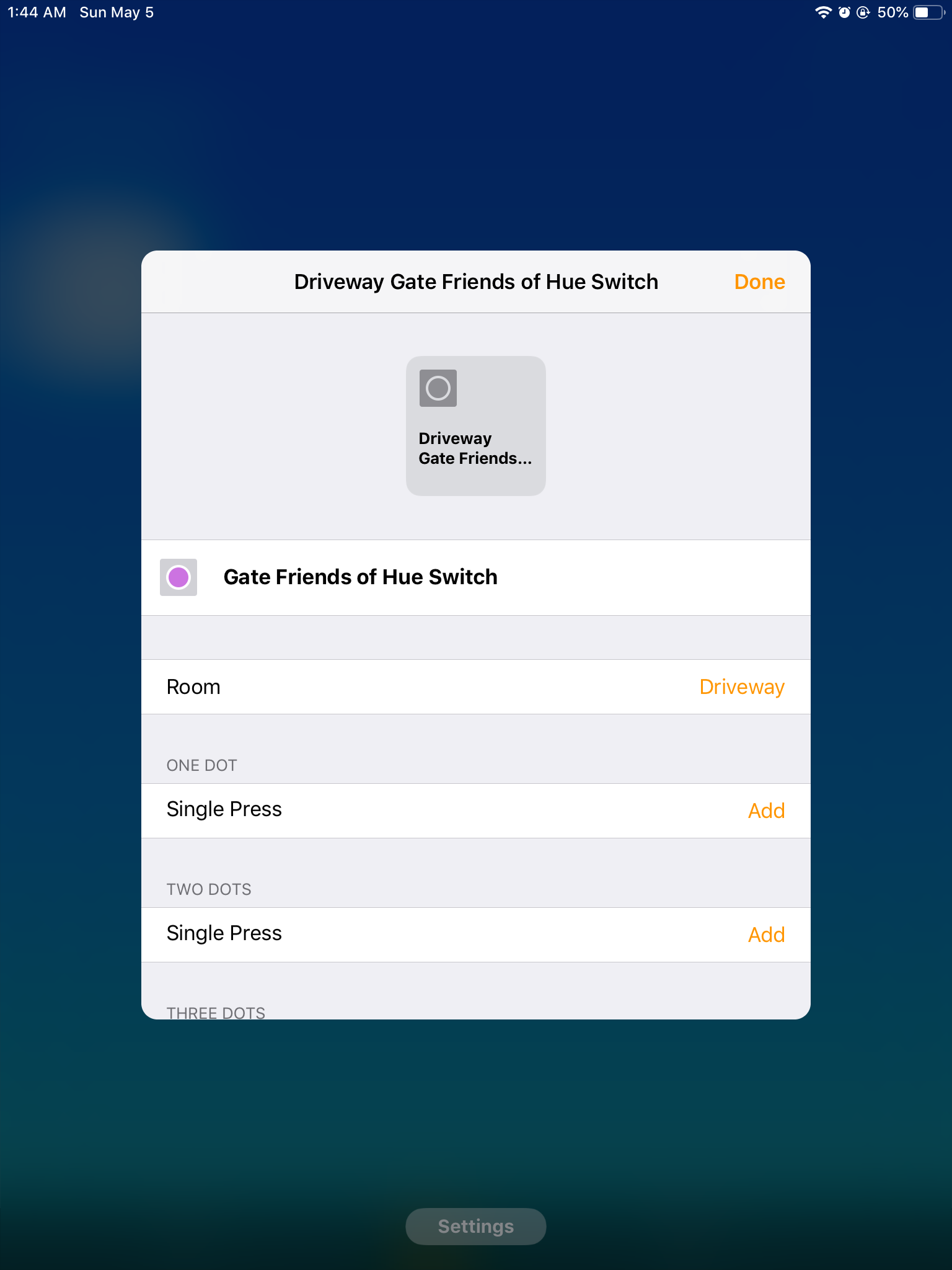

Note that there are no "dots" on that switch. Also note that the screenshot shows no setting for both pressed at the same time, and indeed, the Hue bridge and app doesn't have an action for any notice of both being pressed at the same time (which I thought might be a problem for me since I often want to press both down to turn both off, but I realized none of the things controlled by that switch need to be non-Hue devices, so I just now manually created 8 new rules on the Hue bridge to allow both buttons pressed at the same time to control the Hue lights that switch is for, and I don't need any HomeKit for that).
Ulmo
on 5 May 2019
Thanks!
Note that there are no "dots" on that switch.
Apple's Home app shows either _n_DOTS or BUTTON_n_; it won't show the button names (shown in the homebridge log). Other apps (Eve, Matthias' Home) do show the button names.
the Hue bridge and app doesn't have an action for any notice of both being pressed at the same time (which I thought might be a problem for me since I often want to press both down to turn both off
Yes it would, as no HomeKit event gets triggered when pressing both buttons simultaneously.
but I realized none of the things controlled by that switch need to be non-Hue devices, so I just now manually created 8 new rules on the Hue bridge to allow both buttons pressed at the same time to control the Hue lights that switch is for, and I don't need any HomeKit for that).
Indeed, Hue bridge rules are preferred over HomeKit automations when you want to control devices connected to the Hue bridge. Richer functionality, more responsive, and more reliable (no HomeKit hub needed). On the downside: creating them is less user friendly.
ebaauw
on 5 May 2019
Related issues
 jostrasser
·
3Comments
jostrasser
·
3Comments
 suhajda3
·
9Comments
suhajda3
·
9Comments
 rgerr
·
6Comments
rgerr
·
6Comments
 Stefan-83
·
4Comments
Stefan-83
·
4Comments
 timwegenerDE
·
6Comments
timwegenerDE
·
6Comments