Homebridge-hue: deCONZ and IKEA Trådfri support
I installed a dresden elektronik RaspBee board in my Raspberry Pi, effectively turning the Pi into a Hue bridge alternative. The current beta version of their deCONZ software supports not only ZLL devices (Hue light, Hue dimmer switch, Hue motion sensor) and ZGP devices (Hue tap), but also ZHA devices (IKEA Trådfri, NYCE sensors) and ZigBee 3.0 devices (Ubisys switches). Their open source REST API is more or less compatible with the Hue API. In addition, it provides push notifications through websockets.
Of course, I want to expose the devices connected to the RaspBee to HomeKit as well. Rather than creating another homebridge plugin, I'm attempting to make homebridge-hue work with the deCONZ API. For now, support of deCONZ is experimental. I have a barely functional prototype, but the commits on GitHub won't connect to the current beta of the deCONZ API.
Please note that while homebridge-hue (almost) supports Trådfri lights and remotes, the Hue bridge doesn't. You'll need a RaspBee to expose non-Hue-compatible devices to HomeKit.
 ebaauw
All 25 comments
Got the Ikea Tråfri light and remote working. deCONZ only provides a limited number of button events, in particular no _Long Press_ for the On/Off, Previous and Next buttons.
Got the Ubisys R1 light endpoint working as well; the switch endpoints aren't recognised by the current deCONZ beta. Supporting these will be challenging, as I need to combine one light resource and two sensors resources in a single accessory. Same might hold for similar switches (like the Busch-Jaeger?) connected through deCONZ.
deCONZ doesn't support an unauthenticated GET of /config. Consequently, discovery of deCONZ is broken, even when specifying the hostname in config.json. Should be fixed in the next deCONZ beta.
ebaauw
on 5 May 2017
deCONZ only provides a limited number of button events, in particular no Long Press for the On/Off, Previous and Next buttons.
Compared to the hue dimmer switch most (all?) other switches don't provide feedback like pressed and released state for buttons. Standard ZigBee only sends commands like on, off, toggle, move up, move down and stop. Hence in most cases only short press events can be observed, the move and stop commands could be translated to hold and long press but other than that I'm afraid there's not much room for improvements.
Same might hold for similar switches (like the Busch-Jaeger?) connected through deCONZ
Yes Busch-Jaeger switches are available as 1, 2 and 4 gang (up to 4 ZHASwitch sensor devices). The mains powered switches may have a light endpoint (on/off relay or dimmable light) depending on the UP insert, in which case the top row of buttons is not used as ZigBee switch and only available locally. For all sensor and light endpoints only the MAC address part of the uniqueid is equal (like Philips hue motion sensor).
https://www.busch-jaeger.de/en/products/product-solutions/remote-control/zigbee-light-link/
Can you please provide the firmware version (sw build id) of your Busch-Jaeger switch from the basic cluster?
 manup
on 5 May 2017
manup
on 5 May 2017
Standard ZigBee only sends commands like on, off, toggle, move up, move down and stop. Hence in most cases only short press events can be observed, the move and stop commands could be translated to hold and long press [...]
Yeah, I think I read that from sensors.cpp: on a button action, the switches don't actually report any attributes, but simply send a command to the bound device (or devices or group or groups?). deCONZ "reverse engineers" these commands to derive the buttonevent. The Hue dimmer switches uses commands for the vendor specific FC00 cluster, but the other switches send regular On/Off, Level Control, or Scenes cluster commands. The Trådfri remote uses a vendor specific command in the Scenes cluster to change the colour temperature.
I suppose the Hue dimmer uses regular On/Off and Level Control commands as well, for when paired directly to a light or group. I actually managed to have some of my dimmers paired to the Hue bridge and to a group simultaneously (it took me a while to realise this, but I noticed lights where changing without any bridge rules firing - removing one of the lights from the group confirmed that the dimmer was interacting with the group directly).
[...] but other than that I'm afraid there's not much room for improvements.
When pairing the remote directly to the Trådfri light, holding the Previous or Next button cycles through the colour temperature settings, but when paired to deCONZ, no event at all is reported when holding these buttons (not even the 4002 or 5002). What gives?
Can you please provide the firmware version (sw build id) of your Busch-Jaeger switch from the basic cluster?
Sorry, I don't have any Busch-Jaeger switches, I need to dim 3x80W, which exceeds the Busch-Jaeger's 200W limit. I'm using the Ubisys dimmer instead (up to 500W), but that doesn't report any SW Build ID. It reports Model Identifier D1 (5530) and Date Code 20161223-DE-FB0.
One of my users has a Busch-Jaeger switch with a dimmer insert connected to his Hue bridge. It reports swversion 1.0.0, see https://github.com/ebaauw/homebridge-hue/issues/80#issuecomment-289077003.
ebaauw
on 5 May 2017
v0.4.7 should work with deCONZ v2.04.40 beta. See the release notes how to setup.
ebaauw
on 20 May 2017
I fixed deCONZ support for gateway discovery and created pull request dresden-elektronik/deconz-rest-plugin#44. I hope they merge it before they release the next beta. With these changes, homebridge-hue no longer needs any hacks to work with deCONZ.
ebaauw
on 21 May 2017
homebridge-hue v0.4.8 and later works with deCONZ beta v2.04.44 and later. It doesn't yet make use the deCONZ push notifications, though.
I'm currently on:
[6/18/2017, 9:12:01 PM] [Hue] homebridge-hue v0.5.2, node v6.10.3, homebridge v0.4.20
[6/18/2017, 9:12:01 PM] [Hue] pi: deCONZ bridge v2.04.46, api v1.0.1
To update to the latest deCONZ beta, just issue:
wget http://www.dresden-elektronik.de/rpi/deconz/beta/deconz-2.04.46-qt5.deb
sudo dpkg -i deconz-2.04.46-qt5.deb
and restart deCONZ and homebridge.
ebaauw
on 18 Jun 2017
It’s great to see support for deCONZ! I’m thinking of getting the ConBee myself and plan on using this with homebridge-hue and push notifications. I’m tired of the polling delay with my hue motion sensors. 😉👍🏻
 benjaml4
on 2 Aug 2017
benjaml4
on 2 Aug 2017
As of v0.5.10, homebridge-hue uses deCONZ's websocket events to update sensor, light, and group state in real-time.
Please note that deCONZ doesn't yet issue a (correct) websocket event for every change (notably light colour and changes to config), so homebridge-hue continues to poll deCONZ. However, you might want to use a less frequent heatrate.
Also note that deCONZ only updates its state in real-time for ZigBee devices that support attribute reporting: sensors and OSRAM, IKEA, and ubisys lights. For lights not supporting attribute reporting (notably: Philips, innr), deCONZ tries to predict the light state, based on commands sent to the light and periodically polls the light to receive the actual light state.
ebaauw
on 6 Aug 2017
Hello @ebaauw. Is it easy to setup an deconz as a Hue bridge? Is there a tutorial for this? I consider buying it.
 Krocko
on 9 Aug 2017
Krocko
on 9 Aug 2017
Not sure about an official tutorial, but basically:
- Power down you Raspberry Pi; install the RaspBee board (or ConBee USB stick); start the Pi;
- Download and install the deCONZ dependencies, see: https://github.com/dresden-elektronik/deconz-rest-plugin#install-qt5-development-libraries-and-tools;
- Download and install deCONZ, see https://github.com/dresden-elektronik/deconz-rest-plugin#install-deconz-and-development-package. You only need steps 1 and 2;
- Run deCONZ-autostart.sh from a terminal window on the RaspBerry desktop (or through VNC);
- Checkout the deCONZ web app on http://
- Reset all your lights, sensors, switches to link them to deCONZ. Open the network on the _Settings_ page in the web app and deCONZ should find any factory new devices;
- Homebridge-hue should find the deCONZ gateway automatically on restart;
- Open the gateway through under the _Settings_ page in the webapp, so homebridge-hue can create the username. Edit config.json to include the username, as you would for a Hue bridge.
ebaauw
on 9 Aug 2017
Thank you very much for this explanation. Will buy it.
Krocko
on 9 Aug 2017
How can i reset my lights and sensors?
Krocko
on 10 Aug 2017
That depends on the light or sensor. The Hue motion sensors and dimmer switches have a small hole on the back, for a paperclip (or the iPhone sim eject tool), that you need to press for 10s. Lights typically have a special power off / power on sequence, which differs per vendor (Google is your friend). If you're lucky, the lights are reset when removed from the Hue app, but they need to be powered-on and reachable for this to work.
Philips lights cannot be reset through a power-off / power-on sequence, and need to be "stolen" using touchlink. You need to have the light physically close (< 50cm) to the ConBee for this. I find it easier to power my Raspberry from a power bank and hold it close the lamp, rather than taking the lamp out of its enclosure. Then, in the deCONZ web app, under _Settings_ select _Scan for Devices_.
ebaauw
on 10 Aug 2017
You can also reset lights with the Hue Dimmer Switch, hold it close to the light and press buttons I and O for about 10 s.
manup
on 10 Aug 2017
You can also reset lights with the Hue Dimmer Switch, hold it close to the light and press buttons I and O for about 10 s.
Indeed! I didn't know about that, thanks, @manup!
ebaauw
on 10 Aug 2017
Deconz don´t find my hue motion sensors.
Krocko
on 11 Aug 2017
The motion sensor likes to play hide and seek...
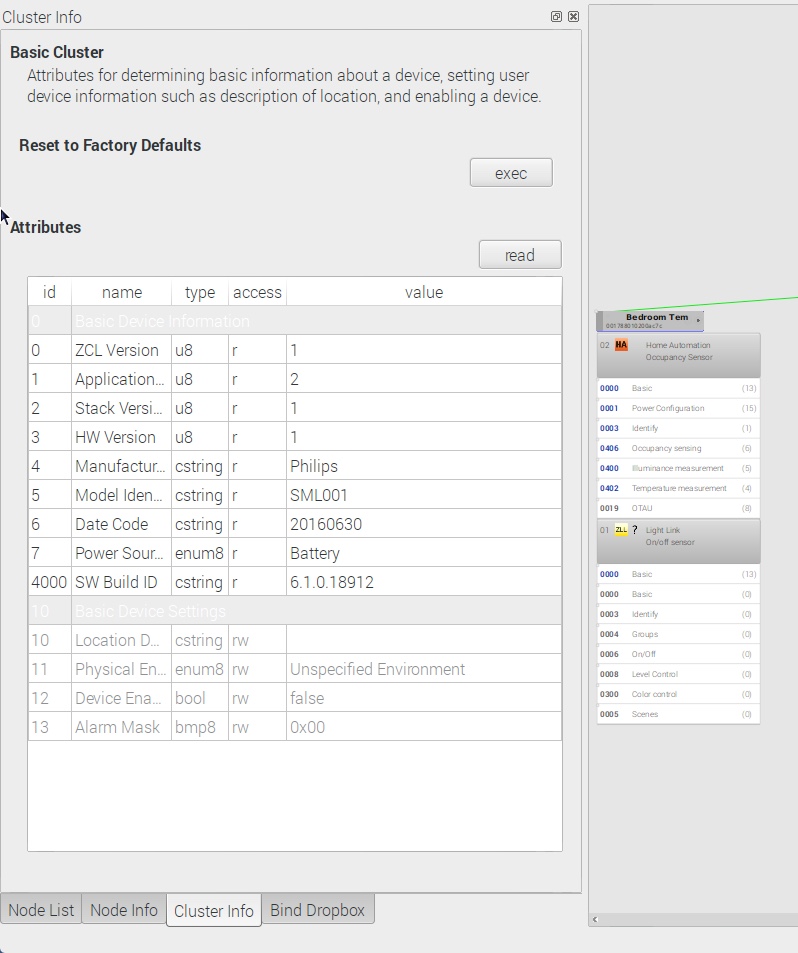
Place the motion sensor close to the Raspberry after resetting it, before opening the the network. You might need to power off nearby lights, to ensure the motion sensor links directly to the RaspBee/ConBee. It should stop blinking red, when paired to the network. At that time, it should appear as new node in the deCONZ GUI. You might need to read the attributes of the Basic Cluster manually, to ensure deCONZ has read the manufacturer and model. Press the almost invisible circle to the right of the node, select cluster 0x000, open the Cluster Info panel and press read, until all attributes are filled/greyed.
ebaauw
on 11 Aug 2017
Ok. I have this. But how to configure the sensor, to switch the light on, if motion is detected?
Krocko
on 11 Aug 2017
This is controlled through rules on the gateway, same as for the Hue bridge. Normally, the Hue app would create these rules for you. For now, you'll have to create them yourself, using the API, as the deCONZ web app doesn't yet support the Hue motion sensor (except for _Daylight Control_), see: https://github.com/dresden-elektronik/deconz-rest-plugin/issues/23 and https://github.com/dresden-elektronik/deconz-rest-plugin/issues/62.
Alternatively, you can create HomeKit automation rules, if you configure homebridge-hue to expose the motion sensor to HomeKit. Note however, there's a bug in tvOS 10.2, so you'd need to setup an iPad as HomeKit Hub for this to work (see #118).
ebaauw
on 11 Aug 2017
Ok. Thank you. Will wait for the deconz update
Krocko
on 11 Aug 2017
After updating to the latest firmware, IKEA Trådfri bulbs can be paired to the Hue bridge. I've added the ones I've seen to the list of known lights in v0.5.15.
As v0.5.15, the IKEA Trådfri remote also supports _Long Press_ for _Previous_ and _Next_ buttons. Note that you need deCONZ v2.04.64 or later to receive the corresponding buttonevents.
Added provisional support for the IKEA Trådfri motion sensor in v0.5.15, but I don't have one, so I haven't tested this.
ebaauw
on 12 Aug 2017
The IKEA Trådfri motion sensor is now also fully supported when connected to the deCONZ gateway. Updated the README with other supported sensors and switches.
ebaauw
on 20 Aug 2017
@ebaauw: If i have the Philips motion sensor in deconz and use it in HomeKit via your plugin, can you say how long is the delay?
Krocko
on 25 Aug 2017
@ebaauw: If i have the Philips motion sensor in deconz and use it in HomeKit via your plugin, can you say how long is the delay?
Please use issue #20 for questions/discussion related to the Hue motion sensor.
ebaauw
on 25 Aug 2017
OK. Sorry for that.
Krocko
on 25 Aug 2017
Related issues
 Sturmhorst
·
4Comments
Sturmhorst
·
4Comments
 gcappucc
·
11Comments
gcappucc
·
11Comments
 leoneleone
·
9Comments
leoneleone
·
9Comments
 derthobo
·
3Comments
derthobo
·
3Comments
 suhajda3
·
9Comments
suhajda3
·
9Comments