Homebridge-config-ui-x: Error Failed to Save Config
Describe Your Problem:
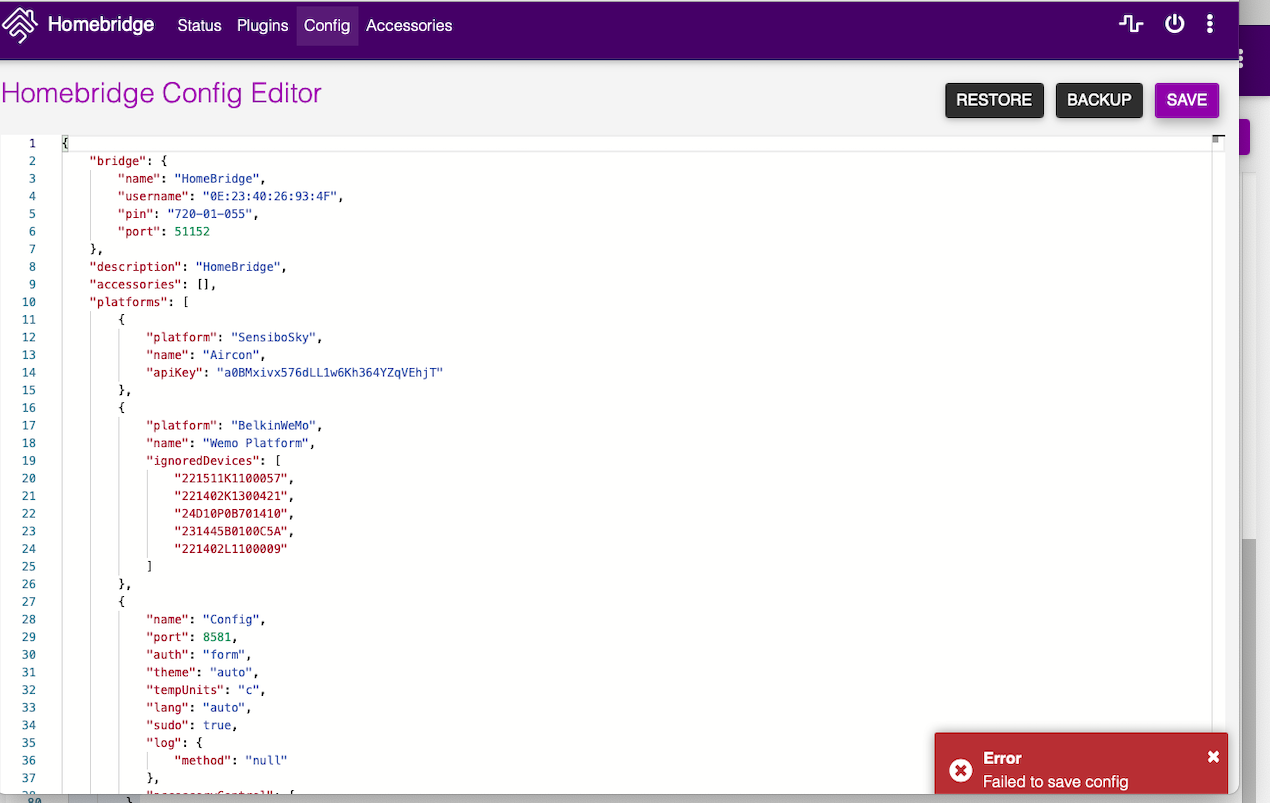
when I try to save the config file in Homebridge Config UI X, I get an "error failed to save config " see attached
Logs: see attached
homebridge.log
Show the Homebridge / Homebridge Config UI X logs here.
[9/9/2020, 4:49:51 PM] Loading 5 platforms...
[9/9/2020, 4:49:51 PM] [Aircon] Initializing SensiboSky platform...
[9/9/2020, 4:49:51 PM] [Aircon] Fetching Sensibo devices...
[9/9/2020, 4:49:51 PM] [Wemo Platform] Initializing BelkinWeMo platform...
[9/9/2020, 4:49:51 PM] [Config] Initializing config platform...
[9/9/2020, 4:49:51 PM] [Config] Running in Service Mode
[9/9/2020, 4:49:51 PM] [TV] Initializing SamsungTizen platform...
[9/9/2020, 4:49:51 PM] [Boom Bar] Initializing SoundTouchPlatform platform...
[9/9/2020, 4:49:51 PM] [Boom Bar] Searching accessories...
[9/9/2020, 4:49:51 PM] TV is running on port 64198.
[9/9/2020, 4:49:51 PM] Please add [TV] manually in Home app. Setup Code: 720-01-055
[9/9/2020, 4:49:51 PM] [Wemo Platform] Online: Right Garage Door [94103ED3A75C]
[9/9/2020, 4:49:51 PM] [Wemo Platform] Online: Left Garage Door [94103ED3D2D4]
[9/9/2020, 4:49:51 PM] [Wemo Platform] Left Garage Door - Get Current Door State: Closed
[9/9/2020, 4:49:51 PM] [Wemo Platform] Right Garage Door - Get Current Door State: Closed
[9/9/2020, 4:49:52 PM] [Config] [HapClient] Discovery :: Failed 1B:CF:C2:29:E7:5E via http://192.168.1.114:6200/accessories
[9/9/2020, 4:49:52 PM] [Config] [HapClient] Discovery :: Could not register to device with username 1B:CF:C2:29:E7:5E
[9/9/2020, 4:49:52 PM] [Config] [HapClient] Discovery :: Found HAP device with username EC:EB:1D:B5:1E:EC
[9/9/2020, 4:49:52 PM] [Config] [HapClient] Discovery :: Testing EC:EB:1D:B5:1E:EC via http://192.168.1.72:64198/accessories
[9/9/2020, 4:49:52 PM] [Config] [HapClient] Discovery :: Failed 92:68:53:2F:63:B1 via http://192.168.1.226:80/accessories
[9/9/2020, 4:49:52 PM] [Config] [HapClient] Discovery :: Could not register to device with username 92:68:53:2F:63:B1
[9/9/2020, 4:49:52 PM] [Config] [HapClient] Discovery :: Success EC:EB:1D:B5:1E:EC via http://192.168.1.72:64198/accessories
[9/9/2020, 4:49:52 PM] [Config] [HapClient] Discovery :: [192.168.1.72:64198 (EC:EB:1D:B5:1E:EC)] Instance Registered
[9/9/2020, 4:49:52 PM] [Config] [HapClient] Discovery :: Failed 95:19:83:12:96:83 via http://192.168.1.92:80/accessories
[9/9/2020, 4:49:52 PM] [Config] [HapClient] Discovery :: Could not register to device with username 95:19:83:12:96:83
[9/9/2020, 4:49:52 PM] [Config] [HapClient] Discovery :: Failed EC:1E:CB:0B:BA:48 via http://192.168.1.148:80/accessories
[9/9/2020, 4:49:52 PM] [Config] [HapClient] Discovery :: Could not register to device with username EC:1E:CB:0B:BA:48
[9/9/2020, 4:49:52 PM] [Aircon] Aircon : AI State: false , RefreshCycle: 30000 , fixedState, AI, hideFan : auto false false
[9/9/2020, 4:49:52 PM] [Aircon] GWVcuJ6r Setting fan up
[9/9/2020, 4:49:52 PM] [Aircon] Device Added (Name: Aircon, ID: GWVcuJ6r, Group: pods)
[9/9/2020, 4:49:52 PM] Initializing platform accessory 'Aircon'...
Setup Payload:
X-HM://0024NSSGV6F4N
Enter this code with your HomeKit app on your iOS device to pair with Homebridge:
┌────────────┐
│ 720-01-055 │
└────────────┘
[9/9/2020, 4:49:52 PM] Homebridge is running on port 51152.
[9/9/2020, 4:49:52 PM] [Config] [HapClient] Discovery :: Failed FD:83:F2:BB:8C:C5 via http://192.168.1.98:80/accessories
[9/9/2020, 4:49:52 PM] [Config] [HapClient] Discovery :: Could not register to device with username FD:83:F2:BB:8C:C5
[9/9/2020, 4:49:53 PM] [Config] [HapClient] Discovery :: Found HAP device with username 0E:23:40:26:93:4F
[9/9/2020, 4:49:53 PM] [Config] [HapClient] Discovery :: Testing 0E:23:40:26:93:4F via http://192.168.1.72:51152/accessories
[9/9/2020, 4:49:53 PM] [Config] [HapClient] Discovery :: Success 0E:23:40:26:93:4F via http://192.168.1.72:51152/accessories
[9/9/2020, 4:49:53 PM] [Config] [HapClient] Discovery :: [192.168.1.72:51152 (0E:23:40:26:93:4F)] Instance Registered
[9/9/2020, 4:49:54 PM] [Config] [HapClient] Discovery :: Failed A4:5E:20:78:5E:4C via http://192.168.1.167:80/accessories
[9/9/2020, 4:49:54 PM] [Config] [HapClient] Discovery :: Could not register to device with username A4:5E:20:78:5E:4C
[9/9/2020, 4:49:56 PM] [Boom Bar] [Boom Bar] Found device
[9/9/2020, 4:49:56 PM] [Boom Bar] [Boom Bar] Found local source 'PRODUCT' with account 'HDMI_1' on device
[9/9/2020, 4:49:56 PM] [Boom Bar] [Boom Bar] Found local source 'BLUETOOTH' with account '' on device
[9/9/2020, 4:49:56 PM] [Boom Bar] [Boom Bar] Found local source 'PRODUCT' with account 'TV' on device
[9/9/2020, 4:49:56 PM] [Boom Bar] [Boom Bar] Found local source 'QPLAY' with account 'QPlay1UserName' on device
[9/9/2020, 4:49:56 PM] [Boom Bar] [Boom Bar] Found local source 'QPLAY' with account 'QPlay2UserName' on device
[9/9/2020, 4:49:56 PM] [Boom Bar] [Boom Bar] Device ready
[9/9/2020, 4:49:56 PM] [Boom Bar] Finish searching accessories
[9/9/2020, 4:50:00 PM] [TV] Opening handshake has timed out
[9/9/2020, 4:50:50 PM] [Config] [HapClient] Discovery :: Ended
Homebridge Config:
json
Show your homebridge config.json here
{
"bridge": {
"name": "HomeBridge",
"username": "0E:23:40:26:93:4F",
"pin": "720-01-055",
"port": 51152
},
"description": "HomeBridge",
"accessories": [],
"platforms": [
{
"platform": "SensiboSky",
"name": "Aircon",
"apiKey": "a0BMxivx576dLL1w6Kh364YZqVEhjT"
},
{
"platform": "BelkinWeMo",
"name": "Wemo Platform",
"ignoredDevices": [
"221511K1100057",
"221402K1300421",
"24D10P0B701410",
"231445B0100C5A",
"221402L1100009"
]
},
{
"name": "Config",
"port": 8581,
"auth": "form",
"theme": "auto",
"tempUnits": "c",
"lang": "auto",
"sudo": true,
"log": {
"method": "null"
},
"accessoryControl": {
"debug": true
},
"platform": "config"
},
{
"name": "TV",
"app_list": true,
"devices": [
{
"name": "TV",
"ip": "192.168.1.172",
"mac": "D0:03:DF:66:04:06"
}
],
"platform": "SamsungTizen"
},
{
"platform": "SoundTouchPlatform",
"name": "Boom Bar",
"discoverAllAccessories": true,
"global": {
"verbose": true,
"sources": [
{
"source": "BLUETOOTH",
"enabled": false
},
{
"source": "switch",
"enabled": false
},
{
"source": "QPLAY",
"enabled": false
},
{
"source": "PRODUCT",
"enabled": false
}
]
}
}
]
}
Screenshots:
- Node.js Version:
- NPM Version:
- Homebridge Version:
- Homebridge Config UI X Version:homebridge-config-ui-x v4.27.1
- Operating System: / macOS /
- Process Supervisor: hb-service
Thanks for your help
 WayneKP
All 10 comments
SIGTERM, shutting down Homebridge...
[37m[8/28/2020, 4:47:07 PM] [39m[31mError: EACCES: permission denied, mkdir
The permissions on your homebridge storage directory are not correct.
Re-installing the service should fix this:
sudo hb-service uninstall
sudo hb-service install
 oznu
on 9 Sep 2020
oznu
on 9 Sep 2020
Hello and thanks for the quick response but unfortunately it didn’t fix the issue
Kind Regards
Wayne Pulbrook
[email protected]
Mobile 0417439539
On 9 Sep 2020, at 17:12, oznu notifications@github.com wrote:
sudo hb-service uninstall
WayneKP
on 9 Sep 2020
Can you manually edit the file as your local user (without sudo)?
oznu
on 9 Sep 2020
homemini@Waynes-Mac-mini ~ % hb-service uninstall
ℹ Removing Homebridge Service
✖ ERROR: This command must be executed using sudo on macOS
✖ sudo hb-service uninstall
homemini@Waynes-Mac-mini ~ %
WayneKP
on 9 Sep 2020
Can you manually edit the "config.json" file as your local user (without sudo)? Using an editor or nano.
oznu
on 9 Sep 2020
yes I am using atom
WayneKP
on 9 Sep 2020
Try
sudo chown -R $USER: ~/.homebridge
all I really want to do is add a switch as an accessory and have tried a few plug ins and they have settings which I also try to add and they won't save so I am a bit lost at adding them manually to the config.json file
WayneKP
on 9 Sep 2020
sudo chown -R $USER: ~/.homebridge worked thanks
WayneKP
on 9 Sep 2020
close this if you like and thanks for your help, Homebridge is great , thanks
WayneKP
on 9 Sep 2020
Related issues
 mrtekkid
·
3Comments
mrtekkid
·
3Comments
 charona
·
3Comments
charona
·
3Comments
 chromusphil
·
5Comments
chromusphil
·
5Comments
 Olepir
·
5Comments
Olepir
·
5Comments
 ronald8192
·
6Comments
ronald8192
·
6Comments
Most helpful comment
sudo chown -R $USER: ~/.homebridge worked thanks