Homebridge-config-ui-x: Testers Wanted: New Dashboard, New Config Editor, and Service Installer
Hello,
I'm looking for some people willing to help test the next version of Homebridge Config UI X.
How To Test
To install the test version of Homebridge Config UI X run this command in the terminal to install from npm using the @test tag:
# remove sudo for Docker and Windows 10 installs
sudo npm install -g  --unsafe-perm homebridge-config-ui-x@test
You can rollback to the stable version at any time by re-installing the @latest tag:
# remove sudo for Docker and Windows 10 installs
sudo npm install -g  --unsafe-perm homebridge-config-ui-x@latest
The source code for this test can be found under the new-dashboard branch on GitHub.
_While I am aiming for this to be a "no breaking changes" release, please take care to backup your setup if you think it's necessary._
New Features
New Dashboard
This release comes with a brand new status dashboard that features a fully customisable, widget-based design. Users can decide which widgets they wish to enable and position and resize them as they like.
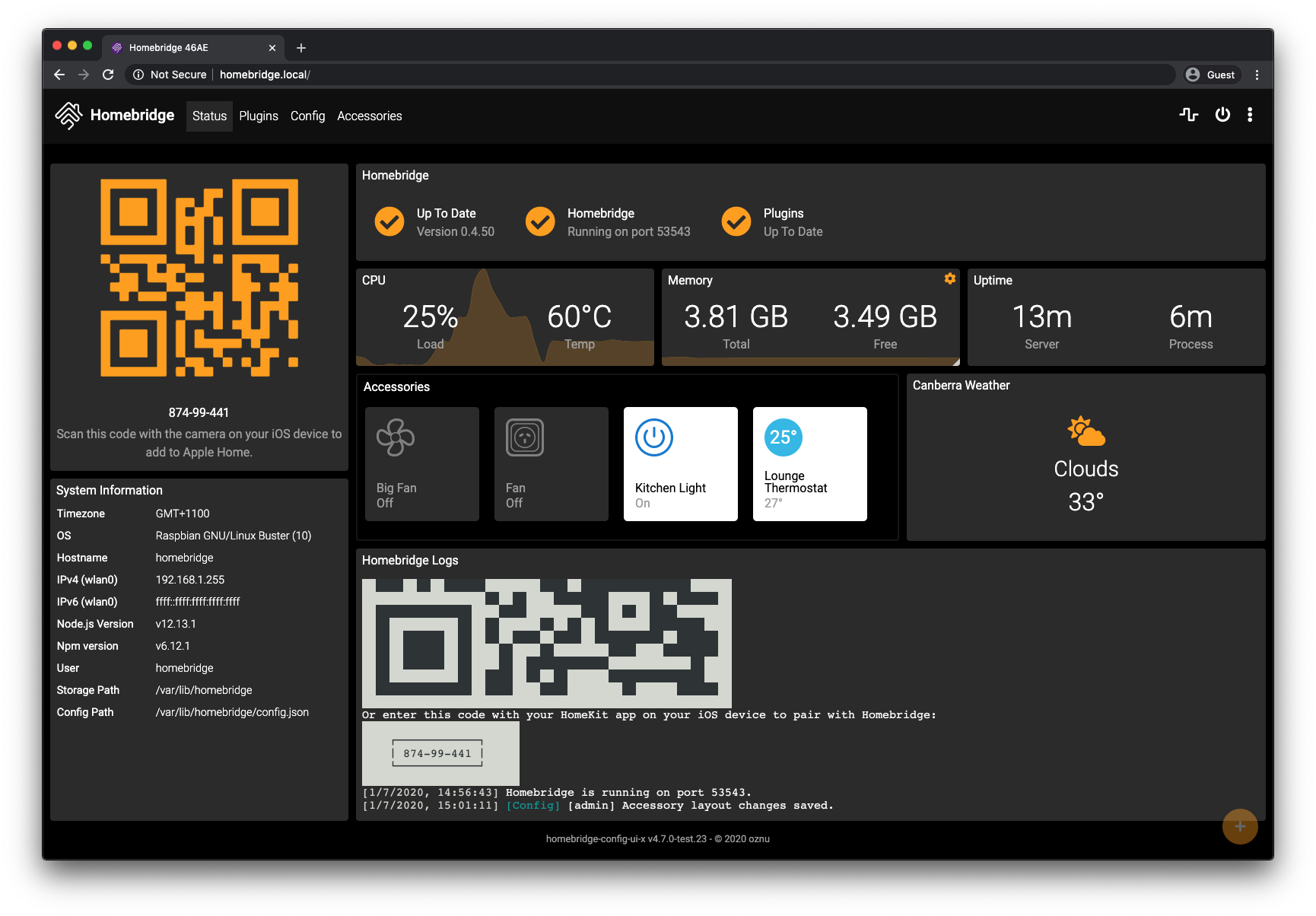
New widgets include:
- Homebridge Status Widget - Homebridge version and update check, current Homebridge service status and Homebridge plugins update check
- CPU Widget - shows the current cpu load (now much more accurate) and CPU temperature when available, plus a graph of the last 0-10 minutes cpu load
- Memory Widget - shows the total and available memory (previously "Free" memory as show which is not a reliable indicator of "Available" memory), plus a graph of the last 0-10 minutes free memory
- Uptime Widget - shows the server uptime and the process uptime
- QR Code Widget - shows the pairing QR Code and Homebridge PIN
- Homebridge Logs Widget - shows the Homebridge logs stream
- Homebridge Terminal Widget - an interactive terminal (only available when interactive web terminals are enabled)
- System Information Widget - shows details about your server and homebridge setup
- Weather Widget - shows the current weather for the set location (may add a forecast later)
- Accessories Widget - display and control the accessories you select
Simple Service Installer
This release expands the hb-service command to support macOS and Linux in addition to Windows 10. This command allows you to setup a Homebridge instance in seconds.
Running hb-service install will setup Homebridge and Homebridge Config UI X to run as a service with auto-start on boot. The same command works across Linux, macOS and Windows 10.

Notable Features:
- The UI will remain running even if there is an issue preventing Homebridge from starting
- Easily setup and manage multiple homebridge instances
- The ability to start, stop, restart and view the logs of your Homebridge instances using the
hb-servicecommands - See the wiki for further details
New Config Editor
The config editor (non-mobile) has had the Ace Editor replaced with the Microsoft Monaco Editor (the code editor that powers VS Code).
This allow for much more powerful JSON syntax checking, more helpful error messages and the new ability to detect duplicate keys in object (like when a second platforms[] array is added by mistake!).

In addition:
- Help text is now shown when hovering over the core components of the config.json
- Autocomplete of the bridge, plugins, ports and mdns objects
- Detect when accessory config has been added to the platform array, or vice versa
- Warnings when the JSON does not match what is allowed by Homebridge
Translations Required
Thank you to everyone who has helped translate Homebridge Config UI X into 16 different languages with a special mention to @the0neyouseek, @razer4908, @mientki, @Caribsky, @HonzaaD, @niinaranpo, @fafoulon, @KamistixX, @r951236958, @kgdudhqcigeg, @rrroyal, @gaojie429, @Rubenfer, @RaymondMouthaan, @cyberfafu, @mafyata, @fschaefer, @grzegorz914, @DewGew, @fmandal, and @elfive1992.
This release does add some new language strings that need translation and any help you or others in the community can provide to achieve this would be most appreciated.
The translation files that require updating are currently in the new-dashboard branch here:
https://github.com/oznu/homebridge-config-ui-x/tree/new-dashboard/ui/src/i18n
Feedback and Issues
Thanks for testing! Feel free to post your feedback in the comments below. I'm also regularly available on the Homebridge Slack channel via @oznu and the #ui channels.
Tagged Issues:
- New Dashboard - https://github.com/oznu/homebridge-config-ui-x/issues/432
- NPM Version on Dashboard - https://github.com/oznu/homebridge-config-ui-x/issues/428
- Process uptime on dashboard - https://github.com/oznu/homebridge-config-ui-x/issues/411
- CPU temp on dashboard - https://github.com/oznu/homebridge-config-ui-x/issues/374
- Ability to hide QR code - https://github.com/oznu/homebridge-config-ui-x/issues/355
- Memory reporting - https://github.com/oznu/homebridge-config-ui-x/issues/329
- Uptime and memory reporting - https://github.com/oznu/homebridge-config-ui-x/issues/76
 oznu
oznu
All 29 comments
@oznu love the new dashboard, no issues so far :) two quick questions:
I see you have added the NodeJS and Npm versions like I requested (thanks!). Will they notify you on the dashboard if they are outdated or have an update available?
I notice the widgets have a settings cog on them but none of the widgets have any options. Is that something to come later?
Once again, thanks and love your work!
 mitch7391
on 8 Jan 2020
mitch7391
on 8 Jan 2020
Hi @mitch7391,
Thanks for testing and your feedback.
I see you have added the NodeJS and Npm versions like I requested (thanks!). Will they notify you on the dashboard if they are outdated or have an update available?
It does now as of v4.7.0-test.30. Note that Node.js is checking against the current LTS version.

I notice the widgets have a settings cog on them but none of the widgets have any options. Is that something to come later?
The box also contains the delete button to remove the widget from the dashboard. Some widgets do have settings, including the Weather widget and now the Logs and Terminal widgets, eg.

oznu
on 9 Jan 2020
This sounds really good @oznu :) what suffix do I add to the install command to test these recent changes?
mitch7391
on 9 Jan 2020
Thanks @mitch7391. You can update to the latest test using the same command described in the original post above.
oznu
on 9 Jan 2020
Awesome thanks!
mitch7391
on 9 Jan 2020
Hi @oznu i would like to test for you! I installed everything in the docker on synology nas. Can this also be tested?
 henkied
on 9 Jan 2020
henkied
on 9 Jan 2020
Hi @henkied. To test on Docker you can run the same commands in my original post (this is the one time you should include the -g flag).
oznu
on 10 Jan 2020
super, it works great. one questions:
- I see that my node and npm are outdated how can I update it?


henkied
on 10 Jan 2020
@henkied to update Node just pull the latest version of the Docker image; it's kept up to date.
I've already pushed the new version of the UI to the Docker builds (it's a know/stable environment).
oznu
on 10 Jan 2020
4.7.0 has now been released. Anyone currently on the test version can update via the UI.
oznu
on 11 Jan 2020
Hey @oznu hope you are managing with the smoke over there.
Wish I had been on here to test for you but just want to say this is absolutely AWESOME!
Thanks for all your great efforts.
 rbhr
on 11 Jan 2020
rbhr
on 11 Jan 2020
Hey @oznu just before I updated from the test version to the v4.7.0 I noticed this. I have only been a recent user, but I think I remember that when it told you there was a plugin for update it would replace the tick with an 'x'; is this a bug or something you moved away from or am I just remembering wrong? If it is a bug, it may have carried into the new version, so just letting you know just in case.

mitch7391
on 11 Jan 2020
This is the old plugin update reminder.

 mafyata
on 11 Jan 2020
mafyata
on 11 Jan 2020
@henkied to update Node just pull the latest version of the Docker image; it's kept up to date.
I've already pushed the new version of the UI to the Docker builds (it's a know/stable environment).
HI @oznu do you mean these one?

henkied
on 11 Jan 2020
How to switch to hb-service?
Why I tried to enter sudo hb-service install --user homebridge I get hb-service: command not found
 Olepir
on 11 Jan 2020
Olepir
on 11 Jan 2020
HI @oznu do you mean these one?
Since you're using the SPK there is a little trick you can do to update. Go into DSM Package Centre (Not Docker) and stop the Homebridge app, the start it again. This get you the latest version of the image as the SPK checks for updates each time it starts.
https://github.com/oznu/homebridge-syno-spk#updating-homebridge
oznu
on 11 Jan 2020
@Olepir - make sure you've got the latest version installed globally; if you're still facing issues please hit my up on Slack and I'd be happy to try and work this out for you.
oznu
on 11 Jan 2020
@Olepir - make sure you've got the latest version installed globally; if you're still facing issues please hit my up on Slack and I'd be happy to try and work this out for you.
Yes, latest version is installed globally. Sorry, I don’t have Slack.
Also I tried this command without sudo and I got this
[HB Supervisor] Installing Homebridge Service
[HB Supervisor] ERROR: This command must be executed using sudo on Linux
HI @oznu do you mean these one?
Since you're using the SPK there is a little trick you can do to update. Go into DSM Package Centre (Not Docker) and stop the Homebridge app, the start it again. This get you the latest version of the image as the SPK checks for updates each time it starts.
https://github.com/oznu/homebridge-syno-spk#updating-homebridge
Ehm I understand but I can't figure it out completely. I have installed several homebridge. I can only install one version of the spk according to me. Or do you have a tip?
henkied
on 11 Jan 2020
@Olepir - it looks like the command is not available in the root users PATH. This is a bit strange, while you could use the sudo -E flag to preserve the PATH I haven't encountered this during my testing and not sure how your setup will react.
I do have some more ideas/questions, but don't want to spam this thread to much. Can you open another issue providing details of your setup + how you originally installed Node.js?
oznu
on 11 Jan 2020
@henkied - looking through your previous issues I found you might be using docker-compose? To update this, go to the path where your docker-compose.yml file is located and run these commands:
docker-compose pull
docker-compose up -d
Otherwise, if you've configured your additional containers manually using the Docker app in DSM, then updating is a bit of a pain - the easiest way is to remove the containers, pull the new image, and recreate them, making sure to point the /homebridge volume mount to the same location (if you do this right you won't lose any config or your HomeKit pairings).
Of course, if Node.js 10 is still working for everything you need it to, you could just leave it. Node.js v10 still has support until April 2021.
If you still need a hand sorting this out, please raise an issue on the oznu/docker-homebridge project page.
oznu
on 11 Jan 2020
@mitch7391 @mafyata - the plugin updates available icon is fixed in the next release (currently in @test). Thanks for reporting this.
oznu
on 12 Jan 2020
No worries @oznu, thanks for the quick fix :)
mitch7391
on 12 Jan 2020
Love that you snuck a clock widget in there too haha
mitch7391
on 12 Jan 2020
I'm thinking about changing the Node.js / NPM version notice so it only shows the circle warning icon if the user is on an unsupported version.
That would be:
- Node.js < v10
- NPM < v6
These versions would change as the LTS versions of Node.js stop being supported; or if plugins start using features exclusive to a later version.
The latest version will still be available by hovering over the version number - I'm just removing the icon so people don't feel the need to do an upgrade of Node.js on a fully working system running a supported version of Node.js.
oznu
on 14 Jan 2020
That makes sense, I only suggested it in the first place as I like to keep everything fully updated at all times. Is there any downside to updating constantly to the latest versions of node.js and npm when they become available? Just sussing out if I should stop that practise (might just be my lack of knowledge and experience).
mitch7391
on 14 Jan 2020
@mitch7391 If you're familiar with the update process, then there shouldn't be any issues staying up-to-date. At the same time, anything v10+ is perfectly fine for now as well.
oznu
on 14 Jan 2020
No worries @oznu :) thanks for the info
mitch7391
on 14 Jan 2020
4.8.0 is out - I'm closing this issue off now.
A big thank you to everyone who tested! 😄
oznu
on 18 Jan 2020
Related issues
 grzegorz914
·
6Comments
grzegorz914
·
6Comments
 RaymondMouthaan
·
5Comments
RaymondMouthaan
·
5Comments
 jamieshaw
·
5Comments
jamieshaw
·
5Comments
 johannrichard
·
4Comments
johannrichard
·
4Comments
 Partizan7676
·
4Comments
Partizan7676
·
4Comments
Most helpful comment
4.8.0 is out - I'm closing this issue off now.
A big thank you to everyone who tested! 😄