Homebrew-core: mkvtoolnix failed to build on 10.14.2
==> ./configure --prefix=/usr/local/Cellar/mkvtoolnix/29.0.0_1 --with-boost=/usr/local/opt/boost --with-docbook-xsl-root=/usr/local/opt/docbook-xsl/docbook-xsl
==> rake -j8
Last 15 lines from /Volumes/Users/nikola/Library/Logs/Homebrew/mkvtoolnix/02.rake:
         CXX src/mkvtoolnix-gui/util/waiting_spinner_widget.cpp
         CXX src/mkvtoolnix-gui/util/widget.cpp
         CXX src/mkvtoolnix-gui/watch_jobs/tab.cpp
         CXX src/mkvtoolnix-gui/watch_jobs/tool.cpp
         RCC src/mkvtoolnix-gui/qt_resources.qrc
         CXX src/mkvtoolnix-gui/qt_resources.cpp
        LINK src/mkvtoolnix-gui/mkvtoolnix-gui
ld: warning: object file (/usr/local/lib/libfmt.a(format.cc.o)) was built for newer OSX version (10.14) than being linked (10.9)
ld: warning: object file (/usr/local/Cellar/pugixml/1.9/lib/pugixml-1.9/libpugixml.a(pugixml.cpp.o)) was built for newer OSX version (10.13) than being linked (10.9)
Undefined symbols for architecture x86_64:
  "___CFConstantStringClassReference", referenced from:
      CFString in macos.o
      CFString in macos.o
ld: symbol(s) not found for architecture x86_64
clang: error: linker command failed with exit code 1 (use -v to see invocation)
 naos
naos
All 34 comments
Exactly the same error when i try to upgrade from version 28.2.0 to 29.0.0_1 with qt.
 BenjaminDigeon
on 19 Dec 2018
BenjaminDigeon
on 19 Dec 2018
+1
 Jumacbook
on 19 Dec 2018
Jumacbook
on 19 Dec 2018
I'm seeing this as well.
 leetoburrito
on 20 Dec 2018
leetoburrito
on 20 Dec 2018
Exactly the same error here on macOS 10.13.6 as well.
 retokromer
on 20 Dec 2018
retokromer
on 20 Dec 2018
Does it work without QT?
 SMillerDev
on 20 Dec 2018
SMillerDev
on 20 Dec 2018
Does it work without QT?
Yes, without the Qt GUI it works.
retokromer
on 20 Dec 2018
Should probably remove the option if it's not building.
 MikeMcQuaid
on 20 Dec 2018
MikeMcQuaid
on 20 Dec 2018
Hi @MikeMcQuaid! I know there's currently an overall effort to remove options, and I totally understand the move in that direction. I'd implore, in this case, to not move too quickly on pulling this one. The Qt interface for mkvtoolnix is a very hard thing to get building independently of Homebrew, and this formula was working very reliably before the most recent update.
I'm happy to take a look and dig in to see what broke and how best to fix it if you'd like, but it would great to have some time to investigate before we just reflexively yank the option.
 sjml
on 20 Dec 2018
sjml
on 20 Dec 2018
Before I investigate further, though, @AlexaraWu, since you made the last few commits and it looks like there was some question about including fmt as a dependency, do you have some insight here? (Since the error message is coming from a build mismatch with libfmt...)
sjml
on 20 Dec 2018
Fmt and pugixml prevents from building --with-qt enabled option
 BorisDr
on 21 Dec 2018
BorisDr
on 21 Dec 2018
The Qt interface for mkvtoolnix is a very hard thing to get building independently of Homebrew, and this formula was working very reliably before the most recent update.
The option is going to eventually either be made default or removed.
MikeMcQuaid
on 21 Dec 2018
The option is going to eventually either be made default or removed.
Right, I know that's the overall goal. I just know the easier option is to quickly remove it, and wanted to put in my two cents that it not be done too quickly, especially before the most recent contributor to the formula has a chance to weigh in. My guess would be that the Qt option is more likely to go away than become default since it's a big GUI dependency, so at least wanted to make sure that the process for making that decision wasn't over-hasty.
sjml
on 21 Dec 2018
I think there is still a need for the UI but it actually would be better to create a cask for this. The problem is, that the project does not release MacOS binaries.
 the-variag
on 21 Dec 2018
the-variag
on 21 Dec 2018
The GUI is needed, at least by me.
 ghost
on 23 Dec 2018
ghost
on 23 Dec 2018
@hagabla
Why not use compiled version?
https://www.fosshub.com/MKVToolNix.html
https://mkvtoolnix.download/macos/MKVToolNix-29.0.0.dmg
 reatlat
on 24 Dec 2018
reatlat
on 24 Dec 2018
@reatlat Homebrew/Linuxbrew allows to keep updated in a singe simple way all the tools we need.
retokromer
on 24 Dec 2018
@retokromer haha, yes, I know, just wandering @hagabla needs the last version right now,
BTW I test build version... and the color scheme works wrong :/ I can't read any text in app :(
switched to Linux machine =) on Linux works perfect :)
reatlat
on 24 Dec 2018
@hagabla
Why not use compiled version?
https://www.fosshub.com/MKVToolNix.html
https://mkvtoolnix.download/macos/MKVToolNix-29.0.0.dmg
Huh! I didn’t know they did compiled releases. Could we make a cask out of this and then leave the brew formula as the command line version?
sjml
on 24 Dec 2018
@sjml this seems like the best idea so far 👍🏻
MikeMcQuaid
on 24 Dec 2018
I just did a quick test. A simple cask made from the second URL works ok. The first URL from Fosshub will not work though as Fosshub does not allow scripted or automated downloads.
the-variag
on 24 Dec 2018
@retokromer haha, yes, I know, just wandering @hagabla needs the last version right now,
BTW I test build version... and the color scheme works wrong :/ I can't read any text in app :(
switched to Linux machine =) on Linux works perfect :)
Which version have you tested? Color scheme was problem with mojave dark mode in earlier versions. They fixed it, there are no visibility problems in version 28.2.0, it works perfectly.
naos
on 24 Dec 2018
@reatlat I don't need it right now, i need it in general, if it's a cask or a compile option, i don't care. I would just prefer it to be handled by brew in one way or the other.
ghost
on 25 Dec 2018
 fxcoudert
on 28 Dec 2018
fxcoudert
on 28 Dec 2018
@retokromer haha, yes, I know, just wandering @hagabla needs the last version right now,
BTW I test build version... and the color scheme works wrong :/ I can't read any text in app :(
switched to Linux machine =) on Linux works perfect :)Which version have you tested? Color scheme was problem with mojave dark mode in earlier versions. They fixed it, there are no visibility problems in version 28.2.0, it works perfectly.
@naos I'm not the one you were asking, but I too have the same problem with the latest version (29.0.0):
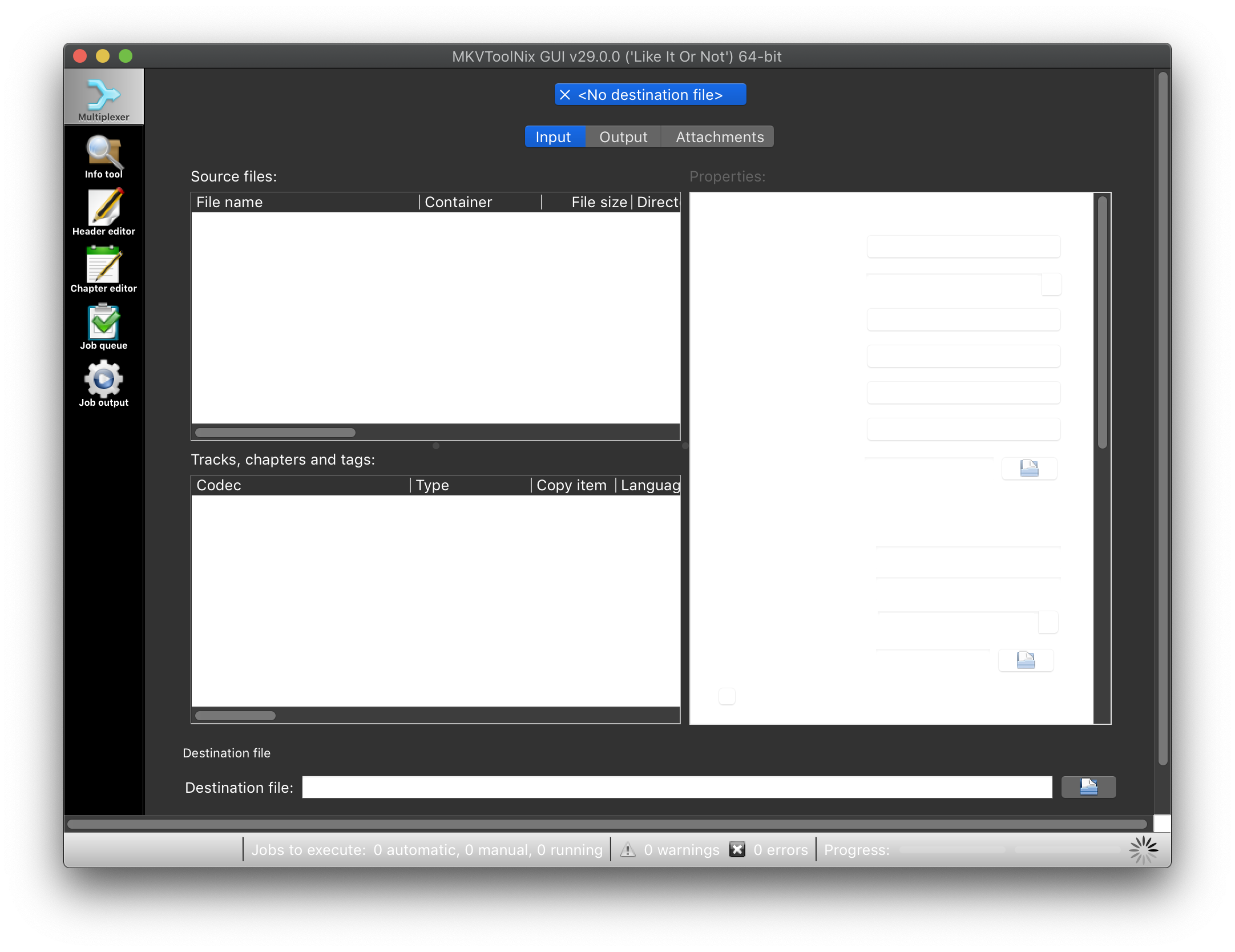
I installed the latest version via brew cask install mkvtoolnix-app since mkvtoolnix in homebrew-core cannot be built with --with-qt option anymore. So, maybe the problem comes from the prebuilt binary.
Can we put --with-qt option back and apply #35364 (some have confirmed this fixed the build issue) instead? We can still remove it from the default options.
 danieljl
on 29 Dec 2018
danieljl
on 29 Dec 2018
I’m in favour of putting --with-qt back.
retokromer
on 29 Dec 2018
We're not adding any options back to formulae, sorry, or building with Qt by default now the cask has been added. Please report any issues with the cask to the upstream MKVToolNix developers.
MikeMcQuaid
on 29 Dec 2018
@MikeMcQuaid If the option is not default, it doesn't hurt, I guess?
danieljl
on 29 Dec 2018
MikeMcQuaid
on 29 Dec 2018
Then I would suggest to hard-enable Qt.
cc @mbunkus
retokromer
on 29 Dec 2018
@MikeMcQuaid I still don't understand why optional options are discouraged. Surely there should be some sane defaults if users install the package without any options. But, we can still provide optional options for users who wants more customizability. And it won't hurt users who install it without any options.
danieljl
on 29 Dec 2018
and the color scheme works wrong :/ I can't read any text in app :(
This is a bug in Qt wrt. the dark color scheme in Mojave that was fixed in Qt 5.12.0. See here for details and links to a v29 DMG linked against Qt 5.12.0.
 mbunkus
on 29 Dec 2018
mbunkus
on 29 Dec 2018
I don't know what "cask" means in this context. If I understand this issue correctly, the Homebrew version of MKVToolNix now comes without the GUI; is that correct? In that case I'll probably remove the link from the MKVToolNix home page as I don't want to recommend incomplete packages.
mbunkus
on 29 Dec 2018
See here for details and links to a v29 DMG linked against Qt 5.12.0.
@mbunkus Nice work thanks 🎉
If I understand this issue correctly, the Homebrew version of MKVToolNix now comes without the GUI; is that correct?
brew install mkvtoolnix installs the CLI rather than the GUI, yes.
In that case I'll probably remove the link from the MKVToolNix home page as I don't want to recommend incomplete packages.
Instead please consider changing the installation instructions to brew cask install mkvtoolnix-app which will install your DMG and no longer requires building from source.
MikeMcQuaid
on 29 Dec 2018
This is a bug in Qt wrt. the dark color scheme in Mojave that was fixed in Qt 5.12.0. See here for details and links to a v29 DMG linked against Qt 5.12.0.
Also to others in this thread: once this is an "official" release the changes here will be applied to the Cask once it's updated (same process as a formula).
MikeMcQuaid
on 29 Dec 2018
Related issues
 Thirudhas
·
4Comments
Thirudhas
·
4Comments
 yuna9
·
4Comments
yuna9
·
4Comments
 jyutzler
·
4Comments
jyutzler
·
4Comments
 tejasmanohar
·
3Comments
tejasmanohar
·
3Comments
 xeoneux
·
3Comments
xeoneux
·
3Comments
Most helpful comment
@sjml this seems like the best idea so far 👍🏻