Homebrew-core: Mojave PHP 5.6.38 craches on phpinfo()/phpversion() functions calls
Please note we will close your issue without comment if you delete, do not read or do not fill out the issue checklist below and provide ALL the requested information. If you repeatedly fail to use the issue template, we will block you from ever submitting issues to Homebrew again.
- [x] are reporting a bug others will be able to reproduce and not asking a question. If you're not sure or want to ask a question do so on our Discourse: https://discourse.brew.sh
- [x] have a problem with
brew install(orupgrade,reinstall) a single, official formula (not cask)? If it's a generalbrewproblem please file this issue at Homebrew/brew: https://github.com/Homebrew/brew/issues/new/choose. If it's abrew caskproblem please file this issue at https://github.com/Homebrew/homebrew-cask/issues/new/choose. If it's a tap (e.g. Homebrew/homebrew-php) problem please file this issue at the tap. - [x] ran
brew updateand can still reproduce the problem? - [x] ran
brew doctor, fixed all issues and can still reproduce the problem? - [x] ran
brew gist-logs <formula>(where<formula>is the name of the formula that failed) and included the output link? - [ ] if
brew gist-logsdidn't work: ranbrew configandbrew doctorand included their output with your issue?
To help us debug your issue please explain:
- What you were trying to do (and why)
-- Installed httpd and [email protected] - What happened (include command output)
-- apache was crashed on calling in php file phpinfo() - What you expected to happen
-- phpinfo displayed - Step-by-step reproduction instructions (by running
brew installcommands)
-- brew install httpd
-- brew intall [email protected] (I tried to fix it with brew reinstall [email protected] -bfs, but it didn't help)
-- add<?php phpinfo();into index.php file and tried to open localhost in browser.
https://gist.github.com/2ef93f681a6c29993d0e65a54dba8301
Newly installed macOS Mojave, newly installed brew and installed php versions 5.6, 7.0, 7.1 and 7.2.
All versions work fine, except 5.6.
Details:
php version 5.6.38 is crashed on calling function like phpinfo()/phpversion().
Apache error log:
[Sat Sep 29 17:05:17.839719 2018] [mpm_prefork:notice] [pid 73820] AH00163: Apache/2.4.35 (Unix) OpenSSL/1.0.2p PHP/5.6.38 configured -- resuming normal operations
[Sat Sep 29 17:05:17.839823 2018] [core:notice] [pid 73820] AH00094: Command line: '/usr/local/opt/httpd/bin/httpd -D FOREGROUND'
[Sat Sep 29 17:05:19.937230 2018] [core:notice] [pid 73820] AH00052: child pid 73825 exit signal Segmentation fault (11)
[Sat Sep 29 17:05:19.937329 2018] [core:notice] [pid 73820] AH00052: child pid 73824 exit signal Segmentation fault (11)
[Sat Sep 29 17:05:19.937357 2018] [core:notice] [pid 73820] AH00052: child pid 73823 exit signal Segmentation fault (11)
Crash log from ~/Library/Logs/DiagnosticReports:
php_2018-09-29-171340_Yuriis-MacBook-Pro.crash.txt
Looks like the issue is with opcache.so, if disable it or replace the file from [email protected] (or from High Sierra) everything works fine.
 ytorbyk
All 24 comments
Please fill out the issue template, and report all logs and error messages.
 fxcoudert
on 26 Sep 2018
fxcoudert
on 26 Sep 2018
Was this closed because it was fixed?
As far as error logs, I couldn't find one for PHP itself (even though I configured it), just PHP-FPM & nginx, which wasn't descriptive at all for the issue. (I'll include them because this is ticket should be taken seriously.)
nginx:
2018/09/26 21:15:15 [error] 19990#0: *6 kevent() reported about an closed connection (54: Connection reset by peer) while reading response header from upstream, client: 127.0.0.1, server: localhost, request: "GET /test.php HTTP/1.1", upstream: "fastcgi://127.0.0.1:9000", host: "127.0.0.1"
PHP-FPM:
[26-Sep-2018 21:15:15] WARNING: [pool www] child 20479 exited on signal 11 (SIGSEGV) after 4.343179 seconds from start
[26-Sep-2018 21:15:15] NOTICE: [pool www] child 20481 started
Once I switched to the php (7.2) package, it worked immediately.
I too did a fresh install of 10.14.
 jzgoda
on 27 Sep 2018
jzgoda
on 27 Sep 2018
If someone can actually fill out the issue template as is requested when you open an issue (and once more requested as the first comment here). We could reopen this, but it might be easier to create a new issue with the template filled out.
 SMillerDev
on 27 Sep 2018
SMillerDev
on 27 Sep 2018
Wasn't that done in #32476?
jzgoda
on 27 Sep 2018
Not really, that one doesn't include any logs or other debugging info. It just includes the commands that were run, which is only very slightly better then nothing.
SMillerDev
on 27 Sep 2018
I will create a new ticket and fill out as much as I can based on your template.
jzgoda
on 27 Sep 2018
@SMillerDev, I apologise I didn't fill all required information. I updated the ticket.
Let me know if I should add anything else.
ytorbyk
on 29 Sep 2018
Same issue. Can we downgrade to PHP < 5.6.38?
FYI: It crashes on 10.13.6 as well
 CaledoniaProject
on 30 Sep 2018
CaledoniaProject
on 30 Sep 2018
It would be helpful if someone can provide a backtrace of the crash.
fxcoudert
on 30 Sep 2018
@fxcoudert How can I get it?
ytorbyk
on 30 Sep 2018
Figure out what process is crashing. Run it inside a debugger (gdb or lldb). Use the backtrace command.
Or find the crash logs in ~/Library/Logs/DiagnosticReports
fxcoudert
on 30 Sep 2018
Here is crash log from ~/Library/Logs/DiagnosticReports: php_2018-09-29-171340_Yuriis-MacBook-Pro.crash.txt
ytorbyk
on 30 Sep 2018
If you run php from the command line, does it issue the same crash/error?
fxcoudert
on 30 Sep 2018
Yes, this crash was created on cli command php index.php (file content <?php phpinfo();:
php_2018-09-30-152427_Yuriis-MacBook-Pro.crash.txt
ytorbyk
on 30 Sep 2018
It looks like it's the same crash as there: http://openbsd-archive.7691.n7.nabble.com/clang-6-php-5-6-broken-with-opcache-td341170.html
Probably something that needs to be reported to the PHP project, and not likely something we can fix ourselves.
fxcoudert
on 30 Sep 2018
@ytobyk Have you tried to disable opcache.so in php.ini?
My other box runs Mojave, but PHP 5.6.38 was compiled before the OS upgrade ... so it's a compiler issue.
CaledoniaProject
on 1 Oct 2018
Yes, I tried and it works fine without opcache.so.
As fix I took opcache.so from HighSierra and replaces it on Mojave.
ytorbyk
on 1 Oct 2018
It doesn't seem to happen on all sapis since it works for me in the cli (not tested the others yet)
➜  artifact git:(master) /usr/local/opt/[email protected]/bin/php -m | grep -i opcache
Zend OPcache
Zend OPcache
➜  git:(master) /usr/local/opt/[email protected]/bin/php -r 'phpinfo();'
(phpinfo output)
➜  git:(master) brew info [email protected]
[email protected]: stable 5.6.38 (bottled) [keg-only]
General-purpose scripting language
Is it isolated to apache and php-fpm sapis ?
 javian
on 20 Oct 2018
javian
on 20 Oct 2018
php-fpm also works for me
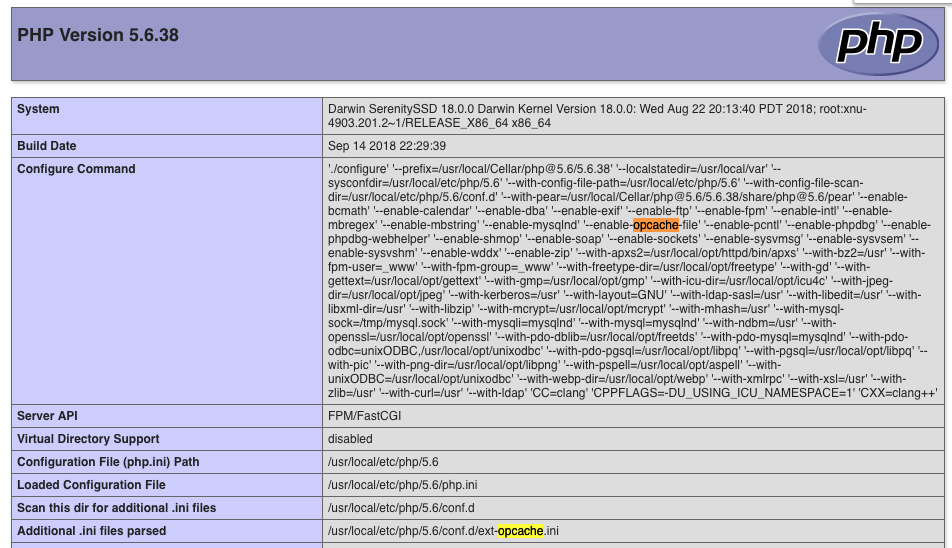
This program makes use of the Zend Scripting Language Engine:
Zend Engine v2.6.0, Copyright (c) 1998-2016 Zend Technologies
    with Zend OPcache v7.0.6-dev, Copyright (c) 1999-2016, by Zend Technologies
I faced same error.
After disabling opcache in '/usr/local/etc/php/5.6/conf.d/ext-opcache.ini' I was able to run 5.6
brew linkage [email protected]
System libraries:
  /System/Library/Frameworks/Kerberos.framework/Versions/A/Kerberos
  /usr/lib/libSystem.B.dylib
  /usr/lib/libbz2.1.0.dylib
  /usr/lib/libc++.1.dylib
  /usr/lib/libcurl.4.dylib
  /usr/lib/libedit.3.dylib
  /usr/lib/libexpat.1.dylib
  /usr/lib/libexslt.0.dylib
  /usr/lib/libicucore.A.dylib
  /usr/lib/libncurses.5.4.dylib
  /usr/lib/libresolv.9.dylib
  /usr/lib/libxml2.2.dylib
  /usr/lib/libxslt.1.dylib
  /usr/lib/libz.1.dylib
Homebrew libraries:
  /usr/local/opt/apr/libexec/lib/libapr-1.0.dylib (apr)
  /usr/local/opt/apr-util/libexec/lib/libaprutil-1.0.dylib (apr-util)
  /usr/local/opt/aspell/lib/libaspell.15.dylib (aspell)
  /usr/local/opt/aspell/lib/libpspell.15.dylib (aspell)
  /usr/local/opt/freetds/lib/libsybdb.5.dylib (freetds)
  /usr/local/opt/freetype/lib/libfreetype.6.dylib (freetype)
  /usr/local/opt/gettext/lib/libintl.8.dylib (gettext)
  /usr/local/opt/gmp/lib/libgmp.10.dylib (gmp)
  /usr/local/opt/icu4c/lib/libicudata.62.1.dylib (icu4c)
  /usr/local/opt/icu4c/lib/libicui18n.62.dylib (icu4c)
  /usr/local/opt/icu4c/lib/libicuio.62.dylib (icu4c)
  /usr/local/opt/icu4c/lib/libicuuc.62.dylib (icu4c)
  /usr/local/opt/jpeg/lib/libjpeg.9.dylib (jpeg)
  /usr/local/opt/libiconv/lib/libiconv.2.dylib (libiconv)
  /usr/local/opt/libpng/lib/libpng16.16.dylib (libpng)
  /usr/local/opt/libpq/lib/libpq.5.dylib (libpq)
  /usr/local/opt/libtool/lib/libltdl.7.dylib (libtool)
  /usr/local/opt/libzip/lib/libzip.5.dylib (libzip)
  /usr/local/opt/mcrypt/lib/libmcrypt.4.dylib (mcrypt)
  /usr/local/opt/openldap/lib/liblber-2.4.2.dylib (openldap)
  /usr/local/opt/openldap/lib/libldap-2.4.2.dylib (openldap)
  /usr/local/opt/openssl/lib/libcrypto.1.0.0.dylib (openssl)
  /usr/local/opt/openssl/lib/libssl.1.0.0.dylib (openssl)
  /usr/local/opt/unixodbc/lib/libodbc.2.dylib (unixodbc)
Indirect dependencies with linkage:
  libtool
brew info [email protected]
[email protected]: stable 5.6.38 (bottled) [keg-only]
General-purpose scripting language
https://secure.php.net/
/usr/local/Cellar/[email protected]/5.6.38 (498 files, 63.9MB)
  Poured from bottle on 2018-10-25 at 20:09:59
From: https://github.com/Homebrew/homebrew-core/blob/master/Formula/[email protected]
==> Dependencies
Build: httpd ✘, pkg-config ✔
Required: apr ✔, apr-util ✔, aspell ✔, autoconf ✔, freetds ✔, freetype ✔, gettext ✔, glib ✔, gmp ✔, icu4c ✔, jpeg ✔, libiconv ✔, libpng ✔, libpq ✔, libzip ✔, mcrypt ✔, openldap ✔, openssl ✔, pcre ✔, unixodbc ✔, webp ✔
 kkrieger85
on 25 Oct 2018
kkrieger85
on 25 Oct 2018
Just upgrade to [email protected], PHP 5 is going EOL this year
CaledoniaProject
on 26 Oct 2018
That's not a proper solution.
Believe me, I'd be glad if my customer were ready to migrate their software to PHP 7.2. Until it is so, I have to use and develop with 5.6.
kkrieger85
on 26 Oct 2018
Keep in mind then that you'll need to find a different option to install php when php 5 enters EOL in December. Homebrew won't keep versions that are EOL
SMillerDev
on 26 Oct 2018
This issue has been automatically marked as stale because it has not had recent activity. It will be closed if no further activity occurs.
![stale[bot] picture](https://avatars3.githubusercontent.com/in/1724?v=4&s=40) stale[bot]
on 16 Nov 2018
stale[bot]
on 16 Nov 2018
Related issues
 tglawless
·
3Comments
tglawless
·
3Comments
 sstadick
·
4Comments
sstadick
·
4Comments
 tejasmanohar
·
3Comments
tejasmanohar
·
3Comments
 kiendang
·
3Comments
kiendang
·
3Comments
 Steffen911
·
3Comments
Steffen911
·
3Comments
Most helpful comment
Yes, I tried and it works fine without opcache.so.
As fix I took opcache.so from HighSierra and replaces it on Mojave.