Homebrew-core: Sed error with bash-completion
Please note we will close your issue without comment if you delete, do not read or do not fill out the issue checklist below and provide ALL the requested information. If you repeatedly fail to use the issue template, we will block you from ever submitting issues to Homebrew again.
- [x] are reporting a bug others will be able to reproduce and not asking a question. If you're not sure or want to ask a question do so on our Discourse: https://discourse.brew.sh
- [x] have a problem with
brew install(orupgrade,reinstall) a single, official formula (not cask)? If it's a generalbrewproblem please file this issue at Homebrew/brew: https://github.com/Homebrew/brew/issues/new. If it's abrew caskproblem please file this issue at https://github.com/caskroom/homebrew-cask/issues/new. If it's a tap (e.g. Homebrew/homebrew-php) problem please file this issue at the tap. - [x] ran
brew updateand can still reproduce the problem? - [x] ran
brew doctor, fixed all issues and can still reproduce the problem? - [x] ran
brew gist-logs <formula>(where<formula>is the name of the formula that failed) and included the output link? (No output) - [x] if
brew gist-logsdidn't work: ranbrew configandbrew doctorand included their output with your issue? (yes)
Brew Config Output
HOMEBREW_VERSION: 1.6.1
ORIGIN: https://github.com/Homebrew/brew
HEAD: 5a2817cb023ca5e929fe030d423002992bdabf1b
Last commit: 31 hours ago
Core tap ORIGIN: https://github.com/Homebrew/homebrew-core
Core tap HEAD: ddfc6ecd076b4aded23cb6b3e257d677ef689b44
Core tap last commit: 4 hours ago
HOMEBREW_PREFIX: /usr/local
CPU: octa-core 64-bit skylake
Homebrew Ruby: 2.3.3 => /usr/local/Homebrew/Library/Homebrew/vendor/portable-ruby/2.3.3/bin/ruby
Clang: 9.1 build 902
Git: 2.17.0 => /usr/local/bin/git
Curl: 7.54.0 => /usr/bin/curl
Java: 1.8.0_144, 1.8.0_111
macOS: 10.13.4-x86_64
CLT: N/A
Xcode: 9.3
XQuartz: N/A
Brew Doctor Output
Your system is ready to brew.
What I was trying to do
Use my terminal after upgrading bash-completion
What happened
Whenever I restart bash, I see sed: RE error: illegal byte sequence. This goes away if I comment out the following line in my .bash_profile:
[ -f /usr/local/etc/bash_completion ] && . /usr/local/etc/bash_completion
What I expected to happen
No error output when restarting bash
Steps to Reproduce
- Run
brew upgradeandbrew updatewithbash_completioninstalled
Additional Info
If I run brew info bash-completion, I get the following:
bash-completion: stable 1.3 (bottled)
Programmable completion for Bash 3.2
https://bash-completion.alioth.debian.org/
Conflicts with:
  bash-completion@2 (because Differing version of same formula)
/usr/local/Cellar/bash-completion/1.3_1 (188 files, 605.6KB)
  Poured from bottle on 2016-12-03 at 11:56:54
/usr/local/Cellar/bash-completion/1.3_2 (189 files, 607.6KB)
  Poured from bottle on 2017-03-11 at 10:40:59
/usr/local/Cellar/bash-completion/1.3_3 (189 files, 608.2KB) *
  Poured from bottle on 2018-03-10 at 23:12:45
From: https://github.com/Homebrew/homebrew-core/blob/master/Formula/bash-completion.rb
==> Caveats
Add the following line to your ~/.bash_profile:
  [ -f /usr/local/etc/bash_completion ] && . /usr/local/etc/bash_completion

Bash completion has been installed to:
  /usr/local/etc/bash_completion.d
 Didericis
All 18 comments
@Didericis what git version do you have?
I have started to see this same error after upgrading some brew packages. Then I downgraded git from 2.17 to 2.16.3 and the error is gone.
_Update_: I reverted to Git 2.17 and commented out the following line in .bash_profile and as per the original comment, the issue is gone.
# [ -f /usr/local/etc/bash_completion.d/git-completion.bash ] && source /usr/local/etc/bash_completion.d/git-completion.bash
 al3xandru
on 23 Apr 2018
al3xandru
on 23 Apr 2018
@al3xandru Good find; yes, I do have 2.17 installed. I don't have 2.16.3 locally, but I have 2.16.2. The issue went away after running brew switch git 2.16.2.
I guess something in git 2.17 broke the bash completion script.
Didericis
on 23 Apr 2018
Please try moving your ~/.gitconfig somewhere else and check if the issue still occurs, as I cannot reproduce any problem here. This is an issue you'll need to report upstream to Git since there's nothing that indicates it's Homebrew specific.
 ilovezfs
on 24 Apr 2018
ilovezfs
on 24 Apr 2018
@ilovezfs just checked and removing ~/.gitconfig doesn't get rid of the error.
al3xandru
on 24 Apr 2018
@ilovezfs I tried removing my ~/.gitconfig as well, did not fix the problem. Just to clarify; did you try switching git to 2.17.0 when attempting to replicate the issue?
Didericis
on 24 Apr 2018
Yes, and given we've had approximately 124,000 installations of Git since 2.17.0 was released, this is definitely something specific to your configuration, or we'd be hearing a lot more complaints about it.
ilovezfs
on 24 Apr 2018
You could also try moving ~/.bash_profile somewhere else, and then creating a new ~/.bash_profile with only [ -f /usr/local/etc/bash_completion ] && . /usr/local/etc/bash_completion in it.
ilovezfs
on 24 Apr 2018
@ilovezfs Hmm, ok. Thanks for the info. I tried emptying my bash profile of everything except that bash completion line, but it didn't help. I'll go spelunking and see what I can find. Just to narrow down possibilities; did you test on something other than a mac? I've seen a couple stack overflow posts suggesting this is something mac specific.
Didericis
on 24 Apr 2018
Tested on 10.11 and 10.13.
What are your locale settings?
Other things to try:
- create a new dummy user account and see if it happens there
- post the output of
envhere (making sure to remove any API tokens) to see if we can spot anything weird
ilovezfs
on 24 Apr 2018
Locale settings are English (U.S)
pwlogs=/Users/didericis/Documents/Programming/PatientWisdom/logs
TERM_PROGRAM=iTerm.app
NVM_CD_FLAGS=
prac=/Users/didericis/Documents/Programming/Practice
TERM=xterm-256color
SHELL=/bin/bash
CLICOLOR=1
nts=/Users/didericis/Google Drive/Stability/Notes
TERM_PROGRAM_VERSION=3.1.6
NVM_DIR=/Users/didericis/.nvm
USER=didericis
__CF_USER_TEXT_ENCODING=0x0:0:0
dotfiles=/Users/didericis/.dotfiles
LSCOLORS=GxFxCxDxBxegedabagaced
PATH=/Users/didericis/.rbenv/shims:/Users/didericis/.rbenv/shims:/Users/didericis/.rbenv/shims:/Users/didericis/.rbenv/shims:/Users/didericis/.rbenv/shims:/Users/didericis/.rbenv/shims:/Users/didericis/.rbenv/shims:/Users/didericis/.rbenv/shims:/Users/didericis/.rbenv/shims:/Users/didericis/.nvm/versions/node/v9.11.1/bin:/Users/didericis/.rbenv/shims:/usr/local/bin:/usr/bin:/bin:/usr/sbin:/sbin:/Applications/Wireshark.app/Contents/MacOS
proj=/Users/didericis/Documents/Programming/Projects
PWD=/Users/didericis
calamorea=/Users/didericis/Documents/Programming/Projects/calamore-api
LANG=en_US.UTF-8
ITERM_PROFILE=Default
XPC_FLAGS=0x0
NODE_ENV=development
drive=/Users/didericis/Google Drive
RBENV_SHELL=bash
lgs=/Users/didericis/Google Drive/Stability/Logs
XPC_SERVICE_NAME=0
didiblog=/Users/didericis/Documents/Programming/Projects/didiblog
test=/Users/didericis/Documents/Programming/Test
prog=/Users/didericis/Documents/Programming
SHLVL=1
HOME=/Users/didericis
COLORFGBG=15;0
alfred=/Users/didericis/Google Drive/App Data/Alfred/Alfred.alfredpreferences
jrnl=/Users/didericis/Documents/Programming/Projects/jrnl
LOGNAME=didericis
calamorew=/Users/didericis/Documents/Programming/Projects/calamore-web
calamore=/Users/didericis/Documents/Programming/Projects/calamore
NVM_BIN=/Users/didericis/.nvm/versions/node/v9.11.1/bin
medusa=/Users/didericis/Documents/Programming/PatientWisdom/medusa
COLORTERM=truecolor
_=/usr/bin/env
Does the issue occur in both Terminal.app and iTerm?
ilovezfs
on 24 Apr 2018
I'm seeing the same behavior and just checked. It does not happen in Terminal.app for me, just in iTerm.
There was an iTerm update within the last few days.
 MattMencel
on 24 Apr 2018
MattMencel
on 24 Apr 2018
What version of iTerm? And have you tried in a new dummy user (presumably with default iTerm settings)?
ilovezfs
on 24 Apr 2018
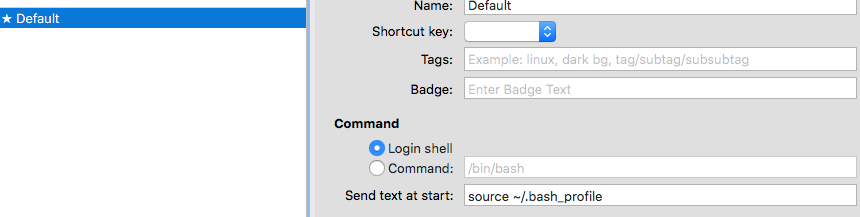
iTerm: 3.1.6
I think I found my issue. Removing the source ~/.bash_profile from the "Send text at start" box solved it for me.
MattMencel
on 24 Apr 2018
I silenced the error by editing /usr/local/etc/bash_completion.d/git-completion.bash and adding an additional 2>/dev/null to line 285, so it looks like this .
unset $(set |sed -ne 's/^\(__gitcomp_builtin_[a-zA-Z0-9_][a-zA-Z0-9_]*\)=.*/\1/p' 2>/dev/null) 2>/dev/null
 dduvnjak
on 24 Apr 2018
dduvnjak
on 24 Apr 2018
Please report this upstream.
ilovezfs
on 24 Apr 2018
FWIW, there's a lengthy thread on the Git mailing list already:
https://public-inbox.org/git/[email protected]/t/
 FND
on 24 Apr 2018
FND
on 24 Apr 2018
Just to wrap up, @dduvnjak 's error silencing solution worked for me, and the thread @FND linked to makes it sound like the underlying issue will probably be fixed in an upcoming patch for git 2.17
Didericis
on 5 May 2018
Related issues
 tglawless
·
3Comments
tglawless
·
3Comments
 dredmorbius
·
3Comments
dredmorbius
·
3Comments
 tejasmanohar
·
3Comments
tejasmanohar
·
3Comments
 oli-laban
·
3Comments
oli-laban
·
3Comments
 sstadick
·
4Comments
sstadick
·
4Comments
Most helpful comment
I silenced the error by editing
/usr/local/etc/bash_completion.d/git-completion.bashand adding an additional2>/dev/nullto line 285, so it looks like this .