Homebrew-core: brew install r doesn't create r.framework and files in /usr/local/cellar/r/3.4.1/bin
Please always follow these steps:
- [x] Confirmed this is a problem with
brew installing one, specific formula (not cask) and not every time you runbrew? If it's a generalbrewproblem please file this issue at https://github.com/Homebrew/brew/issues/new. If it's abrew caskproblem please file this issue at https://github.com/Homebrew/caskroom/homebrew-cask/new - [x] Ran
brew updateand retried your prior step? - [x] Ran
brew doctor, fixed all issues and retried your prior step? - [x] Ran
brew gist-logs <formula>(where<formula>is the name of the formula that failed) and included the output link? - [x] If
brew gist-logsdidn't work: ranbrew configandbrew doctorand included their output with your issue?
HOMEBREW_VERSION: 1.2.4-76-g27cd396
ORIGIN: https://github.com/Homebrew/brew
HEAD: 27cd396d2e59ebf3e65a34e31ea5dc4a238643a1
Last commit: 2 days ago
Core tap ORIGIN: https://github.com/Homebrew/homebrew-core
Core tap HEAD: de22bd54af88996a84b55fbd82dbca97f31d0c79
Core tap last commit: 10 hours ago
HOMEBREW_PREFIX: /usr/local
HOMEBREW_REPOSITORY: /usr/local/Homebrew
HOMEBREW_CELLAR: /usr/local/Cellar
HOMEBREW_BOTTLE_DOMAIN: https://homebrew.bintray.com
CPU: octa-core 64-bit sandybridge
Homebrew Ruby: 2.0.0-p648
Clang: 8.0 build 800
Git: 2.13.3 => /usr/local/bin/git
Perl: /usr/bin/perl
Python: /usr/local/bin/python => /usr/local/Cellar/python/2.7.13/Frameworks/Python.framework/Versions/2.7/bin/python2.7
Ruby: /usr/bin/ruby => /System/Library/Frameworks/Ruby.framework/Versions/2.0/usr/bin/ruby
Java: 1.8.0_131, 1.8.0_121
macOS: 10.11.6-x86_64
Xcode: 8.2.1
CLT: 8.2.0.0.1.1480973914
X11: 2.7.11 => /opt/X11
Gist https://gist.github.com/luisspuerto/78b00826297457b7901f398bdc9f3823
I've been trying to install r with openblas today and I haven't been able (brew install r --with-openblas)
Although the output is satisfactory
brew reinstall r --with-openblas
==> Reinstalling r --with-openblas
==> Using the sandbox
==> Using Homebrew-provided fortran compiler.
This may be changed by setting the FC environment variable.
==> Downloading https://cran.rstudio.com/src/base/R-3/R-3.4.1.tar.gz
Already downloaded: /Users/lpuerto/Library/Caches/Homebrew/r-3.4.1.tar.gz
==> ./configure --prefix=/usr/local/Cellar/r/3.4.1 --enable-memory-profiling --without-cairo --without-x --with-aqua --w
==> make
==> make install
==> make
==> make install
The result is not.
When I'm going to use R in rStudio I get this message.
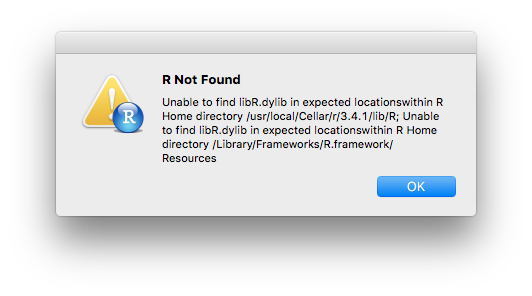
When I check that location this is what I get:

There isn't a libR.dylib in that location and there is also missing other files in there. I've also noted that r.framework isn't there.
I don't know that I'm doing wrong. R was working until now, but for a problem in package compilation from source I decided to reinstall it just to give it a shot. I don't know if I deleted something I shouldn't when I uninstall. I just run the commands
sudo rm -rf /Library/Frameworks/R.framework /Applications/R.app \
   /usr/bin/R /usr/bin/Rscript
And also brew uninstall r
I did that way because although I have a homebrew r installation I wasn't sure that everything was gone from a previous installation from binaries from CRAN.
When I installed R from homebrew I more or less follow this guide: https://www.karambelkar.info/2017/01/setup-osx-for-r/
If I install R using the binaries from CRAN everything works. At least rStudio starts.
Any thought?
Thanks!
 luispuerto
All 33 comments
Please test https://github.com/Homebrew/homebrew-core/pull/15711 if you can.
 ilovezfs
on 18 Jul 2017
ilovezfs
on 18 Jul 2017
@ilovezfs can you tell me how can I test that new formula?
Sorry I'm quite new.
luispuerto
on 18 Jul 2017
brew pull 15711
brew uninstall r
brew install --build-from-source r
now it seems that works...
But I don't understand why is install in /usr/local/Cellar/r/3.4.1_1 instead of /usr/local/Cellar/r/3.4.1
Any solution to this?
luispuerto
on 18 Jul 2017
Thanks for testing it!
But I don't understand why is install in /usr/local/Cellar/r/3.4.1_1 instead of /usr/local/Cellar/r/3.4.1
That is due to the revision 1
If you need a persistent location use
/usr/local/opt/r
which is a symlink to the current version in the Cellar.
ilovezfs
on 18 Jul 2017
ahh!
No I don't need a persisten location, in general... I was just wondering why the different name.
is going to change the name at some point to /usr/local/Cellar/r/3.4.1?
I ask because it isn't the first time I see the folder 3.4.1_1
thanks!
luispuerto
on 18 Jul 2017
is going to change the name at some point to /usr/local/Cellar/r/3.4.1?
I ask because it isn't the first time I see the folder 3.4.1_1
it'll be 3.4.1, 3.4.1_1, 3.4.1_2, 3.4.1_3, etc. until 3.4.2 is released by upstream
ilovezfs
on 18 Jul 2017
ok thanks!
luispuerto
on 18 Jul 2017
@ilovezfs
If you need a persistent location use
/usr/local/opt/r
How do I use this, preferably, with R on macOS? I mean, which file should be edited to set that path?
 slhck
on 18 Jul 2017
slhck
on 18 Jul 2017
@luisspuerto Can you also try:
brew pull 15723
brew uninstall --force r
brew install --build-from-source r
that's a different approach we're trying that hopefully should fix your issue.
 MikeMcQuaid
on 18 Jul 2017
MikeMcQuaid
on 18 Jul 2017
@luisspuerto Actually, before you do that run git -C $(brew --repo homebrew/core) reset --hard origin/master to undo the previous patch.
MikeMcQuaid
on 18 Jul 2017
MikeMcQuaid
on 18 Jul 2017
@MikeMcQuaid I guess it's already late, but yeah, everything works fine now.
Thanks!
luispuerto
on 18 Jul 2017
@luisspuerto I'm glad and thanks for letting me know. Sorry for the inconvenience!
MikeMcQuaid
on 18 Jul 2017
This problem still remaining in 3.4.1_1.
Probably, R.framework was not installed in /usr/local/Cellar/r/3.4.1_1
I also tried as told by @MikeMcQuaid.
I'm using:
Homebrew 1.2.4-96-ge0560ff
Homebrew/homebrew-core (git revision fa5b7; last commit 2017-07-21)
 tkosaka1976
on 21 Jul 2017
tkosaka1976
on 21 Jul 2017
@tkosaka1976 Can you elaborate on what you need the framework specifically for?
MikeMcQuaid
on 21 Jul 2017
I'm using rsruby gem in ruby.
I see. I understand.
I'll change the code for install it.
tkosaka1976
on 21 Jul 2017
@tkosaka1976 Thanks! If that doesn't work, please let us know. We're trying to get by without a framework option but if it's needed by many places we would be tempted to re-add it.
MikeMcQuaid
on 21 Jul 2017
I forget to tell this.
Other problem also happen in R REPL.
Error will come when I call package installed.
Ex.
> library("edgeR")
要求されたパッケージ limma をロード中です
エラー: package or namespace load failed for ‘edgeR’ in dyn.load(file, DLLpath = DLLpath, ...):
共有ライブラリ '/usr/local/lib/R/3.4/site-library/edgeR/libs/edgeR.so' を読み込めません:
dlopen(/usr/local/lib/R/3.4/site-library/edgeR/libs/edgeR.so, 6): Library not loaded: ``/usr/local/opt/gcc/lib/gcc/6/libgfortran.3.dylib
Referenced from: /usr/local/lib/R/3.4/site-library/edgeR/libs/edgeR.so
Reason: image not found
Probably proper library location cannot found.
Could you tell me how to solve this?
tkosaka1976
on 22 Jul 2017
@tkosaka1976 brew install gfortran should fix that for you.
MikeMcQuaid
on 27 Jul 2017
I already installed gcc.
"GNU Fortran is now provided as part of GCC, and can be installed with:"
However, the problem have been continued.
I'm not sure reason why.
Do you need another information to know my situation?
tkosaka1976
on 28 Jul 2017
I'm using GCC 7.1.0
tkosaka1976
on 28 Jul 2017
@tksohishi Try to run brew reinstall gcc r
MikeMcQuaid
on 28 Jul 2017
Reinstall of gcc and r worked well.
Thanks!
tkosaka1976
on 29 Jul 2017
I have a question.
The R Framework dir have already removed.
How do we specify the R_Home?
I tried as "export R_HOME=/usr/local/Cellar/r/3.4.1_1" but did not work well.
I'm also using rsruby gem.
Please let me know how to install it.
tkosaka1976
on 29 Jul 2017
Anyway, I hope to know the alternative way for R.framework setup for brew installed R.
Previously, I do make a symlink to installed in /usr/local/Cellar/r/VERSION/ and copied it in /Library/Frameworks/
tkosaka1976
on 31 Jul 2017
@tkosaka1976 Sorry for the delay. R_HOME should be set to /usr/local/opt/r/lib/R. What else do you need the Framework for? Thanks!
MikeMcQuaid
on 31 Jul 2017
Probably, I'm not sure about Framework for use.
I hope to use rsruby, which bridge R into ruby.
Do you know how to install?
I usually do like this.
sudo ln -s $"r forlder from homebrew"/R.framework /Library/Frameworks/R.framework
gem install rsruby -- --with-R-include=/Library/Frameworks/R.framework/Headers --with-R-lib=/Library/Frameworks/R.framework/Libraries
tkosaka1976
on 31 Jul 2017
@tkosaka1976 I'd imagine gem install rsruby -- --with-R-include=/usr/local/opt/r/lib/R/include --with-R-lib=/usr/local/opt/r/lib/R/include would be it if it can't detect the paths automatically.
MikeMcQuaid
on 31 Jul 2017
@MikeMcQuaid Thank you for your kind help. Now, all things go well!
tkosaka1976
on 1 Aug 2017
@tkosaka1976 Great, thanks again for your kind words!
MikeMcQuaid
on 1 Aug 2017
@MikeMcQuaid R.framework is needed for the r-gui app which has the framework path hardcoded
 krackers
on 8 Aug 2017
krackers
on 8 Aug 2017
@krackers That's not the case, I've tested the R GUI application and it works without the framework with the latest version of the r formula.
MikeMcQuaid
on 8 Aug 2017
Related issues
 oli-laban
·
3Comments
oli-laban
·
3Comments
 ghost
·
3Comments
ghost
·
3Comments
 Thirudhas
·
4Comments
Thirudhas
·
4Comments
 BluePawDev
·
3Comments
BluePawDev
·
3Comments
 ralexx
·
4Comments
ralexx
·
4Comments