Homebrew-core: First issues with macOS 10.13 High Sierra
This is with Developer Beta of macOS 10.13, using Xcode 9 beta, Apple LLVM version 9.0.0 (clang-900.0.22.8).
- [x]
brew test pkg-configfails because it cannot findopenssl.pc(build logs) (https://github.com/Homebrew/homebrew-core/pull/15278.) - [x]
brew test glibfails because it cannot find-lglib-2.0(no-Lis provided in the test) (https://github.com/Homebrew/homebrew-core/pull/15281.) - [x]
libunistringfails to build becausemake checkhas 28 failing tests (Illegal instructionerrors) (https://github.com/Homebrew/homebrew-core/issues/15174.) - [x]
brew test pythonfails (build logs)
 fxcoudert
All 122 comments
libunistring fails to build because make check has 28 failing tests (Illegal instruction errors)
Are you running in a VM?
 MikeMcQuaid
on 9 Jun 2017
MikeMcQuaid
on 9 Jun 2017
Are you running in a VM?
No, it's a mac mini. Smells like miscompilation to me :(
fxcoudert
on 9 Jun 2017
@fxcoudert Cool, just checking given that's sometimes what it is for that error.
MikeMcQuaid
on 9 Jun 2017
The libunistring failures all come from the system's snfprintf:
(lldb) target create ".libs/test-u16-asnprintf1"
Current executable set to '.libs/test-u16-asnprintf1' (x86_64).
(lldb) r
Process 27203 launched: '/Users/fx/Downloads/libunistring-0.9.7/tests/.libs/test-u16-asnprintf1' (x86_64)
Process 27203 stopped
* thread #1, queue = 'com.apple.main-thread', stop reason = EXC_BAD_INSTRUCTION (code=EXC_I386_INVOP, subcode=0x0)
    frame #0: 0x00007fffc01cc89b libsystem_c.dylib`__vfprintf + 16437
libsystem_c.dylib`__vfprintf:
->  0x7fffc01cc89b <+16437>: ud2
    0x7fffc01cc89d <+16439>: nopl   (%rax)
    0x7fffc01cc8a0 <+16442>: retq
Target 0: (test-u16-asnprintf1) stopped.
(lldb) bt
* thread #1, queue = 'com.apple.main-thread', stop reason = EXC_BAD_INSTRUCTION (code=EXC_I386_INVOP, subcode=0x0)
  * frame #0: 0x00007fffc01cc89b libsystem_c.dylib`__vfprintf + 16437
    frame #1: 0x00007fffc01f1431 libsystem_c.dylib`__v2printf + 473
    frame #2: 0x00007fffc01d62e7 libsystem_c.dylib`_vsnprintf + 415
    frame #3: 0x00007fffc01d6344 libsystem_c.dylib`vsnprintf_l + 41
    frame #4: 0x00007fffc01c7364 libsystem_c.dylib`snprintf + 180
    frame #5: 0x00000001000ba114 libunistring.2.dylib`u16_vasnprintf(resultbuf=<unavailable>, lengthp=0x00007fff5fbffac0, format="12345", args=<unavailable>) at vasnprintf.c:0 [opt]
    frame #6: 0x00000001000b3e32 libunistring.2.dylib`u16_asnprintf(resultbuf=<unavailable>, lengthp=<unavailable>, format=<unavailable>) at u-asnprintf.h:34 [opt]
    frame #7: 0x0000000100000b89 test-u16-asnprintf1`main at test-u16-asnprintf1.h:30 [opt]
    frame #8: 0x0000000100000b70 test-u16-asnprintf1`main [inlined] test_asnprintf at test-u16-asnprintf1.c:38 [opt]
    frame #9: 0x0000000100000b70 test-u16-asnprintf1`main(argc=<unavailable>, argv=<unavailable>) at test-u16-asnprintf1.c:44 [opt]
    frame #10: 0x00007fffc013d515 libdyld.dylib`start + 1
    frame #11: 0x00007fffc013d515 libdyld.dylib`start + 1
bison keg has illegal instruction issues (this is exhibited in all bison version >= 2.5). Looks like Apple made some changes to the printf stack. I've reported this to Apple. Could be a bug, or they could just need to release some documentation on what changed.
imagemagick fails to build.
libtool: link: clang  -o coders/.libs/png.so -bundle  coders/.libs/coders_png_la-png.o   MagickCore/.libs/libMagickCore-7.Q16HDRI.dylib -L/usr/local/opt/freetype/lib -L/usr/local/Cellar/xz/5.2.3/lib -lfreetype -lbz2 -lltdl -L/usr/local/Cellar/libpng/1.6.29/lib -lpng16 -ljpeg -llzma -lm  -g -O2 -mtune=haswell -pthre
ad   -pthread -Wl,-exported_symbols_list,coders/.libs/png-symbols.expsym
Undefined symbols for architecture x86_64:
  "_crc32", referenced from:
      _WriteMNGImage in coders_png_la-png.o
      _ReadOnePNGImage in coders_png_la-png.o
      _ReadOneJNGImage in coders_png_la-png.o
      _WriteOnePNGImage in coders_png_la-png.o
      _Magick_png_write_chunk_from_profile in coders_png_la-png.o
      _WriteOneJNGImage in coders_png_la-png.o
  "_zlibVersion", referenced from:
      _RegisterPNGImage in coders_png_la-png.o
      _ReadOnePNGImage in coders_png_la-png.o
      _WriteOnePNGImage in coders_png_la-png.o
ld: symbol(s) not found for architecture x86_64
The built-in telnet client appears to have been dropped, so a telnet package may be desirable now. I'm going to try to get the telnet client gentoo linux uses patched up to work.
 chapeladmin
on 9 Jun 2017
chapeladmin
on 9 Jun 2017
brew test pkg-config fails because it cannot find openssl.pc (build logs)
Apple killed the file. It can be replaced in the test with libiodbc or something.
 DomT4
on 9 Jun 2017
DomT4
on 9 Jun 2017
- [x]
yamltest fails withld: library not found for -lyaml - [x]
gccfails withfatal error: unordered_map: No such file or directorybuildinglibstdc++-v3/include/precompiled/stdc++.h
fxcoudert
on 11 Jun 2017
- [x]
qtfails to build (logs) - [x]
brew test nettlefails withld: library not found for -lnettle(https://github.com/Homebrew/homebrew-core/pull/15282.) - [x]
mpcandmpfrtests fail withld: library not found for -lgmp(https://github.com/Homebrew/homebrew-core/pull/15283) - [x]
isltest fails due to not finding-lisl(https://github.com/Homebrew/homebrew-core/pull/15284) - [x]
carthagefails with:
```
The following build commands failed:
CompileSwift normal x86_64
CompileSwiftSources normal x86_64 com.apple.xcode.tools.swift.compiler
- [x] `brew test shared-mime-info` fails with `unknown file type: /usr/local/Cellar/shared-mime-info/1.8_1/share/mime`
- [x] `tbb` test fails due to not finding `-ltbb` (https://github.com/Homebrew/homebrew-core/pull/15289)
- [x] `macvim` [fails with](https://gist.github.com/1fffb55d3b54e4d331aa7bd613f15f82)
The following build commands failed:
StripNIB English.lproj/Preferences.nib
```
- [x]
winefails while buildingnet-snmpwithmibgroup/mibII/ipv6.c:1762:34: error: variable has incomplete type 'struct in6pcb'(logs)
fxcoudert
on 12 Jun 2017
brew test nettle fails with ld: library not found for -lnettle
Something... weird is going on with clang et al. Not sure how intentional it is to be honest, but may require some tweaks in Homebrew to handle if it sticks around.
=> clang -x c -v -E /dev/null

Apple LLVM version 9.0.0 (clang-900.0.22.8)
Target: x86_64-apple-darwin17.0.0
Thread model: posix
InstalledDir: /Applications/Xcode-beta.app/Contents/Developer/Toolchains/XcodeDefault.xctoolchain/usr/bin
 "/Applications/Xcode-beta.app/Contents/Developer/Toolchains/XcodeDefault.xctoolchain/usr/bin/clang" -cc1 -triple x86_64-apple-macosx10.13.0 -Wdeprecated-objc-isa-usage -Werror=deprecated-objc-isa-usage -E -disable-free -disable-llvm-verifier -discard-value-names -main-file-name null -mrelocation-model pic -pic-level 2 -mthread-model posix -mdisable-fp-elim -fno-strict-return -masm-verbose -munwind-tables -target-cpu penryn -target-linker-version 301.1 -v -dwarf-column-info -debugger-tuning=lldb -resource-dir /Applications/Xcode-beta.app/Contents/Developer/Toolchains/XcodeDefault.xctoolchain/usr/lib/clang/9.0.0 -isysroot /Applications/Xcode-beta.app/Contents/Developer/Platforms/MacOSX.platform/Developer/SDKs/MacOSX10.13.sdk -fdebug-compilation-dir /Users/testing -ferror-limit 19 -fmessage-length 120 -stack-protector 1 -fblocks -fobjc-runtime=macosx-10.13.0 -fencode-extended-block-signature -fmax-type-align=16 -fdiagnostics-show-option -fcolor-diagnostics -o - -x c /dev/null
clang -cc1 version 9.0.0 (clang-900.0.22.8) default target x86_64-apple-darwin17.0.0
ignoring nonexistent directory "/Applications/Xcode-beta.app/Contents/Developer/Platforms/MacOSX.platform/Developer/SDKs/MacOSX10.13.sdk/usr/local/include"
ignoring nonexistent directory "/Applications/Xcode-beta.app/Contents/Developer/Platforms/MacOSX.platform/Developer/SDKs/MacOSX10.13.sdk/Library/Frameworks"
#include "..." search starts here:
#include <...> search starts here:
 /Applications/Xcode-beta.app/Contents/Developer/Toolchains/XcodeDefault.xctoolchain/usr/lib/clang/9.0.0/include
 /Applications/Xcode-beta.app/Contents/Developer/Toolchains/XcodeDefault.xctoolchain/usr/include
 /Applications/Xcode-beta.app/Contents/Developer/Platforms/MacOSX.platform/Developer/SDKs/MacOSX10.13.sdk/usr/include
 /Applications/Xcode-beta.app/Contents/Developer/Platforms/MacOSX.platform/Developer/SDKs/MacOSX10.13.sdk/System/Library/Frameworks (framework directory)
End of search list.
# 1 "/dev/null"
# 1 "<built-in>" 1
# 1 "<built-in>" 3
# 331 "<built-in>" 3
# 1 "<command line>" 1
# 1 "<built-in>" 2
# 1 "/dev/null" 2
=> clang -Xlinker -v

@(#)PROGRAM:ld  PROJECT:ld64-301.1
configured to support archs: armv6 armv7 armv7s arm64 i386 x86_64 x86_64h armv6m armv7k armv7m armv7em (tvOS)
Library search paths:
    /Applications/Xcode-beta.app/Contents/Developer/Platforms/MacOSX.platform/Developer/SDKs/MacOSX10.13.sdk/usr/lib
Framework search paths:
    /Applications/Xcode-beta.app/Contents/Developer/Platforms/MacOSX.platform/Developer/SDKs/MacOSX10.13.sdk/System/Library/Frameworks/
It looks like the direct /usr/local & /usr have been punted from the default search paths when using Xcode. This however isn't true when using only the CLT:
=> /Library/Developer/CommandLineTools/usr/bin/clang -x c -v -E /dev/null
Apple LLVM version 9.0.0 (clang-900.0.22.8)
Target: x86_64-apple-darwin17.0.0
Thread model: posix
InstalledDir: /Library/Developer/CommandLineTools/usr/bin
 "/Library/Developer/CommandLineTools/usr/bin/clang" -cc1 -triple x86_64-apple-macosx10.13.0 -Wdeprecated-objc-isa-usage -Werror=deprecated-objc-isa-usage -E -disable-free -disable-llvm-verifier -discard-value-names -main-file-name null -mrelocation-model pic -pic-level 2 -mthread-model posix -mdisable-fp-elim -fno-strict-return -masm-verbose -munwind-tables -target-cpu penryn -target-linker-version 301.1 -v -dwarf-column-info -debugger-tuning=lldb -resource-dir /Library/Developer/CommandLineTools/usr/lib/clang/9.0.0 -fdebug-compilation-dir /Users/testing -ferror-limit 19 -fmessage-length 120 -stack-protector 1 -fblocks -fobjc-runtime=macosx-10.13.0 -fencode-extended-block-signature -fmax-type-align=16 -fdiagnostics-show-option -fcolor-diagnostics -o - -x c /dev/null
clang -cc1 version 9.0.0 (clang-900.0.22.8) default target x86_64-apple-darwin17.0.0
#include "..." search starts here:
#include <...> search starts here:
 /usr/local/include
 /Library/Developer/CommandLineTools/usr/lib/clang/9.0.0/include
 /Library/Developer/CommandLineTools/usr/include
 /usr/include
 /System/Library/Frameworks (framework directory)
 /Library/Frameworks (framework directory)
=> /Library/Developer/CommandLineTools/usr/bin/clang -Xlinker -v
@(#)PROGRAM:ld  PROJECT:ld64-301.1
configured to support archs: armv6 armv7 armv7s arm64 i386 x86_64 x86_64h armv6m armv7k armv7m armv7em (tvOS)
Library search paths:
    /usr/lib
    /usr/local/lib
Framework search paths:
    /Library/Frameworks/
    /System/Library/Frameworks/
If the Xcode model did become the default: It's possible that would render system-protective keg_only choices like openssl on macOS 10.13 almost unimportant, although I don't expect Homebrew to make any drastic choices on that given it would cause discrepancies between the newest and older macOS versions.
DomT4
on 13 Jun 2017
This however isn't true when using only the CLT:
However, it is true when using the /usr/bin version of clang when the CLT is the active xcode_select path:
$ /usr/bin/clang -Xlinker -v
@(#)PROGRAM:ld  PROJECT:ld64-301.1
configured to support archs: armv6 armv7 armv7s arm64 i386 x86_64 x86_64h armv6m armv7k armv7m armv7em (tvOS)
Library search paths:
    /Library/Developer/CommandLineTools/SDKs/MacOSX.sdk/usr/lib
Framework search paths:
    /Library/Developer/CommandLineTools/SDKs/MacOSX.sdk/System/Library/Frameworks/
 mistydemeo
on 13 Jun 2017
mistydemeo
on 13 Jun 2017
Interesting, I missed that. Nice find! I wonder if both of those exhibiting the same behaviour semi-confirms this might be an intentional choice/direction on Apple's part.
DomT4
on 13 Jun 2017
The behaviour between /usr/bin/clang and /Library/Developer/CommandLineTools/usr/bin/clang feels backward, which makes me wonder if it's a packaging mistake. Assuming that's the case, the intention I'm reading is:
- The Xcode version of the tool, with no headers in
/usr/include, is configured only to look inside the Xcode SDK by default. This makes sense for a tool intended primarily to be used by Xcode itself, along with other software building in an Xcode-centric context. - The
/Libraryversion of the tool is configured only to look inside its own "SDK" by analogy. - The
/usr/bin/clangversion works for Unix-style CLI builds as it always did.
mistydemeo
on 13 Jun 2017
Other failures and links to logs:
wxmac, bison, thefuck (test failure), swiftlint, qt, swig (test failure, cannot find ruby.h).
fxcoudert
on 13 Jun 2017
ghc fails to build (clang preprocessor bug already reported by @mistydemeo), apache-spark test fails, midnight-commander fails to build
fxcoudert
on 13 Jun 2017
It's worth noting based on previous usage that many of the weird behaviour we're seeing now will be changed in later betas of macOS and Xcode. I don't think it's worth either worrying or fixing many of these for a while.
MikeMcQuaid
on 13 Jun 2017
I have packaged a telnet client and built a tap for it available at https://github.com/theeternalsw0rd/homebrew-telnet since the built-in one is mia.
I wouldn't think any package would depend on the built-in client but in case there's some obscure package I'm unaware of that utilizes it, this works as a drop-in replacement.
 theeternalsw0rd
on 13 Jun 2017
theeternalsw0rd
on 13 Jun 2017
I don't think it's worth either worrying or fixing many of these for a while.
Agree with this on the formulae side of things. Making assumptions about High Sierra behaviour quite this early is asking to have to reverse or re-tweak things more going forwards 😓. As long as there's _enough_ support for it on the brew side of things I think if you're actually running 10.13 as your main driver you should absolutely expect _so much_ to break for a while.
I have packaged a telnet client
Doesn't surprise me Apple killed this to be honest. There's still the version from 10.12 on Apple's OpenSource website Homebrew could simply compile with Xcode if the demand reaches whatever level is deemed sufficient. It's not like the world is lacking third-party telnet clients though, so.
DomT4
on 13 Jun 2017
@theeternalsw0rd the missing telnet made me feel so weird. Thanks for the tap.
 chenillen
on 15 Jun 2017
chenillen
on 15 Jun 2017
According to Apple, the issue with bison (and I'm assuming libunistring) is %n in formatted strings that are in dynamic memory. Waiting to hear anything further from Apple, but it seems like something they are planning on fixing as they said they are continuing to work on it.
chapeladmin
on 15 Jun 2017
Also of note. Apple has bundled LibreSSL on the system but is using _a custom version BoringSSL_ internally as well.
This causes issues with dynamic linking as some things grab the wrong SSL. (Erlang for example.)
I am hoping Apple fixes this in the next beta because they don't want people using their BoringSSL.
Anything that isn't TWOLEVEL has issues right now. Aka FLATNAMESPACE.
You can check with otool -hV
I will report back on this once I have more info.
 idyll
on 15 Jun 2017
idyll
on 15 Jun 2017
Cant install gpg because of libunistring which means anything for git commits its broken :(
Anyway to manually build this particular item?
 kylebrowning
on 16 Jun 2017
kylebrowning
on 16 Jun 2017
All versions of gcc are failing to build (at least without multilib support).
Nano builds successfully but does not work, i.e. segfaults when a buffer is flushed to a file (which is unsuccessful).
 sunipkmukherjee
on 18 Jun 2017
sunipkmukherjee
on 18 Jun 2017
@kylebrowning you can brew install --force-bottle foo for anything you're having trouble building and it should pour the Sierra bottle.
 ilovezfs
on 22 Jun 2017
ilovezfs
on 22 Jun 2017
Has everyone else noticed that curl no longer uses SecureTransport? That's quite some shift.
DomT4
on 22 Jun 2017
I am seeing no changes in current beta. Anything that points to OpenSSL compiled as FLATNAMESPACE instead of TWOLEVEL is probably going to hit Apple's private BoringSSL now. :(
A an example, right now this affects all versions of Erlang. And I can't seem to fix it with their compiler flags.
idyll
on 22 Jun 2017
curl got an update, and now seems to have gained HTTP2 support, which will please @vszakats if my memory of an old PR serves me correctly. Not much else seems to have changed. libunistring still fails to build at the make check stage.
DomT4
on 22 Jun 2017
FYI: lftp is also broken 😕
 Korni22
on 24 Jun 2017
Korni22
on 24 Jun 2017
Found some errors in working with apache. It might be my machine, or it may be a product of the beta testing, but I thought I would mention it here just in case. I've attached a screen shot for clarification.

 savemeaspark
on 25 Jun 2017
savemeaspark
on 25 Jun 2017
It might be my machine, or it may be a product of the beta testing, but I thought I would mention it here just in case.
It's not you. It's because the mod_suexec formula has macOS version-specific url and sha256 blocks, and currently does not have one for High Sierra, thus, the syntax is "invalid". It's a simple fix for someone but that tap seems to be at least semi-dead.
DomT4
on 28 Jun 2017
If anyone would like to test the fixes in #15129 it would be most welcome.
 JCount
on 29 Jun 2017
JCount
on 29 Jun 2017
bison appears to be working now thanks to a snfprintf patch from macports. libunistring is still shot so no gpg still. 😕
 selfagency
on 30 Jun 2017
selfagency
on 30 Jun 2017
@selfagency correct. libunistring wasn't in JCount's PR, so we know that.
ilovezfs
on 30 Jun 2017
@selfagency See #15174
JCount
on 1 Jul 2017
cmake broken:
==> Installing crystal-lang dependency: cmake
==> Downloading https://cmake.org/files/v3.8/cmake-3.8.2.tar.gz
######################################################################## 100.0%
==> ./bootstrap --prefix=/usr/local/Cellar/cmake/3.8.2 --no-system-libs --parall
Last 15 lines from /Users/Davy/Library/Logs/Homebrew/cmake/01.bootstrap:
  but not all the files it references.

Call Stack (most recent call first):
  /usr/local/lib/cmake/Qt5Core/Qt5CoreConfigExtras.cmake:50 (_qt5_Core_check_file_exists)
  /usr/local/lib/cmake/Qt5Core/Qt5CoreConfig.cmake:141 (include)
  Tests/RunCMake/CMakeLists.txt:248 (find_package)


-- Configuring incomplete, errors occurred!
See also "/tmp/cmake-20170701-6259-1aapz08/cmake-3.8.2/CMakeFiles/CMakeOutput.log".
See also "/tmp/cmake-20170701-6259-1aapz08/cmake-3.8.2/CMakeFiles/CMakeError.log".
---------------------------------------------
Error when bootstrapping CMake:
Problem while running initial CMake
---------------------------------------------

Do not report this issue to Homebrew/brew or Homebrew/core!

These open issues may also help:
glog.rb add test, use cmake build to generate cmake config files. https://github.com/Homebrew/homebrew-core/pull/14379
CMake modules for TBB do not get installed https://github.com/Homebrew/homebrew-core/issues/14938

Error: You are using macOS 10.13.
We do not provide support for this pre-release version.
You may encounter build failures or other breakages.
Please create pull-requests instead of filing issues.
And there is no log files on mentioned location.
 david50407
on 1 Jul 2017
david50407
on 1 Jul 2017
Got it fixed! Add OS_ACTIVITY_MODEas an environment variable with the value disable in the scheme editor at "Run". That might not be a permanent fix but for now it works, I guess.
 wyteco
on 1 Jul 2017
wyteco
on 1 Jul 2017
gnupg installs successfully with the fix to libunistring! thanks for all your work on this y'all.
selfagency
on 3 Jul 2017
I can avoid the "brew test glib fails because it cannot find -lglib-2.0 (no -L is provided in the test)" issue by setting
ENV["SDKROOT"] = "/"
at the top of the test block. Setting that for all test blocks globally might be preferable to running around adding -L#{lib} everywhere.
ilovezfs
on 4 Jul 2017
@fxcoudert are you still able to reproduce the issue with Python? It appears to be fine to me.
ilovezfs
on 4 Jul 2017
These all probably need fixing due to the -L#{lib} apocalypse:
- [x] beecrypt (https://github.com/Homebrew/homebrew-core/pull/15285)
- [x] confuse (https://github.com/Homebrew/homebrew-core/pull/15286)
- [x] cppcms (https://github.com/Homebrew/homebrew-core/pull/15287)
- [x] cpptest (https://github.com/Homebrew/homebrew-core/pull/15288)
- [x] cubeb (https://github.com/Homebrew/homebrew-core/pull/15289)
- [x] fftw (https://github.com/Homebrew/homebrew-core/pull/15291)
- [x] gl2ps (https://github.com/Homebrew/homebrew-core/pull/15289)
- [x] glbinding (https://github.com/Homebrew/homebrew-core/pull/15289)
- [x] glib (https://github.com/Homebrew/homebrew-core/pull/15281)
- [x] globjects (https://github.com/Homebrew/homebrew-core/pull/15289)
- [x] gnuradio (https://github.com/Homebrew/homebrew-core/pull/15291)
- [x] guichan (https://github.com/Homebrew/homebrew-core/pull/15289)
- [x] hayai (https://github.com/Homebrew/homebrew-core/pull/15291)
- [x] isl (https://github.com/Homebrew/homebrew-core/pull/15284)
- [x] ivykis (https://github.com/Homebrew/homebrew-core/pull/15289)
- [x] jansson (https://github.com/Homebrew/homebrew-core/pull/15289)
- [x] jlog (https://github.com/Homebrew/homebrew-core/pull/15289)
- [x] loudmouth (https://github.com/Homebrew/homebrew-core/pull/15291)
- [x] luabind (https://github.com/Homebrew/homebrew-core/pull/15289)
- [x] mdxmini (https://github.com/Homebrew/homebrew-core/pull/15289)
- [x] mpfi (https://github.com/Homebrew/homebrew-core/pull/15289)
- [x] mpfr (https://github.com/Homebrew/homebrew-core/pull/15283)
- [x] msgpack (https://github.com/Homebrew/homebrew-core/pull/15291)
- [x] nettle (https://github.com/Homebrew/homebrew-core/pull/15282)
- [x] newt (https://github.com/Homebrew/homebrew-core/pull/15289)
- [x] openh264 (https://github.com/Homebrew/homebrew-core/pull/15289)
- [x] pbc (https://github.com/Homebrew/homebrew-core/pull/15289)
- [x] pgplot (https://github.com/Homebrew/homebrew-core/pull/15289)
- [x] pmdmini (https://github.com/Homebrew/homebrew-core/pull/15289)
- [x] r3 (https://github.com/Homebrew/homebrew-core/pull/15289)
- [x] readline (https://github.com/Homebrew/homebrew-core/pull/15289)
- [x] snappystream (https://github.com/Homebrew/homebrew-core/pull/15289)
- [x] supersonic (https://github.com/Homebrew/homebrew-core/pull/15289)
- [x] tbb (https://github.com/Homebrew/homebrew-core/pull/15289)
- [x] unicorn (https://github.com/Homebrew/homebrew-core/pull/15289)
- [x] x264 (https://github.com/Homebrew/homebrew-core/pull/15289)
ilovezfs
on 5 Jul 2017
@fxcoudert are you still able to reproduce the shared-mime-info issue? It seems fine to me.
ilovezfs
on 5 Jul 2017
@fxcoudert same question regarding macvim. Seems fine.
ilovezfs
on 5 Jul 2017
@Korni22 @JCount it looks like lftp is yet another %n issue.
ilovezfs
on 5 Jul 2017
The Erlang team has a PR open with a fix for the BoringSSL linking issue. https://github.com/erlang/otp/pull/1501/commits/882c90f72ba4e298aa5a7796661c28053c540a96
It may be useful for other projects with this issue so I wanted to crosspost here.
I am going to try to update the erlang@19 and erlang formula to include a patch and test on 10.12 to verify things work and then open a PR with them.
idyll
on 5 Jul 2017
@idyll thanks! No love for erlang@18? :smiling_imp:
ilovezfs
on 5 Jul 2017
Do you want love for erlang@18? I don't use it. But I can back port for it too...
idyll
on 5 Jul 2017
It would be much appreciated!
ilovezfs
on 5 Jul 2017
@Korni22 #15306 should make lftp runnable if you want to try testing/using it. The test block now passes, but I haven't done any testing beyond that.
JCount
on 5 Jul 2017
@JCount
korni22@Erics-MBPr ~ $ brew install --build-from-source lftp
==> Using the sandbox
==> Downloading https://lftp.yar.ru/ftp/lftp-4.7.7.tar.bz2
Already downloaded: /Users/korni22/Library/Caches/Homebrew/lftp-4.7.7.tar.bz2
==> Downloading https://raw.githubusercontent.com/macports/macports-ports/edf0ee1e2cf/devel/m4/files/secure_snprintf.patch
######################################################################## 100,0%
==> Patching
==> Applying secure_snprintf.patch
patching file lib/vasnprintf.c
Hunk #1 succeeded at 4858 (offset -11 lines).
==> ./configure --prefix=/usr/local/Cellar/lftp/4.7.7 --with-openssl=/usr/local/opt/openssl --with-readline=/usr/local/opt/readline --with-libidn=/usr/local/opt/libidn
==> make install
🍺  /usr/local/Cellar/lftp/4.7.7: 21 files, 2.5MB, built in 1 minute 54 seconds
korni22@Erics-MBPr ~ $ lftp
lftp :~> exit
works fine, thanks a lot!
Korni22
on 7 Jul 2017
optipng #15419.
 zmwangx
on 8 Jul 2017
zmwangx
on 8 Jul 2017
The libunistring failures all come from the system's snfprintf
@fxcoudert I'm seeing the exact same thing in a non-homebrew setting in 10.13, so I'm guessing something deeper has changed in 10.13.
@chapeladmin any word on the Apple bug you submitted on that illegal instruction?
Edit: just saw this, sorry!
According to Apple, the issue with bison (and I'm assuming libunistring) is %n in formatted strings that are in dynamic memory. Waiting to hear anything further from Apple, but it seems like something they are planning on fixing as they said they are continuing to work on it.
 copumpkin
on 11 Jul 2017
copumpkin
on 11 Jul 2017
The new version of the CLT shipped with yesterday's 10.13 build fixed GHC. Clang was updated to incorporate the patch for the issue I submitted to LLVM.
mistydemeo
on 12 Jul 2017
snprintf failure still there in libunistring and others. Occurs even when compiled with debugging. I don't have a minimal reproducer :(
fxcoudert
on 12 Jul 2017
According to Apple, the issue with bison (and I'm assuming libunistring) is %n in formatted strings that are in dynamic memory.
That's correct. Resolving this is likely to require changes in the projects themselves if they are relying on this printf() misfeature. (That these crash is an intentional change, if you take a look at the Application Specific Information in the crash log you'll see a very brief explanatory message.)
 achivetta
on 12 Jul 2017
achivetta
on 12 Jul 2017
@fxcoudert @achivetta Yeah, I've resolved all the issues I encountered with *printf (again, not in Homebrew, but closely related) by borrowing the patches from Macports: https://github.com/macports/macports-ports/find/master, search for secure_snprintf.patch and apply to the same projects they do.
Edit: sorry, to be clear, that secure_snprintf.patch is basically identical across all those projects and looks to me like it would apply to libunistring as well, since they all seem to contain lib/vasnprintf.c, which is the file being patched.
copumpkin
on 12 Jul 2017
_“they are relying on this printf() misfeature”_ and _“these crash is an intentional change”_: it's a documented feature of the C and POSIX standards. But yeah, break it :(
Also, if you intentionally do it, why make it an illegal instruction and not a clean error? Makes no sense.
fxcoudert
on 12 Jul 2017
@mistydemeo Do you have any thoughts/feelings about this behaviour remaining unchanged? Do you think it's likely to still be a packaging error or? That it has stuck around this long is interesting.
DomT4
on 12 Jul 2017
Update. I installed the wrong CLT. Never mind.
Do you have any thoughts/feelings about this behaviour remaining unchanged?
Is it remaining unchanged though? I just upgraded to Xcode beta 3 and corresponding CLT, and
$ /usr/bin/xcodebuild -version
Xcode 9.0
Build version 9M174d
$ /usr/bin/clang -Xlinker -v
@(#)PROGRAM:ld  PROJECT:ld64-302.1
configured to support archs: armv6 armv7 armv7s arm64 i386 x86_64 x86_64h armv6m armv7k armv7m armv7em (tvOS)
Library search paths:
    /usr/lib
    /usr/local/lib
Framework search paths:
    /Library/Frameworks/
    /System/Library/Frameworks/
...
Prior to the upgrade I was seeing the same as https://github.com/Homebrew/homebrew-core/issues/14418#issuecomment-307970648.
zmwangx
on 12 Jul 2017
Hmm, strange. I could've sworn I checked _after_ I applied the update yesterday but perhaps I tripped over myself or misremembered checking another path other than /usr/bin/clang 😓. Will take another peek either tonight or tomorrow morning; today has been quite the day.
DomT4
on 12 Jul 2017
printf() is not broken. It only seems like it. 😒
Likely for our own collective good, Apple seems to be trying to essentially do what both Linux and Windows have already done. Namely, try and resolve the long known vulnerability that %n in combination with insufficiently validated input in snprintf poses. Their approach may have been somewhat heavy-handed, since it unilaterally disallows the use of %n in (dynamic) format strings in writable memory. This is due to the fact that they can be exploited to essentially write to arbitrary memory addresses, an vulnerability that has been known, and probably used as well, for more than a decade.
So far, the issue seems to be predominantly cropping up in software that uses the portable gnulib. I am glad to say, however, that it has been fixed upstream. The issue now is getting projects to update the versions of gnulib they are shipping so that we won't have to patch everything.
For reference, the two relevant commits and mailing list thread are:
c41f233, 7df04f9, and http://lists.gnu.org/archive/html/bug-gnulib/2017-07/msg00056.html
JCount
on 12 Jul 2017
Do you have any thoughts/feelings about this behaviour remaining unchanged?
@DomT4 I've filed feedback on this, but haven't received a response yet. Not yet sure what the situation is.
mistydemeo
on 12 Jul 2017
@zmwangx here's what I see
Josephs-Mac:~ joe$ /usr/bin/clang -Xlinker -v
@(#)PROGRAM:ld  PROJECT:ld64-302.1
configured to support archs: armv6 armv7 armv7s arm64 i386 x86_64 x86_64h armv6m armv7k armv7m armv7em (tvOS)
Library search paths:
    /Applications/Xcode.app/Contents/Developer/Platforms/MacOSX.platform/Developer/SDKs/MacOSX10.13.sdk/usr/lib
Framework search paths:
    /Applications/Xcode.app/Contents/Developer/Platforms/MacOSX.platform/Developer/SDKs/MacOSX10.13.sdk/System/Library/Frameworks/
Undefined symbols for architecture x86_64:
  "_main", referenced from:
     implicit entry/start for main executable
ld: symbol(s) not found for architecture x86_64
clang: error: linker command failed with exit code 1 (use -v to see invocation)
Josephs-Mac:~ joe$
Oh crap I installed Command_Line_Tools_macOS_10.12_for_Xcode_9_beta_3.dmg. Never mind.
zmwangx
on 12 Jul 2017
More fixes for the /usr/local/lib apocalypse:
- [x] aws-sdk-cpp (https://github.com/Homebrew/homebrew-core/issues/15555)
- [x] cmockery2 (https://github.com/Homebrew/homebrew-core/issues/15555)
- [x] cpputest (https://github.com/Homebrew/homebrew-core/issues/15555)
- [x] gperftools (https://github.com/Homebrew/homebrew-core/issues/15555)
- [x] i2util (https://github.com/Homebrew/homebrew-core/issues/15555)
- [x] libantlr3c (https://github.com/Homebrew/homebrew-core/issues/15555)
- [x] libb2 (https://github.com/Homebrew/homebrew-core/issues/15555)
- [x] libcdr (https://github.com/Homebrew/homebrew-core/issues/15555)
- [x] libchewing (https://github.com/Homebrew/homebrew-core/issues/15555)
- [x] libebur128 (https://github.com/Homebrew/homebrew-core/issues/15555)
- [x] libepoxy (https://github.com/Homebrew/homebrew-core/issues/15555)
- [x] libevent (https://github.com/Homebrew/homebrew-core/issues/15555)
- [x] libghthash (https://github.com/Homebrew/homebrew-core/issues/15555)
- [x] libgphoto2 (https://github.com/Homebrew/homebrew-core/issues/15555)
- [x] libharu (https://github.com/Homebrew/homebrew-core/issues/15555)
- [x] libhttpserver (https://github.com/Homebrew/homebrew-core/issues/15555)
- [x] liblzf (https://github.com/Homebrew/homebrew-core/issues/15555)
- [x] libmodbus (https://github.com/Homebrew/homebrew-core/issues/15555)
- [x] libmodplug (https://github.com/Homebrew/homebrew-core/issues/15555)
- [x] libmowgli (https://github.com/Homebrew/homebrew-core/issues/15555)
- [x] libnfs (https://github.com/Homebrew/homebrew-core/issues/15555)
- [x] libquantum (https://github.com/Homebrew/homebrew-core/issues/15555)
- [x] librcsc (https://github.com/Homebrew/homebrew-core/issues/15555)
- [x] libre (https://github.com/Homebrew/homebrew-core/issues/15555)
- [x] libsass (https://github.com/Homebrew/homebrew-core/issues/15555)
- [x] libsigsegv (https://github.com/Homebrew/homebrew-core/issues/15555)
- [x] libstrophe (https://github.com/Homebrew/homebrew-core/issues/15555)
- [x] libtins (https://github.com/Homebrew/homebrew-core/issues/15555)
- [x] libucl (https://github.com/Homebrew/homebrew-core/issues/15555)
- [x] libuv (https://github.com/Homebrew/homebrew-core/issues/15555)
- [x] libvo-aacenc (https://github.com/Homebrew/homebrew-core/issues/15555)
- [x] libvterm (https://github.com/Homebrew/homebrew-core/issues/15555)
- [x] libwebm (https://github.com/Homebrew/homebrew-core/issues/15555)
- [x] libwebsockets (https://github.com/Homebrew/homebrew-core/issues/15555)
- [x] libxdg-basedir (https://github.com/Homebrew/homebrew-core/issues/15555)
- [x] libxmp-lite (https://github.com/Homebrew/homebrew-core/issues/15555)
- [x] libxmp (https://github.com/Homebrew/homebrew-core/issues/15555)
- [x] libyaml (https://github.com/Homebrew/homebrew-core/issues/15555)
- [x] open-zwave (https://github.com/Homebrew/homebrew-core/issues/15555)
- [x] pbc-sig (https://github.com/Homebrew/homebrew-core/issues/15555)
- [x] sblim-sfcc (https://github.com/Homebrew/homebrew-core/issues/15555)
- [x] simple-amqp-client (https://github.com/Homebrew/homebrew-core/issues/15555)
ilovezfs
on 12 Jul 2017
I'm still having problems with erlang@19.
wxe_impl.cpp:669:55: error: ordered comparison between pointer and zero ('void *' and 'long')
  if((index < memenv->next) && ((index == 0) || (temp > NULL)))
                                                 ~~~~ ^ ~~~~
wxe_impl.cpp:681:55: error: ordered comparison between pointer and zero ('void *' and 'long')
  if((index < memenv->next) && ((index == 0) || (temp > NULL))) {
Just in case anyone is facing this problem I've successfully used a patch from freebsd to this problem:
--- a/lib/wx/c_src/wxe_impl.cpp
+++ b/lib/wx/c_src/wxe_impl.cpp
@@ -666,7 +666,7 @@ void * WxeApp::getPtr(char * bp, wxeMemE
     throw wxe_badarg(index);
   }
   void * temp = memenv->ref2ptr[index];
-  if((index < memenv->next) && ((index == 0) || (temp > NULL)))
+  if((index < memenv->next) && ((index == 0) || (temp != NULL)))
     return temp;
   else {
     throw wxe_badarg(index);
@@ -678,7 +678,7 @@ void WxeApp::registerPid(char * bp, ErlD
   if(!memenv)
     throw wxe_badarg(index);
   void * temp = memenv->ref2ptr[index];
-  if((index < memenv->next) && ((index == 0) || (temp > NULL))) {
+  if((index < memenv->next) && ((index == 0) || (temp != NULL))) {
     ptrMap::iterator it;
     it = ptr2ref.find(temp);
     if(it != ptr2ref.end()) {
 frepond
on 12 Jul 2017
frepond
on 12 Jul 2017
@fxcoudert wine works now (#15612) as does net-snmp (#15602).
 globaloverdose
on 17 Jul 2017
globaloverdose
on 17 Jul 2017
I'm still seeing the same linker path issue as of beta 4.
mistydemeo
on 24 Jul 2017
@frepond thx, your patch worked. Had issue with erlang@19 even with boring-ssl-high-sierra.patch
 g3d
on 24 Jul 2017
g3d
on 24 Jul 2017
@mistydemeo Is that CLT-only or Xcode+CLT?
With the latter I seem to have the correct/expected behaviour now, as of beta 4:
testings-Mac% clang -x c -v -E /dev/null
Apple LLVM version 9.0.0 (clang-900.0.31)
Target: x86_64-apple-darwin17.0.0
Thread model: posix
InstalledDir: /Applications/Xcode-beta.app/Contents/Developer/Toolchains/XcodeDefault.xctoolchain/usr/bin
 "/Applications/Xcode-beta.app/Contents/Developer/Toolchains/XcodeDefault.xctoolchain/usr/bin/clang" -cc1 -triple x86_64-apple-macosx10.13.0 -Wdeprecated-objc-isa-usage -Werror=deprecated-objc-isa-usage -E -disable-free -disable-llvm-verifier -discard-value-names -main-file-name null -mrelocation-model pic -pic-level 2 -mthread-model posix -mdisable-fp-elim -fno-strict-return -masm-verbose -munwind-tables -target-cpu penryn -target-linker-version 302.2 -v -dwarf-column-info -debugger-tuning=lldb -resource-dir /Applications/Xcode-beta.app/Contents/Developer/Toolchains/XcodeDefault.xctoolchain/usr/lib/clang/9.0.0 -isysroot /Applications/Xcode-beta.app/Contents/Developer/Platforms/MacOSX.platform/Developer/SDKs/MacOSX10.13.sdk -I/usr/local/include -fdebug-compilation-dir /Users/testing -ferror-limit 19 -fmessage-length 120 -stack-protector 1 -fblocks -fobjc-runtime=macosx-10.13.0 -fencode-extended-block-signature -fmax-type-align=16 -fdiagnostics-show-option -fcolor-diagnostics -o - -x c /dev/null
clang -cc1 version 9.0.0 (clang-900.0.31) default target x86_64-apple-darwin17.0.0
ignoring nonexistent directory "/Applications/Xcode-beta.app/Contents/Developer/Platforms/MacOSX.platform/Developer/SDKs/MacOSX10.13.sdk/usr/local/include"
ignoring nonexistent directory "/Applications/Xcode-beta.app/Contents/Developer/Platforms/MacOSX.platform/Developer/SDKs/MacOSX10.13.sdk/Library/Frameworks"
#include "..." search starts here:
#include <...> search starts here:
 /usr/local/include
 /Applications/Xcode-beta.app/Contents/Developer/Toolchains/XcodeDefault.xctoolchain/usr/lib/clang/9.0.0/include
 /Applications/Xcode-beta.app/Contents/Developer/Toolchains/XcodeDefault.xctoolchain/usr/include
 /Applications/Xcode-beta.app/Contents/Developer/Platforms/MacOSX.platform/Developer/SDKs/MacOSX10.13.sdk/usr/include
 /Applications/Xcode-beta.app/Contents/Developer/Platforms/MacOSX.platform/Developer/SDKs/MacOSX10.13.sdk/System/Library/Frameworks (framework directory)
End of search list.
<snip>

testings-Mac% clang -Xlinker -v
@(#)PROGRAM:ld  PROJECT:ld64-302.2
configured to support archs: armv6 armv7 armv7s arm64 i386 x86_64 x86_64h armv6m armv7k armv7m armv7em (tvOS)
Library search paths:
    /usr/local/lib
    /Applications/Xcode-beta.app/Contents/Developer/Platforms/MacOSX.platform/Developer/SDKs/MacOSX10.13.sdk/usr/lib
Framework search paths:
    /Applications/Xcode-beta.app/Contents/Developer/Platforms/MacOSX.platform/Developer/SDKs/MacOSX10.13.sdk/System/Library/Frameworks/
Indeed, they even seem to have fixed the _IMO_ ridiculous situation on <10.13 where the default search path prioritised /usr/lib for libraries but /usr/local/include for headers.
DomT4
on 26 Jul 2017
wxmac is fixed once/if https://github.com/Homebrew/homebrew-core/pull/16178 is merged.
DomT4
on 29 Jul 2017
@domt4 CLT-only.
mistydemeo
on 1 Aug 2017
Don't know if this is the right place to report it, but on 10.13 I'm unable to brew gcc due to failure during make. Error prompt is the following:
fatal error: cstdlib: No such file or directory
Tell me how to proceed with this (opening a new issue, just wait it out, whatever). Thanks.
 shatteringlass
on 8 Aug 2017
shatteringlass
on 8 Aug 2017
@shatteringlass thanks for the report! can you file a new issue and fill out the issue template completely? Cc me and I will look into it.
fxcoudert
on 8 Aug 2017
imap-uw seems to have broken in either beta 4 or beta 5.
theeternalsw0rd
on 9 Aug 2017
Can't repro any failure with imap-uw. Do you have a brew gist-logs for that?
DomT4
on 9 Aug 2017
Looks like a variable not getting expanded properly.
https://gist.github.com/theeternalsw0rd/9a7f53f30e42d0bba549b8e142e8e49f
theeternalsw0rd
on 9 Aug 2017
No change on the tcl.sh or clang linker path issues in beta 5.
mistydemeo
on 10 Aug 2017
Looks like a variable not getting expanded properly.
It's correct for the $ symbol to be a part of the symbol name, even though it looks like variable interpolation. You can see this in /usr/lib/system/libsystem_kernel.dylib on 10.12, for example, which has a select$DARWIN_EXTSN.
I actually can't repro this bug with the latest CLT installed. What's the definition of syslog in include/sys/syslog.h look like in your Xcode's 10.13 SDK? Do you see syslog$DARWIN_EXTSN in any of the .tbd libraries in the SDK?
mistydemeo
on 10 Aug 2017
syslog is LOG_SYSLOG which is defined as (5<<3)
there is no syslog$DARWIN_EXTSN in any of the tbd libraries.
theeternalsw0rd
on 10 Aug 2017
if you were referring to the function, not the code list, it's
#if defined(__ENVIRONMENT_MAC_OS_X_VERSION_MIN_REQUIRED__) && __DARWIN_C_LEVEL >= __DARWIN_C_FULL
void    syslog(int, const char *, ...) __printflike(2, 3) __not_tail_called __DARWIN_ALIAS_STARTING(__MAC_10_13, __IPHONE_NA, __DARWIN_EXTSN(syslog));
#else
void    syslog(int, const char *, ...) __printflike(2, 3) __not_tail_called;
#endif
Is that true of usr/lib/system/libsystem_asl.tbd? What version of the Xcode 9 beta do you have?
mistydemeo
on 10 Aug 2017
Yes, no mention there. Xcode Version 9.0 beta (9M136h)
theeternalsw0rd
on 10 Aug 2017
That might be it. For me:
/Applications/Xcode-beta.app/Contents/Developer/Platforms/MacOSX.platform/Developer/SDKs/MacOSX.sdk/usr/lib/system/libsystem_asl.tbd
does contain _syslog$DARWIN_EXTSN. I'm @ Xcode 9M202q (Beta 5).
DomT4
on 10 Aug 2017
No change on the tcl.sh
Did I miss an issue here? Don't think I've heard anything about this one yet.
DomT4
on 10 Aug 2017
I merged a workaround for it here: https://github.com/Homebrew/homebrew-core/pull/14385
The /usr/lib/tclConfig.sh helper is no longer linked to /usr/lib; it's only present within the Xcode and CLT SDKs.
mistydemeo
on 10 Aug 2017
I merged a workaround for it here: #14385
Ah, yeah, completely missed that, apologies. Thanks for the PR reference 🙇.
DomT4
on 10 Aug 2017
Update must have failed to install properly I'll try redownloading.
theeternalsw0rd
on 10 Aug 2017
Ah, yeah, completely missed that, apologies. Thanks for the PR reference 🙇.
No worries, I realize that wasn't too discoverable since it wasn't in this issue. 😄
mistydemeo
on 10 Aug 2017
Someone's going to shout at me for dragging this issue slightly off-topic, but Homebrew could actually check whether people running betas are running the latest Beta Xcode if necessary/desired because xcodebuild -version chucks out a Build version we could reference 🤷♂️.
DomT4
on 10 Aug 2017
That's actually a valid feature request for updating logs used by gist-logs to include the xcode build number instead of just the main version number. That would just be useful to have in general. It's not like Apple's never introduced bugs in the stable versions of Xcode.
theeternalsw0rd
on 10 Aug 2017
Manually updating fixed the problem. Not sure why the app store didn't download the latest one when I updated it earlier today.
theeternalsw0rd
on 10 Aug 2017
For reasons that aren't _entirely_ obvious to me, Apple pushes pre-release CLT updates through MAS but pre-release Xcode versions have to be manually downloaded from the Developer section of the website each time.
DomT4
on 10 Aug 2017
I can no longer repro the Python issue as of the latest beta, so I've checked that off.
mistydemeo
on 12 Aug 2017
With High Sierra beta 6 and Xcode 9 beta 5, heroku fails to build with:
==> npm install -ddd --global --build-from-source --cache=/Users/fx/Library/Caches/Homebrew/npm_cache --prefix=/usr/local/Cellar/heroku/6.13.18/libexec /private/tmp/heroku-20170821-22552-1uk51g7/package/heroku-cli-6.13.18.tgz
Last 15 lines from /Users/fx/Library/Logs/Homebrew/heroku/01.npm:
npm verb stack     at Immediate.Async.drainQueues (/usr/local/Cellar/node/8.4.0/libexec/lib/node_modules/npm/node_modules/bluebird/js/release/async.js:17:14)
npm verb stack     at runCallback (timers.js:781:20)
npm verb stack     at tryOnImmediate (timers.js:743:5)
npm verb stack     at processImmediate [as _immediateCallback] (timers.js:714:5)
npm verb cwd /private/tmp/heroku-20170821-22552-1uk51g7/package
npm verb Darwin 17.0.0
npm verb argv "/usr/local/Cellar/node/8.4.0/bin/node" "/usr/local/opt/node/libexec/bin/npm" "install" "-ddd" "--global" "--build-from-source" "--cache=/Users/fx/Library/Caches/Homebrew/npm_cache" "--prefix=/usr/local/Cellar/heroku/6.13.18/libexec" "/private/tmp/heroku-20170821-22552-1uk51g7/package/heroku-cli-6.13.18.tgz"
npm verb node v8.4.0
npm verb npm  v5.3.0
npm ERR! code E503
npm ERR! 503 No healthy backends: @heroku/foreman@^2.0.2
npm verb exit [ 1, true ]

npm ERR! A complete log of this run can be found in:
npm ERR!     /Users/fx/Library/Caches/Homebrew/npm_cache/_logs/2017-08-21T13_50_08_363Z-debug.log

Do not report this issue to Homebrew/brew or Homebrew/core!
… while it builds fine from source on 10.12.
Edit: a second build attempt succeeded without problem.
fxcoudert
on 21 Aug 2017
CC @dickeyxxx have you had a chance to test the Heroku build on High Sierra yet? See @fxcoudert's comment above.
ilovezfs
on 21 Aug 2017
With High Sierra beta 6 and Xcode 9 beta 5:
macvimnow builds fineshared-mime-infotest is fine- GCC failure is now well-known (make parallelisation issue)
qtfails to build (EDIT: fixed by https://github.com/Homebrew/homebrew-core/pull/17099)carthagefails to build, upstream knows. Head works, and I've asked them to publish a new release
fxcoudert
on 21 Aug 2017
With High Sierra beta 6 and Xcode 9 beta 5:
Beta 7 & Beta 6 are out now FWIW. Doubt much has changed but.
qt fails to build
Like clockwork 😸.
DomT4
on 22 Aug 2017
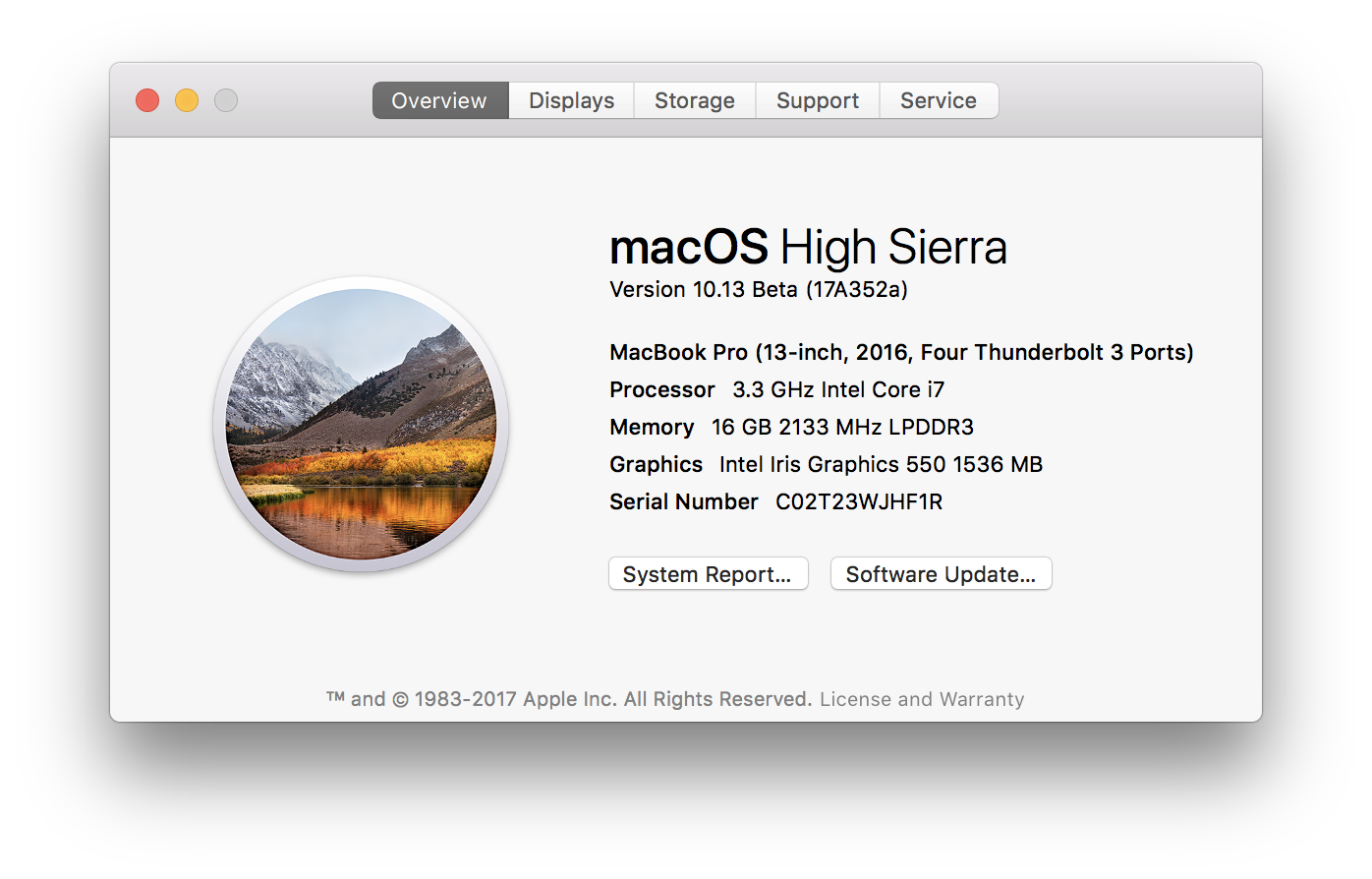
heroku seems to be working fine for me
$ brew install heroku --HEAD
==> Installing dependencies for heroku: node
==> Installing heroku dependency: node
==> Downloading https://nodejs.org/dist/v8.4.0/node-v8.4.0.tar.xz
Already downloaded: /Users/dickeyxxx/Library/Caches/Homebrew/node-8.4.0.tar.xz
==> ./configure --prefix=/usr/local/Cellar/node/8.4.0 --without-npm --with-intl=system-icu
==> make install
==> Downloading https://registry.npmjs.org/npm/-/npm-5.3.0.tgz
######################################################################## 100.0%
==> node /private/tmp/node-20170821-12470-xry5qx/node-v8.4.0/npm_bootstrap/bin/npm-cli.js install -ddd --global --prefix=/usr/
Warning: The post-install step did not complete successfully
You can try again using `brew postinstall node`
==> Caveats
Bash completion has been installed to:
  /usr/local/etc/bash_completion.d
==> Summary
🍺  /usr/local/Cellar/node/8.4.0: 4,152 files, 47.3MB, built in 10 minutes 43 seconds
==> Installing heroku --HEAD
==> Cloning https://github.com/heroku/cli.git
Updating /Users/dickeyxxx/Library/Caches/Homebrew/heroku--git
==> Checking out branch master
==> npm install -ddd --global --build-from-source --cache=/Users/dickeyxxx/Library/Caches/Homebrew/npm_cache --prefix=/usr/loc
🍺  /usr/local/Cellar/heroku/HEAD-a444c52: 6,265 files, 39.0MB, built in 16 seconds
 jdxcode
on 22 Aug 2017
jdxcode
on 22 Aug 2017
Status with High Sierra beta 7 and Xcode 9 beta 6
Issues fixed
midnight-commanderfails to build withno member named 'st_atim' in 'struct stat'erlang@19fails to build due to pointer comparisonphantomjsfails to build because it builds Qtbase and triggers QTBUG-62266. Issue reported upstream: https://github.com/ariya/phantomjs/issues/15116iperffails to buildgspellfails to buildufrawfails to build, which I reported to upstreammd5deepfails to build, for which a patch is available upstream: https://github.com/jessek/hashdeep/pull/361hydrafails to build, it is not 10.13-specific: installinghydrafrom source, without options, whensubversionis present leads to build failurealurefails to build witherror: use of undeclared identifier 'close'expectfails to build because it cannot findtclConfig.shdosboxerlang@18- GCC (latest as well as
gcc@6): known failure on APFS filesystem due to parallel make bochsgcc@5docker-machine-driver-xhyvefails to build, not High Sierra-specific https://github.com/Homebrew/homebrew-core/pull/17186jsoncpp(not 10.13 specific: #17589)atomicparsleyswiftformatfails to build, upstream issue is being worked on: https://github.com/nicklockwood/SwiftFormat/issues/169carthagefails to build, upstream knows. Head works, and I've asked them to publish a new releasexctoolfails to build, upstream issue is fixed in masterchuckrethinkdbfails to build, upstream patch at https://github.com/rethinkdb/rethinkdb/pull/6450mamefails to build, upstream doesn't care for now: https://github.com/mamedev/mame/issues/2598smakefails to build withSegmentation fault[email protected]still fails to build (after first issue was fixed)[email protected]has several issues
Intermittent or unreproducible failures
diracsnappy1.1.7 fails to build (but 1.1.6 was building fine)libftdifails to build: not 10.13 related, fixed by #17766
Not yet fixed, among our top #1000 formulas
gdalfails to build with
In file included from adsrange.cpp:40:
/Applications/Xcode-beta.app/Contents/Developer/Toolchains/XcodeDefault.xctoolchain/usr/include/c++/v1/cmath:313:9: error: no member named 'signbit' in the global namespace
using ::signbit;
      ~~^
gearmanfails to build with the same issuehandbrakefails to build, reported upstream: https://github.com/HandBrake/HandBrake/issues/872inferfails to build, but it is apparently not specific to High Sierraios-deployfails to build withld: framework not found MobileDevice, reported upstream: https://github.com/phonegap/ios-deploy/issues/311passengerfails to buildswiftgenfails to build, does not support Xcode 9: https://github.com/SwiftGen/SwiftGen/issues/330
Not yet fixed, formulas with lower usage
[email protected]anttweakbarapache-arrowaqbankingaurora-clibastetblastembluepillcafcczecharm-toolscockroachcoturndaqdarkstatdc3ddddddosbox-xdromeaudiodshbechoprint-codegenelixirscriptelmenigmaexodriverexultfastbitfceuxffms2flannlibgdarrdtoolucspi-tcp
glew,mpv,xdotandsmpegtests fail, because they can't be run remotely with no graphical session openbandcamp-dl,bbcolors,[email protected],cpanminus,terminal-notifier,netcattests fail
fxcoudert
on 22 Aug 2017
The gdal build failure can be reduced down to a simple header issue, when Xcode and CLT are both installed. I believe it is an Apple bug:
$ cat a.cpp
#include <cmath>
int main (void) { return 0; }
$ clang++ a.cpp
$ clang++ a.cpp -I/usr/include
In file included from a.cpp:1:
/Applications/Xcode-beta.app/Contents/Developer/Toolchains/XcodeDefault.xctoolchain/usr/include/c++/v1/cmath:313:9: error:
      no member named 'signbit' in the global namespace
using ::signbit;
      ~~^
I have reported it to Apple (radar 34030838).
fxcoudert
on 23 Aug 2017
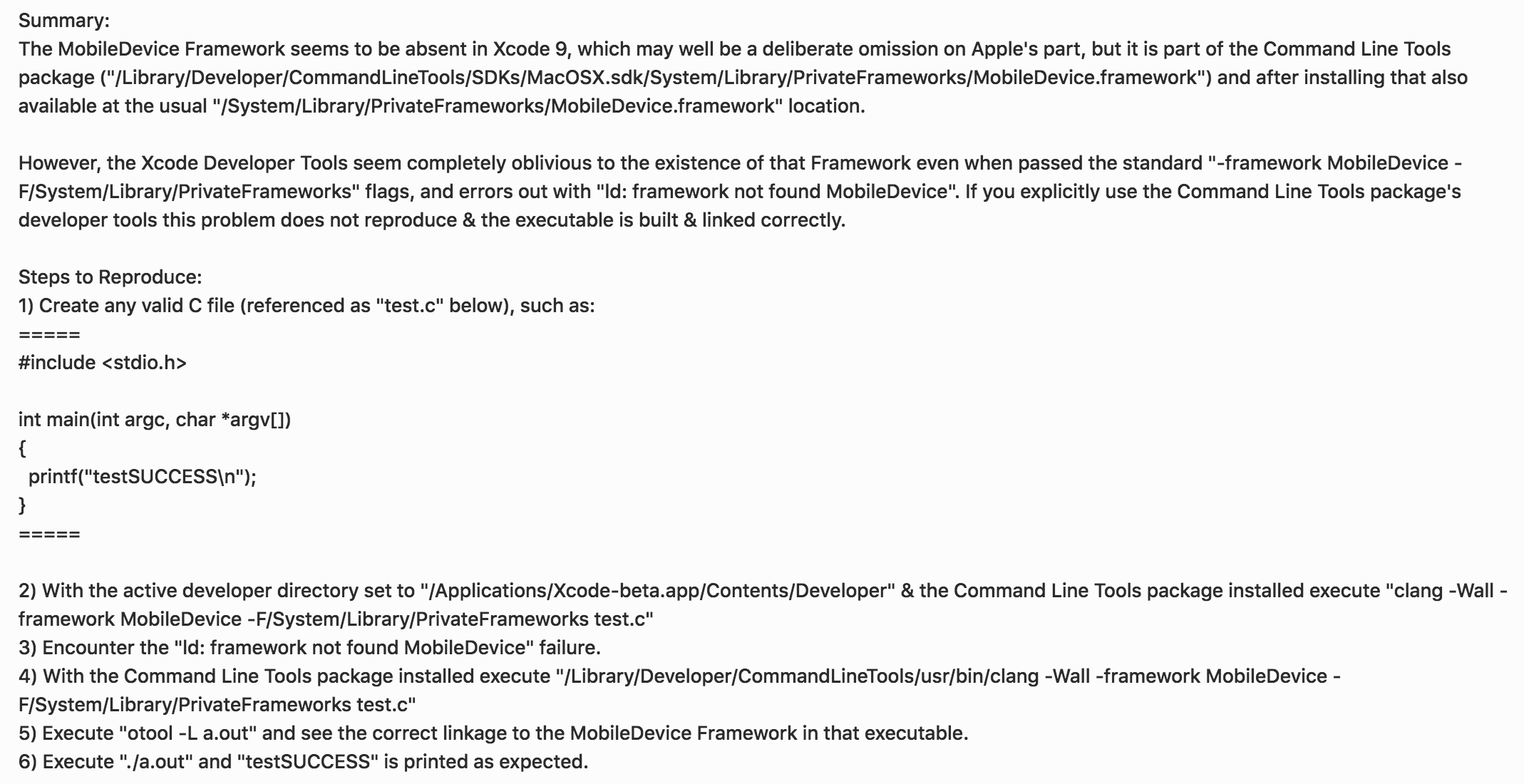
I'm not sure whether it impacts any formulae, but I reported this to Apple last week:
DomT4
on 23 Aug 2017
Currently the Swift formula is failing on 10.13 during the CXX build of the Swift AST.
JCount
on 23 Aug 2017
@fxcoudert, the gdal issue should only be a problem if you installed the CLTools package. It isn't an issue if you just install Xcode but not the CLTools (technically the issue is with the DevSDK package that is contained in the CLTools package missing a file). We were unaware of the issue until about a week ago and are working on a solution.
 jeremyhu
on 24 Aug 2017
jeremyhu
on 24 Aug 2017
I cannot build cmake 3.9.1 which is dependency of many packages. Error is
Error: The core module cannot be found. Did you install Sphinx and its dependencies correctly?
I tried
brew reinstall sphinx
brew reinstall sphinx-doc
brew reinstall docutils
easy_install sphinx
my High Sierra is 17A352a
brew config
HOMEBREW_VERSION: 1.3.1
ORIGIN: https://github.com/Homebrew/brew.git
HEAD: 69799d97b1e7314912b2ee234dec2c179c5fb969
Last commit: 2 weeks ago
Core tap ORIGIN: https://github.com/Homebrew/homebrew-core
Core tap HEAD: 459e0f3ac5dfb30a47c3c26e53a41455553e0753
Core tap last commit: 8 hours ago
HOMEBREW_PREFIX: /usr/local
HOMEBREW_REPOSITORY: /usr/local/Homebrew
HOMEBREW_CELLAR: /usr/local/Cellar
HOMEBREW_BOTTLE_DOMAIN: https://homebrew.bintray.com
CPU: quad-core 64-bit haswell
Homebrew Ruby: 2.3.3 => /System/Library/Frameworks/Ruby.framework/Versions/2.3/usr/bin/ruby
Clang: 9.0 build 900
Git: 2.14.1 => /usr/local/bin/git
Perl: /usr/bin/perl
Python: /usr/local/opt/python/libexec/bin/python => /usr/local/Cellar/python/2.7.13_1/Frameworks/Python.framework/Versions/2.7/bin/python2.7
Ruby: /usr/bin/ruby => /System/Library/Frameworks/Ruby.framework/Versions/2.3/usr/bin/ruby
Java: 1.8.0_73
macOS: 10.13-x86_64
Xcode: N/A
CLT: 9.0.0.0.1.1503068762
X11: 2.7.11 => /opt/X11
- xcode-select -p
/Library/Developer/CommandLineTools
Any hint? Thanks
 darnel
on 24 Aug 2017
darnel
on 24 Aug 2017
@darnel please open a separate issue about the cmake build failure, fill out the full template, attach build logs and brew doctor output as requested by our issue template. Thanks!
fxcoudert
on 24 Aug 2017
Apparently if some PrivateFramework linking remains broken through to GM we're stuck with it. Apple took 10+ days to decide they had no interest in fixing the bug 😓. So ios-deploy might be permanently screwed unless the Xcode clang is accidentally fixed.

I can link to other private frameworks just fine, so, I'm hoping they accidentally fix linking this specific one 🙄.
DomT4
on 25 Aug 2017
@fxcoudert Thanks and sorry. This issue's title looked promising ;-)
darnel
on 25 Aug 2017
Apple took 10+ days to decide they had no interest in fixing the bug
I've gently asked Apple to reconsider the bug closure on the basis that linking to other private frameworks works but that specific one does not, and the inconsistency is the bug rather than the linking failure itself. It's a weak argument but 🤷♂️.
DomT4
on 26 Aug 2017
HOMEBREW_DEVELOPER=1 HOMEBREW_RUBY_PATH=/usr/local/bin/ruby brew install cmake
will fix cmake presuming you have brew ruby installed
 anthonylauzon
on 26 Aug 2017
anthonylauzon
on 26 Aug 2017
The issue with jsoncpp appears to be that it cannot find ccache when compiling under brew install (I'm not sure why this is happening).
A simple hacky fix is to uninstall the ccache package so that there is no ccache binary which then lets jsoncpp install cleanly. I think that a more reasonable approach might be patching out the cmake check for ccache since it seems like using ccache is discouraged in homebrew.
 rundel
on 31 Aug 2017
rundel
on 31 Aug 2017
10.13 has been a nearly painless transition for me so far thanks to the fixes already in brew.
I have built (but not yet tested) a large stack of in-house apps with only one pain point, a regression in fakeroot:
$ brew install fakeroot
$ fakeroot -v
fakeroot version 1.22
$ fakeroot install -d -o root dummy.dir
install: chown 0:4294967295 dummy.dir: Operation not permitted
This works in mac os x 10.12 and below.
For now I'll patch inhouse Makefiles that run into this to remove the -o root, as https://raw.githubusercontent.com/Homebrew/formula-patches/4dcf528/freeimage/3.17.0.patch does.
 dankegel
on 4 Sep 2017
dankegel
on 4 Sep 2017
Having issues installing heroku.
First problem was icu4c, couldn't find include files (specifically unicode/uversion.h). Workaround was to do a brew link --force icu4c
Current problem is node:
brew install heroku --HEAD
==> Installing dependencies for heroku: node
==> Installing heroku dependency: node
==> Downloading https://nodejs.org/dist/v8.4.0/node-v8.4.0.tar.xz
Already downloaded: /Users/kencooper/Library/Caches/Homebrew/node-8.4.0.tar.xz
==> ./configure --prefix=/usr/local/Cellar/node/8.4.0 --without-npm --with-intl=system-icu
==> make install
Last 15 lines from /Users/kencooper/Library/Logs/Homebrew/node/02.make:
      v8::internal::(anonymous namespace)::SetResolvedDateSettings(v8::internal::Isolate*, icu_59::Locale const&, icu_59::SimpleDateFormat*, v8::internal::Handle<v8::internal::JSObject>) in libv8_base.a(intl-objects.o)
      v8::internal::(anonymous namespace)::SetResolvedNumberSettings(v8::internal::Isolate*, icu_59::Locale const&, icu_59::DecimalFormat*, v8::internal::Handle<v8::internal::JSObject>) in libv8_base.a(intl-objects.o)
      v8::internal::(anonymous namespace)::SetResolvedCollatorSettings(v8::internal::Isolate*, icu_59::Locale const&, icu_59::Collator*, v8::internal::Handle<v8::internal::JSObject>) in libv8_base.a(intl-objects.o)
      v8::internal::(anonymous namespace)::SetResolvedBreakIteratorSettings(v8::internal::Isolate*, icu_59::Locale const&, icu_59::BreakIterator*, v8::internal::Handle<v8::internal::JSObject>) in libv8_base.a(intl-objects.o)
      v8::internal::Runtime_CanonicalizeLanguageTag(int, v8::internal::Object**, v8::internal::Isolate*) in libv8_base.a(runtime-intl.o)
      v8::internal::Stats_Runtime_CanonicalizeLanguageTag(int, v8::internal::Object**, v8::internal::Isolate*) in libv8_base.a(runtime-intl.o)
      v8::internal::Runtime_AvailableLocalesOf(int, v8::internal::Object**, v8::internal::Isolate*) in libv8_base.a(runtime-intl.o)
      ...
  "_ulocdata_getCLDRVersion_59", referenced from:
      node::i18n::(anonymous namespace)::GetVersion(v8::FunctionCallbackInfo<v8::Value> const&) in node_i18n.o
ld: symbol(s) not found for architecture x86_64
clang: error: linker command failed with exit code 1 (use -v to see invocation)
make[1]: *** [/private/tmp/node-20170904-56294-1qjc8jf/node-v8.4.0/out/Release/node] Error 1
rm 58c822d65a20139d08a95902da4644da971bee39.intermediate
make: *** [node] Error 2
Any hints? TIA, scratching my head now. Config follows.

brew config
HOMEBREW_VERSION: 1.3.2-2-ge777010
ORIGIN: https://github.com/Homebrew/brew.git
HEAD: e77701075606cbcf3075d7fcc123556b63977bcf
Last commit: 7 hours ago
Core tap ORIGIN: https://github.com/Homebrew/homebrew-core
Core tap HEAD: 75d2a4a97f5e008120a603807131c185bf18dc00
Core tap last commit: 88 minutes ago
HOMEBREW_PREFIX: /usr/local
HOMEBREW_REPOSITORY: /usr/local/Homebrew
HOMEBREW_CELLAR: /usr/local/Cellar
HOMEBREW_BOTTLE_DOMAIN: https://homebrew.bintray.com
CPU: octa-core 64-bit dunno
Homebrew Ruby: 2.3.3 => /System/Library/Frameworks/Ruby.framework/Versions/2.3/usr/bin/ruby
Clang: 9.0 build 900
Git: 2.14.1 => /usr/local/bin/git
Perl: /usr/bin/perl
Python: /usr/bin/python
Ruby: /usr/bin/ruby => /System/Library/Frameworks/Ruby.framework/Versions/2.3/usr/bin/ruby
Java: 1.8.0_60, 1.8.0_05, 1.7.0_51, 1.7.0_21
macOS: 10.13-x86_64
Xcode: 9.0
CLT: N/A
X11: 2.7.11 => /opt/X11
 kcoop
on 5 Sep 2017
kcoop
on 5 Sep 2017
OpenSSL seems to fail to build on 10.13db9 17A360a but it works fine with --force-bottle.
Output:
Stevens-MacBook-Pro:~ steven$ brew install python python3
==> Installing dependencies for python: openssl
==> Installing python dependency: openssl
==> Downloading https://www.openssl.org/source/openssl-1.0.2l.tar.gz
Already downloaded: /Users/steven/Library/Caches/Homebrew/openssl-1.0.2l.tar.gz
^C
Stevens-MacBook-Pro:~ steven$ brew install openssl
==> Downloading https://www.openssl.org/source/openssl-1.0.2l.tar.gz
Already downloaded: /Users/steven/Library/Caches/Homebrew/openssl-1.0.2l.tar.gz
==> perl ./Configure --prefix=/usr/local/Cellar/openssl/1.0.2l --openssldir=/usr
==> make depend
==> make
Last 15 lines from /Users/steven/Library/Logs/Homebrew/openssl/03.make:
2017-09-04 17:34:32 -0700

make

making all in crypto...
/usr/bin/perl ../util/mkbuildinf.pl "clang -I. -I.. -I../include  -fPIC -fno-common -DOPENSSL_PIC -DZLIB_SHARED -DZLIB -DOPENSSL_THREADS -D_REENTRANT -DDSO_DLFCN -DHAVE_DLFCN_H -arch x86_64 -O3 -DL_ENDIAN -Wall -DOPENSSL_IA32_SSE2 -DOPENSSL_BN_ASM_MONT -DOPENSSL_BN_ASM_MONT5 -DOPENSSL_BN_ASM_GF2m -DSHA1_ASM -DSHA256_ASM -DSHA512_ASM -DMD5_ASM -DAES_ASM -DVPAES_ASM -DBSAES_ASM -DWHIRLPOOL_ASM -DGHASH_ASM -DECP_NISTZ256_ASM" "darwin64-x86_64-cc" >buildinf.h
make[1]: *** No rule to make target `6.app/Contents/Developer/Platforms/MacOSX.platform/Developer/SDKs/MacOSX10.13.sdk/usr/include/Availability.h', needed by `cryptlib.o'.  Stop.
make: *** [build_crypto] Error 1

Do not report this issue to Homebrew/brew or Homebrew/core!

These open issues may also help:
Upgrade to mono 5.2.0.215, fsharp 4.1.25 and add msbuild d15.3 https://github.com/Homebrew/homebrew-core/pull/17435
faust. v2.1.0 and v0.9.90 (new formula) https://github.com/Homebrew/homebrew-core/pull/16724
First issues with macOS 10.13 High Sierra https://github.com/Homebrew/homebrew-core/issues/14418
xerces-c 3.2.0 https://github.com/Homebrew/homebrew-core/pull/17371
Formulae affected by Homebrew/brew#2482 https://github.com/Homebrew/homebrew-core/issues/13133
php: 7.1 (new formula) https://github.com/Homebrew/homebrew-core/pull/16067
hadoop 2.8.1 failed to install on 10.12.6 https://github.com/Homebrew/homebrew-core/issues/17065

Error: You are using macOS 10.13.
We do not provide support for this pre-release version.
You may encounter build failures or other breakages.
Please create pull-requests instead of filing issues.

Error: You are using macOS 10.13.
We do not provide support for this pre-release version.
You may encounter build failures or other breakages.
Please create pull-requests instead of filing issues.
 SConaway
on 5 Sep 2017
SConaway
on 5 Sep 2017
It's useful if people provide brew gist-logs of failed builds. There's a fair bit more information in there than just the failure. Also useful is a reading from xcodebuild -version if you're running a system with Xcode present.
DomT4
on 5 Sep 2017
Here's the gist for doing a brew install node directly: https://gist.github.com/1fc2dbabc3b0c1f484fd44cbe016818c
and for Xcode:
xcodebuild -version
Xcode 9.0
Build version 9M214v
@kcoop I presume you're not running a Hackintosh? _(Apparently not. Your screenshot of the overview didn't load last time for some reason, apologies)_ The CPU: octa-core 64-bit dunno is a little odd.
@SConaway A full brew gist-logs openssl is more useful than the condensed output.
DomT4
on 5 Sep 2017
FWIW, I'm unable to reproduce any failures with either node or openssl as per:
HOMEBREW_VERSION: 1.3.2-2-ge777010
ORIGIN: https://github.com/Homebrew/brew.git
HEAD: e77701075606cbcf3075d7fcc123556b63977bcf
Last commit: 8 hours ago
Core tap ORIGIN: https://github.com/Homebrew/homebrew-core
Core tap HEAD: 75d2a4a97f5e008120a603807131c185bf18dc00
Core tap last commit: 3 hours ago
HOMEBREW_PREFIX: /usr/local
HOMEBREW_REPOSITORY: /usr/local/Homebrew
HOMEBREW_CELLAR: /usr/local/Cellar
HOMEBREW_BOTTLE_DOMAIN: https://homebrew.bintray.com
CPU: octa-core 64-bit haswell
Homebrew Ruby: 2.3.3 => /System/Library/Frameworks/Ruby.framework/Versions/2.3/usr/bin/ruby
Clang: 9.0 build 900
Git: 2.14.1 => /usr/local/opt/git/bin/git
Perl: /usr/local/bin/perl => /usr/local/Cellar/perl/5.26.0/bin/perl
Python: /usr/local/opt/python/libexec/bin/python => /usr/local/Cellar/python/2.7.13_1/Frameworks/Python.framework/Versions/2.7/bin/python2.7
Ruby: /usr/local/var/rbenv/shims/ruby => /usr/local/var/rbenv/versions/2.4.1/bin/ruby
Java: 1.8.0_141
macOS: 10.13-x86_64
Xcode: 9.0 => /Applications/Xcode-beta.app/Contents/Developer
CLT: 9.0.0.0.1.1503068762
X11: N/A
I refused the upgrade to APFS though, but if it was related to APFS I'd be surprised if we hadn't heard about it by now with a wad of issue reports despite the "do not report this" message.
DomT4
on 5 Sep 2017
@DomtT4, no hackintosh, stock Mid 2017 MBP 15. See screenshot above. Thought that dunno was odd too.
Huh on the lack of repro. Any thoughts on approaches for further debugging this?
kcoop
on 5 Sep 2017
Yeah reloaded the page & your screenshot popped up. Not sure why it didn't load the first time. Small hunch, what does sysctl -n machdep.cpu.brand_string return for you? If it returns what I think it's going to return it's probably unrelated to the failure, sadly.
Any thoughts on approaches for further debugging this?
Is this the same failure as when icu4c isn't linked or is that failure different?
DomT4
on 5 Sep 2017
sysctl -n machdep.cpu.brand_string
Intel(R) Core(TM) i7-7700HQ CPU @ 2.80GHz
The icu4c failure was different. Error was that the compiler was missing unicode/version.h. Linking fixed that, put the .h files in the search path. Can add a gist for that if you like, but here's the essence of the failure:
In file included from ../deps/v8/src/assembler.cc:95:
../deps/v8/src/intl.h:14:10: fatal error: 'unicode/uversion.h' file not found
#include "unicode/uversion.h"
         ^~~~~~~~~~~~~~~~~~~~
1 error generated.
make[1]: *** [/private/tmp/node-20170904-19246-r81s6n/node-v8.4.0/out/Release/obj.target/v8_base/deps/v8/src/assembler.o] Error 1
make[1]: *** Waiting for unfinished jobs....
rm ff934aa2c35ff414fa4d1a0f92c22012fa1d3de8.intermediate
make: *** [node] Error 2
I should mention that this is all happening after a transfer using the migration assistant to a new machine (both running High Sierra beta). From a machine that has been building cruft over the years. I ran brew doctor a number of times, fixed a bunch of errors by uninstalling and reinstalling various targets. But as you can see from the gist, it's now down to just the ruby version and the warning about running a beta.
kcoop
on 5 Sep 2017
@SConaway this appears to be an issue specific to your configuration or your machine. Please open a new issue, fill out the complete template (including brew doctor, brew config output), and provide a link to logs.
The error message No rule to make target '6.app/Contents/Developer/Platforms/MacOSX.platform/Developer/SDKs/MacOSX10.13.sdk/usr/include/Availability.h' makes me think that you have an Xcode app bundle that includes a space in its name (maybe Xcode-beta 6.app?) and openssl build system isn't smart enough to handle it.
fxcoudert
on 5 Sep 2017
@kcoop this appears to be an issue specific to your configuration or your machine. Please open a new issue (CC'ing me), fill out the complete template (including brew doctor, brew config output), and provide a link to logs.
Also, can you check that you have only one version of icu4c installed, and that it's linked? Can you also reinstall it, building from source?
fxcoudert
on 5 Sep 2017
@fxcoudert, I've uninstalled and reinstalled icu4c using brew install icu4c, which IIRC is compiling from source. If I don't explicitly brew link icu4c, I get that different error installing node (the one mentioned above):
In file included from ../deps/v8/src/assembler.cc:95:
../deps/v8/src/intl.h:14:10: fatal error: 'unicode/uversion.h' file not found
#include "unicode/uversion.h"
         ^~~~~~~~~~~~~~~~~~~~
1 error generated.
BTW, in the process of trying to get as pristine as possible with brew doctor to create a new issue, it tells me to unlink icu4c.
Also, not to pile on, maybe it's relevant, I've been trying to fix this brew doctor warning:
Warning: Ruby version 2.3.3 is unsupported on 10.13. Homebrew
is developed and tested on Ruby 2.0, and may not work correctly
on other Rubies. Patches are accepted as long as they don't cause breakage
on supported Rubies.
I tried updating ruby with brew install ruby (hoping it'd install a version appropriate for brew), but the message persists.
And the following shows
/usr/local/bin/ruby --version
ruby 2.4.1p111 (2017-03-22 revision 58053) [x86_64-darwin17]
but oddly just plain
ruby --version
ruby 2.3.3p222 (2016-11-21 revision 56859) [universal.x86_64-darwin17]
and yet
which ruby
/usr/local/bin/ruby
Related issues
 jyutzler
·
4Comments
jyutzler
·
4Comments
 daviderestivo
·
4Comments
daviderestivo
·
4Comments
 oli-laban
·
3Comments
oli-laban
·
3Comments
 Thirudhas
·
4Comments
Thirudhas
·
4Comments
 sstadick
·
4Comments
sstadick
·
4Comments
Most helpful comment
@kylebrowning you can
brew install --force-bottle foofor anything you're having trouble building and it should pour the Sierra bottle.