Homebrew-cask: Latest Google Chrome upgrade running in App Translocation
General troubleshooting steps
- [ NA ] I have retried my command with
--forceand the issue is still present. - [ x ] I have checked the instructions for reporting bugs.
- [ x ] I made doubly sure this is not a checksum does not match error.
- [ x ] I ran
brew update-reset && brew updateand retried my command. - [ x ] I ran
brew doctor, fixed as many issues as possible and retried my command. - [ x ] I checked there are no open issues for the same problem.
- [ x ] I understand that if I ignore these instructions, my issue may be closed without review.
Description of issue
After latest upgrade of Google Chrome in cask, my Little Snitch is saying the app is running in App Translocation mode and won't allow me to 'always allow' any connections. Have to keep reauthorizing connections every time the app is started. Been upgrading through cask for months now and this is the first time this issue has come up.
Command that failed
Opening Chrome
Output of command with --force --verbose --debug
The application is running in App Translocation, a macOS security mechanism for apps that are not properly installed. You cannot create permanent rules until you move the application to the Applications folder and launch it from there.
Output of brew cask doctor
==> Homebrew Cask Version
Homebrew Cask 1.7.3-36-g88bf60d
Homebrew/homebrew-cask (git revision 02f179; last commit 2018-09-05)
==> macOS
10.13.6
==> SIP
Enabled
==> Java
10.0.2, 1.6.0_65-b14-468
==> Homebrew Cask Install Location
<NONE>
==> Homebrew Cask Staging Location
/usr/local/Caskroom
==> Homebrew Cask Taps:
/usr/local/Homebrew/Library/Taps/homebrew/homebrew-cask (4045 casks)
==> Contents of $LOAD_PATH
/Library/Ruby/Gems/2.3.0/gems/did_you_mean-1.0.0/lib
/Library/Ruby/Site/2.3.0
/Library/Ruby/Site/2.3.0/x86_64-darwin17
/Library/Ruby/Site/2.3.0/universal-darwin17
/Library/Ruby/Site
/System/Library/Frameworks/Ruby.framework/Versions/2.3/usr/lib/ruby/vendor_ruby/2.3.0
/System/Library/Frameworks/Ruby.framework/Versions/2.3/usr/lib/ruby/vendor_ruby/2.3.0/x86_64-darwin17
/System/Library/Frameworks/Ruby.framework/Versions/2.3/usr/lib/ruby/vendor_ruby/2.3.0/universal-darwin17
/System/Library/Frameworks/Ruby.framework/Versions/2.3/usr/lib/ruby/vendor_ruby
/System/Library/Frameworks/Ruby.framework/Versions/2.3/usr/lib/ruby/2.3.0
/System/Library/Frameworks/Ruby.framework/Versions/2.3/usr/lib/ruby/2.3.0/x86_64-darwin17
/System/Library/Frameworks/Ruby.framework/Versions/2.3/usr/lib/ruby/2.3.0/universal-darwin17
/usr/local/Homebrew/Library/Homebrew
==> Environment Variables
LC_ALL="en_US.UTF-8"
PATH="/usr/bin:/bin:/usr/sbin:/sbin:/usr/local/Homebrew/Library/Homebrew/shims/scm"
SHELL="/bin/bash"
Output of brew tap
heroku/brew
homebrew/bundle
homebrew/cask
homebrew/core
 chriskol
All 11 comments
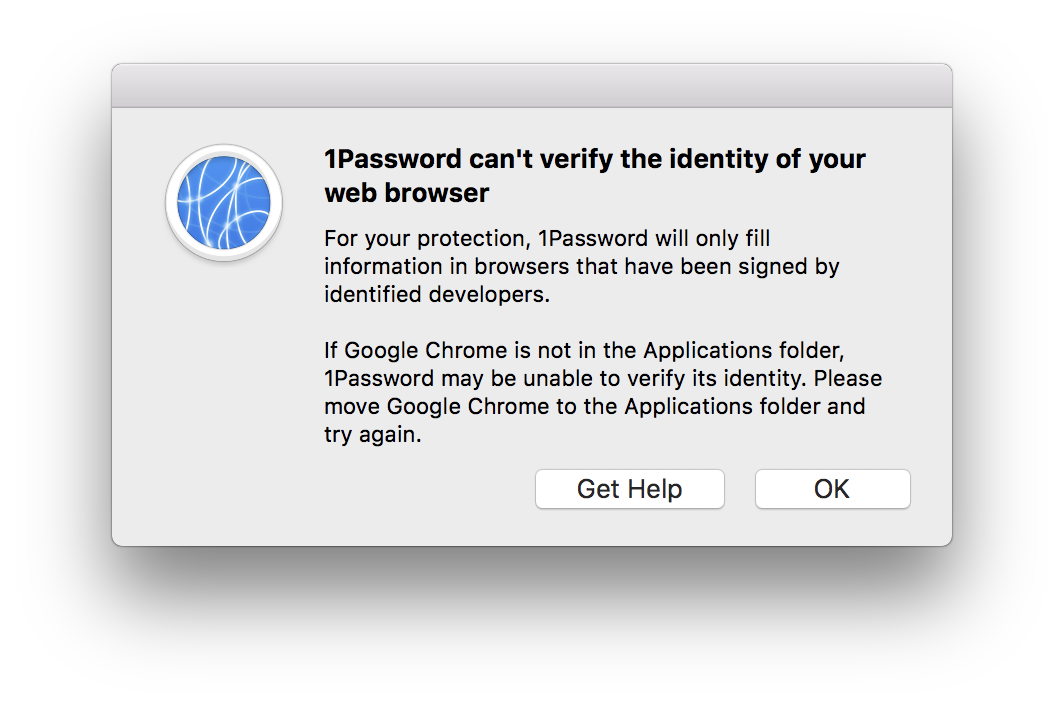
also I have an issue with 1Password
 idoo
on 5 Sep 2018
idoo
on 5 Sep 2018
Ping @reitermarkus. Same issue (different cask) as https://github.com/Homebrew/homebrew-cask/issues/49283, except now we do quarantine.
 vitorgalvao
on 5 Sep 2018
vitorgalvao
on 5 Sep 2018
offtop @vitorgalvao try monosapp
I don’t care for/use external screenshot tools.
vitorgalvao
on 5 Sep 2018
It seems a recent commit to cask is breaking a ton of apps.
For example, I did a cask reinstall of both Google Chrome and 1Password. Both apps now have the com.apple.quarantine flag, which didn't exist before.
There are two workarounds for this:
First, move the affected app (in my case, 1password and Google Chrome) out of the Applications folder to any arbitrary folder, then move it back to /Applications.
Second, remove the quarantine attribute using the command line:
xattr -r -d com.apple.quarantine /Applications/nameOfAppHere.app
Installing these with --no-quarantine brings up a warning about Gatekeeper, but doesn't seem to actually do anything. Those quarantine flags are still set, and these apps are broken until the above workarounds are used.
Any hope for a fix?
 yuusharo
on 5 Sep 2018
yuusharo
on 5 Sep 2018
The same has happened on my machine with every cask I just updated. The workaround by @yuusharo makes the applications work again as supposed. I am a little confused though because not every application having the quarantine attribute is being opened in app translocation mode. Does anyone have some insight in this?
 jankkm
on 5 Sep 2018
jankkm
on 5 Sep 2018
Yeah me too. I just upgraded FireFox and now it's doing it as well.
chriskol
on 6 Sep 2018
@chriskol xattr -r -d com.apple.quarantine /Applications/Firefox.app/ will solve your pain
so as temporary solution we can use:
xattr -r -d com.apple.quarantine /Applications/Firefox.app/
xattr -r -d com.apple.quarantine /Applications/Opera.app/
xattr -r -d com.apple.quarantine /Applications/Google\ Chrome.app/
Despite close, I still have the issue even after brew update/upgrade/reinstalling in cask.
via LittleSnitch
"The application is running in App Translocation, a macOS security mechanism for apps that are not properly installed. You cannot create permanent rules until you move the application to the Applications folder and launch it from there."
The app is already in the Applications folder
chriskol
on 9 Sep 2018
@chriskol Uninstall the app, delete the cache (rm -rf "$(brew --cache)"), and try again.
vitorgalvao
on 9 Sep 2018
@chriskol Apart from @vitorgalvao's steps, please file a separate issue if you're experiencing this.
 amyspark
on 9 Sep 2018
amyspark
on 9 Sep 2018
@chriskol You need to wait for release 1.7.4, which will contain the fix for this issue.
 claui
on 9 Sep 2018
claui
on 9 Sep 2018
Related issues
 lukasmalkmus
·
25Comments
vitorgalvao
·
21Comments
lukasmalkmus
·
25Comments
vitorgalvao
·
21Comments
 core-code
·
1621Comments
core-code
·
1621Comments
 bric3
·
34Comments
vitorgalvao
·
27Comments
bric3
·
34Comments
vitorgalvao
·
27Comments
Most helpful comment
It seems a recent commit to cask is breaking a ton of apps.
For example, I did a cask reinstall of both Google Chrome and 1Password. Both apps now have the com.apple.quarantine flag, which didn't exist before.
There are two workarounds for this:
First, move the affected app (in my case, 1password and Google Chrome) out of the Applications folder to any arbitrary folder, then move it back to /Applications.
Second, remove the quarantine attribute using the command line:
xattr -r -d com.apple.quarantine /Applications/nameOfAppHere.appInstalling these with --no-quarantine brings up a warning about Gatekeeper, but doesn't seem to actually do anything. Those quarantine flags are still set, and these apps are broken until the above workarounds are used.
Any hope for a fix?