Home: [Cross-Platform Signing] Unexpected errors about a package from nuget.org source occur after restoring Class Library (.Net Core) project
Details about Problem
NuGet version: NuGet Client Dev\5.9.0.6972
VS Version: Main\30726.31
OS Version: Windows-10-Enterprise-19h2
Installation:
1.Install VS main\30726.31: https://devdiv.visualstudio.com/DevDiv/_build/results?buildId=4257754&view=ms.vss-build-web.run-extensions-tab
Detailed repro steps
- Create a C# Class Library (.NET 5.0) package, make and update .nuspec file for the package with command “nuget spec”.
- Pack the package with command “nuget pack”, create a new test certificate:
.\CreateTestCertificate.ps1 -AddAsTrustedRootAuthority -GenerateCerFile. - Sign the package:
NuGet.exe sign <PackageFilePath> -CertificatePath <PfxFilePath>. - Create a project, add package reference in the .csproj file
<ItemGroup>

    <PackageReference Include="<packageName>" Version="<packageVersion>" />

 </ItemGroup>
5. Add the feed (path contains package signed in step2), set required mode in nuget.config file with trusted signers list:
<packageSources>

      <add key="<anyname>" value="<signed package parent folder>" />

   </packageSources>

  <config>

    <add key="signatureValidationMode" value="require" />

  </config>

  <trustedSigners>

     <author name="JamieZhang">

         <certificate fingerprint="AAAAA" hashAlgorithm="SHA256" allowUntrustedRoot="false" />

     </author>

  </trustedSigners>
- Clear the cache:
<patchedSDKPath>.\dotnet.exe nuget locals all –clear. - Delete the
\obj folder if there is any. - Go inside the project folder, verify the package by running restore:
<patchedSDKPath>.\dotnet.exe restore <projectpath>/<projectname>.csproj.
Expected
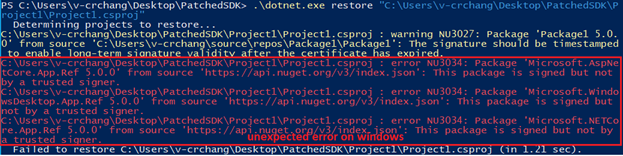
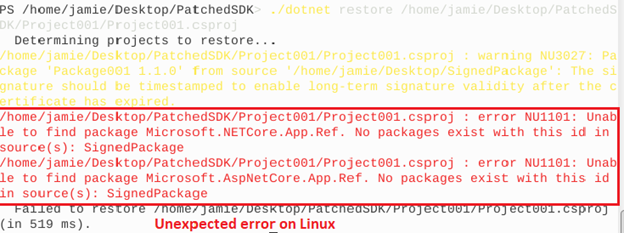
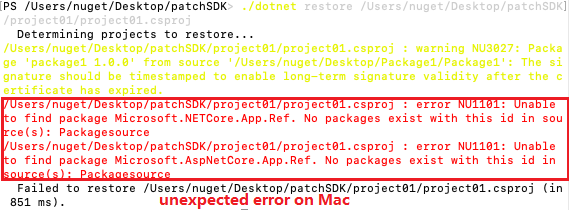
Only warning NU3027: The signature should be timestamped to enable long-term signature validity after the certificate has expired appear.
Actual
Unexpected errors occurred as below screenshot.
 v-crchang
All 7 comments
Sounds like we have a test case problem.
cc @heng-liu @kartheekp-ms.
@v-luzh The SDK doesn't ship with all the targeting packs, and that'd normally be downloaded through nuget.org if it doesn't ship with it.
If you add nuget.org to the sources, that'd do it.
I know that messes with the trusted signers, so consider adding Microsoft as an approved signer.
 nkolev92
on 1 Dec 2020
nkolev92
on 1 Dec 2020
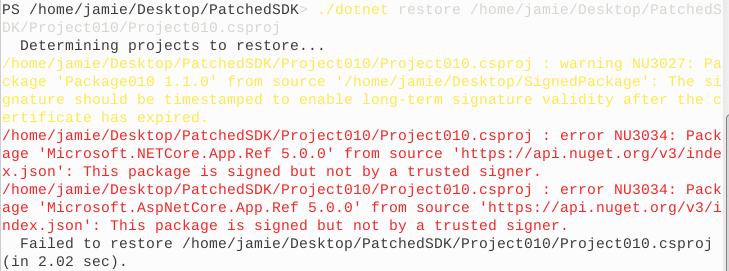
Hey @nkolev92, I still got the error NU3034 on Linux as below after adding "nuget.org" to the sources and "Microsoft" as a trusted signer. And this issue didn't repro when we did the Onboarding Test of the Cross-Platform Signing Verification Test on Dev\5.8.0.6848.
 v-luzh
on 2 Dec 2020
v-luzh
on 2 Dec 2020
@v-luzh Can you please paste the config?
Trusted signers are case sensitive.
nkolev92
on 2 Dec 2020
I think we don't need Patched SDK any more for testing because net5 is GA now. @heng-liu - correct me if my understanding is incorrect.
Microsoft certificate that was being used to sign packages was close to expiring, the certificate was rotated: https://devblogs.microsoft.com/nuget/microsoft-author-signing-certificate-update/
@v-luzh - Please try the work around suggested in the above link and let us know the feedback.
 kartheekp-ms
on 2 Dec 2020
kartheekp-ms
on 2 Dec 2020
@nkolev92 @kartheekp-ms, yes, the issue is fixed after using the workaround suggested in the above link. So, do we need to update all the test case of Cross-Platform Signing Verification Test or wait for the SDK shipped with all the targeting packs?
v-luzh
on 3 Dec 2020
Hi @kartheekp-ms @v-luzh , the difference between testing with patched SDK and testing with latest SDK is if we're testing against latest NuGet change or not.
If we use patched SDK, it's testing against the NuGet code we are going to insert.
If we use latest SDK, it's testing against the NuGet code which we've already inserted into dotnet. So in this way, we could only discover issues after insertion.
So I think testing against patched SDK reflects the latest change and we could discover issues earlier.
 heng-liu
on 3 Dec 2020
heng-liu
on 3 Dec 2020
Triage:
@heng-liu Can you please make sure the test-case is updated as needed.
nkolev92
on 7 Dec 2020
Related issues
 msaraf1
·
3Comments
msaraf1
·
3Comments
 p-kaczynski
·
3Comments
p-kaczynski
·
3Comments
 rrelyea
·
3Comments
rrelyea
·
3Comments
 LordMike
·
3Comments
LordMike
·
3Comments
 skofman1
·
3Comments
skofman1
·
3Comments
Most helpful comment
Hi @kartheekp-ms @v-luzh , the difference between testing with patched SDK and testing with latest SDK is if we're testing against latest NuGet change or not.
If we use patched SDK, it's testing against the NuGet code we are going to insert.
If we use latest SDK, it's testing against the NuGet code which we've already inserted into dotnet. So in this way, we could only discover issues after insertion.
So I think testing against patched SDK reflects the latest change and we could discover issues earlier.