Hls.js: Stall and/or A/V out of sync after subsequent calls on `startLoad` and `stopLoad` on live stream via Akamai (MPEG-TS)
What version of Hls.js are you using?
v0.14.9 it appears, but also 0.13.x, 0.12.x and 0.9 builds we were able to actually reproduce the bug.
What browser and OS are you using?
Chrome and Firefox on macOS (but this is very likely not OS or browser related).
Test stream:
Checklist
- [x] The issue observed is not already reported by searching on Github under https://github.com/video-dev/hls.js/issues
- [x] The issue occurs in the stable client on https://hls-js.netlify.com/demo and not just on my page
- [x] The issue occurs in the latest client on https://hls-js-dev.netlify.com/demo and not just on my page
- [x] The stream has correct Access-Control-Allow-Origin headers (CORS)
- [x] There are no network errors such as 404s in the browser console when trying to play the stream
Steps to reproduce
Scroll to playback controls below video and:
- Click "Stop loading" (only calls
stopLoad()onHlsAPI) - Wait at least a few seconds
- Click "Start loading" (only calls
startLoad()onHlsAPI)
Expected behavior
Loading should resume without issues. Eventually, buffer underrun may happen that should be recoverable after calling startLoad.
Actual behavior
The video will first stall, then it might recover by itself after quite some time.
But if trying to manually seek, the A/V sync will be completely off by several seconds and unrecoverable without reloading the player session completely.
Console output
I will skip on this for now in order to avoid unncessary noise. I have done some investigations so far. The console output hasn't been much conclusive.
Paste the contents of the browser console here.
For media errors reported on Chrome browser, please also paste the output of chrome://media-internals
 tchakabam
All 5 comments
Test stream url 403s for me.
 robwalch
on 26 Aug 2020
robwalch
on 26 Aug 2020
Test stream url 403s for me.
sorry there was geoblockig on stream, I asked ZDF for non-geoblockend stream, please try
https://zdfhls20-i.akamaihd.net/hls/live/744753/none/high/master.m3u8
 nitrat7
on 2 Sep 2020
nitrat7
on 2 Sep 2020
Click "Start loading" (only calls startLoad() on Hls API)
Wait at least a few seconds
Click "Stop loading" (only calls stopLoad() on Hls API)
the player starts loading on it's own. Shouldn't the steps be stopLoad() then startLoad() to resume?
How long should I let the stream player before calling stop load?
Should I let it play and stall after before starting the network again? For how long?
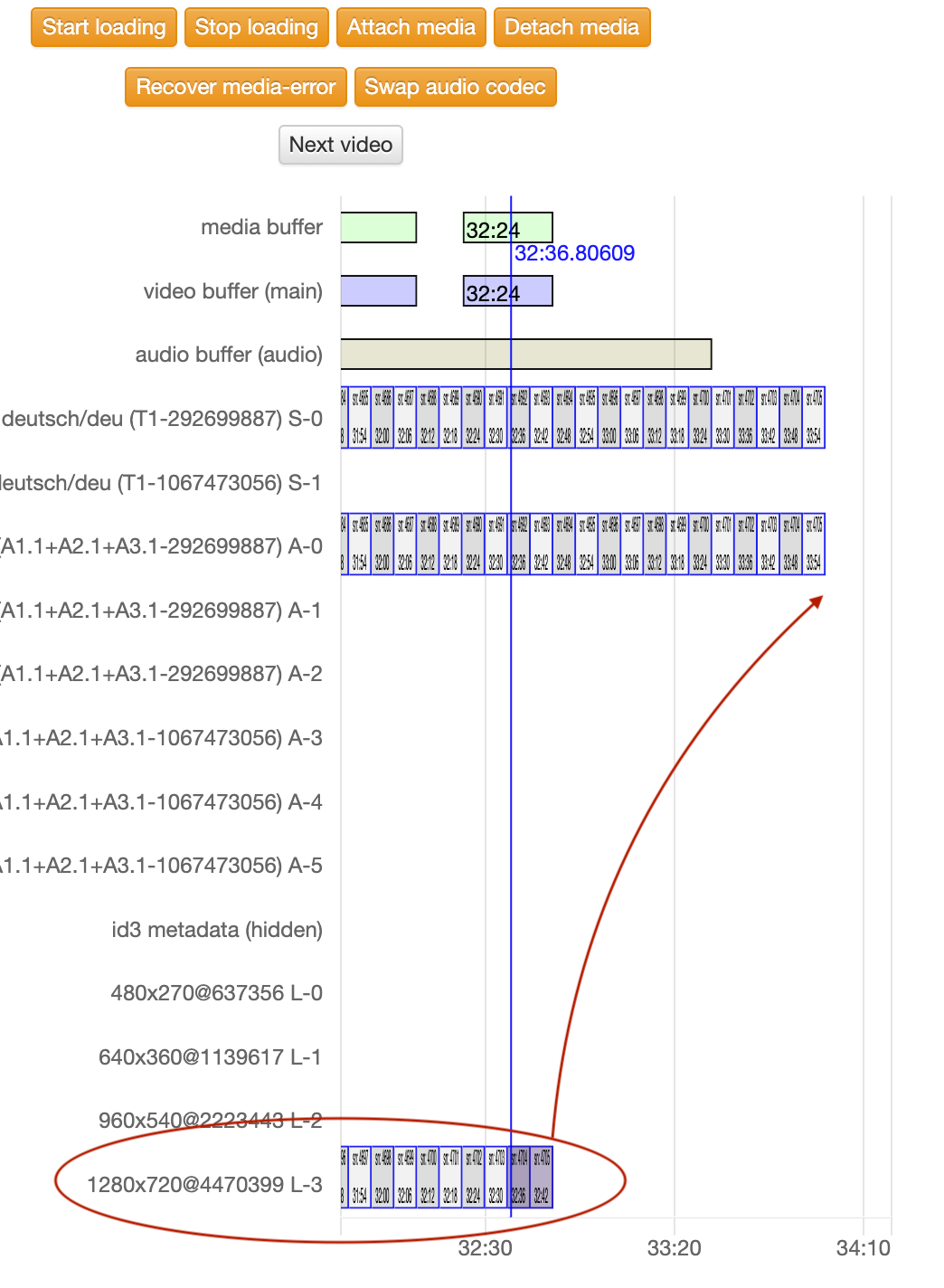
Have you verified that the playlists are in sync and the positions correct in the Timeline? I am seeing the video playlist fall significantly behind the audio and video playlist after stopping and resuming network activity. It't not clear why. This is likely a bug with merging playlist on live updates and syncing of media tracks. I would recommend restarting the stream with a new hls.js instance after calling stopLoad as a workaround until this issue has been isolated.
robwalch
on 2 Sep 2020
I found the issue. Level details are cleared on startLoad which breaks merging of live levels, but the same is not applied to subs or audio tracks. This looks like bad code which I will remove. If it turns out there is something else that needs to be reset in details, or loading of older frags on start needs to be addressed again without clearing details, we can address that on a case-by-case basis.
https://github.com/video-dev/hls.js/commit/935bb53379c8dbc1b70eb8687f4476c65d14bf54
robwalch
on 2 Sep 2020
the player starts loading on it's own. Shouldn't the steps be stopLoad() then startLoad() to resume?
@robwalch Yes obviously. I had inverted the steps by mistake. That's corrected now in the description here.
tchakabam
on 3 Sep 2020
Related issues
 harbinha
·
3Comments
harbinha
·
3Comments
 shalommeoded
·
3Comments
shalommeoded
·
3Comments
 osamay
·
4Comments
osamay
·
4Comments
 PeterBassemYoussef
·
3Comments
PeterBassemYoussef
·
3Comments
 NicholasAsimov
·
3Comments
NicholasAsimov
·
3Comments