Snippets
Creates HiveTypes structure
how to install:
- Call your commands prompt Cmd+Shift+P and type "user snipp"
- Select Configure User Snippets and choose dart.json
- Paste the code above and save it.
usage:
- create a file example.dart
- enter in the file you created _hive_ or _hivc_ to recall the snippet
- _hive_: extends HiveObject
- _hivc_: simple HiveType class
{
"HiveType class extends HiveObject": {
        "prefix": "hive",
        "body": [
            "import 'package:hive/hive.dart';",
            "",
            "part '${TM_FILENAME_BASE}.g.part';",
            "",
            "@HiveType()",
            "class ${TM_FILENAME_BASE/(.*)/${1:/pascalcase}/} extends HiveObject {",
            "\t@HiveField(0)",
            "\tString id;",
            "\t${0:// Hive fields go here}",
            "}",
        ],
        "description": "Creates an HiveType class extending HiveObject structure based on the filename."
    },
    "HiveType class": {
        "prefix": "hivc",
        "body": [
            "import 'package:hive/hive.dart';",
            "",
            "part '${TM_FILENAME_BASE}.g.part';",
            "",
            "@HiveType()",
            "class ${TM_FILENAME_BASE/(.*)/${1:/pascalcase}/} {",
            "\t@HiveField(0)",
            "\tString id;",
            "\t${0:// Hive fields go here}",
            "}",
        ],
        "description": "Creates an HiveType class structure based on the filename."
    }
}
 peekpt
All 11 comments
Wooow this is so cool. I didn't even know you could create snippets yourself 😍
I'm not able to test them currently but if it works and I get your permission, I'd love to create a documentation page for this snippet...
 leisim
on 26 Oct 2019
leisim
on 26 Oct 2019
Yes of course you can 😄
peekpt
on 26 Oct 2019
I'd love to take this a step further with code actions and maybe checks for Hive using the analyzer plugin SDK. I think it would be cool if you could, for example, add all annotations to an existing class.
I have never used the analyzer so I don't know what is possible but I think it is very powerful...
We can use this issue to discuss the possibilities.
leisim
on 26 Oct 2019
Well snippets are a VSCode thing, there's also a documentation for it.
But changing code with the analyzer seems to be a laborious job to do.
I've never seen that kind of behaviour before.
peekpt
on 26 Oct 2019
But changing code with the analyzer seems to be a laborious job to do.
I've never seen that kind of behaviour before.
I don't think it is too hard. I know that moor uses the analyzer to check SQL statements. And I believe Flutter uses it for code actions like center widget etc.
The advantage of the analyzer is that it also works on Android Studio without changes.
But the snippets are enough for now. There are more important tasks than code actions currently.
leisim
on 26 Oct 2019
Maybe it's possible to use some kind of regex, detecting the symbols like class, String, Int,List and add the annotations the line before.🤔
peekpt
on 26 Oct 2019
Yes exactly. We can also check whether the fieldIds are unique.
leisim
on 26 Oct 2019
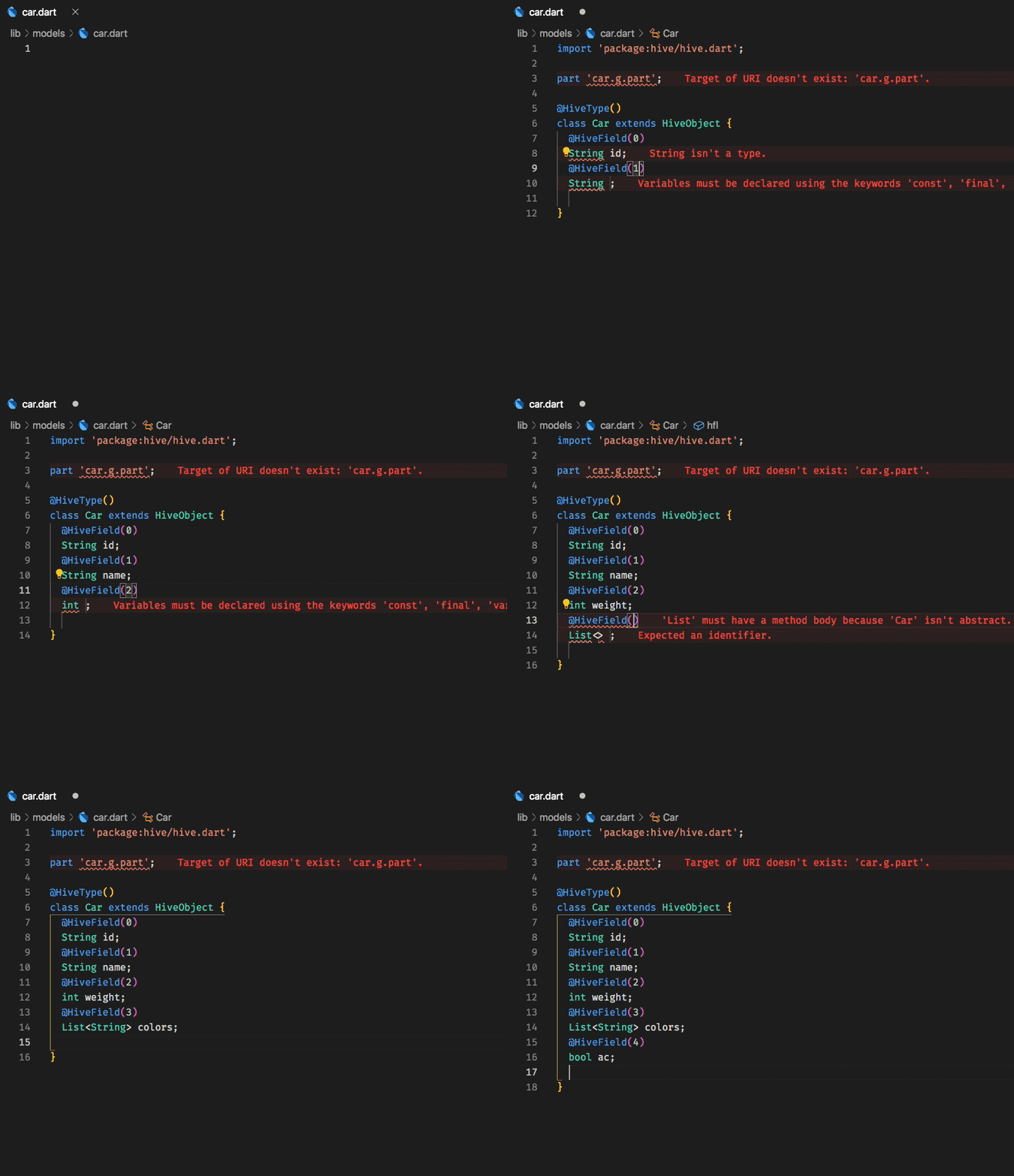
{
      "HiveType class extends HiveObject": {
        "prefix": "hive",
        "body": [
            "import 'package:hive/hive.dart';",
            "",
            "part '${TM_FILENAME_BASE}.g.part';",
            "",
            "@HiveType()",
            "class ${TM_FILENAME_BASE/(.*)/${1:/pascalcase}/} extends HiveObject {",
            "\t@HiveField(0)",
            "\tString id;",
            "\t${0:// Hive fields go here}",
            "}",
        ],
        "description": "Creates an HiveType class extending HiveObject structure based on the filename."
    },
    "HiveType class": {
        "prefix": "hivc",
        "body": [
            "import 'package:hive/hive.dart';",
            "",
            "part '${TM_FILENAME_BASE}.g.part';",
            "",
            "@HiveType()",
            "class ${TM_FILENAME_BASE/(.*)/${1:/pascalcase}/} {",
            "\t@HiveField(0)",
            "\tString id;",
            "\t${0:// Hive fields go here}",
            "}",
        ],
        "description": "Creates an HiveType class structure based on the filename."
    },
    "@HiveField(#)": {
        "prefix": "hf",
        "body": [
            "@HiveField(${1})",
            "${2};",
            "${0}"
        ],
        "description": "Creates @HiveField({number})"
    },
    "@HiveType()": {
        "prefix": "ht",
        "body": [
            "@HiveType()",
            "${0}"
        ],
        "description": "Creates @HiveType()"
    },
    "@HiveField(#) String": {
        "prefix": "hfs",
        "body": [
            "@HiveField(${1})",
            "String ${2};",
            "${0}"
        ],
        "description": "Creates @HiveField({number}) String"
    },
    "@HiveField(#) int": {
        "prefix": "hfi",
        "body": [
            "@HiveField(${1})",
            "int ${2};",
            "${0}"
        ],
        "description": "Creates @HiveField({number}) int"
    },
    "@HiveField(#) bool": {
        "prefix": "hfb",
        "body": [
            "@HiveField(${1})",
            "bool ${2};",
            "${0}"
        ],
        "description": "Creates @HiveField({number}) bool"
    },
    "@HiveField(#) List": {
        "prefix": "hfl",
        "body": [
            "@HiveField(${1})",
            "List<${2}> ${3};",
            "${0}"
        ],
        "description": "Creates @HiveField({number}) List<>"
    },
        "@HiveField(#) double": {
        "prefix": "hfd",
        "body": [
            "@HiveField(${1})",
            "double ${2};",
            "${0}"
        ],
        "description": "Creates @HiveField({number}) double"
    }
}
Thanks again! The snippets work great and I created a documentation page for them.
leisim
on 28 Oct 2019
@leisim there's a typo on the snippet , where is "g.part" should be "g.dart", sorry for that.
peekpt
on 29 Oct 2019
I changed the docs...
leisim
on 29 Oct 2019
Related issues
 Hopheylalal
·
4Comments
Hopheylalal
·
4Comments
 maxim-saplin
·
3Comments
maxim-saplin
·
3Comments
 yannickvg
·
4Comments
yannickvg
·
4Comments
 ProfileID
·
4Comments
ProfileID
·
4Comments
 abacaj
·
3Comments
abacaj
·
3Comments