Highlight.js: (sql) highlight.js is breaking on quote escape sequences
Describe the issue
It looks like things start to go awry after a string escape sequence at the end of some dynamic SQL:
IF @overwrite = 1
BEGIN
    -- Generate the dynamic SQL that will drop the view on the remote database
    DECLARE @DropViewStatement NVARCHAR(MAX) =
        'EXEC ' + QUOTENAME(@DatabaseName) + '.sys.sp_executesql N''DROP VIEW IF EXISTS ' + QUOTENAME(@ViewName) + ';'';'
    EXEC (@DropViewStatement);
END
Which language seems to have the issue?
I've tried both "sql" and "tsql" - not sure which is most appropriate here, but both behave the same.
Are you using highlight or highlightAuto?
highlight, as far as I know (whatever is used on stackoverflow when you explicitly set the code block language).
...
Sample Code to Reproduce
I've created a codepen example here: https://codepen.io/alainbryden/pen/LYZvBXz

Expected behavior
It looks like GitHub gets it right, so it might serve as an example to get things corrected. (Also, a good excuse to drop the full example in this ticket):
SET ANSI_NULLS ON
GO
SET QUOTED_IDENTIFIER ON
GO
-- =============================================
-- Author:        Alain Bryden
-- Create date: 2020-11-17
-- Description:    Copy a view from the current database to another one
-- =============================================
ALTER PROCEDURE [dbo].[usp_Copy_View_To_Database]
    @ViewName SYSNAME, -- The name of the view to copy over
    @DatabaseName SYSNAME, -- The name of the database to copy the view to
    @overwrite bit = 1 -- Whether to overwrite any existing view
AS
    IF DB_ID(@DatabaseName) IS NULL  /*Validate the database name exists*/
    BEGIN
       RAISERROR('Invalid Destination Database Name passed',16,1)
       RETURN
    END

    SET NOCOUNT ON

    IF @overwrite = 1
    BEGIN
        -- Generate the dynamic SQL that will drop the view on the remote database
        DECLARE @DropViewStatement NVARCHAR(MAX) =
            'EXEC ' + QUOTENAME(@DatabaseName) + '.sys.sp_executesql N''DROP VIEW IF EXISTS ' + QUOTENAME(@ViewName) + ';'';'
        EXEC (@DropViewStatement);
    END

    DECLARE @ViewDefinition NVARCHAR(MAX);
    SELECT @ViewDefinition = definition FROM sys.sql_modules WHERE [object_id] = OBJECT_ID(@ViewName);
    -- Check for a mismatch between the internal view name and the expected name (TODO: Resolve this automatically?)
    IF @ViewDefinition NOT LIKE ('%' + @ViewName + '%')
    BEGIN
       DECLARE @InternalName NVARCHAR(MAX) = SUBSTRING(@ViewDefinition, 3, CHARINDEX(char(10), @ViewDefinition, 3)-4);
       PRINT ('Warning: The view named '+@ViewName+' has an internal definition name that is different ('+@InternalName+'). This may have been caused by renaming the view after it was created. You will have to drop and recreate it with the correct name.')
    END
    -- Substitute any hard-coded references to the current database with the destination database
    SET @ViewDefinition = REPLACE(@ViewDefinition, db_name(), @DatabaseName);
    -- Generate the dynamic SQL that will create the view on the remote database
    DECLARE @CreateViewStatement NVARCHAR(MAX) =
        'EXEC ' + QUOTENAME(@DatabaseName) + '.sys.sp_executesql N''' + REPLACE(@ViewDefinition,'''','''''') + ''';'
    --PRINT '@CreateViewStatement: ' + @CreateViewStatement -- Can be used for debugging
    -- Execute the create statement
    EXEC (@CreateViewStatement);
Additional context
Originally discovered when posting an answer on stackoverflow here: https://stackoverflow.com/a/64880979/529618
 alainbryden
All 4 comments
_What variant of SQL is this?_ For tsql you'd need to file an issue against:
https://github.com/highlightjs/highlightjs-tsql
BUT I don't think StackOverflow uses tsql though, so you're likely just getting sql either way. Our new SQL reboot does much better:
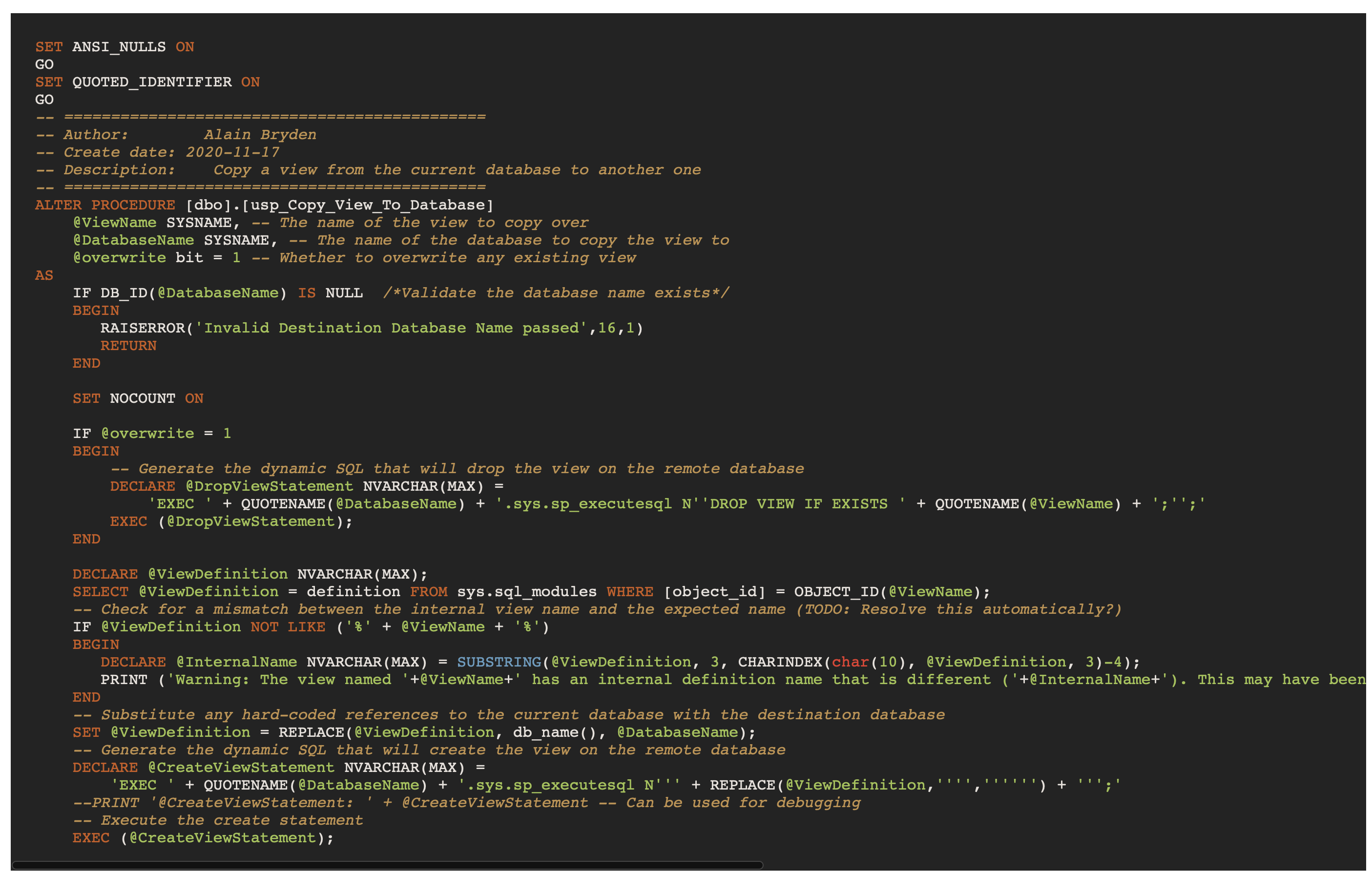
Though sadly it probably won't land until 10.5.
But our built in sql isn't intended to cover all databases... so if you're using it for Transact SQL there are always going to be some deficiencies, missing keywords, etc... to resolve that SO really should add the official Transact SQL grammar.
 joshgoebel
on 18 Nov 2020
joshgoebel
on 18 Nov 2020
So I'm calling this as resolved by work in progress and I'll update that PR to note that it closes this issue. Pretty sure the underlying issue has nothing to do with quoting though and everything to do that that previous grammar wants FULL SQL statements and it doesn't recognize some of your SQL as the start of a statement - so the highlighting just gets entirely derailed as a result.
I you're willing to install an extension and using Chrome I might point you to https://github.com/joshgoebel/se_highlightjs. I could probably be talked into bumping it's version to include the new SQL stuff, but I haven't done much with it since I released it since there didn't seem to be a lot of interest.
joshgoebel
on 18 Nov 2020
Totally reasonable by me.
As you suspected, despite specifying ```tsql in my SO post, the rendered content has class="lang-sql s-code-block hljs" which suggests it's just using sql. Maybe I'll take this up on meta.stackoverflow.com to see if there's a good reason for it. (Nevermind - based on your extension description, you already have.)
Side note: Your add-in is great but my personal reason for not using it is I care too much about what other people are going to see when I post some code. If most SO users reading my post are going to see borked syntax highlighting, my preference would be to see the same, and add a workaround, comment or screenshot to clarify things if needed.
Looking forward to the updates. Thanks for your work.
alainbryden
on 18 Nov 2020
but my personal reason for not using it is I care too much about what other people are going to see when I post some code
Makes total sense.
add a workaround
Sadly that's pretty difficult to do the way the current sql grammar is structured. :-/ I considered just removing the scoping issue (which would have fixed a lot by itself) but our current SQL (trying to do far too much) has SOOOO many keywords and it's quite possible that would break the auto-detect balance with other languages... hence rethinking SQL entirely.
joshgoebel
on 18 Nov 2020
Related issues
 gskinner
·
4Comments
gskinner
·
4Comments
 niche4u
·
5Comments
niche4u
·
5Comments
 sustained
·
4Comments
sustained
·
4Comments
 Suyash2810
·
8Comments
Suyash2810
·
8Comments
 Martii
·
7Comments
Martii
·
7Comments