Highlight.js: install 9.15.1 fail
Error: ENOENT: no such file or directory, chmod '.../node_modules/[email protected]@highlight.js/tools/build.js'
missing tools/build.js file.
 fengmk2
All 62 comments
It cause by https://github.com/highlightjs/highlight.js/commit/ee2ae804e6a39864c0284280bd827d8e78ac81bf#diff-b9cfc7f2cdf78a7f4b91a753d10865a2R25
fengmk2
on 25 Feb 2019
it cause error in npm install.

 czy88840616
on 25 Feb 2019
czy88840616
on 25 Feb 2019
+1
 dindurthy
on 25 Feb 2019
dindurthy
on 25 Feb 2019
Same here.
 zomble
on 25 Feb 2019
zomble
on 25 Feb 2019
Apologies, will fix in ~2 hours unless someone wants to put together a pull request quickly.
 marcoscaceres
on 25 Feb 2019
marcoscaceres
on 25 Feb 2019
+1
 lixiaolihua
on 25 Feb 2019
lixiaolihua
on 25 Feb 2019
Could you change latest tag in npm to fix this problem quickly?
czy88840616
on 25 Feb 2019
+1
 mchaov
on 25 Feb 2019
mchaov
on 25 Feb 2019
+1
 sirjones
on 25 Feb 2019
sirjones
on 25 Feb 2019
+1
 serjout
on 25 Feb 2019
serjout
on 25 Feb 2019
+1
 nbivanov
on 25 Feb 2019
nbivanov
on 25 Feb 2019
+1
 hartja
on 25 Feb 2019
hartja
on 25 Feb 2019
+1
 XKhumalo
on 25 Feb 2019
XKhumalo
on 25 Feb 2019
For those in a hurry (Like I was). You can download the repo and install it locally with npm and it works fine
sirjones
on 25 Feb 2019
+1
 bookofjames
on 25 Feb 2019
bookofjames
on 25 Feb 2019
+1
 EndyKaufman
on 25 Feb 2019
EndyKaufman
on 25 Feb 2019
Also a work around for dependent packages is to install 9.15.0 as a peer dependency via npm i [email protected] -D
 JessicaSachs
on 25 Feb 2019
JessicaSachs
on 25 Feb 2019
+1
 grigoreme
on 25 Feb 2019
grigoreme
on 25 Feb 2019
So it's not fixed yet?
 RedTailBullet
on 25 Feb 2019
RedTailBullet
on 25 Feb 2019
Waiting for a fix...
 zhaoqin-github
on 25 Feb 2019
zhaoqin-github
on 25 Feb 2019
Starting to work on the fix. I’m muting the bug, as it’s getting spammy. If you’d like to subscribe to the bug, to be notified when it’s fixed, please use the subscribe button.
marcoscaceres
on 25 Feb 2019
Ok, can a few folks try:
npm install github:highlightjs/highlight.js#fix_build
npx hljs
Let me know if that works...
marcoscaceres
on 25 Feb 2019
npx hljs
I have tried it, It works for me.
 zhang-shengping
on 25 Feb 2019
zhang-shengping
on 25 Feb 2019
Ok, can a few folks try:
npm install github:highlightjs/highlight.js#fix_build
npx hljs
Let me know if that works...
It works! 👍
 Suzamax
on 25 Feb 2019
Suzamax
on 25 Feb 2019
Ok, testing fix on Travis right now:
https://github.com/highlightjs/highlight.js/pull/1985/files#diff-b9cfc7f2cdf78a7f4b91a753d10865a2R25
marcoscaceres
on 25 Feb 2019
Release in progress... https://highlightjs.org/api/release/
marcoscaceres
on 25 Feb 2019
Ok, 9.15.2 released... hopefully good now 😅
marcoscaceres
on 25 Feb 2019
Huh -- npm i [email protected] doesn't work for me, same error -- and npm hasn't updated the version (yet?)
Edit: But npm i [email protected] or any other future version gives a different error -- so a release is available, just not tagged on npmjs.com and it's broken :(
 opatut
on 25 Feb 2019
opatut
on 25 Feb 2019
@opatut, yeah, odd... might need to just disable the hljs bin.
marcoscaceres
on 25 Feb 2019
@marcoscaceres Seems like this is still not going to work, and installing from a branch is not a good test. The problem is that the tools folder is missing from the published package to npm (check https://unpkg.com/[email protected]/) but it's needed by bin in the package.json. When installing a branch from github, you get all the files in the repo, and you get the tools folder and that's why it works. When installing from npm it doesn't.
I think you need to change in your build/publish scripts to add the tools folder.
And thanks for the quick responses :)
 netanelgilad
on 25 Feb 2019
netanelgilad
on 25 Feb 2019
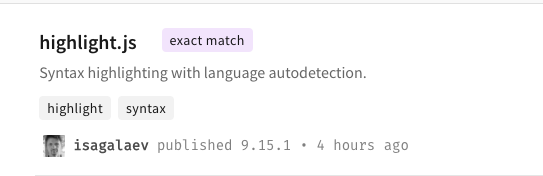
 gaoyoubo
on 25 Feb 2019
gaoyoubo
on 25 Feb 2019
@netanelgilad, yes, you are probably right. Having a look if there is some quick way to do that. Otherwise, I'll revert the offending commit.
marcoscaceres
on 25 Feb 2019
@marcoscaceres I would like if you revert the change. It is currently blocking a lot of build from other people :cry:
 illuxio
on 25 Feb 2019
illuxio
on 25 Feb 2019
Yep, reverting ee2ae804e6a39864c0284280bd827d8e78ac81bf now.
marcoscaceres
on 25 Feb 2019
@marcoscaceres You might want to remove 9.15.1 and 9.15.2 from npmjs.com, and tag 9.14.2
as latest to not break builds for people without fixed dependencies until a new build is available.
Edit: Thank you very much for the quick response to this issue by the way and your efforts to fix it ASAP <3
Edit 2: Now npm website has caught up and is showing 9.15.2 as latest -- apparently it's caching the current version (of course it is) and that took a while to propagate.
opatut
on 25 Feb 2019
  "bin": {
    "hljs": "tools/build.js"
  },
still have problems with it
 Yeti-or
on 25 Feb 2019
Yeti-or
on 25 Feb 2019
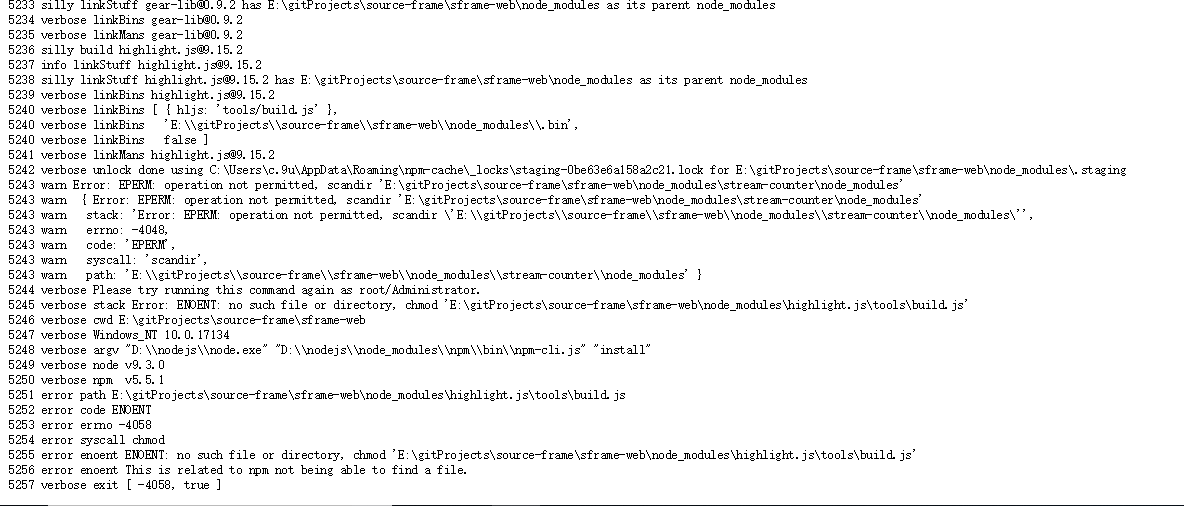
still have this:(
 loooSwc
on 25 Feb 2019
loooSwc
on 25 Feb 2019
+1
 ritikasib
on 25 Feb 2019
ritikasib
on 25 Feb 2019
same here :(
 sushantkarki
on 25 Feb 2019
sushantkarki
on 25 Feb 2019
same to me
 yurytolochko
on 25 Feb 2019
yurytolochko
on 25 Feb 2019
@loooSwc @sushantkarki @yurytolochko He is doing his best. The build finished a minute ago https://travis-ci.org/highlightjs/highlight.js/builds/498080876
illuxio
on 25 Feb 2019
waiting for a fix version.
 TopGrd
on 25 Feb 2019
TopGrd
on 25 Feb 2019
How long we will get fixed package on NPM repo?
 slowpokex
on 25 Feb 2019
slowpokex
on 25 Feb 2019
Getting spammy again, so muting for a bit. Will reopen once I get things back into a good state.
marcoscaceres
on 25 Feb 2019
Just a quick update: master branch is now back to a good state. However, I don't have control over the release script, which is still expecting the old "tools/build.js" to run with --docs (which no longer exists).
I've emailed @isagalaev, as the the release script is on a server that is under his control. I expect this will be fixed soon - but could be a few hours.
Hang tight everyone. Nearly fixed 🤞
marcoscaceres
on 25 Feb 2019
I would like if you revert the change. It is currently blocking a lot of build from other people
On a personal note, let me take this as an opportunity to explain something about the current sorry state of relationship between businesses and open source projects. (Yeah, I know, but people still don't get it.)
highlight.js is not a business, it's a hobby.
It means that whatever gets pushed to this repository or npm should be assumed to be the result of someone having fooled around and gone away for a weekend with their family. Or for a busy working day at their job.
If a business has made a decision to rely on this artifact for anything requiring any sort of stability (i.e. "blocking a lot of build from other people"), it made a stupid and uninformed decision. Or more realistically, it simply relies on maintainers feeling ashamed enough to quickly fix problems when they happen. Even more realistically, it just accept the fact that their engineers are going to deal with maintainers by soliciting free support, because it has always worked this way. I, for one, don't feel any urge at all supporting someone's misplaced expectations :-)
So, dear fellow engineers, please take this build hiccup as an opportunity to explain your particular business people that their entire intellectual property is a thin layer on top of a shaky foundation of open-source code lazily maintained by hobbyists or paid for by other businesses having their own goals in mind. Mention the leftpad story for more effect. So if they really want stability they have to invest in it. By, for example, hiring engineers to deal with myriad of dependencies, maintain local stable forks, contribute patches upstream, or whatever — the key point is that it should not look like it "just works" on fairy dust.
 isagalaev
on 25 Feb 2019
isagalaev
on 25 Feb 2019
@isagalaev is right. We maintainers do the best we can, and it's definitely not part of our day job. There are a few solutions people can use to protect themselves from these kinds of events:
- lock dependency to a particular version number.
- rely on a service like https://greenkeeper.io - which will check that an updates doesn't break your build.
- always test before updating, don't blindly just go for "latest".
marcoscaceres
on 26 Feb 2019
One suggestion that might make it easier for maintainers would be to use a prepublish script, rather than having a separate release script - that way, npm publish can't proceed until that script passes.
 ljharb
on 26 Feb 2019
ljharb
on 26 Feb 2019
@ljharb, that's a good suggestion. I'd also like to write a better check on TravisCI. I wasn't expecting the package to be stripped of some of its contents.
I'll write an incident report and publish it here describing what happened and what we will try to improve to prevent this from happening again.
Again, this is a call for the community to help us (we literally run this project on a skeleton crew... putting in maybe 1 hour a month to keeping it running). I'm definitely not an expert on NPM - so help from folks with more experience would be greatly appreciated to keep this project healthy.
marcoscaceres
on 26 Feb 2019
Folks, I've published 9.15.5.... any better? 🤞
marcoscaceres
on 26 Feb 2019
@marcoscaceres Our build system is all green again - got the latest 9.15.5 version as npm lists that version now too.
@isagalaev & @marcoscaceres Thanks for your efforts, appreciated very much :)
 das-peter
on 26 Feb 2019
das-peter
on 26 Feb 2019
incident report
What happened?
About a week ago we merged #1951, which made changes to the tools/build.js utility by excluding certain files (docs, demos, and other things). The PR's intention was to have a way to build a highlight bundle from the command line, but to not build the docs and demos that are not needed on CI environments.
Although we'd been thoroughly testing this binary in production in another project for over a year, we'd been installing highlight.js over a github: URL. Unknown to me, the highlight.js npm publish script only included certain files: The script is on an ex-maintainer's private server, so I'd incorrectly assumed that it was publishing the repository as is. This assumption was wrong and led to things breaking.
When 9.15.1 release went live, it was missing tools/build.js and possibly other things causing depedents to break.
What we did in response
At first, I thought the problem was that the bin path was maybe wrong. However, thanks to helpful https://github.com/highlightjs/highlight.js/issues/1984#issuecomment-466938694 from @netanelgilad, it was pointed out that the problem was with how the package was being published: it was missing directories/files.
As a result, I reverted #1951. However, this was insufficient because we'd changed our release script to work with the new tools/build.js. We then needed to revert some changes to the release script.
After a few bad releases, we then successfully published 9.15.5.
What we learned
Keeping in mind that the maintainers are new to the project:
- the published package does not reflect what's in the repository.
What could we do to prevent this from happening again
We need to figure out a way to pre-publish (or publish as "beta") a package, and then try to install the package in a mock project to make sure things still work as expected.
If folks have suggestion for how to do that - or what a good setup might be to test what's actually published before it goes live, I'd be open to suggestions.
marcoscaceres
on 26 Feb 2019
I'll wait for a few more confirmation that things are back in a good state before closing. Will keep an eye on things throughout the day.
marcoscaceres
on 26 Feb 2019
@marcoscaceres My system can accomplish npm install now. The installed highlight.js version is 9.15.5. Thanks for you fix!
zhaoqin-github
on 26 Feb 2019
Thanks for confirming @zhaoqin-github.
marcoscaceres
on 26 Feb 2019
success+1
loooSwc
on 26 Feb 2019
Quick solution: npm install [email protected] --save and then run npm shrinkwrap, fix all version info into npm-shrinkwrapwrap.json file, then run npm install. It works for our project
 neilning-xc
on 26 Feb 2019
neilning-xc
on 26 Feb 2019
@marcoscaceres if you enable 2FA for this package (which you should, regardless) then when you run npm publish, before it actually publishes, it will print out a summary of which files will be included in the package and then prompt you for your one time password. I often use this to ensure my packages have the required files.
ljharb
on 26 Feb 2019
I can tell you it is working right now. I have a project that depends of typedoc, hence this project.
Being honest, you give me a lot of headaches today. For me today was a Murphy moment that ended with this incident today.
I'm not blaming you. This is an open source project and we have to be aware this things are going to happen.
And personally, I PREFER, 100x times, an open source project like this one that a private one with no documents.
 ernestoort
on 26 Feb 2019
ernestoort
on 26 Feb 2019
I also met this issue yesterday, thanks for resolving it
 lifuyao
on 26 Feb 2019
lifuyao
on 26 Feb 2019
Ok, seems we are good... closing.
marcoscaceres
on 26 Feb 2019
If folks have suggestion for how to do that - or what a good setup might be to test what's actually published before it goes live, I'd be open to suggestions.
There are a few ways to go about this -
- Publish each release, potentially each time master builds, with a prerelease version indicated by a dash at the end: x.x.x-0
these can be individually tested just like regular versions, but users won't pick them up by default, and it's clear that they may have potential bugs. When it's ready to release, test the latest prerelease and if it works, trim the prerelease part from the version and do a release. - Another approach (which could be done alongside the latter) is to make use of npm tags. When you release a new version, tag with "next" rather than "latest" and test it. If it works, only then change the tag to "latest". That way even if 9.16.0 is released after 9.15.5, as long as it's marked "next", people depending on "^9.0.0" won't pick it up.
 alasdairhurst
on 26 Feb 2019
alasdairhurst
on 26 Feb 2019
Related issues
 Vad1mo
·
7Comments
Vad1mo
·
7Comments
 goloroden
·
3Comments
goloroden
·
3Comments
 sumanstats
·
5Comments
sumanstats
·
5Comments
 dlinx
·
5Comments
dlinx
·
5Comments
 Rarst
·
8Comments
Rarst
·
8Comments
Most helpful comment
incident report
What happened?
About a week ago we merged #1951, which made changes to the
tools/build.jsutility by excluding certain files (docs, demos, and other things). The PR's intention was to have a way to build a highlight bundle from the command line, but to not build the docs and demos that are not needed on CI environments.Although we'd been thoroughly testing this binary in production in another project for over a year, we'd been installing highlight.js over a
github:URL. Unknown to me, the highlight.jsnpm publishscript only included certain files: The script is on an ex-maintainer's private server, so I'd incorrectly assumed that it was publishing the repository as is. This assumption was wrong and led to things breaking.When 9.15.1 release went live, it was missing
tools/build.jsand possibly other things causing depedents to break.What we did in response
At first, I thought the problem was that the
binpath was maybe wrong. However, thanks to helpful https://github.com/highlightjs/highlight.js/issues/1984#issuecomment-466938694 from @netanelgilad, it was pointed out that the problem was with how the package was being published: it was missing directories/files.As a result, I reverted #1951. However, this was insufficient because we'd changed our release script to work with the new
tools/build.js. We then needed to revert some changes to the release script.After a few bad releases, we then successfully published 9.15.5.
What we learned
Keeping in mind that the maintainers are new to the project:
What could we do to prevent this from happening again
We need to figure out a way to pre-publish (or publish as "beta") a package, and then try to install the package in a mock project to make sure things still work as expected.
If folks have suggestion for how to do that - or what a good setup might be to test what's actually published before it goes live, I'd be open to suggestions.