Highcharts: Loading dependent Highcharts modules or highcharts-more via RequireJS fails from ver 6.1.2.
I'm using RequireJS to dynamically load Highcharts to specific pages on my site. I have configured it with shim to load the highcharts-more and additionals modules that I'm using. Starting from few days ago with the version 6.1.2 update in Highchart CDN, it now fails to correctly load the highcharts-more and the modules.
Expected behaviour
I expect to be able to use the highcharts-more and other modules' features.
Actual behaviour
The files are fetched, but initializing Highcharts fails with error code 17 unknown chart type for arearange and other weird behaviour. For example polar area charts are not polar etc.
It does fetch the actual files, but for some reason does not account for the additional features anymore.
Live demo with steps to reproduce
Working demo with Highcharts 6.1.1: http://jsfiddle.net/3kpazfw4/
Failing demo with CDN: http://jsfiddle.net/6zypqedn/
Product version
Highcharts 6.1.2
Affected browser(s)
Chrome 68.
 jee7
jee7
All 51 comments
Hi @jee7
Thank you for reporting this issue. You are right, something is wrong. We will check this.
Internal note:
@oysteinmoseng The same demo on our CDN:
- v6.1.1 - http://jsfiddle.net/BlackLabel/6zypqedn/4/
- v6.1.2 - http://jsfiddle.net/BlackLabel/6zypqedn/5/
Responsible commit: https://github.com/highcharts/highcharts-assembler/commit/0d223359731079077a5a6ad693b53655e8352fc2
 pawelfus
on 5 Sep 2018
pawelfus
on 5 Sep 2018
Since 6.1.2 Highcharts supports AMD loading, which means shimming is no longer necessary. With AMD loading you have to do an additional initialization step, however. This is what is causing your demo to fail.
See here for more information on loading Highcharts with RequireJS.
I'll close this issue for now, but feel free to reopen if you encounter further issues.
 oysteinmoseng
on 5 Sep 2018
oysteinmoseng
on 5 Sep 2018
Thank you for your answer. Sorry for the delayed response, I think I managed to get it working.
Basically I have a large number of my own RequireJS modules, which are loaded on specific pages on my site. Some of those use Highcharts and some do not. So I do not really want to put the new Highcharts initialization into the main requirejs() call (as it is shown on your example). That way it would be loaded on every page all the time even if it is not used. Previously with shim I could just include the one highcharts dependency when needed and was sure that it was configured correctly.

So my first approach was to put the new dependency injection into one of my modules and see if it worked. And it did.

I do see that this way I get more control on what actual Highcharts modules are loaded for each of my own modules. However, I do not want to put and duplicate that much lengthy dependency injection code on top of each of my modules that use Highcharts... So I ended up creating a small number of other modules, which only do the Highcharts config.

And once again I can just use one injection of Highcharts into my own modules.

Seems to work.
jee7
on 9 Sep 2018
Reopening this for discussion around the pattern, as suggested by @mbrodala
oysteinmoseng
on 19 Sep 2018
To get this started once more my comment from #8916:
So to understand this is specifically to allow users to load something else but a module named highcharts and pass this as Highcharts into the various Highcharts modules? I'm not sure how often this is really necessary but I can say that the current state is confusing and feels incomplete. We do use RequireJS to avoid fiddling around with dependencies after all so I'm not sure forcing this on the user is the way to go.
I'd like to ask other AMD users which have integrated Highcharts about their workflows. Especially if the current flexibility is really necessary or if everyone would be fine if all Highcharts modules simple required a module named highcharts to get the Highcharts object injected.
 mbrodala
on 19 Sep 2018
mbrodala
on 19 Sep 2018
As far as I understood, the idea is that you might not need all the additional Highcharts modules on every page. For example you can have a page which shows a sunburst plot, and another page which shows a streamgraph plot. You do not need the user to load the code for both sunburst and streamgraph plots on both pages.
However, this means that you need to specifically configure yourself, which pages use which additional Highcharts modules. With the shim config I was lazy and just added all the other modules I ever used as dependencies for the main Highchart module.
Now with AMD I'm also a bit lazy. My website is actually structured into several, well, modules itself. Let's call them sections. They are named student, teacher, theses and thesis. But for generalization you could think about sections like user, paid-user and admin. Or sections based on different domain objects. So what I did was to create my own separate AMD modules for Highcharts for each of those sections. Basically I have js/modules/student/highcharts, js/modules/teacher/highcharts, js/modules/theses/highcharts etc. All of them configure Highcharts differently depending on what functionality I use on all the pages under a specific section. See my previous post (for some reason the screenshots had disappeared before).
I would have perhaps liked if I could do something similar with just configuration. Like I used to do with shim. Then I could keep that dependency injection stuff all in a single config file and not inside definitions of modules. The actual injection could then be done automatically based on config. Now, I'm not that experienced and familiar with AMD, but as far as I read, writing shim config for an AMD module is a bad idea.
So I currently don't see another way to allow for loading of a specific combination of Highcharts. But I think I certainly do want to be able to load only 1-2 JS files on pages that use the basic Highcharts functionality and ~10 JS files for pages using functionality from 10 different Highcharts modules.
jee7
on 19 Sep 2018
Although, one way would be to perhaps specify as URL parameters what modules you want included and prepared when loading Highcharts from CDN. Kind of like Google does in Google Fonts. Something like this: https://code.highcharts.com/highcharts?modules=more,sunburst,streamgraph.
Then in RequireJS one could name different configurations of Highcharts differently, load only a single file from the CDN for each of them when used and would not have to do any DI yourself.
jee7
on 19 Sep 2018
I agree with @mbrodala what he says:
So to understand this is specifically to allow users to load something else but a module named highcharts and pass this as Highcharts into the various Highcharts modules? I'm not sure how often this is really necessary but I can say that the current state is confusing and feels incomplete. We do use RequireJS to avoid fiddling around with dependencies after all so I'm not sure forcing this on the user is the way to go.
We use RequireJS to load Highcharts library. I think, the earlier method to simply require highcharts to get the Highcharts object injected is better, because the current state is confusing as well as restricting users like us to upgrade to latest version of Highcharts.
 tejaspchordiya
on 2 Nov 2018
tejaspchordiya
on 2 Nov 2018
@oysteinmoseng Any update related to this?
@TorsteinHonsi @pawelfus
tejaspchordiya
on 12 Nov 2018
@tejaspchordiya I think it is pretty clear that most users would prefer going the configuration route, so we should aim to change this for the next version. I will take a look at it.
oysteinmoseng
on 12 Nov 2018
@oysteinmoseng Okay. I will wait for the next release.
tejaspchordiya
on 13 Nov 2018
@jee7 @mbrodala @tejaspchordiya
For upcoming Highcharts v7 we will change our module files to depend on a highcharts module, and our root files will define this module. This will remove the need for the initialization step for modules.
Note that load order for modules still has to be correct, as the modules (for now) only have a dependency on the global highcharts module, and there is no additional information embedded for modules that depend on other modules.
Example loading will look like this:
requirejs.config({
    paths: {
        'highcharts': 'http://code.highcharts.com/highcharts',
        'highcharts-exporting': 'http://code.highcharts.com/modules/exporting',
        'highcharts-accessibility': 'http://code.highcharts.com/modules/accessibility'
    }
});

// Try loading after setting up paths. Note that the loading order has to be correct.
requirejs([
    'highcharts',
    'highcharts-exporting',
    'highcharts-accessibility'
], function (Highcharts, exporting, accessibility) {
    Highcharts.chart('container', {
        series: [{
            data: [1,2,3,4,5]
        }]
    });
});
If you have any comments on this, please let us know as soon as possible.
oysteinmoseng
on 3 Dec 2018
@oysteinmoseng I'm not sure I understand the planned change in the Highcharts source. Normally e.g. the highcharts-exporting module would look like this:
define(['highcharts'], function(Highcharts) {
  // ...
});
Thus all of the following would then be perfectly fine:
require(['highcharts', 'highcharts-exporting'], function (Highcharts, exporting) {
  // ...
});
require(['highcharts-exporting', 'highcharts'], function (exporting, Highcharts) {
  // ...
});
require(['highcharts-exporting'], function (exporting) {
  // ...
});
Thus it wouldn't matter in what order I set the modules nor if I explicitly load the main module at all.
mbrodala
on 4 Dec 2018
@mbrodala Indeed this is how the module will look, and you are correct about the loading of the module vs the main module. The load order comes into play however when you load multiple Highcharts modules that depend on each other. As an example, the accessibility module depends on the exporting module. In this case you will have to ensure the order is correct, as we do not embed that information in the Highcharts module files at this point.
oysteinmoseng
on 4 Dec 2018
Ah OK, now I get what you mean. But in this case I'm not sure this will work either since the order of modules mentioned in require() does not affect the loading order. Modules are loaded out of order and dependees are loaded as soon as all of its dependencies are loaded. So even if I manually sort the modules considering their internal dependencies, I expect loading issues.
Taking the given example, if I require ['highcharts', 'highcharts-exporting', 'highcharts-accessibility'] there is no guarantee that highcharts-exporting is loaded before highcharts-accessibility, only that _my_ module won't be loaded before any of these. So if highcharts-accessibility automatically performs some magic as soon as it is executed, it cannot rely on highcharts-exporting being loaded already. That's why it needs to explicitly declare all of its dependencies.
mbrodala
on 4 Dec 2018
@mbrodala To your concern of order of loading modules, I have a question:
Can't we resolve this issue using shim config with requirejs?
tejaspchordiya
on 4 Dec 2018
Ah, I was not aware of this, thank you for clarifying.
Unfortunately that is a potential showstopper. It looks like we will have to postpone this change to Highcharts v7.1, as making a system for keeping track of dependencies of modules is beyond what we can do in a short timeframe. There is also a concept of optional dependencies (that then require a certain load order) and how to handle this.
We will pick this back up after v7.0 and see what we can do.
EDIT:
If there is a potential workaround using shims we can discuss if this is easier than the current implementation.
oysteinmoseng
on 4 Dec 2018
@tejaspchordiya What do you have in mind? I am not aware of an option to enforce a loading order for modules.
mbrodala
on 4 Dec 2018
With shim config it seems that you basically revert back to the solution prior to ver 6.1.2. Because as far as I understand AMD modules do not work well with shim, as shim is for non-AMD modules.
With the proposed solution in my case I would still have to define my own custom module when I want a certain configuration of Highcharts to be used with a single name.
But, yes, as the modules are loaded async, then the order will be arbitrary.
The dependencies could be defined in the definitions of Highcharts' modules. I think this will ensure that all the prerequisite dependencies are loaded and in the correct order. You would have to define in the module definitions that the highcharts-more module is dependent on the highcharts module etc.
jee7
on 4 Dec 2018
We will be fixing this for 7.1 so that our modules have their dependencies in order. That should remove any need for shims. Exporting will then look like this:
define(['highcharts'], function(Highcharts) {
  // ...
});
And the dependent offline-exporting will look like this:
define(['highcharts', 'exporting'], function(Highcharts, exporting) {
  // ...
});
Does this sound correct?
oysteinmoseng
on 14 Feb 2019
Sounds about right but I'd suggest highcharts-exporting instead of only exporting to have a namespace in all modules and avoid conflicts.
mbrodala
on 14 Feb 2019
Note: Also make sure we use named modules to allow users to merge modules into a single file to reduce server requests:
define('highcharts-offline-exporting', ['highcharts', 'exporting'], function(Highcharts, exporting) {
  // ...
});
Actually this is not recommended. You should leave this to the RequireJS optimizer instead:
These are normally generated by the optimization tool. You can explicitly name modules yourself, but it makes the modules less portable -- if you move the file to another directory you will need to change the name. It is normally best to avoid coding in a name for the module and just let the optimization tool burn in the module names. The optimization tool needs to add the names so that more than one module can be bundled in a file, to allow for faster loading in the browser.
mbrodala
on 18 Feb 2019
@mbrodala Interesting, that looks like a better solution. We still need to refer to named modules as dependencies, however. Example: define(['highcharts', 'highcharts-exporting'], ...). If I understand it correctly, we would then put the burden on the user to define the paths to the relevant files for these modules?
requirejs.config({
    paths: {
        'highcharts': 'highcharts',
        'highcharts-exporting': 'modules/exporting',
        'highcharts-accessibility': 'modules/accessibility'
    }
});
Correct, in the very verbose version this would be the way to go. Of course, you'd normally try to build your assets in a way which allows RequireJS to automatically resolve all Highcharts modules using the baseUrl. But here Highcharts has nothing to do. ;-)
mbrodala
on 18 Feb 2019
After an internal discussion we landed on the following suggestions that we would like to define our modules as following:
// Example of modules/offline-exporting.src.js
define(
    'highcharts/modules/offline-exporting',
    ['highcharts', 'highcharts/modules/exporting'],
    function (Highcharts) {
        ...
    }
)
The reason why we would like to name the modules, as opposed to previous suggestion, is to be able to avoid the modules being loaded and executed several times.
Then the way we would recommend to set up the configuration would be as following:
require.config({
    packages: [{
        name: 'highcharts',
        main: 'highcharts'
    }],
    paths: {
        // Change this to your server if you do not wish to use our CDN.
        'highcharts': 'https://code.highcharts.com'
    }
});
We would also like to run the module factory function on the Highcharts instance and the provide the modified instance as a property on returned module.
Then the usage could look like the following:
require([
    'highcharts/modules/exporting',
    'highcharts/modules/accessibility'
    // This function runs when the above files have been loaded.
], function ({ Highcharts }) {
    // Create a test chart.
    Highcharts.chart('container', {
        series: [{
            data: [1,2,3,4,5]
        }]
    });
});
Instead of the previous pattern:
require([
    'highcharts',
    'highcharts/modules/exporting',
    'highcharts/modules/accessibility'
    // This function runs when the above files have been loaded.
], function (Highcharts, ExportingModule, AccessibilityModule) {
    // We need to initialize module files and pass in Highcharts.
    ExportingModule(Highcharts);
    // Load exporting before accessibility.
    AccessibilityModule(Highcharts);
    // Create a test chart.
    Highcharts.chart('container', {
        series: [{
            data: [1,2,3,4,5]
        }]
    });
});
@bre1470 and @oysteinmoseng please correct me if I am wrong here or missed something in this comment.
Feel free to give us comments on this suggestion.
 jon-a-nygaard
on 1 Mar 2019
jon-a-nygaard
on 1 Mar 2019
Just to point out the naming of the modules - the reason this is controversial seems to be that modules can not be moved in the directory structure. We will regardless have to disallow this, as we need the structure to be fixed in order for our modules to be able to load dependent modules.
oysteinmoseng
on 1 Mar 2019
@oysteinmoseng
In fact, at least in my tests, I can remap modules of our package like this:
require.config({
    packages: [{
        name: 'highcharts',
        main: 'highcharts'
    }],
    paths: {
        'highcharts': 'https://code.highcharts.com'
        'highcharts/modules/exporting': 'http://code.highcharts.local/modules/exporting'
    }
});
Does this solve the objections?
 bre1470
on 1 Mar 2019
bre1470
on 1 Mar 2019
Why is this issue closed?
I use Highchart 7.1.1 and I'am not able to require correctly the module clientside.
Requirejs config:
    map: {
        '*': {
            //charts: 'js/highcharts' <-- I also tried this one
        }
    },
    paths: {
        charts: 'js/highcharts'
    },
    shim: {
        charts: {
            exports: 'Highcharts',
            deps: ['jquery']
        }
    }
The file is correctly loaded in my browser:
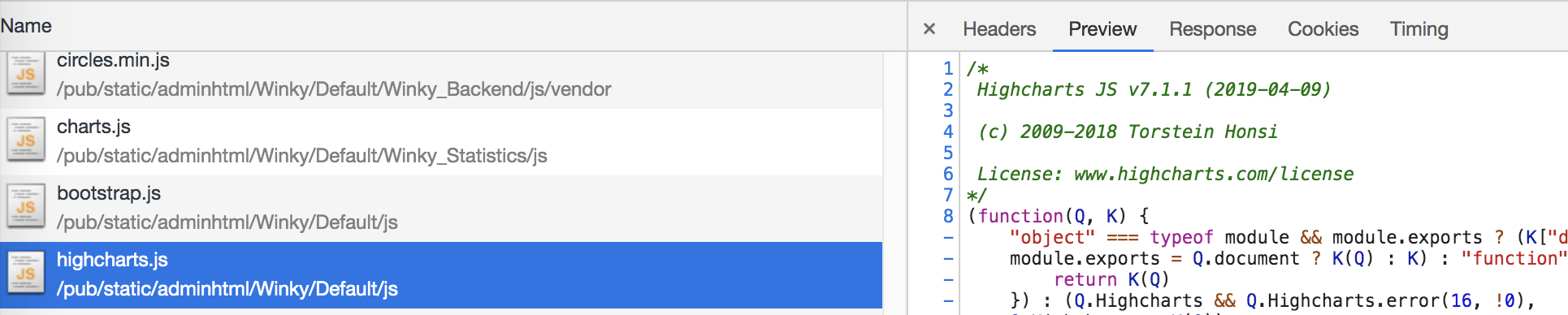
But in my module, it's undefined:
define([
    'jquery',
    'charts'
], function ($, charts) {
    console.log(charts); //Undefined
    console.log(Highcharts); //Throws an error "Highcharts not defined"
Note: js/highcharts points to node_modules/highcharts/highcharts.js.
Any idea?
 vincentwinkel
on 6 May 2019
vincentwinkel
on 6 May 2019
@vincentwinkel Since Highcharts now supports AMD, there is no need for the shim config. Instead you should configure the Highcharts package as outlined in the comments above. If you still encounter issues, feel free to contact our support team for help with your specific case.
oysteinmoseng
on 7 May 2019
I tried all combinaisons, using map/path, with/without shim, nothing works.
I tried using Highcharts 6.1.1 and it works properly without shim.
So in my opinion there is definitely an issue in Highcharts 7.1.1.
[EDIT] Thanks, let me check the suggestions above, but like you said, if it supports AMD we shouldn't have to write extra configuration.
vincentwinkel
on 7 May 2019
Hi,
I did get it to work with the following:
require.config({
    packages: [{
        name: 'highcharts',
        main: 'highcharts'
    }],
    paths: {
        // Change this to your server if you do not wish to use our CDN.
        'highcharts': 'https://code.highcharts.com'
    }
});
May I ask that this be part of the official documentation somehow, so we don't individually have to locate this in comment 2348445 in a github issue?
If the real reason that there is no documentation for this is that the requirejs interface is actually about to be deprecated, please let me/us know about that ASAP :-) Because we need it!
 pmorch
on 17 Jun 2019
pmorch
on 17 Jun 2019
Hi @pmorch, thanks for letting us know.
You can also find this information in our readme at Load Highcharts from the CDN as an AMD module for now.
The different styles of loading Highcharts is at the moment unfortunately not documented in our General Documentation, but we will see to that this information is included there as well.
jon-a-nygaard
on 18 Jun 2019
Hi, @pawelfus
looked through all the documentation and issues on github, but still could not understand how to make a Highchart module loaded correctly in the version since 6.1.2.
I have created an example with highchart-3d module: http://jsfiddle.net/3ugb2e1q/
As you can see the chart is still flat. Whereas same similar code https://jsfiddle.net/cf4Lv6u3/ works as expected.
Seems the function factory(Highcharts) is never executed
} else if (typeof define === 'function' && define.amd) {
        define('highcharts/highcharts-3d', ['highcharts'], function (Highcharts) {
            factory(Highcharts);
            factory.Highcharts = Highcharts;
            return factory;
        });
Could you please point me to a working example?
 sergevic
on 13 Sep 2019
sergevic
on 13 Sep 2019
What I am doing in 7.0.3 is the following.
In app.js:
requirejs.config({
    baseUrl: '/js',
    paths: {
        'highcharts': 'https://code.highcharts.com/7.0.3/highcharts.src',
        'highcharts-more': 'https://code.highcharts.com/7.0.3/highcharts-more.src',
        'highcharts-exporting' : 'https://code.highcharts.com/7.0.3/modules/exporting',
        'highcharts-wordcloud' : 'https://code.highcharts.com/7.0.3/modules/wordcloud',
        'highcharts-sunburst' : 'https://code.highcharts.com/7.0.3/modules/sunburst',
        'highcharts-annotations' : 'https://code.highcharts.com/7.0.3/modules/annotations',
        'highcharts-streamgraph' :  'https://code.highcharts.com/7.0.3/modules/streamgraph',
        'highcharts-serieslabel' :  'https://code.highcharts.com/7.0.3/modules/series-label',
   }
});
No shim for highcharts.
Then I have a module for the specific config I want for Highcharts.
For example modules/highcharts.js:
define([
    'jquery', 'highcharts', 'highcharts-more', 'highcharts-exporting', 'highcharts-serieslabel'
], function(
    $, Highcharts, HighchartsMore, HighchartsExporting, HighchartsSerieslabel) {

    var HS = function() {
        HighchartsMore(Highcharts);
        HighchartsExporting(Highcharts);
        HighchartsSerieslabel(Highcharts);
    };

    new HS();

    return Highcharts;
});
Or for example modules/somethingElse/highcharts.js:
define([
    'jquery', 'highcharts', 'highcharts-more', 'highcharts-exporting', 'highcharts-wordcloud', 'highcharts-sunburst',
    'highcharts-annotations', 'highcharts-streamgraph', 'highcharts-serieslabel'
], function(
    $, Highcharts, HighchartsMore, HighchartsExporting, HighchartsWordcloud, HighchartsSunburst,
    HighchartsAnnotations, HighchartsStreamgraph, HighchartsSerieslabel) {

    var HC = function() {
        HighchartsMore(Highcharts);
        HighchartsExporting(Highcharts);
        HighchartsWordcloud(Highcharts);
        HighchartsSunburst(Highcharts);
        HighchartsAnnotations(Highcharts);
        HighchartsStreamgraph(Highcharts);
        HighchartsSerieslabel(Highcharts);
    };

    new HC();

    return Highcharts;
});
And when I want to use it in some other module like stats.js:
define(['jquery', 'modules/highcharts'], function($, Highcharts) {

    var Stats = function(...) {
        ...
    };

    Stats.prototype = {
         initMyCharts: function() {
              $('...').highcharts({
                    ...
              });
         }
    }

    return Stats;
});
But note again that this is for 7.0.3, as I understood from this thread, they changed the loading afterwards and now it is different again.
jee7
on 13 Sep 2019
Hi @sergevic, our recommended approach is documented at Load Highcharts from the CDN as an AMD module, as an example I have modified your JSFiddle according to these.
jon-a-nygaard
on 16 Sep 2019
Hello I am looking for help in loading dependencies of highstock using requirejs. Posted in highcharts forum:
https://www.highcharts.com/forum/viewtopic.php?f=12&t=42874&p=150985#p150985
I face issue of "undefined" while the dependencies are from server and works fine when it is URL. Kindly advise. Thanks.
 sina123s
on 15 Nov 2019
sina123s
on 15 Nov 2019
Hi @sina123s,
Highcharts registers its own internal namespace highcharts in amd, this is to be able to load internal dependencies, e.g highcharts/modules/stock will automatically the required highcharts module.
This means that highstock is not referring to any module registered in requirejs, because it is registered with the id highcharts/highstock, which is necessary to use to access it.
We also recommend to use the configuration described at Load Highcharts from the CDN as an AMD module, as a starting point and modify it to your setup.
jon-a-nygaard
on 15 Nov 2019
Hello I have some issues with dependencies. Currently I have Highcharts package in the server, but that does not have highstock.js in the modules. Hence i downloaded the file and have it in my VM directory. I tried to modify to accommodate the code to be like the same configuration; would be great to know where I could correct the code to get the desired results as currently I get undefined error. Sorry i think the code has become all messed up as I am confused and have tried possibilities from googling but reached nowhere!
requirejs.config({
packages: [{
name: 'highcharts',
main: 'highcharts'
}],
paths: {
jquery: "js/jquery/jquery",
"datatables.net": "js/datatables/js/jquery.dataTables.min",
"datatables.net-css": "js/datatables/css/jquery.dataTables.min",
tippy: "js/tippy.all.min",
fixedHeader: "js/datatables/js/dataTables.fixedHeader.min",
"fixedHeader-css":"js/datatables/css/fixedHeader.dataTables.min",
jquerymin: "js/jquery-1.10.2.min",
colpick: "js/colpick",
colpickcss: "css/colpick",
highstock: "js/highstock"
},
shim: {
"datatables.net": ["jquery", "css!datatables.net-css"],
fixedHeader: ["css!fixedHeader-css"],
colpick: ["css!colpickcss"]
}
});
require.config({
priority: ["jquery", "jquerymin", "colpick"]
});
require([
"jquery", "tippy", "DS/3DXHighcharts/3DXHighcharts", "highstock", "datatables.net", "fixedHeader", "jquerymin", "colpick"],
function(
$, tippy, Highcharts, highstock )
And then when I use Highcharts.stockChart() i get undefined error.
sina123s
on 15 Nov 2019
Hello...is there any possibility to get this working
sina123s
on 18 Nov 2019
Hi @sina123s, I will create an example that is related to your code. Will come back to you asap when the example is finished.
jon-a-nygaard
on 18 Nov 2019
Hi @sina123s,
Here's an example showing how you can configure RequireJS to load Highcharts from a local source folder: https://codesandbox.io/s/static-jixls
Note that in this example I have set highstock.js as main, but in general the most flexible solution is to use highcharts.js as main, and load highcharts/modules/stock as a dependency.
This is because some modules may have an internal dependency on highcharts/modules/stock, so if highstock.js is main, then some code will be loaded twice in this case. It will not cause errors, but the bundle size of your app increases unnecessarily.
jon-a-nygaard
on 18 Nov 2019
Hi @jon-a-nygaard Thanks a lot for the example; couldnt reply as i was sick and didnt get a chance to test this. But still I have an issue. My server folder for the highchart looks like:
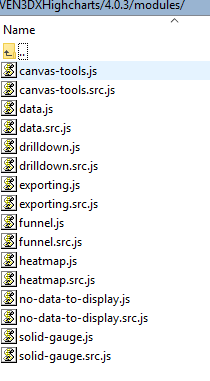
Since i do not fing highstock in the modules directory, i have downloaded Highstock.js and placed in one of the directories and trying to refer it in the requirejs.config. Do i need to still include the reference to Highcharts or only highstock or both. I hope i could my point clear.
sina123s
on 21 Nov 2019
Hi @sina123s
It seems you use Highcharts v4.0.3. Did you try to update to v7?
Note: In order Highstock with Highcharts v4.0.3, you need Highstock v2.0.3 (link). At that time, there was no stock module.
pawelfus
on 21 Nov 2019
Hello Interestingly i found this:
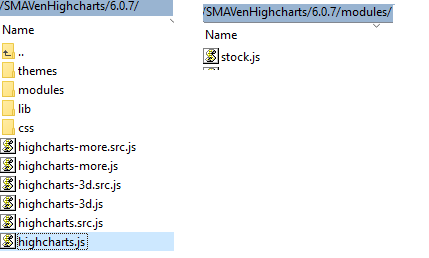
But not sure how to accommodate these paths in my code to refer to the highstock file. When i just have "DS/SMAHighcharts/Highcharts" i dont get the correct path and i get error as undefined. Is there a way i can work with this.
sina123s
on 21 Nov 2019
Hi @sina123s, I am not quite sure if I have understood your last question properly,
but if you want to use Highcharts with the stock module then you can do as in https://codesandbox.io/s/static-lo70d,
otherwise if you want to just use Highstock then you can do as in https://codesandbox.io/s/static-jixls.
In both cases the paths.highcharts that is provided in require.config has to point to the folder where you have the Highcharts files, which from your last comment looks to be something like DS/SMAVenHighcharts/6.0.7/. Based on this I believe your config should look something like:
```
requirejs.config({
paths: {
highcharts: "DS/SMAVenHighcharts/6.0.7"
}
})
jon-a-nygaard
on 21 Nov 2019
I have modified the code to:
requirejs.config({
paths: {
....
highcharts: "DS/SMAVenHighcharts/6.0.7"
},
packages: [
{
name: "highcharts",
// sets highcharts.js as main
main: "highcharts"
}
]
});
require(["jquery", "tippy", "DS/WAFData/WAFData", "DS/i3DXCompassServices/i3DXCompassServices", "DS/PlatformAPI/PlatformAPI",
"DS/DataDragAndDrop/DataDragAndDrop","DS/LifecycleControls/EditPropDialog", "highcharts", "highcharts/modules/stock"
But now i get some script errors, something like:
RequireJS error type: "scripterror" for module(s): ["highcharts/modules/stock"]
Uncaught Error: Script error for: highcharts/modules/stock
AmdLoader.js:1 Uncaught Error: Script error for: highcharts/highcharts
However the path SMAVenHighcharts/6.0.7/modules/stock.js is correct.
Sorry I dont know where or how to correct this so that i could use the Highstock library. I have been trying since long to get this working but no success.
sina123s
on 21 Nov 2019
Just a note: I am using the libraries from Dassault Systemes and just noticed when it works with just Highcharts it takes only the highchart js file and doesnt consider the modules. Though i know javascript, this concept is bit not getting into my head! So if there is anyone possibly to guide on using it kindly advise. Thanks.
sina123s
on 21 Nov 2019
Hi @sina123s, are you able to provide a live reproduction of your project? I believe it can help us understand what is causing the issue.
If the project contains sensitive or private information then you can also contact us at [email protected].
jon-a-nygaard
on 21 Nov 2019
Hello..sorry i fear i would not be able to possibly provide a live reproduction of the project or share the code as it has sensitive information. There is code regarding paths shim, etc, something like below and only js file is loaded accordingly excluding the module directory and other files. :
require.config({
paths: {
"DS/SMAVenHighcharts": a
},
shim: {
"DS/SMAVenHighcharts": {
exports: "Highcharts"
}
}
})
define("DS/SMAHighcharts/Highcharts", ["../SMAVenHighcharts/6.0.7/highcharts"], function(a) {
return a
});
That is the reason why i get script errors i guess.
I am also not able to just specify the path as in the examples in the requirejs.config part as it does not take into account and shows undefined.
sina123s
on 21 Nov 2019
Hi @sina123s,
I think it is time you showed us a concrete version of your problem. If any example you can currently provide contains sensitive information, then you haven't spent enough time to reduce the problem yet. E.g. see https://stackoverflow.com/help/minimal-reproducible-example. Right now, you're asking us to spend time you're not willing to spend yourself.
In my opinion, @jon-a-nygaard has been more than forthcoming so far. It is now your turn to provide us and him a concrete, small, readable example _that exhibits the exact problems you're experiencing_.
As a side effect, I'm 75% certain, that on your way to making the problem smaller and smaller and removing any proprietary and unrelated bits and pieces, you'll find the answer yourself... It really is a very powerful way of debugging in its own right.
And also, please learn to format code snippets you post. The code you post is not readable. See e.g. 'Syntax highlighting' in Mastering Markdown · GitHub Guides
Yes, all of this takes time. But in the long run, it takes a shorter amount of time than finding somebody willing to help if you don't... :-)
pmorch
on 21 Nov 2019
Related issues
 deanshub
·
3Comments
deanshub
·
3Comments
 Rahza
·
3Comments
Rahza
·
3Comments
 remilandais
·
3Comments
remilandais
·
3Comments
 Dunge
·
3Comments
Dunge
·
3Comments
 madreason
·
3Comments
madreason
·
3Comments
Most helpful comment
Hi @sina123s,
I think it is time you showed us a concrete version of your problem. If any example you can currently provide contains sensitive information, then you haven't spent enough time to reduce the problem yet. E.g. see https://stackoverflow.com/help/minimal-reproducible-example. Right now, you're asking us to spend time you're not willing to spend yourself.
In my opinion, @jon-a-nygaard has been more than forthcoming so far. It is now your turn to provide us and him a concrete, small, readable example _that exhibits the exact problems you're experiencing_.
As a side effect, I'm 75% certain, that on your way to making the problem smaller and smaller and removing any proprietary and unrelated bits and pieces, you'll find the answer yourself... It really is a very powerful way of debugging in its own right.
And also, please learn to format code snippets you post. The code you post is not readable. See e.g. 'Syntax highlighting' in Mastering Markdown · GitHub Guides
Yes, all of this takes time. But in the long run, it takes a shorter amount of time than finding somebody willing to help if you don't... :-)